Scroll settings . . .


Andy01

Member
Member
Local time
3:44 AM
Posts
33
Location
Finger Lakes NYS
OS
Windows 11
I've just had this ASUS laptop for a month or so, and I cannot fix a problem with touchpad scrolling. When scrolling down with two fingers, it often gets jerky and may skip a line or two. It gets annoying when scrolling through a long folder to find something.

I've been through all the touchpad settings and cannot find a way of fixing this. It seems to me there used to be a setting called "Smooth scrolling" -- which I think is what I'm looking for -- but that does not even show up with a search.
 

My Computer My Computer

At a glance

Windows 1111th Gen Intel(R) Core(TM) i5-1135G7 @ 2.40GH...36 GB ram
OS
Windows 11
Computer type
Laptop
Manufacturer/Model
ASUS VivoBook, new in June 2024
CPU
11th Gen Intel(R) Core(TM) i5-1135G7 @ 2.40GHz 2.42 G
Memory
36 GB ram
Browser
Firefox
Antivirus
Windows
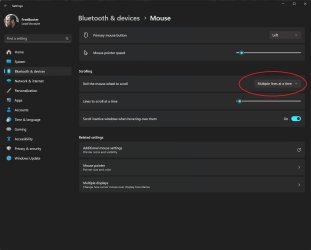
Have you taken a look at Mouse Properties?
 

My Computer My Computer

At a glance

Windows 11AMD Ryzen 7 5700GMicron Technology DDR4-3200 16GBNVIDIA GeForce RTX 3060
OS
Windows 11
Computer type
PC/Desktop
Manufacturer/Model
HP Pavilion
CPU
AMD Ryzen 7 5700G
Motherboard
Erica6
Memory
Micron Technology DDR4-3200 16GB
Graphics Card(s)
NVIDIA GeForce RTX 3060
Sound Card
Realtek ALC671
Monitor(s) Displays
Samsung SyncMaster U28E590
Screen Resolution
3840 x 2160
Hard Drives
SAMSUNG MZVLQ1T0HALB-000H1

My Computer My Computer

At a glance

Windows 1111th Gen Intel(R) Core(TM) i5-1135G7 @ 2.40GH...36 GB ram
OS
Windows 11
Computer type
Laptop
Manufacturer/Model
ASUS VivoBook, new in June 2024
CPU
11th Gen Intel(R) Core(TM) i5-1135G7 @ 2.40GHz 2.42 G
Memory
36 GB ram
Browser
Firefox
Antivirus
Windows
2024-08-16_16-42-49.png
 

My Computer My Computer

At a glance

Windows 11AMD Ryzen 7 5700GMicron Technology DDR4-3200 16GBNVIDIA GeForce RTX 3060
OS
Windows 11
Computer type
PC/Desktop
Manufacturer/Model
HP Pavilion
CPU
AMD Ryzen 7 5700G
Motherboard
Erica6
Memory
Micron Technology DDR4-3200 16GB
Graphics Card(s)
NVIDIA GeForce RTX 3060
Sound Card
Realtek ALC671
Monitor(s) Displays
Samsung SyncMaster U28E590
Screen Resolution
3840 x 2160
Hard Drives
SAMSUNG MZVLQ1T0HALB-000H1
That's where mine was set at.
 

My Computer My Computer

At a glance

Windows 1111th Gen Intel(R) Core(TM) i5-1135G7 @ 2.40GH...36 GB ram
OS
Windows 11
Computer type
Laptop
Manufacturer/Model
ASUS VivoBook, new in June 2024
CPU
11th Gen Intel(R) Core(TM) i5-1135G7 @ 2.40GHz 2.42 G
Memory
36 GB ram
Browser
Firefox
Antivirus
Windows
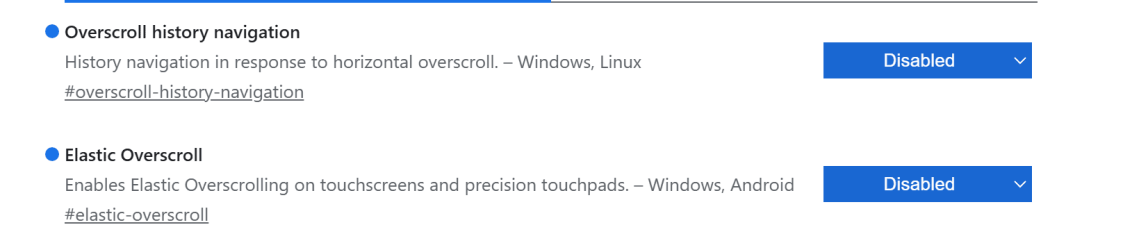
Setting these edge flags as disabled made my scrolling much smoother (enter Edge:\\Flags)

1723819649818.png

First flag stops flipping to previous page when you swipe left or right - I find that annoying but you may choose to leaved this as default.

2nd Flag stops left/right jerkiness in general, and I found scrolling was much smoother after. I do not know if this will help but worth a try.
 

My Computer My Computer

At a glance

Windows 11 Pro + Win11 Canary VM.I9 13th gen i9-13900H 2.60 GHZ16 GB solderedIntegrated Intel Iris XE
OS
Windows 11 Pro + Win11 Canary VM.
Computer type
Laptop
Manufacturer/Model
ASUS Zenbook 14
CPU
I9 13th gen i9-13900H 2.60 GHZ
Motherboard
Yep, Laptop has one.
Memory
16 GB soldered
Graphics Card(s)
Integrated Intel Iris XE
Sound Card
Realtek built in
Monitor(s) Displays
laptop OLED screen
Screen Resolution
2880x1800 touchscreen
Hard Drives
1 TB NVME SSD (only weakness is only one slot)
PSU
Internal + 65W thunderbolt USB4 charger
Case
Yep, got one
Cooling
Stella Artois (UK pint cans - 568 ml) - extra cost.
Keyboard
Built in UK keybd
Mouse
Bluetooth , wireless dongled, wired
Internet Speed
900 mbs (ethernet), wifi 6 typical 350-450 mb/s both up and down
Browser
Edge
Antivirus
Defender
Other Info
TPM 2.0, 2xUSB4 thunderbolt, 1xUsb3 (usb a), 1xUsb-c, hdmi out, 3.5 mm audio out/in combo, ASUS backlit trackpad (inc. switchable number pad)

Macrium Reflect Home V8
Office 365 Family (6 users each 1TB onedrive space)
Hyper-V (a vm runs almost as fast as my older laptop)

Attachments

  • 2024-08-16_16-42-49.jpg
    2024-08-16_16-42-49.jpg
    80.8 KB · Views: 1

My Computer My Computer

At a glance

Windows 1111th Gen Intel(R) Core(TM) i5-1135G7 @ 2.40GH...36 GB ram
OS
Windows 11
Computer type
Laptop
Manufacturer/Model
ASUS VivoBook, new in June 2024
CPU
11th Gen Intel(R) Core(TM) i5-1135G7 @ 2.40GHz 2.42 G
Memory
36 GB ram
Browser
Firefox
Antivirus
Windows

Latest Support Threads

Back
Top Bottom