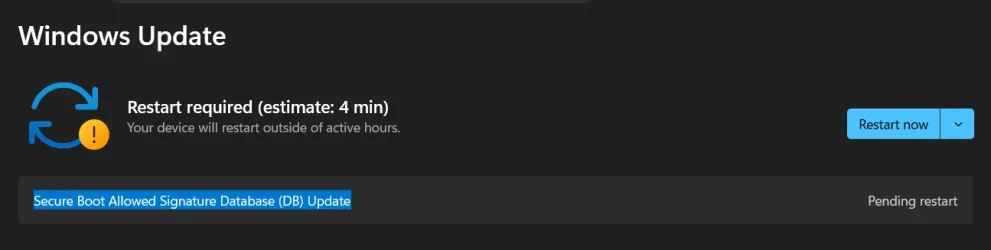
Solved Secure Boot Allowed Signature Database (DB) Update


trevo

Well-known member
Power User
VIP
Local time
10:09 PM
Posts
589
Location
USA
OS
windows 11 Pro
Just got this Windows Update from Microsoft.
 

My Computer

System One

  • OS
    windows 11 Pro
    Computer type
    Laptop
    Manufacturer/Model
    Dell XPS 15 9510
    CPU
    11th Gen Intel(R) Core(TM) i7-11800H @ 2.30GHz (16 CPUs
    Memory
    16 GB
    Graphics Card(s)
    NVIDIA GeForce RTX 3050 Ti
    Hard Drives
    512GB Solid State Drive
    Browser
    Firefox
Same here
1777783794484.webp
 

My Computer

System One

  • OS
    Windows 11
    Computer type
    Laptop
    Manufacturer/Model
    Acer Nitro V15
    CPU
    Intel 13th
    Memory
    96GB
    Graphics Card(s)
    RTX 4050 6GB
    Monitor(s) Displays
    amazon fire tv 50"
    Screen Resolution
    3840x2160

My Computer

System One

  • OS
    Windows 11
    Computer type
    PC/Desktop
    Manufacturer/Model
    Generic
    CPU
    AMD Ryzen 8700G
    Motherboard
    Gigabyte B650 UD AC
    Memory
    64 GB
    Graphics Card(s)
    Onboard
    Sound Card
    Onboard
    Monitor(s) Displays
    Del U2723QE
    Screen Resolution
    3840 x 2160
    Hard Drives
    Corsiar MP600 1TB
    PSU
    Silverstone 750 GOLD
    Case
    Silverstone FARA 513
Have you done any manual updates to your boot certificates? e.g. using Garlins Scripts or Mosby.
No, I am not familiar with Garlins Scripts or Mosby.
 

My Computer

System One

  • OS
    Windows 11
    Computer type
    Laptop
    Manufacturer/Model
    Acer Nitro V15
    CPU
    Intel 13th
    Memory
    96GB
    Graphics Card(s)
    RTX 4050 6GB
    Monitor(s) Displays
    amazon fire tv 50"
    Screen Resolution
    3840x2160
On my computer (located under Other Updates): "Successfully installed on ‎5/‎15/‎2026: Secure Boot Allowed Signature Database (DB) Update"

However, under Device Security > Secure Boot (which is now check marked green) this dialog still displays:

"Secure boot is on but your device is using an older boot trust configuration that should be updated.
There is not enough data to classify your device for automatic update. Visit link below for more info"

I assumed that statement would have changed once I received & installed the Secure Boot DB (& associated Key Exchange Key?) although another automatic Windows Update might be required to fully complete the updated boot trust configuration process.
 

My Computer

System One

  • OS
    Win 11 Pro 25H2 ARM64 (Parallels VM) _ 26200.8655
    Computer type
    Laptop
    Manufacturer/Model
    MacBook Pro (13-inch, M1, 2020)
    CPU
    Apple Silicon M1 / 3.20 GHz (4 processors)
    Memory
    16 GB
    Monitor(s) Displays
    13.3-inch (2560 × 1600)
    Antivirus
    N360 for Mac / Win / Win Defender
    Other Info
    Parallels Pro 26.3.3/ macOS Tahoe 26.5
If you get the "not enough data to classify your device", your UEFI is probably missing the KEK CA 2023 update (unsupported BIOS). You should download this check script, and see where your PC stands. Whenever there isn't enough telemetry data to suggest a specific model can be updated, Windows will hold updates back.

garlin's PowerShell scripts for updating Secure Boot CA 2023

Code:
Check-UEFI.bat -Verbose
 

My Computer

System One

  • OS
    Windows 7
2 days ago, an update to Parallels Desktop version 26.3.3 resolved the Secure Boot issue for my VM:

"Existing Windows 11 virtual machines will be updated to the new Secure Boot certificates automatically upon Windows restart after installing the Parallels Tools update.

After running this PowerShell command: ([System.Text.Encoding]::ASCII.GetString((Get-SecureBootUEFI db).bytes) -match 'Windows UEFI CA 2023') I received a TRUE result as a certificate update confirmation.

I assumed I would get a new Secure Boot status message stating "all required certificates have been applied" (or seeing a green badge) means your certificates are fully updated" although the status message is still "Secure boot is on but your device is using an older boot trust configuration that should be updated. There is not enough data to classify your device for automatic update"
 

My Computer

System One

  • OS
    Win 11 Pro 25H2 ARM64 (Parallels VM) _ 26200.8655
    Computer type
    Laptop
    Manufacturer/Model
    MacBook Pro (13-inch, M1, 2020)
    CPU
    Apple Silicon M1 / 3.20 GHz (4 processors)
    Memory
    16 GB
    Monitor(s) Displays
    13.3-inch (2560 × 1600)
    Antivirus
    N360 for Mac / Win / Win Defender
    Other Info
    Parallels Pro 26.3.3/ macOS Tahoe 26.5
Checking a single cert doesn't provide a complete summary of the situation. You won't get a change in the Security Center status until all of the CA 2023 certs are installed, Windows has switched to a new boot manager, AND rebooted the system.

For a VM, typically they update the "BIOS" so it appears you have new factory defaults. The Secure Boot update task runs twice a day, and will detect new certs are present, and finish the update process. Because a VM isn't a physical PC, it won't be listed in the Confidence Bucket JSON as a "known" device.

Running the update script and restarting Windows should get you the preferred Security Center status. There's no point in waiting for MS to decide if your device is ready, it probably is ready after the Parallels update.
 
Last edited:

My Computer

System One

  • OS
    Windows 7
garlin,

I appreciate your detailed information, instructions, and the time you have expended throughout the forums on the Secure Boot matter and others. Your explanations are precise, logical and intuitive.
 

My Computer

System One

  • OS
    Win 11 Pro 25H2 ARM64 (Parallels VM) _ 26200.8655
    Computer type
    Laptop
    Manufacturer/Model
    MacBook Pro (13-inch, M1, 2020)
    CPU
    Apple Silicon M1 / 3.20 GHz (4 processors)
    Memory
    16 GB
    Monitor(s) Displays
    13.3-inch (2560 × 1600)
    Antivirus
    N360 for Mac / Win / Win Defender
    Other Info
    Parallels Pro 26.3.3/ macOS Tahoe 26.5
With today's Patch Tuesday (26200.8655) my VM Secure Boot was automatically updated under Device Security >

"Secure Boot is on and all required updates have been applied. No further certificate changes are needed."

Thanks again to garlin. I decided to wait for MS to update instead of running garlin's update script to see if this Patch Tuesday would update/change the certificate. Had it not, the script was next.
 

My Computer

System One

  • OS
    Win 11 Pro 25H2 ARM64 (Parallels VM) _ 26200.8655
    Computer type
    Laptop
    Manufacturer/Model
    MacBook Pro (13-inch, M1, 2020)
    CPU
    Apple Silicon M1 / 3.20 GHz (4 processors)
    Memory
    16 GB
    Monitor(s) Displays
    13.3-inch (2560 × 1600)
    Antivirus
    N360 for Mac / Win / Win Defender
    Other Info
    Parallels Pro 26.3.3/ macOS Tahoe 26.5
The CA 2023 cert migration is an one-time event. Due to security fixes, June 2026 rolled out a new version of the boot manager and a higher DBX SVN along with it. Your Security Center status only refers to the basic Secure Boot certs.

If you see this message, Windows will handle installing the new boot manager for you. It might not happen right away, but within 24 hours.
 

My Computer

System One

  • OS
    Windows 7

Latest Support Threads

Back
Top Bottom