
Solved Secure boot update HowTo


My Computers My Computers

  • At a glance

    Win 11 Home ♦♦♦26200.8737 ♦♦♦♦♦♦♦25H2AMD Ryzen 7 3700XG.Skill (F4-3200C14D-16GTZKW)EVGA RTX 2070 (08G-P4-2171-KR)
    OS
    Win 11 Home ♦♦♦26200.8737 ♦♦♦♦♦♦♦25H2
    Computer type
    PC/Desktop
    Manufacturer/Model
    Built by Ghot® [May 2020]
    CPU
    AMD Ryzen 7 3700X
    Motherboard
    Asus Pro WS X570-ACE (BIOS 5302)
    Memory
    G.Skill (F4-3200C14D-16GTZKW)
    Graphics Card(s)
    EVGA RTX 2070 (08G-P4-2171-KR)
    Sound Card
    Realtek ALC1220P / ALC S1220A
    Monitor(s) Displays
    Dell U3011 30"
    Screen Resolution
    2560 x 1600
    Hard Drives
    2x Samsung 860 EVO 500GB,
    WD 4TB Black FZBX - SATA III,
    WD 8TB Black FZBX - SATA III,
    DRW-24B1ST CD/DVD Burner
    PSU
    PC Power & Cooling 750W Quad EPS12V
    Case
    Cooler Master ATCS 840 Tower
    Cooling
    CM Hyper 212 EVO (push/pull)
    Keyboard
    Ducky DK9008 Shine II Blue LED
    Mouse
    Logitech Optical M-100
    Internet Speed
    300/300
    Browser
    Firefox (latest)
    Antivirus
    Bitdefender Total Security
    Other Info
    Speakers: Klipsch Pro Media 2.1
  • At a glance

    Windows XP Pro 32bit w/SP3AMD Athlon 64 X2 5000+ (OC'd @ 3.2Ghz)TWIN2X2048-6400C4DHX (2 x 1GB, DDR2 800)EVGA 256-P2-N758-TR GeForce 8600GT SSC
    Operating System
    Windows XP Pro 32bit w/SP3
    Computer type
    PC/Desktop
    Manufacturer/Model
    Built by Ghot® (not in use)
    CPU
    AMD Athlon 64 X2 5000+ (OC'd @ 3.2Ghz)
    Motherboard
    ASUS M2N32-SLI Deluxe Wireless Edition
    Memory
    TWIN2X2048-6400C4DHX (2 x 1GB, DDR2 800)
    Graphics card(s)
    EVGA 256-P2-N758-TR GeForce 8600GT SSC
    Sound Card
    Onboard
    Monitor(s) Displays
    ViewSonic G90FB Black 19" Professional (CRT)
    Screen Resolution
    up to 2048 x 1536
    Hard Drives
    WD 36GB 10,000rpm Raptor SATA
    Seagate 80GB 7200rpm SATA
    Lite-On LTR-52246S CD/RW
    Lite-On LH-18A1P CD/DVD Burner
    PSU
    PC Power & Cooling Silencer 750 Quad EPS12V
    Case
    Generic Beige case, 80mm fans
    Cooling
    ZALMAN 9500A 92mm CPU Cooler
    Keyboard
    Logitech Classic Keybooard 200
    Mouse
    Logitech Optical M-BT96a
    Internet Speed
    300/300
    Browser
    Firefox 3.x ??
    Antivirus
    Symantec (Norton)
    Other Info
    Still assembled, still runs. Haven't turned it on for 15 years?
@ChrisVie
you have the secure boot cert available but not enabled.
please read post #1 > part B

using > part B in post #1 < should enable the 2023 secure boot cert.
best of luck Steve ..
Thanks, but I I have tried this several times, so far without success.
 

My Computer My Computer

At a glance

Windows 11 ProIntel Core Ultra 9 285H32 GB DDR5Intel Arc 140T
OS
Windows 11 Pro
Computer type
PC/Desktop
Manufacturer/Model
Geekom GT 2 Mega
CPU
Intel Core Ultra 9 285H
Memory
32 GB DDR5
Graphics Card(s)
Intel Arc 140T
Monitor(s) Displays
Asus Rog Strix
Screen Resolution
2560 x 1440 (144 Hz)
Hard Drives
2 TB SSD
PSU
BSY 120 W
Keyboard
Logitech MX Keys S
Mouse
G Pro X Superlight 2
Internet Speed
500 Mbit/s
Antivirus
Microsoft Defender
Last edited:

My Computer My Computer

At a glance

Windows 11 ProIntel Core Ultra 9 285H32 GB DDR5Intel Arc 140T
OS
Windows 11 Pro
Computer type
PC/Desktop
Manufacturer/Model
Geekom GT 2 Mega
CPU
Intel Core Ultra 9 285H
Memory
32 GB DDR5
Graphics Card(s)
Intel Arc 140T
Monitor(s) Displays
Asus Rog Strix
Screen Resolution
2560 x 1440 (144 Hz)
Hard Drives
2 TB SSD
PSU
BSY 120 W
Keyboard
Logitech MX Keys S
Mouse
G Pro X Superlight 2
Internet Speed
500 Mbit/s
Antivirus
Microsoft Defender
OK, here's how to check your Certs...

1. Download the script at the bottom of this post.
2. Extract the Check_BootFile.ps1 script and place it on your desktop.
3. Go to: C:\Users\your account name\Desktop and right click Desktop and choose: Open in Terminal
4. In the powershell windows that pops up, type the following...

.\Check_EFIBootFile.ps1 and hit the ENTER key.

You should get a result similar to this...

Image1.webp


Here is the script...
 

Attachments

Last edited:

My Computers My Computers

  • At a glance

    Win 11 Home ♦♦♦26200.8737 ♦♦♦♦♦♦♦25H2AMD Ryzen 7 3700XG.Skill (F4-3200C14D-16GTZKW)EVGA RTX 2070 (08G-P4-2171-KR)
    OS
    Win 11 Home ♦♦♦26200.8737 ♦♦♦♦♦♦♦25H2
    Computer type
    PC/Desktop
    Manufacturer/Model
    Built by Ghot® [May 2020]
    CPU
    AMD Ryzen 7 3700X
    Motherboard
    Asus Pro WS X570-ACE (BIOS 5302)
    Memory
    G.Skill (F4-3200C14D-16GTZKW)
    Graphics Card(s)
    EVGA RTX 2070 (08G-P4-2171-KR)
    Sound Card
    Realtek ALC1220P / ALC S1220A
    Monitor(s) Displays
    Dell U3011 30"
    Screen Resolution
    2560 x 1600
    Hard Drives
    2x Samsung 860 EVO 500GB,
    WD 4TB Black FZBX - SATA III,
    WD 8TB Black FZBX - SATA III,
    DRW-24B1ST CD/DVD Burner
    PSU
    PC Power & Cooling 750W Quad EPS12V
    Case
    Cooler Master ATCS 840 Tower
    Cooling
    CM Hyper 212 EVO (push/pull)
    Keyboard
    Ducky DK9008 Shine II Blue LED
    Mouse
    Logitech Optical M-100
    Internet Speed
    300/300
    Browser
    Firefox (latest)
    Antivirus
    Bitdefender Total Security
    Other Info
    Speakers: Klipsch Pro Media 2.1
  • At a glance

    Windows XP Pro 32bit w/SP3AMD Athlon 64 X2 5000+ (OC'd @ 3.2Ghz)TWIN2X2048-6400C4DHX (2 x 1GB, DDR2 800)EVGA 256-P2-N758-TR GeForce 8600GT SSC
    Operating System
    Windows XP Pro 32bit w/SP3
    Computer type
    PC/Desktop
    Manufacturer/Model
    Built by Ghot® (not in use)
    CPU
    AMD Athlon 64 X2 5000+ (OC'd @ 3.2Ghz)
    Motherboard
    ASUS M2N32-SLI Deluxe Wireless Edition
    Memory
    TWIN2X2048-6400C4DHX (2 x 1GB, DDR2 800)
    Graphics card(s)
    EVGA 256-P2-N758-TR GeForce 8600GT SSC
    Sound Card
    Onboard
    Monitor(s) Displays
    ViewSonic G90FB Black 19" Professional (CRT)
    Screen Resolution
    up to 2048 x 1536
    Hard Drives
    WD 36GB 10,000rpm Raptor SATA
    Seagate 80GB 7200rpm SATA
    Lite-On LTR-52246S CD/RW
    Lite-On LH-18A1P CD/DVD Burner
    PSU
    PC Power & Cooling Silencer 750 Quad EPS12V
    Case
    Generic Beige case, 80mm fans
    Cooling
    ZALMAN 9500A 92mm CPU Cooler
    Keyboard
    Logitech Classic Keybooard 200
    Mouse
    Logitech Optical M-BT96a
    Internet Speed
    300/300
    Browser
    Firefox 3.x ??
    Antivirus
    Symantec (Norton)
    Other Info
    Still assembled, still runs. Haven't turned it on for 15 years?
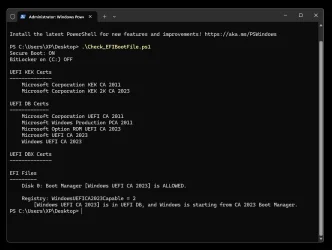
Where did you get that script?
From post #90 on the thread below. Is that a valid script?


Same result with the script from your post #144 above.

1764041024370.webp
 

My Computer My Computer

At a glance

Windows 11 Pro 25H2Intel I9-9900K64GBNVIDIA RTX 2060
OS
Windows 11 Pro 25H2
Computer type
PC/Desktop
Manufacturer/Model
Dell XPS 8930
CPU
Intel I9-9900K
Memory
64GB
Graphics Card(s)
NVIDIA RTX 2060
Sound Card
NVIDIA High Definition Audio
Monitor(s) Displays
4k Samsung
Screen Resolution
3840 x 2160
Hard Drives
512GB NVMe, ADATA SU 800, 2TB HDD
Is that a valid script?


Worked for me as follows...

1. Download the script at the bottom of this post.
2. Extract the Check-SecureBootCerts.ps1 script and place it on your desktop.
3. Go to: C:\Users\your account name\Desktop and right click Desktop and choose: Open in Terminal
4. In the powershell windows that pops up, type the following...

.\Check-SecureBootCerts.ps1 and hit the ENTER key.

You should get a result similar to this...

Image1.webp


Here is the script...
 

Attachments

My Computers My Computers

  • At a glance

    Win 11 Home ♦♦♦26200.8737 ♦♦♦♦♦♦♦25H2AMD Ryzen 7 3700XG.Skill (F4-3200C14D-16GTZKW)EVGA RTX 2070 (08G-P4-2171-KR)
    OS
    Win 11 Home ♦♦♦26200.8737 ♦♦♦♦♦♦♦25H2
    Computer type
    PC/Desktop
    Manufacturer/Model
    Built by Ghot® [May 2020]
    CPU
    AMD Ryzen 7 3700X
    Motherboard
    Asus Pro WS X570-ACE (BIOS 5302)
    Memory
    G.Skill (F4-3200C14D-16GTZKW)
    Graphics Card(s)
    EVGA RTX 2070 (08G-P4-2171-KR)
    Sound Card
    Realtek ALC1220P / ALC S1220A
    Monitor(s) Displays
    Dell U3011 30"
    Screen Resolution
    2560 x 1600
    Hard Drives
    2x Samsung 860 EVO 500GB,
    WD 4TB Black FZBX - SATA III,
    WD 8TB Black FZBX - SATA III,
    DRW-24B1ST CD/DVD Burner
    PSU
    PC Power & Cooling 750W Quad EPS12V
    Case
    Cooler Master ATCS 840 Tower
    Cooling
    CM Hyper 212 EVO (push/pull)
    Keyboard
    Ducky DK9008 Shine II Blue LED
    Mouse
    Logitech Optical M-100
    Internet Speed
    300/300
    Browser
    Firefox (latest)
    Antivirus
    Bitdefender Total Security
    Other Info
    Speakers: Klipsch Pro Media 2.1
  • At a glance

    Windows XP Pro 32bit w/SP3AMD Athlon 64 X2 5000+ (OC'd @ 3.2Ghz)TWIN2X2048-6400C4DHX (2 x 1GB, DDR2 800)EVGA 256-P2-N758-TR GeForce 8600GT SSC
    Operating System
    Windows XP Pro 32bit w/SP3
    Computer type
    PC/Desktop
    Manufacturer/Model
    Built by Ghot® (not in use)
    CPU
    AMD Athlon 64 X2 5000+ (OC'd @ 3.2Ghz)
    Motherboard
    ASUS M2N32-SLI Deluxe Wireless Edition
    Memory
    TWIN2X2048-6400C4DHX (2 x 1GB, DDR2 800)
    Graphics card(s)
    EVGA 256-P2-N758-TR GeForce 8600GT SSC
    Sound Card
    Onboard
    Monitor(s) Displays
    ViewSonic G90FB Black 19" Professional (CRT)
    Screen Resolution
    up to 2048 x 1536
    Hard Drives
    WD 36GB 10,000rpm Raptor SATA
    Seagate 80GB 7200rpm SATA
    Lite-On LTR-52246S CD/RW
    Lite-On LH-18A1P CD/DVD Burner
    PSU
    PC Power & Cooling Silencer 750 Quad EPS12V
    Case
    Generic Beige case, 80mm fans
    Cooling
    ZALMAN 9500A 92mm CPU Cooler
    Keyboard
    Logitech Classic Keybooard 200
    Mouse
    Logitech Optical M-BT96a
    Internet Speed
    300/300
    Browser
    Firefox 3.x ??
    Antivirus
    Symantec (Norton)
    Other Info
    Still assembled, still runs. Haven't turned it on for 15 years?
Same result with the script from your post #144 above.


If D: is a non-booting drive, that may be why you see that.
I ran the script(s) from the Desktop of my booting drive. In my case, the C:\ drive
 

My Computers My Computers

  • At a glance

    Win 11 Home ♦♦♦26200.8737 ♦♦♦♦♦♦♦25H2AMD Ryzen 7 3700XG.Skill (F4-3200C14D-16GTZKW)EVGA RTX 2070 (08G-P4-2171-KR)
    OS
    Win 11 Home ♦♦♦26200.8737 ♦♦♦♦♦♦♦25H2
    Computer type
    PC/Desktop
    Manufacturer/Model
    Built by Ghot® [May 2020]
    CPU
    AMD Ryzen 7 3700X
    Motherboard
    Asus Pro WS X570-ACE (BIOS 5302)
    Memory
    G.Skill (F4-3200C14D-16GTZKW)
    Graphics Card(s)
    EVGA RTX 2070 (08G-P4-2171-KR)
    Sound Card
    Realtek ALC1220P / ALC S1220A
    Monitor(s) Displays
    Dell U3011 30"
    Screen Resolution
    2560 x 1600
    Hard Drives
    2x Samsung 860 EVO 500GB,
    WD 4TB Black FZBX - SATA III,
    WD 8TB Black FZBX - SATA III,
    DRW-24B1ST CD/DVD Burner
    PSU
    PC Power & Cooling 750W Quad EPS12V
    Case
    Cooler Master ATCS 840 Tower
    Cooling
    CM Hyper 212 EVO (push/pull)
    Keyboard
    Ducky DK9008 Shine II Blue LED
    Mouse
    Logitech Optical M-100
    Internet Speed
    300/300
    Browser
    Firefox (latest)
    Antivirus
    Bitdefender Total Security
    Other Info
    Speakers: Klipsch Pro Media 2.1
  • At a glance

    Windows XP Pro 32bit w/SP3AMD Athlon 64 X2 5000+ (OC'd @ 3.2Ghz)TWIN2X2048-6400C4DHX (2 x 1GB, DDR2 800)EVGA 256-P2-N758-TR GeForce 8600GT SSC
    Operating System
    Windows XP Pro 32bit w/SP3
    Computer type
    PC/Desktop
    Manufacturer/Model
    Built by Ghot® (not in use)
    CPU
    AMD Athlon 64 X2 5000+ (OC'd @ 3.2Ghz)
    Motherboard
    ASUS M2N32-SLI Deluxe Wireless Edition
    Memory
    TWIN2X2048-6400C4DHX (2 x 1GB, DDR2 800)
    Graphics card(s)
    EVGA 256-P2-N758-TR GeForce 8600GT SSC
    Sound Card
    Onboard
    Monitor(s) Displays
    ViewSonic G90FB Black 19" Professional (CRT)
    Screen Resolution
    up to 2048 x 1536
    Hard Drives
    WD 36GB 10,000rpm Raptor SATA
    Seagate 80GB 7200rpm SATA
    Lite-On LTR-52246S CD/RW
    Lite-On LH-18A1P CD/DVD Burner
    PSU
    PC Power & Cooling Silencer 750 Quad EPS12V
    Case
    Generic Beige case, 80mm fans
    Cooling
    ZALMAN 9500A 92mm CPU Cooler
    Keyboard
    Logitech Classic Keybooard 200
    Mouse
    Logitech Optical M-BT96a
    Internet Speed
    300/300
    Browser
    Firefox 3.x ??
    Antivirus
    Symantec (Norton)
    Other Info
    Still assembled, still runs. Haven't turned it on for 15 years?
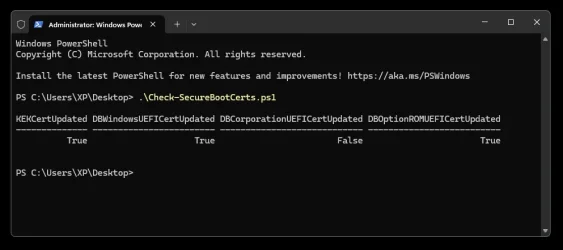
Worked for me as follows...

1. Download the script at the bottom of this post.
2. Extract the Check-SecureBootCerts.ps1 script and place it on your desktop.
3. Go to: C:\Users\your account name\Desktop and right click Desktop and choose: Open in Terminal
4. In the powershell windows that pops up, type the following...

.\Check-SecureBootCerts.ps1 and hit the ENTER key.

You should get a result similar to this...

View attachment 154193


Here is the script...
That is a different script,
If D: is a non-booting drive, that may be why you see that.
I ran the script(s) from the Desktop of my booting drive. In my case, the C:\ drive
OK, I'll try that. But it has no issue with the other script.

1764041911860.webp
 

My Computer My Computer

At a glance

Windows 11 Pro 25H2Intel I9-9900K64GBNVIDIA RTX 2060
OS
Windows 11 Pro 25H2
Computer type
PC/Desktop
Manufacturer/Model
Dell XPS 8930
CPU
Intel I9-9900K
Memory
64GB
Graphics Card(s)
NVIDIA RTX 2060
Sound Card
NVIDIA High Definition Audio
Monitor(s) Displays
4k Samsung
Screen Resolution
3840 x 2160
Hard Drives
512GB NVMe, ADATA SU 800, 2TB HDD
That is a different script,


Possibly. I've been messing with a bunch of them.
The scripts I attached go with the pictures I attached.


I just made a topic about how to check your Secure boot certs, here...

 
Last edited:

My Computers My Computers

  • At a glance

    Win 11 Home ♦♦♦26200.8737 ♦♦♦♦♦♦♦25H2AMD Ryzen 7 3700XG.Skill (F4-3200C14D-16GTZKW)EVGA RTX 2070 (08G-P4-2171-KR)
    OS
    Win 11 Home ♦♦♦26200.8737 ♦♦♦♦♦♦♦25H2
    Computer type
    PC/Desktop
    Manufacturer/Model
    Built by Ghot® [May 2020]
    CPU
    AMD Ryzen 7 3700X
    Motherboard
    Asus Pro WS X570-ACE (BIOS 5302)
    Memory
    G.Skill (F4-3200C14D-16GTZKW)
    Graphics Card(s)
    EVGA RTX 2070 (08G-P4-2171-KR)
    Sound Card
    Realtek ALC1220P / ALC S1220A
    Monitor(s) Displays
    Dell U3011 30"
    Screen Resolution
    2560 x 1600
    Hard Drives
    2x Samsung 860 EVO 500GB,
    WD 4TB Black FZBX - SATA III,
    WD 8TB Black FZBX - SATA III,
    DRW-24B1ST CD/DVD Burner
    PSU
    PC Power & Cooling 750W Quad EPS12V
    Case
    Cooler Master ATCS 840 Tower
    Cooling
    CM Hyper 212 EVO (push/pull)
    Keyboard
    Ducky DK9008 Shine II Blue LED
    Mouse
    Logitech Optical M-100
    Internet Speed
    300/300
    Browser
    Firefox (latest)
    Antivirus
    Bitdefender Total Security
    Other Info
    Speakers: Klipsch Pro Media 2.1
  • At a glance

    Windows XP Pro 32bit w/SP3AMD Athlon 64 X2 5000+ (OC'd @ 3.2Ghz)TWIN2X2048-6400C4DHX (2 x 1GB, DDR2 800)EVGA 256-P2-N758-TR GeForce 8600GT SSC
    Operating System
    Windows XP Pro 32bit w/SP3
    Computer type
    PC/Desktop
    Manufacturer/Model
    Built by Ghot® (not in use)
    CPU
    AMD Athlon 64 X2 5000+ (OC'd @ 3.2Ghz)
    Motherboard
    ASUS M2N32-SLI Deluxe Wireless Edition
    Memory
    TWIN2X2048-6400C4DHX (2 x 1GB, DDR2 800)
    Graphics card(s)
    EVGA 256-P2-N758-TR GeForce 8600GT SSC
    Sound Card
    Onboard
    Monitor(s) Displays
    ViewSonic G90FB Black 19" Professional (CRT)
    Screen Resolution
    up to 2048 x 1536
    Hard Drives
    WD 36GB 10,000rpm Raptor SATA
    Seagate 80GB 7200rpm SATA
    Lite-On LTR-52246S CD/RW
    Lite-On LH-18A1P CD/DVD Burner
    PSU
    PC Power & Cooling Silencer 750 Quad EPS12V
    Case
    Generic Beige case, 80mm fans
    Cooling
    ZALMAN 9500A 92mm CPU Cooler
    Keyboard
    Logitech Classic Keybooard 200
    Mouse
    Logitech Optical M-BT96a
    Internet Speed
    300/300
    Browser
    Firefox 3.x ??
    Antivirus
    Symantec (Norton)
    Other Info
    Still assembled, still runs. Haven't turned it on for 15 years?
Possibly. I've been messing with a bunch of them.
The scripts I attached go with the pictures I attached.


I just made a topic about how to check your Secure boot certs, here...

Same results running from the C:Users\Usernam\Desktop

1764042667446.webp
 

My Computer My Computer

At a glance

Windows 11 Pro 25H2Intel I9-9900K64GBNVIDIA RTX 2060
OS
Windows 11 Pro 25H2
Computer type
PC/Desktop
Manufacturer/Model
Dell XPS 8930
CPU
Intel I9-9900K
Memory
64GB
Graphics Card(s)
NVIDIA RTX 2060
Sound Card
NVIDIA High Definition Audio
Monitor(s) Displays
4k Samsung
Screen Resolution
3840 x 2160
Hard Drives
512GB NVMe, ADATA SU 800, 2TB HDD
Same results running from the C:Users\Usernam\Desktop


It may just mean that Disk 2 and Disk 3 are NOT bootable.
Are they External Disks? Or maybe they are not set as bootable in the BIOS?
Or maybe they are non-bootable partitions?

I don't know the answers to this.
Heck, it took me this long (since post 1, this topic), just to figure out how to RUN these scripts. ^^
 

My Computers My Computers

  • At a glance

    Win 11 Home ♦♦♦26200.8737 ♦♦♦♦♦♦♦25H2AMD Ryzen 7 3700XG.Skill (F4-3200C14D-16GTZKW)EVGA RTX 2070 (08G-P4-2171-KR)
    OS
    Win 11 Home ♦♦♦26200.8737 ♦♦♦♦♦♦♦25H2
    Computer type
    PC/Desktop
    Manufacturer/Model
    Built by Ghot® [May 2020]
    CPU
    AMD Ryzen 7 3700X
    Motherboard
    Asus Pro WS X570-ACE (BIOS 5302)
    Memory
    G.Skill (F4-3200C14D-16GTZKW)
    Graphics Card(s)
    EVGA RTX 2070 (08G-P4-2171-KR)
    Sound Card
    Realtek ALC1220P / ALC S1220A
    Monitor(s) Displays
    Dell U3011 30"
    Screen Resolution
    2560 x 1600
    Hard Drives
    2x Samsung 860 EVO 500GB,
    WD 4TB Black FZBX - SATA III,
    WD 8TB Black FZBX - SATA III,
    DRW-24B1ST CD/DVD Burner
    PSU
    PC Power & Cooling 750W Quad EPS12V
    Case
    Cooler Master ATCS 840 Tower
    Cooling
    CM Hyper 212 EVO (push/pull)
    Keyboard
    Ducky DK9008 Shine II Blue LED
    Mouse
    Logitech Optical M-100
    Internet Speed
    300/300
    Browser
    Firefox (latest)
    Antivirus
    Bitdefender Total Security
    Other Info
    Speakers: Klipsch Pro Media 2.1
  • At a glance

    Windows XP Pro 32bit w/SP3AMD Athlon 64 X2 5000+ (OC'd @ 3.2Ghz)TWIN2X2048-6400C4DHX (2 x 1GB, DDR2 800)EVGA 256-P2-N758-TR GeForce 8600GT SSC
    Operating System
    Windows XP Pro 32bit w/SP3
    Computer type
    PC/Desktop
    Manufacturer/Model
    Built by Ghot® (not in use)
    CPU
    AMD Athlon 64 X2 5000+ (OC'd @ 3.2Ghz)
    Motherboard
    ASUS M2N32-SLI Deluxe Wireless Edition
    Memory
    TWIN2X2048-6400C4DHX (2 x 1GB, DDR2 800)
    Graphics card(s)
    EVGA 256-P2-N758-TR GeForce 8600GT SSC
    Sound Card
    Onboard
    Monitor(s) Displays
    ViewSonic G90FB Black 19" Professional (CRT)
    Screen Resolution
    up to 2048 x 1536
    Hard Drives
    WD 36GB 10,000rpm Raptor SATA
    Seagate 80GB 7200rpm SATA
    Lite-On LTR-52246S CD/RW
    Lite-On LH-18A1P CD/DVD Burner
    PSU
    PC Power & Cooling Silencer 750 Quad EPS12V
    Case
    Generic Beige case, 80mm fans
    Cooling
    ZALMAN 9500A 92mm CPU Cooler
    Keyboard
    Logitech Classic Keybooard 200
    Mouse
    Logitech Optical M-BT96a
    Internet Speed
    300/300
    Browser
    Firefox 3.x ??
    Antivirus
    Symantec (Norton)
    Other Info
    Still assembled, still runs. Haven't turned it on for 15 years?
It may just mean that Disk 2 and Disk 3 are NOT bootable.
Are they External Disks? Or maybe they are not set as bootable in the BIOS?
Or maybe they are non-bootable partitions?

I don't know the answers to this.
Heck, it took me this long (since post 1, this topic), just to figure out how to RUN these scripts. ^^
The systems boot fine on 3 different machines, one is on Disk 2, another on Disk 3 and another on Disk 0.
All 3 get the same Boot Manager [] is BANNED. 🤷‍♂️
 

My Computer My Computer

At a glance

Windows 11 Pro 25H2Intel I9-9900K64GBNVIDIA RTX 2060
OS
Windows 11 Pro 25H2
Computer type
PC/Desktop
Manufacturer/Model
Dell XPS 8930
CPU
Intel I9-9900K
Memory
64GB
Graphics Card(s)
NVIDIA RTX 2060
Sound Card
NVIDIA High Definition Audio
Monitor(s) Displays
4k Samsung
Screen Resolution
3840 x 2160
Hard Drives
512GB NVMe, ADATA SU 800, 2TB HDD
Did your command include the "$_" before before Type? I don't see it in your error message.

Here's what happens when I run it on my system without and with the "$_" (note, my System disk is DIsk 1 so that's why I'm using 1 vs 0).

(WITHOUT)
powershell -ExecutionPolicy Bypass -Command "(Get-Partition -DiskNumber 1 | Where-Object { .Type -eq 'System' })"
Where-Object : The term '.Type' is not recognized as the name of a cmdlet, function, script file, or operable program.
Check the spelling of the name, or if a path was included, verify that the path is correct and try again.
At line:1 char:32
+ (Get-Partition -DiskNumber 1 | Where-Object { .Type -eq 'System' })
+ ~~~~~~~~~~~~~~~~~~~~~~~~~~~~~~~~~~~
+ CategoryInfo : ObjectNotFound: (.Type:String) [Where-Object], CommandNotFoundException
+ FullyQualifiedErrorId : CommandNotFoundException,Microsoft.PowerShell.Commands.WhereObjectCommand


(WITH)
powershell -ExecutionPolicy Bypass -Command "(Get-Partition -DiskNumber 1 | Where-Object { $_.Type -eq 'System' })"


DiskPath: \\?\scsi#disk&ven_nvme&prod_samsung_ssd_990#5&29ebe5f4&0&000000#{53f56307-b6bf-11d0-94f2-00a0c91efb8b}

PartitionNumber DriveLetter Offset Size Type
--------------- ----------- ------ ---- ----
1 1048576 260 MB System
The formatting as code here in the forum has swallowed the “$” :), I entered it correctly. In the meantime, I have worked out that “$_.Type” works at the command prompt, but not directly in Powershell.
 

My Computer My Computer

At a glance

Windows 11 ProIntel Core Ultra 9 285H32 GB DDR5Intel Arc 140T
OS
Windows 11 Pro
Computer type
PC/Desktop
Manufacturer/Model
Geekom GT 2 Mega
CPU
Intel Core Ultra 9 285H
Memory
32 GB DDR5
Graphics Card(s)
Intel Arc 140T
Monitor(s) Displays
Asus Rog Strix
Screen Resolution
2560 x 1440 (144 Hz)
Hard Drives
2 TB SSD
PSU
BSY 120 W
Keyboard
Logitech MX Keys S
Mouse
G Pro X Superlight 2
Internet Speed
500 Mbit/s
Antivirus
Microsoft Defender
The systems boot fine on 3 different machines, one is on Disk 2, another on Disk 3 and another on Disk 0.
All 3 get the same Boot Manager [] is BANNED. 🤷‍♂️
You can have a conversation with COPILOT for an explanation of what the message means "Boot Manager [] is BANNED"
It refers to older files being revoked and present in the EFI partition.
It confused me about how to know which ones. 😵‍💫🤷‍♂️
 

My Computer My Computer

At a glance

Windows 11 Pro 25H2Intel I9-9900K64GBNVIDIA RTX 2060
OS
Windows 11 Pro 25H2
Computer type
PC/Desktop
Manufacturer/Model
Dell XPS 8930
CPU
Intel I9-9900K
Memory
64GB
Graphics Card(s)
NVIDIA RTX 2060
Sound Card
NVIDIA High Definition Audio
Monitor(s) Displays
4k Samsung
Screen Resolution
3840 x 2160
Hard Drives
512GB NVMe, ADATA SU 800, 2TB HDD
The formatting as code here in the forum has swallowed the “$” :), I entered it correctly. In the meantime, I have worked out that “$_.Type” works at the command prompt, but not directly in Powershell.
Interesting. Can you try the following two commands in Powershell and see if they work or fail? They are doing the same thing as the other command in the script, just different ways.

(Get-Partition -DiskNumber 0 | Where-Object -FilterScript { $_.Type -eq 'System' })

(Get-Partition -DiskNumber 0 | Where-Object Type -EQ 'System')

Also, while in powershell, try entering $PSVersionTable

I want to see what version it says. Are you running the one that comes with windows or did you download the "newer" one.
 

My Computer My Computer

At a glance

W11P-24H2
OS
W11P-24H2
Interesting. Can you try the following two commands in Powershell and see if they work or fail? They are doing the same thing as the other command in the script, just different ways.

(Get-Partition -DiskNumber 0 | Where-Object -FilterScript { $_.Type -eq 'System' })

(Get-Partition -DiskNumber 0 | Where-Object Type -EQ 'System')

Also, while in powershell, try entering $PSVersionTable

I want to see what version it says. Are you running the one that comes with windows or did you download the "newer" one.
Both work well.
My Powershell version is 5.1, it was already installed, no download. My device came pre-installed with Windows 11 24H2 26100.3775 and I upgraded it to 25H2 26200.7171.
In PS 5.1, type is an alias for get-content.

1764052227375.webp
 

My Computer My Computer

At a glance

Windows 11 ProIntel Core Ultra 9 285H32 GB DDR5Intel Arc 140T
OS
Windows 11 Pro
Computer type
PC/Desktop
Manufacturer/Model
Geekom GT 2 Mega
CPU
Intel Core Ultra 9 285H
Memory
32 GB DDR5
Graphics Card(s)
Intel Arc 140T
Monitor(s) Displays
Asus Rog Strix
Screen Resolution
2560 x 1440 (144 Hz)
Hard Drives
2 TB SSD
PSU
BSY 120 W
Keyboard
Logitech MX Keys S
Mouse
G Pro X Superlight 2
Internet Speed
500 Mbit/s
Antivirus
Microsoft Defender
Both work well.
My Powershell version is 5.1, it was already installed, no download. My device came pre-installed with Windows 11 24H2 26100.3775 and I upgraded it to 25H2 26200.7171.
In PS 5.1, type is an alias for get-content.

View attachment 154217
Strange then that the original script didn't / doesn't work. I'm using the same version of powershell, albeit with 24H2 26100.7171 but that is supposed to be the same as 25H2 just with some features disabled.

In any case, if you want to try and update the script you have, open it with Notepad and look for the following line:

$GUID = (Get-Partition -DiskNumber $SystemDisk | Where-Object { $_.Type -eq 'System' }).Guid

and change it to

$GUID = (Get-Partition -DiskNumber $SystemDisk | Where-Object -FilterScript { $_.Type -eq 'System' }).Guid

since adding the explicit -Filterscript option seemed to work for you.

As you can see, the next line sets the variable $BootMgr_File using $GUID and the line after that sets the variable $PFXCert to the output of the function Get-PFXCert (defined earlier in the script) using the variable $BootMgr_File as its argument.

If all that works as it should, you should see the $PFXCert value between the [ ], as opposed to blank, and hopefully the function Validate-PFXCert will also return the proper value.
 

My Computer My Computer

At a glance

W11P-24H2
OS
W11P-24H2
Here are my results, some of which are quite alarming, such as “Do not ship, OEM1 Test DB” and “59/60 failures.” I'm wondering what I should do with this now. The computer is a brand new device that was delivered to me a week ago.
If you go to PKfail you can learn more about this Platform Key vulnerability, and its worryingly large prevalence world wide (its been around afew years now).

In short however, as I understand it, your system is compromised, and as someone else already said in this thread, none of the PCA/CA2011 mitigations here will help.

I'd contact the vendor of the new machine, and/or the OEM, and push (hard!) for either a replacement that doesnt have this problem, or a guarantee to get your BIOS fixed ASAP, and preferably before June 2026 when MS start rolling out their revocations.
 

My Computer My Computer

At a glance

Win11 Pro 23H2 Final?...i3 gen 108GNVidia GTX
OS
Win11 Pro 23H2 Final?...
Computer type
PC/Desktop
Manufacturer/Model
DIY
CPU
i3 gen 10
Motherboard
MSI
Memory
8G
Graphics Card(s)
NVidia GTX
Sound Card
Integrated
Monitor(s) Displays
TV
Screen Resolution
HD
Hard Drives
SSD
Other Info
System fully W11 compliant (per WhyNotWin11 2.7.0.0.)
It is Local Account only and never knowingly been attached to a MS Account.
Strange then that the original script didn't / doesn't work. I'm using the same version of powershell, albeit with 24H2 26100.7171 but that is supposed to be the same as 25H2 just with some features disabled.

In any case, if you want to try and update the script you have, open it with Notepad and look for the following line:

$GUID = (Get-Partition -DiskNumber $SystemDisk | Where-Object { $_.Type -eq 'System' }).Guid

and change it to

$GUID = (Get-Partition -DiskNumber $SystemDisk | Where-Object -FilterScript { $_.Type -eq 'System' }).Guid

since adding the explicit -Filterscript option seemed to work for you.

As you can see, the next line sets the variable $BootMgr_File using $GUID and the line after that sets the variable $PFXCert to the output of the function Get-PFXCert (defined earlier in the script) using the variable $BootMgr_File as its argument.

If all that works as it should, you should see the $PFXCert value between the [ ], as opposed to blank, and hopefully the function Validate-PFXCert will also return the proper value.

With the modified line, the script works, even if the result is not satisfactory.

The differences between our PS 5.1 versions could be due to the fact that Powershell 2.0 was never installed on my device; this may be different on yours.
 

My Computer My Computer

At a glance

Windows 11 ProIntel Core Ultra 9 285H32 GB DDR5Intel Arc 140T
OS
Windows 11 Pro
Computer type
PC/Desktop
Manufacturer/Model
Geekom GT 2 Mega
CPU
Intel Core Ultra 9 285H
Memory
32 GB DDR5
Graphics Card(s)
Intel Arc 140T
Monitor(s) Displays
Asus Rog Strix
Screen Resolution
2560 x 1440 (144 Hz)
Hard Drives
2 TB SSD
PSU
BSY 120 W
Keyboard
Logitech MX Keys S
Mouse
G Pro X Superlight 2
Internet Speed
500 Mbit/s
Antivirus
Microsoft Defender
If you go to PKfail you can learn more about this Platform Key vulnerability, and its worryingly large prevalence world wide (its been around afew years now).

In short however, as I understand it, your system is compromised, and as someone else already said in this thread, none of the PCA/CA2011 mitigations here will help.

I'd contact the vendor of the new machine, and/or the OEM, and push (hard!) for either a replacement that doesnt have this problem, or a guarantee to get your BIOS fixed ASAP, and preferably before June 2026 when MS start rolling out their revocations.
In my opinion, requesting a replacement doesn't make much sense, as the new device would have the same problem; my BIOS is up to date. The solution is for the manufacturer or AMI to provide a BIOS update in a timely manner. As a first step, I contacted Geekom via the customer forum, which is also officially monitored by Geekom representatives, and am currently waiting for a response. I am fairly optimistic that they will get to grips with the problem, which affects other well-known manufacturers too.
 

My Computer My Computer

At a glance

Windows 11 ProIntel Core Ultra 9 285H32 GB DDR5Intel Arc 140T
OS
Windows 11 Pro
Computer type
PC/Desktop
Manufacturer/Model
Geekom GT 2 Mega
CPU
Intel Core Ultra 9 285H
Memory
32 GB DDR5
Graphics Card(s)
Intel Arc 140T
Monitor(s) Displays
Asus Rog Strix
Screen Resolution
2560 x 1440 (144 Hz)
Hard Drives
2 TB SSD
PSU
BSY 120 W
Keyboard
Logitech MX Keys S
Mouse
G Pro X Superlight 2
Internet Speed
500 Mbit/s
Antivirus
Microsoft Defender
Back
Top Bottom




