Solved Security Certificates and Secure Boot


wiganken

Well-known member
Power User
VIP
Local time
3:46 AM
Posts
1,254
Location
UK
OS
Windows 11 Pro
New GMKtec computer first set up on 10th November 2025.
BIOS shows that ‘Secure Boot’ is [Disabled] and ‘Not active’.
Also BIOS shows ‘Secure Boot Mode’ is [Standard].

This is how it was set up by GMKtec at the factory so I assume it must be deemed to be safe to leave it alone. I don’t know the implications of enabling Secure Boot and I am loath to enable it so prefer to leave it as-is.

Question 1 - I know that Microsoft are to release new security certificates for the Secure Boot feature in June 2026 but with my Secure Boot [Disabled] is the following statement correct?: - “Microsoft will install these new certificates anyway via Windows Update but they will not stop my device from booting and I will be able to carry on as normal?”.

Question 2 - My other device (ASUS Zenbook 14) bought new on 30th December 2025: 'Secure Boot' is 'Active' and 'Secure Boot Control' is set to 'Enabled' so am I right to expect Microsoft to install the new certificates via Windows Update and I will be able to continue as normal?

Question 3 - Is the June 2026 release date for these certificates a fixed date or is it possible they could have already been installed via a phased rollout?
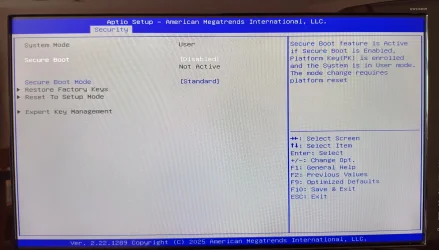
GMKtec BIOS (1).webp

Secure Boot State is OFF (Annotated).webp
 
Last edited:

My Computers

System One System Two

  • OS
    Windows 11 Pro
    Computer type
    PC/Desktop
    Manufacturer/Model
    GMKtec K11
    CPU
    AMD Ryzen 9 8945HS
    Memory
    32GB DDR5 SO-DIMM
    Graphics Card(s)
    Integrated AMD Radeon 780M (4.00 GHz)
    Monitor(s) Displays
    Benq 2250HM
    Screen Resolution
    1920 x 1080
    Hard Drives
    1 TB PCIe 4.0 NVMe M.2 SSD
  • Operating System
    Windows 11 Home
    Computer type
    Laptop
    Manufacturer/Model
    ASUS Zenbook 14 OLED 14" Laptop - UX3405CA-QL192W
    CPU
    Intel® Core™ Ultra 7 - 255H processor
    Memory
    16 GB LPDDR5 SDRAM
    Graphics card(s)
    Intel Arc 140T onboard graphics
    Screen Resolution
    1920 x 1200 (16:10 WUXGA resolution) OLED Touchscreen
    Hard Drives
    1TB SSD
New GMKtec computer first set up on 10th November 2025.
BIOS shows that ‘Secure Boot’ is [Disabled] and ‘Not active’.
Also BIOS shows ‘Secure Boot Mode’ is [Standard].
Secure Boot enforcement is disabled. Any Windows version or bootable USB drive is allowed to boot.
Custom Secure Boot certificates are not allowed, only keys signed by the OEM or MS are permitted for updates.

I know that Microsoft are to release new security certificates for the Secure Boot feature in June 2026 but with my Secure Boot [Disabled] is the following statement correct?: - “Microsoft will install these new certificates anyway via Windows Update but they will not stop my device from booting and I will be able to carry on as normal?”.
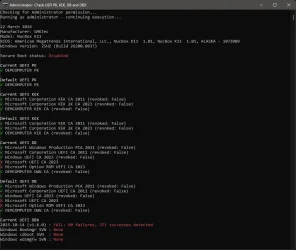
Whether Secure Boot mode is disabled or not, Windows will try adding CA 2023 certs if your BIOS is currently missing them. Assuming your PC's BIOS not older than 1-2 years, the CA 2023 certs are probably already part of the BIOS.

Your BIOS is dated February 2025, and most likely the new certs are present.

If you leave Secure Boot disabled, two things will happen:
1. Windows can never switch the Secure Boot mode. That can only happen manually from the BIOS setup menu.

2. Windows may try to update your system for future compliance with Secure Boot, but as long as Secure Boot is disabled, you don't have to worry about Windows breaking. You might see additional messages or warnings about the migration process.
 

My Computer

System One

  • OS
    Windows 7
Thanks for putting my mind at rest. :-)
 

My Computers

System One System Two

  • OS
    Windows 11 Pro
    Computer type
    PC/Desktop
    Manufacturer/Model
    GMKtec K11
    CPU
    AMD Ryzen 9 8945HS
    Memory
    32GB DDR5 SO-DIMM
    Graphics Card(s)
    Integrated AMD Radeon 780M (4.00 GHz)
    Monitor(s) Displays
    Benq 2250HM
    Screen Resolution
    1920 x 1080
    Hard Drives
    1 TB PCIe 4.0 NVMe M.2 SSD
  • Operating System
    Windows 11 Home
    Computer type
    Laptop
    Manufacturer/Model
    ASUS Zenbook 14 OLED 14" Laptop - UX3405CA-QL192W
    CPU
    Intel® Core™ Ultra 7 - 255H processor
    Memory
    16 GB LPDDR5 SDRAM
    Graphics card(s)
    Intel Arc 140T onboard graphics
    Screen Resolution
    1920 x 1200 (16:10 WUXGA resolution) OLED Touchscreen
    Hard Drives
    1TB SSD

My Computers

System One System Two

  • OS
    Windows 11 Pro
    Computer type
    PC/Desktop
    Manufacturer/Model
    GMKtec K11
    CPU
    AMD Ryzen 9 8945HS
    Memory
    32GB DDR5 SO-DIMM
    Graphics Card(s)
    Integrated AMD Radeon 780M (4.00 GHz)
    Monitor(s) Displays
    Benq 2250HM
    Screen Resolution
    1920 x 1080
    Hard Drives
    1 TB PCIe 4.0 NVMe M.2 SSD
  • Operating System
    Windows 11 Home
    Computer type
    Laptop
    Manufacturer/Model
    ASUS Zenbook 14 OLED 14" Laptop - UX3405CA-QL192W
    CPU
    Intel® Core™ Ultra 7 - 255H processor
    Memory
    16 GB LPDDR5 SDRAM
    Graphics card(s)
    Intel Arc 140T onboard graphics
    Screen Resolution
    1920 x 1200 (16:10 WUXGA resolution) OLED Touchscreen
    Hard Drives
    1TB SSD
UEFI is missing the Microsoft UEFI CA 2023 (used by Linux), and the Option ROM. As you have a NUC PC, Option ROM isn't required since you can't add any graphics or controller cards that might possibly need it.

None of the PCA 2011 certs are revoked. If you really feel like updating them now (instead of waiting), all of this can be done. But with Secure Boot disabled, this is all academic.
 

My Computer

System One

  • OS
    Windows 7
So I don't have to worry about anything and I can just leave things as they are?
 

My Computers

System One System Two

  • OS
    Windows 11 Pro
    Computer type
    PC/Desktop
    Manufacturer/Model
    GMKtec K11
    CPU
    AMD Ryzen 9 8945HS
    Memory
    32GB DDR5 SO-DIMM
    Graphics Card(s)
    Integrated AMD Radeon 780M (4.00 GHz)
    Monitor(s) Displays
    Benq 2250HM
    Screen Resolution
    1920 x 1080
    Hard Drives
    1 TB PCIe 4.0 NVMe M.2 SSD
  • Operating System
    Windows 11 Home
    Computer type
    Laptop
    Manufacturer/Model
    ASUS Zenbook 14 OLED 14" Laptop - UX3405CA-QL192W
    CPU
    Intel® Core™ Ultra 7 - 255H processor
    Memory
    16 GB LPDDR5 SDRAM
    Graphics card(s)
    Intel Arc 140T onboard graphics
    Screen Resolution
    1920 x 1200 (16:10 WUXGA resolution) OLED Touchscreen
    Hard Drives
    1TB SSD
Stop worrying. Secure Boot is disabled, so it doesn't matter if you don't have all the certs fully updated.
 

My Computer

System One

  • OS
    Windows 7
So I don't have to worry about anything and I can just leave things as they are?


That's kind of a judgement call.
MS insists we need Secure Boot to protect ourselves.

Many have decided that common sense works just as well. :-)
 

My Computers

System One System Two

  • OS
    Win 11 Home ♦♦♦26200.8457 ♦♦♦♦♦♦♦25H2
    Computer type
    PC/Desktop
    Manufacturer/Model
    Built by Ghot® [May 2020]
    CPU
    AMD Ryzen 7 3700X
    Motherboard
    Asus Pro WS X570-ACE (BIOS 5302)
    Memory
    G.Skill (F4-3200C14D-16GTZKW)
    Graphics Card(s)
    EVGA RTX 2070 (08G-P4-2171-KR)
    Sound Card
    Realtek ALC1220P / ALC S1220A
    Monitor(s) Displays
    Dell U3011 30"
    Screen Resolution
    2560 x 1600
    Hard Drives
    2x Samsung 860 EVO 500GB,
    WD 4TB Black FZBX - SATA III,
    WD 8TB Black FZBX - SATA III,
    DRW-24B1ST CD/DVD Burner
    PSU
    PC Power & Cooling 750W Quad EPS12V
    Case
    Cooler Master ATCS 840 Tower
    Cooling
    CM Hyper 212 EVO (push/pull)
    Keyboard
    Ducky DK9008 Shine II Blue LED
    Mouse
    Logitech Optical M-100
    Internet Speed
    300/300
    Browser
    Firefox (latest)
    Antivirus
    Bitdefender Total Security
    Other Info
    Speakers: Klipsch Pro Media 2.1
  • Operating System
    Windows XP Pro 32bit w/SP3
    Computer type
    PC/Desktop
    Manufacturer/Model
    Built by Ghot® (not in use)
    CPU
    AMD Athlon 64 X2 5000+ (OC'd @ 3.2Ghz)
    Motherboard
    ASUS M2N32-SLI Deluxe Wireless Edition
    Memory
    TWIN2X2048-6400C4DHX (2 x 1GB, DDR2 800)
    Graphics card(s)
    EVGA 256-P2-N758-TR GeForce 8600GT SSC
    Sound Card
    Onboard
    Monitor(s) Displays
    ViewSonic G90FB Black 19" Professional (CRT)
    Screen Resolution
    up to 2048 x 1536
    Hard Drives
    WD 36GB 10,000rpm Raptor SATA
    Seagate 80GB 7200rpm SATA
    Lite-On LTR-52246S CD/RW
    Lite-On LH-18A1P CD/DVD Burner
    PSU
    PC Power & Cooling Silencer 750 Quad EPS12V
    Case
    Generic Beige case, 80mm fans
    Cooling
    ZALMAN 9500A 92mm CPU Cooler
    Keyboard
    Logitech Classic Keybooard 200
    Mouse
    Logitech Optical M-BT96a
    Internet Speed
    300/300
    Browser
    Firefox 3.x ??
    Antivirus
    Symantec (Norton)
    Other Info
    Still assembled, still runs. Haven't turned it on for 15 years?
MS insists we need Secure Boot to protect ourselves
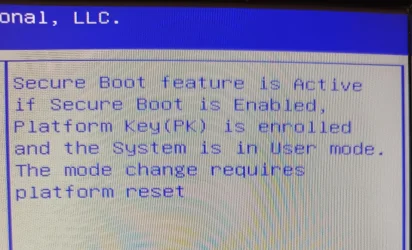
I am scared to enable Secure Boot due the scary sound message in the BIOS. I would not have the the first idea of what it entails. I know nothing about Platform Keys but it sounds as if it is easy to mess things up and be unable to boot if I try to change anything so I'll leave things as-is. See: -

GMKtec BIOS (2).webp
 

My Computers

System One System Two

  • OS
    Windows 11 Pro
    Computer type
    PC/Desktop
    Manufacturer/Model
    GMKtec K11
    CPU
    AMD Ryzen 9 8945HS
    Memory
    32GB DDR5 SO-DIMM
    Graphics Card(s)
    Integrated AMD Radeon 780M (4.00 GHz)
    Monitor(s) Displays
    Benq 2250HM
    Screen Resolution
    1920 x 1080
    Hard Drives
    1 TB PCIe 4.0 NVMe M.2 SSD
  • Operating System
    Windows 11 Home
    Computer type
    Laptop
    Manufacturer/Model
    ASUS Zenbook 14 OLED 14" Laptop - UX3405CA-QL192W
    CPU
    Intel® Core™ Ultra 7 - 255H processor
    Memory
    16 GB LPDDR5 SDRAM
    Graphics card(s)
    Intel Arc 140T onboard graphics
    Screen Resolution
    1920 x 1200 (16:10 WUXGA resolution) OLED Touchscreen
    Hard Drives
    1TB SSD
Many have decided that common sense works just as well
That's what I am going to do. I am careful about what I do.
 

My Computers

System One System Two

  • OS
    Windows 11 Pro
    Computer type
    PC/Desktop
    Manufacturer/Model
    GMKtec K11
    CPU
    AMD Ryzen 9 8945HS
    Memory
    32GB DDR5 SO-DIMM
    Graphics Card(s)
    Integrated AMD Radeon 780M (4.00 GHz)
    Monitor(s) Displays
    Benq 2250HM
    Screen Resolution
    1920 x 1080
    Hard Drives
    1 TB PCIe 4.0 NVMe M.2 SSD
  • Operating System
    Windows 11 Home
    Computer type
    Laptop
    Manufacturer/Model
    ASUS Zenbook 14 OLED 14" Laptop - UX3405CA-QL192W
    CPU
    Intel® Core™ Ultra 7 - 255H processor
    Memory
    16 GB LPDDR5 SDRAM
    Graphics card(s)
    Intel Arc 140T onboard graphics
    Screen Resolution
    1920 x 1200 (16:10 WUXGA resolution) OLED Touchscreen
    Hard Drives
    1TB SSD
You can check on the status of the certificate update by going into the Registry and navigating to:
HKLM\System\CurrentControlSet\Control\SecureBoot\Servicing
Look for the UEFICA2023Status key
The data value will be either "Not Started". "In Process", or "Updated".

You can also go to Event Viewer and navigate to:
Windows Logs > System
Then go to the Action menu > Find
And search for 1808
If the update has completed, Event 1808 will exist and will list the status
 

My Computers

System One System Two

  • OS
    Windows 11 Pro 23H2
    Computer type
    PC/Desktop
    Manufacturer/Model
    Self Built
    CPU
    Intel i7-13700K
    Motherboard
    MSI PRO Z790-A WiFi
    Memory
    Corsair Vengence 5600 - 32GB
    Graphics Card(s)
    MSI RTX3060 Ventus 2x 12GB
    Sound Card
    On board - Realtek ALC4080
    Monitor(s) Displays
    LG 27GL850
    Screen Resolution
    2560 x 1440
    Hard Drives
    WD Black SN850X Nvme - 1TB
    WD Black 6TB HDD 256MB cache CMR
    WD Black 6TB HDD 128MB cache CMR
    PSU
    Corsair RM850x
    Case
    Fractal Design - Define 7
    Cooling
    Deepcool AK400
    Keyboard
    MS KC0405
    Mouse
    MS Model 1113 / MS Wireless Mobile Mouse 3500
    Internet Speed
    940 Mbps
    Browser
    Firefox
    Antivirus
    Windows Security
    Other Info
    I have a Case Speaker!
    I have a Blueray Disk drive!
  • Operating System
    Windows 10 Pro 22H2
    Computer type
    PC/Desktop
    Manufacturer/Model
    Self Built
    CPU
    i7-9700K
    Motherboard
    Asus Prime Z390-A
    Memory
    Corsair Vengence 32GB
    Graphics card(s)
    EVGA GTX1060
    Sound Card
    On Board
    Monitor(s) Displays
    Acer 27"
    Screen Resolution
    1920 x 1080
    Hard Drives
    WD Black Nvme 500GB
    Toshiba X300 5TB
    PSU
    Corsair RM850x
    Case
    Antec P101 Silent
    Cooling
    CoolerMaster Hyper T4
    Keyboard
    MS KC0405
    Mouse
    Logitec M-U0007
    Internet Speed
    940 Mbps
    Browser
    Firefox
    Antivirus
    Avast!
    Other Info
    I have a Case Speaker!
HKLM\System\CurrentControlSet\Control\SecureBoot\Servicing
Look for the UEFICA2023Status key
The data value will be either "Not Started". "In Process", or "Updated".
Thank you. It shows as 'Not Started'.

I'll leave the room now and call this 'Solved'.
 

My Computers

System One System Two

  • OS
    Windows 11 Pro
    Computer type
    PC/Desktop
    Manufacturer/Model
    GMKtec K11
    CPU
    AMD Ryzen 9 8945HS
    Memory
    32GB DDR5 SO-DIMM
    Graphics Card(s)
    Integrated AMD Radeon 780M (4.00 GHz)
    Monitor(s) Displays
    Benq 2250HM
    Screen Resolution
    1920 x 1080
    Hard Drives
    1 TB PCIe 4.0 NVMe M.2 SSD
  • Operating System
    Windows 11 Home
    Computer type
    Laptop
    Manufacturer/Model
    ASUS Zenbook 14 OLED 14" Laptop - UX3405CA-QL192W
    CPU
    Intel® Core™ Ultra 7 - 255H processor
    Memory
    16 GB LPDDR5 SDRAM
    Graphics card(s)
    Intel Arc 140T onboard graphics
    Screen Resolution
    1920 x 1200 (16:10 WUXGA resolution) OLED Touchscreen
    Hard Drives
    1TB SSD
Just came here after seeing a YT vid about the certificates expiring, i checked and my Secure Boot is disabled. glad i came here instead of immediately fiddling :-D
 

My Computer

System One

  • OS
    Win11
    Computer type
    PC/Desktop
    Manufacturer/Model
    homemade
    CPU
    Intel Core i7-10700K 3.8GHz (Comet Lake) Socket LGA1200
    Motherboard
    gigabyte aorus Z490 Elite AC
    Memory
    Corsair CMK16GX4M2B3200C16 Vengeance LPX 16 GB (2 x 8 GB) DDR4 3200 MHz
    Graphics Card(s)
    Gigabyte RTX-3060 Windforce OC 12G
    Monitor(s) Displays
    iiyama Prolite B2780HSU
    Screen Resolution
    1920x1080
    Hard Drives
    Western Digital WDS500G2B0A WD Blue 3D NAND Internal SSD 2.5 Inch SATA, 500 GB ~ OS disc
    Seagate SSHD 7200RPM 3.5" 1TB SATA 6Gbs 64MB Cache
    Crucial MX100 128GB SATA 2.5” 7mm SSD
    PSU
    Corsair RMx Series RMx750 750W '80 Plus Gold'
    Case
    Cooler Master CM-690 III - USB 3.0 ATX Case
    Cooling
    Noctua NH-U14S Ultra-Quiet Slim CPU Cooler with NF-A15 Fan
    Keyboard
    Logitech K120
I am scared to enable Secure Boot due the scary sound message in the BIOS. I would not have the the first idea of what it entails. I know nothing about Platform Keys but it sounds as if it is easy to mess things up and be unable to boot if I try to change anything so I'll leave things as-is. See: -
If you enable secure boot and have issues, you can simply disable it to get back to where you are. It's a trivial issue.
 

My Computers

System One System Two

  • OS
    Win 11 Pro 25H2, Build 26200.8524
    Computer type
    PC/Desktop
    Manufacturer/Model
    Home Brew
    CPU
    Intel Core i5 14500
    Motherboard
    Gigabyte B760M G P WIFI
    Memory
    64GB DDR4
    Graphics Card(s)
    GeForce RTX 4060
    Sound Card
    Chipset Realtek
    Monitor(s) Displays
    LG 45" Ultragear, Acer 24" 1080p
    Screen Resolution
    5120x1440, 1920x1080
    Hard Drives
    Crucial P310 2TB 2280 PCIe Gen4 3D NAND NVMe M.2 SSD (O/S)
    Silicon Power 2TB US75 NVMe PCIe Gen4 M.2 2280 SSD (backup)
    Crucial BX500 2TB 3D NAND (2nd backup)
    Seagate 4TB Ironwolf, rotating HDD archive files
    External off-line backup Drives: 2 NVMe 4TB drives in external enclosures
    PSU
    Thermaltake Toughpower GF3 750W
    Case
    LIAN LI LANCOOL 216 E-ATX PC Case
    Cooling
    Lots of fans!
    Keyboard
    Microsoft Comfort Curve 2000
    Mouse
    Logitech G305
    Internet Speed
    Verizon FiOS 1GB
    Browser
    Firefox
    Antivirus
    Malware Bytes & Windows Defender Security
  • Operating System
    Win 11 Pro 25H2, Build 26200.8524
    Computer type
    PC/Desktop
    Manufacturer/Model
    Home Brew
    CPU
    Intel Core i5 14400
    Motherboard
    Gigabyte B760M DS3H AX
    Memory
    32GB DDR5
    Graphics card(s)
    Intel 700 Embedded GPU
    Sound Card
    Realtek Embedded
    Monitor(s) Displays
    27" HP 1080p
    Screen Resolution
    1920x1080
    Hard Drives
    Crucial P310 2TB 2280 PCIe Gen4 eD NAND PCIe SSD
    Samsung EVO 990 2TB NVMe Gen4 SSD
    Samsung 2TB SATA SSD
    PSU
    Thermaltake Smart BM3 650W
    Case
    Okinos Micro ATX Case
    Cooling
    Fans
    Keyboard
    Microsoft Comfort Curve 2000
    Mouse
    Logitech G305
    Internet Speed
    Verizon FiOS 1GB
    Browser
    Firefox
    Antivirus
    Malware Bytes & Windows Defender Security
Back
Top Bottom