
Security platform Kb5007651 error 0x80070643


DMD

Well-known member
Member
Local time
10:15 AM
Posts
218
OS
W11
Good morning
With the latest update I get this message: "error 0x80070643 Security platform Kb5007651"
I tried the fix commands "DISM.exe / Online / Cleanup-image / Restorehealth" nothing to do.
To remove any doubts about the integrity of the OS, I made a clean installation from build 318 downloaded from MCT, installed on a virtual machine and I get the same error.
Some idea?
Thank you
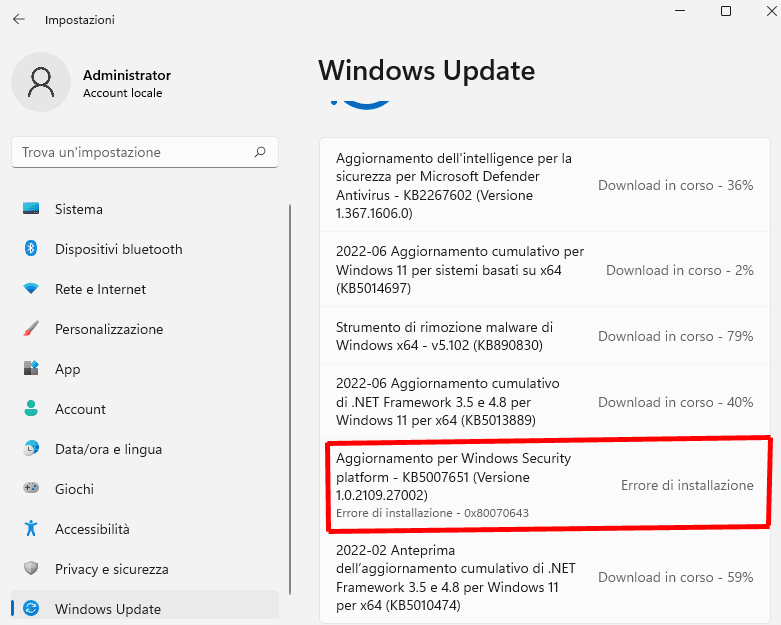
Screenshot-001.png
 

My Computer My Computer

At a glance

W11CPU AMD Ryzen 9 7950XG.Skill Flare X5 32GB Kit DDR5-6000 CL32 (F5-...
OS
W11
Computer type
PC/Desktop
CPU
CPU AMD Ryzen 9 7950X
Motherboard
ASUS ROG Strix X670E-F Gaming WiFi
Memory
G.Skill Flare X5 32GB Kit DDR5-6000 CL32 (F5-6000J3238F16GX2-FX5)
Monitor(s) Displays
LG E2381VR
Screen Resolution
1920x1080
Hard Drives
1x Samsung Memorie MZ-V8P1T0B 980 PRO SSD 1TB
2x Western Digital WD Red Nas 4TB
PSU
SEASONIC FOCUS PX-850 Plus Platinum
Case
Corsair 4000D Airflow
Cooling
ARCTIC Liquid Freezer II 280 A-RGB
Keyboard
Logitech G510
Mouse
Logitech G502 HERO
Browser
Firefox
Antivirus
Avg free
Other Info
Download: 90 Mbps
Upload: 20Mbps
You are not alone. A web search shows many complaints about the same KB with same error, but it's not affecting everyone. MS has not posted any official response on how to fix it yet. It failed for me twice but eventually installed.
 

My Computers My Computers

  • At a glance

    Windows 11 Pro 25H2 26200.9168i9-10900 10 core 20 threads32 gbnone-Intel UHD Graphics 630
    OS
    Windows 11 Pro 25H2 26200.9168
    Computer type
    PC/Desktop
    Manufacturer/Model
    Dell Optiplex 7080
    CPU
    i9-10900 10 core 20 threads
    Motherboard
    DELL 0J37VM
    Memory
    32 gb
    Graphics Card(s)
    none-Intel UHD Graphics 630
    Sound Card
    Integrated Realtek
    Monitor(s) Displays
    Benq 27
    Screen Resolution
    2560x1440
    Hard Drives
    2x1tb Solidigm m.2 nvme /External drives 512gb Samsung m.2 sata+2tb Kingston m2.nvme
    PSU
    500w
    Case
    MT
    Cooling
    Dell Premium
    Keyboard
    Logitech wired
    Mouse
    Logitech wireless
    Internet Speed
    so slow I'm too embarrassed to tell
    Browser
    #1 Edge #2 Firefox
    Antivirus
    Defender+MWB Premium
  • At a glance

    Windows 11 Pro 24H2 26200.9168AMD Ryzen 7 6800U32 gbintegrated
    Operating System
    Windows 11 Pro 24H2 26200.9168
    Computer type
    PC/Desktop
    Manufacturer/Model
    Beelink Mini PC SER5
    CPU
    AMD Ryzen 7 6800U
    Memory
    32 gb
    Graphics card(s)
    integrated
    Sound Card
    integrated
    Monitor(s) Displays
    Benq 27
    Screen Resolution
    2560x1440
    Hard Drives
    1TB Crucial nvme
    Keyboard
    Logitech wired
    Mouse
    Logitech wireless
    Internet Speed
    still too embarrassed to tell
    Browser
    Firefox
    Antivirus
    Defender
  • System 3 is non compliant Dell 9020 i7-4770/24gb ram Win11 PRO 26200.9168
This tool can be a temporary solution until the next update.
https://download.microsoft.com/down...9cd-4275-8c95-1be17bf70b21/wushowhide.diagcab

Step 1: run the "wushowhide.diagcab" file by double clicking on it from the download path or by simply clicking on the downloaded file in the browser
Step 2: select "Advanced", select the "Apply updates automatically" option and click "Next"
Step 3: select the "Hide updates" option and from the list, select KB5007651 update and press "Next"
Step 4: Apply the changes and click "Close".
 

My Computer My Computer

At a glance

W11CPU AMD Ryzen 9 7950XG.Skill Flare X5 32GB Kit DDR5-6000 CL32 (F5-...
OS
W11
Computer type
PC/Desktop
CPU
CPU AMD Ryzen 9 7950X
Motherboard
ASUS ROG Strix X670E-F Gaming WiFi
Memory
G.Skill Flare X5 32GB Kit DDR5-6000 CL32 (F5-6000J3238F16GX2-FX5)
Monitor(s) Displays
LG E2381VR
Screen Resolution
1920x1080
Hard Drives
1x Samsung Memorie MZ-V8P1T0B 980 PRO SSD 1TB
2x Western Digital WD Red Nas 4TB
PSU
SEASONIC FOCUS PX-850 Plus Platinum
Case
Corsair 4000D Airflow
Cooling
ARCTIC Liquid Freezer II 280 A-RGB
Keyboard
Logitech G510
Mouse
Logitech G502 HERO
Browser
Firefox
Antivirus
Avg free
Other Info
Download: 90 Mbps
Upload: 20Mbps
Just disabling Avast Antivirus for 10 minutes before retrying to install the package did the trick !
 

My Computer My Computer

At a glance

Windows 11
OS
Windows 11
Not just Avast, any antimalware program. Seen solutions about ESET, and had to exit/shutdown my Kaspersky.

Dunno about the others, but still wouldn't install with Kaspersky just disabled, had to exit the program fully.

This KB is a security platform update. On 2 devices where it wouldn't install, both are non-compliant fudged W11 installations ... co-incidence?
 

My Computers My Computers

  • At a glance

    Windows 11 2xH2 (latest update ... forever anal)Intel i5-124008GBNVIDIA GeForce GT730
    OS
    Windows 11 2xH2 (latest update ... forever anal)
    Computer type
    PC/Desktop
    Manufacturer/Model
    HP Slim S01
    CPU
    Intel i5-12400
    Memory
    8GB
    Graphics Card(s)
    NVIDIA GeForce GT730
    Sound Card
    OOBE
    Monitor(s) Displays
    Acer 32"
    Screen Resolution
    1920x1080
    Hard Drives
    512GB KIOXIA NVMe
    1TB SATA SSD
    PSU
    OOBE
    Case
    OOBE
    Cooling
    OOBE
    Keyboard
    BT
    Mouse
    BT
    Browser
    Brave FFox Chrome Opera
    Antivirus
    KIS
  • At a glance

    Windows 11 Pro 2xH2 (latest update ... 4ever ...i7-1165G7 @ 2.80GHzIntel Iris Xe Graphics
    Operating System
    Windows 11 Pro 2xH2 (latest update ... 4ever anal)
    Computer type
    Laptop
    Manufacturer/Model
    HP Pavillion 15
    CPU
    i7-1165G7 @ 2.80GHz
    Graphics card(s)
    Intel Iris Xe Graphics
    Hard Drives
    Samsung NVMe 512GB
    + numerous/multiple SSD Type C USB enclosures
    Internet Speed
    NBN FTTN 50
    Browser
    Brave
    Antivirus
    KIS
It happened on two Win 11 machines. The update failed and when hit retry it just disappeared!

Running WU again does not display the update to be installed!

Guess will have to wait for MS to fix this!
 

My Computer My Computer

At a glance

Windows 11 Proi7-12700K64GbGeforce RTX 3050
OS
Windows 11 Pro
Computer type
PC/Desktop
CPU
i7-12700K
Motherboard
Z690M Aorus Elite AX DDR4
Memory
64Gb
Graphics Card(s)
Geforce RTX 3050
Monitor(s) Displays
Samsung S* 32"
Screen Resolution
4K
PSU
650w Gold
Case
Thermaltake
It happened on two Win 11 machines. The update failed and when hit retry it just disappeared!

Running WU again does not display the update to be installed!

Guess will have to wait for MS to fix this!
Check your update history (might need to scroll through numerically sequenced KBs) . I think you'll find because it "disappeared", it was in fact, installed/applied.
 

My Computers My Computers

  • At a glance

    Windows 11 2xH2 (latest update ... forever anal)Intel i5-124008GBNVIDIA GeForce GT730
    OS
    Windows 11 2xH2 (latest update ... forever anal)
    Computer type
    PC/Desktop
    Manufacturer/Model
    HP Slim S01
    CPU
    Intel i5-12400
    Memory
    8GB
    Graphics Card(s)
    NVIDIA GeForce GT730
    Sound Card
    OOBE
    Monitor(s) Displays
    Acer 32"
    Screen Resolution
    1920x1080
    Hard Drives
    512GB KIOXIA NVMe
    1TB SATA SSD
    PSU
    OOBE
    Case
    OOBE
    Cooling
    OOBE
    Keyboard
    BT
    Mouse
    BT
    Browser
    Brave FFox Chrome Opera
    Antivirus
    KIS
  • At a glance

    Windows 11 Pro 2xH2 (latest update ... 4ever ...i7-1165G7 @ 2.80GHzIntel Iris Xe Graphics
    Operating System
    Windows 11 Pro 2xH2 (latest update ... 4ever anal)
    Computer type
    Laptop
    Manufacturer/Model
    HP Pavillion 15
    CPU
    i7-1165G7 @ 2.80GHz
    Graphics card(s)
    Intel Iris Xe Graphics
    Hard Drives
    Samsung NVMe 512GB
    + numerous/multiple SSD Type C USB enclosures
    Internet Speed
    NBN FTTN 50
    Browser
    Brave
    Antivirus
    KIS
Fix is update defender definitions they are corrupted and then update.. microsoft is trash with their updates
 

My Computer My Computer

At a glance

Windows 114770k16 gb Kingston2070 super
OS
Windows 11
Computer type
PC/Desktop
Manufacturer/Model
-
CPU
4770k
Motherboard
Asus Maximus Formula VI
Memory
16 gb Kingston
Graphics Card(s)
2070 super
Fix is update defender definitions they are corrupted and then update.. microsoft is trash with their updates
It's not just Defender. Multiple other antimalware programs have affected this KB. Surely they all can't have corrupted updates ...?
 

My Computers My Computers

  • At a glance

    Windows 11 2xH2 (latest update ... forever anal)Intel i5-124008GBNVIDIA GeForce GT730
    OS
    Windows 11 2xH2 (latest update ... forever anal)
    Computer type
    PC/Desktop
    Manufacturer/Model
    HP Slim S01
    CPU
    Intel i5-12400
    Memory
    8GB
    Graphics Card(s)
    NVIDIA GeForce GT730
    Sound Card
    OOBE
    Monitor(s) Displays
    Acer 32"
    Screen Resolution
    1920x1080
    Hard Drives
    512GB KIOXIA NVMe
    1TB SATA SSD
    PSU
    OOBE
    Case
    OOBE
    Cooling
    OOBE
    Keyboard
    BT
    Mouse
    BT
    Browser
    Brave FFox Chrome Opera
    Antivirus
    KIS
  • At a glance

    Windows 11 Pro 2xH2 (latest update ... 4ever ...i7-1165G7 @ 2.80GHzIntel Iris Xe Graphics
    Operating System
    Windows 11 Pro 2xH2 (latest update ... 4ever anal)
    Computer type
    Laptop
    Manufacturer/Model
    HP Pavillion 15
    CPU
    i7-1165G7 @ 2.80GHz
    Graphics card(s)
    Intel Iris Xe Graphics
    Hard Drives
    Samsung NVMe 512GB
    + numerous/multiple SSD Type C USB enclosures
    Internet Speed
    NBN FTTN 50
    Browser
    Brave
    Antivirus
    KIS
It's not just Defender. Multiple other antimalware programs have affected this KB. Surely they all can't have corrupted updates ...?
its probably bc defender doesnt have updated definitions bc you use 3rd party anti-malware program it has some kind of dumb check for installation bc microsoft is "smart"
 

My Computer My Computer

At a glance

Windows 114770k16 gb Kingston2070 super
OS
Windows 11
Computer type
PC/Desktop
Manufacturer/Model
-
CPU
4770k
Motherboard
Asus Maximus Formula VI
Memory
16 gb Kingston
Graphics Card(s)
2070 super
Checked my update history and no evidence that this KB5007651 was installed. Checking for updates does not offer it again.

Multiple defender definitions have been successfully installed since patch Tuesday so not sure they are corrupted!
 

My Computer My Computer

At a glance

Windows 11 Proi7-12700K64GbGeforce RTX 3050
OS
Windows 11 Pro
Computer type
PC/Desktop
CPU
i7-12700K
Motherboard
Z690M Aorus Elite AX DDR4
Memory
64Gb
Graphics Card(s)
Geforce RTX 3050
Monitor(s) Displays
Samsung S* 32"
Screen Resolution
4K
PSU
650w Gold
Case
Thermaltake
I had same issue did sfc, dism and windows update reset procedure and only thing that worked was manual check for update for definitions inside windows defender and then update just went through in 2 secs.. even though definitions were 10 mins old
 

My Computer My Computer

At a glance

Windows 114770k16 gb Kingston2070 super
OS
Windows 11
Computer type
PC/Desktop
Manufacturer/Model
-
CPU
4770k
Motherboard
Asus Maximus Formula VI
Memory
16 gb Kingston
Graphics Card(s)
2070 super
nope went into defender and did manual check for updates and it just said I was up to date and did not install the KB
 

My Computer My Computer

At a glance

Windows 11 Proi7-12700K64GbGeforce RTX 3050
OS
Windows 11 Pro
Computer type
PC/Desktop
CPU
i7-12700K
Motherboard
Z690M Aorus Elite AX DDR4
Memory
64Gb
Graphics Card(s)
Geforce RTX 3050
Monitor(s) Displays
Samsung S* 32"
Screen Resolution
4K
PSU
650w Gold
Case
Thermaltake
However I repeat that to remove any doubts about the integrity of the operating system, I did a clean installation from build 318 downloaded from MCT, installed on a virtual machine and I get the same error even disabling the Windows antivirus.
 

My Computer My Computer

At a glance

W11CPU AMD Ryzen 9 7950XG.Skill Flare X5 32GB Kit DDR5-6000 CL32 (F5-...
OS
W11
Computer type
PC/Desktop
CPU
CPU AMD Ryzen 9 7950X
Motherboard
ASUS ROG Strix X670E-F Gaming WiFi
Memory
G.Skill Flare X5 32GB Kit DDR5-6000 CL32 (F5-6000J3238F16GX2-FX5)
Monitor(s) Displays
LG E2381VR
Screen Resolution
1920x1080
Hard Drives
1x Samsung Memorie MZ-V8P1T0B 980 PRO SSD 1TB
2x Western Digital WD Red Nas 4TB
PSU
SEASONIC FOCUS PX-850 Plus Platinum
Case
Corsair 4000D Airflow
Cooling
ARCTIC Liquid Freezer II 280 A-RGB
Keyboard
Logitech G510
Mouse
Logitech G502 HERO
Browser
Firefox
Antivirus
Avg free
Other Info
Download: 90 Mbps
Upload: 20Mbps
nope went into defender and did manual check for updates and it just said I was up to date and did not install the KB
No, you're not looking in Defender for updates. You need to go Settings > Windows Update > scroll down to Definition Updates > expand > should be listed at the top.
 
Last edited:

My Computers My Computers

  • At a glance

    Windows 11 2xH2 (latest update ... forever anal)Intel i5-124008GBNVIDIA GeForce GT730
    OS
    Windows 11 2xH2 (latest update ... forever anal)
    Computer type
    PC/Desktop
    Manufacturer/Model
    HP Slim S01
    CPU
    Intel i5-12400
    Memory
    8GB
    Graphics Card(s)
    NVIDIA GeForce GT730
    Sound Card
    OOBE
    Monitor(s) Displays
    Acer 32"
    Screen Resolution
    1920x1080
    Hard Drives
    512GB KIOXIA NVMe
    1TB SATA SSD
    PSU
    OOBE
    Case
    OOBE
    Cooling
    OOBE
    Keyboard
    BT
    Mouse
    BT
    Browser
    Brave FFox Chrome Opera
    Antivirus
    KIS
  • At a glance

    Windows 11 Pro 2xH2 (latest update ... 4ever ...i7-1165G7 @ 2.80GHzIntel Iris Xe Graphics
    Operating System
    Windows 11 Pro 2xH2 (latest update ... 4ever anal)
    Computer type
    Laptop
    Manufacturer/Model
    HP Pavillion 15
    CPU
    i7-1165G7 @ 2.80GHz
    Graphics card(s)
    Intel Iris Xe Graphics
    Hard Drives
    Samsung NVMe 512GB
    + numerous/multiple SSD Type C USB enclosures
    Internet Speed
    NBN FTTN 50
    Browser
    Brave
    Antivirus
    KIS
This tool can be a temporary solution until the next update.
https://download.microsoft.com/down...9cd-4275-8c95-1be17bf70b21/wushowhide.diagcab

Step 1: run the "wushowhide.diagcab" file by double clicking on it from the download path or by simply clicking on the downloaded file in the browser
Step 2: select "Advanced", select the "Apply updates automatically" option and click "Next"
Step 3: select the "Hide updates" option and from the list, select KB5007651 update and press "Next"
Step 4: Apply the changes and click "Close".
Sadly, it is now considered an unsafe tool by the same Microsoft. Win 11 blocks it in any viable way. Sad that's not a replacement procedure or a new tool to do what wushowhide.diagcab perfectly did. After Solarwind nightmare, updating a kernel is something ever more stealth and not accesible, for comprehensible reasons. Ok, you can force it and quickly remove it after using it. But malicious attempts to hide updates which solve vulnerabilities represent a sensitive matter for common users.
Hopefully, Microsoft will resolve this issue soon.
 

My Computer My Computer

At a glance

Win 11 IP Dev ChannelRyzen 9 598032 GB DDR4 - 3200 MhzAMD embedded Radeon 512 GB - 2100 Mhz
OS
Win 11 IP Dev Channel
Computer type
PC/Desktop
Manufacturer/Model
Miniforums HX 90
CPU
Ryzen 9 5980
Motherboard
AIO AMD - Cezanne Family
Memory
32 GB DDR4 - 3200 Mhz
Graphics Card(s)
AMD embedded Radeon 512 GB - 2100 Mhz
Monitor(s) Displays
Samsung
Screen Resolution
1920 x 1280
Hard Drives
M.2 NMVe 512 GB PCIe

Latest Support Threads

Back
Top Bottom




