Seeking a second opinion... Is OneDrive malicious malpractice ?


You have hit on exactly my primary objection to OneDrive! I never argued it didn't work, just that it's certainly not transparent and easy to understand what it's doing out of the gate. This is coming from a guy that had been in software development since he was in his 20's!

Yes, I'm sure I could easily figure it out and use it, but my point is I shouldn't have to "figure it out"! And it certainly shouldn't be the default!

Moving the data is one of the simplest jobs when I migrate to a different computer! All my files are on a separate logical data drive, so I just copy the drive, problem solved! Even stuff like my email data base, etc. are on the data drive. The time consuming part of moving to a new computer is really installing all the applications, and OneDrive ain't gonna do that for you.
I'm certainly not trying to criticize anyone, as we all have different levels of expertise and experience, but for me, I am no longer the young geek guy I once was and now simplicity matters. 😒 However, I found it very easy to understand how OneDrive works: Whatever is in C:\...\OneDrive is what gets synced with the cloud, period; it truly is that simple.

Yes, if all your data files are on some sort of network/shared resource then it is just as simple as OneDrive to get re-started on a new PC, after all the applications have been installed, because you can then just simply point your data folders to that network/shared resource. However, if you need/want multi-device and/or offline multi-user access/collaboration for those files, this is where OneDrive comes in handy, keeping everything in sync.
 

My Computer My Computer

At a glance

Windows 11 Pro32GB
OS
Windows 11 Pro
Computer type
Laptop
Manufacturer/Model
Microsoft Surface Laptop Studio
Memory
32GB
Monitor(s) Displays
Three (3) Dell U3223QE
Screen Resolution
Surface: 2400x1600; Dells: 3840x2160
Hard Drives
1TB
Been using Skydrive, later renamed to OneDrive for many years to store an extra backup copy of files i wanted to make sure was safe

In addtion i have the files backed up on 4 Other external drives

Also Pay for Office 365, so i make sure to get some use out of it.

Only store up there Purchased Xbox Music/Groove Music from way back in Windows 8 and maybe early Windows 10 days if it still worked then. and some GameDVR Clips from American Truck Simulator & Euro Truck Simulator 2 typically


SecondLife Game Pictures

and Some non personal documents related to PC maintenance commands and such


I use Onedrive daily myself
 

My Computers My Computers

  • At a glance

    Windows 11 Pro 25H2 26200.8894AMD Ryzen 7700X32GB DDR 5 RGB 5600MhzRadeon 7800XT
    OS
    Windows 11 Pro 25H2 26200.8894
    Computer type
    PC/Desktop
    Manufacturer/Model
    PreBuilt
    CPU
    AMD Ryzen 7700X
    Motherboard
    MSI B650 VC WIfi Rev 1.0
    Memory
    32GB DDR 5 RGB 5600Mhz
    Graphics Card(s)
    Radeon 7800XT
    Sound Card
    Onboard Audio
    Monitor(s) Displays
    Asus VG245H
    Screen Resolution
    1920x1080
    Hard Drives
    Samsung 990 Pro 1TB Boot NVMe
    Samsung 990 Pro 2TB Game NVMe


    External
    Western Digital Elements 500GB
    Western Digital My Passport 2TB Blue
    Western Digital My Passport 2TB Red
    Toshiba 2TB in External Enclosure
    Seagate 8TB in External Enclosure
    Seagate 1TB Portable USB 3 External Drive
    Western Digital My Book 8TB (Primary Backup drive)
    Western Digital Black 4TB In External Enclosure
    PSU
    Seasonic Focus GX 750 Watt Power Supply
    Case
    Lian Li Lan Cool 216 ARGB Airflow
    Cooling
    2 160MM Front, 1 140MM Rear Exhaust
    Keyboard
    Logitech G513
    Mouse
    Logitech G502 X
    Internet Speed
    Gigabit 1100Mb/35 Upload
    Browser
    MS Edge Chromium and Bing Search
    Antivirus
    Windows Defender, Malwarebytes Premium
    Other Info
    UEFI, Secure Boot, TPM 2.0, Macrium Reflect X
  • At a glance

    Windows 11 Pro 25H2 26200.8894Ryzen 7 7735HS16GB DDR 5AMD Radeon™ 680M & Radeon 7700S
    Operating System
    Windows 11 Pro 25H2 26200.8894
    Computer type
    Laptop
    Manufacturer/Model
    Asus TUF A16 Advantage Edition FA617NT.A16.R7700
    CPU
    Ryzen 7 7735HS
    Motherboard
    OEM Asus Motherboard
    Memory
    16GB DDR 5
    Graphics card(s)
    AMD Radeon™ 680M & Radeon 7700S
    Sound Card
    Onboard
    Monitor(s) Displays
    16inch FHD 165hz
    Screen Resolution
    1920x1080
    Hard Drives
    512GB NVMe Boot Drive
    Samsung 990 Evo Plus 1TB Game NVMe
    PSU
    Laptop PSU
    Case
    Laptop Case
    Cooling
    OEM Cooling
    Keyboard
    OEM Laptop Keyboard
    Mouse
    Touchpad & G502 Hero
    Internet Speed
    Gigabit 1100 Download/35 Upload
    Browser
    MS Edge with Bing search
    Antivirus
    Windows Defender & Malwarebytes Premium
    Other Info
    Macrium Reflect X
Both Bitlocker and Onedrive is a good idea.. but... i give MS an A for the effort, but an F for the execution in the default format of them.

Edit:
How stupid was MS when they put in a backdoor to get around bitlocker.. sure it might make some people happy if they hadn't written down the key.. But encryption is supposed to be unrecoverable if you slip up or the device get stolen.
How stupid is it to have the encryption key in the hands of a company that can be ordered to hand over the key.
How stupid is it that the data in the cloud isn't encrypted so MS can read the data. If they get a data-breach and someone get clear access to their servers. Then they can get to the data.

So A in effort and an F in execution on default solution.
So a user has to take extra step to secure their data before it becomes a good solution.. that is not good as 99% of the people will not take those steps.. only nerd like us do.
Backdoor or not, my paranoid assumption is that the cloud service provider can see and access my files. 😁

As such, for my personal laptops, everything I upload is AES 256-encrypted before I upload; so, even if the cloud admin or some hacker gets access to my files, they will still need to be able to crack the password to view the file contents. With OneNote, this can't be done with the notebook, so I do the next best thing: I password-protect every section in the notebook. The net effect is, once again, you can't see anything unless you are able to crack the password.

Microsoft was defensive about the backdoor announcement, but I was not surprised with the revelation, and my position is don't trust them or anyone; that is, even if well-intentioned, this is IT and we are human, so mistakes/bugs can and will occur.
 

My Computer My Computer

At a glance

Windows 11 Pro32GB
OS
Windows 11 Pro
Computer type
Laptop
Manufacturer/Model
Microsoft Surface Laptop Studio
Memory
32GB
Monitor(s) Displays
Three (3) Dell U3223QE
Screen Resolution
Surface: 2400x1600; Dells: 3840x2160
Hard Drives
1TB
Backdoor or not, my paranoid assumption is that the cloud service provider can see and access my files. 😁

As such, for my personal laptops, everything I upload is AES 256-encrypted before I upload; so, even if the cloud admin or some hacker gets access to my files, they will still need to be able to crack the password to view the file contents. With OneNote, this can't be done with the notebook, so I do the next best thing: I password-protect every section in the notebook. The net effect is, once again, you can't see anything unless you are able to crack the password.

Microsoft was defensive about the backdoor announcement, but I was not surprised with the revelation, and my position is don't trust them or anyone; that is, even if well-intentioned, this is IT and we are human, so mistakes/bugs can and will occur.
Encryption i never ever checked out for my files, i thought about it, but then never looked into it further. I doubt i'd be able to encrypt all 200GB of GameDVR videos, reuploading all that would be alot to do i think.

I may have to research the encryption aspect more, i'd be willing to do that, i typically don't forget passwords, and do have Roboform Password Manager these days
 

My Computers My Computers

  • At a glance

    Windows 11 Pro 25H2 26200.8894AMD Ryzen 7700X32GB DDR 5 RGB 5600MhzRadeon 7800XT
    OS
    Windows 11 Pro 25H2 26200.8894
    Computer type
    PC/Desktop
    Manufacturer/Model
    PreBuilt
    CPU
    AMD Ryzen 7700X
    Motherboard
    MSI B650 VC WIfi Rev 1.0
    Memory
    32GB DDR 5 RGB 5600Mhz
    Graphics Card(s)
    Radeon 7800XT
    Sound Card
    Onboard Audio
    Monitor(s) Displays
    Asus VG245H
    Screen Resolution
    1920x1080
    Hard Drives
    Samsung 990 Pro 1TB Boot NVMe
    Samsung 990 Pro 2TB Game NVMe


    External
    Western Digital Elements 500GB
    Western Digital My Passport 2TB Blue
    Western Digital My Passport 2TB Red
    Toshiba 2TB in External Enclosure
    Seagate 8TB in External Enclosure
    Seagate 1TB Portable USB 3 External Drive
    Western Digital My Book 8TB (Primary Backup drive)
    Western Digital Black 4TB In External Enclosure
    PSU
    Seasonic Focus GX 750 Watt Power Supply
    Case
    Lian Li Lan Cool 216 ARGB Airflow
    Cooling
    2 160MM Front, 1 140MM Rear Exhaust
    Keyboard
    Logitech G513
    Mouse
    Logitech G502 X
    Internet Speed
    Gigabit 1100Mb/35 Upload
    Browser
    MS Edge Chromium and Bing Search
    Antivirus
    Windows Defender, Malwarebytes Premium
    Other Info
    UEFI, Secure Boot, TPM 2.0, Macrium Reflect X
  • At a glance

    Windows 11 Pro 25H2 26200.8894Ryzen 7 7735HS16GB DDR 5AMD Radeon™ 680M & Radeon 7700S
    Operating System
    Windows 11 Pro 25H2 26200.8894
    Computer type
    Laptop
    Manufacturer/Model
    Asus TUF A16 Advantage Edition FA617NT.A16.R7700
    CPU
    Ryzen 7 7735HS
    Motherboard
    OEM Asus Motherboard
    Memory
    16GB DDR 5
    Graphics card(s)
    AMD Radeon™ 680M & Radeon 7700S
    Sound Card
    Onboard
    Monitor(s) Displays
    16inch FHD 165hz
    Screen Resolution
    1920x1080
    Hard Drives
    512GB NVMe Boot Drive
    Samsung 990 Evo Plus 1TB Game NVMe
    PSU
    Laptop PSU
    Case
    Laptop Case
    Cooling
    OEM Cooling
    Keyboard
    OEM Laptop Keyboard
    Mouse
    Touchpad & G502 Hero
    Internet Speed
    Gigabit 1100 Download/35 Upload
    Browser
    MS Edge with Bing search
    Antivirus
    Windows Defender & Malwarebytes Premium
    Other Info
    Macrium Reflect X
For me one of the most important features that OneDrive offers is a real-time offsite copy of all my data. From personal experience having one component of my backup strategy always offsite and always up to date in real time is vitally important. I never want to lose even a single byte of anything I'm working on throughout my day.
I originally used AWS, then I switched to GCP (for cost reasons), then I switched to OneDrive (also for cost reasons, since it was now free/included with my ISP service).

I used third-party tools to upload to AWS and GCP and they worked well; I especially liked the detailed progress stats. But when there was a glitch (e.g., my computer froze, loss of internet connection, etc.), this is where things would become unpredictable and tricky. Nevertheless, I had a process in place and knew the steps to perform in the event of an interruption.

OneDrive, on the other hand, is like a set-it-and-forget-it tool. As a test, I deliberately shutdown my PC prematurely, cut off the internet, etc., and when I rebooted, syncing resumed without me having to lift a finger. Absolutely fabulous!!!
 

My Computer My Computer

At a glance

Windows 11 Pro32GB
OS
Windows 11 Pro
Computer type
Laptop
Manufacturer/Model
Microsoft Surface Laptop Studio
Memory
32GB
Monitor(s) Displays
Three (3) Dell U3223QE
Screen Resolution
Surface: 2400x1600; Dells: 3840x2160
Hard Drives
1TB
Backdoor or not, my paranoid assumption is that the cloud service provider can see and access my files. 😁

As such, for my personal laptops, everything I upload is AES 256-encrypted before I upload; so, even if the cloud admin or some hacker gets access to my files, they will still need to be able to crack the password to view the file contents. With OneNote, this can't be done with the notebook, so I do the next best thing: I password-protect every section in the notebook. The net effect is, once again, you can't see anything unless you are able to crack the password.

Microsoft was defensive about the backdoor announcement, but I was not surprised with the revelation, and my position is don't trust them or anyone; that is, even if well-intentioned, this is IT and we are human, so mistakes/bugs can and will occur.
I only reused the word backdoor from both bug-hunters and security researches as they found the incident to wired to actually be a bug and not an intentionally "bug"
So its not my opinion, But i have to tend to agree with what i read.. it seems just to easy.

Yeah.. to be sure you should encrypt the data before uploading to someone else computer... You can always host your own cloud storage, then you do have full control..🤓....... But its not fun to keep up with security when web-hosting yourself. 😇 *lol* 😅


((Time for me to get some sleep.. its 5AM over here.. ))
 

My Computers My Computers

  • At a glance

    Linux: Debian, Kali-linux, Alma, Win:7,10IoT,...i3, i5 and i7 From 2gen to 9th gen... Server ...
    OS
    Linux: Debian, Kali-linux, Alma, Win:7,10IoT,2012R
    Manufacturer/Model
    HP Elitebook 840, AsusX53, Aspire E1-572. AsusUX32A, HP Pro3130mt+3010mt, HP Proliant ML150, 3xCustom-PC, i3, i5, i7
    CPU
    i3, i5 and i7 From 2gen to 9th gen... Server dual Xenon
    Hard Drives
    Sata, M.2, SAS
  • At a glance

    Retro: 2003server.XPpro, Win2000, Win98SE, Wi...Oldest intel 8088 up to P4 dual core
    Operating System
    Retro: 2003server.XPpro, Win2000, Win98SE, Win95, Win3.11, MS-DOS, IBM-DOS
    Manufacturer/Model
    Commodore, AST, Fujitsu, Compaq, etc etc. etc Around 15 desktops and 20 laptops in the collection
    CPU
    Oldest intel 8088 up to P4 dual core
    Hard Drives
    MFM, IDE, SCSI
Sure, when OneDrive is turned off by default.

And when having an email address is no longer a requirement by default to set up a new machine. Just like the good old days.

I think that would go quite a ways....
I think that we are way beyond that, unfortunately.

Today, the assumption is that we are all internet-connected. Especially when watching some important news story about some incident or whatever, I am always puzzled by the company-in-question's single-solution directive to go their website. I'm, like, but what about those who don't have internet access?! Can't you at least also give out a phone number?! Sheesh!
 

My Computer My Computer

At a glance

Windows 11 Pro32GB
OS
Windows 11 Pro
Computer type
Laptop
Manufacturer/Model
Microsoft Surface Laptop Studio
Memory
32GB
Monitor(s) Displays
Three (3) Dell U3223QE
Screen Resolution
Surface: 2400x1600; Dells: 3840x2160
Hard Drives
1TB
Im probably minority, but I don't think shutting it off my default is the right answer. For most people who are not enthusiasts. Having it there and on i think is the best thing.
Agreed!

OneDrive is a very valuable tool that allows you to seamlessly maintain and sync with a cloud copy of your (important) files, so that you can access and edit them from other devices and get back up and running using a new device, but without losing any of that data. This is functionally that definitely should be enabled by default.

However, it is also functionality that warrants a "Welcome to OneDrive" tutorial to demonstrate how it works so that, at the end of the tutorial, Microsoft can ask the question, "Do you want to enable this functionality?" It wouldn't take them much time/effort to do this.

Release Notes are fine for some things but the quick-and-dirty way out is not always the best or right approach.
 

My Computer My Computer

At a glance

Windows 11 Pro32GB
OS
Windows 11 Pro
Computer type
Laptop
Manufacturer/Model
Microsoft Surface Laptop Studio
Memory
32GB
Monitor(s) Displays
Three (3) Dell U3223QE
Screen Resolution
Surface: 2400x1600; Dells: 3840x2160
Hard Drives
1TB
This is functionally that definitely should be enabled by default.
I'll whole heartedly disagree with this, especially when it only gives you 5 GB of storage. We discussed that and losing data from running out of space earlier. But then again I don't use it or need it.
 

My Computers My Computers

  • At a glance

    Windows 11 25H2Intel Core Ultra 9 275HX (24-Core)64GB DDR5 6400MT/sNVIDIA GeForce RTX 5080 and Intel UHD Graphics
    OS
    Windows 11 25H2
    Computer type
    Laptop
    Manufacturer/Model
    Alienware 18 Area-51
    CPU
    Intel Core Ultra 9 275HX (24-Core)
    Motherboard
    Alienware
    Memory
    64GB DDR5 6400MT/s
    Graphics Card(s)
    NVIDIA GeForce RTX 5080 and Intel UHD Graphics
    Sound Card
    Onboard, Realtek high-performance Audio chips (ALC3329 & ALC1708))
    Monitor(s) Displays
    300HZ 18-inch QHD 500 nit Comfort View+
    Screen Resolution
    2560 x 1600
    Hard Drives
    2TB NVMe M.2 PCIe Gen 5 SSD
    Case
    Magnesium Alloy
    Cooling
    Advanced Cryo-Tech Quad-Fan Cooling system & large vapor chamber
    Keyboard
    Cherry MX ultra low profile mechanical keyboard with per key AlienFX RGB lighting
    Mouse
    Logitech MX Master 4
    Browser
    Vivaldi (main), Firefox, Chrome, Edge
    Antivirus
    MS Defender and Malwarebytes Free
  • At a glance

    Windows 11 25H2Qualcomm Snapdragon X Elite (12 Core) ARM bas...16GB LPDDR5Qualcomm Adreno X1-85
    Operating System
    Windows 11 25H2
    Computer type
    Laptop
    Manufacturer/Model
    Microsoft Surface Laptop 7
    CPU
    Qualcomm Snapdragon X Elite (12 Core) ARM based CPU
    Motherboard
    Microsoft Corp.
    Memory
    16GB LPDDR5
    Graphics card(s)
    Qualcomm Adreno X1-85
    Sound Card
    Omnisonic speakers with Dolby Atmos spatial sound
    Monitor(s) Displays
    120 Hz 13.8-inch 600 nit PixelSense Flow touchscreen
    Screen Resolution
    2304x1536
    Hard Drives
    1TB NVMe Gen 4 SSD
    Case
    Anodized Aluminum
    Cooling
    Traditional active cooling fan system
    Keyboard
    Mechanical QWERTY, backlit when in use
    Mouse
    Logitech MX Master 4 and Surface Arc Mouse
    Browser
    Vivaldi (main), Firefox, Chrome, Edge
    Antivirus
    MS Defender and Malwarebytes Free
IMHO, Microsoft Backup should never have been introduced in the first place. The vast majority are simply appliance users. They want to turn it ON and it just works. They're not going to take the time to learn or think or read.

OneDrive should have been left the way it had been since it was introduced 19 years ago. Available for use by the few who want to learn to use it and ignored by everyone else.
 

My Computers My Computers

  • At a glance

    Windows 11 ProIntel Series 3 Core Ultra X9 388H64GB LPDDR5x 9600 MT/sIntel Arc graphics B390 Panther Lake
    OS
    Windows 11 Pro
    Computer type
    Laptop
    Manufacturer/Model
    Dell XPS 16 DA16260
    CPU
    Intel Series 3 Core Ultra X9 388H
    Memory
    64GB LPDDR5x 9600 MT/s
    Graphics Card(s)
    Intel Arc graphics B390 Panther Lake
    Monitor(s) Displays
    16" 3.2K Tandem OLED Infinity Edge
    Screen Resolution
    3200 x 2000 16:10 236 PPI
    Hard Drives
    1 Terabyte M.2 PCIe NVMe SSD
    Case
    Black Anodized Aluminum
    Cooling
    Vapor Chamber Cooling
    Mouse
    None
    Internet Speed
    942 Mbps Netgear Mesh + 2 Satellites
    Browser
    Microsoft Edge (Chromium)
    Antivirus
    Windows Security (Defender)
    Other Info
    NPU delivering 67 TOPS
    Microsoft 365 subscription
    Microsoft Office 365
    Microsoft OneDrive 1TB Cloud
    Microsoft Visual Studio
    Microsoft Visual Studio Code
    Microsoft Sysinternals Suite
    Microsoft BitLocker
    Microsoft Copilot
    Dell Support Assist
    Dell Command | Update
    Macrium Reflect X subscription
    1Password Password Manager
    Amazon Kindle for PC
    Lightroom/Photoshop subscription
    Interactive Brokers Trader Workstation
  • At a glance

    Windows 11 ProSnapdragon® X Elite (12 Core) with Hexagon NP...32GB LPDDR5x 8448 MT/sIntegrated Adreno GPU
    Operating System
    Windows 11 Pro
    Computer type
    Laptop
    Manufacturer/Model
    Microsoft Surface Laptop 7
    CPU
    Snapdragon® X Elite (12 Core) with Hexagon NPU delivering 45 TOPS
    Memory
    32GB LPDDR5x 8448 MT/s
    Graphics card(s)
    Integrated Adreno GPU
    Sound Card
    Omnisonic speakers with Dolby Atmos spatial sound
    Monitor(s) Displays
    13.8″ PixelSense Flow touchscreen 120 Hz 600 NIT
    Screen Resolution
    2304 × 1536 (201 PPI), 3:2 aspect ratio
    Hard Drives
    1 TB PCIe NVMe Gen 4 SSD
    Case
    Black Anodized Aluminum
    Cooling
    Vapor Chamber Cooling
    Mouse
    None
    Internet Speed
    942 Mbps Netgear Mesh + 2 Satellites
    Browser
    Microsoft Edge (Chromium)
    Antivirus
    Windows Security (Defender)
    Other Info
    Microsoft 365 subscription (Office)
    Microsoft Office 365
    Microsoft OneDrive 1TB Cloud
    Microsoft Visual Studio 2026
    Microsoft Visual Studio Code
    Interactive Brokers Trader Workstation
    Lightroom/Photoshop subscription
    1Password Password Manager
    Microsoft Sysinternals
    Amazon Kindle for PC
    Microsoft BitLocker
    Microsoft Copilot
Given all the problems with it that you are reading about in these forums, I don't see how you came to that conclusion.

Another option would be to leave it off Windows 11 in it's entirety and offer OneDrive through the Microsoft Store as an add-in module. For those who want it, that is. Otherwise the less savvy will continue to come on these forums, frustrated looking for endless 'back-up' answers.
But it's too important and valuable of a functionality to leave off by default.

I'm very much no longer the young tech geek guy I used to be, but I was able to grasp the understanding of OneDrive. I'm not saying that everyone is or should be like me; rather, I'm just stating how the initial experience was for me.

Moreover, the default OneDrive behavior did and does not suit my use case; that is, I do not want to keep certain files/folders on my PC in sync with OneDrive. Rather, I want to use OneDrive as a cloud repository to store my backups giving me--after my USB and NAS--a third and offsite copy of my backups. Just by doing some additional reading/research, I was able to accomplish this OneDrive functional setup!

Bear with me for a second here 😉 but I think since the introduction of the iPhone, we entered into an era of, "Oh, it's so simple, you don't need instructions or a help guide! Just push buttons, slide selectors on/off, click dropdown boxes and make a selection, etc. Who needs a User Manual?!" 😂

That is, it would serve Microsoft and the Windows community well if Microsoft had and were to publish basic video tutorial(s) to explain what OneDrive is and how it works; at the end of the tutorial(s), they could then ask the user if the feature should be enabled. Again, in the era of the iPhone, this is not just about OneDrive: Point-in-time Restore is another feature that I think warrants a video tutorial rather than just blog/release notes.
 

My Computer My Computer

At a glance

Windows 11 Pro32GB
OS
Windows 11 Pro
Computer type
Laptop
Manufacturer/Model
Microsoft Surface Laptop Studio
Memory
32GB
Monitor(s) Displays
Three (3) Dell U3223QE
Screen Resolution
Surface: 2400x1600; Dells: 3840x2160
Hard Drives
1TB
I'd be curious to know if most average OneDrive users can get by with the free 5GB of storage or if most pay for additional storage. I don't use it so don't know how fast it fills up before you start losing data if you don't upgrade. I looked up the pricing plan out of curiosity:

  • Free Tier: 5 GB of storage. It includes web versions of Word and Excel but fills up almost instantly if you back up photos or phone data.
  • Microsoft 365 Basic: $1.99/month (or ~$19.99/year). This expands your pool to 100 GB and removes ads from Outlook.
  • Microsoft 365 Personal: $6.99/month (or $69.99/year). This jumps your storage up to 1 TB (1,000 GB) and unlocks desktop Office apps.
  • Microsoft 365 Family: $9.99/month (or $99.99/year). This provides 6 TB total storage space, allocated as 1 TB each for up to 6 family members.
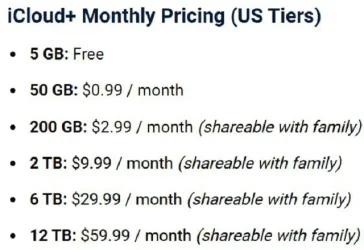
As great as the OneDrive feature is, make no mistake that it's a bait! That is, they all do it (i.e., Apple, Google, Microsoft, etc.): You get very little free storage in the hopes that you will then ask for more and pay them monthly for the additional storage!

Case in point:

Clipboard Image - Copy-small.webp
 

My Computer My Computer

At a glance

Windows 11 Pro32GB
OS
Windows 11 Pro
Computer type
Laptop
Manufacturer/Model
Microsoft Surface Laptop Studio
Memory
32GB
Monitor(s) Displays
Three (3) Dell U3223QE
Screen Resolution
Surface: 2400x1600; Dells: 3840x2160
Hard Drives
1TB
I pay yearly for Office 365 Family, originally bought in 2017 with previous gaming laptop for 5 years, then renewed it every year since.
Onedrive I have for my usage 1TB of space

Overall works good for my needs, but I know everyone has there preference
 

My Computers My Computers

  • At a glance

    Windows 11 Pro 25H2 26200.8894AMD Ryzen 7700X32GB DDR 5 RGB 5600MhzRadeon 7800XT
    OS
    Windows 11 Pro 25H2 26200.8894
    Computer type
    PC/Desktop
    Manufacturer/Model
    PreBuilt
    CPU
    AMD Ryzen 7700X
    Motherboard
    MSI B650 VC WIfi Rev 1.0
    Memory
    32GB DDR 5 RGB 5600Mhz
    Graphics Card(s)
    Radeon 7800XT
    Sound Card
    Onboard Audio
    Monitor(s) Displays
    Asus VG245H
    Screen Resolution
    1920x1080
    Hard Drives
    Samsung 990 Pro 1TB Boot NVMe
    Samsung 990 Pro 2TB Game NVMe


    External
    Western Digital Elements 500GB
    Western Digital My Passport 2TB Blue
    Western Digital My Passport 2TB Red
    Toshiba 2TB in External Enclosure
    Seagate 8TB in External Enclosure
    Seagate 1TB Portable USB 3 External Drive
    Western Digital My Book 8TB (Primary Backup drive)
    Western Digital Black 4TB In External Enclosure
    PSU
    Seasonic Focus GX 750 Watt Power Supply
    Case
    Lian Li Lan Cool 216 ARGB Airflow
    Cooling
    2 160MM Front, 1 140MM Rear Exhaust
    Keyboard
    Logitech G513
    Mouse
    Logitech G502 X
    Internet Speed
    Gigabit 1100Mb/35 Upload
    Browser
    MS Edge Chromium and Bing Search
    Antivirus
    Windows Defender, Malwarebytes Premium
    Other Info
    UEFI, Secure Boot, TPM 2.0, Macrium Reflect X
  • At a glance

    Windows 11 Pro 25H2 26200.8894Ryzen 7 7735HS16GB DDR 5AMD Radeon™ 680M & Radeon 7700S
    Operating System
    Windows 11 Pro 25H2 26200.8894
    Computer type
    Laptop
    Manufacturer/Model
    Asus TUF A16 Advantage Edition FA617NT.A16.R7700
    CPU
    Ryzen 7 7735HS
    Motherboard
    OEM Asus Motherboard
    Memory
    16GB DDR 5
    Graphics card(s)
    AMD Radeon™ 680M & Radeon 7700S
    Sound Card
    Onboard
    Monitor(s) Displays
    16inch FHD 165hz
    Screen Resolution
    1920x1080
    Hard Drives
    512GB NVMe Boot Drive
    Samsung 990 Evo Plus 1TB Game NVMe
    PSU
    Laptop PSU
    Case
    Laptop Case
    Cooling
    OEM Cooling
    Keyboard
    OEM Laptop Keyboard
    Mouse
    Touchpad & G502 Hero
    Internet Speed
    Gigabit 1100 Download/35 Upload
    Browser
    MS Edge with Bing search
    Antivirus
    Windows Defender & Malwarebytes Premium
    Other Info
    Macrium Reflect X
OneDrive is the first bit of Microsoft software i disable and then remove from any and all my systems after an install which is always setup for a local account. i just wont have it on any of systems. thats my personal choice others may choose differently.

best of luck Steve ..
 

My Computers My Computers

  • At a glance

    Windows 11 HomeRyzen 7 5825u64GB DDR4 3200Ryzen 7 5825u
    OS
    Windows 11 Home
    Computer type
    PC/Desktop
    Manufacturer/Model
    HP 24" AiO
    CPU
    Ryzen 7 5825u
    Motherboard
    HP
    Memory
    64GB DDR4 3200
    Graphics Card(s)
    Ryzen 7 5825u
    Sound Card
    RealTek
    Monitor(s) Displays
    24" HP AiO
    Screen Resolution
    1920 x 1080 @60 Hz
    Hard Drives
    1TB WD Blue SN580 M2 SSD Partitioned.
    2x 1TB USB HDD External Backup/Storage.
    PSU
    90W external power brick
    Case
    24" All in One
    Cooling
    Default Air Cooling
    Keyboard
    HP WiFi UK extended
    Mouse
    HP WiFi 3 Button
    Internet Speed
    1GB full fibre
    Browser
    Edge & Firefox
    Antivirus
    AVG Internet Security/Windows Defender
    Other Info
    Mainly Open Source Software
  • At a glance

    Ubuntu 22.04.5 LTSi5 7200u16GB DDR4Intel
    Operating System
    Ubuntu 22.04.5 LTS
    Computer type
    Laptop
    Manufacturer/Model
    Dell 13" Latitude 2017
    CPU
    i5 7200u
    Motherboard
    Dell
    Memory
    16GB DDR4
    Graphics card(s)
    Intel
    Sound Card
    Intel
    Monitor(s) Displays
    13" Dell Laptop
    Hard Drives
    250GB Crucial 2.5" SSD
    Mouse
    Generic WiFi 3 button
    Internet Speed
    WiFi only
    Browser
    Firefox
    Antivirus
    ClamAV TK
    Other Info
    Mainly Open Source Software

Latest Support Threads

Back
Top Bottom