settings page "Installed Apps" crashes a few seconds after opening


Sibbie

Member
Local time
2:27 PM
Posts
3
OS
11
As the title says, whenever I go to my settings to look at the list of installed apps to uninstall one, it closes. I originally noticed this because I went to install an program that I thought was being problematic and needed a clean install - Steam - and closing every time I clicked anywhere with a type field) it may be unrelated.

However it's basically just closing the window, nothing else, but it closes so fast I cannot do anything if I tried.

I used to be more savvy about this stuff but not lately and my searches have yielded nothing in terms of solutions.

Not to be dramatic, but if anyone has any ideas I could really use the help!

Edit:

Specifically it is happening with the "Settings > Installed Apps" and "Settings > Default Apps" after a little exploring. It hasn't occurred with any other setting so far. There is no error message, the window merely closes.
 
Windows Build/Version
23H2 OS Build 22631.3447
Last edited:

My Computer My Computer

At a glance

11AMD Ryzen 5 7600X 6-Core Processor 4.70 GHz16Nvidia GeForce RTX 3060
OS
11
Computer type
PC/Desktop
CPU
AMD Ryzen 5 7600X 6-Core Processor 4.70 GHz
Motherboard
Micro-Star International Co., Ltd. BaseBoard Product PRO B650M-A WIFI (MS-7D77) 1.0
Memory
16
Graphics Card(s)
Nvidia GeForce RTX 3060
Antivirus
malwarebytes
Possibly corrupt system files? Let's try this fix first.


My Computer My Computer

At a glance

Windows 11 Homei7-13700k(2 x 16 GB) 32 GBNVIDIA FOUNDERS EDITION GEFORCE RTX 4060-Ti
OS
Windows 11 Home
Computer type
PC/Desktop
Manufacturer/Model
DELL XPS 8960
CPU
i7-13700k
Motherboard
GENUINE DELL XPS 8960 DESKTOP MOTHERBOARD INTEL SOCKET LGA1700 XD433
Memory
(2 x 16 GB) 32 GB
Graphics Card(s)
NVIDIA FOUNDERS EDITION GEFORCE RTX 4060-Ti
Sound Card
ON BOARD 7.1 CHANNEL AUDIO
Monitor(s) Displays
DELL 27 MONITOR - P2722H
Screen Resolution
FULL HD (1080p) 1920 x 1080 at 60 Hz
Hard Drives
512 GB, M.2, PCIe NVMe, SSD (boot) + 1 TB, 7200 RPM, SATA, HDD (storage)
PSU
750W
Case
DELL
Cooling
DELL PERFORMANCE CPU LIQUID COOLING
Keyboard
AZIO
Mouse
LOGITECH M650
Internet Speed
INTERNET SPEED 100 MBPS
Browser
MICROSOFT EDGE AND GOOGLE CHROME
Antivirus
NORTON 360
Other Info
ALTEC LANSING SPEAKERS
Hello, If it were me, before I chased my tail in other directions I would first perform a clean boot to eliminate software conflict causing the issue. If it doesn't happen in a clean boot, you have some software conflicting with Windows that is causing the issue. Brink's procedure will help you weed out which one. Perform a Clean Boot in Windows 11 to Troubleshoot Software Conflicts Tutorial

If it still happens in clean boot, boot back into normal boot per the tutorial and check system file integrity.
Search for cmd
In search results, right click on Command Prompt app. Select 'run as administrator'
type sfc /scannowand enter. It will scan your system for corrupted files.
Pay attention to the scan results to see if SFC found anything it could not repair. If it found corruption it could not fix followup with this command (note the spaces)
dism /online /cleanup-image /restorehealth
Restart computer
(Note-you can follow up with another sfc /scannow command to make sure that dism repaired the files if you wish)

If still no luck, do a repair install. Repair Install Windows 11 with an In-place Upgrade Tutorial
 

My Computers My Computers

  • At a glance

    Windows 11 Pro 25H2 26200.8875i9-10900 10 core 20 threads32 gbnone-Intel UHD Graphics 630
    OS
    Windows 11 Pro 25H2 26200.8875
    Computer type
    PC/Desktop
    Manufacturer/Model
    Dell Optiplex 7080
    CPU
    i9-10900 10 core 20 threads
    Motherboard
    DELL 0J37VM
    Memory
    32 gb
    Graphics Card(s)
    none-Intel UHD Graphics 630
    Sound Card
    Integrated Realtek
    Monitor(s) Displays
    Benq 27
    Screen Resolution
    2560x1440
    Hard Drives
    2x1tb Solidigm m.2 nvme /External drives 512gb Samsung m.2 sata+2tb Kingston m2.nvme
    PSU
    500w
    Case
    MT
    Cooling
    Dell Premium
    Keyboard
    Logitech wired
    Mouse
    Logitech wireless
    Internet Speed
    so slow I'm too embarrassed to tell
    Browser
    #1 Edge #2 Firefox
    Antivirus
    Defender+MWB Premium
  • At a glance

    Windows 11 Pro 24H2 26200.8875AMD Ryzen 7 6800U32 gbintegrated
    Operating System
    Windows 11 Pro 24H2 26200.8875
    Computer type
    PC/Desktop
    Manufacturer/Model
    Beelink Mini PC SER5
    CPU
    AMD Ryzen 7 6800U
    Memory
    32 gb
    Graphics card(s)
    integrated
    Sound Card
    integrated
    Monitor(s) Displays
    Benq 27
    Screen Resolution
    2560x1440
    Hard Drives
    1TB Crucial nvme
    Keyboard
    Logitech wired
    Mouse
    Logitech wireless
    Internet Speed
    still too embarrassed to tell
    Browser
    Firefox
    Antivirus
    Defender
    Other Info
    System 3 is non compliant Dell 9020 i7-4770/24gb ram Win11 PRO 26200.8875
From Start Menu right-click Settings and from context menu select App Settings from here you can Repair and Reset Settings app.
 

My Computer My Computer

At a glance

Windows 11AMD Ryzen 7 5700GMicron Technology DDR4-3200 16GBNVIDIA GeForce RTX 3060
OS
Windows 11
Computer type
PC/Desktop
Manufacturer/Model
HP Pavilion
CPU
AMD Ryzen 7 5700G
Motherboard
Erica6
Memory
Micron Technology DDR4-3200 16GB
Graphics Card(s)
NVIDIA GeForce RTX 3060
Sound Card
Realtek ALC671
Monitor(s) Displays
Samsung SyncMaster U28E590
Screen Resolution
3840 x 2160
Hard Drives
SAMSUNG MZVLQ1T0HALB-000H1
If it still happens in clean boot, boot back into normal boot per the tutorial and check system file integrity.
Search for cmd
In search results, right click on Command Prompt app. Select 'run as administrator'
type sfc /scannowand enter. It will scan your system for corrupted files.
Pay attention to the scan results to see if SFC found anything it could not repair. If it found corruption it could not fix followup with this command (note the spaces)
dism /online /cleanup-image /restorehealth
Restart computer
(Note-you can follow up with another sfc /scannow command to make sure that dism repaired the files if you wish)

If still no luck, do a repair install. Repair Install Windows 11 with an In-place Upgrade Tutorial

Follow up - settings app repair didn't work. Nor did a clean boot.

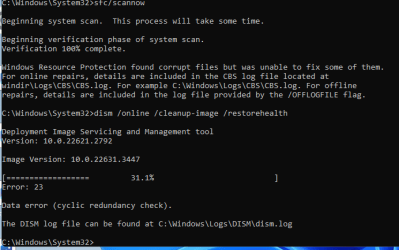
System file integrity came back with unable to fix some. So I'm trying the suggested command, but it came back with this lovely little error in the attached image. Thoughts before I attempt a repair install?
 

Attachments

  • cyclicredundancycheck.png
    cyclicredundancycheck.png
    12.1 KB · Views: 3

My Computer My Computer

At a glance

11AMD Ryzen 5 7600X 6-Core Processor 4.70 GHz16Nvidia GeForce RTX 3060
OS
11
Computer type
PC/Desktop
CPU
AMD Ryzen 5 7600X 6-Core Processor 4.70 GHz
Motherboard
Micro-Star International Co., Ltd. BaseBoard Product PRO B650M-A WIFI (MS-7D77) 1.0
Memory
16
Graphics Card(s)
Nvidia GeForce RTX 3060
Antivirus
malwarebytes
Insufficient Resources for SFC.

Sometimes, the SFC utility lacks the necessary resources to fix the problem. To address this:

Restart the PC in Safe Mode and run the SFC command again.

If it fails, try booting with your installation media or recovery disc and run the command from there.
 

My Computer My Computer

At a glance

Windows 11 Homei7-13700k(2 x 16 GB) 32 GBNVIDIA FOUNDERS EDITION GEFORCE RTX 4060-Ti
OS
Windows 11 Home
Computer type
PC/Desktop
Manufacturer/Model
DELL XPS 8960
CPU
i7-13700k
Motherboard
GENUINE DELL XPS 8960 DESKTOP MOTHERBOARD INTEL SOCKET LGA1700 XD433
Memory
(2 x 16 GB) 32 GB
Graphics Card(s)
NVIDIA FOUNDERS EDITION GEFORCE RTX 4060-Ti
Sound Card
ON BOARD 7.1 CHANNEL AUDIO
Monitor(s) Displays
DELL 27 MONITOR - P2722H
Screen Resolution
FULL HD (1080p) 1920 x 1080 at 60 Hz
Hard Drives
512 GB, M.2, PCIe NVMe, SSD (boot) + 1 TB, 7200 RPM, SATA, HDD (storage)
PSU
750W
Case
DELL
Cooling
DELL PERFORMANCE CPU LIQUID COOLING
Keyboard
AZIO
Mouse
LOGITECH M650
Internet Speed
INTERNET SPEED 100 MBPS
Browser
MICROSOFT EDGE AND GOOGLE CHROME
Antivirus
NORTON 360
Other Info
ALTEC LANSING SPEAKERS
Did you ever find out how to fix this issue?

I am currently having this issue iand it is really bugging me that i cant see whats taking up space in the installed apps sectiuons
 

My Computer My Computer

At a glance

Window 11 Home
OS
Window 11 Home
Computer type
Laptop
Manufacturer/Model
ASUS 2024 ROG G14
I recently had this issue too, couldn't figure out how to fix it. Creating a new local Windows account gave me access to the screen from another account.
 

My Computer My Computer

At a glance

Windows 11
OS
Windows 11
Computer type
Laptop
Manufacturer/Model
HP
See what happens if you open Control Panel and go to select "Programs and features" rather than doing it through Settings.
 

My Computers My Computers

  • At a glance

    Win11 Pro 25H2 (RTM+)Intel i7-14650HX32 GBNo GPU - Built-in Intel Graphics
    OS
    Win11 Pro 25H2 (RTM+)
    Computer type
    PC/Desktop
    Manufacturer/Model
    Acemagic
    CPU
    Intel i7-14650HX
    Memory
    32 GB
    Graphics Card(s)
    No GPU - Built-in Intel Graphics
    Sound Card
    Integrated
    Monitor(s) Displays
    Varies as machine will often be moved to locations with different monitors
    Screen Resolution
    Varies
    Hard Drives
    1 x 1TB Gen 4 NVMe SSD
    PSU
    120W Power Brick
    Keyboard
    Corsair K70 Max RGB Magnetic Keyboard
    Mouse
    Logitech MX Master 3
    Internet Speed
    1Gb Up / 1 Gb Down
    Browser
    Edge
    Antivirus
    Windows Defender
  • At a glance

    Win11 Pro 25H2 (RTM+)Intel i7-1255U16 GBIntel Iris Xe Graphics
    Operating System
    Win11 Pro 25H2 (RTM+)
    Computer type
    Laptop
    Manufacturer/Model
    Lenovo ThinkBook 13x Gen 2
    CPU
    Intel i7-1255U
    Memory
    16 GB
    Graphics card(s)
    Intel Iris Xe Graphics
    Sound Card
    Realtek® ALC3306-CG codec
    Monitor(s) Displays
    13.3-inch IPS Display
    Screen Resolution
    WQXGA (2560 x 1600)
    Hard Drives
    2 TB 4 x 4 NVMe SSD
    PSU
    USB-C / Thunderbolt 4 Power / Charging
    Keyboard
    Backlit, spill resistant keyboard
    Mouse
    Buttonless Glass Precision Touchpad
    Internet Speed
    1Gb Up / 1Gb Down
    Browser
    Edge
    Antivirus
    Windows Defender
    Other Info
    WiFi 6e / Bluetooth 5.1 / Facial Recognition / Fingerprint Sensor / ToF (Time of Flight) Human Presence Sensor
Thanks that works, but its still piddling me off that settings isn't working

Do you know how to clear cache and other things from C: drive? it keeps getting full after i delete things even after i clear recycle bin
 

My Computer My Computer

At a glance

Window 11 Home
OS
Window 11 Home
Computer type
Laptop
Manufacturer/Model
ASUS 2024 ROG G14
A Cyclic Redundancy Check error means the drive you are trying to fix is having issues, most likely due to Bad Sectors on the drive making some of the data or files corrupted.
Download DiskGenius and or Crystal Disk Info both available in my signature.
View the SMART Information on the drive. If it is any less than GOOD, it needs to be replaced.
You can also run a Surface Scan (ie) Verify or Repair Bad Sectors for a graphical map of the sectors on the drive.
 

My Computer My Computer

At a glance

Windows 11 Pro Insider 64 bit 25H2 26200.5742Intel Core i7 9700K 3.6016 GBnVidia GEForce RTX 2060 Super
OS
Windows 11 Pro Insider 64 bit 25H2 26200.5742
Computer type
PC/Desktop
Manufacturer/Model
Gigabyte Z390 UD
CPU
Intel Core i7 9700K 3.60
Motherboard
Gigabyte Z390 UD
Memory
16 GB
Graphics Card(s)
nVidia GEForce RTX 2060 Super
Sound Card
onboard
Monitor(s) Displays
Two 27" Dell 4K monitors
Screen Resolution
3840 x 2160
Hard Drives
M.2 NVME SSD, 500 GB; Two 2TB Mechanical HDD's
PSU
850w PSU
Case
Cyberpower PC
Cooling
Water cooled
Keyboard
Backlit Cyberpower gaming keyboard
Mouse
Backlit Cyberpower gaming mouse
Internet Speed
1 GB mbps
Browser
Brave
Antivirus
Windows Security
Back
Top Bottom