Microsoft SharePoint Blog:
Your sites, files, news, and people, together in the redesigned SharePoint mobile app.
Work does not always happen while you are sitting at your desk. You may need to review a presentation before a meeting, find a document someone shared, or catch up on an important team update while moving between tasks.
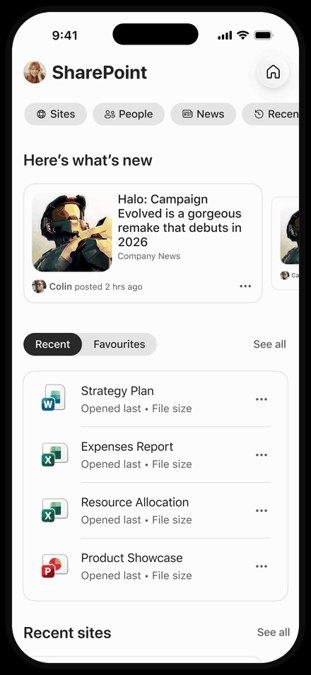
The redesigned SharePoint mobile app now gives you a mobile starting point for finding relevant content, seeing what is new, and returning to the work that matters to you, similar to the SharePoint Discover experience on web.
The app brings your sites, files, news, and people together in a connected experience designed for how you work on a phone.
Alongside the refreshed design, we’ve updated sign-in, improved content loading and made navigation more dependable. These changes help make everyday tasks feel smoother, whether you’re checking a document before a meeting or catching up on the go.
SharePoint Discover, designed for your phone
Earlier this year, we introduced a new SharePoint experience for discovering knowledge, publishing content, and building solutions. Discover is its personalized front door to relevant content, updates, and work in progress.The redesigned SharePoint mobile app extends that Discover experience to your phone.
The Overview tab brings relevant content, recent and favorite items, sites, coworker activity, and news together, giving you a view of what matters across your work.
When you want to go deeper, Resents and Favorites help you return to content, Sites lets you explore information through a team or project, People helps you find content shared by coworkers, and News brings organizational stories into a dedicated feed. Search provides a direct way to find information across SharePoint or within a particular hub or site. Your organization’s home site also remains accessible within the app. Refreshed navigation, focused layouts, and in-app file previews make it easier to move through your SharePoint content on a smaller screen and on the go.
Start with what matters to you
The Overview tab in Discover brings relevant content, recent and favorite items, sites, coworker updates, and news together. Catch up on activity or return to recent and favorite content, and see your work across SharePoint without navigating to another site first.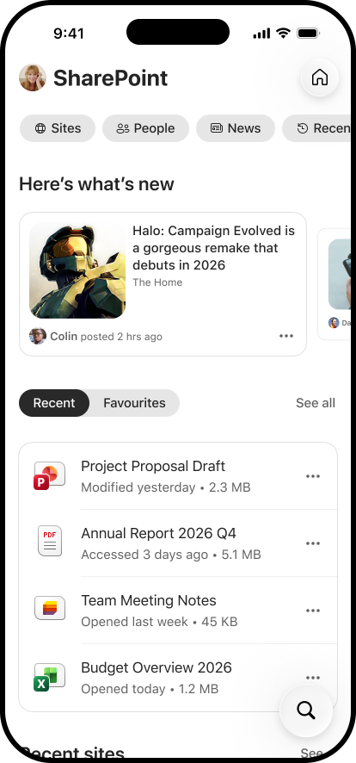
Pick up where you left off
Use Recents to find, preview, and share files, or add important items to Favorites. Sort or filter by file type to narrow the list.
Find your way through sites and people
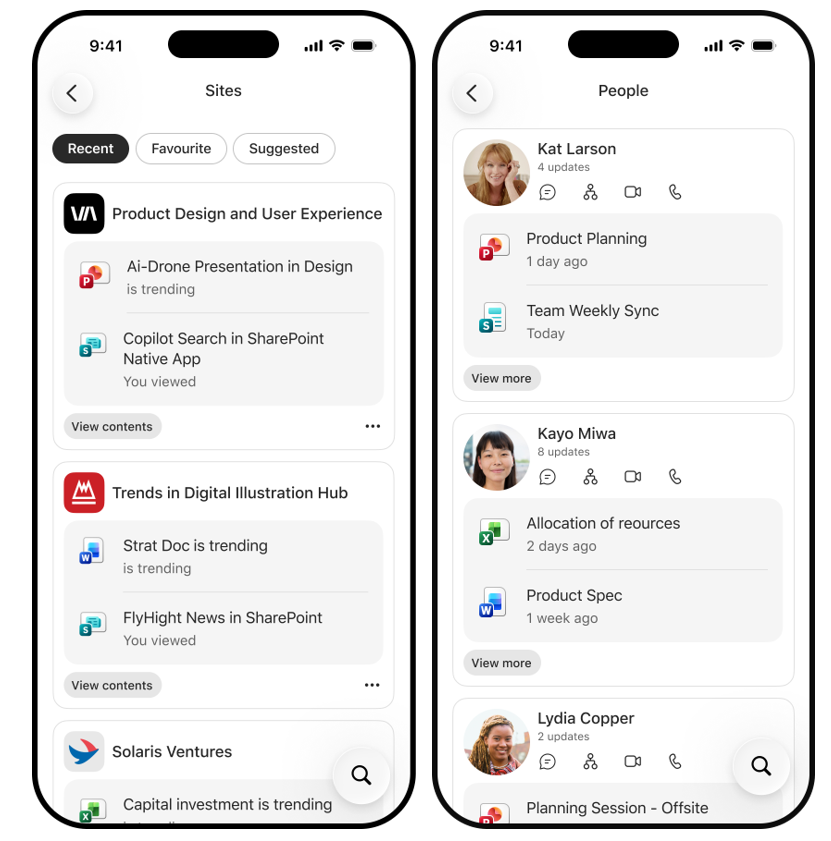
With Sites, you can explore recent, favorite, and suggested sites, then move into their files, lists, and news. Your organization’s home site also remains accessible alongside your personalized Discover experience.With People, you can find coworkers and view content they have shared with you, where your organization’s settings allow it.
Catch up on news, on your terms
SharePoint news helps organizations communicate important updates.The mobile News experience brings stories into a scannable feed. Use the Unread filter to focus on stories you have not seen, or narrow the feed by source when you want updates from a particular part of your organization.
When you find a relevant story, you can open it, interact with it, share it, or add it to Favorites for later.
News sits alongside the files, sites, and people already connected to your work.

The SharePoint you are familiar with, now built for mobile work
The redesigned app carries forward the direction of the refreshed SharePoint experience: clearer navigation, less visual clutter, and more focus on your content.It also recognizes that people use phones differently from desktop devices. That is why the redesigned experience emphasizes discovering, reading, finding, previewing, and sharing.
The standalone SharePoint mobile app also complements the SharePoint experience in Microsoft Teams. The mobile app emphasizes personalized discovery, while the Teams experience centers on the organization-curated home.
And this is just the beginning of updates for the SharePoint mobile app, starting with bringing Discover to you wherever you go.
Get started
The redesigned SharePoint mobile app will be available based on the confirmed rollout schedule and supported platforms for your organization.- Rollout: iOS 28th October. Android: End November
- App store: App Store: Microsoft SharePoint App - App Store
- Support: About SharePoint mobile app | Microsoft Support
Product drops
Here's what's new in SharePoint this month.New advanced capabilities for Copilot in SharePoint: New capabilities powered by Copilot Credits include image generation and editing directly in document libraries and sites, AI-generated site analytics reports, and[CL19.1][RR19.2] metadata autofill that runs in near real time. Available with Copilot Credits for Copilot-licensed users; now generally available.
Copilot in OneDrive: Copilot in OneDrive has been rebuilt on the same foundation as Copilot in SharePoint, creating a more consistent experience for creating content, organizing information, and working with files wherever your content lives. Follows same licensing as Copilot in SharePoint.
SharePoint tools in WorkIQ (in Frontier): We’re bringing SharePoint’s content and action tools to Work IQ, making it possible for Copilot experiences to tap into SharePoint content intelligence and take action on SharePoint content.
Personal skills in SharePoint: Create your own personal skills in Copilot in SharePoint and use them anywhere you work. Personal skills travel with you across SharePoint sites and OneDrive—so a skill like document generation works everywhere without recreating it per site. You own your skills, saved as a markdown file in your OneDrive. Roadmap
Enterprise plugin in Copilot in SharePoint: Copilot in SharePoint now supports plugins from your enterprise store. A plugin can bundle skills, MCP servers, and other capabilities that extend what Copilot can do. Any plugin made available to your organization, whether installed tenant-wide by an admin or added by you, works directly in Copilot in SharePoint, all governed by your M365 admin. Roadmap
Microsoft 365 admin center: Optional Public CDN Support in Brand Center Setup: Updated Brand Center setup experience so that administrators can set up Brand Center without enabling Public CDN. Today, Public CDN is enabled as part of Brand Center setup, even when an organization only wants to use branding governance capabilities that do not require it. With this update, organizations can begin using Brand Center while deferring Public CDN until they need capabilities that depend on it, such as organizational fonts. Roadmap
Microsoft Teams: SharePoint app in Teams: When a user who has access to the SharePoint app in Teams clicks a SharePoint page or news link in Teams chat or channels, the link will open inside the SharePoint app in Teams (if available) instead of the mobile browser. Roadmap
SharePoint: New mobile experience on iOS and Android: The SharePoint mobile app for iOS and Android is redesigned around the personalized SharePoint Discover experience, bringing your most relevant files, sites, people, and news together in one place, with improved site browsing, in-app file previews, refreshed news and search, dark mode, and better performance. Roadmap
Anchored comments in the PDF viewer: Microsoft is adding anchored comments to the PDF viewer in OneDrive and SharePoint on the web. Users can attach a comment to a specific spot on a page, to selected text, and collaborate through replies and @mentions — bringing PDF review to parity with commenting in Office documents. This feature will be on by default and requires no admin action. Roadmap
SharePoint: HTML pages: Create HTML with Copilot in SharePoint or upload your own HTML from another source. Once stored in the pages library, you can render HTML as a page in SharePoint, make additional edits, and share with your audience. HTML gives you new ways to present your content beautifully alongside our existing ASPX pages. Roadmap
Stay tuned every month for the SharePoint Showcase, where we share updates, best practices, and real-world examples of how SharePoint helps teams move faster, work smarter, and stay in control as AI reshapes work.
Source:
SharePoint Showcase: Refreshed SharePoint mobile app | Microsoft Community Hub
SharePoint Showcase: Refreshed SharePoint mobile app Your sites, files, news, and people, together in the redesigned SharePoint mobile app. Work does not...
 techcommunity.microsoft.com