Should i buy WindowsBlinds 11


supersonic

Active member
Member
Local time
10:15 PM
Posts
29
OS
Windows 11 Pro
I just tried installing and testing Stardock WindowBlinds® 11. I tried using the free version and i like it very much. Just what was needed with compliment with
the boring color and this Windows Theme or changing the taskbar etc. This software was able to change the theme, and beautiful ones too. "Diamond", "Corporate" and Acrylic 7 was
my favorite.
It changed the color of the taskbar and it looked better than boring Win 11 Desktop. So my concern is if anyone has purchased or anyone who tested, could
u give ur reviews here.I very much like to see. Also do u think there are any other software that could do it.
Using this was a fresh breath of cool air. Awaiting reply.
 

My Computer My Computer

At a glance

Windows 11 ProAMD Ryzen 5 5600GT32GBAMD Radeon RX 6500 XT
OS
Windows 11 Pro
Computer type
PC/Desktop
Manufacturer/Model
GIGABYTE B450M K-CF
CPU
AMD Ryzen 5 5600GT
Motherboard
GIGABYTE B450M K-CF
Memory
32GB
Graphics Card(s)
AMD Radeon RX 6500 XT
Monitor(s) Displays
BenQ GW2480
Screen Resolution
1600 x 900 60 Hz
Hard Drives
2TB
Keyboard
Logitech
Mouse
Dell
Internet Speed
2MB
Browser
Firefox
@supersonic

Here's ten points just for filling out your computer specs. :-)


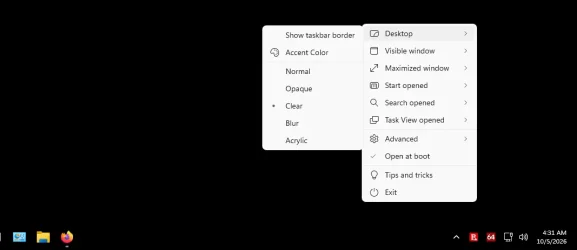
I don't really use any theme changers. I do use TranslucentTB (MS Store), which can make the Taskbar, clear, among other options.

Image1.webp


For most of the rest, I just use Win 11 Tutorials.


Here's some other things that you may find useful...


My Computers My Computers

  • At a glance

    Win 11 Home 26H2 26300.9711AMD Ryzen 7 3700XG.Skill (F4-3200C14D-16GTZKW)EVGA RTX 2070 (08G-P4-2171-KR)
    OS
    Win 11 Home 26H2 26300.9711
    Computer type
    PC/Desktop
    Manufacturer/Model
    Built by Ghot® [May 2020]
    CPU
    AMD Ryzen 7 3700X
    Motherboard
    Asus Pro WS X570-ACE (BIOS 5302)
    Memory
    G.Skill (F4-3200C14D-16GTZKW)
    Graphics Card(s)
    EVGA RTX 2070 (08G-P4-2171-KR)
    Sound Card
    Realtek ALC1220P / ALC S1220A
    Monitor(s) Displays
    Dell U3011 30"
    Screen Resolution
    2560 x 1600
    Hard Drives
    2x Samsung 860 EVO 500GB,
    WD 4TB Black FZBX - SATA III,
    WD 8TB Black FZBX - SATA III,
    DRW-24B1ST CD/DVD Burner
    PSU
    PC Power & Cooling 750W Quad EPS12V
    Case
    Cooler Master ATCS 840 Tower
    Cooling
    CM Hyper 212 EVO (push/pull)
    Keyboard
    Ducky DK9008 Shine II Blue LED
    Mouse
    Logitech Optical M-100
    Internet Speed
    300/300
    Browser
    Firefox (latest)
    Antivirus
    Bitdefender Total Security
    Other Info
    Speakers: Klipsch Pro Media 2.1
  • At a glance

    Windows XP Pro 32bit w/SP3AMD Athlon 64 X2 5000+ (OC'd @ 3.2Ghz)TWIN2X2048-6400C4DHX (2 x 1GB, DDR2 800)EVGA 256-P2-N758-TR GeForce 8600GT SSC
    Operating System
    Windows XP Pro 32bit w/SP3
    Computer type
    PC/Desktop
    Manufacturer/Model
    Built by Ghot® (not in use)
    CPU
    AMD Athlon 64 X2 5000+ (OC'd @ 3.2Ghz)
    Motherboard
    ASUS M2N32-SLI Deluxe Wireless Edition
    Memory
    TWIN2X2048-6400C4DHX (2 x 1GB, DDR2 800)
    Graphics card(s)
    EVGA 256-P2-N758-TR GeForce 8600GT SSC
    Sound Card
    Onboard
    Monitor(s) Displays
    ViewSonic G90FB Black 19" Professional (CRT)
    Screen Resolution
    up to 2048 x 1536
    Hard Drives
    WD 36GB 10,000rpm Raptor SATA
    Seagate 80GB 7200rpm SATA
    Lite-On LTR-52246S CD/RW
    Lite-On LH-18A1P CD/DVD Burner
    PSU
    PC Power & Cooling Silencer 750 Quad EPS12V
    Case
    Generic Beige case, 80mm fans
    Cooling
    ZALMAN 9500A 92mm CPU Cooler
    Keyboard
    Logitech Classic Keybooard 200
    Mouse
    Logitech Optical M-BT96a
    Internet Speed
    300/300
    Browser
    Firefox 3.x ??
    Antivirus
    Symantec (Norton)
    Other Info
    Still assembled, still runs. Haven't turned it on for 15 years?
  • Like
Reactions: OAT
Same here. Translucent TB and just windows tweaks here as well. I don't mind the way 11 looks etc.
 

My Computers My Computers

  • At a glance

    Windows 11 HomeIntel i7 10700128gb crucialnVidia RTX 2070 super
    OS
    Windows 11 Home
    Computer type
    PC/Desktop
    Manufacturer/Model
    Dell XPS 8940
    CPU
    Intel i7 10700
    Motherboard
    Dell
    Memory
    128gb crucial
    Graphics Card(s)
    nVidia RTX 2070 super
    Sound Card
    Dell
    Monitor(s) Displays
    2 24 inch Dell ultrasharp displays one touch enabled for video and photo editing
    Screen Resolution
    1080p
    Hard Drives
    Main Drive- XPG 2tb, Project drive - Kingston 1tb, Scratch drive - Kingston 512gb, Storage drive - Seagate barracuda 8tb
    PSU
    Dell
    Case
    Dell
    Cooling
    Custom Noctua setup
    Keyboard
    Vital Pro keyboard
    Mouse
    Vital Pro mouse
    Internet Speed
    Bell fibe 1.0 gbps
    Browser
    Edge
    Antivirus
    Defender
    Other Info
    Various printers, card readers, scanners etc for creative work. I built a NAS out of my old acer AC100 4 bay hot swap server with Xeon processor.
  • At a glance

    WIndows 11 Homeintel i7 1165G764gb of Ballistix DD4 ramIris Xe
    Operating System
    WIndows 11 Home
    Computer type
    Laptop
    Manufacturer/Model
    Dell Inspiron 5406 2 in 1
    CPU
    intel i7 1165G7
    Motherboard
    dell
    Memory
    64gb of Ballistix DD4 ram
    Graphics card(s)
    Iris Xe
    Sound Card
    dell
    Monitor(s) Displays
    14 inch touchscreen, plus a second 14 inch touchscreen via HDMI while on location
    Screen Resolution
    1080p
    Hard Drives
    Main drive - 2tb XPG, Storage drive - 1tb Seagate portable drive
    PSU
    dell plus a compact charger for travel
    Case
    dell
    Cooling
    repasted stock coolers
    Browser
    Edge
    Antivirus
    defender
    Other Info
    Thinking about getting an eGpu for this system to take on the road with us.
Very much your choice, although see Edwin's experience with WindowBlinds which he found maybe a couple of years back a tad unpredictable or incomplete.. maybe that's improved.

I use Stardock's Fences & Icon Changer, Explorer Patcher, Open Shell, Qttabbar and DWMBlurglass, the last 4 free.

You can see the contrast between inactive and active titlebar in these:


W11 1.webp
W11 2.webp
 

My Computer My Computer

At a glance

Windows 11 Proi7-8650U16GBIntel UHD 620
OS
Windows 11 Pro
Computer type
Laptop
Manufacturer/Model
Lenovo t480s
CPU
i7-8650U
Memory
16GB
Graphics Card(s)
Intel UHD 620
Screen Resolution
1920x1080
Hard Drives
C SN810 SDCPNRY-512G-1006
Browser
Edge, Firefox
Antivirus
Defender
Thank u all for ur reply. So i decided i'll buy it. Since its a fresh look for the taskbar and other changes like File Explorer Windows.
So the first thing i see is wallpaper and the taskbar which is kind a boring- Typical Billgates and his team, The Win xp taskbar was perfect
and felt like a boys toy. That feeling i don't get now when its Win 10 or 11. Win 11 has boring kind of colour and the taskbar too. System tray is okay.
Msoft doesn't incorporate things that made xp great. N it should be adopted in the later windows release. Ubuntu images for wallpaper has almost similar color images and it feels alright. But i m a noob in ubuntu. Thank u all.
 

My Computer My Computer

At a glance

Windows 11 ProAMD Ryzen 5 5600GT32GBAMD Radeon RX 6500 XT
OS
Windows 11 Pro
Computer type
PC/Desktop
Manufacturer/Model
GIGABYTE B450M K-CF
CPU
AMD Ryzen 5 5600GT
Motherboard
GIGABYTE B450M K-CF
Memory
32GB
Graphics Card(s)
AMD Radeon RX 6500 XT
Monitor(s) Displays
BenQ GW2480
Screen Resolution
1600 x 900 60 Hz
Hard Drives
2TB
Keyboard
Logitech
Mouse
Dell
Internet Speed
2MB
Browser
Firefox

Latest Support Threads

Latest Tutorials

Back
Top Bottom