Should i upgrade to Windows 11?


onionat

Member
Member
Local time
9:25 PM
Posts
6
OS
Windows 10
Hi,
I'm on Windows 10 ESU with unsupported hardware for a Windows 11 installation. I know i can use rufus to bypass hardware requirements but i want to know if it's worth it doing. Are there pros and cons? My aim is to do a debloated installation through rufus. Thanks
 

My Computer My Computer

At a glance

Windows 10Intel(R) Core(TM) i7-7700 CPU @ 3.60GHz32 GBNVIDIA GeForce RTX 3060
OS
Windows 10
Computer type
PC/Desktop
CPU
Intel(R) Core(TM) i7-7700 CPU @ 3.60GHz
Motherboard
ASRock H170M Pro4S
Memory
32 GB
Graphics Card(s)
NVIDIA GeForce RTX 3060
Screen Resolution
1920x1080
PSU
Berlin Thermaltake W0393RE 630W
Cooling
Cooler Master Hyper H412R
What would be your motivation other than the fear that you are missing out on something?

What are your specific complaints about operating with Windows 10?
 

My Computer My Computer

At a glance

Windows 11 ProIntel 265KG Skill DDR5 2 x 16 kit 6000/36none
OS
Windows 11 Pro
Computer type
PC/Desktop
Manufacturer/Model
Fishmill Special
CPU
Intel 265K
Motherboard
MSI Pro Z890-A
Memory
G Skill DDR5 2 x 16 kit 6000/36
Graphics Card(s)
none
Sound Card
none
Monitor(s) Displays
Dell 2316H
Screen Resolution
1600 x 900
Hard Drives
WD SN770 NVME 500 GB boot; Intel 660p NVME 2 TB and WD Green 3 TB storage
PSU
Be Quiet 13M 750 ATX 3.1
Case
Lancool PC-K65
Cooling
Noctua U12S
Keyboard
Logitech K120 Wired
Mouse
Dell MS-116
Browser
Chrome
Antivirus
Microsoft Defender and Malwarebytes
What would be your motivation other than the fear that you are missing out on something?

What are your specific complaints about operating with Windows 10?

When the ESU will be over i won't receive security updates.
 

My Computer My Computer

At a glance

Windows 10Intel(R) Core(TM) i7-7700 CPU @ 3.60GHz32 GBNVIDIA GeForce RTX 3060
OS
Windows 10
Computer type
PC/Desktop
CPU
Intel(R) Core(TM) i7-7700 CPU @ 3.60GHz
Motherboard
ASRock H170M Pro4S
Memory
32 GB
Graphics Card(s)
NVIDIA GeForce RTX 3060
Screen Resolution
1920x1080
PSU
Berlin Thermaltake W0393RE 630W
Cooling
Cooler Master Hyper H412R
When the ESU will be over i won't receive security updates.

Have ever any of the security updates you received ever had any positive value?
I mean, did it protect from a concrete threat that you were affected by?

More often than not the "no security updates" argument is just repeating the MS sales pitch rather than a concrete need. Think in term of new features you'll have, removed features you'll lose, time needed to learn the new layout and to setup everything as you like in the new install.
 

My Computer My Computer

At a glance

Windows 11
OS
Windows 11
Computer type
PC/Desktop
Have ever any of the security updates you received ever had any positive value?
I mean, did it protect from a concrete threat that you were affected by?

According to your logic i could still stick to Windows 7, then :LOL:
Jokes apart, just because i've never had any issues doesn't mean i can't be protected against potential vulnerabilities that are fixed through updates and security patches.

More often than not the "no security updates" argument is just repeating the MS sales pitch rather than a concrete need. Think in term of new features you'll have, removed features you'll lose, time needed to learn the new layout and to setup everything as you like in the new install.

You're right. I'm already familiar with Windows 11 environment so no big deal. My question is if it is worth upgrading even with unsupported hardware.
 

My Computer My Computer

At a glance

Windows 10Intel(R) Core(TM) i7-7700 CPU @ 3.60GHz32 GBNVIDIA GeForce RTX 3060
OS
Windows 10
Computer type
PC/Desktop
CPU
Intel(R) Core(TM) i7-7700 CPU @ 3.60GHz
Motherboard
ASRock H170M Pro4S
Memory
32 GB
Graphics Card(s)
NVIDIA GeForce RTX 3060
Screen Resolution
1920x1080
PSU
Berlin Thermaltake W0393RE 630W
Cooling
Cooler Master Hyper H412R
My question is if it is worth upgrading even with unsupported hardware.


Welcome to ElevenForum.
Here's ten points, just for filling out your computer specs. :-)


As for your question, many folks have upgraded to Win 11 on unsupported hardware, very many.

Here are their tales... (might want to start with the last post and read them backwards)

Here's an article explaining how to use RUFUS (free) to accomplish this...


As for whether it's worth it... only you can decide that.
The only real technical advantage is that you'll get updates, for free.
Win 11 does do more things than Win 10, but nothing I've personally needed. :-)


If you do decide to upgrade to Windows 11, these may help you on your journey...


My Computers My Computers

  • At a glance

    Win 11 Home ♦♦♦26200.8655 ♦♦♦♦♦♦♦25H2AMD Ryzen 7 3700XG.Skill (F4-3200C14D-16GTZKW)EVGA RTX 2070 (08G-P4-2171-KR)
    OS
    Win 11 Home ♦♦♦26200.8655 ♦♦♦♦♦♦♦25H2
    Computer type
    PC/Desktop
    Manufacturer/Model
    Built by Ghot® [May 2020]
    CPU
    AMD Ryzen 7 3700X
    Motherboard
    Asus Pro WS X570-ACE (BIOS 5302)
    Memory
    G.Skill (F4-3200C14D-16GTZKW)
    Graphics Card(s)
    EVGA RTX 2070 (08G-P4-2171-KR)
    Sound Card
    Realtek ALC1220P / ALC S1220A
    Monitor(s) Displays
    Dell U3011 30"
    Screen Resolution
    2560 x 1600
    Hard Drives
    2x Samsung 860 EVO 500GB,
    WD 4TB Black FZBX - SATA III,
    WD 8TB Black FZBX - SATA III,
    DRW-24B1ST CD/DVD Burner
    PSU
    PC Power & Cooling 750W Quad EPS12V
    Case
    Cooler Master ATCS 840 Tower
    Cooling
    CM Hyper 212 EVO (push/pull)
    Keyboard
    Ducky DK9008 Shine II Blue LED
    Mouse
    Logitech Optical M-100
    Internet Speed
    300/300
    Browser
    Firefox (latest)
    Antivirus
    Bitdefender Total Security
    Other Info
    Speakers: Klipsch Pro Media 2.1
  • At a glance

    Windows XP Pro 32bit w/SP3AMD Athlon 64 X2 5000+ (OC'd @ 3.2Ghz)TWIN2X2048-6400C4DHX (2 x 1GB, DDR2 800)EVGA 256-P2-N758-TR GeForce 8600GT SSC
    Operating System
    Windows XP Pro 32bit w/SP3
    Computer type
    PC/Desktop
    Manufacturer/Model
    Built by Ghot® (not in use)
    CPU
    AMD Athlon 64 X2 5000+ (OC'd @ 3.2Ghz)
    Motherboard
    ASUS M2N32-SLI Deluxe Wireless Edition
    Memory
    TWIN2X2048-6400C4DHX (2 x 1GB, DDR2 800)
    Graphics card(s)
    EVGA 256-P2-N758-TR GeForce 8600GT SSC
    Sound Card
    Onboard
    Monitor(s) Displays
    ViewSonic G90FB Black 19" Professional (CRT)
    Screen Resolution
    up to 2048 x 1536
    Hard Drives
    WD 36GB 10,000rpm Raptor SATA
    Seagate 80GB 7200rpm SATA
    Lite-On LTR-52246S CD/RW
    Lite-On LH-18A1P CD/DVD Burner
    PSU
    PC Power & Cooling Silencer 750 Quad EPS12V
    Case
    Generic Beige case, 80mm fans
    Cooling
    ZALMAN 9500A 92mm CPU Cooler
    Keyboard
    Logitech Classic Keybooard 200
    Mouse
    Logitech Optical M-BT96a
    Internet Speed
    300/300
    Browser
    Firefox 3.x ??
    Antivirus
    Symantec (Norton)
    Other Info
    Still assembled, still runs. Haven't turned it on for 15 years?
You're right. I'm already familiar with Windows 11 environment so no big deal. My question is if it is worth upgrading even with unsupported hardware.
I recently upgraded an aging HP ENVY desktop from 2014 to Windows 11 Pro, it was running Windows 10. I used Rufus to bypass the TPM and MSC Account issues. It was painless to update, and the system has received several updates since. A nice surprise was since I already had a Windows 10 installation, it was apparently registered with MSC as I didn't need to provide a fresh license for the upgrade. The HP-ENVY originally came with WIndows 8 as I recall.
 

My Computers My Computers

  • At a glance

    Win 11 Pro 25H2, Build 26200.8655Intel Core i5 1450064GB DDR4GeForce RTX 4060
    OS
    Win 11 Pro 25H2, Build 26200.8655
    Computer type
    PC/Desktop
    Manufacturer/Model
    Home Brew
    CPU
    Intel Core i5 14500
    Motherboard
    Gigabyte B760M G P WIFI
    Memory
    64GB DDR4
    Graphics Card(s)
    GeForce RTX 4060
    Sound Card
    Chipset Realtek
    Monitor(s) Displays
    LG 45" Ultragear, Acer 24" 1080p
    Screen Resolution
    5120x1440, 1920x1080
    Hard Drives
    Crucial P310 2TB 2280 PCIe Gen4 3D NAND NVMe M.2 SSD (O/S)
    Silicon Power 2TB US75 NVMe PCIe Gen4 M.2 2280 SSD (backup)
    Crucial BX500 2TB 3D NAND (2nd backup)
    Seagate 4TB Ironwolf, rotating HDD archive files
    External off-line backup Drives: 2 NVMe 4TB drives in external enclosures
    PSU
    Thermaltake Toughpower GF3 750W
    Case
    LIAN LI LANCOOL 216 E-ATX PC Case
    Cooling
    Lots of fans!
    Keyboard
    Microsoft Comfort Curve 2000
    Mouse
    Logitech G305
    Internet Speed
    Verizon FiOS 1GB
    Browser
    Firefox
    Antivirus
    Malware Bytes & Windows Defender Security
  • At a glance

    Win 11 Pro 25H2, Build 26200.8655Intel Core i5 1440032GB DDR5Intel 700 Embedded GPU
    Operating System
    Win 11 Pro 25H2, Build 26200.8655
    Computer type
    PC/Desktop
    Manufacturer/Model
    Home Brew
    CPU
    Intel Core i5 14400
    Motherboard
    Gigabyte B760M DS3H AX
    Memory
    32GB DDR5
    Graphics card(s)
    Intel 700 Embedded GPU
    Sound Card
    Realtek Embedded
    Monitor(s) Displays
    27" HP 1080p
    Screen Resolution
    1920x1080
    Hard Drives
    Crucial P310 2TB 2280 PCIe Gen4 eD NAND PCIe SSD
    Samsung EVO 990 2TB NVMe Gen4 SSD
    Samsung 2TB SATA SSD
    PSU
    Thermaltake Smart BM3 650W
    Case
    Okinos Micro ATX Case
    Cooling
    Fans
    Keyboard
    Microsoft Comfort Curve 2000
    Mouse
    Logitech G305
    Internet Speed
    Verizon FiOS 1GB
    Browser
    Firefox
    Antivirus
    Malware Bytes & Windows Defender Security
  • Nimo N171 17" Laptop, (Intel i3-1215U, 16GB RAM, 2TB NVMe, Win11 Pro)
    Acemagic Vista Mini PC V1 (Intel N150, 16GB RAM, 1TB NVMe, Win11 Pro)
    HP ENVY h8-1540t, (24GB RAM, 2TB SSD, 2TB HDD, Win11 Pro)
It's critical to use the new OS because of security updates. If you can't do that, then use the latest version of a free OS that works with your device.
 

My Computer My Computer

At a glance

Windows 11 Proi5-13400F16 GBRTX 4060
OS
Windows 11 Pro
Computer type
PC/Desktop
Manufacturer/Model
Custom Build
CPU
i5-13400F
Motherboard
Gigabyte B-760M
Memory
16 GB
Graphics Card(s)
RTX 4060
Sound Card
internal
Monitor(s) Displays
AOC 27 gaming
Screen Resolution
1920 x 1080
Hard Drives
Kingston 2 TB M.2
PSU
Thermaltake 700W
Case
DarkFlash C285P
Cooling
Kingsman KA-R240 ARGB Liquid Cooling
Keyboard
Redragon Kala
Mouse
Marvo G945
Internet Speed
400 Mbps DL/UL
Browser
Firefox, Mullvad
Antivirus
Kaspersky Standard
Other Info
Adguard for Desktop, Kerish PC Doctor, PerfectDisk Pro with OptiWrite, AOMEI Backupper Pro, Open-Shell, ExplorerPatcher
My question is if it is worth upgrading even with unsupported hardware.
Are there pros and cons?
My System Two in 'My Computers' below is an unsupported device. I have had it running Windows 11 since the launch in October 2021 to check out just that question.

The 'pros' are obvious, you'll have a supported OS that gets all the same cumulative updates as any supported device would get.

The only significant 'con' is that it will never see Windows Update offer the Feature Update to the next version of Windows.

For that you'd have to upgrade it yourself, as I had to do each year. Some years that meant an in-place upgrade with an ISO and a workaround, for others (like 24H2 to 25H2) that shared a common set of system files they were feature updates by means of a small enablement package. These were available to download from this forum, and install like a cumulative update (no workaround needed). The next feature update (25H2 to 26H2) is going to be another enablement package.
 

My Computers My Computers

  • At a glance

    Windows 11 HomeAMD Athlon Silver 3050U8GBRadeon Graphics
    OS
    Windows 11 Home
    Computer type
    Laptop
    Manufacturer/Model
    Acer Aspire 3 A315-23-R9VY
    CPU
    AMD Athlon Silver 3050U
    Memory
    8GB
    Graphics Card(s)
    Radeon Graphics
    Monitor(s) Displays
    laptop screen
    Screen Resolution
    1366x768 native resolution, up to 2560x1440 with Radeon Virtual Super Resolution
    Hard Drives
    1TB Samsung EVO 870 SSD (from April 2026: 250GB EVO 850)
    Internet Speed
    150 Mbps
    Browser
    Edge, Firefox
    Antivirus
    Defender
    Other Info
    fully 'Windows 11 ready' laptop. Windows 10 C: partition migrated from my old unsupported 'main machine' then upgraded to 11. A test migration ran Insider builds for 2 months. When 11 was released on 5th October 2021 it was re-imaged back to 10 and was offered the upgrade in Windows Update on 20th October. Windows Update offered the 22H2 Feature Update on 20th September 2022. It got the 23H2 Feature Update on 4th November 2023 through Windows Update, 24H2 on 3rd October 2024 through Windows Update by setting the Target Release Version for 24H2, and 25H2 on 30th September 2025 through Windows Update by setting the Target Release Version for 25H2.

    UPDATE - 11 April 2026: due to mechanical deterioration this PC has been retired from active duty. The OS with all software and files has been migrated to my System Seven in 'Other systems' to carry on as my general purpose 'main machine'.
  • At a glance

    Windows 11 ProIntel® Core™ i5-520M8GB(integrated graphics) Intel HD Graphics
    Operating System
    Windows 11 Pro
    Computer type
    Laptop
    Manufacturer/Model
    Dell Latitude E4310
    CPU
    Intel® Core™ i5-520M
    Motherboard
    0T6M8G
    Memory
    8GB
    Graphics card(s)
    (integrated graphics) Intel HD Graphics
    Screen Resolution
    1366x768
    Hard Drives
    500GB Crucial MX500 SSD
    Browser
    Firefox, Edge
    Antivirus
    Defender
    Other Info
    unsupported machine: Legacy bios, MBR, TPM 1.2, upgraded from W10 to W11 using W10/W11 hybrid install media workaround.

    In-place upgrade to 22H2 using ISO and a workaround.
    Feature Update to 23H2 by manually installing the Enablement Package.
    In-place upgrade to 24H2 using hybrid 23H2/24H2 install media.
    Upgraded to 25H2 by Enablement Package.

    Also running Insider Dev, and Canary builds and Windows 10 as native boot .vhdx.
  • My SYSTEM THREE is a Dell Latitude 5410, i7-10610U, 32GB RAM, 512GB NVMe ssd, supported device running Windows 11 Pro.

    My SYSTEM FOUR is a 2-in-1 convertible Lenovo Yoga 11e 20DA, Celeron N2930, 8GB RAM, 256GB ssd. Unsupported device: currently running Win10 Pro, plus Win11 Pro RTM and Insider Dev, Beta, and RP 24H2 as native boot vhdx.

    My SYSTEM FIVE is a Dell Latitude 3190 2-in-1, Pentium Silver N5030, 8GB RAM, 1TB NVMe ssd, supported device running Windows 11 Pro, plus Insider Beta, Dev, and Canary builds (and a few others) as a native boot .vhdx.

    My SYSTEM SIX is a Dell Latitude 5550, Core Ultra 7 165H, 64GB RAM, 1TB NVMe SSD, supported device, Windows 11 Pro 24H2, Hyper-V host machine. Updated to 25H2 on 30th September 2025.

    My SYSTEM SEVEN is a Lenovo Thinkpad T580, Intel Core i7-8650U, 16GB RAM, 512GB NVMe SSD + 2nd 512GB NVMe SSD, a supported device for Windows 11. This is my current general purpose 'main machine'. The installed Windows 11 Home from my System One has been migrated to this machine.
The only significant 'con' is that it will never see Windows Update offer the Feature Update to the next version of Windows.

For that you'd have to upgrade it yourself, as I had to do each year. Some years that meant an in-place upgrade with an ISO and a workaround, for others (like 24H2 to 25H2) that shared a common set of system files they were feature updates by means of a small enablement package. These were available to download from this forum, and install like a cumulative update (no workaround needed). The next feature update (25H2 to 26H2) is going to be another enablement package.

Could you elaborate this for me, please?
 

My Computer My Computer

At a glance

Windows 10Intel(R) Core(TM) i7-7700 CPU @ 3.60GHz32 GBNVIDIA GeForce RTX 3060
OS
Windows 10
Computer type
PC/Desktop
CPU
Intel(R) Core(TM) i7-7700 CPU @ 3.60GHz
Motherboard
ASRock H170M Pro4S
Memory
32 GB
Graphics Card(s)
NVIDIA GeForce RTX 3060
Screen Resolution
1920x1080
PSU
Berlin Thermaltake W0393RE 630W
Cooling
Cooler Master Hyper H412R
Could you elaborate this for me, please?
Only fully-compliant computers get offered feature updates [Version updates] automatically.
The rest of us have to download & install them manually. It's only once a year so it's not a big burden.
All get offered monthly Cumulative updates.

So the "con" referred to is in comparison to buying a new computer that is fully-compliant.
It is not a "con" in relation to the decision to upgrade to Windows 11 in the first place.


Denis
 

My Computer My Computer

At a glance

Windows 11 Home x64 Version 25H2 Build 26200....
OS
Windows 11 Home x64 Version 25H2 Build 26200.8037
Have ever any of the security updates you received ever had any positive value?
That is a daft and pointless statement.

The security updates mostly work quietly in the background doing their job. They do not seek glory and fanfare.

Your argument is like asking if car seatbelts have had any positive value.

Of course they do nothing the vast majority of the time BUT WHEN THEY ARE NEEDED, they have great value reducing risk of being thrown through a windscreen. The same is true of security updates.

So OP, upgrade and stay secure. Why take risks you do not need to - end of story.
 

My Computer My Computer

At a glance

Windows 11 Pro + Win11 Canary VM.I9 13th gen i9-13900H 2.60 GHZ16 GB solderedIntegrated Intel Iris XE
OS
Windows 11 Pro + Win11 Canary VM.
Computer type
Laptop
Manufacturer/Model
ASUS Zenbook 14
CPU
I9 13th gen i9-13900H 2.60 GHZ
Motherboard
Yep, Laptop has one.
Memory
16 GB soldered
Graphics Card(s)
Integrated Intel Iris XE
Sound Card
Realtek built in
Monitor(s) Displays
laptop OLED screen
Screen Resolution
2880x1800 touchscreen
Hard Drives
1 TB NVME SSD (only weakness is only one slot)
PSU
Internal + 65W thunderbolt USB4 charger
Case
Yep, got one
Cooling
Stella Artois (UK pint cans - 568 ml) - extra cost.
Keyboard
Built in UK keybd
Mouse
Bluetooth , wireless dongled, wired
Internet Speed
900 mbs (ethernet), wifi 6 typical 350-450 mb/s both up and down
Browser
Edge
Antivirus
Defender
Other Info
TPM 2.0, 2xUSB4 thunderbolt, 1xUsb3 (usb a), 1xUsb-c, hdmi out, 3.5 mm audio out/in combo, ASUS backlit trackpad (inc. switchable number pad)

Macrium Reflect Home V8
Office 365 Family (6 users each 1TB onedrive space)
Hyper-V (a vm runs almost as fast as my older laptop)
Could you elaborate this for me, please?
Only a supported device will be offered the next version of W11 as a feature update in Windows Update.

Some feature updates were a full replacement of all system files. For an unsupported device these required installing from an ISO using a workaround. Rufus is one such workaround.

Others shared a common set of system with the previous version, the new features were delivered as part of the most recent cumulative updates. These features remained dormant until the enablement package was installed.

  • Version 21H2: Initial release. (Full Update/OS Swap)
  • Version 22H2: (Full Update)
  • Version 23H2: (Enablement Package)
  • Version 24H2: (Full Update)
  • Version 25H2: (Enablement Package)
  • Version 26H2: (Enablement Package)
Windows 11 version history - Wikipedia
 

My Computers My Computers

  • At a glance

    Windows 11 HomeAMD Athlon Silver 3050U8GBRadeon Graphics
    OS
    Windows 11 Home
    Computer type
    Laptop
    Manufacturer/Model
    Acer Aspire 3 A315-23-R9VY
    CPU
    AMD Athlon Silver 3050U
    Memory
    8GB
    Graphics Card(s)
    Radeon Graphics
    Monitor(s) Displays
    laptop screen
    Screen Resolution
    1366x768 native resolution, up to 2560x1440 with Radeon Virtual Super Resolution
    Hard Drives
    1TB Samsung EVO 870 SSD (from April 2026: 250GB EVO 850)
    Internet Speed
    150 Mbps
    Browser
    Edge, Firefox
    Antivirus
    Defender
    Other Info
    fully 'Windows 11 ready' laptop. Windows 10 C: partition migrated from my old unsupported 'main machine' then upgraded to 11. A test migration ran Insider builds for 2 months. When 11 was released on 5th October 2021 it was re-imaged back to 10 and was offered the upgrade in Windows Update on 20th October. Windows Update offered the 22H2 Feature Update on 20th September 2022. It got the 23H2 Feature Update on 4th November 2023 through Windows Update, 24H2 on 3rd October 2024 through Windows Update by setting the Target Release Version for 24H2, and 25H2 on 30th September 2025 through Windows Update by setting the Target Release Version for 25H2.

    UPDATE - 11 April 2026: due to mechanical deterioration this PC has been retired from active duty. The OS with all software and files has been migrated to my System Seven in 'Other systems' to carry on as my general purpose 'main machine'.
  • At a glance

    Windows 11 ProIntel® Core™ i5-520M8GB(integrated graphics) Intel HD Graphics
    Operating System
    Windows 11 Pro
    Computer type
    Laptop
    Manufacturer/Model
    Dell Latitude E4310
    CPU
    Intel® Core™ i5-520M
    Motherboard
    0T6M8G
    Memory
    8GB
    Graphics card(s)
    (integrated graphics) Intel HD Graphics
    Screen Resolution
    1366x768
    Hard Drives
    500GB Crucial MX500 SSD
    Browser
    Firefox, Edge
    Antivirus
    Defender
    Other Info
    unsupported machine: Legacy bios, MBR, TPM 1.2, upgraded from W10 to W11 using W10/W11 hybrid install media workaround.

    In-place upgrade to 22H2 using ISO and a workaround.
    Feature Update to 23H2 by manually installing the Enablement Package.
    In-place upgrade to 24H2 using hybrid 23H2/24H2 install media.
    Upgraded to 25H2 by Enablement Package.

    Also running Insider Dev, and Canary builds and Windows 10 as native boot .vhdx.
  • My SYSTEM THREE is a Dell Latitude 5410, i7-10610U, 32GB RAM, 512GB NVMe ssd, supported device running Windows 11 Pro.

    My SYSTEM FOUR is a 2-in-1 convertible Lenovo Yoga 11e 20DA, Celeron N2930, 8GB RAM, 256GB ssd. Unsupported device: currently running Win10 Pro, plus Win11 Pro RTM and Insider Dev, Beta, and RP 24H2 as native boot vhdx.

    My SYSTEM FIVE is a Dell Latitude 3190 2-in-1, Pentium Silver N5030, 8GB RAM, 1TB NVMe ssd, supported device running Windows 11 Pro, plus Insider Beta, Dev, and Canary builds (and a few others) as a native boot .vhdx.

    My SYSTEM SIX is a Dell Latitude 5550, Core Ultra 7 165H, 64GB RAM, 1TB NVMe SSD, supported device, Windows 11 Pro 24H2, Hyper-V host machine. Updated to 25H2 on 30th September 2025.

    My SYSTEM SEVEN is a Lenovo Thinkpad T580, Intel Core i7-8650U, 16GB RAM, 512GB NVMe SSD + 2nd 512GB NVMe SSD, a supported device for Windows 11. This is my current general purpose 'main machine'. The installed Windows 11 Home from my System One has been migrated to this machine.
Part of the security for Windows 11 is the hardware requirements.
If security is your priority then compatible hardware should be part of the solution.
 

My Computer My Computer

At a glance

Windows 11AMD Ryzen 8700G64 GBOnboard
OS
Windows 11
Computer type
PC/Desktop
Manufacturer/Model
Generic
CPU
AMD Ryzen 8700G
Motherboard
Gigabyte B650 UD AC
Memory
64 GB
Graphics Card(s)
Onboard
Sound Card
Onboard
Monitor(s) Displays
Del U2723QE
Screen Resolution
3840 x 2160
Hard Drives
Corsiar MP600 1TB
PSU
Silverstone 750 GOLD
Case
Silverstone FARA 513
Part of the security for Windows 11 is the hardware requirements.
If security is your priority then compatible hardware should be part of the solution.
Well, if i could afford to buy a totally new hardware i would have not asked the question... :LOL:
 

My Computer My Computer

At a glance

Windows 10Intel(R) Core(TM) i7-7700 CPU @ 3.60GHz32 GBNVIDIA GeForce RTX 3060
OS
Windows 10
Computer type
PC/Desktop
CPU
Intel(R) Core(TM) i7-7700 CPU @ 3.60GHz
Motherboard
ASRock H170M Pro4S
Memory
32 GB
Graphics Card(s)
NVIDIA GeForce RTX 3060
Screen Resolution
1920x1080
PSU
Berlin Thermaltake W0393RE 630W
Cooling
Cooler Master Hyper H412R
Well, if i could afford to buy a totally new hardware i would have not asked the question... :LOL:
I interpreted your post as being concerned about security.
 

My Computer My Computer

At a glance

Windows 11AMD Ryzen 8700G64 GBOnboard
OS
Windows 11
Computer type
PC/Desktop
Manufacturer/Model
Generic
CPU
AMD Ryzen 8700G
Motherboard
Gigabyte B650 UD AC
Memory
64 GB
Graphics Card(s)
Onboard
Sound Card
Onboard
Monitor(s) Displays
Del U2723QE
Screen Resolution
3840 x 2160
Hard Drives
Corsiar MP600 1TB
PSU
Silverstone 750 GOLD
Case
Silverstone FARA 513
I interpreted your post as being concerned about security.

Yes, also. Since Windows 10 will no longer be supported in a few months and will no longer receive security updates and over time, many programs will likely stop supporting Windows 10 as well (i think) i was wondering if it makes sense to “force” the upgrade to Windows 11
 

My Computer My Computer

At a glance

Windows 10Intel(R) Core(TM) i7-7700 CPU @ 3.60GHz32 GBNVIDIA GeForce RTX 3060
OS
Windows 10
Computer type
PC/Desktop
CPU
Intel(R) Core(TM) i7-7700 CPU @ 3.60GHz
Motherboard
ASRock H170M Pro4S
Memory
32 GB
Graphics Card(s)
NVIDIA GeForce RTX 3060
Screen Resolution
1920x1080
PSU
Berlin Thermaltake W0393RE 630W
Cooling
Cooler Master Hyper H412R
Part of the security for Windows 11 is the hardware requirements.
If security is your priority then compatible hardware should be part of the solution.
Well, if i could afford to buy a totally new hardware i would have not asked the question... :LOL:
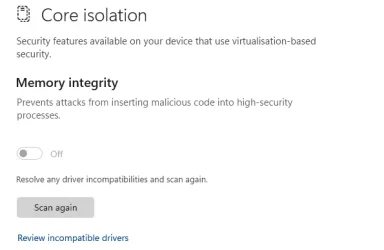
Yes, some of the extra security in W11 does depend on newer hardware and/or drivers. Memory Integrity, for example, cannot be enabled on some older systems because, being out of support, compatible drivers are no longer being developed for them. However, running W11 on such a system should be no less secure than it was when running a fully updated W10 - and maybe a bit more secure.

1782151916961.webp
 

My Computers My Computers

  • At a glance

    Windows 11 HomeAMD Athlon Silver 3050U8GBRadeon Graphics
    OS
    Windows 11 Home
    Computer type
    Laptop
    Manufacturer/Model
    Acer Aspire 3 A315-23-R9VY
    CPU
    AMD Athlon Silver 3050U
    Memory
    8GB
    Graphics Card(s)
    Radeon Graphics
    Monitor(s) Displays
    laptop screen
    Screen Resolution
    1366x768 native resolution, up to 2560x1440 with Radeon Virtual Super Resolution
    Hard Drives
    1TB Samsung EVO 870 SSD (from April 2026: 250GB EVO 850)
    Internet Speed
    150 Mbps
    Browser
    Edge, Firefox
    Antivirus
    Defender
    Other Info
    fully 'Windows 11 ready' laptop. Windows 10 C: partition migrated from my old unsupported 'main machine' then upgraded to 11. A test migration ran Insider builds for 2 months. When 11 was released on 5th October 2021 it was re-imaged back to 10 and was offered the upgrade in Windows Update on 20th October. Windows Update offered the 22H2 Feature Update on 20th September 2022. It got the 23H2 Feature Update on 4th November 2023 through Windows Update, 24H2 on 3rd October 2024 through Windows Update by setting the Target Release Version for 24H2, and 25H2 on 30th September 2025 through Windows Update by setting the Target Release Version for 25H2.

    UPDATE - 11 April 2026: due to mechanical deterioration this PC has been retired from active duty. The OS with all software and files has been migrated to my System Seven in 'Other systems' to carry on as my general purpose 'main machine'.
  • At a glance

    Windows 11 ProIntel® Core™ i5-520M8GB(integrated graphics) Intel HD Graphics
    Operating System
    Windows 11 Pro
    Computer type
    Laptop
    Manufacturer/Model
    Dell Latitude E4310
    CPU
    Intel® Core™ i5-520M
    Motherboard
    0T6M8G
    Memory
    8GB
    Graphics card(s)
    (integrated graphics) Intel HD Graphics
    Screen Resolution
    1366x768
    Hard Drives
    500GB Crucial MX500 SSD
    Browser
    Firefox, Edge
    Antivirus
    Defender
    Other Info
    unsupported machine: Legacy bios, MBR, TPM 1.2, upgraded from W10 to W11 using W10/W11 hybrid install media workaround.

    In-place upgrade to 22H2 using ISO and a workaround.
    Feature Update to 23H2 by manually installing the Enablement Package.
    In-place upgrade to 24H2 using hybrid 23H2/24H2 install media.
    Upgraded to 25H2 by Enablement Package.

    Also running Insider Dev, and Canary builds and Windows 10 as native boot .vhdx.
  • My SYSTEM THREE is a Dell Latitude 5410, i7-10610U, 32GB RAM, 512GB NVMe ssd, supported device running Windows 11 Pro.

    My SYSTEM FOUR is a 2-in-1 convertible Lenovo Yoga 11e 20DA, Celeron N2930, 8GB RAM, 256GB ssd. Unsupported device: currently running Win10 Pro, plus Win11 Pro RTM and Insider Dev, Beta, and RP 24H2 as native boot vhdx.

    My SYSTEM FIVE is a Dell Latitude 3190 2-in-1, Pentium Silver N5030, 8GB RAM, 1TB NVMe ssd, supported device running Windows 11 Pro, plus Insider Beta, Dev, and Canary builds (and a few others) as a native boot .vhdx.

    My SYSTEM SIX is a Dell Latitude 5550, Core Ultra 7 165H, 64GB RAM, 1TB NVMe SSD, supported device, Windows 11 Pro 24H2, Hyper-V host machine. Updated to 25H2 on 30th September 2025.

    My SYSTEM SEVEN is a Lenovo Thinkpad T580, Intel Core i7-8650U, 16GB RAM, 512GB NVMe SSD + 2nd 512GB NVMe SSD, a supported device for Windows 11. This is my current general purpose 'main machine'. The installed Windows 11 Home from my System One has been migrated to this machine.
Remember that security is not the only potential reason to change over to Windows 11. At least for me, I find some of the features compelling.

But here is my suggestion: Just try it. Make a full disk image backup so that you can go back to where you were easily, then install Windows 11 and run it on trial to see if you like it. You could also rely upon the ability to roll back if it doesn't work well for you, but my preference is to have a full backup "just in case".

Another option would be to simply install it in a VM to see if you like it, but ultimately, you want to see how well it works on your hardware with all of your drivers.

Speaking of drivers: I would suggest backing up all your drivers while in Windows 10, and then simply restoring them onto Windows 11 (if you do a clean install). If you need details, just ask.
 

My Computers My Computers

  • At a glance

    Win11 Pro 25H2 (RTM+)Intel i7-14650HX32 GBNo GPU - Built-in Intel Graphics
    OS
    Win11 Pro 25H2 (RTM+)
    Computer type
    PC/Desktop
    Manufacturer/Model
    Acemagic
    CPU
    Intel i7-14650HX
    Memory
    32 GB
    Graphics Card(s)
    No GPU - Built-in Intel Graphics
    Sound Card
    Integrated
    Monitor(s) Displays
    Varies as machine will often be moved to locations with different monitors
    Screen Resolution
    Varies
    Hard Drives
    1 x 1TB Gen 4 NVMe SSD
    PSU
    120W Power Brick
    Keyboard
    Corsair K70 Max RGB Magnetic Keyboard
    Mouse
    Logitech MX Master 3
    Internet Speed
    1Gb Up / 1 Gb Down
    Browser
    Edge
    Antivirus
    Windows Defender
  • At a glance

    Win11 Pro 25H2 (RTM+)Intel i7-1255U16 GBIntel Iris Xe Graphics
    Operating System
    Win11 Pro 25H2 (RTM+)
    Computer type
    Laptop
    Manufacturer/Model
    Lenovo ThinkBook 13x Gen 2
    CPU
    Intel i7-1255U
    Memory
    16 GB
    Graphics card(s)
    Intel Iris Xe Graphics
    Sound Card
    Realtek® ALC3306-CG codec
    Monitor(s) Displays
    13.3-inch IPS Display
    Screen Resolution
    WQXGA (2560 x 1600)
    Hard Drives
    2 TB 4 x 4 NVMe SSD
    PSU
    USB-C / Thunderbolt 4 Power / Charging
    Keyboard
    Backlit, spill resistant keyboard
    Mouse
    Buttonless Glass Precision Touchpad
    Internet Speed
    1Gb Up / 1Gb Down
    Browser
    Edge
    Antivirus
    Windows Defender
    Other Info
    WiFi 6e / Bluetooth 5.1 / Facial Recognition / Fingerprint Sensor / ToF (Time of Flight) Human Presence Sensor
Yes, also. Since Windows 10 will no longer be supported in a few months and will no longer receive security updates and over time, many programs will likely stop supporting Windows 10 as well (i think) i was wondering if it makes sense to “force” the upgrade to Windows 11
i run w11 on 4770k ezpz you just debloat it with christitus winutil or winhance and you are set, its win 10, all these "security features" are non essential with you behind NAT on router.. i literally deleted win defender 4-5 years ago and had no issues.. i full scan once a year with emsisoft emergency kit and never found anything
 

My Computer My Computer

At a glance

Windows 114770k16 gb Kingston2070 super
OS
Windows 11
Computer type
PC/Desktop
Manufacturer/Model
-
CPU
4770k
Motherboard
Asus Maximus Formula VI
Memory
16 gb Kingston
Graphics Card(s)
2070 super

Latest Support Threads

Back
Top Bottom