Solved Show widgets on lockscreen. 25H2


Oldschool297

New member
Local time
10:25 AM
Posts
5
OS
Windows 11 H25.
I have noticed that the widgets on my lockscreen is not there anymore. Is it a new update that has caused it? I have it turned on in taskbar. But i cannot see it in lockscreen options. I can only see 3 options wheather. Xbox. 3d.
 

My Computer My Computer

At a glance

Windows 11 H25.
OS
Windows 11 H25.
Computer type
PC/Desktop
Manufacturer/Model
Asrock Z590 Oc Formula (Extreme overclocking board)
I tried to activate in gpedit.msc but it is the same
 

My Computer My Computer

At a glance

Windows 11 H25.
OS
Windows 11 H25.
Computer type
PC/Desktop
Manufacturer/Model
Asrock Z590 Oc Formula (Extreme overclocking board)
To show widgets on your Windows 11 lock screen, open Settings, go to Personalization > Lock screen, find the Lock screen status or Widgets section, and choose your preferred option or turn the feature on.


My Computer My Computer

At a glance

Windows 11AMD Ryzen 7 5700GMicron Technology DDR4-3200 16GBNVIDIA GeForce RTX 3060
OS
Windows 11
Computer type
PC/Desktop
Manufacturer/Model
HP Pavilion
CPU
AMD Ryzen 7 5700G
Motherboard
Erica6
Memory
Micron Technology DDR4-3200 16GB
Graphics Card(s)
NVIDIA GeForce RTX 3060
Sound Card
Realtek ALC671
Monitor(s) Displays
Samsung SyncMaster U28E590
Screen Resolution
3840 x 2160
Hard Drives
SAMSUNG MZVLQ1T0HALB-000H1
Hello @Oldschool297, :alien:

Go ahead and post a screenshot showing the complete Lock Screen Settings page to see if anything may stand out. Be sure to blank out any personal info on it first.

For now, you can check the options in the tutorials below.


My Computers My Computers

  • At a glance

    Windows 11 Pro for WorkstationsIntel i7-8700K 5 GHz64 GB (4x16GB) G.SKILL TridentZ RGB DDR4 3600...ASUS ROG-STRIX-GTX1080TI-O11G-GAMING (11GB GD...
    OS
    Windows 11 Pro for Workstations
    Computer type
    PC/Desktop
    Manufacturer/Model
    Custom self build
    CPU
    Intel i7-8700K 5 GHz
    Motherboard
    ASUS ROG Maximus XI Formula Z390
    Memory
    64 GB (4x16GB) G.SKILL TridentZ RGB DDR4 3600 MHz (F4-3600C18D-32GTZR)
    Graphics Card(s)
    ASUS ROG-STRIX-GTX1080TI-O11G-GAMING (11GB GDDR5X)
    Sound Card
    Integrated Digital Audio (S/PDIF)
    Monitor(s) Displays
    2 x Samsung Odyssey G75 27"
    Screen Resolution
    2560x1440
    Hard Drives
    1TB Samsung 990 PRO M.2,
    4TB Samsung 990 PRO M.2,
    TerraMaster F8 SSD Plus NAS
    PSU
    Seasonic Prime Titanium 850W
    Case
    Thermaltake Core P3 wall mounted
    Cooling
    Corsair Hydro H115i
    Keyboard
    Amazon Basics Wired Full Keyboard MD005
    Mouse
    Logitech MX Master 4
    Internet Speed
    2 Gbps Download and 100 Mbps Upload
    Browser
    Chrome and Edge
    Antivirus
    Microsoft Defender
    Other Info
    Logitech Z625 speaker system,
    Logitech BRIO 4K Pro webcam,
    HP Color LaserJet Pro MFP M477fdn,
    CyberPower CP1500PFCLCD
    Galaxy S23 Plus phone
  • At a glance

    Windows 11 ProSnapdragon X Elite (12 core) 3.42 GHz16 GB LPDDR5x-7467 MHz
    Operating System
    Windows 11 Pro
    Computer type
    Laptop
    Manufacturer/Model
    Surface Laptop 7 Copilot+ PC
    CPU
    Snapdragon X Elite (12 core) 3.42 GHz
    Memory
    16 GB LPDDR5x-7467 MHz
    Monitor(s) Displays
    15" HDR
    Screen Resolution
    2496 x 1664
    Hard Drives
    1 TB SSD
    Internet Speed
    Wi-Fi 7 and Bluetooth 5.4
    Browser
    Chrome and Edge
    Antivirus
    Microsoft Defender
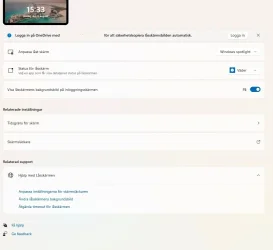
I tried the reg file, i only see this.

Utgåva Windows 11 Pro
Version 25H2
Installerad ‎2026-‎05-‎30
OS-version 26200.9168
Funktioner Gränssnittspaket för Windows-funktioner 1000.26100.344.0

Skärmbild 2026-08-12 153445.webp
 
Last edited by a moderator:

My Computer My Computer

At a glance

Windows 11 H25.
OS
Windows 11 H25.
Computer type
PC/Desktop
Manufacturer/Model
Asrock Z590 Oc Formula (Extreme overclocking board)
I solved it with the reg file after a restart. Thank you very much. I hope that Microsoft do not find another way to remove them.
 

My Computer My Computer

At a glance

Windows 11 H25.
OS
Windows 11 H25.
Computer type
PC/Desktop
Manufacturer/Model
Asrock Z590 Oc Formula (Extreme overclocking board)
I solved it with the reg file after a restart. Thank you very much. I hope that Microsoft do not find another way to remove them.

Great news. :shawn:

Which reg file did you use?
 

My Computers My Computers

  • At a glance

    Windows 11 Pro for WorkstationsIntel i7-8700K 5 GHz64 GB (4x16GB) G.SKILL TridentZ RGB DDR4 3600...ASUS ROG-STRIX-GTX1080TI-O11G-GAMING (11GB GD...
    OS
    Windows 11 Pro for Workstations
    Computer type
    PC/Desktop
    Manufacturer/Model
    Custom self build
    CPU
    Intel i7-8700K 5 GHz
    Motherboard
    ASUS ROG Maximus XI Formula Z390
    Memory
    64 GB (4x16GB) G.SKILL TridentZ RGB DDR4 3600 MHz (F4-3600C18D-32GTZR)
    Graphics Card(s)
    ASUS ROG-STRIX-GTX1080TI-O11G-GAMING (11GB GDDR5X)
    Sound Card
    Integrated Digital Audio (S/PDIF)
    Monitor(s) Displays
    2 x Samsung Odyssey G75 27"
    Screen Resolution
    2560x1440
    Hard Drives
    1TB Samsung 990 PRO M.2,
    4TB Samsung 990 PRO M.2,
    TerraMaster F8 SSD Plus NAS
    PSU
    Seasonic Prime Titanium 850W
    Case
    Thermaltake Core P3 wall mounted
    Cooling
    Corsair Hydro H115i
    Keyboard
    Amazon Basics Wired Full Keyboard MD005
    Mouse
    Logitech MX Master 4
    Internet Speed
    2 Gbps Download and 100 Mbps Upload
    Browser
    Chrome and Edge
    Antivirus
    Microsoft Defender
    Other Info
    Logitech Z625 speaker system,
    Logitech BRIO 4K Pro webcam,
    HP Color LaserJet Pro MFP M477fdn,
    CyberPower CP1500PFCLCD
    Galaxy S23 Plus phone
  • At a glance

    Windows 11 ProSnapdragon X Elite (12 core) 3.42 GHz16 GB LPDDR5x-7467 MHz
    Operating System
    Windows 11 Pro
    Computer type
    Laptop
    Manufacturer/Model
    Surface Laptop 7 Copilot+ PC
    CPU
    Snapdragon X Elite (12 core) 3.42 GHz
    Memory
    16 GB LPDDR5x-7467 MHz
    Monitor(s) Displays
    15" HDR
    Screen Resolution
    2496 x 1664
    Hard Drives
    1 TB SSD
    Internet Speed
    Wi-Fi 7 and Bluetooth 5.4
    Browser
    Chrome and Edge
    Antivirus
    Microsoft Defender
I solved it with the reg file after a restart. Thank you very much. I hope that Microsoft do not find another way to remove them.
tell us the reg key
 

My Computer My Computer

At a glance

Windows 11i7 13700K64 GB DDR5RTX 5080 FE
OS
Windows 11
Computer type
PC/Desktop
Manufacturer/Model
NZXT
CPU
i7 13700K
Motherboard
NZXT Z790
Memory
64 GB DDR5
Graphics Card(s)
RTX 5080 FE
Monitor(s) Displays
Philips 279M1RV
Screen Resolution
4K
Case
NZXT H7 Flow
This happened to me also within the past week or so (not sure of the exact date, but, it's one of those things that slowly hits you: "Hey......on my Lockscreen after I boot up....there used to be little rectangular widgets down the bottom of the screen showing little Internet stories.....").

So, I performed a random search online and eventually came across this forum. I also came across articles online that showed how to Turn On Widgets to have them appear on your Lockscreen, and, according to what I found, yes, everything seems to be correct.....but those Widgets aren't there.

First off, here's what I'm on: Windows 11; Version 25H2; OS Build 26200.9457

Here's a pic from my Settings:
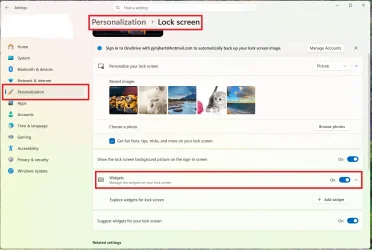
Widgets1.webp
So, it seems like I should be good-to-go, right? But nope, no Widgets on the Lockscreen. But you see the button that has "+ Add Widget"? When I click that, I get this:
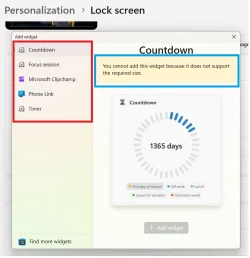
Widgets2.webp
You see the red rectangle on the left? From an article / video I found during a search, that list of items was much longer. In my picture, there are five items to choose from. In the article / video, there were many more, such as "Daily Discovery....Events Near You......Sports....Today's Moments....Weather.....".

And that blue rectangle? What the heck does that mean?!?! :LOL: "You cannot add this widget because it does not support the required size." What's that referring to?

Anyway, is this something weird that happened during the latest Windows 11 OS Update?
Appreciate any help or tips;
thanks,
Pez

 

My Computer My Computer

At a glance

Windows 11 Pro
OS
Windows 11 Pro

Latest Support Threads

Back
Top Bottom