This happened to me also within the past week or so (not sure of the exact date, but, it's one of those things that slowly hits you: "
Hey......on my Lockscreen after I boot up....there used to be little rectangular widgets down the bottom of the screen showing little Internet stories.....").
So, I performed a random search online and eventually came across this forum. I also came across articles online that showed how to Turn On Widgets to have them appear on your Lockscreen, and, according to what I found, yes, everything seems to be correct.....but those Widgets aren't there.
First off, here's what I'm on: Windows 11; Version 25H2; OS Build 26200.9457
Here's a pic from my Settings:
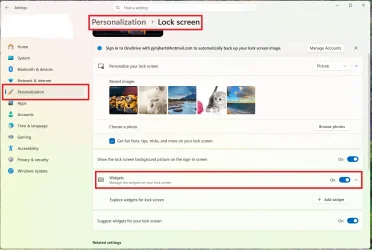
So, it seems like I should be good-to-go, right? But nope, no Widgets on the Lockscreen. But you see the button that has "
+ Add Widget"? When I click that, I get this:
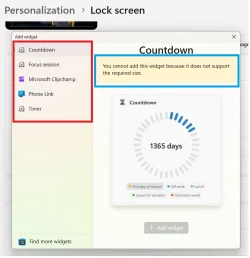
You see the
red rectangle on the left? From an article / video I found during a search, that list of items was much longer. In my picture, there are five items to choose from. In the article / video, there were many more, such as "Daily Discovery....Events Near You......Sports....Today's Moments....Weather.....".
And that
blue rectangle? What the heck does
that mean?!?!

"
You cannot add this widget because it does not support the required size." What's that referring to?
Anyway, is this something weird that happened during the latest Windows 11 OS Update?
Appreciate any help or tips;
thanks,
Pez