Shutdown without logon button - the saga continues.


Morph000

Well-known member
Member
VIP
Local time
6:21 AM
Posts
250
Location
Australia (best bit)
OS
Windows 11 Pro 24H2
It's the only issue I have at the moment with W11 !
It's minor I know, just irritating. Must-not-let-Microsoft-beat-me. :p
At the login screen I'm missing the Shutdown button.
It IS there if I logout though. Every time.
I checked the registry in safe mode and the setting is still there.
I disabled 3rd party apps and it's still missing on boot, so a Windows app is changing it on startup.
Question is, which one.
I could start disabling groups of apps/services at a time to narrow it down but that's just going to cause grief and errors or worse.
The registry value gets changed from a DWord to a string, which is interesting.
If the DWord is 1 then it's enabled, 0 = disabled, so a string is undefined?
How do I find which app is responsible. Registry monitoring via Sysinternals Procmon etc didn't offer anything.
Given that the value is "ShutdownWithoutLogon", I could scan every file in a system image (using an image to ensure files aren't locked and inaccessible) to find that string and the culprit and at worst edit the file and modify /delete the string.
I'm grudgingly considering a 23H2 factory recovery install and reinstall everything again, but that's a serious pain.
Maybe an inplace upgrade, but I don't have high hopes there.
Any ideas?
 

My Computer

System One

  • OS
    Windows 11 Pro 24H2
    Computer type
    Laptop
    Manufacturer/Model
    LG
    CPU
    i7 Ultra
    Memory
    16GB
    Graphics Card(s)
    Intel
    Sound Card
    Intel Realtek
    Monitor(s) Displays
    Laptop 17" & TB4 Dell 27" QHD Ultrasharp w/integral TB4 hub
    Screen Resolution
    2560x1600
    Hard Drives
    1TB SSD, 5 external WDs
    Mouse
    Logitech Master MX 3S
    Browser
    Vivaldi
    Antivirus
    Kaspersky Premium Suite
I don't get it, it works as written

regedit

Computer\HKEY_LOCAL_MACHINE\SOFTWARE\Microsoft\Windows\CurrentVersion\Policies\System

shutdownwithoutlogon REG_DWORD 1

Computer users are members of the BUILTIN\Users group and have the privilege to shut down the computer. Unless you have changed something.
 
Last edited:

My Computer

System One

  • OS
    Microsoft Windows 11 Home
    Computer type
    PC/Desktop
    Manufacturer/Model
    MSI MS-7D98
    CPU
    Intel Core i5-13490F
    Motherboard
    MSI B760 GAMING PLUS WIFI
    Memory
    2 x 16 Patriot Memory (PDP Systems) PSD516G560081 6400MT (32-37-37-74); 1.35V)
    Graphics Card(s)
    GIGABYTE GeForce RTX 4070 WINDFORCE OC 12G (GV-N4070WF3OC-12GD)
    Sound Card
    Bluetooth Аудио
    Monitor(s) Displays
    INNOCN 15K1F
    Screen Resolution
    1920 x 1080
    Hard Drives
    WD_BLACK SN770 250GB
    KINGSTON SNV2S1000G (ELFK0S.6)
    PSU
    Thermaltake Toughpower GF3 1000W
    Case
    CG560 - DeepCool
    Cooling
    ID-COOLING SE-224-XTS / 2 x 140Mm Fan - rear and top; 3 x 120Mm - front
    Keyboard
    Corsair K70 RGB TKL
    Mouse
    Corsair KATAR PRO XT
    Internet Speed
    100 Mbps
    Browser
    Firefox
    Antivirus
    Microsoft Defender Antivirus
    Other Info
    https://www.userbenchmark.com/UserRun/66553205
Interesting. In forty-four years of owning many dozens of computers, this is something I've never thought about before, or apparently even wanted to do. So, I'll watch the thread and see what you guys come up with.
 

My Computers

System One System Two

  • OS
    Windows 11 Pro
    Computer type
    Laptop
    Manufacturer/Model
    Dell XPS 16 DA16260
    CPU
    Intel Series 3 Core Ultra X9 388H
    Memory
    64GB LPDDR5x 9600 MT/s
    Graphics Card(s)
    Intel Arc graphics B390 Panther Lake
    Monitor(s) Displays
    16" 3.2K Tandem OLED Infinity Edge
    Screen Resolution
    3200 x 2000 16:10 236 PPI
    Hard Drives
    1 Terabyte M.2 PCIe NVMe SSD
    Case
    Black Anodized Aluminum
    Cooling
    Vapor Chamber Cooling
    Mouse
    None
    Internet Speed
    942 Mbps Netgear Mesh + 2 Satellites
    Browser
    Microsoft Edge (Chromium)
    Antivirus
    Windows Security (Defender)
    Other Info
    NPU delivering 67 TOPS
    Microsoft 365 subscription
    Microsoft OneDrive 1TB Cloud
    Microsoft Visual Studio
    Microsoft Visual Studio Code
    Microsoft Sysinternals Suite
    Microsoft BitLocker
    Microsoft Copilot
    Dell Support Assist
    Dell Command | Update
    Macrium Reflect X subscription
    1Password Password Manager
    Amazon Kindle for PC
    Lightroom/Photoshop subscription
    Interactive Brokers Trader Workstation
  • Operating System
    Windows 11 Pro
    Computer type
    Laptop
    Manufacturer/Model
    Microsoft Surface Laptop 7
    CPU
    Snapdragon® X Elite (12 Core) with Hexagon NPU delivering 45 TOPS
    Memory
    32GB LPDDR5x 8448 MT/s
    Graphics card(s)
    Integrated Adreno GPU
    Sound Card
    Omnisonic speakers with Dolby Atmos spatial sound
    Monitor(s) Displays
    13.8″ PixelSense Flow touchscreen 120 Hz 600 NIT
    Screen Resolution
    2304 × 1536 (201 PPI), 3:2 aspect ratio
    Hard Drives
    1 TB PCIe NVMe Gen 4 SSD
    Case
    Black Anodized Aluminum
    Cooling
    Vapor Chamber Cooling
    Mouse
    None
    Internet Speed
    942 Mbps Netgear Mesh + 2 Satellites
    Browser
    Microsoft Edge (Chromium)
    Antivirus
    Windows Security (Defender)
    Other Info
    Microsoft 365 subscription (Office)
    Microsoft OneDrive 1TB Cloud
    Microsoft Visual Studio 2026
    Microsoft Visual Studio Code
    Interactive Brokers Trader Workstation
    Lightroom/Photoshop subscription
    1Password Password Manager
    Microsoft Sysinternals
    Amazon Kindle for PC
    Microsoft BitLocker
    Microsoft Copilot
At the login screen

At what kind of login screen specifically? "Logged-in but locked" login screen? Or "not logged-in yet" login screen? If it is the latter, is there a difference between "just booted" login screen and "just logged-out" login screen?

I'm missing the Shutdown button.
There's no "shutdown button" in Windows 11. There's a "Power" button which opens a pop-up menu that contains a "Shut down" entry (among other things). So, what exactly are you missing: the entire "Power" button or just the "Shut down" entry from the menu?
 

My Computer

System One

  • OS
    Windows 11 Pro
    Computer type
    PC/Desktop
    CPU
    Intel(R) Core(TM) i7-5930K CPU @ 3.50GHz
    Motherboard
    EVGA X99 Micro
    Graphics Card(s)
    NVIDIA GeForce GTX 970
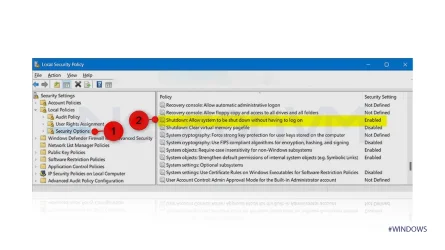
Check the settings in local security policy

1750091676814.webp
 

My Computers

System One System Two

  • OS
    Windows 11 Pro
    Computer type
    PC/Desktop
    CPU
    AMD Ryzen 7 9800X3D
    Motherboard
    MSI PRO B850-P Wifi
    Memory
    32GB DDR5 CL30 Kingston Fury
    Graphics Card(s)
    ASUS Prime Radeon RX 9060 XT OC Edition 16GB
    Monitor(s) Displays
    LG Ultrawide 34" + LG 27" 1080p
    Screen Resolution
    3440x1440
    Hard Drives
    Main Boot Drive : 512GB Adata XPG RGB Gen3x4 NVMe M.2 SSD
    PSU
    EVGA 750 Watts 80+ Gold
    Case
    Deepcool Genome II
    Cooling
    Thermalright Burst Assassin 120
    Internet Speed
    1Gbps
    Browser
    Chrome
    Antivirus
    "Moderna"
  • Operating System
    Windows 11 Pro
    Computer type
    PC/Desktop
    CPU
    i7-4790K
    Motherboard
    ASRock Xtreme6 Z97
    Memory
    16GB Corsair Vengeance Pro
    Graphics card(s)
    MSI R9 290
    Monitor(s) Displays
    LG Ultrawide 34"
    Screen Resolution
    3440x1440
    Hard Drives
    500GB Adata SSD (OS Only)
    PSU
    Thermaltake 475 Watts 80 Bronze
    Case
    Thermaltake Commander I Snow Edition
    Cooling
    Deep Cool Archer Air Cooler
    Keyboard
    Armageddon MKA-5R RGB-Hornet
    Mouse
    Logitech G402
    Internet Speed
    1Gbps
    Browser
    Chrome
    Antivirus
    Moderna :)
As stated, the setting is ENABLED and there if I reboot into safe mode or anything else and check it.
Something is changing it during boot up.
As I said too, if I LOGOUT (not just a screensaver lock screen or such) and have to enter my password to LOGIN again, the Shutdown button is there EVERY time.
Ironically when I made this post and rebooted, lo and behold, the Shutdown button was there. Once. Gone next reboot.
I can't see how a timing issue could cause this but it *may* be a possibility as I've seen such anomalies before.
What I need to know is what applications/driver/service would want to control this feature. Presumably something security related.
Something keeps changing the registry value to a string value. Undefined.
It's almost though it's being over-ridden by a server policy or such, but this is a standalone pc, never been on a network or domain.
Maybe manually writing the setting to Group Policy for machine in Sys32? :p
 
Last edited:

My Computer

System One

  • OS
    Windows 11 Pro 24H2
    Computer type
    Laptop
    Manufacturer/Model
    LG
    CPU
    i7 Ultra
    Memory
    16GB
    Graphics Card(s)
    Intel
    Sound Card
    Intel Realtek
    Monitor(s) Displays
    Laptop 17" & TB4 Dell 27" QHD Ultrasharp w/integral TB4 hub
    Screen Resolution
    2560x1600
    Hard Drives
    1TB SSD, 5 external WDs
    Mouse
    Logitech Master MX 3S
    Browser
    Vivaldi
    Antivirus
    Kaspersky Premium Suite
I found the solution at last! It was due to a service called LG Security Guard which provides extra security for Windows Hello, which I don't use.
2 weeks and 50 restarts/shutdowns later and it's perfect!
I gave up on it for a while as it looked to be a Microsludge process rather than 3rd party, which would be a headache to track down.
Why it didn't show up when I disabled all 3rd party stuff to start with I don't know, maybe a child process, self-protection or similar, but it was intermittent.
The weirdness of W11.
So, deleting group policy settings, rollbacks, SFC/DISM etc would have done nothing, which I suspected.
No software parts cannon. ;-)
 

My Computer

System One

  • OS
    Windows 11 Pro 24H2
    Computer type
    Laptop
    Manufacturer/Model
    LG
    CPU
    i7 Ultra
    Memory
    16GB
    Graphics Card(s)
    Intel
    Sound Card
    Intel Realtek
    Monitor(s) Displays
    Laptop 17" & TB4 Dell 27" QHD Ultrasharp w/integral TB4 hub
    Screen Resolution
    2560x1600
    Hard Drives
    1TB SSD, 5 external WDs
    Mouse
    Logitech Master MX 3S
    Browser
    Vivaldi
    Antivirus
    Kaspersky Premium Suite

Latest Support Threads

Back
Top Bottom