
- Local time
- 11:46 AM
- Posts
- 64
- OS
- windows 11 25h2 Pro
I’m back with a slightly different question. After I had installed Win 11 pro and ExplorerPatcher on my laptop (LG-1), I also did the same on my wife’s laptop (LG-2). I thought I had used the same options at each EP section, but got very different Start Menus (see LG-1 and LG-2 below).
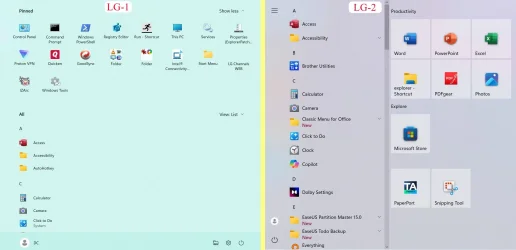
Essentially, in LG-2, the pinned items are to the right, in what I think is called Win10 style, while LG-1 has them above the list of apps.
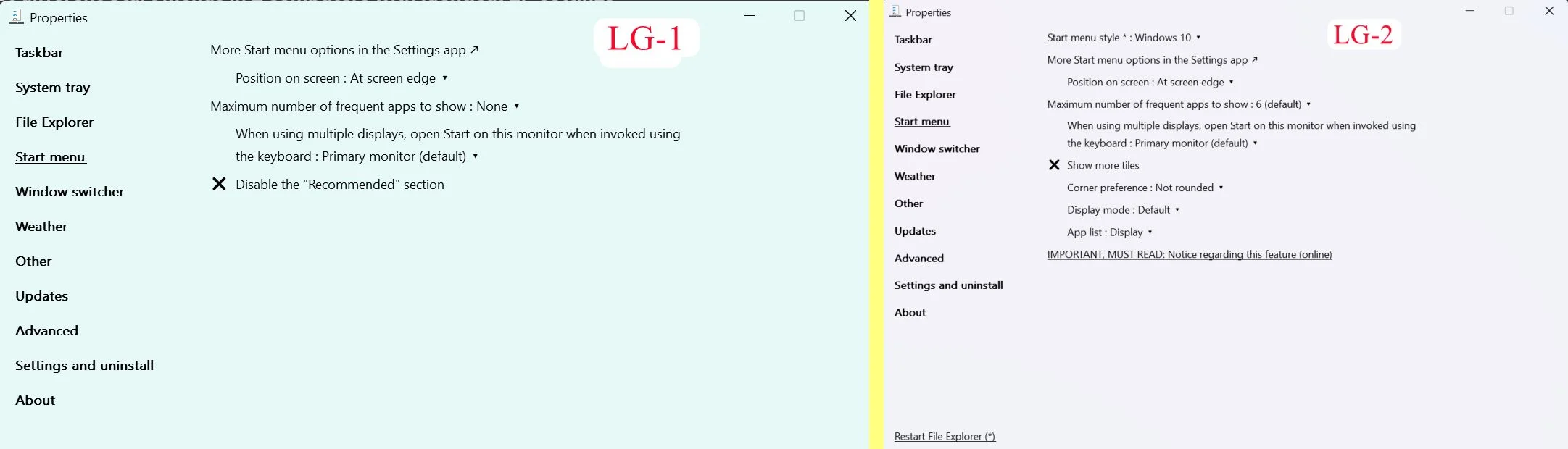
While they are both acceptable, I much prefer the one showed as LG-2. I compared the 2 sets of settings, and made them those in LG-1 identical in those cases where they were different, but it did not change the Start menu. Each tab is the same in both the settings, EXCEPT that in LG-2 has an option “inStart Menu Style” which I do not see in LG-1 (see below).
I figured I must have set something different, and so I exported the EP settings from LG-2 and imported them into LG-1, but I still get the same Start menu in LG-1. I have attached the EP settings reg file.
I can only conclude that there are some differences in the Windows 11 installation that are different, but I do not know what it could be, and I am hoping for guidance in what to look for. Thanks in advance.
Even if I cannot figure this out, the Start Menu in LG-1 is good enough, and EP overcomes enough of the hurdles I found in Win 11 to make the OS usable.
Essentially, in LG-2, the pinned items are to the right, in what I think is called Win10 style, while LG-1 has them above the list of apps.
While they are both acceptable, I much prefer the one showed as LG-2. I compared the 2 sets of settings, and made them those in LG-1 identical in those cases where they were different, but it did not change the Start menu. Each tab is the same in both the settings, EXCEPT that in LG-2 has an option “inStart Menu Style” which I do not see in LG-1 (see below).
I figured I must have set something different, and so I exported the EP settings from LG-2 and imported them into LG-1, but I still get the same Start menu in LG-1. I have attached the EP settings reg file.
I can only conclude that there are some differences in the Windows 11 installation that are different, but I do not know what it could be, and I am hoping for guidance in what to look for. Thanks in advance.
Even if I cannot figure this out, the Start Menu in LG-1 is good enough, and EP overcomes enough of the hurdles I found in Win 11 to make the OS usable.
Attachments
My Computer
At a glance
windows 11 25h2 ProIntel(R) Core(TM) Ultra 7 355 (2.30 GHz)32gbIntel Graphics
- OS
- windows 11 25h2 Pro
- Computer type
- Laptop
- Manufacturer/Model
- LG electronics
- CPU
- Intel(R) Core(TM) Ultra 7 355 (2.30 GHz)
- Motherboard
- LG Electronics 17Z90U Fab1
- Memory
- 32gb
- Graphics Card(s)
- Intel Graphics






