
Similar (identical ?) settings of EP in 2 computers result in 2 very different Start Menus.


UpdatesMess

Well-known member
Member
Local time
9:25 AM
Posts
62
OS
windows 11 25h2 Pro
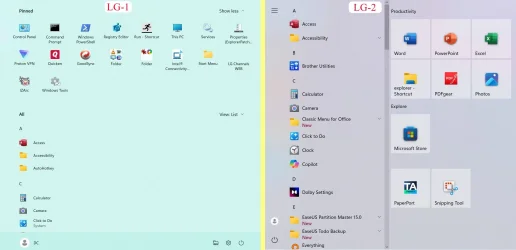
I’m back with a slightly different question. After I had installed Win 11 pro and ExplorerPatcher on my laptop (LG-1), I also did the same on my wife’s laptop (LG-2). I thought I had used the same options at each EP section, but got very different Start Menus (see LG-1 and LG-2 below).
LG1,2 start menu.webp

Essentially, in LG-2, the pinned items are to the right, in what I think is called Win10 style, while LG-1 has them above the list of apps.

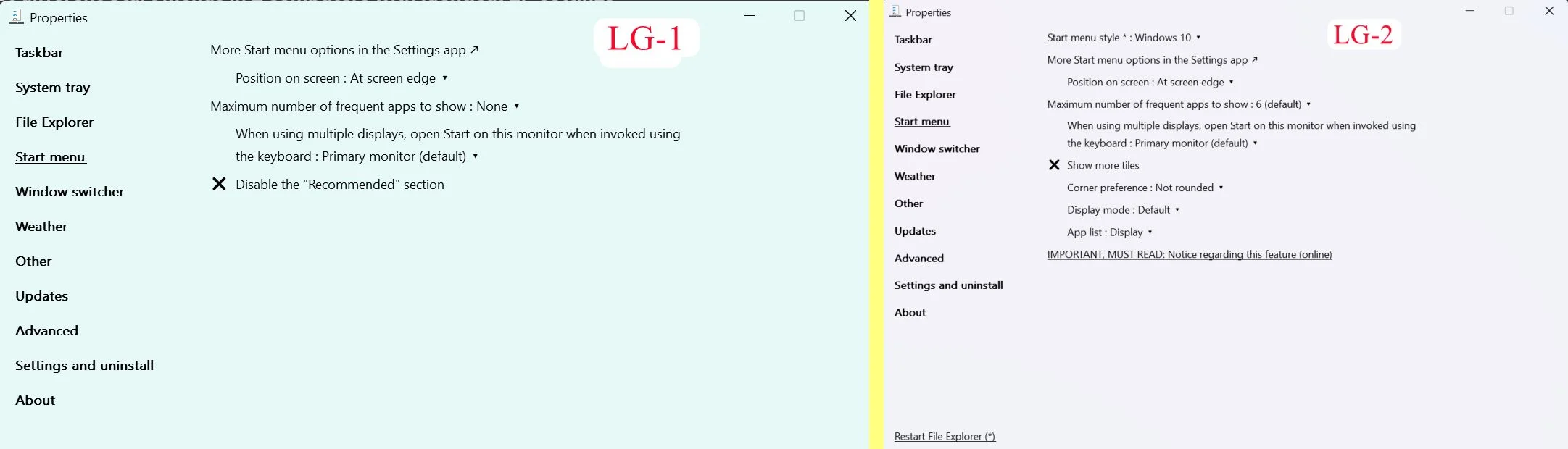
While they are both acceptable, I much prefer the one showed as LG-2. I compared the 2 sets of settings, and made them those in LG-1 identical in those cases where they were different, but it did not change the Start menu. Each tab is the same in both the settings, EXCEPT that in LG-2 has an option “inStart Menu Style” which I do not see in LG-1 (see below).

LG1,2 ep settings.webp

I figured I must have set something different, and so I exported the EP settings from LG-2 and imported them into LG-1, but I still get the same Start menu in LG-1. I have attached the EP settings reg file.

I can only conclude that there are some differences in the Windows 11 installation that are different, but I do not know what it could be, and I am hoping for guidance in what to look for. Thanks in advance.

Even if I cannot figure this out, the Start Menu in LG-1 is good enough, and EP overcomes enough of the hurdles I found in Win 11 to make the OS usable.
 

Attachments

My Computer My Computer

At a glance

windows 11 25h2 ProIntel(R) Core(TM) Ultra 7 355 (2.30 GHz)32gbIntel Graphics
OS
windows 11 25h2 Pro
Computer type
Laptop
Manufacturer/Model
LG electronics
CPU
Intel(R) Core(TM) Ultra 7 355 (2.30 GHz)
Motherboard
LG Electronics 17Z90U Fab1
Memory
32gb
Graphics Card(s)
Intel Graphics
If you search the forum for Start menu, you'll find that several people have reported that they have got a new-style Start menu on some computers but not on others even though they are the same Windows version-build.
You'll also see that the explanation they are given is that MS are enabling this new feature on only some computers [presumably as part of a gradual rollout program].


Denis
 

My Computer My Computer

At a glance

Windows 11 Home x64 Version 25H2 Build 26200....
OS
Windows 11 Home x64 Version 25H2 Build 26200.8037
Are you using different versions of EP?
 

My Computers My Computers

  • At a glance

    Windows 11 Pro 25H2 26200.8737i9-10900 10 core 20 threads32 gbnone-Intel UHD Graphics 630
    OS
    Windows 11 Pro 25H2 26200.8737
    Computer type
    PC/Desktop
    Manufacturer/Model
    Dell Optiplex 7080
    CPU
    i9-10900 10 core 20 threads
    Motherboard
    DELL 0J37VM
    Memory
    32 gb
    Graphics Card(s)
    none-Intel UHD Graphics 630
    Sound Card
    Integrated Realtek
    Monitor(s) Displays
    Benq 27
    Screen Resolution
    2560x1440
    Hard Drives
    2x1tb Solidigm m.2 nvme /External drives 512gb Samsung m.2 sata+2tb Kingston m2.nvme
    PSU
    500w
    Case
    MT
    Cooling
    Dell Premium
    Keyboard
    Logitech wired
    Mouse
    Logitech wireless
    Internet Speed
    so slow I'm too embarrassed to tell
    Browser
    #1 Edge #2 Firefox
    Antivirus
    Defender+MWB Premium
  • At a glance

    Windows 11 Pro 24H2 26200.8737AMD Ryzen 7 6800U32 gbintegrated
    Operating System
    Windows 11 Pro 24H2 26200.8737
    Computer type
    PC/Desktop
    Manufacturer/Model
    Beelink Mini PC SER5
    CPU
    AMD Ryzen 7 6800U
    Memory
    32 gb
    Graphics card(s)
    integrated
    Sound Card
    integrated
    Monitor(s) Displays
    Benq 27
    Screen Resolution
    2560x1440
    Hard Drives
    1TB Crucial nvme
    Keyboard
    Logitech wired
    Mouse
    Logitech wireless
    Internet Speed
    still too embarrassed to tell
    Browser
    Firefox
    Antivirus
    Defender
    Other Info
    System 3 is non compliant Dell 9020 i7-4770/24gb ram Win11 PRO 26200.8457
Are you using different versions of EP?
Both the same
If you search the forum for Start menu, you'll find that several people have reported that they have got a new-style Start menu on some computers but not on others even though they are the same Windows version-build.
You'll also see that the explanation they are given is that MS are enabling this new feature on only some computers [presumably as part of a gradual rollout program].


Denis

How is that even feasible? Wait, it's Microsoft!

I can only quote something written by
@Marie SWE
It's nice to see that I'm not the only one swearing at Microsoft.
 

My Computer My Computer

At a glance

windows 11 25h2 ProIntel(R) Core(TM) Ultra 7 355 (2.30 GHz)32gbIntel Graphics
OS
windows 11 25h2 Pro
Computer type
Laptop
Manufacturer/Model
LG electronics
CPU
Intel(R) Core(TM) Ultra 7 355 (2.30 GHz)
Motherboard
LG Electronics 17Z90U Fab1
Memory
32gb
Graphics Card(s)
Intel Graphics

My Computers My Computers

  • At a glance

    11 Homei7 13650HX16GB DDR5GeForce RTX 4060 Mobile
    OS
    11 Home
    Computer type
    Laptop
    Manufacturer/Model
    Asus TUF Gaming F16 (2024)
    CPU
    i7 13650HX
    Memory
    16GB DDR5
    Graphics Card(s)
    GeForce RTX 4060 Mobile
    Sound Card
    Eastern Electric MiniMax DAC Supreme; Emotiva UMC-200; Astell & Kern AK240
    Monitor(s) Displays
    Sony Bravia XR-55X90J
    Screen Resolution
    3840×2160
    Hard Drives
    512GB SSD internal
    37TB external
    PSU
    Li-ion
    Cooling
    2× Arc Flow Fans, 4× exhaust vents, 5× heatpipes
    Keyboard
    Logitech K800
    Mouse
    Logitech G402
    Internet Speed
    30Mbit/s up, 500Mbit/s down
    Browser
    FF
    Antivirus
    What's an antivirus?
  • At a glance

    11 Homei5 1135G716GB DDR4Intel Iris Xe
    Operating System
    11 Home
    Computer type
    Laptop
    Manufacturer/Model
    Medion S15450
    CPU
    i5 1135G7
    Memory
    16GB DDR4
    Graphics card(s)
    Intel Iris Xe
    Sound Card
    Eastern Electric MiniMax DAC Supreme; Emotiva UMC-200; Astell & Kern AK240
    Monitor(s) Displays
    Sony Bravia XR-55X90J
    Screen Resolution
    3840×2160
    Hard Drives
    2TB SSD internal
    37TB external
    PSU
    Li-ion
    Keyboard
    Logitech K800
    Mouse
    Logitech G402
    Internet Speed
    30Mbit/s up, 500Mbit/s down
    Browser
    FF

Latest Support Threads

Back
Top Bottom




