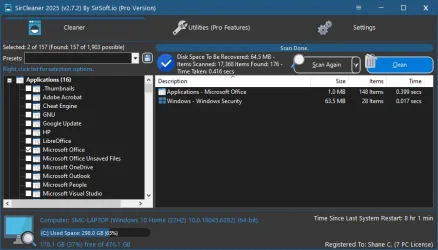
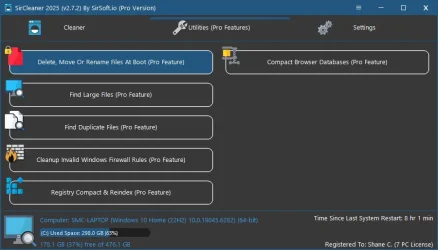
SirCleaner Released - New Powerful Junk File Cleaner


Something is keeping those files from being deleted, here is how to find out!
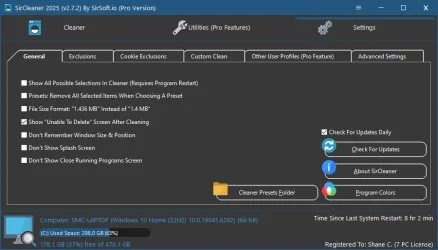
In settings. on the general tab, put a check on "Show Unable To Delete Screen after cleaning" this will show you the files it couldn't delete and why. Pro feature of it on that screen is that you can have the files delete at the next reboot.

Right now when the program says how much it deleted it is just reading the total amount of selected files, Since the program can tell which ones it didn't delete perhaps I should have it update the totals at the end of cleaning so it shows the proper amount that was actually deleted.

The unable to delete screen was added way after the core of the cleaning was done, So didn't think about having the total updated.

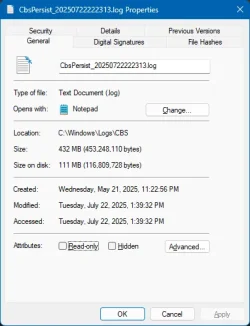
Also the program uses the windows API to pull file size. I think it is just the actual size of the file and not the space it is taking. So lets say it finds 100 2kb files, it would say 200kb total, but if your cluster size is 4k it would actually be 800kb of space being used. But depending on your cluster size the size on disk shouldn't be too different. But compressed files on the file system are using less space than what is report for the file size as well.
1753583146828.webp

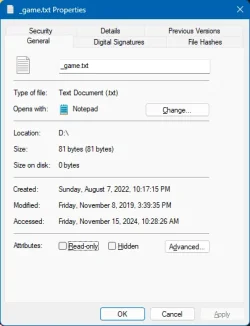
Although something odd, on my Windows 11 machine files less than 1kb are showing "Size On Disk" as 0, that doesn't see, right.
1753582386792.webp

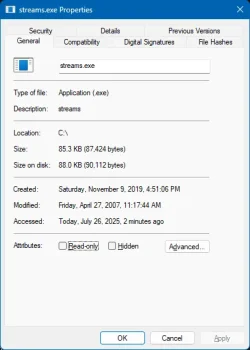
Yet on files larger than 1kb it does show the size on disk.
1753582467028.webp

Edit:
"This happens if the file is so small that its contents and the filesystem bookkeeping fit in 1KB. To save disk space, NTFS keeps small files "resident", storing their contents right in the file record, so no cluster has to be allocated for it. Therefore, the size on disk is zero because there's nothing beyond the file record. Once the file gets sufficiently large, NTFS makes it "nonresident", allocates one or more clusters for it (creating a nonzero "size on disk"), and creates a "mapping pair" in the file record in the place of the data to point to the cluster."

I learn something new every day!
 
Last edited:

My Computer

System One

  • OS
    Windows 11
    Computer type
    PC/Desktop
@SirShane ,

The content of the above post should be added to the Help file. While you do have some of that information in the "General Settings" section, there is nothing about that in the "Getting Started" section. One would assume from reading the "Getting Started" section that everything identified by an SC scan will be deleted when the user hits "Clean."

Just a suggestion . . .

Have a great day.

Regards,
Phil
 

My Computers

System One System Two

  • OS
    Windows 11 Pro Version 25H2 (Build 26200.8655
    Computer type
    PC/Desktop
    Manufacturer/Model
    Dell XPS8930 SE
    CPU
    Intel i7-9700K 4700 MHz
    Motherboard
    Dell XPS 8930
    Memory
    32 GB (4 x 8GB SK Hynix DDR4 @1333 MHz) (2666 MHz)
    Graphics Card(s)
    NVIDIA GeForce RTX 2060 (6 GB) GDDR6 300 MHz
    Sound Card
    None
    Monitor(s) Displays
    Dell UltraSharp U2518D 25"
    Screen Resolution
    2560 x 1440
    Hard Drives
    NVMe Intel 1024 TB
    Seagate 2 TB, SATA-III
    Western Digital Black 4TB
    PSU
    850 W Gold Standard
    Case
    Dell XPS 8930 Base (Special Edition)
    Cooling
    Air
    Keyboard
    Dell 0G4D2W
    Mouse
    Dell MOCZUL
    Internet Speed
    Download 553 Mbps, Upload 686 Mbps
    Browser
    Google Chrome
    Antivirus
    ESET Smart Security Premium, plus Malwarebytes Premium
    Other Info
    BIOS Version 1.1.31
  • Operating System
    Windows 11 Pro Version 25H2 (Build 26200.8655)
    Computer type
    Laptop
    Manufacturer/Model
    Dell XPS 15 7590
    CPU
    i7-9750H 4.5 GHz
    Motherboard
    Dell XPS 15 7590
    Memory
    16 GB (2 x 8GB @ 1333 MHz) DDR4-2666 MHz
    Graphics card(s)
    NVIDIA GeForce 1650 4 GB GDDR5
    Sound Card
    None
    Monitor(s) Displays
    Dell XPS 15 7590, 15.6" InfinityEdge Anti-Glare, Non-Touch
    Screen Resolution
    1920 x 1080
    Hard Drives
    512 GB M.2 PCle NVMe SK Hynix
    PSU
    130W Power Adapter
    Case
    Dell XPS 15 7590
    Cooling
    Air
    Keyboard
    Laptop
    Mouse
    Logitech M510
    Internet Speed
    Download: 400 Mbps, Upload: 203 Mbps
    Browser
    Google Chrome
    Antivirus
    ESET Smart Security Premium, plus Malwarebytes Premium
    Other Info
    BIOS Version 1.35.0
For both browsers it just says "access denied".
I'll just live with it.
Thanks
 

My Computer

System One

  • OS
    Win 11 Pro
    Computer type
    PC/Desktop
    Manufacturer/Model
    N/A
    CPU
    AMD Ryzen 7 9700X
    Motherboard
    Asrock 870E Nova WiFi
    Memory
    G.Skill Trident Z5 Neo RGB 64GB Kit (2x32GB) DDR5-6000 C30
    Graphics Card(s)
    PowerColor Radeon RX 9060 XT Reaper GDDR6 16GB
    Sound Card
    USB Out NAD M51 DAC with Adams A8 powered speakers
    Monitor(s) Displays
    Dell 3219Q
    Screen Resolution
    3840 x 2160
    Hard Drives
    5 x WD_BLACK SN850x PCIe Gen4 NVMe M.2 SSD - 4TB
    PSU
    be quiet! DARK POWER 13 1000W Titanium PCIe 5.0 ATX Modular PSU
    Case
    Fractal Design Define 7 Full Tower Case (Black)
    Cooling
    Noctua NH-D15 G2 LBC - High Performance Multi-Socket PWM CPU Cooler
    Keyboard
    Razer Huntsman V2
    Mouse
    Razer Viper Ultimate
    Internet Speed
    Starlink 94Mbps down 20Mbps up
    Browser
    Brave
    Antivirus
    ESET
It would be great if you would allow the user to edit the filters. (y)
 

My Computers

System One System Two

  • OS
    Windows 11 Pro x64
    Computer type
    PC/Desktop
    Manufacturer/Model
    📷🔈🎧 🪛 DIY Photoshop/Audio/Game/tinker
    CPU
    i9 14900K P/E 5.8/4.5 GHz, cache 5.0 GHz
    Motherboard
    Asus ROG Maximus Z790 Dark Hero
    Memory
    🐏 96GB (2x48) G.skill Ripjaws 6800 MT/s
    Graphics Card(s)
    Asus ROG Strix 4070 Ti OC
    Sound Card
    🔊Bowers & Wilkins 606 S3 speakers; Audiolabs 7000a integrated amp; RSL 10S Mk2 sub; Creative Pebble Pro Minimilist
    Monitor(s) Displays
    🖥️🖥️ Eizo CG2730 ColorEdge, ViewSonic VP2768
    Screen Resolution
    🖥️🖥️ 2560 x 1440p x 2
    Hard Drives
    💾 WDC SN850X 4TB nvme, SN850 1TB nvme, SK-Hynix 2 TB P41 nvme,. Sabrent USB-C DS-SC5B 5-bay docking station: 6TB WDC Black, 6TB Ironwolf Pro; 2x 2TB WDC Black HDD
    PSU
    ⚡️ 850W Seasonic Vertex PX-850 ATX 3.0/PCI-E 5.0
    Case
    Fractal Design North XL Mesh, Black Walnut
    Cooling
    ❄️ EK Nucleus black 360 AIO w/Phanteks T30-120 fans, 2 Noctua NF-A14 Chromax case fan, 1 T30-120 fan cooling memory
    Keyboard
    ⌨️ Keychron Q3 Max TKL with custom GMK Redsuns Red Samuri keycaps, TX Stabs
    Mouse
    🖱️ Logitech G305 wireless gaming
    Internet Speed
    ⬇️ 500 Mb/s ⬆️ 12 Mb/s
    Browser
    🔥🦊 Firefox
    Antivirus
    🦺 Defender, Macrium Reflect X 🏆
    Other Info
    Phangkey Amaterasu V2 Desk Mat
  • Computer type
    Laptop
    Manufacturer/Model
    💻 Apple 13" Macbook Pro 2020 (m1)
    CPU
    Apple M1
    Screen Resolution
    2560x1600
    Browser
    Firefox
@PerpetualCycle ,

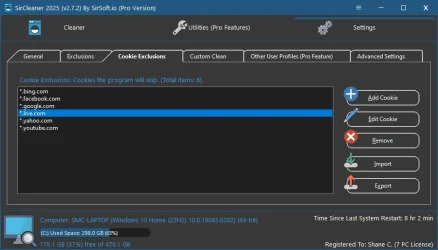
You can exclude files from scanning/cleaning, and you can also create your own custom cleaning rules.

It is all described in the SirCleaner Help file.

Have a great day.

Regards,
Phil
 

My Computers

System One System Two

  • OS
    Windows 11 Pro Version 25H2 (Build 26200.8655
    Computer type
    PC/Desktop
    Manufacturer/Model
    Dell XPS8930 SE
    CPU
    Intel i7-9700K 4700 MHz
    Motherboard
    Dell XPS 8930
    Memory
    32 GB (4 x 8GB SK Hynix DDR4 @1333 MHz) (2666 MHz)
    Graphics Card(s)
    NVIDIA GeForce RTX 2060 (6 GB) GDDR6 300 MHz
    Sound Card
    None
    Monitor(s) Displays
    Dell UltraSharp U2518D 25"
    Screen Resolution
    2560 x 1440
    Hard Drives
    NVMe Intel 1024 TB
    Seagate 2 TB, SATA-III
    Western Digital Black 4TB
    PSU
    850 W Gold Standard
    Case
    Dell XPS 8930 Base (Special Edition)
    Cooling
    Air
    Keyboard
    Dell 0G4D2W
    Mouse
    Dell MOCZUL
    Internet Speed
    Download 553 Mbps, Upload 686 Mbps
    Browser
    Google Chrome
    Antivirus
    ESET Smart Security Premium, plus Malwarebytes Premium
    Other Info
    BIOS Version 1.1.31
  • Operating System
    Windows 11 Pro Version 25H2 (Build 26200.8655)
    Computer type
    Laptop
    Manufacturer/Model
    Dell XPS 15 7590
    CPU
    i7-9750H 4.5 GHz
    Motherboard
    Dell XPS 15 7590
    Memory
    16 GB (2 x 8GB @ 1333 MHz) DDR4-2666 MHz
    Graphics card(s)
    NVIDIA GeForce 1650 4 GB GDDR5
    Sound Card
    None
    Monitor(s) Displays
    Dell XPS 15 7590, 15.6" InfinityEdge Anti-Glare, Non-Touch
    Screen Resolution
    1920 x 1080
    Hard Drives
    512 GB M.2 PCle NVMe SK Hynix
    PSU
    130W Power Adapter
    Case
    Dell XPS 15 7590
    Cooling
    Air
    Keyboard
    Laptop
    Mouse
    Logitech M510
    Internet Speed
    Download: 400 Mbps, Upload: 203 Mbps
    Browser
    Google Chrome
    Antivirus
    ESET Smart Security Premium, plus Malwarebytes Premium
    Other Info
    BIOS Version 1.35.0
I just checked on this - even though I have set Recycle Bin to be cleaned, it isn't touched. Has anyone else encountered this? Or am I missing something?
 

My Computer

System One

  • OS
    Win11 Pro
    Computer type
    PC/Desktop
    Manufacturer/Model
    BeeLink SER Mini
    CPU
    AMD Ryzen 5 5500U
    Motherboard
    BeeLink SER
    Memory
    16 GB
    Graphics Card(s)
    Radeon 2100
    Sound Card
    none
    Monitor(s) Displays
    Primary: Phillips 4K; Secondary: LG 4K
    Screen Resolution
    Both 3860 x 2160
    Hard Drives
    C: NVme 500 GB Windows only
    D: 128 GB NVme User data + Windows Temp via Junction Link
    PSU
    External
    Case
    Mini
    Cooling
    Internal fan
    Keyboard
    Logitech Wireless Lighted
    Mouse
    Kensington ExpertMouse wireless trackball
    Internet Speed
    500/500
    Browser
    Brave
    Antivirus
    Windows Defender
@Birk ,

I keep my Recycle Bin clean manually, so I have never encountered that. I wonder if there are some undeletable files in there? You could enable "Show 'Unable to Delete' Screen After Cleaning," under Settings, the General tab. The Pro version does have a capability to delete stubborn files on reboot, although I have suggested to Shane that the module could use some improvements, which he is going to tackle in the coming weeks.

If not, I would recommend waiting for @SirShane to respond here. I believe he is on vacation with his family for the weekend. Shane has been quiet in the last couple of weeks because of a medical issue that seems to be now resolved. This ping should get his attention.

Have a great day.

Regards,
Phil
 

My Computers

System One System Two

  • OS
    Windows 11 Pro Version 25H2 (Build 26200.8655
    Computer type
    PC/Desktop
    Manufacturer/Model
    Dell XPS8930 SE
    CPU
    Intel i7-9700K 4700 MHz
    Motherboard
    Dell XPS 8930
    Memory
    32 GB (4 x 8GB SK Hynix DDR4 @1333 MHz) (2666 MHz)
    Graphics Card(s)
    NVIDIA GeForce RTX 2060 (6 GB) GDDR6 300 MHz
    Sound Card
    None
    Monitor(s) Displays
    Dell UltraSharp U2518D 25"
    Screen Resolution
    2560 x 1440
    Hard Drives
    NVMe Intel 1024 TB
    Seagate 2 TB, SATA-III
    Western Digital Black 4TB
    PSU
    850 W Gold Standard
    Case
    Dell XPS 8930 Base (Special Edition)
    Cooling
    Air
    Keyboard
    Dell 0G4D2W
    Mouse
    Dell MOCZUL
    Internet Speed
    Download 553 Mbps, Upload 686 Mbps
    Browser
    Google Chrome
    Antivirus
    ESET Smart Security Premium, plus Malwarebytes Premium
    Other Info
    BIOS Version 1.1.31
  • Operating System
    Windows 11 Pro Version 25H2 (Build 26200.8655)
    Computer type
    Laptop
    Manufacturer/Model
    Dell XPS 15 7590
    CPU
    i7-9750H 4.5 GHz
    Motherboard
    Dell XPS 15 7590
    Memory
    16 GB (2 x 8GB @ 1333 MHz) DDR4-2666 MHz
    Graphics card(s)
    NVIDIA GeForce 1650 4 GB GDDR5
    Sound Card
    None
    Monitor(s) Displays
    Dell XPS 15 7590, 15.6" InfinityEdge Anti-Glare, Non-Touch
    Screen Resolution
    1920 x 1080
    Hard Drives
    512 GB M.2 PCle NVMe SK Hynix
    PSU
    130W Power Adapter
    Case
    Dell XPS 15 7590
    Cooling
    Air
    Keyboard
    Laptop
    Mouse
    Logitech M510
    Internet Speed
    Download: 400 Mbps, Upload: 203 Mbps
    Browser
    Google Chrome
    Antivirus
    ESET Smart Security Premium, plus Malwarebytes Premium
    Other Info
    BIOS Version 1.35.0
I just checked on this - even though I have set Recycle Bin to be cleaned, it isn't touched. Has anyone else encountered this? Or am I missing something?
Sorry for late reply, had been sick, kidney stones for the first time ever. I hate getting older lol

As for the recycle bin, it currently only cleans the main Windows drive recycle bin, as it accesses the files directly. I was trying to find how to use the API to call it directly but found it not reliable and didn't remove everything when multiple users on the system and wouldn't report the size of the files in the recycle bin. If you have items from different drive letters then the recycle bin wouldn't show empty.

So two ways I can change that in the next update. Either have the program simply check the recycle bin on each drive (Would be fastest) or try getting the API to work with the recycle bin. No matter what it needs updated and so will be on my list to get done for the next update!
 

My Computer

System One

  • OS
    Windows 11
    Computer type
    PC/Desktop
Welcome back SirShane - here's hoping you'll stay a stones throw away from any more kidney stones. (Sorry, I just couldn't resist that one.)

Thanks for explaining how you go after Recycle Bin contents. That could explain why I have the situation I have.

I have used a Junction Link to physically direct all temporary files (Windows/Temp) to a second SSD (Drive D:) on my system. That means the files that end up in the Recycle Bin will be a mixture of files that get deleted from Drive D: as well as those that get deleted from the Windows/Temp directory. So depending on what I've done during the day there could easily be Recycle Bin contents left over that your cleaner just didn't see.
 

My Computer

System One

  • OS
    Win11 Pro
    Computer type
    PC/Desktop
    Manufacturer/Model
    BeeLink SER Mini
    CPU
    AMD Ryzen 5 5500U
    Motherboard
    BeeLink SER
    Memory
    16 GB
    Graphics Card(s)
    Radeon 2100
    Sound Card
    none
    Monitor(s) Displays
    Primary: Phillips 4K; Secondary: LG 4K
    Screen Resolution
    Both 3860 x 2160
    Hard Drives
    C: NVme 500 GB Windows only
    D: 128 GB NVme User data + Windows Temp via Junction Link
    PSU
    External
    Case
    Mini
    Cooling
    Internal fan
    Keyboard
    Logitech Wireless Lighted
    Mouse
    Kensington ExpertMouse wireless trackball
    Internet Speed
    500/500
    Browser
    Brave
    Antivirus
    Windows Defender
Welcome back SirShane - here's hoping you'll stay a stones throw away from any more kidney stones. (Sorry, I just couldn't resist that one.)

Thanks for explaining how you go after Recycle Bin contents. That could explain why I have the situation I have.

I have used a Junction Link to physically direct all temporary files (Windows/Temp) to a second SSD (Drive D:) on my system. That means the files that end up in the Recycle Bin will be a mixture of files that get deleted from Drive D: as well as those that get deleted from the Windows/Temp directory. So depending on what I've done during the day there could easily be Recycle Bin contents left over that your cleaner just didn't see.
Ha! I did laugh at that lol

That is a first for a setup like that, I wonder if the custom clean option could help with that. Right now the program looks at the $Recycle.Bin folder on the windows drive, next update I will have it look for that folder on all drives (Except mapped drives) and it will pick those up. For now you could use the custom clean (under settings) and have it look at D:\$Recycle.Bin or anything else you need till I get the update out, which looks like will be next week. Im still playing catch up with everything now that I'm feeling 100% again.
 

My Computer

System One

  • OS
    Windows 11
    Computer type
    PC/Desktop
Sorry for late reply, had been sick, kidney stones for the first time ever. I hate getting older lol
Kidney stones can be extremely painful.
 

My Computers

System One System Two

  • OS
    Windows 11 Pro
    Computer type
    PC/Desktop
    Manufacturer/Model
    Stigg's Build
    CPU
    Intel Core i9-10900X
    Motherboard
    GIGABYTE X299X DESIGNARE 10G
    Memory
    Corsair 64 GB (4 x 16 GB) CMW64GX4M4C3000C15 Vengeance RGB Pro 3000Mhz DDR4
    Graphics Card(s)
    GIGABYTE GeForce GTX 1660 Super Mini ITX 6 GB OC
    Sound Card
    Realtek ALC1220
    Monitor(s) Displays
    Samsung 27" FHD LED FreeSync Gaming Monitor (LS27F350FHEXXY)
    Screen Resolution
    1920 x 1080
    Hard Drives
    Samsung 970 Pro Series 1TB M.2 2280 NVMe SSD
    Western Digital Red Pro WD8003FFBX-68B9AN0 8 TB, 7200 RPM, SATA-III
    Western Digital Red Pro WD8003FFBX-68B9AN0 8 TB, 7200 RPM, SATA-III
    PSU
    Corsair HX1200 1200W 80 Plus Platinum
    Case
    Fractal Design Define 7 Black Solid Case
    Cooling
    Noctua NH-D15 Chromax Black
    Keyboard
    Razer Ornata V2
    Mouse
    Razer DeathAdder Essential
    Internet Speed
    FTTN 100Mbps / 40Mbps
    Browser
    Mozilla Firefox
    Antivirus
    N/A
    Other Info
    Logitech BRIO 4k Ultra HD USB-C Webcam
  • Operating System
    Windows 10 Pro
    Computer type
    Laptop
    Manufacturer/Model
    ASUS ROG Zephyrus M GM501GS
    CPU
    Core i7-8750H
    Motherboard
    Zephyrus M GM501GS
    Memory
    SK Hynix 32 GB (2 x 16 GB) HMA82GS6CJR8N-VK 16 GB DDR4-2666 DDR4 SDRAM
    Graphics card(s)
    NVIDIA GeForce GTX 1070
    Sound Card
    Realtek ALC294
    Monitor(s) Displays
    AU Optronics B156HAN07.1 [15.6" LCD]
    Screen Resolution
    1920 x 1080
    Hard Drives
    Samsung MZVKW512HMJP-00000 512 GB, PCI-E 3.0 x4
    Samsung SSD 860 QVO 4TB 4 TB, SATA-III
    PSU
    N/A
    Case
    N/A
    Cooling
    N/A
    Keyboard
    PC/AT Enhanced PS2 Keyboard (101/102-Key)
    Mouse
    Razer DeathAdder Essential
    Internet Speed
    FTTN 100Mbps / 40Mbps
    Browser
    Mozilla Firefox
    Antivirus
    N/A
    Other Info
    USB2.0 HD UVC Webcam
Kidney stones can be extremely painful.
Yeah was a scare when I went to the restroom and seen the blood mixed in. Thankfully I only had back pain, which I didn't have before that night.

Since then I stopped drinking, and to replace drinking hard alcohol (I liked to sip on it and take my time) with water mixed in with over a cup of fresh squeezed lemon juice.
This had to benefits.
1. I think it helped get rid of the stones without passing them and lemon juice can soften and help break stones.
2. The shock to the mouth when drinking something that tart, was similar to the hit to the mouth when drinking hard alcohol, and so kept any cravings at bay.

Been a couple of weeks now and I feel amazing. And so catching up on work and everything else.
 

My Computer

System One

  • OS
    Windows 11
    Computer type
    PC/Desktop
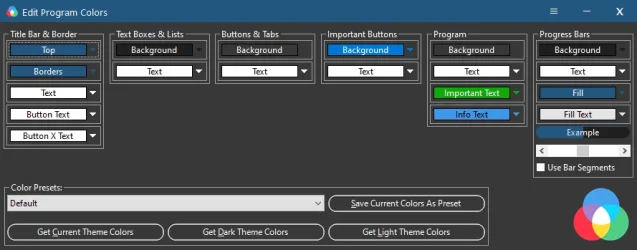
Here is the progress of updating the program to not look so outdated. Still more to do and changes coming, but I'm working hard at it!
 

Attachments

  • 1.webp
    1.webp
    46.9 KB · Views: 8
  • 2.webp
    2.webp
    32.4 KB · Views: 6
  • 3.webp
    3.webp
    39.3 KB · Views: 5
  • 4.webp
    4.webp
    31.7 KB · Views: 4
  • 5.webp
    5.webp
    26.2 KB · Views: 5

My Computer

System One

  • OS
    Windows 11
    Computer type
    PC/Desktop
New version released. Also soon I will be updating the site to include a submit program for cleaning contact form, redoing a few pages and also lowering the price some.

v2.8.0
Huge interface changes and updates, to hopefully make the program look more modern and easier on the eyes.

Updated cleaner Windows Logs.

Updated cleaner Epic Games Launcher.

Updated cleaner Windows Font Cache.

Updated cleaner Windows Temporary Files.

Fixed text "Time Since Last Restart" stretching to far and going under windows version text.

Many other small fixes and changes.
 

My Computer

System One

  • OS
    Windows 11
    Computer type
    PC/Desktop
One hell of a talented guy! Good luck with SirCleaner. I hope it will be a roaring success!
I am waiting for a stable version before giving it a try.
 

My Computer

System One

  • OS
    Win 7,8.1,10,11, Mint, Kde Plasma, Debian
    Computer type
    Laptop
    Manufacturer/Model
    Dell
    CPU
    Intel(R) Core(TM) i7-6500U CPU @ 2.50GHz
    Memory
    16 GB
    Graphics Card(s)
    Intel(R) HD Graphics 520/Nvidia GeForce 930M
    Sound Card
    Intel(R) Display Audio/RealtekAudio
    Monitor(s) Displays
    Generic Pnp Monitor
    Screen Resolution
    1366 X 768
    Hard Drives
    ST2000LM024-1EJ164
    Keyboard
    Eng (US)
    Mouse
    Sanwa Supply
    Browser
    Firefox
    Antivirus
    Avast One
    Other Info
    Too many laptops with different system specifications.
@pewa ,

The latest version is not a beta; it is a stable version. That said, Shane continues to modify and enhance the SirCleaner in response to user suggestions and he investigates all bug reports personally. SirCleaner is a new program, relatively, having been launched earlier this year, so it will only continue to improve.

The SirCleaner website is: sirsoft.io

There is a free and a paid version.

Have a great day.

Regards,
Phil
 

My Computers

System One System Two

  • OS
    Windows 11 Pro Version 25H2 (Build 26200.8655
    Computer type
    PC/Desktop
    Manufacturer/Model
    Dell XPS8930 SE
    CPU
    Intel i7-9700K 4700 MHz
    Motherboard
    Dell XPS 8930
    Memory
    32 GB (4 x 8GB SK Hynix DDR4 @1333 MHz) (2666 MHz)
    Graphics Card(s)
    NVIDIA GeForce RTX 2060 (6 GB) GDDR6 300 MHz
    Sound Card
    None
    Monitor(s) Displays
    Dell UltraSharp U2518D 25"
    Screen Resolution
    2560 x 1440
    Hard Drives
    NVMe Intel 1024 TB
    Seagate 2 TB, SATA-III
    Western Digital Black 4TB
    PSU
    850 W Gold Standard
    Case
    Dell XPS 8930 Base (Special Edition)
    Cooling
    Air
    Keyboard
    Dell 0G4D2W
    Mouse
    Dell MOCZUL
    Internet Speed
    Download 553 Mbps, Upload 686 Mbps
    Browser
    Google Chrome
    Antivirus
    ESET Smart Security Premium, plus Malwarebytes Premium
    Other Info
    BIOS Version 1.1.31
  • Operating System
    Windows 11 Pro Version 25H2 (Build 26200.8655)
    Computer type
    Laptop
    Manufacturer/Model
    Dell XPS 15 7590
    CPU
    i7-9750H 4.5 GHz
    Motherboard
    Dell XPS 15 7590
    Memory
    16 GB (2 x 8GB @ 1333 MHz) DDR4-2666 MHz
    Graphics card(s)
    NVIDIA GeForce 1650 4 GB GDDR5
    Sound Card
    None
    Monitor(s) Displays
    Dell XPS 15 7590, 15.6" InfinityEdge Anti-Glare, Non-Touch
    Screen Resolution
    1920 x 1080
    Hard Drives
    512 GB M.2 PCle NVMe SK Hynix
    PSU
    130W Power Adapter
    Case
    Dell XPS 15 7590
    Cooling
    Air
    Keyboard
    Laptop
    Mouse
    Logitech M510
    Internet Speed
    Download: 400 Mbps, Upload: 203 Mbps
    Browser
    Google Chrome
    Antivirus
    ESET Smart Security Premium, plus Malwarebytes Premium
    Other Info
    BIOS Version 1.35.0
I appreciate it! Yes the releases are all stable builds, I update anytime anyone reports something or has feedback on how to make it better.
 

My Computer

System One

  • OS
    Windows 11
    Computer type
    PC/Desktop
How does this compare to Wise Cleaner? (Not the 365 nonsense, the actual cleaner app)
 

My Computer

System One

  • OS
    Windows 11
    Computer type
    PC/Desktop
    Manufacturer/Model
    Custom
    CPU
    Intel(R) Core(TM) i7-8700 CPU @ 3.20GHz
    Motherboard
    ROG Maximus X Code
    Memory
    G.Skill F4-3200C16D-16GTZR Trident Z RGB Series 16 GBx2 (32GB)
    Graphics Card(s)
    PowerColor Fighter AMD Radeon RX 6700 XT w/ 12GB GDDR6 Memory
    Monitor(s) Displays
    3x ASUS VP28UQG 28" 4K/UHD 3840x2160 1ms DP HDMI Adaptive Sync/FreeSync Eye Care Monitor
    Screen Resolution
    3840x2160 x3
    Hard Drives
    1x 1TB NVME SSD
    1x 1TB Sata SSD
    1x 1TB Hard Drive (7200rpm)
    Keyboard
    Razer Huntsman V2 TKL
    Mouse
    Razer Basilisk V3 Pro
    Internet Speed
    500 Up / 20 Down
    Browser
    Firefox Beta and Brave Beta
    Antivirus
    Defender / MB Firewall Control
How does this compare to Wise Cleaner? (Not the 365 nonsense, the actual cleaner app)
It has a ton of more options to remove even more, like 3 or 4 times more than CCleaner or WDC.
 

My Computers

System One System Two

  • OS
    Windows11 Pro 26200.8655
    Computer type
    PC/Desktop
    Manufacturer/Model
    Dell Alienware Aurora R16
    CPU
    Intel Core i9 14900F (24 -Core, 68 MB Total Cache)
    Motherboard
    Dell Alienware
    Memory
    32GB DDR5
    Graphics Card(s)
    RTX 4080 Super w/581.95
    Sound Card
    Realtec
    Monitor(s) Displays
    Corsair XENEON 32QHD165
    Screen Resolution
    2560 X 1440
    Hard Drives
    1-2TB Samsung 990 Pro PCIe NVMe M2 SSD
    1-4TB Samsung 990 Pro PCIe NVMe M2 SSD
    PSU
    1000 Watt Platinum Dell
    Case
    Alienware
    Cooling
    Liquid Closed Loop
    Keyboard
    Corsair Strafe RGB
    Mouse
    Logitech MK270 Wireless
    Internet Speed
    100Gb's Down-20 Up
    Browser
    Firefox 151.0.4
    Antivirus
    Defender
    Other Info
    Very Quiet And Fast
    CyberPower UPS CP1500PFCLCD
  • Operating System
    PClinuxOS Mate (2025.7)
    Computer type
    PC/Desktop
    Manufacturer/Model
    Intel
    CPU
    13th Gen Inter(R) Core(TM) i3-1315U
    Motherboard
    Intel
    Memory
    64 GB DDR4 @3200 MHz.
    Graphics card(s)
    Internal
    Sound Card
    None
    Monitor(s) Displays
    Dell 2419HGCF
    Screen Resolution
    1920 X 1080
    Hard Drives
    SAMSUNG 980 PRO SSD 2TB, PCIe 4.0 M.2 2280
    PSU
    Chicony 30 Watt
    Case
    Small
    Keyboard
    Dell
    Mouse
    Razor
    Internet Speed
    1GB
    Browser
    Slimjet

Latest Support Threads

Back
Top Bottom