Sleep bug!


BrianInEngland

Well-known member
Pro User
VIP
Local time
12:18 PM
Posts
3,104
OS
Windows 11 Pro 25H2 (RP channel)
I have my User account (admin), and also use a second account (local).
If I switch to the local account without signing out of my main account, Sleep won't then work on my account.
I sign out of the local account when done but no Sleep option will work (desktop shortcut, Start menu or from the lock screen). No errors, just nothing happens.
If I sign out of my account then back in, sleep works normally again.

It's not a new thing, I noticed it a while back.
 

My Computer

System One

  • OS
    Windows 11 Pro 25H2 (RP channel)
    Computer type
    PC/Desktop
    Manufacturer/Model
    MSI
    CPU
    AMD Ryzen 7 9800X3D 8-core
    Motherboard
    MEG X870E Godlike
    Memory
    64GB Corsair Titanium 6000/CL30
    Graphics Card(s)
    MSI Suprim 5080 SOC
    Sound Card
    Soundblaster AE-9
    Monitor(s) Displays
    ASUS TUF Gaming VG289Q
    Screen Resolution
    3840x2160
    Hard Drives
    Samsung 9100 Pro 4TB (gen 5 x4, system drive/games)
    Samsung 990 Pro 2TB
    Samsung 980 Pro 2TB
    Samsung 870 Evo 4TB
    Samsung 870 Evo 2TB
    Samsung T9 4TB
    PSU
    Seasonic PX-2200
    Case
    Bequiet! Dark Base Pro 901
    Cooling
    Noctua NH-D15S Chromax black
    Keyboard
    Logitech G915 X (wired)
    Mouse
    Logitech G903 with PowerPlay charger
    Internet Speed
    900Mb/sec
    Browser
    Microsoft Edge
    Antivirus
    Windows Defender
I would run
powercfg /requests and/or
powercfg /waketimers

Processes, drivers services can all control power execution states. In plain English PSE can refresh the keep awake timer that would prevent the system from entering a sleep state. The other user may have something set that way to prevent sleep.
 

My Computer

System One

  • OS
    Linux Mint
    Computer type
    Laptop
    Manufacturer/Model
    System76 Lemur Pro
I would run
powercfg /requests and/or
powercfg /waketimers

Processes, drivers services can all control power execution states. In plain English PSE can refresh the keep awake timer that would prevent the system from entering a sleep state. The other user may have something set that way to prevent sleep.
Nope, it's not that. If I sign out of my account before or after using the other account it's fine.
If I stayed logged in after using the other account sleep won't work - even if I've signed out of the other user account.
The other user account is also mine (I use it to run a separate OneDrive backup) so there's nothing on there that I don't know about
 

My Computer

System One

  • OS
    Windows 11 Pro 25H2 (RP channel)
    Computer type
    PC/Desktop
    Manufacturer/Model
    MSI
    CPU
    AMD Ryzen 7 9800X3D 8-core
    Motherboard
    MEG X870E Godlike
    Memory
    64GB Corsair Titanium 6000/CL30
    Graphics Card(s)
    MSI Suprim 5080 SOC
    Sound Card
    Soundblaster AE-9
    Monitor(s) Displays
    ASUS TUF Gaming VG289Q
    Screen Resolution
    3840x2160
    Hard Drives
    Samsung 9100 Pro 4TB (gen 5 x4, system drive/games)
    Samsung 990 Pro 2TB
    Samsung 980 Pro 2TB
    Samsung 870 Evo 4TB
    Samsung 870 Evo 2TB
    Samsung T9 4TB
    PSU
    Seasonic PX-2200
    Case
    Bequiet! Dark Base Pro 901
    Cooling
    Noctua NH-D15S Chromax black
    Keyboard
    Logitech G915 X (wired)
    Mouse
    Logitech G903 with PowerPlay charger
    Internet Speed
    900Mb/sec
    Browser
    Microsoft Edge
    Antivirus
    Windows Defender

My Computer

System One

  • OS
    Windows 11 Pro 25H2
    Computer type
    PC/Desktop
    Manufacturer/Model
    Intel NUC12WSHi7
    CPU
    12th Gen Core i7-1260P
    Motherboard
    NUC12WSBi7
    Memory
    64 GB Micron PC4-25600
    Graphics Card(s)
    Intel Iris Xe Graphics
    Sound Card
    on-board Realtek HD Audio
    Monitor(s) Displays
    Dell U3219Q
    Screen Resolution
    3840 x 2160
    Hard Drives
    Samsung SSD 990 PRO 1TB
    Crucial MX500 2 TB
    Antivirus
    Microsoft Defender
If I sign out of my account then back in, sleep works normally again
1 What power/sleep-related utilities are in use by either user account?
2 What Windows tweaks have been done in either user account?
3 Have all the BIOS updates & other updates provided by the hardware makers been done?
4 Are there any warnings in Device manager?
5 Have you tried reinstalling the display driver [in case it has become corrupted]?
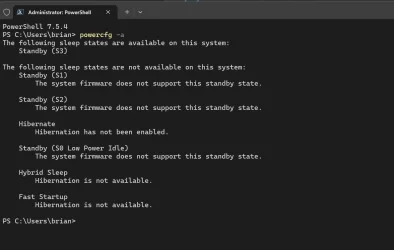
6 What are the results of running PowerCfg -a and has anything ever been done to change any of those parameters?


Denis
 

My Computer

System One

  • OS
    Windows 11 Home x64 Version 25H2 Build 26200.8037
1 What power/sleep-related utilities are in use by either user account?
2 What Windows tweaks have been done in either user account?
3 Have all the BIOS updates & other updates provided by the hardware makers been done?
4 Are there any warnings in Device manager?
5 Have you tried reinstalling the display driver [in case it has become corrupted]?
6 What are the results of running PowerCfg -a and has anything ever been done to change any of those parameters?


Denis
1) none, I've never used any other than Windows settings
2) none, I basically log in to sync another OneDrive account, then log out.
3) Yes, all up to date
4) Nope
5) Yes, DDU driver and re-installed. Using the latest Nvidia driver released recently
6) see picture attached
 

Attachments

  • Screenshot 2026-01-14 153053.webp
    Screenshot 2026-01-14 153053.webp
    42.2 KB · Views: 1

My Computer

System One

  • OS
    Windows 11 Pro 25H2 (RP channel)
    Computer type
    PC/Desktop
    Manufacturer/Model
    MSI
    CPU
    AMD Ryzen 7 9800X3D 8-core
    Motherboard
    MEG X870E Godlike
    Memory
    64GB Corsair Titanium 6000/CL30
    Graphics Card(s)
    MSI Suprim 5080 SOC
    Sound Card
    Soundblaster AE-9
    Monitor(s) Displays
    ASUS TUF Gaming VG289Q
    Screen Resolution
    3840x2160
    Hard Drives
    Samsung 9100 Pro 4TB (gen 5 x4, system drive/games)
    Samsung 990 Pro 2TB
    Samsung 980 Pro 2TB
    Samsung 870 Evo 4TB
    Samsung 870 Evo 2TB
    Samsung T9 4TB
    PSU
    Seasonic PX-2200
    Case
    Bequiet! Dark Base Pro 901
    Cooling
    Noctua NH-D15S Chromax black
    Keyboard
    Logitech G915 X (wired)
    Mouse
    Logitech G903 with PowerPlay charger
    Internet Speed
    900Mb/sec
    Browser
    Microsoft Edge
    Antivirus
    Windows Defender
P Seymour explaination :D.

power execution state
 

My Computer

System One

  • OS
    Linux Mint
    Computer type
    Laptop
    Manufacturer/Model
    System76 Lemur Pro
Brian,

Your answers mean that none of the causes I suspected are present.

My only semi-sensible suggestion is that you create two user accounts for test purposes to see if
1 Switching to one of the new ones from your main account has the same symptoms, and
2 Logging in to one of the new ones when Windows starts then switching to the other new one has the same symptoms.
It's merely a semi-sensible suggestion because user profile corruption is nowhere near as prevalent as it used to be.

Added a few minutes later: - In light of your thread Account info not showing MS 365 sub - ElevenForum I think my suggested user accounts tests are not the long shot I first thought.


Best of luck,
Denis
 

My Computer

System One

  • OS
    Windows 11 Home x64 Version 25H2 Build 26200.8037
Brian,

Your answers mean that none of the causes I suspected are present.

My only semi-sensible suggestion is that you create two user accounts for test purposes to see if
1 Switching to one of the new ones from your main account has the same symptoms, and
2 Logging in to one of the new ones when Windows starts then switching to the other new one has the same symptoms.
It's merely a semi-sensible suggestion because user profile corruption is nowhere near as prevalent as it used to be.


Best of luck,
Denis
Suggestions noted.
It's not a major issue because Sleep works normally if I log out of my account before or after I've used the other one.
Certainly weird though
If Sleep didn't work at all I'd be more concerned and do more troubleshooting
 

My Computer

System One

  • OS
    Windows 11 Pro 25H2 (RP channel)
    Computer type
    PC/Desktop
    Manufacturer/Model
    MSI
    CPU
    AMD Ryzen 7 9800X3D 8-core
    Motherboard
    MEG X870E Godlike
    Memory
    64GB Corsair Titanium 6000/CL30
    Graphics Card(s)
    MSI Suprim 5080 SOC
    Sound Card
    Soundblaster AE-9
    Monitor(s) Displays
    ASUS TUF Gaming VG289Q
    Screen Resolution
    3840x2160
    Hard Drives
    Samsung 9100 Pro 4TB (gen 5 x4, system drive/games)
    Samsung 990 Pro 2TB
    Samsung 980 Pro 2TB
    Samsung 870 Evo 4TB
    Samsung 870 Evo 2TB
    Samsung T9 4TB
    PSU
    Seasonic PX-2200
    Case
    Bequiet! Dark Base Pro 901
    Cooling
    Noctua NH-D15S Chromax black
    Keyboard
    Logitech G915 X (wired)
    Mouse
    Logitech G903 with PowerPlay charger
    Internet Speed
    900Mb/sec
    Browser
    Microsoft Edge
    Antivirus
    Windows Defender

Latest Support Threads

Back
Top Bottom