
Solved Slow Wi-fi speed - baffling me


zaarin_2003

Member
Local time
4:55 AM
Posts
21
OS
Windows 11
Hi,

I recently upgraded my internet connection from BT fibre to YouFibre - 900Mb/s.

I'm not expecting to achieve those speeds for obvious reasons, the world isn't perfect, and it is also broadcasts on 802.11ac, which I would expect to see speeds drop off fairly quickly. So, it was no surprise to me that I saw download speeds of 400 or so on my iPhone 13 in my study, which is in the floor above the wifi router and a couple of rooms away (so, approximately 25 feet away or so). But what surprises me is that my PC, which is set at the desk I'm sitting at with my iPhone achieving speeds pushing 400, only downloads at 200-270ish. These results are repeatable and both tests on both devices are done at the same time.

Why would two devices, literally next to each other, get such vastly different download speeds?

My PC is connected via a wifi dongle, specifically a TP-Link A1300 (Amazon.co.uk). it should be capable of speeds I'm looking for. It connects to my PC with a USB 3 socket on the motherboard, I haven't plugged it into a USB 2, because there aren't any on my motherboard. 867 Mbps on the 5Ghz and 400 Mbps on the 2.4Ghz band.

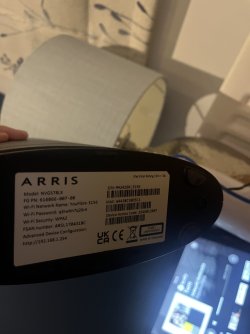
The router is an Arris NVG578LX (https://www.commscope.com/globalassets/digizuite/844935-nvg578lx.pdf), which I gather transmits both the 5ghz and 2.4ghz frequencies on one SSID, which the device dynamically connects to. So, I can't choose which frequency the PC connects to manually, well, not that I know of.

Are there any settings I should check? Could the PC be connecting to the 2.4ghz frequency by mistake?

My settings and specs are all attached. Windows 11 23H2.

Thanks!

M

Edit: Ok, so both are connecting to the 802.11 ac channel, so the PC is not defaulting to the 2.4Ghz frequency.
 

Attachments
  • IMG_1780.jpg
    IMG_1780.jpg
    562.7 KB · Views: 1
  • Screenshot 2024-10-10 190605.png
    Screenshot 2024-10-10 190605.png
    40.8 KB · Views: 1
  • Screenshot 2024-10-10 200336.jpg
    Screenshot 2024-10-10 200336.jpg
    69.5 KB · Views: 1
Last edited:

My Computer My Computer

At a glance

Windows 11i9 990032 Gb DDR4nVidia 1070
OS
Windows 11
Computer type
PC/Desktop
CPU
i9 9900
Motherboard
Z390 Gigabyte Aorus Elite
Memory
32 Gb DDR4
Graphics Card(s)
nVidia 1070
Sound Card
Realtek
Monitor(s) Displays
Samsung 4k
Screen Resolution
4k
Hard Drives
Intel Optane 905p
PSU
600w
Browser
Edge
Antivirus
Microsoft Defender
Hi,

I recently upgraded my internet connection from BT fibre to YouFibre - 900Mb/s.

I'm not expecting to achieve those speeds for obvious reasons, the world isn't perfect, and it is also broadcasts on 802.11ac, which I would expect to see speeds drop off fairly quickly. So, it was no surprise to me that I saw download speeds of 400 or so on my iPhone 13 in my study, which is in the floor above the wifi router and a couple of rooms away (so, approximately 25 feet away or so). But what surprises me is that my PC, which is set at the desk I'm sitting at with my iPhone achieving speeds pushing 400, only downloads at 200-270ish. These results are repeatable and both tests on both devices are done at the same time.

Why would two devices, literally next to each other, get such vastly different download speeds?

My PC is connected via a wifi dongle, specifically a TP-Link A1300 (Amazon.co.uk). it should be capable of speeds I'm looking for. It connects to my PC with a USB 3 socket on the motherboard, I haven't plugged it into a USB 2, because there aren't any on my motherboard. 867 Mbps on the 5Ghz and 400 Mbps on the 2.4Ghz band.

The router is an Arris NVG578LX (https://www.commscope.com/globalassets/digizuite/844935-nvg578lx.pdf), which I gather transmits both the 5ghz and 2.4ghz frequencies on one SSD, which the device dynamically connects to. So, I can't choose which frequency the PC connects to manually, well, not that I know of.

Are there any settings I should check? Could the PC be connecting to the 2.4ghz frequency by mistake?

My settings and specs are all attached. Windows 11 23H2.

Thanks!

M
I had an ISP router that dumbed down the bands so you could only have only one band like you say. The ISP bs excuse was it was less confusing for majority of users!

I got round it by connnecting a second router via ethernet lan port to lan port, gave it a fixed IP address on same subnet, and turned off dchp on second router. I could then set two separate wifi bands on second router.

Regarding wif differences, it really depends on the quality of the wifi adaptor. I have two laptops connected to a nominal 900 mb/s ISP speed.
At the same distance, my older laptop (wifi 5) gives a speed of around 450 mb/s. The new laptop (on wifi 6) only runs at around 300 mb/s.

However, if both laptops are within a meter of the router, the old one maxes out at around 800 mb/s but I get the full 850+ mb/s on the new one.

So distance is a big factor, but also quality of the hardware is important too. I doubt there is anything wrong - it is just what is.

You could be right about auto connecting to 2.4 ghz which is more crowded, but I do not think so. You should be able to tell from network and wifi internet settings which band you are connected to
 

My Computer My Computer

At a glance

Windows 11 Pro + Win11 Canary VM.I9 13th gen i9-13900H 2.60 GHZ16 GB solderedIntegrated Intel Iris XE
OS
Windows 11 Pro + Win11 Canary VM.
Computer type
Laptop
Manufacturer/Model
ASUS Zenbook 14
CPU
I9 13th gen i9-13900H 2.60 GHZ
Motherboard
Yep, Laptop has one.
Memory
16 GB soldered
Graphics Card(s)
Integrated Intel Iris XE
Sound Card
Realtek built in
Monitor(s) Displays
laptop OLED screen
Screen Resolution
2880x1800 touchscreen
Hard Drives
1 TB NVME SSD (only weakness is only one slot)
PSU
Internal + 65W thunderbolt USB4 charger
Case
Yep, got one
Cooling
Stella Artois (UK pint cans - 568 ml) - extra cost.
Keyboard
Built in UK keybd
Mouse
Bluetooth , wireless dongled, wired
Internet Speed
900 mbs (ethernet), wifi 6 typical 350-450 mb/s both up and down
Browser
Edge
Antivirus
Defender
Other Info
TPM 2.0, 2xUSB4 thunderbolt, 1xUsb3 (usb a), 1xUsb-c, hdmi out, 3.5 mm audio out/in combo, ASUS backlit trackpad (inc. switchable number pad)

Macrium Reflect Home V8
Office 365 Family (6 users each 1TB onedrive space)
Hyper-V (a vm runs almost as fast as my older laptop)
I had an ISP router that dumbed down the bands so you could only have only one band like you say. The ISP bs excuse was it was less confusing for majority of users!

I got round it by connnecting a second router via ethernet lan port to lan port, gave it a fixed IP address on same subnet, and turned off dchp on second router. I could then set two separate wifi bands on second router.

Regarding wif differences, it really depends on the quality of the wifi adaptor. I have two laptops connected to a nominal 900 mb/s ISP speed.
At the same distance, my older laptop (wifi 5) gives a speed of around 450 mb/s. The new laptop (on wifi 6) only runs at around 300 mb/s.

However, if both laptops are within a meter of the router, the old one maxes out at around 800 mb/s but I get the full 850+ mb/s on the new one.

So distance is a big factor, but also quality of the hardware is important too. I doubt there is anything wrong - it is just what is.

You could be right about auto connecting to 2.4 ghz which is more crowded, but I do not think so. You should be able to tell from network and wifi internet settings which band you are connected to
I don't really mind the way it combines both bands into one SSD, as long as it picks the right one! Luckily, there is an option on the router to split it into two SSIDs if I wanted to, and I was tempted to make sure the PC was connecting to the 5Ghz. But anyway, you were right, it was easy to check from the wifi settings that both were connected to the 5Ghz band.

Maybe although the dongle on my PC has the ability to connect at 867mb/s, perhaps it has a poor quality aerial? i.e a worse quality one than the iPhone (which I suppose you would expect, right?). It's does actually have a physical aerial, it isn't one of those tiny stubby dongles, but has a three inch aerial you can adjust.
 

My Computer My Computer

At a glance

Windows 11i9 990032 Gb DDR4nVidia 1070
OS
Windows 11
Computer type
PC/Desktop
CPU
i9 9900
Motherboard
Z390 Gigabyte Aorus Elite
Memory
32 Gb DDR4
Graphics Card(s)
nVidia 1070
Sound Card
Realtek
Monitor(s) Displays
Samsung 4k
Screen Resolution
4k
Hard Drives
Intel Optane 905p
PSU
600w
Browser
Edge
Antivirus
Microsoft Defender
I don't really mind the way it combines both bands into one SSD, as long as it picks the right one! Luckily, there is an option on the router to split it into two SSIDs if I wanted to, and I was tempted to make sure the PC was connecting to the 5Ghz. But anyway, you were right, it was easy to check from the wifi settings that both were connected to the 5Ghz band.

Maybe although the dongle on my PC has the ability to connect at 867mb/s, perhaps it has a poor quality aerial? i.e a worse quality one than the iPhone (which I suppose you would expect, right?). It's does actually have a physical aerial, it isn't one of those tiny stubby dongles, but has a three inch aerial you can adjust.
My new ISP's (vodafone) router does allow bands to be separated. Apart from a couple of chromecasts, I use 5gHZ for everything, so I always split the bands.

The trick of adding a second router also allows me to connect laptop to wifi 6e band - my laptop had 6e capability but not the vodafone router.

Pretty sure it comes down to factors like the aerial quality.
 

My Computer My Computer

At a glance

Windows 11 Pro + Win11 Canary VM.I9 13th gen i9-13900H 2.60 GHZ16 GB solderedIntegrated Intel Iris XE
OS
Windows 11 Pro + Win11 Canary VM.
Computer type
Laptop
Manufacturer/Model
ASUS Zenbook 14
CPU
I9 13th gen i9-13900H 2.60 GHZ
Motherboard
Yep, Laptop has one.
Memory
16 GB soldered
Graphics Card(s)
Integrated Intel Iris XE
Sound Card
Realtek built in
Monitor(s) Displays
laptop OLED screen
Screen Resolution
2880x1800 touchscreen
Hard Drives
1 TB NVME SSD (only weakness is only one slot)
PSU
Internal + 65W thunderbolt USB4 charger
Case
Yep, got one
Cooling
Stella Artois (UK pint cans - 568 ml) - extra cost.
Keyboard
Built in UK keybd
Mouse
Bluetooth , wireless dongled, wired
Internet Speed
900 mbs (ethernet), wifi 6 typical 350-450 mb/s both up and down
Browser
Edge
Antivirus
Defender
Other Info
TPM 2.0, 2xUSB4 thunderbolt, 1xUsb3 (usb a), 1xUsb-c, hdmi out, 3.5 mm audio out/in combo, ASUS backlit trackpad (inc. switchable number pad)

Macrium Reflect Home V8
Office 365 Family (6 users each 1TB onedrive space)
Hyper-V (a vm runs almost as fast as my older laptop)
"Why would two devices, literally next to each other, get such vastly different download speeds?"

That is not a vast difference at all, rather small and well within the bounds of an uncontrolled experiment.
You can get that sort of variation easily by merely changing the positioning of aerials within or outside the devices concerned by a few inches/cms or re-orienting the aerial. Particularly at that sort of distance.
Also the PC box itself is a large chunk of metal which will also affect things, partially blocking or reflecting wireless signals.

I have a very similar USB Wireless dongle which in addition has a little USB dock so a lot of positioning is available, and it shows a vast variations in signal strength which in turn relates to the speed.
 

My Computer My Computer

At a glance

Windows 11
OS
Windows 11
"Why would two devices, literally next to each other, get such vastly different download speeds?"

That is not a vast difference at all, rather small and well within the bounds of an uncontrolled experiment.
You can get that sort of variation easily by merely changing the positioning of aerials within or outside the devices concerned by a few inches/cms or re-orienting the aerial. Particularly at that sort of distance.
Also the PC box itself is a large chunk of metal which will also affect things, partially blocking or reflecting wireless signals.

I have a very similar USB Wireless dongle which in addition has a little USB dock so a lot of positioning is available, and it shows a vast variations in signal strength which in turn relates to the speed.
I appreciate all you say, and you’re probably right. I have bought a dongle with a larger arrial and on a cable with a dock, so that it can be positioned away from the PC, on the desk or such, rather than being directly plugged into the back of the PC box (which, incidentally is on the floor next to an inactive metal radiator).

But is it really a small difference? The phone connects at almost twice the speed of the PC, 400 compared to 200ish.
 

My Computer My Computer

At a glance

Windows 11i9 990032 Gb DDR4nVidia 1070
OS
Windows 11
Computer type
PC/Desktop
CPU
i9 9900
Motherboard
Z390 Gigabyte Aorus Elite
Memory
32 Gb DDR4
Graphics Card(s)
nVidia 1070
Sound Card
Realtek
Monitor(s) Displays
Samsung 4k
Screen Resolution
4k
Hard Drives
Intel Optane 905p
PSU
600w
Browser
Edge
Antivirus
Microsoft Defender
"Why would two devices, literally next to each other, get such vastly different download speeds?"

That is not a vast difference at all, rather small and well within the bounds of an uncontrolled experiment.
You can get that sort of variation easily by merely changing the positioning of aerials within or outside the devices concerned by a few inches/cms or re-orienting the aerial. Particularly at that sort of distance.
Also the PC box itself is a large chunk of metal which will also affect things, partially blocking or reflecting wireless signals.

I have a very similar USB Wireless dongle which in addition has a little USB dock so a lot of positioning is available, and it shows a vast variations in signal strength which in turn relates to the speed.
So, you were right. I bought a single that had a meter or so cable. Literally putting it on the desk rather than directly connected to the back of the Pc, which is on the floor next to a cold metal radiator, boosted the speed up from 250 to 450! Thanks
 

My Computer My Computer

At a glance

Windows 11i9 990032 Gb DDR4nVidia 1070
OS
Windows 11
Computer type
PC/Desktop
CPU
i9 9900
Motherboard
Z390 Gigabyte Aorus Elite
Memory
32 Gb DDR4
Graphics Card(s)
nVidia 1070
Sound Card
Realtek
Monitor(s) Displays
Samsung 4k
Screen Resolution
4k
Hard Drives
Intel Optane 905p
PSU
600w
Browser
Edge
Antivirus
Microsoft Defender
The problem is that you have different implementations of 802.11AC using different Wi-Fi chipsets on the router and the clients so some work better with the other and some don't.
 

My Computer My Computer

At a glance

WindowsXP/7/8/8.1/10/11,Linux,Android,FreeBSD...Intel® Core™ i7-8750H 8th Gen 2.2Ghz up to 4....64GB using 2x32GB CL16 Mushkin redLine modulesIntel UHD 630 & NVIDIA GeForce GTX 1050 Ti wi...
OS
WindowsXP/7/8/8.1/10/11,Linux,Android,FreeBSD Unix
Computer type
Laptop
Manufacturer/Model
Dell XPS 15 9570
CPU
Intel® Core™ i7-8750H 8th Gen 2.2Ghz up to 4.1Ghz
Motherboard
Dell XPS 15 9570
Memory
64GB using 2x32GB CL16 Mushkin redLine modules
Graphics Card(s)
Intel UHD 630 & NVIDIA GeForce GTX 1050 Ti with 4GB DDR5
Sound Card
Realtek ALC3266-CG
Monitor(s) Displays
15.6" 4K Touch UltraHD 3840x2160 made by Sharp
Screen Resolution
3840x2160 4K UltraHD
Hard Drives
Samsung MZ-V9P4T0B/AM 990 PRO 4TB PCIe®4.0 NVMe™ M.2 SSD was Toshiba KXG60ZNV1T02 NVMe 1TB SSD
PSU
Dell XPS 15 9570
Case
Dell XPS 15 9570
Cooling
Stock
Keyboard
Stock
Mouse
SwitftPoint ProPoint
Internet Speed
Comcast/XFinity 1.44Gbps/42.5Mbps
Browser
Microsoft EDGE (Chromium based) & Google Chrome
Antivirus
Windows Defender that came with Windows
Back
Top Bottom




