
Snipping tool error message


dikesh

New member
Local time
4:10 AM
Posts
1
OS
windows 11
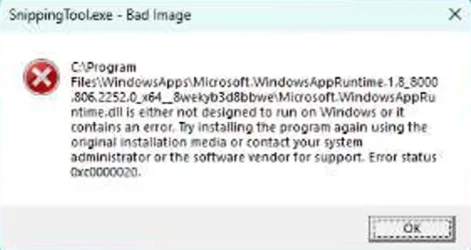
Got snipping tool error as "C:\Program Files\WindowsApps\Microsoft.WindowsAppRuntime.1.8_8000.806.2252.0_x64__8wekyb3d8bbwe\Microsoft.WindowsAppRuntime.dll is either not designed to run on Windows or it contains an error. Try installing the program again using the original installation media or contact your system administrator or the software vendor for support. Error status 0xc0000020. " also in attached the screenshot

Already did dism, sfc check but issue still persist

Any one has same issue in windows 11 and resolved it, please let me know.
 

Attachments
  • snipping tool error.webp
    snipping tool error.webp
    23.7 KB · Views: 2

My Computer My Computer

At a glance

windows 11
OS
windows 11
Computer type
Laptop
Manufacturer/Model
dell
0xc0000020 (NT: 0xc0000020 STATUS_INVALID_FILE_FOR_SECTION) -- 3221225504 (-1073741792)
Error message text: {Bad File}
The attributes of the specified mapping file for a section of memory cannot be read.


  • Press the Windows Key and type PowerShell.
  • Right-click on Windows PowerShell and select Run as administrator.

Copy and paste the following command into the window and press Enter:

Powershell:
Get-AppxPackage -allusers *Microsoft.ScreenSketch* | Foreach {Add-AppxPackage -DisableDevelopmentMode -Register "$($_.InstallLocation)\AppXManifest.xml"}


Wait for the process to complete (this should only take a few seconds), then try searching for the Snipping Tool in your Start menu again.
 

My Computer My Computer

At a glance

Windows 11AMD Ryzen 7 5700GMicron Technology DDR4-3200 16GBNVIDIA GeForce RTX 3060
OS
Windows 11
Computer type
PC/Desktop
Manufacturer/Model
HP Pavilion
CPU
AMD Ryzen 7 5700G
Motherboard
Erica6
Memory
Micron Technology DDR4-3200 16GB
Graphics Card(s)
NVIDIA GeForce RTX 3060
Sound Card
Realtek ALC671
Monitor(s) Displays
Samsung SyncMaster U28E590
Screen Resolution
3840 x 2160
Hard Drives
SAMSUNG MZVLQ1T0HALB-000H1
Windows > Settings > Apps > Installed apps > Snipping Tool > 3 dots > Advanced options >
Terminate, Repair, Reset, or uninstall.

It is in the MS Store to re-install.
Also whilst in MS Store > Downloads > Check for updates.
 

My Computer My Computer

At a glance

Windows 11
OS
Windows 11
Back
Top Bottom




