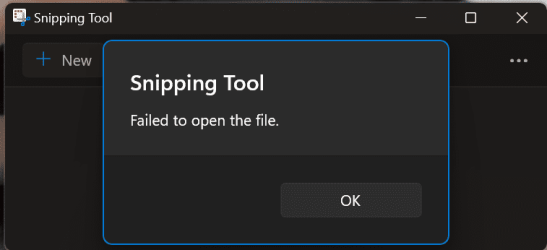
Snipping Tool problem


BrianInEngland

Well-known member
Pro User
VIP
Local time
12:04 AM
Posts
3,200
OS
Windows 11 Pro 25H2 (RP channel)
I've been getting problems with Snipping Tool since a recent update (see pic)
I've tried repairing, resetting, uninstall and re-install.

I don't get this error if I turn OFF 'automatically save screenshots'
 

Attachments

  • Screenshot (15).png
    Screenshot (15).png
    11.6 KB · Views: 3

My Computer My Computer

At a glance

Windows 11 Pro 25H2 (RP channel)AMD Ryzen 7 9800X3D 8-core64GB Corsair Titanium 6000/CL30MSI Suprim 5080 SOC
OS
Windows 11 Pro 25H2 (RP channel)
Computer type
PC/Desktop
Manufacturer/Model
MSI
CPU
AMD Ryzen 7 9800X3D 8-core
Motherboard
MEG X870E Godlike
Memory
64GB Corsair Titanium 6000/CL30
Graphics Card(s)
MSI Suprim 5080 SOC
Sound Card
Soundblaster AE-9
Monitor(s) Displays
ASUS TUF Gaming VG289Q
Screen Resolution
3840x2160
Hard Drives
Samsung 9100 Pro 4TB (gen 5 x4, system drive/games)
Samsung 990 Pro 2TB
Samsung 980 Pro 2TB
Samsung 870 Evo 4TB
Samsung 870 Evo 2TB
Samsung T9 4TB
PSU
Seasonic PX-2200
Case
Bequiet! Dark Base Pro 901
Cooling
Noctua NH-D15S Chromax black
Keyboard
Logitech G915 X (wired)
Mouse
Logitech G903 with PowerPlay charger
Internet Speed
900Mb/sec
Browser
Microsoft Edge
Antivirus
Windows Defender
Have you tried selecting "Open the Screenshots Folder" in the 3-dot drop-down menu in Snipping Tool?
I am curious to learn whether or not this action resolves to a folder location that you can actually reach.
This may be the reason why the program throws an error when you set it to automatically save the screen snip.
 

My Computer My Computer

At a glance

Windows 11 Pro 26200.9168Ryzen 5 5600G24GB
OS
Windows 11 Pro 26200.9168
Computer type
PC/Desktop
Manufacturer/Model
Home Built
CPU
Ryzen 5 5600G
Motherboard
ASUS X470 Prime Pro
Memory
24GB
Monitor(s) Displays
Alienware 2518HF
Screen Resolution
1920 x 1080
Hard Drives
Boot: NVME WDC WDS500G; ASUS M.2 Riser card with 3 additional NVME drives
Various Internal SDD (Samsung and WDC) and HDD drives mostly Western Digital
PSU
Seasonic Focus Gold 650W
Case
Corsair 200R
Cooling
Noctua PWM fans x 3
Keyboard
Corsair K60 SE Pro
Mouse
Corsair Dark Core RGB Pro SE
Internet Speed
500/500
Browser
MS Edge
Antivirus
Malwarebytes Premium
Have you tried selecting "Open the Screenshots Folder" in the 3-dot drop-down menu in Snipping Tool?
I am curious to learn whether or not this action resolves to a folder location that you can actually reach.
This may be the reason why the program throws an error when you set it to automatically save the screen snip.

No problem on W11 pro latest canary edition. Images in the middle folder -

Skjámynd 2024-02-22 133349.png

Cheers
jimbo
 

My Computer My Computer

At a glance

Windows XP,11 Linux Fedora Rawhide pre-releas...2 X Intel i7
OS
Windows XP,11 Linux Fedora Rawhide pre-release 46
Computer type
PC/Desktop
CPU
2 X Intel i7
Screen Resolution
4KUHD X 2
The only issue I've had with the Snipping Tool is I inadvertently left it open last evening [just closed the lid and went to bed] and this morning had screen flashing like it was refreshing. Rebooted and flashing still there, turned off Snipping Tool and rebooted, flashing gone.
 

My Computers My Computers

  • At a glance

    Win11 Pro RTM Version 24H2 Build 26100.4202Intel Core i5 11th Gen. 2.40GHz12GB
    OS
    Win11 Pro RTM Version 24H2 Build 26100.4202
    Computer type
    Laptop
    Manufacturer/Model
    Dell Vostro 3400
    CPU
    Intel Core i5 11th Gen. 2.40GHz
    Memory
    12GB
    Hard Drives
    256GB SSD NVMe M.2
  • At a glance

    Win11 Pro RTM Version 24H2 Build 26100.4202Intel Core i5 10th Gen. 2.90GHz16GBOnboard, no VGA, using a DisplayPort-to-VGA a...
    Operating System
    Win11 Pro RTM Version 24H2 Build 26100.4202
    Computer type
    PC/Desktop
    Manufacturer/Model
    Dell Vostro 5890
    CPU
    Intel Core i5 10th Gen. 2.90GHz
    Memory
    16GB
    Graphics card(s)
    Onboard, no VGA, using a DisplayPort-to-VGA adapter
    Monitor(s) Displays
    24" Dell
    Hard Drives
    512GB SSD NVMe, 4TB Seagate HDD
    Browser
    Firefox, Edge
    Antivirus
    Windows Defender/Microsoft Security
No problem on W11 pro latest canary edition. Images in the middle folder -

View attachment 87959

Cheers
jimbo

Have you tried selecting "Open the Screenshots Folder" in the 3-dot drop-down menu in Snipping Tool?
I am curious to learn whether or not this action resolves to a folder location that you can actually reach.
This may be the reason why the program throws an error when you set it to automatically save the screen snip.
Yes it opens the screenshots folder, which is Pictures/Screenshots
 

My Computer My Computer

At a glance

Windows 11 Pro 25H2 (RP channel)AMD Ryzen 7 9800X3D 8-core64GB Corsair Titanium 6000/CL30MSI Suprim 5080 SOC
OS
Windows 11 Pro 25H2 (RP channel)
Computer type
PC/Desktop
Manufacturer/Model
MSI
CPU
AMD Ryzen 7 9800X3D 8-core
Motherboard
MEG X870E Godlike
Memory
64GB Corsair Titanium 6000/CL30
Graphics Card(s)
MSI Suprim 5080 SOC
Sound Card
Soundblaster AE-9
Monitor(s) Displays
ASUS TUF Gaming VG289Q
Screen Resolution
3840x2160
Hard Drives
Samsung 9100 Pro 4TB (gen 5 x4, system drive/games)
Samsung 990 Pro 2TB
Samsung 980 Pro 2TB
Samsung 870 Evo 4TB
Samsung 870 Evo 2TB
Samsung T9 4TB
PSU
Seasonic PX-2200
Case
Bequiet! Dark Base Pro 901
Cooling
Noctua NH-D15S Chromax black
Keyboard
Logitech G915 X (wired)
Mouse
Logitech G903 with PowerPlay charger
Internet Speed
900Mb/sec
Browser
Microsoft Edge
Antivirus
Windows Defender
Forgot to say, even with the error the screenshot does actually save to the Screenshots folder
 

My Computer My Computer

At a glance

Windows 11 Pro 25H2 (RP channel)AMD Ryzen 7 9800X3D 8-core64GB Corsair Titanium 6000/CL30MSI Suprim 5080 SOC
OS
Windows 11 Pro 25H2 (RP channel)
Computer type
PC/Desktop
Manufacturer/Model
MSI
CPU
AMD Ryzen 7 9800X3D 8-core
Motherboard
MEG X870E Godlike
Memory
64GB Corsair Titanium 6000/CL30
Graphics Card(s)
MSI Suprim 5080 SOC
Sound Card
Soundblaster AE-9
Monitor(s) Displays
ASUS TUF Gaming VG289Q
Screen Resolution
3840x2160
Hard Drives
Samsung 9100 Pro 4TB (gen 5 x4, system drive/games)
Samsung 990 Pro 2TB
Samsung 980 Pro 2TB
Samsung 870 Evo 4TB
Samsung 870 Evo 2TB
Samsung T9 4TB
PSU
Seasonic PX-2200
Case
Bequiet! Dark Base Pro 901
Cooling
Noctua NH-D15S Chromax black
Keyboard
Logitech G915 X (wired)
Mouse
Logitech G903 with PowerPlay charger
Internet Speed
900Mb/sec
Browser
Microsoft Edge
Antivirus
Windows Defender
I use that snipping tool a lot. But I always draw an area to snip.
What I like is I can take a snip and not save it, then simply paste into a thread on this forum.
Like right now
1708630790704.png
 

My Computer My Computer

At a glance

windows 11old AMD B958gb
OS
windows 11
Computer type
PC/Desktop
Manufacturer/Model
some kind of old ASUS MB
CPU
old AMD B95
Motherboard
ASUS
Memory
8gb
Hard Drives
ssd WD 500 gb
I use that snipping tool a lot. But I always draw an area to snip.
What I like is I can take a snip and not save it, then simply paste into a thread on this forum.
Like right now
View attachment 88012
Oh yes it's very useful, I've got a workaround for my issue for now but I don't know why it's started misbehaving.
 

My Computer My Computer

At a glance

Windows 11 Pro 25H2 (RP channel)AMD Ryzen 7 9800X3D 8-core64GB Corsair Titanium 6000/CL30MSI Suprim 5080 SOC
OS
Windows 11 Pro 25H2 (RP channel)
Computer type
PC/Desktop
Manufacturer/Model
MSI
CPU
AMD Ryzen 7 9800X3D 8-core
Motherboard
MEG X870E Godlike
Memory
64GB Corsair Titanium 6000/CL30
Graphics Card(s)
MSI Suprim 5080 SOC
Sound Card
Soundblaster AE-9
Monitor(s) Displays
ASUS TUF Gaming VG289Q
Screen Resolution
3840x2160
Hard Drives
Samsung 9100 Pro 4TB (gen 5 x4, system drive/games)
Samsung 990 Pro 2TB
Samsung 980 Pro 2TB
Samsung 870 Evo 4TB
Samsung 870 Evo 2TB
Samsung T9 4TB
PSU
Seasonic PX-2200
Case
Bequiet! Dark Base Pro 901
Cooling
Noctua NH-D15S Chromax black
Keyboard
Logitech G915 X (wired)
Mouse
Logitech G903 with PowerPlay charger
Internet Speed
900Mb/sec
Browser
Microsoft Edge
Antivirus
Windows Defender
I use that snipping tool a lot. But I always draw an area to snip.
What I like is I can take a snip and not save it, then simply paste into a thread on this forum.
Like right now
View attachment 88012
Just save to clipboard rather than to a file. I think the problem then is that the Forum expects to upload an image from a file rather than accept from paste from th clipboard -- not a snipping tool problem but how theForum handles image content.

Cheers
jimbo
 

My Computer My Computer

At a glance

Windows XP,11 Linux Fedora Rawhide pre-releas...2 X Intel i7
OS
Windows XP,11 Linux Fedora Rawhide pre-release 46
Computer type
PC/Desktop
CPU
2 X Intel i7
Screen Resolution
4KUHD X 2
Just save to clipboard rather than to a file. I think the problem then is that the Forum expects to upload an image from a file rather than accept from paste from th clipboard -- not a snipping tool problem but how theForum handles image content.

Cheers
jimbo
All I do is snip , then use paste, file is never saved as it does not exist and it appears on the forum. Every new snip wipes out the old snip like it never was. Just a copy of an image in memory
 

My Computer My Computer

At a glance

windows 11old AMD B958gb
OS
windows 11
Computer type
PC/Desktop
Manufacturer/Model
some kind of old ASUS MB
CPU
old AMD B95
Motherboard
ASUS
Memory
8gb
Hard Drives
ssd WD 500 gb

Latest Support Threads

Back
Top Bottom