Some videos play wrong way from some sites..is there a way to flip them


Fourthcar

Well-known member
Member
Local time
7:24 AM
Posts
76
OS
windows 11 Pro 22H2
I have noticed some videos on various sites ie YouTube,Dailymotion etc play wrong way round...i know there are some software that can rotate 90 / 180 or make videos play them upside but i have not come across any thay play them right way round and you just see a mirror image of the original video ...is there a way to correct this.
with some software.

I think the term is 'flipping'
 
Windows Build/Version
Windows 11 Pro 22H2

My Computer My Computer

At a glance

windows 11 Pro 22H2
OS
windows 11 Pro 22H2
Computer type
PC/Desktop
Manufacturer/Model
Asus
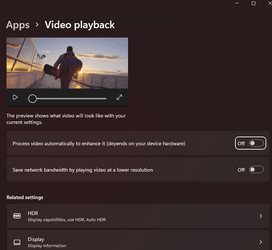
Fiddle around with settings in Video playback, in Display settings you can flip the screen and you can use a video editor like Clipchamp or photos legacy to flip downloaded videos.
 

Attachments

  • 1686997295040.png
    1686997295040.png
    38.7 KB · Views: 1
  • 1686997316131.png
    1686997316131.png
    35.4 KB · Views: 1

My Computers My Computers

  • At a glance

    Windows 11 21H2AMD Ryzen 3 3100Corsair 8GB x 2 (16GB)Asus Nvidia Geforce GTX 1650 Super
    OS
    Windows 11 21H2
    Computer type
    PC/Desktop
    Manufacturer/Model
    Chillblast
    CPU
    AMD Ryzen 3 3100
    Motherboard
    Asus ROG Strix b450-f
    Memory
    Corsair 8GB x 2 (16GB)
    Graphics Card(s)
    Asus Nvidia Geforce GTX 1650 Super
    Monitor(s) Displays
    Dell 27" 1440p
    Screen Resolution
    1440p
    Hard Drives
    Seagate Barracuda 1TB
    256GB NVME Seagate Barracuda
    Browser
    Firefox / Edge
    Antivirus
    Windows Defender
  • At a glance

    Windows 8.1Amd E24GB
    Operating System
    Windows 8.1
    Computer type
    Laptop
    Manufacturer/Model
    HP
    CPU
    Amd E2
    Memory
    4GB
    Hard Drives
    128GB SSD
@Fourthcar
Please fill in "My Computers" section in full so that we don't have to assume what web browser you're running.

If you use MS Edge then verify
edge://settings/system -> Optimize Performance is turned off.
 

My Computer My Computer

At a glance

Windows 11 Pro 23H2Intel i3 8100 @3.6Ghz1 x 16GB DDR4 @2400 MHzNvidia GeForce GT 1030 2GB SDDR4
OS
Windows 11 Pro 23H2
Computer type
PC/Desktop
Manufacturer/Model
MSI / MS-7B29
CPU
Intel i3 8100 @3.6Ghz
Motherboard
H310M PRO-VDH (MS-7B29)
Memory
1 x 16GB DDR4 @2400 MHz
Graphics Card(s)
Nvidia GeForce GT 1030 2GB SDDR4
Sound Card
Realtek VEN_10EC&DEV_0887 / NVIDIA VEN_10DE&DEV_0081
Monitor(s) Displays
Acer V226HQL
Screen Resolution
1920 x 1080
Hard Drives
SSD 500 GB Crucial MX500 / HDD 1 TB TOSHIBA DT01ACA100
PSU
ATX, details unknown
Case
Everest 551B
Cooling
details unknown
Keyboard
Mechanical Gaming Hydra R7 - Rampage
Mouse
Logitech G703
Internet Speed
Down: 28Mbps / Up: 19Mbps
Browser
Microsoft Edge
Antivirus
Microsoft Defender Antivirus
Other Info
Bluetooth: TP Link 5.0 Nano USB adapter UB500
WLAN: D-Link 150 Pico USB adapter, N standard
Web camera: Logitech C270 HD 720p @30fps
Microphone: Trust MICO, model 23790
Back
Top Bottom