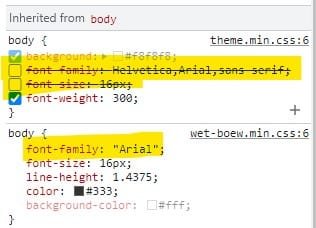
Some *web* pages not displaying fonts correctly: at a loss here


Attachments

  • Screenshot 2022-01-30 005732.jpg
    Screenshot 2022-01-30 005732.jpg
    28.8 KB · Views: 5

My Computer My Computer

At a glance

Windows 11NVIDA 1650 Ti
OS
Windows 11
Computer type
Laptop
Manufacturer/Model
Lenovo
Graphics Card(s)
NVIDA 1650 Ti
Monitor(s) Displays
Lenovo C32q-20
If you have a laptop, you can use Intel for the browser instead of Nvidia.
 

My Computer My Computer

At a glance

Microsoft Windows 11 HomeIntel Core i5-13490F2 x 16 Patriot Memory (PDP Systems) PSD516G56...GIGABYTE GeForce RTX 4070 WINDFORCE OC 12G (G...
OS
Microsoft Windows 11 Home
Computer type
PC/Desktop
Manufacturer/Model
MSI MS-7D98
CPU
Intel Core i5-13490F
Motherboard
MSI B760 GAMING PLUS WIFI
Memory
2 x 16 Patriot Memory (PDP Systems) PSD516G560081 6400MT (32-37-37-74); 1.35V)
Graphics Card(s)
GIGABYTE GeForce RTX 4070 WINDFORCE OC 12G (GV-N4070WF3OC-12GD)
Sound Card
Bluetooth Аудио
Monitor(s) Displays
INNOCN 15K1F
Screen Resolution
1920 x 1080
Hard Drives
WD_BLACK SN770 250GB
KINGSTON SNV2S1000G (ELFK0S.6)
PSU
Thermaltake Toughpower GF3 1000W
Case
CG560 - DeepCool
Cooling
ID-COOLING SE-224-XTS / 2 x 140Mm Fan - rear and top; 3 x 120Mm - front
Keyboard
Corsair K70 RGB TKL
Mouse
Corsair KATAR PRO XT
Internet Speed
100 Mbps
Browser
Firefox
Antivirus
Microsoft Defender Antivirus
Other Info
https://www.userbenchmark.com/UserRun/66553205
I would think the refresh rate should be 60 but check the manual for your monitor.
 
Last edited:

My Computers My Computers

  • At a glance

    Windows 11 Pro 25H2 26200.9168i9-10900 10 core 20 threads32 gbnone-Intel UHD Graphics 630
    OS
    Windows 11 Pro 25H2 26200.9168
    Computer type
    PC/Desktop
    Manufacturer/Model
    Dell Optiplex 7080
    CPU
    i9-10900 10 core 20 threads
    Motherboard
    DELL 0J37VM
    Memory
    32 gb
    Graphics Card(s)
    none-Intel UHD Graphics 630
    Sound Card
    Integrated Realtek
    Monitor(s) Displays
    Benq 27
    Screen Resolution
    2560x1440
    Hard Drives
    2x1tb Solidigm m.2 nvme /External drives 512gb Samsung m.2 sata+2tb Kingston m2.nvme
    PSU
    500w
    Case
    MT
    Cooling
    Dell Premium
    Keyboard
    Logitech wired
    Mouse
    Logitech wireless
    Internet Speed
    so slow I'm too embarrassed to tell
    Browser
    #1 Edge #2 Firefox
    Antivirus
    Defender+MWB Premium
  • At a glance

    Windows 11 Pro 24H2 26200.9168AMD Ryzen 7 6800U32 gbintegrated
    Operating System
    Windows 11 Pro 24H2 26200.9168
    Computer type
    PC/Desktop
    Manufacturer/Model
    Beelink Mini PC SER5
    CPU
    AMD Ryzen 7 6800U
    Memory
    32 gb
    Graphics card(s)
    integrated
    Sound Card
    integrated
    Monitor(s) Displays
    Benq 27
    Screen Resolution
    2560x1440
    Hard Drives
    1TB Crucial nvme
    Keyboard
    Logitech wired
    Mouse
    Logitech wireless
    Internet Speed
    still too embarrassed to tell
    Browser
    Firefox
    Antivirus
    Defender
  • System 3 is non compliant Dell 9020 i7-4770/24gb ram Win11 PRO 26200.9168

My Computers My Computers

  • At a glance

    Windows 11 Pro 25H2 26200.9168i9-10900 10 core 20 threads32 gbnone-Intel UHD Graphics 630
    OS
    Windows 11 Pro 25H2 26200.9168
    Computer type
    PC/Desktop
    Manufacturer/Model
    Dell Optiplex 7080
    CPU
    i9-10900 10 core 20 threads
    Motherboard
    DELL 0J37VM
    Memory
    32 gb
    Graphics Card(s)
    none-Intel UHD Graphics 630
    Sound Card
    Integrated Realtek
    Monitor(s) Displays
    Benq 27
    Screen Resolution
    2560x1440
    Hard Drives
    2x1tb Solidigm m.2 nvme /External drives 512gb Samsung m.2 sata+2tb Kingston m2.nvme
    PSU
    500w
    Case
    MT
    Cooling
    Dell Premium
    Keyboard
    Logitech wired
    Mouse
    Logitech wireless
    Internet Speed
    so slow I'm too embarrassed to tell
    Browser
    #1 Edge #2 Firefox
    Antivirus
    Defender+MWB Premium
  • At a glance

    Windows 11 Pro 24H2 26200.9168AMD Ryzen 7 6800U32 gbintegrated
    Operating System
    Windows 11 Pro 24H2 26200.9168
    Computer type
    PC/Desktop
    Manufacturer/Model
    Beelink Mini PC SER5
    CPU
    AMD Ryzen 7 6800U
    Memory
    32 gb
    Graphics card(s)
    integrated
    Sound Card
    integrated
    Monitor(s) Displays
    Benq 27
    Screen Resolution
    2560x1440
    Hard Drives
    1TB Crucial nvme
    Keyboard
    Logitech wired
    Mouse
    Logitech wireless
    Internet Speed
    still too embarrassed to tell
    Browser
    Firefox
    Antivirus
    Defender
  • System 3 is non compliant Dell 9020 i7-4770/24gb ram Win11 PRO 26200.9168
I had a similar problem back in Oct but my fonts were pixelated in explorer rather than my browser. You might see if any of the solutions in that thread would help you. There are quite a few suggestions and I posted what fixed it for me at the end.
Does anyone else have problems with grainy pixelated fonts in explorer in light mode?
Thanks. I had already tried making these adjustments previously.

My latest experience once again reinforces my belief that Windows "repair" and upgrading has little effect on fixing most issues with the previous version of Windows.

Suggestions like spending (wasting) time in running malware scans, uninstalling and reinstalling applications, drivers et al rarely have worked in my experience.

From what I understand, a Windows repair is the same as reinstalling Windows. In situations like mine where the IT gurus at work all said the same thing: don't spend too much time trying to resolve the issue. Just wipe your drive and start fresh and clean. And because I have an OEM factory image, the process should require minimal effort. Reinstalling your applications on the other hand will be time-consuming

At the end of the day, I appreciate everyone's willingness to help, but the final outcome here is to restore my OEM factory image of my laptop. The first thing I will do afterwards is try the problematic websites. I don't want to mess around with nuances of OEM drivers and applications. If everything is fine at this point, I will upgrade to W11. I will install only one application at a time and check after a few days the same sites.

My takeaway here is don't install Windows tweaks that have been mentioned in this forum or elsewhere like re-adding the old Windows photoviewer, adding Recent items, Recent folders to your Quick Access, old Windows Start menu, and 8 Gadgets.

Nonetheless, I remain incredibly baffled why a heavily modified version of Firefox like TorBrowser or an existing FF browser (modified by my IT gurus at work) work just fine, but not standard (vanilla) versions of Chromium and FF browsers.
 

My Computer My Computer

At a glance

Windows 11NVIDA 1650 Ti
OS
Windows 11
Computer type
Laptop
Manufacturer/Model
Lenovo
Graphics Card(s)
NVIDA 1650 Ti
Monitor(s) Displays
Lenovo C32q-20

My Computer My Computer

At a glance

Windows 11NVIDA 1650 Ti
OS
Windows 11
Computer type
Laptop
Manufacturer/Model
Lenovo
Graphics Card(s)
NVIDA 1650 Ti
Monitor(s) Displays
Lenovo C32q-20
If you have a laptop, you can use Intel for the browser instead of Nvidia.
Correct. In "laptop" mode it will use the Intel, when connected to an external display it will use NVIDiA. But using Intel defeats the purpose of a 4GB video card.
 

My Computer My Computer

At a glance

Windows 11NVIDA 1650 Ti
OS
Windows 11
Computer type
Laptop
Manufacturer/Model
Lenovo
Graphics Card(s)
NVIDA 1650 Ti
Monitor(s) Displays
Lenovo C32q-20
Correct. In "laptop" mode it will use the Intel, when connected to an external display it will use NVIDiA. But using Intel defeats the purpose of a 4GB video card.
Can you post the link to the lousy looking web site?
 

My Computer My Computer

At a glance

windows 11old AMD B958gb
OS
windows 11
Computer type
PC/Desktop
Manufacturer/Model
some kind of old ASUS MB
CPU
old AMD B95
Motherboard
ASUS
Memory
8gb
Hard Drives
ssd WD 500 gb
Can you post the link to the lousy looking web site?
There are several of these 'lousy" websites, here are just a few:
Regardless of browser (FF or Chromium) these two font families are the problem. However, if I disabled them (by unclicking) they are fine. My system for whatever reason is blocking the files. I also added Arial and deleted Helvetica, the display is fine.
 

Attachments

  • Screenshot 2022-02-01 185659.jpg
    Screenshot 2022-02-01 185659.jpg
    13.2 KB · Views: 2

My Computer My Computer

At a glance

Windows 11NVIDA 1650 Ti
OS
Windows 11
Computer type
Laptop
Manufacturer/Model
Lenovo
Graphics Card(s)
NVIDA 1650 Ti
Monitor(s) Displays
Lenovo C32q-20

My Computers My Computers

  • At a glance

    Windows 11 Pro 25H2 26200.9168i9-10900 10 core 20 threads32 gbnone-Intel UHD Graphics 630
    OS
    Windows 11 Pro 25H2 26200.9168
    Computer type
    PC/Desktop
    Manufacturer/Model
    Dell Optiplex 7080
    CPU
    i9-10900 10 core 20 threads
    Motherboard
    DELL 0J37VM
    Memory
    32 gb
    Graphics Card(s)
    none-Intel UHD Graphics 630
    Sound Card
    Integrated Realtek
    Monitor(s) Displays
    Benq 27
    Screen Resolution
    2560x1440
    Hard Drives
    2x1tb Solidigm m.2 nvme /External drives 512gb Samsung m.2 sata+2tb Kingston m2.nvme
    PSU
    500w
    Case
    MT
    Cooling
    Dell Premium
    Keyboard
    Logitech wired
    Mouse
    Logitech wireless
    Internet Speed
    so slow I'm too embarrassed to tell
    Browser
    #1 Edge #2 Firefox
    Antivirus
    Defender+MWB Premium
  • At a glance

    Windows 11 Pro 24H2 26200.9168AMD Ryzen 7 6800U32 gbintegrated
    Operating System
    Windows 11 Pro 24H2 26200.9168
    Computer type
    PC/Desktop
    Manufacturer/Model
    Beelink Mini PC SER5
    CPU
    AMD Ryzen 7 6800U
    Memory
    32 gb
    Graphics card(s)
    integrated
    Sound Card
    integrated
    Monitor(s) Displays
    Benq 27
    Screen Resolution
    2560x1440
    Hard Drives
    1TB Crucial nvme
    Keyboard
    Logitech wired
    Mouse
    Logitech wireless
    Internet Speed
    still too embarrassed to tell
    Browser
    Firefox
    Antivirus
    Defender
  • System 3 is non compliant Dell 9020 i7-4770/24gb ram Win11 PRO 26200.9168
In the past browsers used other methods of rendering text.
You can try Palemon, it's built on the old Firefox code base. Maybe it will be better, maybe not.


My Computer My Computer

At a glance

Microsoft Windows 11 HomeIntel Core i5-13490F2 x 16 Patriot Memory (PDP Systems) PSD516G56...GIGABYTE GeForce RTX 4070 WINDFORCE OC 12G (G...
OS
Microsoft Windows 11 Home
Computer type
PC/Desktop
Manufacturer/Model
MSI MS-7D98
CPU
Intel Core i5-13490F
Motherboard
MSI B760 GAMING PLUS WIFI
Memory
2 x 16 Patriot Memory (PDP Systems) PSD516G560081 6400MT (32-37-37-74); 1.35V)
Graphics Card(s)
GIGABYTE GeForce RTX 4070 WINDFORCE OC 12G (GV-N4070WF3OC-12GD)
Sound Card
Bluetooth Аудио
Monitor(s) Displays
INNOCN 15K1F
Screen Resolution
1920 x 1080
Hard Drives
WD_BLACK SN770 250GB
KINGSTON SNV2S1000G (ELFK0S.6)
PSU
Thermaltake Toughpower GF3 1000W
Case
CG560 - DeepCool
Cooling
ID-COOLING SE-224-XTS / 2 x 140Mm Fan - rear and top; 3 x 120Mm - front
Keyboard
Corsair K70 RGB TKL
Mouse
Corsair KATAR PRO XT
Internet Speed
100 Mbps
Browser
Firefox
Antivirus
Microsoft Defender Antivirus
Other Info
https://www.userbenchmark.com/UserRun/66553205
Been there, done that. The Arial font is a system file and I can't uninstall it and reinstall it.
In the past browsers used other methods of rendering text.
You can try Palemon, it's built on the old Firefox code base. Maybe it will be better, maybe not.

Palemon works!! Thank you.

Unfortunately, none of the other Chromium based and Firefox browsers do.
 

My Computer My Computer

At a glance

Windows 11NVIDA 1650 Ti
OS
Windows 11
Computer type
Laptop
Manufacturer/Model
Lenovo
Graphics Card(s)
NVIDA 1650 Ti
Monitor(s) Displays
Lenovo C32q-20
There are several of these 'lousy" websites, here are just a few:
Regardless of browser (FF or Chromium) these two font families are the problem. However, if I disabled them (by unclicking) they are fine. My system for whatever reason is blocking the files. I also added Arial and deleted Helvetica, the display is fine.
Both sites look good on my PC
Sorry about your messed up fonts
Can an undamaged font be copied into the font folder, and delete the damaged font file?
You might have to boot a live usb of linux to do that, dont know.

When the system prevents file changes, use a different OS to force the change

You can use Ventoy to easily boot an iso of linux, perhaps linux mint, Ubuntu or another one.
It will boot as a live usb. And most linux versions have a try it before install it option.
Some versions of linux can do it, and some live usb linux versions may block access to the c drive, but I have done this before, so I know it can work. ALL linux versions give full drives access after an install, in which case the PC would be dual bootable to either linux or windows.

Get a good copy of the font file, download it off some web storage place, delete the font in windows and copy in a good file

You can join a linux forum and ask about this.

 

My Computer My Computer

At a glance

windows 11old AMD B958gb
OS
windows 11
Computer type
PC/Desktop
Manufacturer/Model
some kind of old ASUS MB
CPU
old AMD B95
Motherboard
ASUS
Memory
8gb
Hard Drives
ssd WD 500 gb
other possibility is pull the drive and stick in another PC and work on the files.
Dont know if windows OS host would block file changes then on another copy of a non running windows.
But you could do it with a linux host OS no problem, and you would not have to install linux on the same machine.

Other possibility take a linux installed on a different drive and put that drive in the PC and boot from it.
 

My Computer My Computer

At a glance

windows 11old AMD B958gb
OS
windows 11
Computer type
PC/Desktop
Manufacturer/Model
some kind of old ASUS MB
CPU
old AMD B95
Motherboard
ASUS
Memory
8gb
Hard Drives
ssd WD 500 gb
Thanks for the suggestions.

I'll just "blow up" my Windows 11 and install it from scratch. It will take less effort for me than booting and using Linux.
 

My Computer My Computer

At a glance

Windows 11NVIDA 1650 Ti
OS
Windows 11
Computer type
Laptop
Manufacturer/Model
Lenovo
Graphics Card(s)
NVIDA 1650 Ti
Monitor(s) Displays
Lenovo C32q-20
Thanks for the suggestions.

I'll just "blow up" my Windows 11 and install it from scratch. It will take less effort for me than booting and using Linux.
Did you run SFC?
And cant you do an upgrade install and keep all your files?
That will just overwrite all the OS files, and it will be easy and fast.
I dont know if 'blow up' means blanking the drive
 

My Computer My Computer

At a glance

windows 11old AMD B958gb
OS
windows 11
Computer type
PC/Desktop
Manufacturer/Model
some kind of old ASUS MB
CPU
old AMD B95
Motherboard
ASUS
Memory
8gb
Hard Drives
ssd WD 500 gb
Did you run SFC?
And cant you do an upgrade install and keep all your files?
That will just overwrite all the OS files, and it will be easy and fast.
I dont know if 'blow up' means blanking the drive
Yes, I did everything humanly possible within Windows itself. Including SFC and DISM.

As mentioned earlier, I upgraded from W10 to W11 and that didn't override the files which only a new (clean) installation (not upgrade) with full format (blowing up Win11). And the issue seems to be progressively becoming worse. Even my Windows Settings display no longer appear to be crisp. They are starting to ghost, but only within the Settings "module".

I believe in situations like mine. Time, and effort is best spent to perform a reformat (not quick) and install Windows fresh (no Windows backup, no Acronis backup). Reinstall Windows from scratch to ensure the cleanest install possible. Examine the problematic Windows settings and websites. And install applications one by one, but create a restore point before installation of the applications, test, and repeat.
 

My Computer My Computer

At a glance

Windows 11NVIDA 1650 Ti
OS
Windows 11
Computer type
Laptop
Manufacturer/Model
Lenovo
Graphics Card(s)
NVIDA 1650 Ti
Monitor(s) Displays
Lenovo C32q-20
Yes, I did everything humanly possible within Windows itself. Including SFC and DISM.

As mentioned earlier, I upgraded from W10 to W11 and that didn't override the files which only a new (clean) installation (not upgrade) with full format (blowing up Win11). And the issue seems to be progressively becoming worse. Even my Windows Settings display no longer appear to be crisp. They are starting to ghost, but only within the Settings "module".

I believe in situations like mine. Time, and effort is best spent to perform a reformat (not quick) and install Windows fresh (no Windows backup, no Acronis backup). Reinstall Windows from scratch to ensure the cleanest install possible. Examine the problematic Windows settings and websites. And install applications one by one, but create a restore point before installation of the applications, test, and repeat.
What a STRANGE experience to have, I wonder if you have an unknown disease afflicting your system. I hope that fixes things. I have also heard of malware being found in firmware of devices...firmware that is written is software stored on all sorts of computer components, like a reservoir of malware that can not be eliminated, unless the hardware is removed. Can also be present on a thumb drive. People opening an email.

If a fresh format and install and problem still comes back, I would first start with getting a new SSD and go from there, trying different things.
If you can run the MCT for windows on a good working PC, do it. Try not to involve your current OS at all.
 

My Computer My Computer

At a glance

windows 11old AMD B958gb
OS
windows 11
Computer type
PC/Desktop
Manufacturer/Model
some kind of old ASUS MB
CPU
old AMD B95
Motherboard
ASUS
Memory
8gb
Hard Drives
ssd WD 500 gb
I once wrote a program that had code payloads embedded in jpeg files. Simply is, you can insert code in a picture, and have that code run on your PC unawares. I did it as a way of controlling the software distribution. It is covert and few will notice. The picture file will be much bigger depending on how much code has been inserted, but then people don't usually pay attention to it and why would they.
The whole point of being stealthy is to not cause a user to experience a problem. So I suppose bad malware is badly written. Personally I think we are tracked and botted and affected today so much more than ever before, and most wont notice a few cycles of wasted CPU used up as today's machines power is so much greater and greater over time.

My software was not for nefarious purpose, I was protecting it from simply being installed willy nilly on any machine and having it function without being paid for.
 

My Computer My Computer

At a glance

windows 11old AMD B958gb
OS
windows 11
Computer type
PC/Desktop
Manufacturer/Model
some kind of old ASUS MB
CPU
old AMD B95
Motherboard
ASUS
Memory
8gb
Hard Drives
ssd WD 500 gb
Try to block untrusted fonts, disable Fonts cache service.
Code:
rem 1000000000000 - Block untrusted fonts and log events / 2000000000000 - Do not block untrusted fonts / 3000000000000 - Log events without blocking untrusted fonts
reg add "HKLM\Software\Policies\Microsoft\Windows NT\MitigationOptions" /v "MitigationOptions_FontBocking" /t REG_SZ /d "1000000000000" /f
sc config FontCache start= disabled
 

My Computer My Computer

At a glance

Home2FH2CanAMD Ryzen 5 8600G (07/24)2x32GB Kingston FURY DDR5 5600 MHz CL36 @5200...ASROCK Radeon RX 6600 Challenger D 8G @48FPS ...
OS
Home2FH2Can
Computer type
PC/Desktop
CPU
AMD Ryzen 5 8600G (07/24)
Motherboard
ASROCK B650M-HDV/M.2 (07/24) BIOS 4.43 AGESA ComboAM5 1.3.0.1b Patch A (07/26)
Memory
2x32GB Kingston FURY DDR5 5600 MHz CL36 @5200 CL40 (07/24)
Graphics Card(s)
ASROCK Radeon RX 6600 Challenger D 8G @48FPS (08/24)
Sound Card
Creative Sound BlasterX AE-5 Plus (05/24)
Monitor(s) Displays
24" Philips 24M1N3200ZS/00 (05/24)
Screen Resolution
1920×1080@165Hz via DP1.4
Hard Drives
Kingston KC3000 NVMe 2TB (05/24)
ADATA XPG GAMMIX S11 Pro 512GB (07/19)
PSU
Seasonic Core GM 550 Gold (04/24)
Case
Fractal Design Define 7 Mini with 3x Noctua NF-P14s/12@555rpm (04/24)
Cooling
Noctua NH-U12S with Noctua NF-P12 (04/24)
Keyboard
HP Pavilion Wired Keyboard 300 (07/24) + Rabalux 76017 Parker (01/24)
Mouse
Logitech M330 Silent Plus (07/26)
Internet Speed
500/100 Mbps via RouterOS (05/21) & TCP Optimizer
Browser
Edge, Brave for YouTube, LibreWolf for FB
Antivirus
NextDNS blocking 1/3 Traffic
Other Info
Phone: Motorola Moto G86 (02/26)
Backup: Hasleo Backup Suite (PreOS)
Headphones: Sennheiser RS170 (09/10)
Chair: Huzaro Force 4.4 Grey Mesh (05/24)
Notifier: Xiaomi Mi Band 9 Milanese (10/24)
FlexCore USB-C 3.2 Gen 1 (M) to LAN (F) (08/25)

Latest Support Threads

Back
Top Bottom