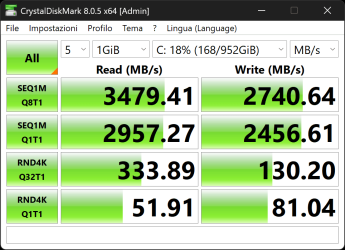
The suggestion of a clean install was purely as a test.
I did it a few months back when I had a USB port issue on a new motherboard. The problem persisted after a clean install. I restored the OS to my NVME boot drive, and exchanged the MB for a new copy (from the store, as I was within the exchange window). The old Windows install worked OK on the new MB, which confirmed that the old one was defective. (Hasn't failed again, since. Touch wood.)
Restoring the current OS using Reflect would take me about 10 minutes.
The challenge would be if a clean install restored the performance of the SSD. You could try restoring your current OS and trying to fix it, or going to a clean install and rebuilding. I've managed to do most of a rebuilding in a day if I've prepared for it, but it's still a pain.
Looking back over the thread, I see no mention of a repair installation. It may be worth a try. It's almost completely nondestructive. (Some apps may require re-installation, but that's unlikely.)
I did it a few months back when I had a USB port issue on a new motherboard. The problem persisted after a clean install. I restored the OS to my NVME boot drive, and exchanged the MB for a new copy (from the store, as I was within the exchange window). The old Windows install worked OK on the new MB, which confirmed that the old one was defective. (Hasn't failed again, since. Touch wood.)
Restoring the current OS using Reflect would take me about 10 minutes.
The challenge would be if a clean install restored the performance of the SSD. You could try restoring your current OS and trying to fix it, or going to a clean install and rebuilding. I've managed to do most of a rebuilding in a day if I've prepared for it, but it's still a pain.
Looking back over the thread, I see no mention of a repair installation. It may be worth a try. It's almost completely nondestructive. (Some apps may require re-installation, but that's unlikely.)
My Computers
-
At a glance
Windows 11 26300.9278Amd Threadripper 7970X128GB (4 X 32) G.Skill DDR5 6400 (RDIMM)Gigabyte RTX 4090 OC- OS
- Windows 11 26300.9278
- Computer type
- PC/Desktop
- Manufacturer/Model
- homebuilt
- CPU
- Amd Threadripper 7970X
- Motherboard
- Gigabyte TRX50 Aero D Rev. 1.0
- Memory
- 128GB (4 X 32) G.Skill DDR5 6400 (RDIMM)
- Graphics Card(s)
- Gigabyte RTX 4090 OC
- Sound Card
- none (USB to speakers), Realtek
- Monitor(s) Displays
- Innocn 32" OLED
- Screen Resolution
- 3840 X 2160 @ 60Hz
- Hard Drives
- Crucial T700 2TB M.2 NVME SSD
WD 4TB Blue SATA SSD
Seagate 18TB IronWolf Pro
- PSU
- BeQuiet! Straight Power 12 1500W
- Case
- Lian Li 011 Dynamic Evo XL
- Cooling
- SilverStone Technology XE360-TR5, with 3 Phanteks T30 fans
- Keyboard
- Cherry KC 500 MX LP (mechanical)
- Mouse
- Logitech M500s (wired)
- Internet Speed
- 2000/250 Mbps (down/up)
- Other Info
- xFinity gateway
-
At a glance
windows 11 26300.9278Intel I9-13900K64GB G.Skill DDR5-6000Gigabyte RTX 3090 ti- Operating System
- windows 11 26300.9278
- Computer type
- PC/Desktop
- Manufacturer/Model
- homebuilt
- CPU
- Intel I9-13900K
- Motherboard
- Asus RoG Strix Z690-E
- Memory
- 64GB G.Skill DDR5-6000
- Graphics card(s)
- Gigabyte RTX 3090 ti
- Sound Card
- built in Realtek
- Monitor(s) Displays
- Philips 27E1N8900 27" OLED
- Screen Resolution
- 3840 X 2160 @60Hz
- Hard Drives
- WDC SN850 1TB
8TB Seagate Ironwolf
4TB Seagate Ironwolf
- PSU
- eVGA SuperNOVA 1300 GT
- Case
- Lian Li 011 Dynamic Evo
- Cooling
- Corsair iCUE H150i ELITE CAPELLIX Liquid CPU Cooler
- Keyboard
- Cherry Streaming (wired)
- Mouse
- Logitech M500s (wired)