StartAllBack


StartAllBack: Windows 11 from better timeline​

Get the latest version here Download

Embrace, enhance, unsweep classic UI from under the rug​

Restore and improve taskbar​

  • Show labels on task icons
  • Adjust icon size and margins
  • Move taskbar to top, left or right edges
  • Drag and drop stuff onto taskbar
  • Center task icons but keep Start button on the left
  • Split into segments, use dynamic translucency
  • Separate corner icons with Windows 7/10 UI
  • Auto-hide when covered by maximized window

Restore and improve File Explorer and Control Panel​

  • Ribbon and Command Bar revamped with translucent effects
  • Details pane on bottom
  • Old search box (the one which works)
  • Dark mode support for more dialogs

Restore and improve context menus​

  • All new look with rounded acrylic menus
  • Fast and responsive taskbar menus
  • New fonts, better touch support

Restore and improve start menu​

  • Launch apps and go to system places in one click
  • Navigate dropdown menus like a boss
  • Enjoy fast and reliable search

Finally, lightweight styling and UI consistency​

  • Enjoy Windows 7, Windows 8 and third-party taskbar and start menu styles
  • Fix UI inconsistencies in Win32 apps
  • Don't be blue: recolor UI in all windows apps
  • Negative resource usage: fewer RAM used, fewer processes started, faster startup



StartAllBack For Windows 11 has been released.
It's an RC release. I haven't tested it yet as I have Start11 installed.

Edit: I have now tested it. It's working quite well.
Apart from a great start menu, you can also have the Enhanced Classic Taskbar back.
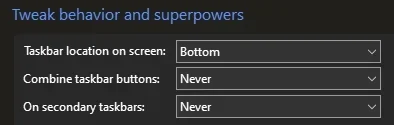
This means (for example) that you can have an uncombined and unlocked Taskbar.
You will now also be able to enhance the Taskbar clock using T-Clock Redux or similar.

T-Clock Redux Tray Clock_.png

You can also change Windows Explorer to Ribbon UI or Simple UI.

You can get it Download


01 - Welcome.png
02 - Start Menu.png
04 - Taskbar.png
05 - Explorer.png
06 - Advanced.png
Get

 
Again not sure what's been updated
Me neither..., but, I keep 'em all anyway, just in case sumpthin goes haywire!!! :cool:

9105.webp
 

My Computers My Computers

  • At a glance

    Windows 11 Pro
    OS
    Windows 11 Pro
    Computer type
    PC/Desktop
    Manufacturer/Model
    ASUS ROG Strix
  • At a glance

    Windows 11 Pro
    Operating System
    Windows 11 Pro
    Computer type
    Laptop
    Manufacturer/Model
    ASUS VivoBook
  • ASUS VivoBook 'Lite' ~ Windows 11 Home
Again not sure what's been updated

Some alternate/darker shading in W7 mode, perhaps? I've never noticed it before.

9106.webp
 

My Computers My Computers

  • At a glance

    Windows 11 Pro
    OS
    Windows 11 Pro
    Computer type
    PC/Desktop
    Manufacturer/Model
    ASUS ROG Strix
  • At a glance

    Windows 11 Pro
    Operating System
    Windows 11 Pro
    Computer type
    Laptop
    Manufacturer/Model
    ASUS VivoBook
  • ASUS VivoBook 'Lite' ~ Windows 11 Home
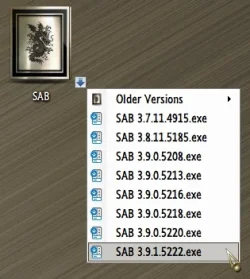
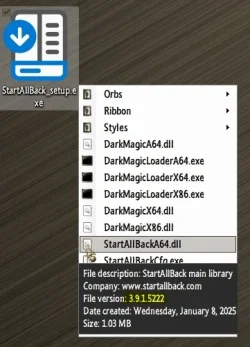
Where i can download StartAllBack 3.9.1?
 

My Computer My Computer

At a glance

Windows 11Intel(R) Core(TM) i5-10400F32 GBNVIDIA GeForce RTX 3050
OS
Windows 11
Computer type
PC/Desktop
Manufacturer/Model
ASRock
CPU
Intel(R) Core(TM) i5-10400F
Motherboard
ASRock H510M-HDV/M.2 SE
Memory
32 GB
Graphics Card(s)
NVIDIA GeForce RTX 3050
Screen Resolution
1920x1080
Browser
Chrome

My Computer My Computer

At a glance

Windows 11Intel(R) Core(TM) i5-10400F32 GBNVIDIA GeForce RTX 3050
OS
Windows 11
Computer type
PC/Desktop
Manufacturer/Model
ASRock
CPU
Intel(R) Core(TM) i5-10400F
Motherboard
ASRock H510M-HDV/M.2 SE
Memory
32 GB
Graphics Card(s)
NVIDIA GeForce RTX 3050
Screen Resolution
1920x1080
Browser
Chrome

My Computers My Computers

  • At a glance

    Windows 11 Pro
    OS
    Windows 11 Pro
    Computer type
    PC/Desktop
    Manufacturer/Model
    ASUS ROG Strix
  • At a glance

    Windows 11 Pro
    Operating System
    Windows 11 Pro
    Computer type
    Laptop
    Manufacturer/Model
    ASUS VivoBook
  • ASUS VivoBook 'Lite' ~ Windows 11 Home

My Computer My Computer

At a glance

Windows 11Intel(R) Core(TM) i5-10400F32 GBNVIDIA GeForce RTX 3050
OS
Windows 11
Computer type
PC/Desktop
Manufacturer/Model
ASRock
CPU
Intel(R) Core(TM) i5-10400F
Motherboard
ASRock H510M-HDV/M.2 SE
Memory
32 GB
Graphics Card(s)
NVIDIA GeForce RTX 3050
Screen Resolution
1920x1080
Browser
Chrome
I did and it downloaded the RC instead.
Don't know what to tell ya, chief!!! 🤷‍♂️

Maybe clear your browser's cache...

It gives me the proper one...

9117.webp
 

My Computers My Computers

  • At a glance

    Windows 11 Pro
    OS
    Windows 11 Pro
    Computer type
    PC/Desktop
    Manufacturer/Model
    ASUS ROG Strix
  • At a glance

    Windows 11 Pro
    Operating System
    Windows 11 Pro
    Computer type
    Laptop
    Manufacturer/Model
    ASUS VivoBook
  • ASUS VivoBook 'Lite' ~ Windows 11 Home
It just shows the RC version
It's a "release candidate" version that the author is ready to give his stamp of approval for general consumption. I'll wait for the "final" version.
 

My Computer My Computer

At a glance

Windows 11 Pro 25H2 (Build 26200.8117)HexaCore AMD Ryzen 5 4600G, 4300 MHz (43 x 100Corsair 64GB (16x4)GeForce RTX 3050 8GB GDDR6
OS
Windows 11 Pro 25H2 (Build 26200.8117)
Computer type
PC/Desktop
Manufacturer/Model
Asus TUF Gaming A520M-Plus WiFi
CPU
HexaCore AMD Ryzen 5 4600G, 4300 MHz (43 x 100
Motherboard
Asus TUF Gaming A520M-Plus WiFi
Memory
Corsair 64GB (16x4)
Graphics Card(s)
GeForce RTX 3050 8GB GDDR6
Sound Card
Creative Sound Blaster Z SE
Monitor(s) Displays
ACER 27 Inch
Screen Resolution
1600 x 900
Hard Drives
3 X Samsung SSD 990 EVO 1TB
PSU
CORSAIR RMx Series RM850x
Case
NZXT H510 - CA-H510B-B1
Cooling
Aer F120mm
Keyboard
Logitech
Mouse
Logitech
Browser
Mozilla Firefox
Antivirus
Malwarebytes
Widgets still doesn't work on taskbar unless you refresh them twice manually :(
 

My Computer My Computer

At a glance

Windows 11 Pro
OS
Windows 11 Pro
Computer type
PC/Desktop
Manufacturer/Model
Apple Mac Pro 6,1 (2013)
Widgets still doesn't work on taskbar unless you refresh them twice manually :(
Thanks Spacedust. Trying all suggestions given here. Out of 11 of my Win 11 242H builds, only three are experiencing the issue.
 

My Computer My Computer

At a glance

Windows 11 Pro 25H2 (Build 26200.8117)HexaCore AMD Ryzen 5 4600G, 4300 MHz (43 x 100Corsair 64GB (16x4)GeForce RTX 3050 8GB GDDR6
OS
Windows 11 Pro 25H2 (Build 26200.8117)
Computer type
PC/Desktop
Manufacturer/Model
Asus TUF Gaming A520M-Plus WiFi
CPU
HexaCore AMD Ryzen 5 4600G, 4300 MHz (43 x 100
Motherboard
Asus TUF Gaming A520M-Plus WiFi
Memory
Corsair 64GB (16x4)
Graphics Card(s)
GeForce RTX 3050 8GB GDDR6
Sound Card
Creative Sound Blaster Z SE
Monitor(s) Displays
ACER 27 Inch
Screen Resolution
1600 x 900
Hard Drives
3 X Samsung SSD 990 EVO 1TB
PSU
CORSAIR RMx Series RM850x
Case
NZXT H510 - CA-H510B-B1
Cooling
Aer F120mm
Keyboard
Logitech
Mouse
Logitech
Browser
Mozilla Firefox
Antivirus
Malwarebytes
Just tried out stardocks start menu.
Went back to SAB. But there was one cool feature that I liked.

It has an option to have non-pinned apps on the task manager ungrouped with labels. Love to see that option if possible in this app.
Is there any way to configure this in the registry or someone knows of a good app for this option?817ac9dd-29e0-4a96-9d04-bda4fdd4219b.webp
 

My Computer My Computer

At a glance

Windows 11 LTSC
OS
Windows 11 LTSC
Computer type
Laptop
Manufacturer/Model
LG
Hi.

Thanks for your reply


I am sorry but let me rephrase what I mean. I am referring to the labels. It is either on or off. I am looking for granularity.
As you can see in the picture. I have my pinned apps Combined and hidden lablels. but the unpinned are not labeled.
 

My Computer My Computer

At a glance

Windows 11 LTSC
OS
Windows 11 LTSC
Computer type
Laptop
Manufacturer/Model
LG
Thanks Spacedust. Trying all suggestions given here. Out of 11 of my Win 11 242H builds, only three are experiencing the issue.
Just installed latest updates and still no widgets. It's so annoying.
 

My Computer My Computer

At a glance

Windows 11 Pro
OS
Windows 11 Pro
Computer type
PC/Desktop
Manufacturer/Model
Apple Mac Pro 6,1 (2013)
Has anyone else had an issue on the latest version with the first app being cut off? This is what it looks like with the full app name being shown
1736908633420.webp
and what it looks like just app icons
1736908677360.webp
If I separate the windows icon into it's own corner, it shows up fine.
 

My Computer My Computer

At a glance

Windows 11Intel(R) Core(TM) i7-8700 CPU @ 3.20GHzG.Skill F4-3200C16D-16GTZR Trident Z RGB Seri...PowerColor Fighter AMD Radeon RX 6700 XT w/ 1...
OS
Windows 11
Computer type
PC/Desktop
Manufacturer/Model
Custom
CPU
Intel(R) Core(TM) i7-8700 CPU @ 3.20GHz
Motherboard
ROG Maximus X Code
Memory
G.Skill F4-3200C16D-16GTZR Trident Z RGB Series 16 GBx2 (32GB)
Graphics Card(s)
PowerColor Fighter AMD Radeon RX 6700 XT w/ 12GB GDDR6 Memory
Monitor(s) Displays
3x ASUS VP28UQG 28" 4K/UHD 3840x2160 1ms DP HDMI Adaptive Sync/FreeSync Eye Care Monitor
Screen Resolution
3840x2160 x3
Hard Drives
1x 1TB NVME SSD
1x 1TB Sata SSD
1x 1TB Hard Drive (7200rpm)
Keyboard
Razer Huntsman V2 TKL
Mouse
Razer Basilisk V3 Pro
Internet Speed
500 Up / 20 Down
Browser
Firefox Beta and Brave Beta
Antivirus
Defender / MB Firewall Control
StartAllBack 3.9.1.5225 (Stable)

- Adjusted indicator bar in dark mode

- Adjusted plump small icons language indicator

- Fixed Run autocomplete not dark on newer versions

- Fixed taskbar not unhiding with Teams screen sharing

- Fixed high CPU usage with auto-hidden taskbar

- Fixed search box images on 24H2

- Fixed rare crash with Explorer fullscreen

- Fixed rare crash with secondary displays
 

My Computer My Computer

At a glance

Windows 11 ProIntel Core i9 12900KFCorsair 64GB DDR5 Vengeance C40 5200MhzASUS GeForce RTX 3090 ROG Strix OC 24GB
OS
Windows 11 Pro
Computer type
PC/Desktop
Manufacturer/Model
Custom Build
CPU
Intel Core i9 12900KF
Motherboard
ASUS ROG Maximus Z690 Hero
Memory
Corsair 64GB DDR5 Vengeance C40 5200Mhz
Graphics Card(s)
ASUS GeForce RTX 3090 ROG Strix OC 24GB
Sound Card
OnBoard
Monitor(s) Displays
Acer Predator XB323UGP 32" QHD G-SYNC-C 144Hz 1MS IPS LED
Screen Resolution
2560 x 1440
Hard Drives
1x Samsung 980 Pro Series Gen4 250GB M.2 NVMe
1x Samsung 980 Pro Series Gen4 500GB M.2 NVMe
2x Samsung 980 Pro Series Gen4 2TB M.2 NVMe
PSU
Corsair AX1200i 1200W 80PLUS Titanium Modular
Case
Corsair 4000D Black Case w/ Tempered Glass Side Panel
Cooling
Noctua NH-U12A Chromax Black CPU Cooler, 4x Noctua 120mm Fans
Keyboard
Logitech MK545
Mouse
Logitech MX Master 3
Internet Speed
Fixed Wireless 150mbps/75mbps
Browser
Firefox
Antivirus
Kaspersky
Other Info
Thrustmaster TS-PC RACER
Fanatec CSL Elite Pedals with the Load Cell Kit
Yamaha Amp with Bose Speakers
Still searching for a way to change the color of the selected item in right-click contextmenu .........
Its very light-blue , with latest SAB ( almost white/light-grey , when SAB is off)
Any idea ............??? :wink:
 

My Computers My Computers

  • At a glance

    Windows11 Pro 25H2i732GBnVidia
    OS
    Windows11 Pro 25H2
    Computer type
    PC/Desktop
    Manufacturer/Model
    Asus
    CPU
    i7
    Motherboard
    z97k
    Memory
    32GB
    Graphics Card(s)
    nVidia
    Sound Card
    Realtek
    Hard Drives
    3
    Cooling
    air
    Browser
    Edge
    Antivirus
    ESET
  • At a glance

    Windows11 ProIntel i516GBIntel
    Operating System
    Windows11 Pro
    Computer type
    PC/Desktop
    Manufacturer/Model
    ASUS
    CPU
    Intel i5
    Motherboard
    ASUS Basic
    Memory
    16GB
    Graphics card(s)
    Intel
    Sound Card
    Realtek
    Monitor(s) Displays
    Samsung
    Hard Drives
    one intern , 0ne extern, OS on SSD
    Cooling
    air
    Keyboard
    wireless Logitech
    Mouse
    wireless Logitech
    Internet Speed
    1GB
    Browser
    Edge
    Antivirus
    ESET
Still searching for a way to change the color of the selected item in right-click contextmenu .........
Its very light-blue , with latest SAB ( almost white/light-grey , when SAB is off)
Any idea ............??? :wink:
You mean Show accent color on Start and taskbar?
 

My Computers My Computers

  • At a glance

    Windows 11 Pro 25H2 (WinMac v1.4.0)Intel Core i5-12400F16 GB (DDR4, 3200 MHz)NVIDIA GeForce RTX 2070 Super
    OS
    Windows 11 Pro 25H2 (WinMac v1.4.0)
    Computer type
    PC/Desktop
    CPU
    Intel Core i5-12400F
    Motherboard
    B760 GAMING X DDR4
    Memory
    16 GB (DDR4, 3200 MHz)
    Graphics Card(s)
    NVIDIA GeForce RTX 2070 Super
    Screen Resolution
    2560x1440 @ 240Hz
    Other Info
    I loved modding and customizing operating systems since very young age, gaining experience from all important systems, including Windows, Ubuntu, MacOS and Android, which led to creation of Windows 11 mod called WinMac. Seamlessly blending the elegance of macOS with the versatility of Windows, my customized interface elevates user experience through meticulously crafted modifications and UI enhancements.

    With WinMac, every interaction with Windows 11 environment is imbued with a touch of sophistication, where the boundaries between the Windows and Mac universes blur, offering a sublime computing experience that transcends conventional limitations of Windows 11.
  • At a glance

    macOS SonomaApple M3 Pro18 GB
    Operating System
    macOS Sonoma
    Computer type
    Laptop
    Manufacturer/Model
    Apple MacBook Pro
    CPU
    Apple M3 Pro
    Memory
    18 GB
Back
Top Bottom