Solved Strange Display On Startup Screen


jmallard

Member
Member
Local time
11:18 PM
Posts
14
Location
So Cal
OS
Windows 11 Home 25H2 Build 26200.6899
Hi,

I have had this problem one before but I don't remember how to turn it off.

I'm not sure what I did to cause this display to appear on my Startup Screen (Home). It is displayed at the top right corner of my screen in small print.

Strange_Home_Screen_Display.webp

Would someone please tell me what it is and how to turn it off ?

Thanks.

Jerry
 

My Computers

System One System Two

  • OS
    Windows 11 Home 25H2 Build 26200.6899
    Computer type
    PC/Desktop
    Manufacturer/Model
    Dell XPS 8930 (Feb 2020)
    CPU
    Processor Intel(R) Core(TM) i7-9700 CPU @ 3.00GHz, 3000
    Motherboard
    Dell Inc. 0T2HR0, ver A02, s/n F1J6P23.CNPE1009CK0644
    Memory
    32 GB
    Graphics Card(s)
    NVIDIA GeForce GT 1030
    Sound Card
    Reaktek Audio
    Monitor(s) Displays
    (2) HP Pavilion 22cw IPS LED Backlit Monitor
    Screen Resolution
    1280 x 960
    Hard Drives
    C: 1TB Samsung 990 Evo Plus PCIe NVMe M.2 SSD
    E: 1TB SSD Scan Disk Plus
    F: 1TB GB WD Hard Disk
    G: 1TB GB WD Hard Disk
    I: WD 2TB My Passport USB 3.0 Secure Portable Hard Drive (Red)
    PSU
    Dell 450 watt
    Case
    Dell XPS 8930
    Cooling
    5" internal fan
    Keyboard
    Wired Dell keyboard came with system
    Mouse
    Wireless Kensington Expert Mouse
    Internet Speed
    Frontier Fiber Optic 800MB up 940MB down (average). Killer Ethernet Controller cannot be updated.
    Browser
    MozillaFirefox | Brave |
    Antivirus
    Winows Defender
    Other Info
    3 printers:
    Brother 8040 USB (Copy - Print - Scan) b&w (scan in color & b&w)
    HP LaserJet 4000 Series (print 17 ppm in b&w)
    HP OfficeJet Pro 8630 Wireless Color (Print - Fax - Scan - Copy - Web)
  • Operating System
    Windows 11 Home 25H2 Build 26200.6899
    Computer type
    Laptop
    Manufacturer/Model
    Hewlett Packard Laptop 17t-by200
    CPU
    Processor Intel(R) Core(TM) i7-10510U CPU @ 1.80GHz, 2304 Mhz, 4 Core(s), 8 Logical Processor(s)
    Motherboard
    HP 865B
    Memory
    16.8 GB
    Graphics card(s)
    Built In - Unk
    Sound Card
    Built In - Unk
    Monitor(s) Displays
    17.3 Inch Touchscreen
    Screen Resolution
    1600 x 900
    Hard Drives
    1 TB PCIe NVMe M.2 Solid State Drive
    PSU
    Built In
    Case
    Plastic
    Cooling
    Internal
    Keyboard
    Built In
    Mouse
    DPI
    Internet Speed
    Frontier Fiber Optic 235 up/down average
    Browser
    Mozilla Firefox | Brave
    Antivirus
    Windows Defender
    Other Info
    3 printers:
    Brother 8040 USB (Copy - Print - Scan) b&w (scan in color & b&w)
    HP LaserJet 4000 Series (print 17 ppm in b&w)
    HP OfficeJet Pro 8630 Wireless Color (Print - Fax - Scan - Copy - Web)
Nnvidia Geforce Experience
 

My Computers

System One System Two

  • OS
    Windows 11 Pro 25H2
    Computer type
    PC/Desktop
    Manufacturer/Model
    Dell Optiplex 7080
    CPU
    i9-10900 10 core 20 threads
    Motherboard
    DELL 0J37VM
    Memory
    32 gb
    Graphics Card(s)
    none-Intel UHD Graphics 630
    Sound Card
    Integrated Realtek
    Monitor(s) Displays
    Benq 27
    Screen Resolution
    2560x1440
    Hard Drives
    2x1tb Solidigm m.2 nvme /External drives 512gb Samsung m.2 sata+2tb Kingston m2.nvme
    PSU
    500w
    Case
    MT
    Cooling
    Dell Premium
    Keyboard
    Logitech wired
    Mouse
    Logitech wireless
    Internet Speed
    so slow I'm too embarrassed to tell
    Browser
    #1 Edge #2 Firefox
    Antivirus
    Defender+MWB Premium
  • Operating System
    Windows 11 Pro 24H2 26200.8457
    Computer type
    PC/Desktop
    Manufacturer/Model
    Beelink Mini PC SER5
    CPU
    AMD Ryzen 7 6800U
    Memory
    32 gb
    Graphics card(s)
    integrated
    Sound Card
    integrated
    Monitor(s) Displays
    Benq 27
    Screen Resolution
    2560x1440
    Hard Drives
    1TB Crucial nvme
    Keyboard
    Logitech wired
    Mouse
    Logitech wireless
    Internet Speed
    still too embarrassed to tell
    Browser
    Firefox
    Antivirus
    Defender
    Other Info
    System 3 is non compliant Dell 9020 i7-4770/24gb ram Win11 PRO 26200.8457
@glasskuter,
Thanks for the quick response.
I thought it had something to do with video (FPS). The Nnvidia icon loads on my Task Bar at startup but I never use it so I don't know why it appeared.

I looked around in the Nnvidia app and I didn't find anything that mentions a desktop display, so I still don't know how to turn it off.

Jerry
 

My Computers

System One System Two

  • OS
    Windows 11 Home 25H2 Build 26200.6899
    Computer type
    PC/Desktop
    Manufacturer/Model
    Dell XPS 8930 (Feb 2020)
    CPU
    Processor Intel(R) Core(TM) i7-9700 CPU @ 3.00GHz, 3000
    Motherboard
    Dell Inc. 0T2HR0, ver A02, s/n F1J6P23.CNPE1009CK0644
    Memory
    32 GB
    Graphics Card(s)
    NVIDIA GeForce GT 1030
    Sound Card
    Reaktek Audio
    Monitor(s) Displays
    (2) HP Pavilion 22cw IPS LED Backlit Monitor
    Screen Resolution
    1280 x 960
    Hard Drives
    C: 1TB Samsung 990 Evo Plus PCIe NVMe M.2 SSD
    E: 1TB SSD Scan Disk Plus
    F: 1TB GB WD Hard Disk
    G: 1TB GB WD Hard Disk
    I: WD 2TB My Passport USB 3.0 Secure Portable Hard Drive (Red)
    PSU
    Dell 450 watt
    Case
    Dell XPS 8930
    Cooling
    5" internal fan
    Keyboard
    Wired Dell keyboard came with system
    Mouse
    Wireless Kensington Expert Mouse
    Internet Speed
    Frontier Fiber Optic 800MB up 940MB down (average). Killer Ethernet Controller cannot be updated.
    Browser
    MozillaFirefox | Brave |
    Antivirus
    Winows Defender
    Other Info
    3 printers:
    Brother 8040 USB (Copy - Print - Scan) b&w (scan in color & b&w)
    HP LaserJet 4000 Series (print 17 ppm in b&w)
    HP OfficeJet Pro 8630 Wireless Color (Print - Fax - Scan - Copy - Web)
  • Operating System
    Windows 11 Home 25H2 Build 26200.6899
    Computer type
    Laptop
    Manufacturer/Model
    Hewlett Packard Laptop 17t-by200
    CPU
    Processor Intel(R) Core(TM) i7-10510U CPU @ 1.80GHz, 2304 Mhz, 4 Core(s), 8 Logical Processor(s)
    Motherboard
    HP 865B
    Memory
    16.8 GB
    Graphics card(s)
    Built In - Unk
    Sound Card
    Built In - Unk
    Monitor(s) Displays
    17.3 Inch Touchscreen
    Screen Resolution
    1600 x 900
    Hard Drives
    1 TB PCIe NVMe M.2 Solid State Drive
    PSU
    Built In
    Case
    Plastic
    Cooling
    Internal
    Keyboard
    Built In
    Mouse
    DPI
    Internet Speed
    Frontier Fiber Optic 235 up/down average
    Browser
    Mozilla Firefox | Brave
    Antivirus
    Windows Defender
    Other Info
    3 printers:
    Brother 8040 USB (Copy - Print - Scan) b&w (scan in color & b&w)
    HP LaserJet 4000 Series (print 17 ppm in b&w)
    HP OfficeJet Pro 8630 Wireless Color (Print - Fax - Scan - Copy - Web)
2 ways:

Open GeForce Experience. Press Start, type GeForce Experience, and launch it.

2. Go to Settings. Click the gear icon ⚙️ in the top-right corner.

3. Under the General tab, toggle In-Game Overlay to Off.

[Prevent GeForce Experience from Starting with Windows]

This stops the app from launching at boot and consuming resources.

1. Open Task Manager• Press Ctrl + Shift + Esc.

2. Go to Startup Tab• Click the Startup tab at the top.

3. Find NVIDIA GeForce Experience• Right-click it and choose Disable.
 
Last edited:

My Computers

System One System Two

  • OS
    Windows 11 Pro 25H2 Build 26200.8524
    Computer type
    PC/Desktop
    Manufacturer/Model
    Sin-built 2013
    CPU
    Intel(R) Core(TM) i7-4770K CPU @ 3.50GHz
    Motherboard
    ASUS ROG Maximus VI Formula
    Memory
    32.0 GB of I forget and the box is in storage.
    Graphics Card(s)
    Gigabyte nVidia GeForce GTX 1660 Super OC 6GB
    Sound Card
    Onboard thingy
    Monitor(s) Displays
    5 x LG 25MS500-B - 1 x 24MK430H-B - 1 x Wacom Pro 22" Touch Screen Tablet
    Screen Resolution
    All over the place
    Hard Drives
    Too many to list.
    OS on Samsung 1TB 870 QVO SATA
    PSU
    Silverstone 1500
    Case
    NZXT Phantom 820 Full-Tower Case
    Cooling
    Noctua NH-D15 Elite Class Dual Tower CPU Cooler / 6 x EziDIY 120mm / 2 x Corsair 140mm somethings / 1 x 140mm Thermaltake something / 2 x 200mm Corsair.
    Keyboard
    Corsair K95 / Logitech diNovo Edge Wireless
    Mouse
    Logitech: G402 / G502 / Mx Masters / Mx Air Cordless
    Internet Speed
    2000/500Mbps
    Browser
    All sorts
    Antivirus
    Kaspersky Premium
    Other Info
    ㅤㅤㅤㅤㅤㅤㅤㅤㅤㅤㅤㅤㅤㅤㅤㅤㅤㅤㅤㅤㅤㅤㅤㅤㅤㅤㅤㅤㅤㅤㅤㅤㅤㅤㅤㅤㅤㅤㅤㅤ⠀⠀⠀⠀⠀⠀⠀⠀⠀⠀
    TP-Link BE9300 WiFi 7 Bluetooth 5.4 (Archer TBE550E)
    TP-Link TX201 V1 2.5GB Lan

    Grandstream HT812 - VoIP
    ASUS DSL-AX82U - Mesh
    ASUS RT-AC68U - Mesh
    ASUS RT-BE88U Router

    Brother MFC-L2880DW Printer

    I’m on a horse.
  • Operating System
    Windows 11 Pro 25H2 Build 26200.8524
    Computer type
    Laptop
    Manufacturer/Model
    LENOVO Yoga 7 14IRL8 - 7i EVO OLED 14" Touchscreen i5 12 Core 16GB/512GB
    CPU
    Intel Core 12th Gen i5-1240P Processor (1.7 - 4.4GHz)
    Memory
    16GB LPDDR5 RAM
    Graphics card(s)
    Intel Iris Xe Graphics Processor
    Sound Card
    Optimized with Dolby Atmos®
    Screen Resolution
    QHD 2880 x 1800 OLED
    Hard Drives
    M.2 512GB
    Antivirus
    Defender / Malwarebytes
    Other Info
    …still on a horse.
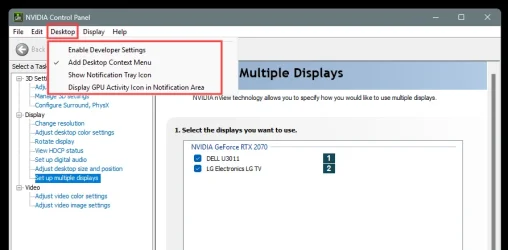
I looked around in the Nnvidia app and I didn't find anything that mentions a desktop display, so I still don't know how to turn it off.

Setting yours like this (RED box), should remove that fly-out that you're seeing.

Image1.webp
 

My Computers

System One System Two

  • OS
    Win 11 Home ♦♦♦26200.8457 ♦♦♦♦♦♦♦25H2
    Computer type
    PC/Desktop
    Manufacturer/Model
    Built by Ghot® [May 2020]
    CPU
    AMD Ryzen 7 3700X
    Motherboard
    Asus Pro WS X570-ACE (BIOS 5302)
    Memory
    G.Skill (F4-3200C14D-16GTZKW)
    Graphics Card(s)
    EVGA RTX 2070 (08G-P4-2171-KR)
    Sound Card
    Realtek ALC1220P / ALC S1220A
    Monitor(s) Displays
    Dell U3011 30"
    Screen Resolution
    2560 x 1600
    Hard Drives
    2x Samsung 860 EVO 500GB,
    WD 4TB Black FZBX - SATA III,
    WD 8TB Black FZBX - SATA III,
    DRW-24B1ST CD/DVD Burner
    PSU
    PC Power & Cooling 750W Quad EPS12V
    Case
    Cooler Master ATCS 840 Tower
    Cooling
    CM Hyper 212 EVO (push/pull)
    Keyboard
    Ducky DK9008 Shine II Blue LED
    Mouse
    Logitech Optical M-100
    Internet Speed
    300/300
    Browser
    Firefox (latest)
    Antivirus
    Bitdefender Total Security
    Other Info
    Speakers: Klipsch Pro Media 2.1
  • Operating System
    Windows XP Pro 32bit w/SP3
    Computer type
    PC/Desktop
    Manufacturer/Model
    Built by Ghot® (not in use)
    CPU
    AMD Athlon 64 X2 5000+ (OC'd @ 3.2Ghz)
    Motherboard
    ASUS M2N32-SLI Deluxe Wireless Edition
    Memory
    TWIN2X2048-6400C4DHX (2 x 1GB, DDR2 800)
    Graphics card(s)
    EVGA 256-P2-N758-TR GeForce 8600GT SSC
    Sound Card
    Onboard
    Monitor(s) Displays
    ViewSonic G90FB Black 19" Professional (CRT)
    Screen Resolution
    up to 2048 x 1536
    Hard Drives
    WD 36GB 10,000rpm Raptor SATA
    Seagate 80GB 7200rpm SATA
    Lite-On LTR-52246S CD/RW
    Lite-On LH-18A1P CD/DVD Burner
    PSU
    PC Power & Cooling Silencer 750 Quad EPS12V
    Case
    Generic Beige case, 80mm fans
    Cooling
    ZALMAN 9500A 92mm CPU Cooler
    Keyboard
    Logitech Classic Keybooard 200
    Mouse
    Logitech Optical M-BT96a
    Internet Speed
    300/300
    Browser
    Firefox 3.x ??
    Antivirus
    Symantec (Norton)
    Other Info
    Still assembled, still runs. Haven't turned it on for 15 years?
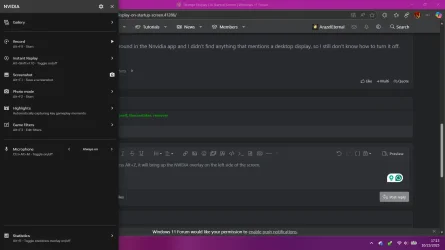
If you press Alt+Z, it will bring up the NVIDIA overlay on the left side of the screen. Then click on statistics on the bottom of the overlay.

Screenshot 2025-10-23 171600.webp

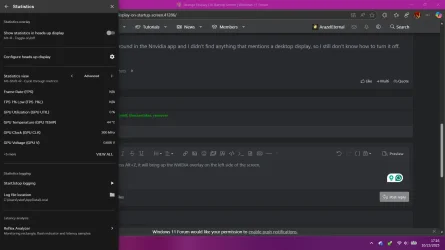
Then you will see the option for a heads-up display. Turn that off, or hit Alt+R.

Screenshot 2025-10-23 171656.webp

You probably pressed Alt+R without realizing it. I just found out about that hotkey as I was describing how to turn it off.
 

My Computer

System One

  • OS
    Windows 11 Pro For Workstations 25H2
    Computer type
    Laptop
    Manufacturer/Model
    Dell Precision 7550
    CPU
    Intel Xeon W-10855M @ 4.9Ghz
    Memory
    32GB OWC ECC DDR4-2666 RAM
    Graphics Card(s)
    iGPU: Intel UHD Graphics P630 | Discrete GPU: NVIDIA Quadro RTX 3000 6GB
    Sound Card
    Realtek Audio
    Monitor(s) Displays
    Integrated Ultrasharp
    Screen Resolution
    1920*1080
    Hard Drives
    OS: Samsung 980 PRO 500GB NVMe
    Data: Western Digital Black SN750 1TB
    PSU
    Dell 180W
    Internet Speed
    1Gbps
    Browser
    Edge Chromium
    Antivirus
    Microsoft Defender
    Other Info
    OpenSUSE Leap 16 VM
    Zorin OS 18 VM
@antspants,

Thanks for your response.

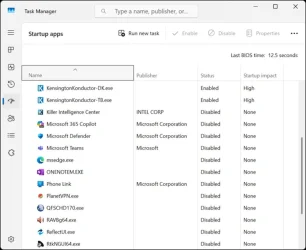
I tried both your suggested methods and I didn't get a proper response.

GetForce_Experiance_NO.webp

Task_Manager_Start_Up_No_NVIDIA.webp
 

My Computers

System One System Two

  • OS
    Windows 11 Home 25H2 Build 26200.6899
    Computer type
    PC/Desktop
    Manufacturer/Model
    Dell XPS 8930 (Feb 2020)
    CPU
    Processor Intel(R) Core(TM) i7-9700 CPU @ 3.00GHz, 3000
    Motherboard
    Dell Inc. 0T2HR0, ver A02, s/n F1J6P23.CNPE1009CK0644
    Memory
    32 GB
    Graphics Card(s)
    NVIDIA GeForce GT 1030
    Sound Card
    Reaktek Audio
    Monitor(s) Displays
    (2) HP Pavilion 22cw IPS LED Backlit Monitor
    Screen Resolution
    1280 x 960
    Hard Drives
    C: 1TB Samsung 990 Evo Plus PCIe NVMe M.2 SSD
    E: 1TB SSD Scan Disk Plus
    F: 1TB GB WD Hard Disk
    G: 1TB GB WD Hard Disk
    I: WD 2TB My Passport USB 3.0 Secure Portable Hard Drive (Red)
    PSU
    Dell 450 watt
    Case
    Dell XPS 8930
    Cooling
    5" internal fan
    Keyboard
    Wired Dell keyboard came with system
    Mouse
    Wireless Kensington Expert Mouse
    Internet Speed
    Frontier Fiber Optic 800MB up 940MB down (average). Killer Ethernet Controller cannot be updated.
    Browser
    MozillaFirefox | Brave |
    Antivirus
    Winows Defender
    Other Info
    3 printers:
    Brother 8040 USB (Copy - Print - Scan) b&w (scan in color & b&w)
    HP LaserJet 4000 Series (print 17 ppm in b&w)
    HP OfficeJet Pro 8630 Wireless Color (Print - Fax - Scan - Copy - Web)
  • Operating System
    Windows 11 Home 25H2 Build 26200.6899
    Computer type
    Laptop
    Manufacturer/Model
    Hewlett Packard Laptop 17t-by200
    CPU
    Processor Intel(R) Core(TM) i7-10510U CPU @ 1.80GHz, 2304 Mhz, 4 Core(s), 8 Logical Processor(s)
    Motherboard
    HP 865B
    Memory
    16.8 GB
    Graphics card(s)
    Built In - Unk
    Sound Card
    Built In - Unk
    Monitor(s) Displays
    17.3 Inch Touchscreen
    Screen Resolution
    1600 x 900
    Hard Drives
    1 TB PCIe NVMe M.2 Solid State Drive
    PSU
    Built In
    Case
    Plastic
    Cooling
    Internal
    Keyboard
    Built In
    Mouse
    DPI
    Internet Speed
    Frontier Fiber Optic 235 up/down average
    Browser
    Mozilla Firefox | Brave
    Antivirus
    Windows Defender
    Other Info
    3 printers:
    Brother 8040 USB (Copy - Print - Scan) b&w (scan in color & b&w)
    HP LaserJet 4000 Series (print 17 ppm in b&w)
    HP OfficeJet Pro 8630 Wireless Color (Print - Fax - Scan - Copy - Web)
@ArazelEternal
Apparently you posted whjle I was preparing my screen shots. I probably did hit the Alt+Z without realizing it. :-)
The Alt+Z and Alt+R did the deed ! Turned the display right off.
I love hot keys, just can't remember them.
Thanks for the reply and the SOLVE.

@Ghot


Thanks for your response also. I tried ArazelEternal's fix before yours.

Jerry
 

My Computers

System One System Two

  • OS
    Windows 11 Home 25H2 Build 26200.6899
    Computer type
    PC/Desktop
    Manufacturer/Model
    Dell XPS 8930 (Feb 2020)
    CPU
    Processor Intel(R) Core(TM) i7-9700 CPU @ 3.00GHz, 3000
    Motherboard
    Dell Inc. 0T2HR0, ver A02, s/n F1J6P23.CNPE1009CK0644
    Memory
    32 GB
    Graphics Card(s)
    NVIDIA GeForce GT 1030
    Sound Card
    Reaktek Audio
    Monitor(s) Displays
    (2) HP Pavilion 22cw IPS LED Backlit Monitor
    Screen Resolution
    1280 x 960
    Hard Drives
    C: 1TB Samsung 990 Evo Plus PCIe NVMe M.2 SSD
    E: 1TB SSD Scan Disk Plus
    F: 1TB GB WD Hard Disk
    G: 1TB GB WD Hard Disk
    I: WD 2TB My Passport USB 3.0 Secure Portable Hard Drive (Red)
    PSU
    Dell 450 watt
    Case
    Dell XPS 8930
    Cooling
    5" internal fan
    Keyboard
    Wired Dell keyboard came with system
    Mouse
    Wireless Kensington Expert Mouse
    Internet Speed
    Frontier Fiber Optic 800MB up 940MB down (average). Killer Ethernet Controller cannot be updated.
    Browser
    MozillaFirefox | Brave |
    Antivirus
    Winows Defender
    Other Info
    3 printers:
    Brother 8040 USB (Copy - Print - Scan) b&w (scan in color & b&w)
    HP LaserJet 4000 Series (print 17 ppm in b&w)
    HP OfficeJet Pro 8630 Wireless Color (Print - Fax - Scan - Copy - Web)
  • Operating System
    Windows 11 Home 25H2 Build 26200.6899
    Computer type
    Laptop
    Manufacturer/Model
    Hewlett Packard Laptop 17t-by200
    CPU
    Processor Intel(R) Core(TM) i7-10510U CPU @ 1.80GHz, 2304 Mhz, 4 Core(s), 8 Logical Processor(s)
    Motherboard
    HP 865B
    Memory
    16.8 GB
    Graphics card(s)
    Built In - Unk
    Sound Card
    Built In - Unk
    Monitor(s) Displays
    17.3 Inch Touchscreen
    Screen Resolution
    1600 x 900
    Hard Drives
    1 TB PCIe NVMe M.2 Solid State Drive
    PSU
    Built In
    Case
    Plastic
    Cooling
    Internal
    Keyboard
    Built In
    Mouse
    DPI
    Internet Speed
    Frontier Fiber Optic 235 up/down average
    Browser
    Mozilla Firefox | Brave
    Antivirus
    Windows Defender
    Other Info
    3 printers:
    Brother 8040 USB (Copy - Print - Scan) b&w (scan in color & b&w)
    HP LaserJet 4000 Series (print 17 ppm in b&w)
    HP OfficeJet Pro 8630 Wireless Color (Print - Fax - Scan - Copy - Web)

My Computers

System One System Two

  • OS
    Windows 11 Pro 25H2 Build 26200.8524
    Computer type
    PC/Desktop
    Manufacturer/Model
    Sin-built 2013
    CPU
    Intel(R) Core(TM) i7-4770K CPU @ 3.50GHz
    Motherboard
    ASUS ROG Maximus VI Formula
    Memory
    32.0 GB of I forget and the box is in storage.
    Graphics Card(s)
    Gigabyte nVidia GeForce GTX 1660 Super OC 6GB
    Sound Card
    Onboard thingy
    Monitor(s) Displays
    5 x LG 25MS500-B - 1 x 24MK430H-B - 1 x Wacom Pro 22" Touch Screen Tablet
    Screen Resolution
    All over the place
    Hard Drives
    Too many to list.
    OS on Samsung 1TB 870 QVO SATA
    PSU
    Silverstone 1500
    Case
    NZXT Phantom 820 Full-Tower Case
    Cooling
    Noctua NH-D15 Elite Class Dual Tower CPU Cooler / 6 x EziDIY 120mm / 2 x Corsair 140mm somethings / 1 x 140mm Thermaltake something / 2 x 200mm Corsair.
    Keyboard
    Corsair K95 / Logitech diNovo Edge Wireless
    Mouse
    Logitech: G402 / G502 / Mx Masters / Mx Air Cordless
    Internet Speed
    2000/500Mbps
    Browser
    All sorts
    Antivirus
    Kaspersky Premium
    Other Info
    ㅤㅤㅤㅤㅤㅤㅤㅤㅤㅤㅤㅤㅤㅤㅤㅤㅤㅤㅤㅤㅤㅤㅤㅤㅤㅤㅤㅤㅤㅤㅤㅤㅤㅤㅤㅤㅤㅤㅤㅤ⠀⠀⠀⠀⠀⠀⠀⠀⠀⠀
    TP-Link BE9300 WiFi 7 Bluetooth 5.4 (Archer TBE550E)
    TP-Link TX201 V1 2.5GB Lan

    Grandstream HT812 - VoIP
    ASUS DSL-AX82U - Mesh
    ASUS RT-AC68U - Mesh
    ASUS RT-BE88U Router

    Brother MFC-L2880DW Printer

    I’m on a horse.
  • Operating System
    Windows 11 Pro 25H2 Build 26200.8524
    Computer type
    Laptop
    Manufacturer/Model
    LENOVO Yoga 7 14IRL8 - 7i EVO OLED 14" Touchscreen i5 12 Core 16GB/512GB
    CPU
    Intel Core 12th Gen i5-1240P Processor (1.7 - 4.4GHz)
    Memory
    16GB LPDDR5 RAM
    Graphics card(s)
    Intel Iris Xe Graphics Processor
    Sound Card
    Optimized with Dolby Atmos®
    Screen Resolution
    QHD 2880 x 1800 OLED
    Hard Drives
    M.2 512GB
    Antivirus
    Defender / Malwarebytes
    Other Info
    …still on a horse.

My Computers

System One System Two

  • OS
    Windows 11 Home 25H2 Build 26200.6899
    Computer type
    PC/Desktop
    Manufacturer/Model
    Dell XPS 8930 (Feb 2020)
    CPU
    Processor Intel(R) Core(TM) i7-9700 CPU @ 3.00GHz, 3000
    Motherboard
    Dell Inc. 0T2HR0, ver A02, s/n F1J6P23.CNPE1009CK0644
    Memory
    32 GB
    Graphics Card(s)
    NVIDIA GeForce GT 1030
    Sound Card
    Reaktek Audio
    Monitor(s) Displays
    (2) HP Pavilion 22cw IPS LED Backlit Monitor
    Screen Resolution
    1280 x 960
    Hard Drives
    C: 1TB Samsung 990 Evo Plus PCIe NVMe M.2 SSD
    E: 1TB SSD Scan Disk Plus
    F: 1TB GB WD Hard Disk
    G: 1TB GB WD Hard Disk
    I: WD 2TB My Passport USB 3.0 Secure Portable Hard Drive (Red)
    PSU
    Dell 450 watt
    Case
    Dell XPS 8930
    Cooling
    5" internal fan
    Keyboard
    Wired Dell keyboard came with system
    Mouse
    Wireless Kensington Expert Mouse
    Internet Speed
    Frontier Fiber Optic 800MB up 940MB down (average). Killer Ethernet Controller cannot be updated.
    Browser
    MozillaFirefox | Brave |
    Antivirus
    Winows Defender
    Other Info
    3 printers:
    Brother 8040 USB (Copy - Print - Scan) b&w (scan in color & b&w)
    HP LaserJet 4000 Series (print 17 ppm in b&w)
    HP OfficeJet Pro 8630 Wireless Color (Print - Fax - Scan - Copy - Web)
  • Operating System
    Windows 11 Home 25H2 Build 26200.6899
    Computer type
    Laptop
    Manufacturer/Model
    Hewlett Packard Laptop 17t-by200
    CPU
    Processor Intel(R) Core(TM) i7-10510U CPU @ 1.80GHz, 2304 Mhz, 4 Core(s), 8 Logical Processor(s)
    Motherboard
    HP 865B
    Memory
    16.8 GB
    Graphics card(s)
    Built In - Unk
    Sound Card
    Built In - Unk
    Monitor(s) Displays
    17.3 Inch Touchscreen
    Screen Resolution
    1600 x 900
    Hard Drives
    1 TB PCIe NVMe M.2 Solid State Drive
    PSU
    Built In
    Case
    Plastic
    Cooling
    Internal
    Keyboard
    Built In
    Mouse
    DPI
    Internet Speed
    Frontier Fiber Optic 235 up/down average
    Browser
    Mozilla Firefox | Brave
    Antivirus
    Windows Defender
    Other Info
    3 printers:
    Brother 8040 USB (Copy - Print - Scan) b&w (scan in color & b&w)
    HP LaserJet 4000 Series (print 17 ppm in b&w)
    HP OfficeJet Pro 8630 Wireless Color (Print - Fax - Scan - Copy - Web)
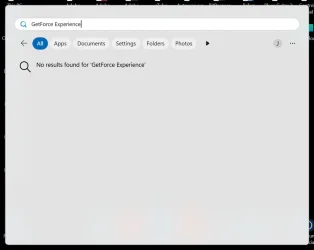
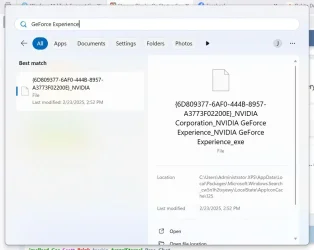
I tried GetForce also, surprisingly there was no response. It’s a mystery?
Well, it's not an excuse, but my eyes are old (81) along with the rest of me ;-)

I tried it again and here are my responses.

GetForce_Experiance_2.webp

The above screen popped up as soon as I typed "GeForce". If I click on either of the bold file names, I get this response.

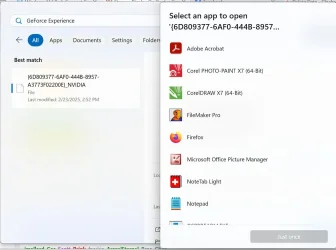
GetForce_Experiance_3.webp

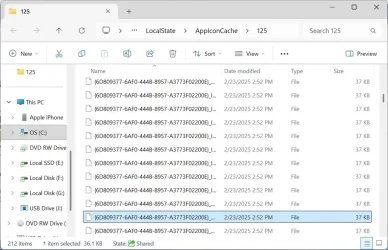
NVIVIA was not displayed as a choice. At the bottom right of the first display, I clicked on the "Open file location" and got this response:

GetForce_Experiance_4.webp

I don't know why, but strange stuff always happens to me.

At any rate, I got fast responses and more that one way to fix my problem.

Thanks very much.

Jerry
 

My Computers

System One System Two

  • OS
    Windows 11 Home 25H2 Build 26200.6899
    Computer type
    PC/Desktop
    Manufacturer/Model
    Dell XPS 8930 (Feb 2020)
    CPU
    Processor Intel(R) Core(TM) i7-9700 CPU @ 3.00GHz, 3000
    Motherboard
    Dell Inc. 0T2HR0, ver A02, s/n F1J6P23.CNPE1009CK0644
    Memory
    32 GB
    Graphics Card(s)
    NVIDIA GeForce GT 1030
    Sound Card
    Reaktek Audio
    Monitor(s) Displays
    (2) HP Pavilion 22cw IPS LED Backlit Monitor
    Screen Resolution
    1280 x 960
    Hard Drives
    C: 1TB Samsung 990 Evo Plus PCIe NVMe M.2 SSD
    E: 1TB SSD Scan Disk Plus
    F: 1TB GB WD Hard Disk
    G: 1TB GB WD Hard Disk
    I: WD 2TB My Passport USB 3.0 Secure Portable Hard Drive (Red)
    PSU
    Dell 450 watt
    Case
    Dell XPS 8930
    Cooling
    5" internal fan
    Keyboard
    Wired Dell keyboard came with system
    Mouse
    Wireless Kensington Expert Mouse
    Internet Speed
    Frontier Fiber Optic 800MB up 940MB down (average). Killer Ethernet Controller cannot be updated.
    Browser
    MozillaFirefox | Brave |
    Antivirus
    Winows Defender
    Other Info
    3 printers:
    Brother 8040 USB (Copy - Print - Scan) b&w (scan in color & b&w)
    HP LaserJet 4000 Series (print 17 ppm in b&w)
    HP OfficeJet Pro 8630 Wireless Color (Print - Fax - Scan - Copy - Web)
  • Operating System
    Windows 11 Home 25H2 Build 26200.6899
    Computer type
    Laptop
    Manufacturer/Model
    Hewlett Packard Laptop 17t-by200
    CPU
    Processor Intel(R) Core(TM) i7-10510U CPU @ 1.80GHz, 2304 Mhz, 4 Core(s), 8 Logical Processor(s)
    Motherboard
    HP 865B
    Memory
    16.8 GB
    Graphics card(s)
    Built In - Unk
    Sound Card
    Built In - Unk
    Monitor(s) Displays
    17.3 Inch Touchscreen
    Screen Resolution
    1600 x 900
    Hard Drives
    1 TB PCIe NVMe M.2 Solid State Drive
    PSU
    Built In
    Case
    Plastic
    Cooling
    Internal
    Keyboard
    Built In
    Mouse
    DPI
    Internet Speed
    Frontier Fiber Optic 235 up/down average
    Browser
    Mozilla Firefox | Brave
    Antivirus
    Windows Defender
    Other Info
    3 printers:
    Brother 8040 USB (Copy - Print - Scan) b&w (scan in color & b&w)
    HP LaserJet 4000 Series (print 17 ppm in b&w)
    HP OfficeJet Pro 8630 Wireless Color (Print - Fax - Scan - Copy - Web)
My eyes are bad also, but in the answer I gave, I didn’t mention searching for anything. I gave you direct steps to work with.

Not an issue as it’s fixed, well done.
 

My Computers

System One System Two

  • OS
    Windows 11 Pro 25H2 Build 26200.8524
    Computer type
    PC/Desktop
    Manufacturer/Model
    Sin-built 2013
    CPU
    Intel(R) Core(TM) i7-4770K CPU @ 3.50GHz
    Motherboard
    ASUS ROG Maximus VI Formula
    Memory
    32.0 GB of I forget and the box is in storage.
    Graphics Card(s)
    Gigabyte nVidia GeForce GTX 1660 Super OC 6GB
    Sound Card
    Onboard thingy
    Monitor(s) Displays
    5 x LG 25MS500-B - 1 x 24MK430H-B - 1 x Wacom Pro 22" Touch Screen Tablet
    Screen Resolution
    All over the place
    Hard Drives
    Too many to list.
    OS on Samsung 1TB 870 QVO SATA
    PSU
    Silverstone 1500
    Case
    NZXT Phantom 820 Full-Tower Case
    Cooling
    Noctua NH-D15 Elite Class Dual Tower CPU Cooler / 6 x EziDIY 120mm / 2 x Corsair 140mm somethings / 1 x 140mm Thermaltake something / 2 x 200mm Corsair.
    Keyboard
    Corsair K95 / Logitech diNovo Edge Wireless
    Mouse
    Logitech: G402 / G502 / Mx Masters / Mx Air Cordless
    Internet Speed
    2000/500Mbps
    Browser
    All sorts
    Antivirus
    Kaspersky Premium
    Other Info
    ㅤㅤㅤㅤㅤㅤㅤㅤㅤㅤㅤㅤㅤㅤㅤㅤㅤㅤㅤㅤㅤㅤㅤㅤㅤㅤㅤㅤㅤㅤㅤㅤㅤㅤㅤㅤㅤㅤㅤㅤ⠀⠀⠀⠀⠀⠀⠀⠀⠀⠀
    TP-Link BE9300 WiFi 7 Bluetooth 5.4 (Archer TBE550E)
    TP-Link TX201 V1 2.5GB Lan

    Grandstream HT812 - VoIP
    ASUS DSL-AX82U - Mesh
    ASUS RT-AC68U - Mesh
    ASUS RT-BE88U Router

    Brother MFC-L2880DW Printer

    I’m on a horse.
  • Operating System
    Windows 11 Pro 25H2 Build 26200.8524
    Computer type
    Laptop
    Manufacturer/Model
    LENOVO Yoga 7 14IRL8 - 7i EVO OLED 14" Touchscreen i5 12 Core 16GB/512GB
    CPU
    Intel Core 12th Gen i5-1240P Processor (1.7 - 4.4GHz)
    Memory
    16GB LPDDR5 RAM
    Graphics card(s)
    Intel Iris Xe Graphics Processor
    Sound Card
    Optimized with Dolby Atmos®
    Screen Resolution
    QHD 2880 x 1800 OLED
    Hard Drives
    M.2 512GB
    Antivirus
    Defender / Malwarebytes
    Other Info
    …still on a horse.

Latest Support Threads

Back
Top Bottom