
When I use Handbrake to transcode video, CPU utilisation flatlines at 100%, expected for such a compute-intensive task:
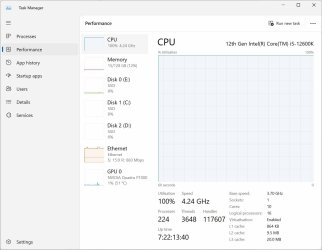
However, when I look at the details tab in Task Manager, it shows the majority of CPU is being used by System Idle Process, which seems to me to make not too much sense. The CPU use by Handbrake goes up and down by a few percent, but it never shows as more than about 40%.
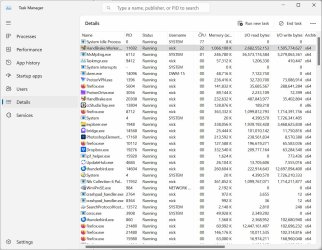
If I pause Handbrake, then System Idle Process goes to 98-99%, and on the performance tab, CPU utilisation drops to 1-2%. Resume Handbrake, and CPU goes to 100%, but System Idle still shows as being the majority of that. Seems to me that either the CPU utilisation on the performance tab is wrong or the System Idle Process percent of CPU on the details tab is wrong.
However, when I look at the details tab in Task Manager, it shows the majority of CPU is being used by System Idle Process, which seems to me to make not too much sense. The CPU use by Handbrake goes up and down by a few percent, but it never shows as more than about 40%.
If I pause Handbrake, then System Idle Process goes to 98-99%, and on the performance tab, CPU utilisation drops to 1-2%. Resume Handbrake, and CPU goes to 100%, but System Idle still shows as being the majority of that. Seems to me that either the CPU utilisation on the performance tab is wrong or the System Idle Process percent of CPU on the details tab is wrong.
- Windows Build/Version
- 23H2 build 22631.3447
My Computer
At a glance
Windows 11 ProIntel i5-12600K128GbnVidia Quadro P1000
- OS
- Windows 11 Pro
- Computer type
- PC/Desktop
- Manufacturer/Model
- Gigabyte
- CPU
- Intel i5-12600K
- Motherboard
- Z690 Aorus Pro
- Memory
- 128Gb
- Graphics Card(s)
- nVidia Quadro P1000
- Sound Card
- N/A
- Monitor(s) Displays
- BenQ PD3205U, Eizo EV3237
- Screen Resolution
- 3840x2160, 3840x2160
- Hard Drives
- Samsung SSD 980 Pro
Samsung SSD 970 EVO Plus
Sabrent Rocket Q
- Case
- Be Quiet






