Suggestions needed for home networking


kanenas

Well-known member
Member
Local time
10:19 PM
Posts
92
OS
Windows 11 Pro for Workstations 25H2 26200.8524
Hello.
I'm pretty sure that I have a good handle on what I'll have to do, but for lack of experience, an expert I'm not.
Any advice is welcome.

Current situation:

I have an old DSL connection (100MB) in the living room, with its router supporting the phone line, feeding the TV through a wired 5-port giga switch box, and also supply wireless connection to any cell phones around it.

I've added a couple of years ago a 1GB fiber line that goes directly to my computer room.

With the prices being ridiculous, I decided to get rid of the DSL line and transfer my phone to the fiber company. The phone works fine as an IP phone when plugged in the fiber's router.

Things to do:

Transfer the fiber's signal over to the living room so I can feed the TV etc.

The fiber's router is a ZTE (GPON ONT, March 2024), model ZXHN F870L

I also have a couple of leftover older routers:
Mercusys MR50G and a ZTE Gateway ZXHN H288A.

Problems:
I can't connect the fiber to the living room using an ethernet wire. Wife problem...
I'd like to keep the whole setup as close to the fiber's speed as possible.
Get the phone out of my computer area.

This (probably, see below the Powerline possibility) takes out of consideration the MR50G which is an access point and needs an ethernet connection to the router.
For the ZTE Gateway, I'm not sure yet. It might have worked but I need to locate its power plug before I try it.

Powerlines dawned on me but I have never tried them.
Could I send the fiber signal through a powerline adaptor, pick it up in the living room and feed it to the wired connection of the MR50G or the ZTE Gateway?
After that, I should be able to feed the TV through the switch.

Only thing I can't figure out: is it possible to connect the phone (that's now transformed to an IP one) back in the living room. The ZTE Gateway has a phone connection but that device was for the older DSL so it's rather doubtful it can be done.

There's Mesh too but it's over my head and I'm already dizzy :)

Thanks in advance for any advice on setup or hardware that would do the job without breaking the Bank.
 

My Computer

System One

  • OS
    Windows 11 Pro for Workstations 25H2 26200.8524
    Computer type
    PC/Desktop
    Manufacturer/Model
    ASRock
    CPU
    6C+4c Intel 13th Gen Intel(R) Core(TM) i5-13400, 4100 M
    Motherboard
    ASRock B660M-HDV
    Memory
    64 GB
    Graphics Card(s)
    NVIDIA GeForce RTX 4060, Intel UHD Graphics 730
    Sound Card
    Realtek
    Monitor(s) Displays
    AOC 24V2W1G5
    Screen Resolution
    1920x1080
    Hard Drives
    Samsung SSD 990 Pro with Heatsink
    Keyboard
    Logitech
    Mouse
    Logitech
    Internet Speed
    1GB
    Antivirus
    Windows Defender
Ah. Fiber. Well I have the same situation as you (I think) I admire your asking for advise. Always a good thing!

Forget the thought to use a fiber cable from your modem to somewhere else. This is tech stuff that is so advanced. Nobody would have the equipment to do that. Excepts the people responsible for bring that fiber in your house. And I have seem them working. A fiber cable might to look simple enough, but it's connected to a box somewhere in your house. Inside the box there is a fiber optical receiver. A chip. The alignment is crucial; a deviation of 1nm!! can make the difference between a good or bad reception. Those ISP guys do have the equipment to be that precise.

Look at that box. Maybe there are 2 led's on it; 1-telling there is a good fiber connection and 2-the status of the fiberoptics connection inside your telecom distribution station (that houses also a fiber-modem) is good and the modem is working fine. You are logged-in to your ISP successfully.

On the same box you will see an UTP cable coming out of that box that is hooked up to your modem. That is the 1Gb (or faster) connection right there. That speed is an total overkill for all your equipment inside your house. That modem (suspect that) will house an internal 4-ports router. One of those connection is attached to your PC and you can download and maybe upload stuff with 1Gb with ease.

Your TV, Phone etc. can't even handle speeds like 1Gb!!!!! In Realtime it uses only a fraction of that 1Gb speed!! We are talking about Mb's/sec and not Gb's/sec!!! Depending on the quality of the TV broadcast: 3-5 Mbps for standard definition (SD), 5-8 Mbps for high definition (HD), and 25 Mbps or higher for 4K Ultra HD. So forget fiber al together. You absolutely don't need that!!! Nobody on the world needs that. Putting things into perspective.....

So see your high speed 1Gb 4-ports modem as the main transfer hub. If you want to move signals to other rooms: Use good quality UTP cables. (CAT6 from your modem to your PC, CAT5 for the rest.)

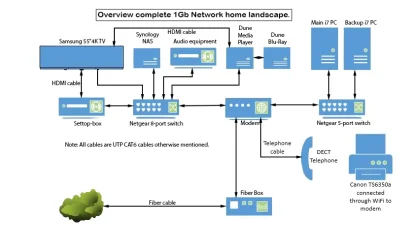
Maybe it's wise to share my home network layout. Pictures say more than a 1000 words.
 

Attachments

  • Network overview.webp
    Network overview.webp
    28.6 KB · Views: 3
Last edited:

My Computer

System One

  • OS
    Win 11 Pro "25H2" Build 26200.8524, Zorin OS Pro
    Computer type
    PC/Desktop
    Manufacturer/Model
    Self built
    CPU
    Intel® Core™ i7-12700KF 12th Gen.
    Motherboard
    ASUS Prime Z690-A, BIOS v4505
    Memory
    32GB DDR5 5600-36 Vengeance
    Graphics Card(s)
    PCIe4.0 Asus NVIDIA RTX3060Ti
    Sound Card
    Onboard; Realtek
    Monitor(s) Displays
    34" LG 34UC79G-B Curved 21:9 144Hz
    Screen Resolution
    2560x1080 (No HDR)
    Hard Drives
    250Gb Samsung 870PRO NVMe (Win 11 Pro)
    1Tb Samsung 980PRO NVMe
    1Tb Samsung 970EVO NVMe
    2Tb Samsung 990PRO NVMe with heatsink.
    4Tb WDC WD40EZRZ Blue SATA (Int.)
    4Tb WDC WD40EZRZ Blue SATA (Int.)
    3Tb WDC WD30EFRZ Red SATA (Int.)
    256Gb Samsung 840PRO SSD (RHEL 9,5)
    256Gb Samsung 850PRO SSD (Zorin OS Pro 18)
    PSU
    Coolermaster 850W V2 Gold with internal 12cm exaust fan
    Case
    Be-Quiet Pure Base 600.
    Cooling
    3x Be-Quiet! 12/14cm "Silent Wings 4" casefans, 1x Arctic Freezer i35 CPU towerblock with fan.
    Keyboard
    Steelseries APEX 7 keyboard.
    Mouse
    Logitech G-502 Hero
    Internet Speed
    1Gb
    Browser
    Brave
    Antivirus
    F-Secure
    Other Info
    No Noise system.
    256Gb Kingston Travler USB 3.0 drive.
    64Gb Sandisk USB 3.2 drive. (Ventoy)
    8Gb Philips USB 3.0 drive. (Win. Inst.)
    8Gb Philips USB 3.0 drive. (Rescue disk)
    2Tb WD USB 3.0 Passport drive.
    USB Ext. 500Gb WD SATA drive.
    External USB 3.0 C.A. CD/DVD* burner.
Thank you hader. Nice setup you have there :)

Excluding NAS and such goodies, my setup is a bit similar.
Instead of your 2 PCs and their switch, I have a desktop and a laptop connected directly to 1GB ports in the router.
The fiber box is incorporated in the ISP-provided router. I used to have such a fiber box in my last year's router but not now.
My TV, set top box and switch setup, match yours. All around, I use CAT6 for everything.

What I don't have though, is the connection between the router and the TV setup in the other room.
I can't connect them with an ethernet cable, so I need an efficient way to get the fiber signal to the TV room.

It sounds simple but I can't decide what's the best way.

Regards.
 

My Computer

System One

  • OS
    Windows 11 Pro for Workstations 25H2 26200.8524
    Computer type
    PC/Desktop
    Manufacturer/Model
    ASRock
    CPU
    6C+4c Intel 13th Gen Intel(R) Core(TM) i5-13400, 4100 M
    Motherboard
    ASRock B660M-HDV
    Memory
    64 GB
    Graphics Card(s)
    NVIDIA GeForce RTX 4060, Intel UHD Graphics 730
    Sound Card
    Realtek
    Monitor(s) Displays
    AOC 24V2W1G5
    Screen Resolution
    1920x1080
    Hard Drives
    Samsung SSD 990 Pro with Heatsink
    Keyboard
    Logitech
    Mouse
    Logitech
    Internet Speed
    1GB
    Antivirus
    Windows Defender
Does your router have WiFi? If it does what speeds does it support? For example, WiFi 5, 6, 6E?

I have cable Internet (2.1Gbps down /300 Mbps up). I use the modem/router from my ISP. It has 3x1GB Ethernet ports & 1x2.5GB Ethernet port. It also supports WiFi 6E. I use Ethernet for my desktops but WiFi with my laptops.
My main desktop has a 2.5Gbps port so I can get about 2.3Gbps down. My other desktops get about 900Mbps down.
My main laptop supports WiFi 6. WiFi speed is about 600-800Mbps. My other laptop supports WiFi 5. WiFi speed is about 300Mbps.
BTW, my main desktop also has WiFi 6E but is a lot slower than Ethernet.
 

My Computers

System One System Two

  • OS
    Windows 11 Pro 25H2 (26200.6901)
    Computer type
    Laptop
    Manufacturer/Model
    ASUS TUF Gaming A15 (2022)
    CPU
    AMD Ryzen 7 6800H with Radeon 680M GPU (486MB RAM)
    Memory
    Crucial DDR5-4800 (2400MHz) 32GB (2 x 16GB)
    Graphics Card(s)
    NVIDIA RTX 3060 Laptop (6GB RAM)
    Sound Card
    n/a
    Monitor(s) Displays
    15.6-inch
    Screen Resolution
    1920x1080 300Hz
    Hard Drives
    2 x Samsung 990 Evo Plus (2TB M.2 NVME SSD)
    PSU
    n/a
    Mouse
    Wireless Mouse M510
    Internet Speed
    2100Mbps/300Mbps
    Browser
    Firefox
    Antivirus
    Malwarebytes
  • Operating System
    Windows 11 Pro 25H2 (26200.8246)
    Computer type
    PC/Desktop
    Manufacturer/Model
    Custom build
    CPU
    AMD Ryzen 7 5700X3D
    Motherboard
    ASUS ROG Strix B550-F Gaming WiFi II
    Memory
    G.SKILL Flare X 32GB (2x16GB) DDR4
    Graphics card(s)
    ASUS ROG-STRIX-RTX3060TI-08G-V2-GAMING (RTX 3060-Ti, 8GB RAM)
    Monitor(s) Displays
    Samsung G50D IPS 27"
    Screen Resolution
    1440p/180Hz
    Hard Drives
    SAMSUNG 990 EVO Plus (2TB] M.2 NVME SSD
    SAMSUNG 990 EVO Plus (4TB) M.2 NVME SSD
    PSU
    Corsair RM750x (750 watts)
    Case
    Cooler Master MasterCase 5
    Cooling
    Scythe Mugen 6
    Keyboard
    Logitech K520 (MK540 keyboard/mouse combo)
    Mouse
    Logitech M310 (MK540 keyboard/mouse combo)
    Internet Speed
    2100 Mbps down / 300 Mbps up
    Browser
    Firefox, Edge, Chrome
    Antivirus
    Malwarebytes (Premium)
    Other Info
    ASUS Blu-ray Burner BW-16D1HT (SATA) || Western Digital Easystore 20TB USB 3.0 external hard drive used with Acronis True Image 2025 backup software || HP OfficeJet Pro 6975 Printer/Scanner
My router supports 2.4 GHz (at 600 Mbps) and 5 GHz (at 1300 Mbps). 1900 Mbps max combined Wi-Fi speed.
The 4 wired LAN ports are symmetric (all are 1GB up/1GB down).
Router info: MR50G | AC1900 Wireless Dual Band Gigabit Router - MERCUSYS

On my connection to the other room (without an ethernet cable) problem, I'll call them on Monday for another possible solution.
My line comes off a box in the street and gets from a balcony to the computer room.
Maybe they can use a splitter and get a second line through the living room's balcony. Assuming this works...
It gets too complicated just for not being able to get an ethernet wire through the house.
 

My Computer

System One

  • OS
    Windows 11 Pro for Workstations 25H2 26200.8524
    Computer type
    PC/Desktop
    Manufacturer/Model
    ASRock
    CPU
    6C+4c Intel 13th Gen Intel(R) Core(TM) i5-13400, 4100 M
    Motherboard
    ASRock B660M-HDV
    Memory
    64 GB
    Graphics Card(s)
    NVIDIA GeForce RTX 4060, Intel UHD Graphics 730
    Sound Card
    Realtek
    Monitor(s) Displays
    AOC 24V2W1G5
    Screen Resolution
    1920x1080
    Hard Drives
    Samsung SSD 990 Pro with Heatsink
    Keyboard
    Logitech
    Mouse
    Logitech
    Internet Speed
    1GB
    Antivirus
    Windows Defender
What I don't have though, is the connection between the router and the TV setup in the other room.
I can't connect them with an ethernet cable, so I need an efficient way to get the fiber signal to the TV room.

It sounds simple but I can't decide what's the best way.

Regards.

Thanks. OK. You are saying you don't have enough. Enough of what? It looks to me that all the ports of the modem are already taken. There are options for that that was visible in my drawing also. Take one port. Extend it to your TV room. Buy a Netgear 5-port switch. (Amazon has them for a good and cheap price. Netgear is quality stuff.) Place your switch there, connect it with that cable that is coming from your modem. You now have 4 other ports available to hook onto other equipment in your TV room. (TV, Settop-box, Audio etc.)

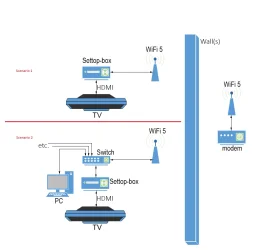
If cable isn't an option; use WiFi. (WiFi 4; 802.11n, Max 600Mbps, WiFi 5; 802.11ac, Max 6,8Gbps. WiFi 6; 802.11ax, Max 10Gbps.) Their speeds lays above what is needed. (25Mbps for a 4K Ultra HD TV) Most modems today have a build-in WiFi transmitter. You have to login into your modem (with a non-standard password please. If standard: Change it! Security) to see what your modem is capable off. To have some bandwidth use WiFi 5. Buy a WiFi receiver that is capable of receiving a WiFi 5 signal. Place the receiver in an imagery line-off sight pointing towards your modem. (orientation does not matter) What kind of walls your house has depends. Wooden structured walls, bricks, concrete. (My apartment walls are made up of 7,8 inch thick concrete walls, can go through 2 before the signal degrades) You can then go with several options. I made a drawing to explain. It's up to you how to proceed......
 

Attachments

  • WiFi 5.webp
    WiFi 5.webp
    19.8 KB · Views: 3

My Computer

System One

  • OS
    Win 11 Pro "25H2" Build 26200.8524, Zorin OS Pro
    Computer type
    PC/Desktop
    Manufacturer/Model
    Self built
    CPU
    Intel® Core™ i7-12700KF 12th Gen.
    Motherboard
    ASUS Prime Z690-A, BIOS v4505
    Memory
    32GB DDR5 5600-36 Vengeance
    Graphics Card(s)
    PCIe4.0 Asus NVIDIA RTX3060Ti
    Sound Card
    Onboard; Realtek
    Monitor(s) Displays
    34" LG 34UC79G-B Curved 21:9 144Hz
    Screen Resolution
    2560x1080 (No HDR)
    Hard Drives
    250Gb Samsung 870PRO NVMe (Win 11 Pro)
    1Tb Samsung 980PRO NVMe
    1Tb Samsung 970EVO NVMe
    2Tb Samsung 990PRO NVMe with heatsink.
    4Tb WDC WD40EZRZ Blue SATA (Int.)
    4Tb WDC WD40EZRZ Blue SATA (Int.)
    3Tb WDC WD30EFRZ Red SATA (Int.)
    256Gb Samsung 840PRO SSD (RHEL 9,5)
    256Gb Samsung 850PRO SSD (Zorin OS Pro 18)
    PSU
    Coolermaster 850W V2 Gold with internal 12cm exaust fan
    Case
    Be-Quiet Pure Base 600.
    Cooling
    3x Be-Quiet! 12/14cm "Silent Wings 4" casefans, 1x Arctic Freezer i35 CPU towerblock with fan.
    Keyboard
    Steelseries APEX 7 keyboard.
    Mouse
    Logitech G-502 Hero
    Internet Speed
    1Gb
    Browser
    Brave
    Antivirus
    F-Secure
    Other Info
    No Noise system.
    256Gb Kingston Travler USB 3.0 drive.
    64Gb Sandisk USB 3.2 drive. (Ventoy)
    8Gb Philips USB 3.0 drive. (Win. Inst.)
    8Gb Philips USB 3.0 drive. (Rescue disk)
    2Tb WD USB 3.0 Passport drive.
    USB Ext. 500Gb WD SATA drive.
    External USB 3.0 C.A. CD/DVD* burner.
Thanks for the info hader and sorry for the delay responding.

I just gave up fighting to connect to my router my leftover home gateway and another old router I had. They just refused to connect with the main router no matter how many Google references I went through.
I ordered a Mercusys ME50G that matches the MR50G router. Pretty positive this combo will work.
I'll have it by next Thursday and I'll post the results around then.

Regards.
 

My Computer

System One

  • OS
    Windows 11 Pro for Workstations 25H2 26200.8524
    Computer type
    PC/Desktop
    Manufacturer/Model
    ASRock
    CPU
    6C+4c Intel 13th Gen Intel(R) Core(TM) i5-13400, 4100 M
    Motherboard
    ASRock B660M-HDV
    Memory
    64 GB
    Graphics Card(s)
    NVIDIA GeForce RTX 4060, Intel UHD Graphics 730
    Sound Card
    Realtek
    Monitor(s) Displays
    AOC 24V2W1G5
    Screen Resolution
    1920x1080
    Hard Drives
    Samsung SSD 990 Pro with Heatsink
    Keyboard
    Logitech
    Mouse
    Logitech
    Internet Speed
    1GB
    Antivirus
    Windows Defender
Thanks for the info hader and sorry for the delay responding.

I just gave up fighting to connect to my router my leftover home gateway and another old router I had. They just refused to connect with the main router no matter how many Google references I went through.
I ordered a Mercusys ME50G that matches the MR50G router. Pretty positive this combo will work.
I'll have it by next Thursday and I'll post the results around then.

Regards.
Thanks for the update. It's always a good thing to have matching stuff especially with routers. (they are more picky if the setting are not correct) With switches it's easy; they are dumb. I hope you will solve your situation with relative ease. Goodluck.
 

My Computer

System One

  • OS
    Win 11 Pro "25H2" Build 26200.8524, Zorin OS Pro
    Computer type
    PC/Desktop
    Manufacturer/Model
    Self built
    CPU
    Intel® Core™ i7-12700KF 12th Gen.
    Motherboard
    ASUS Prime Z690-A, BIOS v4505
    Memory
    32GB DDR5 5600-36 Vengeance
    Graphics Card(s)
    PCIe4.0 Asus NVIDIA RTX3060Ti
    Sound Card
    Onboard; Realtek
    Monitor(s) Displays
    34" LG 34UC79G-B Curved 21:9 144Hz
    Screen Resolution
    2560x1080 (No HDR)
    Hard Drives
    250Gb Samsung 870PRO NVMe (Win 11 Pro)
    1Tb Samsung 980PRO NVMe
    1Tb Samsung 970EVO NVMe
    2Tb Samsung 990PRO NVMe with heatsink.
    4Tb WDC WD40EZRZ Blue SATA (Int.)
    4Tb WDC WD40EZRZ Blue SATA (Int.)
    3Tb WDC WD30EFRZ Red SATA (Int.)
    256Gb Samsung 840PRO SSD (RHEL 9,5)
    256Gb Samsung 850PRO SSD (Zorin OS Pro 18)
    PSU
    Coolermaster 850W V2 Gold with internal 12cm exaust fan
    Case
    Be-Quiet Pure Base 600.
    Cooling
    3x Be-Quiet! 12/14cm "Silent Wings 4" casefans, 1x Arctic Freezer i35 CPU towerblock with fan.
    Keyboard
    Steelseries APEX 7 keyboard.
    Mouse
    Logitech G-502 Hero
    Internet Speed
    1Gb
    Browser
    Brave
    Antivirus
    F-Secure
    Other Info
    No Noise system.
    256Gb Kingston Travler USB 3.0 drive.
    64Gb Sandisk USB 3.2 drive. (Ventoy)
    8Gb Philips USB 3.0 drive. (Win. Inst.)
    8Gb Philips USB 3.0 drive. (Rescue disk)
    2Tb WD USB 3.0 Passport drive.
    USB Ext. 500Gb WD SATA drive.
    External USB 3.0 C.A. CD/DVD* burner.
Sorry for another delay. The mind was willing but Covid had other ideas.

The extender ME50G was easy to set up by just using WPS to link it to the main router.
I installed the extender (on a straight line from the router to the living room -- about 10 meters away) and it seems to connect at 5 Ghz.
The TV linked to the wi-fi without problems. I also connected the ethernet cable of the switch box (that sits next to the TV) to the single ethernet output of the extender, and the TV can connect through wire too.

All (or most) is in place now.
The only hiccup is the home alarm system. It needed a regular telephone line and since I now have an IP telephone on the router (and can't use a telephone wire to get to it), the easy way out is to replace a circuit on the alarm box with a digital one that can connect wirelessly. The alarm company's support will take care of that.

Thank you all for the suggestions, schematics and the rest.

Enjoy the Holidays,
 

My Computer

System One

  • OS
    Windows 11 Pro for Workstations 25H2 26200.8524
    Computer type
    PC/Desktop
    Manufacturer/Model
    ASRock
    CPU
    6C+4c Intel 13th Gen Intel(R) Core(TM) i5-13400, 4100 M
    Motherboard
    ASRock B660M-HDV
    Memory
    64 GB
    Graphics Card(s)
    NVIDIA GeForce RTX 4060, Intel UHD Graphics 730
    Sound Card
    Realtek
    Monitor(s) Displays
    AOC 24V2W1G5
    Screen Resolution
    1920x1080
    Hard Drives
    Samsung SSD 990 Pro with Heatsink
    Keyboard
    Logitech
    Mouse
    Logitech
    Internet Speed
    1GB
    Antivirus
    Windows Defender
Your TV, Phone etc. can't even handle speeds like 1Gb!!!!! In Realtime it uses only a fraction of that 1Gb speed!!
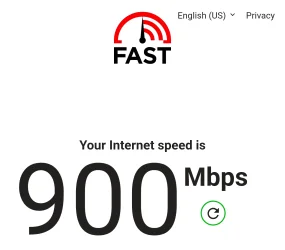
This information is somewhat false. My phones since almost 10 years ago can easily do over 1Gbps, and I use this speed extensively, even over 5G. There's other things one can do except video streaming...

...just saying.

Example...ISP limited atm because of congestion (quite often goes beyond 1.2Gbps):
Screenshot_20251226_113113_Edge.webp
 

My Computers

System One System Two

  • OS
    Win 11 Pro 25H2 26200.8457 / Linux Mint 22.3
    Computer type
    Laptop
    Manufacturer/Model
    Lenovo A485
    CPU
    Ryzen 7 2700U Pro
    Motherboard
    Lenovo (WiFi/BT module upgraded to Intel Wireless-AC-9260)
    Memory
    32GB
    Graphics Card(s)
    iGPU Vega 10
    Sound Card
    Realtek
    Monitor(s) Displays
    14" FHD (built-in) + 14" Lenovo Thinkvision M14t (touch+pen) + 32" Asus PB328
    Screen Resolution
    FHD + FHD + 1440p
    Hard Drives
    Intel 660p m.2 nVME PCIe3.0 x2 512GB
    PSU
    125W(Dock)/65W(Travel Adapter)
    Keyboard
    Thinkpad / Logitech MX Keys
    Mouse
    Logitech MX Master 2S
    Internet Speed
    1/1Gbit
    Browser
    Firefox
    Antivirus
    Windows Defender
    Other Info
    SecureBoot: Enabled
    TPM2.0: Enabled
    AMD-V: Enabled
  • Operating System
    Win 11 Pro 25H2 26200.8521(RP)
    Computer type
    PC/Desktop
    Manufacturer/Model
    Custom
    CPU
    i7-7700k @4.8GHz
    Motherboard
    Asus PRIME Z270-A
    Memory
    32GB 2x16GB 2133MHz CL15
    Graphics card(s)
    EVGA GTX1080Ti FTW 11GB
    Sound Card
    Integrated
    Monitor(s) Displays
    32" 10-bit Asus PB328Q
    Screen Resolution
    WQHD 2560x1440
    Hard Drives
    512GB ADATA SX8000NP NVMe PCIe Gen 3 x4
    PSU
    850W
    Case
    Fractal Design Define 7
    Cooling
    Noctua NH-D15 chromax.black
    Keyboard
    Logitech MX Keys
    Mouse
    Logitech MX Master 2S
    Internet Speed
    1/1Gbit
    Browser
    Firefox
    Antivirus
    Windows Defender
    Other Info
    AC WiFi Card
This information is somewhat false. My phones since almost 10 years ago can easily do over 1Gbps, and I use this speed extensively, even over 5G. There's other things one can do except video streaming...

...just saying.

Example...ISP limited atm because of congestion (quite often goes beyond 1.2Gbps):
View attachment 158042
Hahahaha.. It works I believe that but does it need 900Mbps or uses it 900Mbps..? Nope. That is what I meant. Only a fraction of that speed. The rest of the bandwidth is unused. A 500Mpbs connection can also do everything. (PC, multiple phones, multiple TV's everything at the same time at max speeds.) The only thing that will uses this speed if your downloading with your PC or laptop.

I download with my 1Gb fiber connection arround 119MB/sec. *should be arround 128MB/sec in theory, is slower because of the overhead inside the protocol layers. That's what my UTP network-card "speaks"* (MegaBytes is not Mbps. That's Megabit/sec) 900Mbps = 900/8 = 112,5MB/sec.

With 119Mb/sec->That means a 140Gb file will take some 20 minutes to download. It will drop down to 108MB/sec if I use TV, Radio, Phone, PC, Printer all at the same time at once. Not bad. Those 20 minutes will now take 24..... A couple of minutes longer. Mwah. So what?...... In all transmissions and communication protocols there are still gaps. There is no way that every devices are talking at the same time at full capacity! That like saying I have 5 dices and I will throw these at once and there will be always a 6 on top of every dice every and all the time! No way!!!

Your Phone or TV will never need or uses that kind of speeds. That was my point. Everything will work even with a speed of 1Tb. No problem. But everything using only a 50Mbps connection? That's a different story. You have to lower your speed demands by lowering your needs towards HD quality if you use multiple devices at the same time. Without a PC, 100Mbps wil be just fine. Hope you have some sort of insight of what's really going on.....? If not? Ask!....
It's all technical mumbo-jumbo I know. I am a tech guy that tries to explain things. I don't expect that everybody know this all.... No. That would be insane.

Some facts:
Phone uses only

  • Basic Tasks (Email, Browsing, Music): 1-5 Mbps
  • HD Streaming/Video Calls: 5-10 Mbps (recommended)
  • 4K Streaming/Online Gaming: 25-35+ Mbps
  • Heavy Multi-Device Use (4K, Gaming, Downloads): 100+ Mbps
TV uses only
  • Standard Definition (SD): ~3-5 Mbps
  • High Definition (HD/1080p): 5-15 Mbps (aim for 10-25 Mbps for buffer-free)
  • 4K Ultra HD (UHD): 20-25 Mbps (minimum), but 50+ Mbps recommended for multiple 4K streams or heavy usage
  • Live TV: 8-10+ Mbps (higher for sports/fast action)
So any speed e.g. 200Mbps is already enough. Not 1000Mps. That's overkill. Personally? I love 1000Mbps. It want to download stuff in a short period as possible. Other people that only sending or reading mails or browse stuff or view movies on the internet don't need that kind of speeds. As a tech guy I do much more than that. Even work related stuff. I don't sit in a office the whole time as an DBA. Only 2 days/week I am at work. The other 3 days I work from home. That changes is the aftermath of Covid. Some people can't. If you are a pro baker and have a shop you can't do these things from home. Tech guys can.

My info still stands. Check it yourself.
 
Last edited:

My Computer

System One

  • OS
    Win 11 Pro "25H2" Build 26200.8524, Zorin OS Pro
    Computer type
    PC/Desktop
    Manufacturer/Model
    Self built
    CPU
    Intel® Core™ i7-12700KF 12th Gen.
    Motherboard
    ASUS Prime Z690-A, BIOS v4505
    Memory
    32GB DDR5 5600-36 Vengeance
    Graphics Card(s)
    PCIe4.0 Asus NVIDIA RTX3060Ti
    Sound Card
    Onboard; Realtek
    Monitor(s) Displays
    34" LG 34UC79G-B Curved 21:9 144Hz
    Screen Resolution
    2560x1080 (No HDR)
    Hard Drives
    250Gb Samsung 870PRO NVMe (Win 11 Pro)
    1Tb Samsung 980PRO NVMe
    1Tb Samsung 970EVO NVMe
    2Tb Samsung 990PRO NVMe with heatsink.
    4Tb WDC WD40EZRZ Blue SATA (Int.)
    4Tb WDC WD40EZRZ Blue SATA (Int.)
    3Tb WDC WD30EFRZ Red SATA (Int.)
    256Gb Samsung 840PRO SSD (RHEL 9,5)
    256Gb Samsung 850PRO SSD (Zorin OS Pro 18)
    PSU
    Coolermaster 850W V2 Gold with internal 12cm exaust fan
    Case
    Be-Quiet Pure Base 600.
    Cooling
    3x Be-Quiet! 12/14cm "Silent Wings 4" casefans, 1x Arctic Freezer i35 CPU towerblock with fan.
    Keyboard
    Steelseries APEX 7 keyboard.
    Mouse
    Logitech G-502 Hero
    Internet Speed
    1Gb
    Browser
    Brave
    Antivirus
    F-Secure
    Other Info
    No Noise system.
    256Gb Kingston Travler USB 3.0 drive.
    64Gb Sandisk USB 3.2 drive. (Ventoy)
    8Gb Philips USB 3.0 drive. (Win. Inst.)
    8Gb Philips USB 3.0 drive. (Rescue disk)
    2Tb WD USB 3.0 Passport drive.
    USB Ext. 500Gb WD SATA drive.
    External USB 3.0 C.A. CD/DVD* burner.
Tell that to the ones with 5Gbit fiber...that they don't need it. You'll get a big eybrow look back. 😂

Actually with data stream compression I get about 70-85MB/s on my fiber which is only a 600Mbit link, so your assessment isn't accurate.

...but anyways, we should not judge anyones needs and don't needs. In my household I could not live with less than a 500Mbit connection. The link would be congested all the time. And while I'm busy, I need stuff to get downloaded or uploaded asap. Don't have time to wait hours.
 

My Computers

System One System Two

  • OS
    Win 11 Pro 25H2 26200.8457 / Linux Mint 22.3
    Computer type
    Laptop
    Manufacturer/Model
    Lenovo A485
    CPU
    Ryzen 7 2700U Pro
    Motherboard
    Lenovo (WiFi/BT module upgraded to Intel Wireless-AC-9260)
    Memory
    32GB
    Graphics Card(s)
    iGPU Vega 10
    Sound Card
    Realtek
    Monitor(s) Displays
    14" FHD (built-in) + 14" Lenovo Thinkvision M14t (touch+pen) + 32" Asus PB328
    Screen Resolution
    FHD + FHD + 1440p
    Hard Drives
    Intel 660p m.2 nVME PCIe3.0 x2 512GB
    PSU
    125W(Dock)/65W(Travel Adapter)
    Keyboard
    Thinkpad / Logitech MX Keys
    Mouse
    Logitech MX Master 2S
    Internet Speed
    1/1Gbit
    Browser
    Firefox
    Antivirus
    Windows Defender
    Other Info
    SecureBoot: Enabled
    TPM2.0: Enabled
    AMD-V: Enabled
  • Operating System
    Win 11 Pro 25H2 26200.8521(RP)
    Computer type
    PC/Desktop
    Manufacturer/Model
    Custom
    CPU
    i7-7700k @4.8GHz
    Motherboard
    Asus PRIME Z270-A
    Memory
    32GB 2x16GB 2133MHz CL15
    Graphics card(s)
    EVGA GTX1080Ti FTW 11GB
    Sound Card
    Integrated
    Monitor(s) Displays
    32" 10-bit Asus PB328Q
    Screen Resolution
    WQHD 2560x1440
    Hard Drives
    512GB ADATA SX8000NP NVMe PCIe Gen 3 x4
    PSU
    850W
    Case
    Fractal Design Define 7
    Cooling
    Noctua NH-D15 chromax.black
    Keyboard
    Logitech MX Keys
    Mouse
    Logitech MX Master 2S
    Internet Speed
    1/1Gbit
    Browser
    Firefox
    Antivirus
    Windows Defender
    Other Info
    AC WiFi Card
Your Phone or TV will never need or uses that kind of speeds.
My phone definitely needs a 1Gbit connection. Period.
 

My Computers

System One System Two

  • OS
    Win 11 Pro 25H2 26200.8457 / Linux Mint 22.3
    Computer type
    Laptop
    Manufacturer/Model
    Lenovo A485
    CPU
    Ryzen 7 2700U Pro
    Motherboard
    Lenovo (WiFi/BT module upgraded to Intel Wireless-AC-9260)
    Memory
    32GB
    Graphics Card(s)
    iGPU Vega 10
    Sound Card
    Realtek
    Monitor(s) Displays
    14" FHD (built-in) + 14" Lenovo Thinkvision M14t (touch+pen) + 32" Asus PB328
    Screen Resolution
    FHD + FHD + 1440p
    Hard Drives
    Intel 660p m.2 nVME PCIe3.0 x2 512GB
    PSU
    125W(Dock)/65W(Travel Adapter)
    Keyboard
    Thinkpad / Logitech MX Keys
    Mouse
    Logitech MX Master 2S
    Internet Speed
    1/1Gbit
    Browser
    Firefox
    Antivirus
    Windows Defender
    Other Info
    SecureBoot: Enabled
    TPM2.0: Enabled
    AMD-V: Enabled
  • Operating System
    Win 11 Pro 25H2 26200.8521(RP)
    Computer type
    PC/Desktop
    Manufacturer/Model
    Custom
    CPU
    i7-7700k @4.8GHz
    Motherboard
    Asus PRIME Z270-A
    Memory
    32GB 2x16GB 2133MHz CL15
    Graphics card(s)
    EVGA GTX1080Ti FTW 11GB
    Sound Card
    Integrated
    Monitor(s) Displays
    32" 10-bit Asus PB328Q
    Screen Resolution
    WQHD 2560x1440
    Hard Drives
    512GB ADATA SX8000NP NVMe PCIe Gen 3 x4
    PSU
    850W
    Case
    Fractal Design Define 7
    Cooling
    Noctua NH-D15 chromax.black
    Keyboard
    Logitech MX Keys
    Mouse
    Logitech MX Master 2S
    Internet Speed
    1/1Gbit
    Browser
    Firefox
    Antivirus
    Windows Defender
    Other Info
    AC WiFi Card
Tell that to the ones with 5Gbit fiber...that they don't need it. You'll get a big eybrow look back. 😂

Actually with data stream compression I get about 70-85MB/s on my fiber which is only a 600Mbit link, so your assessment isn't accurate.

...but anyways, we should not judge anyones needs and don't needs. In my household I could not live with less than a 500Mbit connection. The link would be congested all the time. And while I'm busy, I need stuff to get downloaded or uploaded asap. Don't have time to wait hours.
I have also not the paitence to wait for downloads. That's why I use a 1Gb fiber connection. But other people don't care by browsing and sending some e-mails and watch TV. The are fine with a lower speeds than 1Gb.
 

My Computer

System One

  • OS
    Win 11 Pro "25H2" Build 26200.8524, Zorin OS Pro
    Computer type
    PC/Desktop
    Manufacturer/Model
    Self built
    CPU
    Intel® Core™ i7-12700KF 12th Gen.
    Motherboard
    ASUS Prime Z690-A, BIOS v4505
    Memory
    32GB DDR5 5600-36 Vengeance
    Graphics Card(s)
    PCIe4.0 Asus NVIDIA RTX3060Ti
    Sound Card
    Onboard; Realtek
    Monitor(s) Displays
    34" LG 34UC79G-B Curved 21:9 144Hz
    Screen Resolution
    2560x1080 (No HDR)
    Hard Drives
    250Gb Samsung 870PRO NVMe (Win 11 Pro)
    1Tb Samsung 980PRO NVMe
    1Tb Samsung 970EVO NVMe
    2Tb Samsung 990PRO NVMe with heatsink.
    4Tb WDC WD40EZRZ Blue SATA (Int.)
    4Tb WDC WD40EZRZ Blue SATA (Int.)
    3Tb WDC WD30EFRZ Red SATA (Int.)
    256Gb Samsung 840PRO SSD (RHEL 9,5)
    256Gb Samsung 850PRO SSD (Zorin OS Pro 18)
    PSU
    Coolermaster 850W V2 Gold with internal 12cm exaust fan
    Case
    Be-Quiet Pure Base 600.
    Cooling
    3x Be-Quiet! 12/14cm "Silent Wings 4" casefans, 1x Arctic Freezer i35 CPU towerblock with fan.
    Keyboard
    Steelseries APEX 7 keyboard.
    Mouse
    Logitech G-502 Hero
    Internet Speed
    1Gb
    Browser
    Brave
    Antivirus
    F-Secure
    Other Info
    No Noise system.
    256Gb Kingston Travler USB 3.0 drive.
    64Gb Sandisk USB 3.2 drive. (Ventoy)
    8Gb Philips USB 3.0 drive. (Win. Inst.)
    8Gb Philips USB 3.0 drive. (Rescue disk)
    2Tb WD USB 3.0 Passport drive.
    USB Ext. 500Gb WD SATA drive.
    External USB 3.0 C.A. CD/DVD* burner.
I have also not the paitence to wait for downloads. That's why I use a 1Gb fiber connection. But other people don't care by browsing and sending some e-mails and watch TV. The are fine with a lower speeds than 1Gb.
Fair enough
 

My Computers

System One System Two

  • OS
    Win 11 Pro 25H2 26200.8457 / Linux Mint 22.3
    Computer type
    Laptop
    Manufacturer/Model
    Lenovo A485
    CPU
    Ryzen 7 2700U Pro
    Motherboard
    Lenovo (WiFi/BT module upgraded to Intel Wireless-AC-9260)
    Memory
    32GB
    Graphics Card(s)
    iGPU Vega 10
    Sound Card
    Realtek
    Monitor(s) Displays
    14" FHD (built-in) + 14" Lenovo Thinkvision M14t (touch+pen) + 32" Asus PB328
    Screen Resolution
    FHD + FHD + 1440p
    Hard Drives
    Intel 660p m.2 nVME PCIe3.0 x2 512GB
    PSU
    125W(Dock)/65W(Travel Adapter)
    Keyboard
    Thinkpad / Logitech MX Keys
    Mouse
    Logitech MX Master 2S
    Internet Speed
    1/1Gbit
    Browser
    Firefox
    Antivirus
    Windows Defender
    Other Info
    SecureBoot: Enabled
    TPM2.0: Enabled
    AMD-V: Enabled
  • Operating System
    Win 11 Pro 25H2 26200.8521(RP)
    Computer type
    PC/Desktop
    Manufacturer/Model
    Custom
    CPU
    i7-7700k @4.8GHz
    Motherboard
    Asus PRIME Z270-A
    Memory
    32GB 2x16GB 2133MHz CL15
    Graphics card(s)
    EVGA GTX1080Ti FTW 11GB
    Sound Card
    Integrated
    Monitor(s) Displays
    32" 10-bit Asus PB328Q
    Screen Resolution
    WQHD 2560x1440
    Hard Drives
    512GB ADATA SX8000NP NVMe PCIe Gen 3 x4
    PSU
    850W
    Case
    Fractal Design Define 7
    Cooling
    Noctua NH-D15 chromax.black
    Keyboard
    Logitech MX Keys
    Mouse
    Logitech MX Master 2S
    Internet Speed
    1/1Gbit
    Browser
    Firefox
    Antivirus
    Windows Defender
    Other Info
    AC WiFi Card

Latest Support Threads

Back
Top Bottom