
Sunset and Sunrise totally wrong


wimorrison

Well-known member
Member
VIP
Local time
11:58 AM
Posts
285
OS
Win11 26100.3323
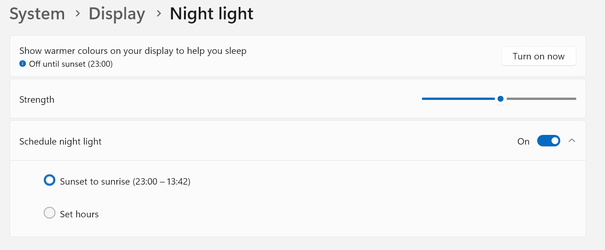
I noticed last night that my screen was still showing the 'daylight' screen at 22:00 and this morning a bit of digging has found the issue which I show below.

1673425746765.png

My laptop has the correct language (UK English), the correct location UK, and the time is correctly sync'd however I seem unable to get sunrise and sunset to reflect the actual local time, which should currently be 08:04 to 16:19, which is definitely not what Windows is setting it to :(

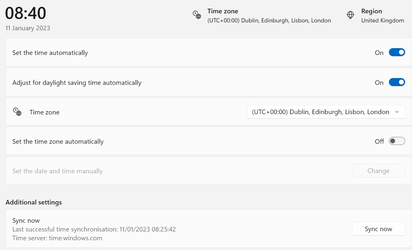
One thing I do notice is that I cannot set the timezone automatically as teh slider changes back to Off when I slide it to On. I am not sure if that is related?
1673426516481.png

Any suggestions on what I can do to make it work correctly?

22H2 22623.1095
 

My Computer My Computer

At a glance

Win11 26100.332312th Gen Intel(R) Core(TM) i7-1270P 2.20 GHz16Gb
OS
Win11 26100.3323
Computer type
Laptop
Manufacturer/Model
Dell Latitude 7430
CPU
12th Gen Intel(R) Core(TM) i7-1270P 2.20 GHz
Motherboard
Dell
Memory
16Gb
That is very odd.

Have you tried changing your timezone and seeing if the sunset/sunrise times change to see if it's just something affecting your current timezone?
 

My Computers My Computers

  • At a glance

    Windows 11 WorkstationRyzen 9 5950XCorsair Vengeance RGB PRO Black 64GB (4x16GB)...ASUS AMD Radeon RX 6900 XT 16GB ROG Strix LC OC
    OS
    Windows 11 Workstation
    Computer type
    PC/Desktop
    Manufacturer/Model
    doofenshmirtz evil incorporated
    CPU
    Ryzen 9 5950X
    Motherboard
    Asus ROG Crosshair VIII Formula
    Memory
    Corsair Vengeance RGB PRO Black 64GB (4x16GB) 3600MHz AMD Ryzen Tuned DDR4
    Graphics Card(s)
    ASUS AMD Radeon RX 6900 XT 16GB ROG Strix LC OC
    Sound Card
    Sound BlasterX Katana
    Monitor(s) Displays
    3 x27" Dell U2724D & 1 x 34" Dell U3415W
    Hard Drives
    Samsung 980 Pro 1TB M.2 2280 PCI-e 4.0 x4 NVMe Solid State
    Drive
    PSU
    ASUS ROG THOR 850W 80 Plus Platinum
    Case
    ASUS ROG Strix Helios Midi-Tower ARGB Gaming Case
    Cooling
    ASUS ROG Strix LC Performance RGB AIO CPU Liquid Cooler - 360mm
    Keyboard
    Logi Ergo
    Mouse
    Logitech MX Vertical
    Internet Speed
    1000/200 Mbps
    Browser
    Chrome
    Antivirus
    Windows Defender, Malwarebytes Pro
    Other Info
    HP M281 Printer
    Logitech Brio Stream webcam
    Logitech G Yeti orb mic
  • At a glance

    Windows 11 ProSnapdragon X2 Plus64GB
    Operating System
    Windows 11 Pro
    Computer type
    Laptop
    Manufacturer/Model
    Surface Laptop
    CPU
    Snapdragon X2 Plus
    Memory
    64GB
    Monitor(s) Displays
    15"
  • Nothing to see here.
Check Settings, Privacy & Security, Location, Default location.
 

My Computer My Computer

At a glance

Windows 11
OS
Windows 11
Computer type
Laptop
Two observations: one is the Version of Win11, yours suggests Insider Preview and the other is a question, is a VPN in use? Current as of last night's Patch Tuesday, the RTM Version of Win11 is 22H2 Build 22621.1105.
 

My Computers My Computers

  • At a glance

    Win11 Pro RTM Version 24H2 Build 26100.4202Intel Core i5 11th Gen. 2.40GHz12GB
    OS
    Win11 Pro RTM Version 24H2 Build 26100.4202
    Computer type
    Laptop
    Manufacturer/Model
    Dell Vostro 3400
    CPU
    Intel Core i5 11th Gen. 2.40GHz
    Memory
    12GB
    Hard Drives
    256GB SSD NVMe M.2
  • At a glance

    Win11 Pro RTM Version 24H2 Build 26100.4202Intel Core i5 10th Gen. 2.90GHz16GBOnboard, no VGA, using a DisplayPort-to-VGA a...
    Operating System
    Win11 Pro RTM Version 24H2 Build 26100.4202
    Computer type
    PC/Desktop
    Manufacturer/Model
    Dell Vostro 5890
    CPU
    Intel Core i5 10th Gen. 2.90GHz
    Memory
    16GB
    Graphics card(s)
    Onboard, no VGA, using a DisplayPort-to-VGA adapter
    Monitor(s) Displays
    24" Dell
    Hard Drives
    512GB SSD NVMe, 4TB Seagate HDD
    Browser
    Firefox, Edge
    Antivirus
    Windows Defender/Microsoft Security
... is a VPN in use?
VPN to the opposite side of the globe? The local time setting should still be correct, though, unless the OP took his laptop to the opposite of the globe :devilish:
 

My Computer My Computer

At a glance

Windows 10 Pro
OS
Windows 10 Pro
VPN to the opposite side of the globe? The local time setting should still be correct, though, unless the OP took his laptop to the opposite of the globe :devilish:
When trying to find a solution to a problem all possibilities have to be eliminated as the cause which is the basis of such questions. The basic premise of a VPN is to hide/disguise the actual location of the computer.
 

My Computers My Computers

  • At a glance

    Win11 Pro RTM Version 24H2 Build 26100.4202Intel Core i5 11th Gen. 2.40GHz12GB
    OS
    Win11 Pro RTM Version 24H2 Build 26100.4202
    Computer type
    Laptop
    Manufacturer/Model
    Dell Vostro 3400
    CPU
    Intel Core i5 11th Gen. 2.40GHz
    Memory
    12GB
    Hard Drives
    256GB SSD NVMe M.2
  • At a glance

    Win11 Pro RTM Version 24H2 Build 26100.4202Intel Core i5 10th Gen. 2.90GHz16GBOnboard, no VGA, using a DisplayPort-to-VGA a...
    Operating System
    Win11 Pro RTM Version 24H2 Build 26100.4202
    Computer type
    PC/Desktop
    Manufacturer/Model
    Dell Vostro 5890
    CPU
    Intel Core i5 10th Gen. 2.90GHz
    Memory
    16GB
    Graphics card(s)
    Onboard, no VGA, using a DisplayPort-to-VGA adapter
    Monitor(s) Displays
    24" Dell
    Hard Drives
    512GB SSD NVMe, 4TB Seagate HDD
    Browser
    Firefox, Edge
    Antivirus
    Windows Defender/Microsoft Security
Check Settings, Privacy & Security, Location, Default location.

I had checked them before I posted, and it makes no difference where I put the default location :(

Looking around the net, I am not alone with this issue, and there doesn't seem to be a definitive fix. People try all sorts of things and for some they work, for some they don't - most wierd.
 

My Computer My Computer

At a glance

Win11 26100.332312th Gen Intel(R) Core(TM) i7-1270P 2.20 GHz16Gb
OS
Win11 26100.3323
Computer type
Laptop
Manufacturer/Model
Dell Latitude 7430
CPU
12th Gen Intel(R) Core(TM) i7-1270P 2.20 GHz
Motherboard
Dell
Memory
16Gb
Two observations: one is the Version of Win11, yours suggests Insider Preview and the other is a question, is a VPN in use? Current as of last night's Patch Tuesday, the RTM Version of Win11 is 22H2 Build 22621.1105.
VPN in use doesn't matter if the region / location for Windows is set.

Certain things like some Windows apps e.g climate stuff depend on the Windows settings not where the Computer is pysically located (unless of course the app uses "Use current location").

Things like Geo-blocking depend on the location of your "public Internet address" assigned by an ISP depending on where that server is located. That's how some services can be "Unblocked" as the VPN poodlesfakes the app to use the VPN's server IP selected rather than the ISP native one.

If I set my standard Windows application to say LIMA Peru and I'm actually in Capetown SA the windows apps will show weather etc for LIMA rather than Capetown so your settings must be hosed up somewhere or you are using the wrong apps.

BTW I'm in neither of those places currently but just an example.

Cheers
jimbo
 
Last edited:

My Computer My Computer

At a glance

Windows XP,11 Linux Fedora Rawhide pre-releas...2 X Intel i7
OS
Windows XP,11 Linux Fedora Rawhide pre-release 46
Computer type
PC/Desktop
CPU
2 X Intel i7
Screen Resolution
4KUHD X 2
It could be an issue with WinDynamicDesktop that changes wallpapers throughout the day on a time based schedule.

To go back to the OP's noticing the time is totally wrong, its either a time zone or a clock issue.
 

My Computers My Computers

  • At a glance

    Windows 11 Education For 25H2Intel® Core i7 5500u8 GBIntel HD Family Graphics 5500 AMD Firepro 4150M
    OS
    Windows 11 Education For 25H2
    Computer type
    Laptop
    Manufacturer/Model
    HP ZBook G2
    CPU
    Intel® Core i7 5500u
    Motherboard
    HP
    Memory
    8 GB
    Graphics Card(s)
    Intel HD Family Graphics 5500 AMD Firepro 4150M
    Sound Card
    Realtek High Audio
    Hard Drives
    1 TB SSD
    Mouse
    HP USB Mouse
    Antivirus
    Windows Defender
  • At a glance

    Windows 11 Pro For Workstations 25H2Xeon 1535m v632 GBAMD Quadro Pro 4100
    Operating System
    Windows 11 Pro For Workstations 25H2
    Computer type
    Laptop
    Manufacturer/Model
    HP Zbook G4
    CPU
    Xeon 1535m v6
    Motherboard
    HP
    Memory
    32 GB
    Graphics card(s)
    AMD Quadro Pro 4100
    Sound Card
    Bang and Olufson Audio
    Hard Drives
    1TB SSD
    Mouse
    HP USB Mouse
    Antivirus
    Windows Defender
It could be an issue with WinDynamicDesktop that changes wallpapers throughout the day on a time based schedule.

To go back to the OP's noticing the time is totally wrong, its either a time zone or a clock issue.
If you look at the images I posted you will see that the displayed time matches when I posted them and that is in line with the time zone 😏
 

My Computer My Computer

At a glance

Win11 26100.332312th Gen Intel(R) Core(TM) i7-1270P 2.20 GHz16Gb
OS
Win11 26100.3323
Computer type
Laptop
Manufacturer/Model
Dell Latitude 7430
CPU
12th Gen Intel(R) Core(TM) i7-1270P 2.20 GHz
Motherboard
Dell
Memory
16Gb
If you look at the images I posted you will see that the displayed time matches when I posted them and that is in line with the time zone 😏

A possible fix is to turn off set the time automatically tab and see what happens. You'd have to manually set it but people know what setting works best for them than software.
 

My Computers My Computers

  • At a glance

    Windows 11 Education For 25H2Intel® Core i7 5500u8 GBIntel HD Family Graphics 5500 AMD Firepro 4150M
    OS
    Windows 11 Education For 25H2
    Computer type
    Laptop
    Manufacturer/Model
    HP ZBook G2
    CPU
    Intel® Core i7 5500u
    Motherboard
    HP
    Memory
    8 GB
    Graphics Card(s)
    Intel HD Family Graphics 5500 AMD Firepro 4150M
    Sound Card
    Realtek High Audio
    Hard Drives
    1 TB SSD
    Mouse
    HP USB Mouse
    Antivirus
    Windows Defender
  • At a glance

    Windows 11 Pro For Workstations 25H2Xeon 1535m v632 GBAMD Quadro Pro 4100
    Operating System
    Windows 11 Pro For Workstations 25H2
    Computer type
    Laptop
    Manufacturer/Model
    HP Zbook G4
    CPU
    Xeon 1535m v6
    Motherboard
    HP
    Memory
    32 GB
    Graphics card(s)
    AMD Quadro Pro 4100
    Sound Card
    Bang and Olufson Audio
    Hard Drives
    1TB SSD
    Mouse
    HP USB Mouse
    Antivirus
    Windows Defender

Latest Support Threads

Back
Top Bottom




