Surface Pro 7 touchscreen unresponsive - windows 11


alexnesbitt

Member
Local time
1:21 AM
Posts
1
OS
Windows 11
Hi All,

I posted some feedback to Microsoft on this but wanted to see if anyone else was experiencing the same issue of the touch screen (and the pen) on the Surface Pro 7 becoming unresponsive without any clear indication as to the cause. Keyboard and touchpad are working fine.

I was hoping this would be resolved with the various fixes that are getting released but now I see W11 will be available "outside" of the insider program, perhaps this isn't a problem for others?

I am on the Beta channel running W11 version 21H2 (OS Build 22000.168)

Thanks in advance for your assistance,
Alex
 
Windows Build/Version
Windows 11 version 21H2 (OS Build 22000.168)

My Computer My Computer

At a glance

Windows 11i7-1065G7 @ 1.30Ghz16GB DDR4Intel Iris Plus graphics
OS
Windows 11
Computer type
Tablet
Manufacturer/Model
Microsoft Surface Pro 7
CPU
i7-1065G7 @ 1.30Ghz
Motherboard
Surface Pro 7
Memory
16GB DDR4
Graphics Card(s)
Intel Iris Plus graphics
Hi alexnesbitt, Welcome to eleven forums :)

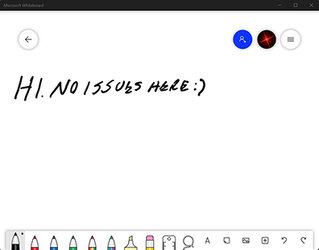
Anyway, I'm on the Dev version (22454.1000) of Windows 11 Pro on a Lenovo laptop with touchscreen and pen no issues here. Both touchscreen and pen work without hesitation or issue. I just tested this prior to posting so at this moment no issues.

Screenshot-2021-09-10-135712.jpg

No idea here as to why your Surface Pro 7 is having issues.
 
Last edited:

My Computers My Computers

  • At a glance

    Windows 11 Pro 24H2 (Build 26100.4770)Intel Core 9 Ultra 285K64G (4x16) DDR5 Corsair RGB Dominator Platinu...Radeon (XFX Mercury) RX 9070XT OC (with Magne...
    OS
    Windows 11 Pro 24H2 (Build 26100.4770)
    Computer type
    PC/Desktop
    Manufacturer/Model
    Custom built
    CPU
    Intel Core 9 Ultra 285K
    Motherboard
    Gigabyte Aorus Z890 Xtreme AI Top
    Memory
    64G (4x16) DDR5 Corsair RGB Dominator Platinum (6400Mhz)
    Graphics Card(s)
    Radeon (XFX Mercury) RX 9070XT OC (with Magnetic Fans)
    Sound Card
    Onboard (DTS:X® Ultra Audio: ESS ES9280A DAC)
    Monitor(s) Displays
    27-inch Eizo Color Edge - CG2700X
    Screen Resolution
    3840 x 2160
    Hard Drives
    4 Samsung NVM 990 Pro drives: 1TB (OS), 2TB, 2 X 4TB.
    PSU
    Seasonic TX-1300 (1300 Watts)
    Case
    Cooler Master H500M
    Cooling
    Corsair Link Titan 280 RX RGB
    Keyboard
    Logitech Craft
    Mouse
    Logitech MX Master 3S
    Internet Speed
    1TB Download. 512mb Upload
    Browser
    Microsoft Edge Chromium
    Antivirus
    Windows Security
    Other Info
    System used for gaming, photography, music, school.
  • At a glance

    Windows 11 Pro 24H2 (Build 26100.4061)Intel Core i9-9900K32gig (4 x 8) Corsair Dominator Platinum DDR4...Radeon XFX Merc 7900XT (20gig)
    Operating System
    Windows 11 Pro 24H2 (Build 26100.4061)
    Computer type
    PC/Desktop
    Manufacturer/Model
    Custom built
    CPU
    Intel Core i9-9900K
    Motherboard
    Gigabyte Z390 Aorus Xtreme
    Memory
    32gig (4 x 8) Corsair Dominator Platinum DDR4 3600Mhz (B-Die)
    Graphics card(s)
    Radeon XFX Merc 7900XT (20gig)
    Sound Card
    Onboard
    Monitor(s) Displays
    24-Inch NEC PA242W
    Screen Resolution
    2880 x 1800
    Hard Drives
    2 X NVME, 1 X SATA SSD
    PSU
    EVGA Super Nova 1000 P2 (1000 Watt)
    Case
    Phantek Enthoo Luxe
    Cooling
    Corsair H115i Elite AIO Cooler
    Keyboard
    Logitech Keys
    Mouse
    Logitech MX Master 3
    Internet Speed
    1TB Download. 512mb Upload
    Browser
    Microsoft Edge Chromium
    Antivirus
    Windows Security
    Other Info
    Backup System
I was also on 22000.xxx and touch screen + pen worked great for me on my laptop (see my computers) connected to an external Lenovo USB-C Display (also listed in My Computers).

Right now I am on build 22454.1000 (dev channel) and the same display is working flawlessly.

Have you checked in Device Manager that all the drivers are installed and running correctly?
 

My Computers My Computers

  • At a glance

    Win 11 Pro 25H2 26200.8457 / Linux Mint 22.3Ryzen 7 2700U Pro32GBiGPU Vega 10
    OS
    Win 11 Pro 25H2 26200.8457 / Linux Mint 22.3
    Computer type
    Laptop
    Manufacturer/Model
    Lenovo A485
    CPU
    Ryzen 7 2700U Pro
    Motherboard
    Lenovo (WiFi/BT module upgraded to Intel Wireless-AC-9260)
    Memory
    32GB
    Graphics Card(s)
    iGPU Vega 10
    Sound Card
    Realtek
    Monitor(s) Displays
    14" FHD (built-in) + 14" Lenovo Thinkvision M14t (touch+pen) + 32" Asus PB328
    Screen Resolution
    FHD + FHD + 1440p
    Hard Drives
    Intel 660p m.2 nVME PCIe3.0 x2 512GB
    PSU
    125W(Dock)/65W(Travel Adapter)
    Keyboard
    Thinkpad / Logitech MX Keys
    Mouse
    Logitech MX Master 2S
    Internet Speed
    1/1Gbit
    Browser
    Firefox
    Antivirus
    Windows Defender
    Other Info
    SecureBoot: Enabled
    TPM2.0: Enabled
    AMD-V: Enabled
  • At a glance

    Win 11 Pro 25H2 26200.8521(RP)i7-7700k @4.8GHz32GB 2x16GB 2133MHz CL15EVGA GTX1080Ti FTW 11GB
    Operating System
    Win 11 Pro 25H2 26200.8521(RP)
    Computer type
    PC/Desktop
    Manufacturer/Model
    Custom
    CPU
    i7-7700k @4.8GHz
    Motherboard
    Asus PRIME Z270-A
    Memory
    32GB 2x16GB 2133MHz CL15
    Graphics card(s)
    EVGA GTX1080Ti FTW 11GB
    Sound Card
    Integrated
    Monitor(s) Displays
    32" 10-bit Asus PB328Q
    Screen Resolution
    WQHD 2560x1440
    Hard Drives
    512GB ADATA SX8000NP NVMe PCIe Gen 3 x4
    PSU
    850W
    Case
    Fractal Design Define 7
    Cooling
    Noctua NH-D15 chromax.black
    Keyboard
    Logitech MX Keys
    Mouse
    Logitech MX Master 2S
    Internet Speed
    1/1Gbit
    Browser
    Firefox
    Antivirus
    Windows Defender
    Other Info
    AC WiFi Card
Try cleaning the display and the nib of the pen with a lens cleaning wipe. Debris built up on the display can interfere with the digitizer's interpretation of where your finger(s)/pen is. It's also worth considering if thermal throttling is taking place. I work on highway construction and in my first couple days owning the SP7 I've noticed that the cursor becomes quite unresponsive at times when the unit is warm. Holding it up to the AC in my truck tends to make it somewhat more responsive. Behold the critical flaw of passive cooling.

I'll have to evaluate further if thermals are really the cause (at least in my own case).

Edit: I was USB-C PD charging my SP7 via a relatively low power charger with my phone when I was experiencing the slowness. Unplugging it made an instant improvement... Interference?
 

My Computer My Computer

At a glance

Windows 10
OS
Windows 10
I am having similar symptoms. When I reboot, the system works fine; however, after the system suspends (e.g. after keyboard cover closed), the touchscreen and surface pen stops working.

Interestingly, the pen's top button still works (not on the screen but clicking). This tells me the pen is working, but the touchscreen is the problem

I tried reinstalling the device following this page without success: What to try if your Surface touchscreen doesn't work

Here are the specs of my system:

Windows 11 Home
10.0.22000 build 22000

Device name: Surface
Serial number: 059706194653
Surface model: Surface Pro 7 Model 1866 i5
Version Information
SAM: 14.418.139.0
UEFI: 9.107.140.0
Touch driver: 3.321.139.0
Wi-Fi driver: 22.40.0.7
 

My Computer My Computer

At a glance

Windows 11
OS
Windows 11
Sounds like we're having a similar problem Soh. I've got a Surface Pro 7 with i7, and started on the insider builds as soon as they became available. After the 2nd or 3rd one I started having the problem where the touchscreen would stop working after the device resumed from sleep. Rebooting would fix it, but then it would become problematic again as soon as it slept.

Strangely, the Windows Hello Face also stops working at the same time. Do you have that issue too?

I tried doing a Reset (which reset it to 11 rather than Windows 10 as I was expecting), but that didn't help. So then I went more drastic and did a clean install of 10 using a USB made with the Media Creation Tool. Touchscreen then worked fine (in win 10) but the Face Hello would not work at all, got a message saying it was unavailable in Settings. I tried all the different ways to try and fix this I could find, none worked. I did a chat with Microsoft support and they had me do a Recovery install using a USB (more thorough than Clean Install, which seems weird). That finally did the trick, and Face Hello and touchscreen both working great in Windows 10 again.

So...then re-enrolled in Insider (beta)... and right back where I started: As soon as device sleeps the Face login and touchscreen stop working. Very frustrating. I can manage without the face login but the primary reason for me to pick up the SP7 is to use the touchscreen, so super annoying to have to reboot every time.

One other thing: I noticed in Windows 10 that the SP7 would go into hibernation really quickly, after just a couple of hours. On Windows 10 it would sleep overnight with almost no battery drain and be ready immediately in the morning (this behavior came back after I re-installed 10). It seems like there's a cluster of sort-of-related things going on here that may have a common cause but I can't put my finger on what it would be.

If anyone has any ideas on how to fix this would definitely appreciate it! I've posted about this multiple times in the Feedback Hub, have not heard anything back.
 

My Computer My Computer

At a glance

Windows 11
OS
Windows 11
OK @soh I was futzing around more today and accidentally discovered a solution to my problem at least, see if it works for you.
1. Wake the device up using the power button. For me, the Hello camera won't activate. If I were to proceed from this point then neither the face recognition nor the touchscreen will work (if I get past the login using PIN instead)
2. Momentarily close the cover and then immediately open it up again
3. The face recognition sensors should kick on and log in
4. Once logged in, the touchscreen will now work

Sometimes it takes me a couple of goes. Give it a try!
 

My Computer My Computer

At a glance

Windows 11
OS
Windows 11
Yes, it is very possible it is simply just a power state issue, which is very normal with beta builds and certain device drivers.
 

My Computers My Computers

  • At a glance

    Win 11 Pro 25H2 26200.8457 / Linux Mint 22.3Ryzen 7 2700U Pro32GBiGPU Vega 10
    OS
    Win 11 Pro 25H2 26200.8457 / Linux Mint 22.3
    Computer type
    Laptop
    Manufacturer/Model
    Lenovo A485
    CPU
    Ryzen 7 2700U Pro
    Motherboard
    Lenovo (WiFi/BT module upgraded to Intel Wireless-AC-9260)
    Memory
    32GB
    Graphics Card(s)
    iGPU Vega 10
    Sound Card
    Realtek
    Monitor(s) Displays
    14" FHD (built-in) + 14" Lenovo Thinkvision M14t (touch+pen) + 32" Asus PB328
    Screen Resolution
    FHD + FHD + 1440p
    Hard Drives
    Intel 660p m.2 nVME PCIe3.0 x2 512GB
    PSU
    125W(Dock)/65W(Travel Adapter)
    Keyboard
    Thinkpad / Logitech MX Keys
    Mouse
    Logitech MX Master 2S
    Internet Speed
    1/1Gbit
    Browser
    Firefox
    Antivirus
    Windows Defender
    Other Info
    SecureBoot: Enabled
    TPM2.0: Enabled
    AMD-V: Enabled
  • At a glance

    Win 11 Pro 25H2 26200.8521(RP)i7-7700k @4.8GHz32GB 2x16GB 2133MHz CL15EVGA GTX1080Ti FTW 11GB
    Operating System
    Win 11 Pro 25H2 26200.8521(RP)
    Computer type
    PC/Desktop
    Manufacturer/Model
    Custom
    CPU
    i7-7700k @4.8GHz
    Motherboard
    Asus PRIME Z270-A
    Memory
    32GB 2x16GB 2133MHz CL15
    Graphics card(s)
    EVGA GTX1080Ti FTW 11GB
    Sound Card
    Integrated
    Monitor(s) Displays
    32" 10-bit Asus PB328Q
    Screen Resolution
    WQHD 2560x1440
    Hard Drives
    512GB ADATA SX8000NP NVMe PCIe Gen 3 x4
    PSU
    850W
    Case
    Fractal Design Define 7
    Cooling
    Noctua NH-D15 chromax.black
    Keyboard
    Logitech MX Keys
    Mouse
    Logitech MX Master 2S
    Internet Speed
    1/1Gbit
    Browser
    Firefox
    Antivirus
    Windows Defender
    Other Info
    AC WiFi Card
OK @soh I was futzing around more today and accidentally discovered a solution to my problem at least, see if it works for you.
1. Wake the device up using the power button. For me, the Hello camera won't activate. If I were to proceed from this point then neither the face recognition nor the touchscreen will work (if I get past the login using PIN instead)
2. Momentarily close the cover and then immediately open it up again
3. The face recognition sensors should kick on and log in
4. Once logged in, the touchscreen will now work

Sometimes it takes me a couple of goes. Give it a try!
I made an account just to say I have been having the same problems since the beta. I reinstalled via USB as a clean install (with the final build that was just released). Still have the problem.

And this trick worked. Still sucks to have to do this every time... but hopefully a real fix is out there? Trying to send feedback to MS seems.. futile.
 

My Computer My Computer

At a glance

Windows 11i58GB
OS
Windows 11
Computer type
Tablet
Manufacturer/Model
Surface Pro 7
CPU
i5
Memory
8GB
Exactly the same problem here on my Surface Pro 7 with the Windows 11 RTM build that was released yesterday (21H2 22000.194). I will try the trick with closing and reopening the type cover. Hope Microsoft will release a fix for this asap....
 

My Computer My Computer

At a glance

Windows 11i34 Gb
OS
Windows 11
Computer type
Tablet
Manufacturer/Model
Microsoft Surface Pro 7
CPU
i3
Memory
4 Gb
I remember having similar sleep issues with Windows 10 on all my devices years ago. Not entirely sure if the issue is in UEFI firmware, Windows, drivers or the actual hardware.

After sleep for some reason, USB devices did not want to wake up properly, rendering my mouse and KB useless. Haven't had this issue in a very long time though.
 

My Computers My Computers

  • At a glance

    Win 11 Pro 25H2 26200.8457 / Linux Mint 22.3Ryzen 7 2700U Pro32GBiGPU Vega 10
    OS
    Win 11 Pro 25H2 26200.8457 / Linux Mint 22.3
    Computer type
    Laptop
    Manufacturer/Model
    Lenovo A485
    CPU
    Ryzen 7 2700U Pro
    Motherboard
    Lenovo (WiFi/BT module upgraded to Intel Wireless-AC-9260)
    Memory
    32GB
    Graphics Card(s)
    iGPU Vega 10
    Sound Card
    Realtek
    Monitor(s) Displays
    14" FHD (built-in) + 14" Lenovo Thinkvision M14t (touch+pen) + 32" Asus PB328
    Screen Resolution
    FHD + FHD + 1440p
    Hard Drives
    Intel 660p m.2 nVME PCIe3.0 x2 512GB
    PSU
    125W(Dock)/65W(Travel Adapter)
    Keyboard
    Thinkpad / Logitech MX Keys
    Mouse
    Logitech MX Master 2S
    Internet Speed
    1/1Gbit
    Browser
    Firefox
    Antivirus
    Windows Defender
    Other Info
    SecureBoot: Enabled
    TPM2.0: Enabled
    AMD-V: Enabled
  • At a glance

    Win 11 Pro 25H2 26200.8521(RP)i7-7700k @4.8GHz32GB 2x16GB 2133MHz CL15EVGA GTX1080Ti FTW 11GB
    Operating System
    Win 11 Pro 25H2 26200.8521(RP)
    Computer type
    PC/Desktop
    Manufacturer/Model
    Custom
    CPU
    i7-7700k @4.8GHz
    Motherboard
    Asus PRIME Z270-A
    Memory
    32GB 2x16GB 2133MHz CL15
    Graphics card(s)
    EVGA GTX1080Ti FTW 11GB
    Sound Card
    Integrated
    Monitor(s) Displays
    32" 10-bit Asus PB328Q
    Screen Resolution
    WQHD 2560x1440
    Hard Drives
    512GB ADATA SX8000NP NVMe PCIe Gen 3 x4
    PSU
    850W
    Case
    Fractal Design Define 7
    Cooling
    Noctua NH-D15 chromax.black
    Keyboard
    Logitech MX Keys
    Mouse
    Logitech MX Master 2S
    Internet Speed
    1/1Gbit
    Browser
    Firefox
    Antivirus
    Windows Defender
    Other Info
    AC WiFi Card
Same here, thought about reinstalling Windows 11, but might just have to wait for lazy Microsoft to fix it.
Can't believe we have these problems with both OS and Device being from the same company😒
Thanks for the tip with the cover that worked.

To their defense, they haven't recommended Windows 11 on SP7 yet, as they haven't made the Update available via the official Windows Update thing.
 

My Computer My Computer

At a glance

Windows 10 / Windows 11Intel(R) Core(TM) i5-1035G4 CPU @ 1.10GHz 1.5...8,00 GB
OS
Windows 10 / Windows 11
Computer type
Tablet
Manufacturer/Model
Microsoft / Surface Pro 7
CPU
Intel(R) Core(TM) i5-1035G4 CPU @ 1.10GHz 1.50 GHz
Memory
8,00 GB
Screen Resolution
2736 x 1824
Internet Speed
100 mb/s
Browser
Microsoft Edge
Antivirus
Windows Defender
At least I'm not alone :)
Thanks for the trick.
 

My Computer My Computer

At a glance

Windows 11
OS
Windows 11
Computer type
Tablet
Manufacturer/Model
Microsoft Surface Pro 7
OK @soh I was futzing around more today and accidentally discovered a solution to my problem at least, see if it works for you.
1. Wake the device up using the power button. For me, the Hello camera won't activate. If I were to proceed from this point then neither the face recognition nor the touchscreen will work (if I get past the login using PIN instead)
2. Momentarily close the cover and then immediately open it up again
3. The face recognition sensors should kick on and log in
4. Once logged in, the touchscreen will now work

Sometimes it takes me a couple of goes. Give it a try!

This trick worked for me on my Surface Pro 7 i7 too. Thanks!
 

My Computer My Computer

At a glance

Windows 11
OS
Windows 11
Computer type
Tablet
Manufacturer/Model
Microsoft Surface Pro 7
My Computers System Two is also a Surface Pro 7.

When I purchased both of my current computers this year, I opted out of the Insider Program because of beta build problems. I need for my two computers to work reliably and that just wasn't the case with the Insider Program.

Bottom line is that I've not had any problems whatsoever with either of my systems on release Windows 10 or release Windows 11.

TraderGary
 

My Computers My Computers

  • At a glance

    Windows 11 ProIntel Series 3 Core Ultra X9 388H64GB LPDDR5x 9600 MT/sIntel Arc graphics B390 Panther Lake
    OS
    Windows 11 Pro
    Computer type
    Laptop
    Manufacturer/Model
    Dell XPS 16 DA16260
    CPU
    Intel Series 3 Core Ultra X9 388H
    Memory
    64GB LPDDR5x 9600 MT/s
    Graphics Card(s)
    Intel Arc graphics B390 Panther Lake
    Monitor(s) Displays
    16" 3.2K Tandem OLED Infinity Edge
    Screen Resolution
    3200 x 2000 16:10 236 PPI
    Hard Drives
    1 Terabyte M.2 PCIe NVMe SSD
    Case
    Black Anodized Aluminum
    Cooling
    Vapor Chamber Cooling
    Mouse
    None
    Internet Speed
    942 Mbps Netgear Mesh + 2 Satellites
    Browser
    Microsoft Edge (Chromium)
    Antivirus
    Windows Security (Defender)
    Other Info
    NPU delivering 67 TOPS
    Microsoft 365 subscription
    Microsoft Office 365
    Microsoft OneDrive 1TB Cloud
    Microsoft Visual Studio
    Microsoft Visual Studio Code
    Microsoft Sysinternals Suite
    Microsoft BitLocker
    Microsoft Copilot
    Dell Support Assist
    Dell Command | Update
    Macrium Reflect X subscription
    1Password Password Manager
    Amazon Kindle for PC
    Lightroom/Photoshop subscription
    Interactive Brokers Trader Workstation
  • At a glance

    Windows 11 ProSnapdragon® X Elite (12 Core) with Hexagon NP...32GB LPDDR5x 8448 MT/sIntegrated Adreno GPU
    Operating System
    Windows 11 Pro
    Computer type
    Laptop
    Manufacturer/Model
    Microsoft Surface Laptop 7
    CPU
    Snapdragon® X Elite (12 Core) with Hexagon NPU delivering 45 TOPS
    Memory
    32GB LPDDR5x 8448 MT/s
    Graphics card(s)
    Integrated Adreno GPU
    Sound Card
    Omnisonic speakers with Dolby Atmos spatial sound
    Monitor(s) Displays
    13.8″ PixelSense Flow touchscreen 120 Hz 600 NIT
    Screen Resolution
    2304 × 1536 (201 PPI), 3:2 aspect ratio
    Hard Drives
    1 TB PCIe NVMe Gen 4 SSD
    Case
    Black Anodized Aluminum
    Cooling
    Vapor Chamber Cooling
    Mouse
    None
    Internet Speed
    942 Mbps Netgear Mesh + 2 Satellites
    Browser
    Microsoft Edge (Chromium)
    Antivirus
    Windows Security (Defender)
    Other Info
    Microsoft 365 subscription (Office)
    Microsoft Office 365
    Microsoft OneDrive 1TB Cloud
    Microsoft Visual Studio 2026
    Microsoft Visual Studio Code
    Interactive Brokers Trader Workstation
    Lightroom/Photoshop subscription
    1Password Password Manager
    Microsoft Sysinternals
    Amazon Kindle for PC
    Microsoft BitLocker
    Microsoft Copilot
I've the same problem with Win 11 on Surface Pro 7. The only way to regain the touch screen is reboot.
 

My Computer My Computer

At a glance

Windows 11
OS
Windows 11
I'm not sure about Windows 11, but I have seen in Windows 10 that if you update the drivers through Windows Update or other tool on a tablet you lose the touch functionality and might also lose audio, sensor or other feature. The remedy is to install the chipset (platform) drivers directly from the manufacturer. If I recall correctly, Microsoft just provides a single installation for all drivers, download and install that. Then use the Windows Update Show/Hide Tool to hide (block) any driver updates. No matter what Microsoft's site says, it works in all Windows 10 builds and Windows 11. I tested it myself.
 

My Computers My Computers

  • At a glance

    Windows 11 Pro 23H2 (5699), 25H2 (8655)Mobile DualCore Intel Core 2 Duo T7250, 2000 MHz4GBMobile Intel(R) GMA 4500M (Mobile 4 series)
    OS
    Windows 11 Pro 23H2 (5699), 25H2 (8655)
    Computer type
    Laptop
    Manufacturer/Model
    Acer Extensa 5630EZ
    CPU
    Mobile DualCore Intel Core 2 Duo T7250, 2000 MHz
    Motherboard
    Acer Extensa 5630
    Memory
    4GB
    Graphics Card(s)
    Mobile Intel(R) GMA 4500M (Mobile 4 series)
    Sound Card
    Realtek ALC268 @ Intel 82801IB ICH9 - High Definition Audio Controller
    Monitor(s) Displays
    1
    Screen Resolution
    1280x800
    Hard Drives
    Samsung SSD 850 EVO 250GB SATA Device (250 GB, SATA-III)
    Internet Speed
    VDSL 50 Mbps
    Browser
    MICROSOFT EDGE
    Antivirus
    WINDOWS DEFENDER
    Other Info
    Legacy MBR installation, no TPM, no Secure Boot, no WDDM 2.0 graphics drivers, no SSE4.2, cannot get more unsupported ;) This is only my test laptop. I had installed Windows 11 here before upgrading my main PC. For my main PC I use everyday see my 2nd system specs.
  • At a glance

    Windows 11 Pro v25H2 (build 26200.8655)Intel Core-i7 3770 3.40GHz s1155 (3rd generat...2x Kingston Hyper-X Blu 8GB DDR3-1600GIGABYTE GeForce RTX 3050 WINDFORCE OC V2 6GB...
    Operating System
    Windows 11 Pro v25H2 (build 26200.8655)
    Computer type
    PC/Desktop
    Manufacturer/Model
    Custom-built PC
    CPU
    Intel Core-i7 3770 3.40GHz s1155 (3rd generation)
    Motherboard
    Asus P8H61 s1155 ATX
    Memory
    2x Kingston Hyper-X Blu 8GB DDR3-1600
    Graphics card(s)
    GIGABYTE GeForce RTX 3050 WINDFORCE OC V2 6GB (GV-N3050WF2OCV2-6GD)
    Sound Card
    Realtek HD audio (ALC887)
    Monitor(s) Displays
    Sony Bravia KDL-19L4000 19" LCD TV via VGA
    Screen Resolution
    1440x900 32-bit 60Hz
    Hard Drives
    WD Blue SA510 2.5 1000GB SSD as system disk, Western Digital Caviar Purple 4TB SATA III (WD40PURZ) as second
    PSU
    Thermaltake Litepower RGB 550W Full Wired
    Case
    SUPERCASE MIDI-TOWER
    Cooling
    Deepcool Gamma Archer CPU cooler, 1x 8cm fan at the back
    Keyboard
    Mitsumi 101-key PS/2
    Mouse
    Sunnyline OptiEye PS/2
    Internet Speed
    100Mbps
    Browser
    Microsoft Edge, Mozilla Firefox
    Antivirus
    Microsoft Windows Defender
    Other Info
    Legacy BIOS (MBR) installation, no TPM, no Secure Boot, WDDM 3.0 graphics drivers, WEI score 7.4
Installed Final release Win11 yesterday and this problem occurs. Even had an update today, but still touch screen unresponsive.
 

My Computer My Computer

At a glance

Win11
OS
Win11
Installed Final release Win11 yesterday and this problem occurs. Even had an update today, but still touch screen unresponsive.
Mark, welcome to ElevenForum, and please tap on "My Computer" on the lower left and fill out your computer data so we know what you have.
 

My Computers My Computers

  • At a glance

    Windows 11 ProIntel Series 3 Core Ultra X9 388H64GB LPDDR5x 9600 MT/sIntel Arc graphics B390 Panther Lake
    OS
    Windows 11 Pro
    Computer type
    Laptop
    Manufacturer/Model
    Dell XPS 16 DA16260
    CPU
    Intel Series 3 Core Ultra X9 388H
    Memory
    64GB LPDDR5x 9600 MT/s
    Graphics Card(s)
    Intel Arc graphics B390 Panther Lake
    Monitor(s) Displays
    16" 3.2K Tandem OLED Infinity Edge
    Screen Resolution
    3200 x 2000 16:10 236 PPI
    Hard Drives
    1 Terabyte M.2 PCIe NVMe SSD
    Case
    Black Anodized Aluminum
    Cooling
    Vapor Chamber Cooling
    Mouse
    None
    Internet Speed
    942 Mbps Netgear Mesh + 2 Satellites
    Browser
    Microsoft Edge (Chromium)
    Antivirus
    Windows Security (Defender)
    Other Info
    NPU delivering 67 TOPS
    Microsoft 365 subscription
    Microsoft Office 365
    Microsoft OneDrive 1TB Cloud
    Microsoft Visual Studio
    Microsoft Visual Studio Code
    Microsoft Sysinternals Suite
    Microsoft BitLocker
    Microsoft Copilot
    Dell Support Assist
    Dell Command | Update
    Macrium Reflect X subscription
    1Password Password Manager
    Amazon Kindle for PC
    Lightroom/Photoshop subscription
    Interactive Brokers Trader Workstation
  • At a glance

    Windows 11 ProSnapdragon® X Elite (12 Core) with Hexagon NP...32GB LPDDR5x 8448 MT/sIntegrated Adreno GPU
    Operating System
    Windows 11 Pro
    Computer type
    Laptop
    Manufacturer/Model
    Microsoft Surface Laptop 7
    CPU
    Snapdragon® X Elite (12 Core) with Hexagon NPU delivering 45 TOPS
    Memory
    32GB LPDDR5x 8448 MT/s
    Graphics card(s)
    Integrated Adreno GPU
    Sound Card
    Omnisonic speakers with Dolby Atmos spatial sound
    Monitor(s) Displays
    13.8″ PixelSense Flow touchscreen 120 Hz 600 NIT
    Screen Resolution
    2304 × 1536 (201 PPI), 3:2 aspect ratio
    Hard Drives
    1 TB PCIe NVMe Gen 4 SSD
    Case
    Black Anodized Aluminum
    Cooling
    Vapor Chamber Cooling
    Mouse
    None
    Internet Speed
    942 Mbps Netgear Mesh + 2 Satellites
    Browser
    Microsoft Edge (Chromium)
    Antivirus
    Windows Security (Defender)
    Other Info
    Microsoft 365 subscription (Office)
    Microsoft Office 365
    Microsoft OneDrive 1TB Cloud
    Microsoft Visual Studio 2026
    Microsoft Visual Studio Code
    Interactive Brokers Trader Workstation
    Lightroom/Photoshop subscription
    1Password Password Manager
    Microsoft Sysinternals
    Amazon Kindle for PC
    Microsoft BitLocker
    Microsoft Copilot
Touchscreen can be disabled/enabled in Device Manager.
You might check status in Device Manager.
It's found in Device Manager under "Human Interface Devices".
 

My Computers My Computers

  • At a glance

    Windows 11 ProIntel Series 3 Core Ultra X9 388H64GB LPDDR5x 9600 MT/sIntel Arc graphics B390 Panther Lake
    OS
    Windows 11 Pro
    Computer type
    Laptop
    Manufacturer/Model
    Dell XPS 16 DA16260
    CPU
    Intel Series 3 Core Ultra X9 388H
    Memory
    64GB LPDDR5x 9600 MT/s
    Graphics Card(s)
    Intel Arc graphics B390 Panther Lake
    Monitor(s) Displays
    16" 3.2K Tandem OLED Infinity Edge
    Screen Resolution
    3200 x 2000 16:10 236 PPI
    Hard Drives
    1 Terabyte M.2 PCIe NVMe SSD
    Case
    Black Anodized Aluminum
    Cooling
    Vapor Chamber Cooling
    Mouse
    None
    Internet Speed
    942 Mbps Netgear Mesh + 2 Satellites
    Browser
    Microsoft Edge (Chromium)
    Antivirus
    Windows Security (Defender)
    Other Info
    NPU delivering 67 TOPS
    Microsoft 365 subscription
    Microsoft Office 365
    Microsoft OneDrive 1TB Cloud
    Microsoft Visual Studio
    Microsoft Visual Studio Code
    Microsoft Sysinternals Suite
    Microsoft BitLocker
    Microsoft Copilot
    Dell Support Assist
    Dell Command | Update
    Macrium Reflect X subscription
    1Password Password Manager
    Amazon Kindle for PC
    Lightroom/Photoshop subscription
    Interactive Brokers Trader Workstation
  • At a glance

    Windows 11 ProSnapdragon® X Elite (12 Core) with Hexagon NP...32GB LPDDR5x 8448 MT/sIntegrated Adreno GPU
    Operating System
    Windows 11 Pro
    Computer type
    Laptop
    Manufacturer/Model
    Microsoft Surface Laptop 7
    CPU
    Snapdragon® X Elite (12 Core) with Hexagon NPU delivering 45 TOPS
    Memory
    32GB LPDDR5x 8448 MT/s
    Graphics card(s)
    Integrated Adreno GPU
    Sound Card
    Omnisonic speakers with Dolby Atmos spatial sound
    Monitor(s) Displays
    13.8″ PixelSense Flow touchscreen 120 Hz 600 NIT
    Screen Resolution
    2304 × 1536 (201 PPI), 3:2 aspect ratio
    Hard Drives
    1 TB PCIe NVMe Gen 4 SSD
    Case
    Black Anodized Aluminum
    Cooling
    Vapor Chamber Cooling
    Mouse
    None
    Internet Speed
    942 Mbps Netgear Mesh + 2 Satellites
    Browser
    Microsoft Edge (Chromium)
    Antivirus
    Windows Security (Defender)
    Other Info
    Microsoft 365 subscription (Office)
    Microsoft Office 365
    Microsoft OneDrive 1TB Cloud
    Microsoft Visual Studio 2026
    Microsoft Visual Studio Code
    Interactive Brokers Trader Workstation
    Lightroom/Photoshop subscription
    1Password Password Manager
    Microsoft Sysinternals
    Amazon Kindle for PC
    Microsoft BitLocker
    Microsoft Copilot

Latest Support Threads

Back
Top Bottom