Sysinternals question


Clean install would mean all my apps have to be reinstalled and set up from scratch, right?
 

My Computer

System One

  • OS
    win 11
    Computer type
    PC/Desktop
    Manufacturer/Model
    Home build
    CPU
    Ryzen 5600G
    Motherboard
    B450 Tomahawk Max
    Memory
    32 GB DDR4
    Graphics Card(s)
    on board
    Monitor(s) Displays
    LG 27MR400
    Screen Resolution
    1280 x 1024
    Hard Drives
    SSD
    Internet Speed
    3MB/s
    Browser
    Opera
    Antivirus
    Windows
TraderGary: I noticed that you have the Sysinternals suite installed. Are there any of the dozens .exe files that would show what's wrong with my PC?
 

My Computer

System One

  • OS
    win 11
    Computer type
    PC/Desktop
    Manufacturer/Model
    Home build
    CPU
    Ryzen 5600G
    Motherboard
    B450 Tomahawk Max
    Memory
    32 GB DDR4
    Graphics Card(s)
    on board
    Monitor(s) Displays
    LG 27MR400
    Screen Resolution
    1280 x 1024
    Hard Drives
    SSD
    Internet Speed
    3MB/s
    Browser
    Opera
    Antivirus
    Windows

My Computer

System One

  • OS
    Windows 11 Pro 25H2
    Computer type
    PC/Desktop
    Manufacturer/Model
    Intel NUC12WSHi7
    CPU
    12th Gen Core i7-1260P
    Motherboard
    NUC12WSBi7
    Memory
    64 GB Micron PC4-25600
    Graphics Card(s)
    Intel Iris Xe Graphics
    Sound Card
    on-board Realtek HD Audio
    Monitor(s) Displays
    Dell U3219Q
    Screen Resolution
    3840 x 2160
    Hard Drives
    Samsung SSD 990 PRO 1TB
    Crucial MX500 2 TB
    Antivirus
    Microsoft Defender
Sysinternals is very good as an in-depth diagnostic tool but it has a decent learning curve to go with it. There is a very good tutorial from the guy who helped create it.


More tutorials here for anyone who is interested.


My Computers

System One System Two

  • OS
    Windows 11 Pro 25H2
    Computer type
    PC/Desktop
    Manufacturer/Model
    Homebuilt
    CPU
    Intel Core i9 13900K
    Motherboard
    Asus ProArt Z790 Creator WiFi - Bios 3107
    Memory
    Corsair Dominator Platinum 64gb 5600MT/s DDR5 Dual Channel
    Graphics Card(s)
    Sapphire NITRO+ AMD Radeon RX 7900 XTX Vapor-X 24GB
    Sound Card
    External DAC: Cambridge Audio DACMagic200M - Headphone Amp: Topping L50
    Monitor(s) Displays
    Panasonic MX950 Mini LED 55" TV 120hz
    Screen Resolution
    3840 x 2160 120hz
    Hard Drives
    Samsung 980 Pro 2TB (OS)
    Samsung 980 Pro 1TB (Files)
    Lexar NZ790 4TB
    LaCie d2 Professional 6TB external - USB 3.1
    Seagate Expansion 16TB external - USB 3.2
    Seagate One Touch 18TB external HD - USB 3.0
    PSU
    Corsair RM1200x Shift
    Case
    Corsair RGB Smart Case 5000x (white)
    Cooling
    Corsair iCue H150i Elite Capellix XT
    Keyboard
    Incase Ergonomic USB (Microsoft clone)
    Mouse
    Logitech MX Master 3S
    Internet Speed
    Fibre 900/500 Mbps
    Browser
    Microsoft Edge Chromium
    Antivirus
    Bitdefender Total Security
    Other Info
    AMD Radeon Software & Drivers 26.1.1
    Hasleo Backup Suite
    Dashlane password manager
    Kensington Verimark fingerprint reader
    Logitech Brio 4K webcam
    Orico 10-port powered USB 3.0 hub
  • Operating System
    Windows 11 Pro 25H2
    Computer type
    Laptop
    Manufacturer/Model
    Asus Vivobook X1605VA
    CPU
    Intel® Core™ i9-13900H
    Motherboard
    Asus X1605VA bios 309
    Memory
    32GB DDR4-3200 Dual channel
    Graphics card(s)
    *Intel Iris Xᵉ Graphics G7
    Sound Card
    Realtek | Intel SST Bluetooth & USB
    Monitor(s) Displays
    16.0-inch, WUXGA 16:10 aspect ratio, IPS-level Panel
    Screen Resolution
    1920 x 1200 60hz
    Hard Drives
    512GB M.2 NVMe™ PCIe® 3.0 SSD
    Mouse
    Logitech MX Ergo Trackball
    Antivirus
    Bitdefender Total Security
    Other Info
    720p Webcam
    WiFi & USB to ethernet
I tried that WhoCrash app and it tells me there is no minidump, so no dice.
 

My Computer

System One

  • OS
    win 11
    Computer type
    PC/Desktop
    Manufacturer/Model
    Home build
    CPU
    Ryzen 5600G
    Motherboard
    B450 Tomahawk Max
    Memory
    32 GB DDR4
    Graphics Card(s)
    on board
    Monitor(s) Displays
    LG 27MR400
    Screen Resolution
    1280 x 1024
    Hard Drives
    SSD
    Internet Speed
    3MB/s
    Browser
    Opera
    Antivirus
    Windows
My suggestion is to run a memory test with Memtest386+. That way, you can rule out the RAM as a problem. When Windows is running in normal (not safe) mode, it may be accessing a bad memory location and kaboom. It can happen that the memory location is being written or read to during normal operation, but is not written to using safe mode.

Here is the place to get Memtest386+:


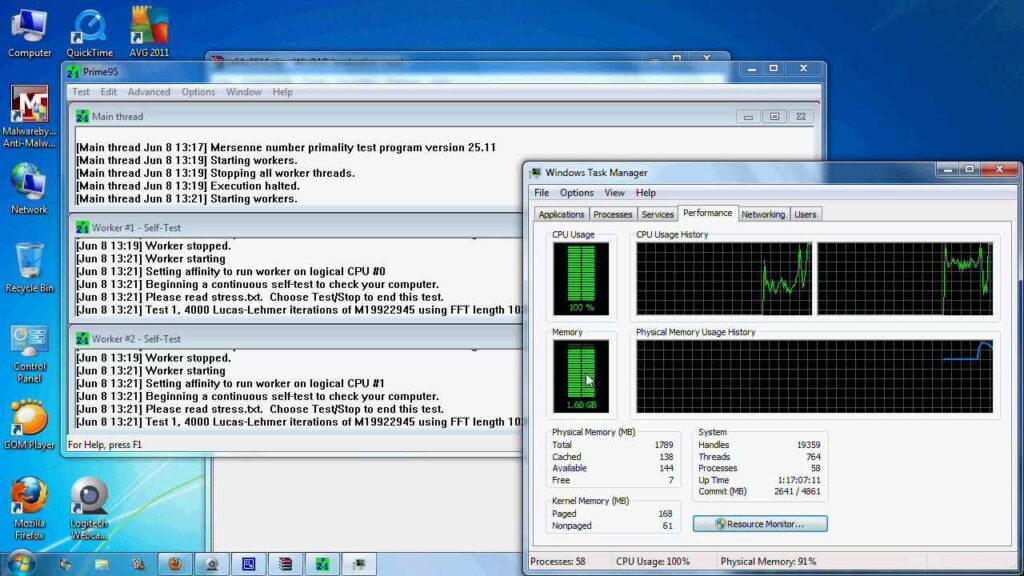
Another useful utility is Prime95. It will stress test your computer. Be careful though. You have to monitor your temps while you run this utility, and you have to shut down if the CPU gets too hot (above TJMax). The TJMax rating for your CPU is 95C. Don't let Prime95 exceed that temp. I don't know what you are using for cooling, but if you are using a small cooler or a stock cooler, it is very important to monitor your temps. When I do this, I have Prime95 open and running, with HWMonitor running along side it.

Here is where to get Prime95:


And HWMonitor:


My Computer

System One

  • OS
    Win 11 Pro 25H2
    Computer type
    PC/Desktop
    Manufacturer/Model
    Self build
    CPU
    Intel i7 13700KF
    Motherboard
    Gigabyte Z790 UD AC
    Memory
    32 GB Team Group DDR5 - 6000 CL 30
    Graphics Card(s)
    ASUS TUF GAMING RTX 3070 Ti
    Sound Card
    On board Realtek
    Monitor(s) Displays
    ACER 34 inch
    Screen Resolution
    4K
    Hard Drives
    1 TB Samsung 980 Pro Nvme, 1 TB Samsung 970 EVO Nvme, 2 x Samsung 970 2TB SSD SATA
    PSU
    EVGA 1000Q
    Case
    Rosewill something or other
    Cooling
    Noctua NH-D15. A whole schwak of Noctua case fans. $$$
    Keyboard
    Logitech G815
    Mouse
    Logitech G502 Hero
    Internet Speed
    700 up, 600 down
    Browser
    Firefox
    Antivirus
    MalwareBytes
As to "accessing a bad memory location", that should not come into play when the PC just sits there, no application is even open, just the desktop, no keystroke, no mouse movement and, boom!
 

My Computer

System One

  • OS
    win 11
    Computer type
    PC/Desktop
    Manufacturer/Model
    Home build
    CPU
    Ryzen 5600G
    Motherboard
    B450 Tomahawk Max
    Memory
    32 GB DDR4
    Graphics Card(s)
    on board
    Monitor(s) Displays
    LG 27MR400
    Screen Resolution
    1280 x 1024
    Hard Drives
    SSD
    Internet Speed
    3MB/s
    Browser
    Opera
    Antivirus
    Windows
Just for fun, I replaced the memory sticks, same result.
I also ran the stress test until the CPU temp got up to 85 degrees, no problem at all.
Stopped it, temps got back to normal and 2 minutes later the PC shut off. Drives me nuts!
 

My Computer

System One

  • OS
    win 11
    Computer type
    PC/Desktop
    Manufacturer/Model
    Home build
    CPU
    Ryzen 5600G
    Motherboard
    B450 Tomahawk Max
    Memory
    32 GB DDR4
    Graphics Card(s)
    on board
    Monitor(s) Displays
    LG 27MR400
    Screen Resolution
    1280 x 1024
    Hard Drives
    SSD
    Internet Speed
    3MB/s
    Browser
    Opera
    Antivirus
    Windows
This might sound like a stupid question, but do you have access to a FLIR temperature probe? You can use one to look for really hot spots on the motherboard. This sounds like either a FET getting hot on your mobo, or something in the power supply might be getting too hot. And no, good cooling won't help in this situation.
 

My Computer

System One

  • OS
    Win 11 Pro 25H2
    Computer type
    PC/Desktop
    Manufacturer/Model
    Self build
    CPU
    Intel i7 13700KF
    Motherboard
    Gigabyte Z790 UD AC
    Memory
    32 GB Team Group DDR5 - 6000 CL 30
    Graphics Card(s)
    ASUS TUF GAMING RTX 3070 Ti
    Sound Card
    On board Realtek
    Monitor(s) Displays
    ACER 34 inch
    Screen Resolution
    4K
    Hard Drives
    1 TB Samsung 980 Pro Nvme, 1 TB Samsung 970 EVO Nvme, 2 x Samsung 970 2TB SSD SATA
    PSU
    EVGA 1000Q
    Case
    Rosewill something or other
    Cooling
    Noctua NH-D15. A whole schwak of Noctua case fans. $$$
    Keyboard
    Logitech G815
    Mouse
    Logitech G502 Hero
    Internet Speed
    700 up, 600 down
    Browser
    Firefox
    Antivirus
    MalwareBytes
No, I don't have one of those probes.
Power supply is new.
PC runs for days in safe mode without a problem, so i does not seem like a hardware problem. right?
 

My Computer

System One

  • OS
    win 11
    Computer type
    PC/Desktop
    Manufacturer/Model
    Home build
    CPU
    Ryzen 5600G
    Motherboard
    B450 Tomahawk Max
    Memory
    32 GB DDR4
    Graphics Card(s)
    on board
    Monitor(s) Displays
    LG 27MR400
    Screen Resolution
    1280 x 1024
    Hard Drives
    SSD
    Internet Speed
    3MB/s
    Browser
    Opera
    Antivirus
    Windows
Guys, update: the PC has been running for a good week now in normal mode withot a hitch, go figure.
I'm ready to do a repair install for good measure but I find different approches suggested.
What would be the best surefire method?
Thanks for all the help so far.
 

My Computer

System One

  • OS
    win 11
    Computer type
    PC/Desktop
    Manufacturer/Model
    Home build
    CPU
    Ryzen 5600G
    Motherboard
    B450 Tomahawk Max
    Memory
    32 GB DDR4
    Graphics Card(s)
    on board
    Monitor(s) Displays
    LG 27MR400
    Screen Resolution
    1280 x 1024
    Hard Drives
    SSD
    Internet Speed
    3MB/s
    Browser
    Opera
    Antivirus
    Windows

I've always used the ISO myself. Windows Update method sounds good, but I've never had occasion to use it; I don't need to repair much, thankfully.
 

My Computer

System One

  • OS
    Windows 11 Pro 25H2
    Computer type
    PC/Desktop
    Manufacturer/Model
    Intel NUC12WSHi7
    CPU
    12th Gen Core i7-1260P
    Motherboard
    NUC12WSBi7
    Memory
    64 GB Micron PC4-25600
    Graphics Card(s)
    Intel Iris Xe Graphics
    Sound Card
    on-board Realtek HD Audio
    Monitor(s) Displays
    Dell U3219Q
    Screen Resolution
    3840 x 2160
    Hard Drives
    Samsung SSD 990 PRO 1TB
    Crucial MX500 2 TB
    Antivirus
    Microsoft Defender
1) Open the event viewer > system and application > post share links


2) The share link in post #38 had:


a) the tuneup plus zip instead of the script results

Please run the script then view the completion pop up:


b) the V2 findings were typical of a malfunctioning PSU

Please swap test or replace the PSU.


3) The BIOS Version/Date American Megatrends International, LLC. H.90, 7/25/2022

Upgrade the BIOS: H.9 > HE


(wait until the PSU is swap tested)
 
Last edited:

My Computer

System One

  • OS
    Windows 10
    Computer type
    Laptop
    Manufacturer/Model
    HP
    CPU
    Intel(R) Core(TM) i7-4800MQ CPU @ 2.70GHz
    Motherboard
    Product : 190A Version : KBC Version 94.56
    Memory
    16 GB Total: Manufacturer : Samsung MemoryType : DDR3 FormFactor : SODIMM Capacity : 8GB Speed : 1600
    Graphics Card(s)
    NVIDIA Quadro K3100M; Intel(R) HD Graphics 4600
    Sound Card
    IDT High Definition Audio CODEC; PNP Device ID HDAUDIO\FUNC_01&VEN_111D&DEV_76E0
    Hard Drives
    Model Hitachi HTS727575A9E364
    Antivirus
    Microsoft Defender
    Other Info
    Mobile Workstation
Just out of curiosity , do you have fast boot enabled in the bios?
I recently did a new pc build and my pc was doing sort of the same thing , driving me nuts , I disabled fast boot in the bios and it stopped.
 

My Computer

System One

  • OS
    Windows 11 Pro 25H2 v26200.7171
    Computer type
    PC/Desktop
    Manufacturer/Model
    self built
    CPU
    Intel I9-12900k Adler Lake
    Motherboard
    Gigabyte Z790 Gaming Plus AX
    Memory
    Corsair Vengeance 64GB DDR5
    Graphics Card(s)
    Realtek
    Monitor(s) Displays
    Samsung Curved 23"
    Screen Resolution
    1920x1080
    Hard Drives
    9 Drives total: Two 1TB M.2 SSD's, Three internal Seagate Barracuda 1TB HDD's , 4 Western Digital External removable drives , 3 @ 1TB each and 1 8TB
    Case
    Antec Flux Pro
    Cooling
    ID Cooling FX 240 Pro
    Browser
    Firefox
    Antivirus
    Bitdefender
No, I don't have one of those probes.
Power supply is new.
PC runs for days in safe mode without a problem, so i does not seem like a hardware problem. right?
I recommend you boot from a live Linux and put your system under pressure. there are some apps for benchmarking, stress testing and stability monitoring.
run as many as you can. also, I recommend memtest x86. disconnect all of your internal storages before running Linux from your USB drive.
 

My Computers

System One System Two

  • OS
    Windows 11 Pro 25H2
    Computer type
    Laptop
    Manufacturer/Model
    Huawei MateBook D15
    CPU
    Ryzen 5 3500U
    Memory
    8GB
    Graphics Card(s)
    Vega 8
    Screen Resolution
    FHD
    Hard Drives
    256GB Samsung SSD + 1TB HDD
    Browser
    Microsoft Edge
    Antivirus
    ESET Smart Security Premium
  • Operating System
    Windows 10 Enterprise LTSC 21H2
    Computer type
    Laptop
    Manufacturer/Model
    MSI GS73 6RF Stealth Pro
    CPU
    intel core i7 6700HQ
    Memory
    16GB
    Graphics card(s)
    Nvidia Geforce GTX1060 (6GB)
    Screen Resolution
    FHD
    Hard Drives
    128GB SSD + 1TB HDD
    Browser
    Microsoft Edge
    Antivirus
    Windows Defender
The prior V2 ran while the computer was in safe mode with networking.

If possible, run the V2 log collector when in normal or clean boot:


My Computer

System One

  • OS
    Windows 10
    Computer type
    Laptop
    Manufacturer/Model
    HP
    CPU
    Intel(R) Core(TM) i7-4800MQ CPU @ 2.70GHz
    Motherboard
    Product : 190A Version : KBC Version 94.56
    Memory
    16 GB Total: Manufacturer : Samsung MemoryType : DDR3 FormFactor : SODIMM Capacity : 8GB Speed : 1600
    Graphics Card(s)
    NVIDIA Quadro K3100M; Intel(R) HD Graphics 4600
    Sound Card
    IDT High Definition Audio CODEC; PNP Device ID HDAUDIO\FUNC_01&VEN_111D&DEV_76E0
    Hard Drives
    Model Hitachi HTS727575A9E364
    Antivirus
    Microsoft Defender
    Other Info
    Mobile Workstation
Guys, thanks for all the suggestions.
I am at a loss, what could be gained from the event viewer and log collector after the PC has run flawlessly for over a week now?
BIOS has been updated to the 2025 version.
Power supply has been replaced with a high quality unit.
As to fast boot, I've checked the BIOS but find no mention of fast boot anywhere.
As to Linux, I know nothing about it, so it's out of the question.
 

My Computer

System One

  • OS
    win 11
    Computer type
    PC/Desktop
    Manufacturer/Model
    Home build
    CPU
    Ryzen 5600G
    Motherboard
    B450 Tomahawk Max
    Memory
    32 GB DDR4
    Graphics Card(s)
    on board
    Monitor(s) Displays
    LG 27MR400
    Screen Resolution
    1280 x 1024
    Hard Drives
    SSD
    Internet Speed
    3MB/s
    Browser
    Opera
    Antivirus
    Windows
Have you considered checking whether or not it could be shutting down because of overheating?
I would definitely check my fans and CPU cooler. Check for dust buildup or fan failure.
Maybe use a resident monitoring program like HWinfo or cpuid

Your processor will shut the computer down if the temp is excessive to prevent damage
 

My Computer

System One

  • OS
    Windows 11 Pro Insider (Beta)
    Computer type
    PC/Desktop
    Manufacturer/Model
    MSI Gaming Desktop Aegis RS 11TE-089US
    CPU
    Intel Core i7 11th Gen 11700K (3.60 GHz)
    Motherboard
    MSI Z590 PRO WIFI
    Memory
    32 GBytes
    Graphics Card(s)
    MSI RTX 3080 Suprim X
    Sound Card
    Internal
    Monitor(s) Displays
    27"
    Screen Resolution
    1900 X 1080
    PSU
    750W 80+ Gold
    Case
    Gungnir 110R (BLK) w/ ARGB, Glass Panel, VGA Holder
    Cooling
    NZXT Kraken X53 240mm
    Keyboard
    Hyper X backlit keyboard
    Mouse
    Logiitec Silent Cordless Mouse
    Internet Speed
    100-250 Mbps (Starlink)
    Browser
    Firefox
    Antivirus
    MalwareBytes
Yes, checking the temps has been one of the first things I did, using cpuid and hwinfo, resetting the CPU with fresh thermal paste, no dust whatsoever.
 

My Computer

System One

  • OS
    win 11
    Computer type
    PC/Desktop
    Manufacturer/Model
    Home build
    CPU
    Ryzen 5600G
    Motherboard
    B450 Tomahawk Max
    Memory
    32 GB DDR4
    Graphics Card(s)
    on board
    Monitor(s) Displays
    LG 27MR400
    Screen Resolution
    1280 x 1024
    Hard Drives
    SSD
    Internet Speed
    3MB/s
    Browser
    Opera
    Antivirus
    Windows
The V2 log collector from 06/18/2025 with a 30 day look back had reported greater than 100 unexpected shutdowns and restarts.

When was the PSU replaced?


Please post a new V2 share link into the newest post with event viewer system and application if you want the stability / instability checked.


Code:
Event[33181]
  Log Name: System
  Source: Microsoft-Windows-Kernel-Power
  Date: 2025-06-18T13:50:54.8110000Z
  Event ID: 41
  Task: N/A
  Level: Critical
  Opcode: Info 
  Keyword: N/A
  User: S-1-5-18
  User Name: NT AUTHORITY\SYSTEM
  Computer: Edgar
  Description:
The system has rebooted without cleanly shutting down first. This error could be caused if the system stopped responding, crashed, or lost power unexpectedly.


Code:
Event[33154]
  Log Name: System
  Source: EventLog
  Date: 2025-06-18T13:50:57.1740000Z
  Event ID: 6008
  Task: None
  Level: Error
  Opcode: N/A
  Keyword: Classic,
  User: N/A
  User Name: N/A
  Computer: Edgar
  Description:
The previous system shutdown at 1:46:20 PM on ?6/?18/?2025 was unexpected.
 

My Computer

System One

  • OS
    Windows 10
    Computer type
    Laptop
    Manufacturer/Model
    HP
    CPU
    Intel(R) Core(TM) i7-4800MQ CPU @ 2.70GHz
    Motherboard
    Product : 190A Version : KBC Version 94.56
    Memory
    16 GB Total: Manufacturer : Samsung MemoryType : DDR3 FormFactor : SODIMM Capacity : 8GB Speed : 1600
    Graphics Card(s)
    NVIDIA Quadro K3100M; Intel(R) HD Graphics 4600
    Sound Card
    IDT High Definition Audio CODEC; PNP Device ID HDAUDIO\FUNC_01&VEN_111D&DEV_76E0
    Hard Drives
    Model Hitachi HTS727575A9E364
    Antivirus
    Microsoft Defender
    Other Info
    Mobile Workstation
Back
Top Bottom