System Explorer


FreeBooter

Well-known member
Guru
VIP
Local time
12:37 PM
Posts
5,468
OS
Windows 11
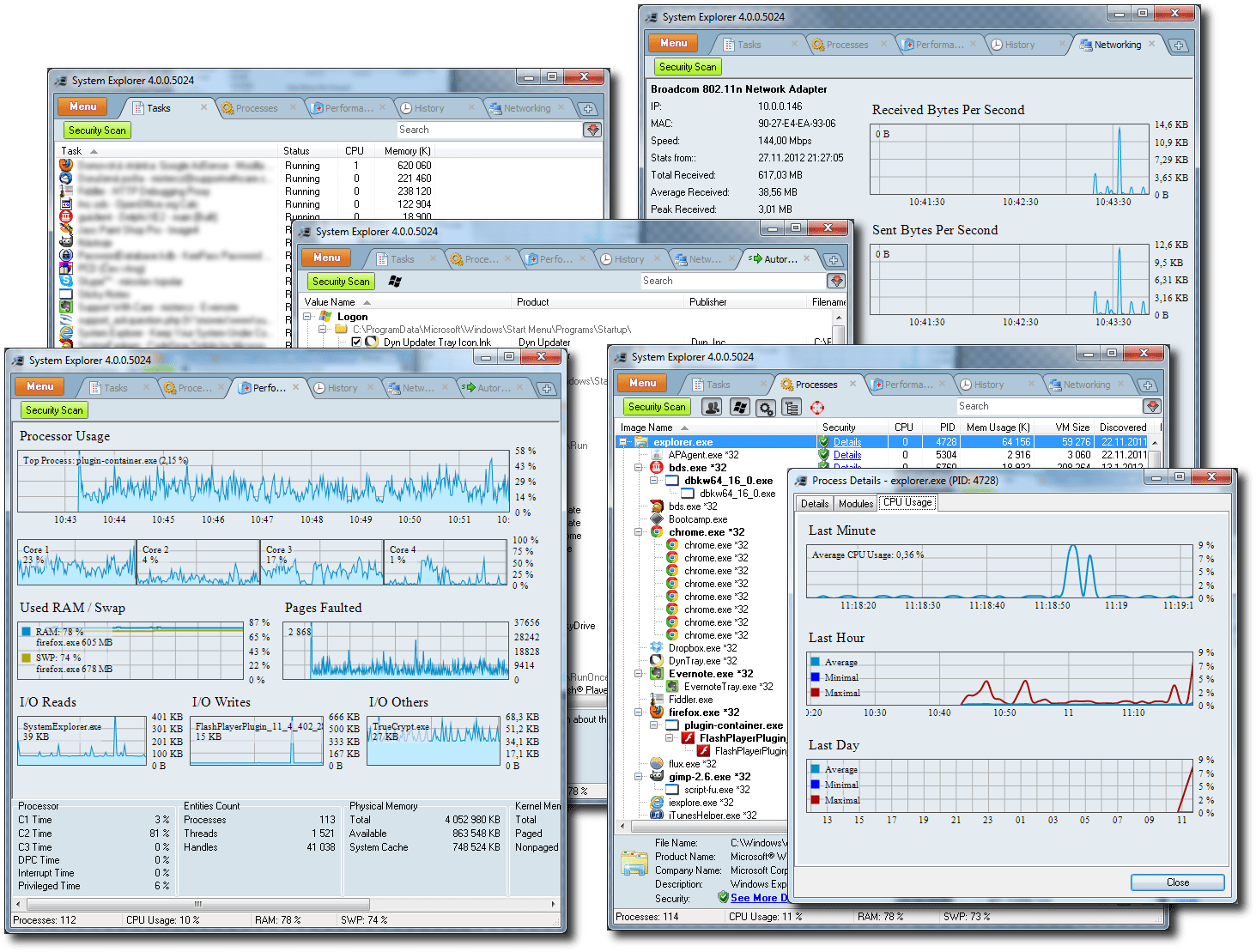
System Explorer is free , awards winning software for exploration and management of System Internals. This small software includes many usefull tools which help you Keep Your System Under Control . With System Explorer You get also fast access to File Database which help you to determine unwanted processes or threats .


Main Features
  • Detailed information about Tasks, Processes, Modules, Startups, IE Addons, Uninstallers, Windows, Services, Drivers, Connections and Opened Files.
  • Easy check of suspicious files via File Database or the VirusTotal service.
  • Easy monitoring of processes activities and System changes.
  • Usage graphs of important System resources.
  • Tray Hint with detailed System and Battery status.
  • WMI Browser and System Additional Info
  • Multilanguage Support

systemexplorer4.png


My Computer My Computer

At a glance

Windows 11AMD Ryzen 7 5700GMicron Technology DDR4-3200 16GBNVIDIA GeForce RTX 3060
OS
Windows 11
Computer type
PC/Desktop
Manufacturer/Model
HP Pavilion
CPU
AMD Ryzen 7 5700G
Motherboard
Erica6
Memory
Micron Technology DDR4-3200 16GB
Graphics Card(s)
NVIDIA GeForce RTX 3060
Sound Card
Realtek ALC671
Monitor(s) Displays
Samsung SyncMaster U28E590
Screen Resolution
3840 x 2160
Hard Drives
SAMSUNG MZVLQ1T0HALB-000H1
Another useful tool is Shadow Explorer if you need to look back into old copies after upgrades.
 

My Computers My Computers

  • At a glance

    Windows 11 Pro13th Gen Core i9 13900HX32GB DDR5 @4800MHz 2x16GBGeforce RTX 4090HX 16GB
    OS
    Windows 11 Pro
    Computer type
    Laptop
    Manufacturer/Model
    Alienware M18 R1
    CPU
    13th Gen Core i9 13900HX
    Memory
    32GB DDR5 @4800MHz 2x16GB
    Graphics Card(s)
    Geforce RTX 4090HX 16GB
    Sound Card
    Nvidia HD / Realtek ALC3254
    Monitor(s) Displays
    18" QHD+
    Screen Resolution
    25660 X 1600
    Hard Drives
    C: KIOXIA (Toshiba) 2TB KXG80ZNV2T04 NVMe PCIe M.2 SSD
    D: KIOXIA (Toshiba) 2TB KXG80ZNV2T04 NVMe PCIe M.2 SSD
    Case
    Dark Metallic Moon
    Keyboard
    Alienware M Series per-key AlienFX RGB
    Mouse
    Alienware AW610M
    Browser
    Chrome and Firefox
    Antivirus
    Norton
    Other Info
    Killer E3000 Ethernet Controller
    Killer Killer AX1690 Wi-Fi Network Adaptor Wi-Fi 6E
    Bluetooth 5.2
    Alienware Z01G Graphic Amplifier
  • At a glance

    Windows 11 Pro10th Gen i-9 10900 K32Gb Dual Channel DDR4 @ 8843MHzNvidia RTX 2080 Super
    Operating System
    Windows 11 Pro
    Computer type
    Laptop
    Manufacturer/Model
    Alienware Area 51m R2
    CPU
    10th Gen i-9 10900 K
    Memory
    32Gb Dual Channel DDR4 @ 8843MHz
    Graphics card(s)
    Nvidia RTX 2080 Super
    Sound Card
    Nvidia
    Screen Resolution
    1920 x 1080
    Hard Drives
    Hard Drive C: Samsung 2TB SSD PM981a NVMe
    Hard Drive D:Samsung 2TB SSD 970 EVO Plus
    Mouse
    Alienware 610M
    Browser
    Chrome
    Antivirus
    Norton
Hi, this is a great system tool, but how to make it go to check processes or services not in Edge or iExplorer from MS? And check it in Firefox?
 

My Computer My Computer

At a glance

11 10 NTSC 7Intel I9-11900K64GBNvidia GeForce RTX 2080 Ti
OS
11 10 NTSC 7
Computer type
PC/Desktop
Manufacturer/Model
None
CPU
Intel I9-11900K
Motherboard
ASUS ROG STRIX Z590-A GAMING WIFI
Memory
64GB
Graphics Card(s)
Nvidia GeForce RTX 2080 Ti
Sound Card
Realtec UAC ALC4080 codec
Monitor(s) Displays
Huawei 34
Screen Resolution
3440 - 1440
Hard Drives
M.2 : 2, 2, 1, TB
PSU
1000W
Case
Define 7 XL
Cooling
water/air
Keyboard
present
Mouse
present

My Computer My Computer

At a glance

Windows 11 Pro 25H2AMD Ryzen 7 5700GKingston FURY Beast 2x16GB DIMM DDR4 2666 CL16MSI GeForce GT 730 2GB LP V1
OS
Windows 11 Pro 25H2
Computer type
PC/Desktop
Manufacturer/Model
Build by vendor to my specs
CPU
AMD Ryzen 7 5700G
Motherboard
MSI PRO B550M-P Gen3
Memory
Kingston FURY Beast 2x16GB DIMM DDR4 2666 CL16
Graphics Card(s)
MSI GeForce GT 730 2GB LP V1
Sound Card
Creative Sound Blaster Audigy FX
Monitor(s) Displays
Samsung S24E450F 24"
Screen Resolution
1920 x 1080
Hard Drives
1. SSD Crucial P5 Plus 500GB PCIe M.2
2. SSD-SATA Crucial MX500-2TB
PSU
Corsair CV650W
Case
Cooler Master Silencio S400
Cooling
Cooler Master Hyper H412R with Be Quiet Pure Wings 2 PWM BL038 fan
Keyboard
Cherry Stream (wired, scissor keys)
Mouse
Asus WT465 (wireless)
Internet Speed
70 Mbps down / 80 Mbps up
Browser
Firefox 130.0
Antivirus
F-Secure (Internetprovider version)
Other Info
Router: FRITZBox 7490
Oracle VirtualBox 7 for testing software on Win 10 or 11
Wanted to look at the app, but failed.

This link does not function anymore!
Hasn't been updated since 2016 but a safe link HERE
 

My Computers My Computers

  • At a glance

    Win 11 ProAMD Ryzen™ 7 7730U24GB Dual-Channel DDR4 @ 1596MHz (22-22-22-52)512MB ATI AMD Radeon Graphics (ASUStek Comput...
    OS
    Win 11 Pro
    Computer type
    Laptop
    Manufacturer/Model
    ASUS Vivobook
    CPU
    AMD Ryzen™ 7 7730U
    Motherboard
    M1605YA
    Memory
    24GB Dual-Channel DDR4 @ 1596MHz (22-22-22-52)
    Graphics Card(s)
    512MB ATI AMD Radeon Graphics (ASUStek Computer Inc)
    Monitor(s) Displays
    Generic PnP Monitor (1920x1200@60Hz) - P1 PLUS (1920x1080@59Hz)
    Screen Resolution
    1920 X 1200
    Hard Drives
    953GB Western Digital WD
    PSU
    45 Watts
    Mouse
    Lenovo Bluetooth.
    Internet Speed
    500 Mbps
    Browser
    Edge
    Antivirus
    Defender
  • At a glance

    Windows 11AMD Ryzen 7 5800H / 3.2 GHz32 GB DDR4 SDRAM 3200 MHzNVIDIA GeForce RTX 3060 6 GB GDDR6 SDRAM
    Operating System
    Windows 11
    Computer type
    Laptop
    Manufacturer/Model
    ACER NITRO
    CPU
    AMD Ryzen 7 5800H / 3.2 GHz
    Motherboard
    CZ Scala_CAS (FP6)
    Memory
    32 GB DDR4 SDRAM 3200 MHz
    Graphics card(s)
    NVIDIA GeForce RTX 3060 6 GB GDDR6 SDRAM
    Sound Card
    Realtek Audio. NVIDIA High Definition Audio
    Monitor(s) Displays
    15.6" LED backlight 1920 x 1080 (Full HD) 144 Hz
    Screen Resolution
    1920 x 1080 (Full HD)
    Hard Drives
    Samsung 970 Evo Plus 2TB NVMe M.2
    PSU
    180 Watt, 19.5 V
    Mouse
    Lenovo Bluetooth
    Internet Speed
    500 Mbps
    Browser
    Edge
    Antivirus
    Defender
Hasn't been updated since 2016 but a safe link HERE

Thanks. We have the last version, but we now cannot check files in databases, and when this is clicked, it opens Internet Explorer with the note Website cannot be reached. This Project shall be reactivated!
 

My Computer My Computer

At a glance

11 10 NTSC 7Intel I9-11900K64GBNvidia GeForce RTX 2080 Ti
OS
11 10 NTSC 7
Computer type
PC/Desktop
Manufacturer/Model
None
CPU
Intel I9-11900K
Motherboard
ASUS ROG STRIX Z590-A GAMING WIFI
Memory
64GB
Graphics Card(s)
Nvidia GeForce RTX 2080 Ti
Sound Card
Realtec UAC ALC4080 codec
Monitor(s) Displays
Huawei 34
Screen Resolution
3440 - 1440
Hard Drives
M.2 : 2, 2, 1, TB
PSU
1000W
Case
Define 7 XL
Cooling
water/air
Keyboard
present
Mouse
present
Hasn't been updated since 2016
Did a test on my VirtualBox system (where no harm can be done to the system).
Will not use it, because it is that old and it is using (and possibly changing) system parameters everywhere.
Would not like to risk my system using this program.
Was just curious what it was like. Now I know. :-)
 

My Computer My Computer

At a glance

Windows 11 Pro 25H2AMD Ryzen 7 5700GKingston FURY Beast 2x16GB DIMM DDR4 2666 CL16MSI GeForce GT 730 2GB LP V1
OS
Windows 11 Pro 25H2
Computer type
PC/Desktop
Manufacturer/Model
Build by vendor to my specs
CPU
AMD Ryzen 7 5700G
Motherboard
MSI PRO B550M-P Gen3
Memory
Kingston FURY Beast 2x16GB DIMM DDR4 2666 CL16
Graphics Card(s)
MSI GeForce GT 730 2GB LP V1
Sound Card
Creative Sound Blaster Audigy FX
Monitor(s) Displays
Samsung S24E450F 24"
Screen Resolution
1920 x 1080
Hard Drives
1. SSD Crucial P5 Plus 500GB PCIe M.2
2. SSD-SATA Crucial MX500-2TB
PSU
Corsair CV650W
Case
Cooler Master Silencio S400
Cooling
Cooler Master Hyper H412R with Be Quiet Pure Wings 2 PWM BL038 fan
Keyboard
Cherry Stream (wired, scissor keys)
Mouse
Asus WT465 (wireless)
Internet Speed
70 Mbps down / 80 Mbps up
Browser
Firefox 130.0
Antivirus
F-Secure (Internetprovider version)
Other Info
Router: FRITZBox 7490
Oracle VirtualBox 7 for testing software on Win 10 or 11
Did a test on my VirtualBox system (where no harm can be done to the system).
Will not use it, because it is that old and it is using (and possibly changing) system parameters everywhere.
Would not like to risk my system using this program.
Was just curious what it was like. Now I know. :-)
You're entirely wrong. But what if you're right where you suggest to go? BTW., what harm can this utility do to the "system"?
 

My Computer My Computer

At a glance

11 10 NTSC 7Intel I9-11900K64GBNvidia GeForce RTX 2080 Ti
OS
11 10 NTSC 7
Computer type
PC/Desktop
Manufacturer/Model
None
CPU
Intel I9-11900K
Motherboard
ASUS ROG STRIX Z590-A GAMING WIFI
Memory
64GB
Graphics Card(s)
Nvidia GeForce RTX 2080 Ti
Sound Card
Realtec UAC ALC4080 codec
Monitor(s) Displays
Huawei 34
Screen Resolution
3440 - 1440
Hard Drives
M.2 : 2, 2, 1, TB
PSU
1000W
Case
Define 7 XL
Cooling
water/air
Keyboard
present
Mouse
present
You're entirely wrong. But what if you're right where you suggest to go? BTW., what harm can this utility do to the "system"?
Had a quick look at the debloater and saw that it can be used to change many things that I am using registry edits for.
When using registry edits I know what they are doing.
With this program I don't know. Beside that the debloater was built for Win7 or possibly already Win10, not Win11.

Did not want to test the program any further.
Don't think I am accountable to you for that decision so I won't explain the 'why' any more.

Edit: I just mixed up with another app I tested recently. This app does not have a debloat function at all. :oops:
But I still stay with my opinion that a very old app that is showing Windows processes, which you can stop and start, should not be used in a newer OS like Windows 11. Besides that: if you click any link that says 'Check', the result is a page that does not exist!
 
Last edited:

My Computer My Computer

At a glance

Windows 11 Pro 25H2AMD Ryzen 7 5700GKingston FURY Beast 2x16GB DIMM DDR4 2666 CL16MSI GeForce GT 730 2GB LP V1
OS
Windows 11 Pro 25H2
Computer type
PC/Desktop
Manufacturer/Model
Build by vendor to my specs
CPU
AMD Ryzen 7 5700G
Motherboard
MSI PRO B550M-P Gen3
Memory
Kingston FURY Beast 2x16GB DIMM DDR4 2666 CL16
Graphics Card(s)
MSI GeForce GT 730 2GB LP V1
Sound Card
Creative Sound Blaster Audigy FX
Monitor(s) Displays
Samsung S24E450F 24"
Screen Resolution
1920 x 1080
Hard Drives
1. SSD Crucial P5 Plus 500GB PCIe M.2
2. SSD-SATA Crucial MX500-2TB
PSU
Corsair CV650W
Case
Cooler Master Silencio S400
Cooling
Cooler Master Hyper H412R with Be Quiet Pure Wings 2 PWM BL038 fan
Keyboard
Cherry Stream (wired, scissor keys)
Mouse
Asus WT465 (wireless)
Internet Speed
70 Mbps down / 80 Mbps up
Browser
Firefox 130.0
Antivirus
F-Secure (Internetprovider version)
Other Info
Router: FRITZBox 7490
Oracle VirtualBox 7 for testing software on Win 10 or 11
Had a quick look at the debloater and saw that it can be used to change many things that I am using registry edits for.
When using registry edits I know what they are doing.
With this program I don't know. Beside that the debloater was built for Win7 or possibly already Win10, not Win11.

Did not want to test the program any further.
Don't think I am accountable to you for that decision so I won't explain the 'why' any more.

Edit: I just mixed up with another app I tested recently. This app does not have a debloat function at all. :oops:
But I still stay with my opinion that a very old app that is showing Windows processes, which you can stop and start, should not be used in a newer OS like Windows 11. Besides that: if you click any link that says 'Check', the result is a page that does not exist!
Thank you for trying to cooperate. Yes, the project was abandoned, but it is still better stuff than MS Task Manager.
 

My Computer My Computer

At a glance

11 10 NTSC 7Intel I9-11900K64GBNvidia GeForce RTX 2080 Ti
OS
11 10 NTSC 7
Computer type
PC/Desktop
Manufacturer/Model
None
CPU
Intel I9-11900K
Motherboard
ASUS ROG STRIX Z590-A GAMING WIFI
Memory
64GB
Graphics Card(s)
Nvidia GeForce RTX 2080 Ti
Sound Card
Realtec UAC ALC4080 codec
Monitor(s) Displays
Huawei 34
Screen Resolution
3440 - 1440
Hard Drives
M.2 : 2, 2, 1, TB
PSU
1000W
Case
Define 7 XL
Cooling
water/air
Keyboard
present
Mouse
present
Yes, the project was abandoned, but it is still better stuff than MS Task Manager.
You say so, but exactly that is what I don't know for sure. So I will not use the app.

MS Task Manager always has been fullfilling what I expected it to do.
 

My Computer My Computer

At a glance

Windows 11 Pro 25H2AMD Ryzen 7 5700GKingston FURY Beast 2x16GB DIMM DDR4 2666 CL16MSI GeForce GT 730 2GB LP V1
OS
Windows 11 Pro 25H2
Computer type
PC/Desktop
Manufacturer/Model
Build by vendor to my specs
CPU
AMD Ryzen 7 5700G
Motherboard
MSI PRO B550M-P Gen3
Memory
Kingston FURY Beast 2x16GB DIMM DDR4 2666 CL16
Graphics Card(s)
MSI GeForce GT 730 2GB LP V1
Sound Card
Creative Sound Blaster Audigy FX
Monitor(s) Displays
Samsung S24E450F 24"
Screen Resolution
1920 x 1080
Hard Drives
1. SSD Crucial P5 Plus 500GB PCIe M.2
2. SSD-SATA Crucial MX500-2TB
PSU
Corsair CV650W
Case
Cooler Master Silencio S400
Cooling
Cooler Master Hyper H412R with Be Quiet Pure Wings 2 PWM BL038 fan
Keyboard
Cherry Stream (wired, scissor keys)
Mouse
Asus WT465 (wireless)
Internet Speed
70 Mbps down / 80 Mbps up
Browser
Firefox 130.0
Antivirus
F-Secure (Internetprovider version)
Other Info
Router: FRITZBox 7490
Oracle VirtualBox 7 for testing software on Win 10 or 11
Back
Top Bottom