Jaysum
Member
- Local time
- 6:21 PM
- Posts
- 3
- OS
- Windows 11
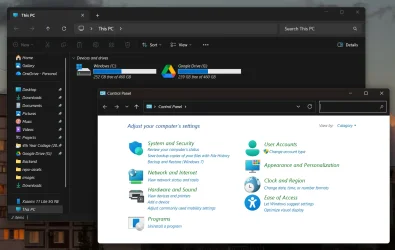
I was trying to install 'Segoe UI' font because I was trying to test a css file that is using 'Segoe UI' font. I was not able to find it in my system fonts as I only had 'Segoe UI variable' font installed.
I found the "Segoe UI" font on Dafont and
installed it for all users now the weird thing was after I installed it, the text on file explorer iteslf turned into some unreadable gibberish. It wasn't readable at all. So what I did was try to uninstall the font. But it wouldn't let me because it says its:Segoe UI Black Italic cannot be deleted because it is a protected system font
Now I tried to restart my laptop and now every system text is italicized as seen on the photos.
Can somebody help me out?
- Windows Build/Version
- 24H2 (OS build 26100.6899)
My Computer
At a glance
Windows 1113th Gen Intel(R) Core(TM) i7-13620H, 2400 Mh16.0 GBNVIDIA® GeForce RTX™ 4050 Laptop GPU 6GB GDDR...
- OS
- Windows 11
- Computer type
- Laptop
- Manufacturer/Model
- Gigabyte G5 MF5
- CPU
- 13th Gen Intel(R) Core(TM) i7-13620H, 2400 Mh
- Memory
- 16.0 GB
- Graphics Card(s)
- NVIDIA® GeForce RTX™ 4050 Laptop GPU 6GB GDDR6 Boost Clock 2130MHz, Intel(R) UHD Graphics