Solved System32 file removal


Bryan

Well-known member
Member
Local time
3:26 AM
Posts
39
Location
New Zealand
OS
Windows 11 Pro 25H2 26200 current release
For a long time now, my system currently 21600.4946, has a number of files being reported when I run REVO. They are always left behind and I am unsure if they should be left alone or if there is a way that they can be safely removed.

The files are in the Windows System32 folder and are:

15 files beginning C:\Windows\System32\OLD3108.temp. There are 15 files such files in this sequence starting with this file.

27 files beginning C:\Windows\Drivers\SET64C0.temp. There are 27 such files in this sequence starting with this file.

If they could be removed, how would I go about removing them? I don’t think for one moment that it would be a case of just deleting them from the system32 folder.
 

My Computer

System One

  • OS
    Windows 11 Pro 25H2 26200 current release
    Computer type
    PC/Desktop
    Manufacturer/Model
    Home DIY
    CPU
    i7 11700KF
    Motherboard
    Gigabyte Z590 Aorus Elite AX
    Memory
    32g DDR4 @3200
    Graphics Card(s)
    Gigabyte RTX3060ti
    Sound Card
    0
    Monitor(s) Displays
    Samsung Syncmaster B2430HD
    Screen Resolution
    1920 x 1080
    Hard Drives
    Samsung EVO 980 500G M.2
    PSU
    600w EVGA
    Case
    Antec P280
    Cooling
    Coolmaster V6 GT
    Keyboard
    Logitech wireless K520r
    Mouse
    Logitech wirless M705
    Internet Speed
    Starlink 100mbps
    Browser
    Google
    Antivirus
    ESET
    Other Info
    Starlink
For a long time now, my system currently 21600.4946, has a number of files being reported when I run REVO. They are always left behind and I am unsure if they should be left alone or if there is a way that they can be safely removed.

The files are in the Windows System32 folder and are:

15 files beginning C:\Windows\System32\OLD3108.temp. There are 15 files such files in this sequence starting with this file.

27 files beginning C:\Windows\Drivers\SET64C0.temp. There are 27 such files in this sequence starting with this file.

If they could be removed, how would I go about removing them? I don’t think for one moment that it would be a case of just deleting them from the system32 folder.
Hi,
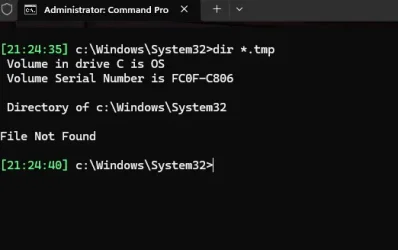
Are they .temp or .tmp files?
Those files can be many things, what are the file dates & sizes?
They might be left over from the OS installation.
In most cases they can be safely deleted but a backup can always help.
I think I might have them as well.

Screenshot 2025-08-13 211506.webp


OK, I deleted them after taking ownership.

Screenshot 2025-08-13 211506.webp
 
Last edited:

My Computers

System One System Two

  • OS
    All Branches but Release
    Computer type
    Laptop
    Manufacturer/Model
    Acer Nitro ANV15-51
    CPU
    AMD Ryzen 7 7735HS 3200-4500 Mhz 8 cores x 2
    Motherboard
    Sportage_RBH
    Memory
    32 GB DDR5
    Graphics Card(s)
    Radeon Graphic / NVIDIA GeForce RTX 4060 8 GB GDDR6
    Sound Card
    AMD/Realtek(R) Audio
    Monitor(s) Displays
    Integrated Monitor (15.3"vis)
    Screen Resolution
    FHD 1920X1080 16:9 144Hz
    Hard Drives
    KINGSTON OM8SEP4512Q-AA 1TB
    Western Digital 256GB
    PSU
    19V DC 6.32 A 120 W
    Cooling
    Dual Fans
    Mouse
    MS Bluetooth
    Internet Speed
    Fiber 1GB Cox -us & 1GB Orange-fr
    Browser
    Edge Canary- Firefox Nightly-Chrome Dev-Chrome Dev
    Antivirus
    Windows Defender
  • Operating System
    Windows 11 Beta
    Computer type
    Laptop
    Manufacturer/Model
    Asus X751BP
    CPU
    AMD A9-9420
    Memory
    8 GB of DDR4
    Graphics card(s)
    AMD Radeon R5
    Screen Resolution
    1600x900
    Hard Drives
    Seagate 1 TB
The safe way is to run Disk Cleanup and do the deletions that way.
 

My Computers

System One System Two

  • OS
    Win 11 Pro 25H2, Build 26200.8524
    Computer type
    PC/Desktop
    Manufacturer/Model
    Home Brew
    CPU
    Intel Core i5 14500
    Motherboard
    Gigabyte B760M G P WIFI
    Memory
    64GB DDR4
    Graphics Card(s)
    GeForce RTX 4060
    Sound Card
    Chipset Realtek
    Monitor(s) Displays
    LG 45" Ultragear, Acer 24" 1080p
    Screen Resolution
    5120x1440, 1920x1080
    Hard Drives
    Crucial P310 2TB 2280 PCIe Gen4 3D NAND NVMe M.2 SSD (O/S)
    Silicon Power 2TB US75 NVMe PCIe Gen4 M.2 2280 SSD (backup)
    Crucial BX500 2TB 3D NAND (2nd backup)
    Seagate 4TB Ironwolf, rotating HDD archive files
    External off-line backup Drives: 2 NVMe 4TB drives in external enclosures
    PSU
    Thermaltake Toughpower GF3 750W
    Case
    LIAN LI LANCOOL 216 E-ATX PC Case
    Cooling
    Lots of fans!
    Keyboard
    Microsoft Comfort Curve 2000
    Mouse
    Logitech G305
    Internet Speed
    Verizon FiOS 1GB
    Browser
    Firefox
    Antivirus
    Malware Bytes & Windows Defender Security
  • Operating System
    Win 11 Pro 25H2, Build 26200.8524
    Computer type
    PC/Desktop
    Manufacturer/Model
    Home Brew
    CPU
    Intel Core i5 14400
    Motherboard
    Gigabyte B760M DS3H AX
    Memory
    32GB DDR5
    Graphics card(s)
    Intel 700 Embedded GPU
    Sound Card
    Realtek Embedded
    Monitor(s) Displays
    27" HP 1080p
    Screen Resolution
    1920x1080
    Hard Drives
    Crucial P310 2TB 2280 PCIe Gen4 eD NAND PCIe SSD
    Samsung EVO 990 2TB NVMe Gen4 SSD
    Samsung 2TB SATA SSD
    PSU
    Thermaltake Smart BM3 650W
    Case
    Okinos Micro ATX Case
    Cooling
    Fans
    Keyboard
    Microsoft Comfort Curve 2000
    Mouse
    Logitech G305
    Internet Speed
    Verizon FiOS 1GB
    Browser
    Firefox
    Antivirus
    Malware Bytes & Windows Defender Security
Just a bit of advice for when using Revo Uninstaller.
The whole reason for using it is that it lets the user scan for left-over files and registry entries after a program uninstalls. After you scan, you should always check all the boxes for everything Revo finds and select delete. It is safe to let Revo remove them.
 

My Computers

System One System Two

  • OS
    Windows 11 Pro 25H2
    Computer type
    PC/Desktop
    Manufacturer/Model
    Dell Optiplex 7080
    CPU
    i9-10900 10 core 20 threads
    Motherboard
    DELL 0J37VM
    Memory
    32 gb
    Graphics Card(s)
    none-Intel UHD Graphics 630
    Sound Card
    Integrated Realtek
    Monitor(s) Displays
    Benq 27
    Screen Resolution
    2560x1440
    Hard Drives
    2x1tb Solidigm m.2 nvme /External drives 512gb Samsung m.2 sata+2tb Kingston m2.nvme
    PSU
    500w
    Case
    MT
    Cooling
    Dell Premium
    Keyboard
    Logitech wired
    Mouse
    Logitech wireless
    Internet Speed
    so slow I'm too embarrassed to tell
    Browser
    #1 Edge #2 Firefox
    Antivirus
    Defender+MWB Premium
  • Operating System
    Windows 11 Pro 24H2 26200.8457
    Computer type
    PC/Desktop
    Manufacturer/Model
    Beelink Mini PC SER5
    CPU
    AMD Ryzen 7 6800U
    Memory
    32 gb
    Graphics card(s)
    integrated
    Sound Card
    integrated
    Monitor(s) Displays
    Benq 27
    Screen Resolution
    2560x1440
    Hard Drives
    1TB Crucial nvme
    Keyboard
    Logitech wired
    Mouse
    Logitech wireless
    Internet Speed
    still too embarrassed to tell
    Browser
    Firefox
    Antivirus
    Defender
    Other Info
    System 3 is non compliant Dell 9020 i7-4770/24gb ram Win11 PRO 26200.8457
They are .tmp files of varying sizes. The OLD... are dated 1/4/2024 and the Drivers... are dated 6/9/2024.

I have used Disk Cleanup quite regularly but these files have been overlooked.
 

My Computer

System One

  • OS
    Windows 11 Pro 25H2 26200 current release
    Computer type
    PC/Desktop
    Manufacturer/Model
    Home DIY
    CPU
    i7 11700KF
    Motherboard
    Gigabyte Z590 Aorus Elite AX
    Memory
    32g DDR4 @3200
    Graphics Card(s)
    Gigabyte RTX3060ti
    Sound Card
    0
    Monitor(s) Displays
    Samsung Syncmaster B2430HD
    Screen Resolution
    1920 x 1080
    Hard Drives
    Samsung EVO 980 500G M.2
    PSU
    600w EVGA
    Case
    Antec P280
    Cooling
    Coolmaster V6 GT
    Keyboard
    Logitech wireless K520r
    Mouse
    Logitech wirless M705
    Internet Speed
    Starlink 100mbps
    Browser
    Google
    Antivirus
    ESET
    Other Info
    Starlink
They are .tmp files of varying sizes. The OLD... are dated 1/4/2024 and the Drivers... are dated 6/9/2024.

I have used Disk Cleanup quite regularly but these files have been overlooked.
I have deleted those after taking ownership and they did not return after a reboot.

Screenshot 2025-08-13 211506.webp
 

My Computers

System One System Two

  • OS
    All Branches but Release
    Computer type
    Laptop
    Manufacturer/Model
    Acer Nitro ANV15-51
    CPU
    AMD Ryzen 7 7735HS 3200-4500 Mhz 8 cores x 2
    Motherboard
    Sportage_RBH
    Memory
    32 GB DDR5
    Graphics Card(s)
    Radeon Graphic / NVIDIA GeForce RTX 4060 8 GB GDDR6
    Sound Card
    AMD/Realtek(R) Audio
    Monitor(s) Displays
    Integrated Monitor (15.3"vis)
    Screen Resolution
    FHD 1920X1080 16:9 144Hz
    Hard Drives
    KINGSTON OM8SEP4512Q-AA 1TB
    Western Digital 256GB
    PSU
    19V DC 6.32 A 120 W
    Cooling
    Dual Fans
    Mouse
    MS Bluetooth
    Internet Speed
    Fiber 1GB Cox -us & 1GB Orange-fr
    Browser
    Edge Canary- Firefox Nightly-Chrome Dev-Chrome Dev
    Antivirus
    Windows Defender
  • Operating System
    Windows 11 Beta
    Computer type
    Laptop
    Manufacturer/Model
    Asus X751BP
    CPU
    AMD A9-9420
    Memory
    8 GB of DDR4
    Graphics card(s)
    AMD Radeon R5
    Screen Resolution
    1600x900
    Hard Drives
    Seagate 1 TB
Just a bit of advice for when using Revo Uninstaller.
The whole reason for using it is that it lets the user scan for left-over files and registry entries after a program uninstalls. After you scan, you should always check all the boxes for everything Revo finds and select delete. It is safe to let Revo remove them.
Just the ones Revo shows in Bold. I'm not sure about the free version but the paid version has a option box that will automatically delete the leftover entries when it's clicked on.
 

My Computers

System One System Two

  • OS
    Windows 11 Pro 25H2
    Computer type
    PC/Desktop
    Manufacturer/Model
    PowerSpec B746
    CPU
    Intel Core i7-10700K
    Motherboard
    ASRock Z490 Phantom Gaming 4/ax
    Memory
    16GB (8GB PC4-19200 DDR4 SDRAM x2)
    Graphics Card(s)
    NVIDIA GeForce GTX 1050 TI
    Sound Card
    Realtek Audio
    Monitor(s) Displays
    #1. LG ULTRAWIDE 34" #2. AOC Q32G2WG3 32"
    Screen Resolution
    #1. 3440 X 1440 #2. 1920 x 1080
    Hard Drives
    NVMe WDC WDS100T2B0C-00PXH0 1TB
    Samsung SSD 860 EVO 1TB
    PSU
    750 Watts (62.5A)
    Case
    PowerSpec/Lian Li ATX 205
    Keyboard
    Logitech K270
    Mouse
    Logitech M185
    Browser
    Microsoft Edge and Firefox
    Antivirus
    Webroot SecureAnywhere CE 26.1
  • Operating System
    Windows 11 Canary Channel
    Computer type
    PC/Desktop
    Manufacturer/Model
    PowerSpec G156
    CPU
    Intel Core i5-8400 CPU @ 2.80GHz
    Motherboard
    AsusTeK Prime B360M-A
    Memory
    16 MB DDR 4-2666
    Monitor(s) Displays
    23" Speptre HDMI 75Hz
    Screen Resolution
    1920x1080
    Hard Drives
    Samsung 970 EVO 500GB NVMe
    Keyboard
    Logitek K270
    Mouse
    Logitek M185
    Browser
    Firefox, Edge and Edge Canary
    Antivirus
    Windows Defender

Latest Support Threads

Back
Top Bottom