Task Host Window


MaggieDale

Member
Local time
12:52 AM
Posts
8
OS
Windows 11
Hello - During shutdown, my desktop hangs and I keep getting the following popup window. "Task Host Window" "Task Host is stopping background tasks."
( \Microsoft\Windows\DeviceDirectoryClient\RegisterUserDevice )

Any help with this annoyance would be greatly appreciated!

Thank you
 

Attachments

  • Task Host.webp
    Task Host.webp
    489.3 KB · Views: 1

My Computer

System One

  • OS
    Windows 11
    Computer type
    PC/Desktop
    Manufacturer/Model
    Homemade
    CPU
    AMD Ryzen 7 5700G 3.8 GHz 8-Core Processor
    Motherboard
    MSI B450M GAMING PLUS Micro ATX AM4
    Memory
    Corsair Vengeance LPX 32 GB (2 x 16 GB) DDR4-2400 CL15 Memory
    Graphics Card(s)
    Integrated Graphics Radeon Vega 8
    Sound Card
    integrated
    Monitor(s) Displays
    AOC C27G2Z 27" Curved Frameless Ultra-Fast Gaming Monitor, FHD 1080p
    Hard Drives
    Samsung 970 Evo 500 GB M.2-2280 PCIe 3.0 X4 NVME Solid State Drive
    Western Digital Black SN750 500 GB M.2-2280 PCIe 3.0 X4 NVME Solid State Drive
    PSU
    Corsair RM750 (2019) 750 W 80+ Gold Certified Fully Modular ATX Power Supply
    Case
    CORSAIR CRYSTAL 280X Micro-ATX Case, Tempered Glass - Black
I had this happen to me recently,what solved it for me was,when you goto shutdown,instead of using the menu option,press and hold the power button until the system shut off,the next time you shutdown via the menu you should be fine!
 

My Computer

System One

  • OS
    win 11
    Computer type
    PC/Desktop
    Manufacturer/Model
    PC Specialist
    CPU
    Intel Core i7-12700F
    Motherboard
    GIGABYTE B660 DS3H DDR4 (rev. 1.0) : LGA1700, DDR4, USB 3.2
    Memory
    16GB DDR4 3200MHz
    Graphics Card(s)
    NVIDIA GeForce RTX 3060 Ti 8GB
    Sound Card
    On-Board 5.1 High Definition Audio
    Monitor(s) Displays
    msi curved gaming monitor
    Screen Resolution
    3440x1440
    Hard Drives
    1TB M.2 SSD
    1TB (1,000GB) SATA III 6Gb/s 7200rpm
    Seagate
    8Tb BarraCuda 3.5 inch Internal Hard Drive
    PSU
    650W POWER SUPPLY 80+ Bronze PSU
    Case
    cypher g70
    Keyboard
    steelseries apex 350
    Mouse
    steelseries rival 5
    Internet Speed
    sky full fibre ultrafast 500mb d/l
    Browser
    chrome
    Antivirus
    windows
I'll give it a try! (y)
 

My Computer

System One

  • OS
    Windows 11
    Computer type
    PC/Desktop
    Manufacturer/Model
    Homemade
    CPU
    AMD Ryzen 7 5700G 3.8 GHz 8-Core Processor
    Motherboard
    MSI B450M GAMING PLUS Micro ATX AM4
    Memory
    Corsair Vengeance LPX 32 GB (2 x 16 GB) DDR4-2400 CL15 Memory
    Graphics Card(s)
    Integrated Graphics Radeon Vega 8
    Sound Card
    integrated
    Monitor(s) Displays
    AOC C27G2Z 27" Curved Frameless Ultra-Fast Gaming Monitor, FHD 1080p
    Hard Drives
    Samsung 970 Evo 500 GB M.2-2280 PCIe 3.0 X4 NVME Solid State Drive
    Western Digital Black SN750 500 GB M.2-2280 PCIe 3.0 X4 NVME Solid State Drive
    PSU
    Corsair RM750 (2019) 750 W 80+ Gold Certified Fully Modular ATX Power Supply
    Case
    CORSAIR CRYSTAL 280X Micro-ATX Case, Tempered Glass - Black
I had this happen to me recently,what solved it for me was,when you goto shutdown,instead of using the menu option,press and hold the power button until the system shut off,the next time you shutdown via the menu you should be fine!

I’ve read the same fix on various forums (y)
 

My Computers

System One System Two

  • OS
    Windows 11 Pro 25H2 Build 26200.8524
    Computer type
    PC/Desktop
    Manufacturer/Model
    Sin-built 2013
    CPU
    Intel(R) Core(TM) i7-4770K CPU @ 3.50GHz
    Motherboard
    ASUS ROG Maximus VI Formula
    Memory
    32.0 GB of I forget and the box is in storage.
    Graphics Card(s)
    Gigabyte nVidia GeForce GTX 1660 Super OC 6GB
    Sound Card
    Onboard thingy
    Monitor(s) Displays
    5 x LG 25MS500-B - 1 x 24MK430H-B - 1 x Wacom Pro 22" Touch Screen Tablet
    Screen Resolution
    All over the place
    Hard Drives
    Too many to list.
    OS on Samsung 1TB 870 QVO SATA
    PSU
    Silverstone 1500
    Case
    NZXT Phantom 820 Full-Tower Case
    Cooling
    Noctua NH-D15 Elite Class Dual Tower CPU Cooler / 6 x EziDIY 120mm / 2 x Corsair 140mm somethings / 1 x 140mm Thermaltake something / 2 x 200mm Corsair.
    Keyboard
    Corsair K95 / Logitech diNovo Edge Wireless
    Mouse
    Logitech: G402 / G502 / Mx Masters / Mx Air Cordless
    Internet Speed
    2000/500Mbps
    Browser
    All sorts
    Antivirus
    Kaspersky Premium
    Other Info
    ㅤㅤㅤㅤㅤㅤㅤㅤㅤㅤㅤㅤㅤㅤㅤㅤㅤㅤㅤㅤㅤㅤㅤㅤㅤㅤㅤㅤㅤㅤㅤㅤㅤㅤㅤㅤㅤㅤㅤㅤ⠀⠀⠀⠀⠀⠀⠀⠀⠀⠀
    TP-Link BE9300 WiFi 7 Bluetooth 5.4 (Archer TBE550E)
    TP-Link TX201 V1 2.5GB Lan

    Grandstream HT812 - VoIP
    ASUS DSL-AX82U - Mesh
    ASUS RT-AC68U - Mesh
    ASUS RT-BE88U Router

    Brother MFC-L2880DW Printer

    I’m on a horse.
  • Operating System
    Windows 11 Pro 25H2 Build 26200.8524
    Computer type
    Laptop
    Manufacturer/Model
    LENOVO Yoga 7 14IRL8 - 7i EVO OLED 14" Touchscreen i5 12 Core 16GB/512GB
    CPU
    Intel Core 12th Gen i5-1240P Processor (1.7 - 4.4GHz)
    Memory
    16GB LPDDR5 RAM
    Graphics card(s)
    Intel Iris Xe Graphics Processor
    Sound Card
    Optimized with Dolby Atmos®
    Screen Resolution
    QHD 2880 x 1800 OLED
    Hard Drives
    M.2 512GB
    Antivirus
    Defender / Malwarebytes
    Other Info
    …still on a horse.
Thanks, guys, I'll give this a try this evening and report back.
 

My Computer

System One

  • OS
    Windows 11
    Computer type
    PC/Desktop
    Manufacturer/Model
    Homemade
    CPU
    AMD Ryzen 7 5700G 3.8 GHz 8-Core Processor
    Motherboard
    MSI B450M GAMING PLUS Micro ATX AM4
    Memory
    Corsair Vengeance LPX 32 GB (2 x 16 GB) DDR4-2400 CL15 Memory
    Graphics Card(s)
    Integrated Graphics Radeon Vega 8
    Sound Card
    integrated
    Monitor(s) Displays
    AOC C27G2Z 27" Curved Frameless Ultra-Fast Gaming Monitor, FHD 1080p
    Hard Drives
    Samsung 970 Evo 500 GB M.2-2280 PCIe 3.0 X4 NVME Solid State Drive
    Western Digital Black SN750 500 GB M.2-2280 PCIe 3.0 X4 NVME Solid State Drive
    PSU
    Corsair RM750 (2019) 750 W 80+ Gold Certified Fully Modular ATX Power Supply
    Case
    CORSAIR CRYSTAL 280X Micro-ATX Case, Tempered Glass - Black
In the Registry, go to Computer\HKEY_CURRENT_USER\Control Panel\Desktop
change the WaitToKillAppTimeout string value to 2000
 

My Computers

System One System Two

  • OS
    Windows 11 Pro
    Computer type
    PC/Desktop
    Manufacturer/Model
    ASUS ROG Strix
  • Operating System
    Windows 11 Pro
    Computer type
    Laptop
    Manufacturer/Model
    ASUS VivoBook
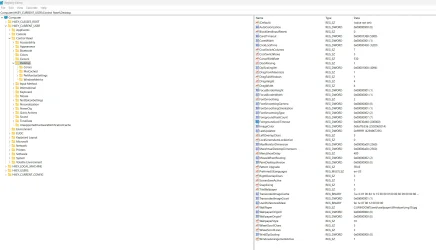
Edwin, tried "Computer\HKEY_CURRENT_USER\Control Panel\Desktop
change the WaitToKillAppTimeout string value to 2000" but cannot find "WaitToKillAppTimeout" in Desktop.
Please see screenshot
Also tried "HKEY_LOCAL_MACHINE\SYSTEM\CurrentControlSet\Control" don't see it there either.

Thanks
 

Attachments

  • RegEdit.webp
    RegEdit.webp
    195 KB · Views: 2

My Computer

System One

  • OS
    Windows 11
    Computer type
    PC/Desktop
    Manufacturer/Model
    Homemade
    CPU
    AMD Ryzen 7 5700G 3.8 GHz 8-Core Processor
    Motherboard
    MSI B450M GAMING PLUS Micro ATX AM4
    Memory
    Corsair Vengeance LPX 32 GB (2 x 16 GB) DDR4-2400 CL15 Memory
    Graphics Card(s)
    Integrated Graphics Radeon Vega 8
    Sound Card
    integrated
    Monitor(s) Displays
    AOC C27G2Z 27" Curved Frameless Ultra-Fast Gaming Monitor, FHD 1080p
    Hard Drives
    Samsung 970 Evo 500 GB M.2-2280 PCIe 3.0 X4 NVME Solid State Drive
    Western Digital Black SN750 500 GB M.2-2280 PCIe 3.0 X4 NVME Solid State Drive
    PSU
    Corsair RM750 (2019) 750 W 80+ Gold Certified Fully Modular ATX Power Supply
    Case
    CORSAIR CRYSTAL 280X Micro-ATX Case, Tempered Glass - Black
Maggie, hi & welcome here.

You can create the “WaitToKillAppTimeout“ value in the registry if it isn’t there.

1. Press “Win + R”, type “regedit`”, right click and open regedit as Admin”.
2. Navigate to:
HKEY_CURRENT_USER\Control Panel\Desktop
3. In the right pane, create a new “String Value” and name it “WaitToKillAppTimeout”.
4. Double-click it and set a value in milliseconds 2000
5. Click “OK”, close the Registry Editor, and restart your computer for the changes to take effect
 
Last edited:

My Computers

System One System Two

  • OS
    Windows 11 Pro 25H2 Build 26200.8524
    Computer type
    PC/Desktop
    Manufacturer/Model
    Sin-built 2013
    CPU
    Intel(R) Core(TM) i7-4770K CPU @ 3.50GHz
    Motherboard
    ASUS ROG Maximus VI Formula
    Memory
    32.0 GB of I forget and the box is in storage.
    Graphics Card(s)
    Gigabyte nVidia GeForce GTX 1660 Super OC 6GB
    Sound Card
    Onboard thingy
    Monitor(s) Displays
    5 x LG 25MS500-B - 1 x 24MK430H-B - 1 x Wacom Pro 22" Touch Screen Tablet
    Screen Resolution
    All over the place
    Hard Drives
    Too many to list.
    OS on Samsung 1TB 870 QVO SATA
    PSU
    Silverstone 1500
    Case
    NZXT Phantom 820 Full-Tower Case
    Cooling
    Noctua NH-D15 Elite Class Dual Tower CPU Cooler / 6 x EziDIY 120mm / 2 x Corsair 140mm somethings / 1 x 140mm Thermaltake something / 2 x 200mm Corsair.
    Keyboard
    Corsair K95 / Logitech diNovo Edge Wireless
    Mouse
    Logitech: G402 / G502 / Mx Masters / Mx Air Cordless
    Internet Speed
    2000/500Mbps
    Browser
    All sorts
    Antivirus
    Kaspersky Premium
    Other Info
    ㅤㅤㅤㅤㅤㅤㅤㅤㅤㅤㅤㅤㅤㅤㅤㅤㅤㅤㅤㅤㅤㅤㅤㅤㅤㅤㅤㅤㅤㅤㅤㅤㅤㅤㅤㅤㅤㅤㅤㅤ⠀⠀⠀⠀⠀⠀⠀⠀⠀⠀
    TP-Link BE9300 WiFi 7 Bluetooth 5.4 (Archer TBE550E)
    TP-Link TX201 V1 2.5GB Lan

    Grandstream HT812 - VoIP
    ASUS DSL-AX82U - Mesh
    ASUS RT-AC68U - Mesh
    ASUS RT-BE88U Router

    Brother MFC-L2880DW Printer

    I’m on a horse.
  • Operating System
    Windows 11 Pro 25H2 Build 26200.8524
    Computer type
    Laptop
    Manufacturer/Model
    LENOVO Yoga 7 14IRL8 - 7i EVO OLED 14" Touchscreen i5 12 Core 16GB/512GB
    CPU
    Intel Core 12th Gen i5-1240P Processor (1.7 - 4.4GHz)
    Memory
    16GB LPDDR5 RAM
    Graphics card(s)
    Intel Iris Xe Graphics Processor
    Sound Card
    Optimized with Dolby Atmos®
    Screen Resolution
    QHD 2880 x 1800 OLED
    Hard Drives
    M.2 512GB
    Antivirus
    Defender / Malwarebytes
    Other Info
    …still on a horse.
Also tried "HKEY_LOCAL_MACHINE\SYSTEM\CurrentControlSet\Control" don't see it there either.

What do you want to modify in there?


The HKEY_LOCAL_MACHINE\SYSTEM\CurrentControlSet\Control registry key contains essential system settings that influence startup behaviour and device configuration. It includes subkeys that manage various aspects of Windows.

- Class: Stores information about device setup classes.
- CoDeviceInstallers: Lists class-specific co-installers.
- DeviceClasses: Contains details about device interfaces.

This key plays a crucial role in ensuring Windows boots correctly and manages hardware efficiently. Has nothing to do with the Shutdown Processes that I am aware of.
 

My Computers

System One System Two

  • OS
    Windows 11 Pro 25H2 Build 26200.8524
    Computer type
    PC/Desktop
    Manufacturer/Model
    Sin-built 2013
    CPU
    Intel(R) Core(TM) i7-4770K CPU @ 3.50GHz
    Motherboard
    ASUS ROG Maximus VI Formula
    Memory
    32.0 GB of I forget and the box is in storage.
    Graphics Card(s)
    Gigabyte nVidia GeForce GTX 1660 Super OC 6GB
    Sound Card
    Onboard thingy
    Monitor(s) Displays
    5 x LG 25MS500-B - 1 x 24MK430H-B - 1 x Wacom Pro 22" Touch Screen Tablet
    Screen Resolution
    All over the place
    Hard Drives
    Too many to list.
    OS on Samsung 1TB 870 QVO SATA
    PSU
    Silverstone 1500
    Case
    NZXT Phantom 820 Full-Tower Case
    Cooling
    Noctua NH-D15 Elite Class Dual Tower CPU Cooler / 6 x EziDIY 120mm / 2 x Corsair 140mm somethings / 1 x 140mm Thermaltake something / 2 x 200mm Corsair.
    Keyboard
    Corsair K95 / Logitech diNovo Edge Wireless
    Mouse
    Logitech: G402 / G502 / Mx Masters / Mx Air Cordless
    Internet Speed
    2000/500Mbps
    Browser
    All sorts
    Antivirus
    Kaspersky Premium
    Other Info
    ㅤㅤㅤㅤㅤㅤㅤㅤㅤㅤㅤㅤㅤㅤㅤㅤㅤㅤㅤㅤㅤㅤㅤㅤㅤㅤㅤㅤㅤㅤㅤㅤㅤㅤㅤㅤㅤㅤㅤㅤ⠀⠀⠀⠀⠀⠀⠀⠀⠀⠀
    TP-Link BE9300 WiFi 7 Bluetooth 5.4 (Archer TBE550E)
    TP-Link TX201 V1 2.5GB Lan

    Grandstream HT812 - VoIP
    ASUS DSL-AX82U - Mesh
    ASUS RT-AC68U - Mesh
    ASUS RT-BE88U Router

    Brother MFC-L2880DW Printer

    I’m on a horse.
  • Operating System
    Windows 11 Pro 25H2 Build 26200.8524
    Computer type
    Laptop
    Manufacturer/Model
    LENOVO Yoga 7 14IRL8 - 7i EVO OLED 14" Touchscreen i5 12 Core 16GB/512GB
    CPU
    Intel Core 12th Gen i5-1240P Processor (1.7 - 4.4GHz)
    Memory
    16GB LPDDR5 RAM
    Graphics card(s)
    Intel Iris Xe Graphics Processor
    Sound Card
    Optimized with Dolby Atmos®
    Screen Resolution
    QHD 2880 x 1800 OLED
    Hard Drives
    M.2 512GB
    Antivirus
    Defender / Malwarebytes
    Other Info
    …still on a horse.
antspants, thank you for the welcome.
I'm trying to rid my PC of a popup warning each time I shutdown,
"Task Host Window" "Task Host is stopping background tasks."
( \Microsoft\Windows\DeviceDirectoryClient\RegisterUserDevice )
I'm not a programmer by any means, and although familiar with the registry, I surely don't want to make things worse! I would just like to get rid of this annoyance.
 

Attachments

  • Task Host.webp
    Task Host.webp
    489.3 KB · Views: 2

My Computer

System One

  • OS
    Windows 11
    Computer type
    PC/Desktop
    Manufacturer/Model
    Homemade
    CPU
    AMD Ryzen 7 5700G 3.8 GHz 8-Core Processor
    Motherboard
    MSI B450M GAMING PLUS Micro ATX AM4
    Memory
    Corsair Vengeance LPX 32 GB (2 x 16 GB) DDR4-2400 CL15 Memory
    Graphics Card(s)
    Integrated Graphics Radeon Vega 8
    Sound Card
    integrated
    Monitor(s) Displays
    AOC C27G2Z 27" Curved Frameless Ultra-Fast Gaming Monitor, FHD 1080p
    Hard Drives
    Samsung 970 Evo 500 GB M.2-2280 PCIe 3.0 X4 NVME Solid State Drive
    Western Digital Black SN750 500 GB M.2-2280 PCIe 3.0 X4 NVME Solid State Drive
    PSU
    Corsair RM750 (2019) 750 W 80+ Gold Certified Fully Modular ATX Power Supply
    Case
    CORSAIR CRYSTAL 280X Micro-ATX Case, Tempered Glass - Black
antspants, thank you for the welcome

It’s good to help you here.

Maggie if you create that WaitToKillAppTimeout registry entry, things should improve. Creating the key is basically harmless and what you create, you can also delete if you ever have to. Just take notes.

Maggie do you have any Logitech products, like a mouse, Keyboard, Headphones etc, and use the Logitech software?. Edwin, from memory wasn’t there an issue at shutdown that Logitech software caused?
 

My Computers

System One System Two

  • OS
    Windows 11 Pro 25H2 Build 26200.8524
    Computer type
    PC/Desktop
    Manufacturer/Model
    Sin-built 2013
    CPU
    Intel(R) Core(TM) i7-4770K CPU @ 3.50GHz
    Motherboard
    ASUS ROG Maximus VI Formula
    Memory
    32.0 GB of I forget and the box is in storage.
    Graphics Card(s)
    Gigabyte nVidia GeForce GTX 1660 Super OC 6GB
    Sound Card
    Onboard thingy
    Monitor(s) Displays
    5 x LG 25MS500-B - 1 x 24MK430H-B - 1 x Wacom Pro 22" Touch Screen Tablet
    Screen Resolution
    All over the place
    Hard Drives
    Too many to list.
    OS on Samsung 1TB 870 QVO SATA
    PSU
    Silverstone 1500
    Case
    NZXT Phantom 820 Full-Tower Case
    Cooling
    Noctua NH-D15 Elite Class Dual Tower CPU Cooler / 6 x EziDIY 120mm / 2 x Corsair 140mm somethings / 1 x 140mm Thermaltake something / 2 x 200mm Corsair.
    Keyboard
    Corsair K95 / Logitech diNovo Edge Wireless
    Mouse
    Logitech: G402 / G502 / Mx Masters / Mx Air Cordless
    Internet Speed
    2000/500Mbps
    Browser
    All sorts
    Antivirus
    Kaspersky Premium
    Other Info
    ㅤㅤㅤㅤㅤㅤㅤㅤㅤㅤㅤㅤㅤㅤㅤㅤㅤㅤㅤㅤㅤㅤㅤㅤㅤㅤㅤㅤㅤㅤㅤㅤㅤㅤㅤㅤㅤㅤㅤㅤ⠀⠀⠀⠀⠀⠀⠀⠀⠀⠀
    TP-Link BE9300 WiFi 7 Bluetooth 5.4 (Archer TBE550E)
    TP-Link TX201 V1 2.5GB Lan

    Grandstream HT812 - VoIP
    ASUS DSL-AX82U - Mesh
    ASUS RT-AC68U - Mesh
    ASUS RT-BE88U Router

    Brother MFC-L2880DW Printer

    I’m on a horse.
  • Operating System
    Windows 11 Pro 25H2 Build 26200.8524
    Computer type
    Laptop
    Manufacturer/Model
    LENOVO Yoga 7 14IRL8 - 7i EVO OLED 14" Touchscreen i5 12 Core 16GB/512GB
    CPU
    Intel Core 12th Gen i5-1240P Processor (1.7 - 4.4GHz)
    Memory
    16GB LPDDR5 RAM
    Graphics card(s)
    Intel Iris Xe Graphics Processor
    Sound Card
    Optimized with Dolby Atmos®
    Screen Resolution
    QHD 2880 x 1800 OLED
    Hard Drives
    M.2 512GB
    Antivirus
    Defender / Malwarebytes
    Other Info
    …still on a horse.
antspants, a Logitech mouse for sure, the keyboard is ancient and wired. I have never had problems with the mouse prior.
I did find this here somewhere, ( How To Fix "Task Host Is Stopping Background Tasks" In Windows ) but at this point, I'm getting a lot of options.
Like always I was hoping for a simple fix!
 

My Computer

System One

  • OS
    Windows 11
    Computer type
    PC/Desktop
    Manufacturer/Model
    Homemade
    CPU
    AMD Ryzen 7 5700G 3.8 GHz 8-Core Processor
    Motherboard
    MSI B450M GAMING PLUS Micro ATX AM4
    Memory
    Corsair Vengeance LPX 32 GB (2 x 16 GB) DDR4-2400 CL15 Memory
    Graphics Card(s)
    Integrated Graphics Radeon Vega 8
    Sound Card
    integrated
    Monitor(s) Displays
    AOC C27G2Z 27" Curved Frameless Ultra-Fast Gaming Monitor, FHD 1080p
    Hard Drives
    Samsung 970 Evo 500 GB M.2-2280 PCIe 3.0 X4 NVME Solid State Drive
    Western Digital Black SN750 500 GB M.2-2280 PCIe 3.0 X4 NVME Solid State Drive
    PSU
    Corsair RM750 (2019) 750 W 80+ Gold Certified Fully Modular ATX Power Supply
    Case
    CORSAIR CRYSTAL 280X Micro-ATX Case, Tempered Glass - Black

My Computers

System One System Two

  • OS
    Windows 11 Pro
    Computer type
    PC/Desktop
    Manufacturer/Model
    ASUS ROG Strix
  • Operating System
    Windows 11 Pro
    Computer type
    Laptop
    Manufacturer/Model
    ASUS VivoBook
Here's my entire Speedy Script:

Code:
Windows Registry Editor Version 5.00

[HKEY_CLASSES_ROOT\AllFilesystemObjects\shellex\ContextMenuHandlers\Copy To]
@="{C2FBB630-2971-11D1-A18C-00C04FD75D13}"
 
[HKEY_CLASSES_ROOT\AllFilesystemObjects\shellex\ContextMenuHandlers\Move To]
@="{C2FBB631-2971-11D1-A18C-00C04FD75D13}"

[HKEY_CURRENT_USER\Control Panel\Desktop]
"AutoEndTasks"="1"
"HungAppTimeout"="1000"
"MenuShowDelay"="8"
"WaitToKillAppTimeout"="2000"
"LowLevelHooksTimeout"="1000"

[HKEY_CURRENT_USER\Control Panel\Mouse]
"MouseHoverTime"="8"

[HKEY_CURRENT_USER\Software\Microsoft\Windows\CurrentVersion\Policies\Explorer]
"NoLowDiskSpaceChecks"=dword:00000001
"LinkResolveIgnoreLinkInfo"=dword:00000001
"NoResolveSearch"=dword:00000001
"NoResolveTrack"=dword:00000001
"NoInternetOpenWith"=dword:00000001

[HKEY_LOCAL_MACHINE\SYSTEM\CurrentControlSet\Control]
"WaitToKillServiceTimeout"="2000"

The entries you may not like are the MenuShowDelay and MouseHoverTime!
 

My Computers

System One System Two

  • OS
    Windows 11 Pro
    Computer type
    PC/Desktop
    Manufacturer/Model
    ASUS ROG Strix
  • Operating System
    Windows 11 Pro
    Computer type
    Laptop
    Manufacturer/Model
    ASUS VivoBook
Like always I was hoping for a simple fix!

I believe the simplest fix is that registry key, WaitToKillAppTimeout.
I have it in my registry, I created it because I am impatient.


a Logitech mouse for sure

Did you install Logitech Software for it?

Edwin, found it. Probably not related but I wondered


My Computers

System One System Two

  • OS
    Windows 11 Pro 25H2 Build 26200.8524
    Computer type
    PC/Desktop
    Manufacturer/Model
    Sin-built 2013
    CPU
    Intel(R) Core(TM) i7-4770K CPU @ 3.50GHz
    Motherboard
    ASUS ROG Maximus VI Formula
    Memory
    32.0 GB of I forget and the box is in storage.
    Graphics Card(s)
    Gigabyte nVidia GeForce GTX 1660 Super OC 6GB
    Sound Card
    Onboard thingy
    Monitor(s) Displays
    5 x LG 25MS500-B - 1 x 24MK430H-B - 1 x Wacom Pro 22" Touch Screen Tablet
    Screen Resolution
    All over the place
    Hard Drives
    Too many to list.
    OS on Samsung 1TB 870 QVO SATA
    PSU
    Silverstone 1500
    Case
    NZXT Phantom 820 Full-Tower Case
    Cooling
    Noctua NH-D15 Elite Class Dual Tower CPU Cooler / 6 x EziDIY 120mm / 2 x Corsair 140mm somethings / 1 x 140mm Thermaltake something / 2 x 200mm Corsair.
    Keyboard
    Corsair K95 / Logitech diNovo Edge Wireless
    Mouse
    Logitech: G402 / G502 / Mx Masters / Mx Air Cordless
    Internet Speed
    2000/500Mbps
    Browser
    All sorts
    Antivirus
    Kaspersky Premium
    Other Info
    ㅤㅤㅤㅤㅤㅤㅤㅤㅤㅤㅤㅤㅤㅤㅤㅤㅤㅤㅤㅤㅤㅤㅤㅤㅤㅤㅤㅤㅤㅤㅤㅤㅤㅤㅤㅤㅤㅤㅤㅤ⠀⠀⠀⠀⠀⠀⠀⠀⠀⠀
    TP-Link BE9300 WiFi 7 Bluetooth 5.4 (Archer TBE550E)
    TP-Link TX201 V1 2.5GB Lan

    Grandstream HT812 - VoIP
    ASUS DSL-AX82U - Mesh
    ASUS RT-AC68U - Mesh
    ASUS RT-BE88U Router

    Brother MFC-L2880DW Printer

    I’m on a horse.
  • Operating System
    Windows 11 Pro 25H2 Build 26200.8524
    Computer type
    Laptop
    Manufacturer/Model
    LENOVO Yoga 7 14IRL8 - 7i EVO OLED 14" Touchscreen i5 12 Core 16GB/512GB
    CPU
    Intel Core 12th Gen i5-1240P Processor (1.7 - 4.4GHz)
    Memory
    16GB LPDDR5 RAM
    Graphics card(s)
    Intel Iris Xe Graphics Processor
    Sound Card
    Optimized with Dolby Atmos®
    Screen Resolution
    QHD 2880 x 1800 OLED
    Hard Drives
    M.2 512GB
    Antivirus
    Defender / Malwarebytes
    Other Info
    …still on a horse.
Edwin, can I copy and paste script? I can't remember how to do this!
 

My Computer

System One

  • OS
    Windows 11
    Computer type
    PC/Desktop
    Manufacturer/Model
    Homemade
    CPU
    AMD Ryzen 7 5700G 3.8 GHz 8-Core Processor
    Motherboard
    MSI B450M GAMING PLUS Micro ATX AM4
    Memory
    Corsair Vengeance LPX 32 GB (2 x 16 GB) DDR4-2400 CL15 Memory
    Graphics Card(s)
    Integrated Graphics Radeon Vega 8
    Sound Card
    integrated
    Monitor(s) Displays
    AOC C27G2Z 27" Curved Frameless Ultra-Fast Gaming Monitor, FHD 1080p
    Hard Drives
    Samsung 970 Evo 500 GB M.2-2280 PCIe 3.0 X4 NVME Solid State Drive
    Western Digital Black SN750 500 GB M.2-2280 PCIe 3.0 X4 NVME Solid State Drive
    PSU
    Corsair RM750 (2019) 750 W 80+ Gold Certified Fully Modular ATX Power Supply
    Case
    CORSAIR CRYSTAL 280X Micro-ATX Case, Tempered Glass - Black

My Computers

System One System Two

  • OS
    Windows 11 Pro
    Computer type
    PC/Desktop
    Manufacturer/Model
    ASUS ROG Strix
  • Operating System
    Windows 11 Pro
    Computer type
    Laptop
    Manufacturer/Model
    ASUS VivoBook
Edwin, can I copy and paste script? I can't remember how to do this!
Absolutely!
Paste it into Notepad, then save it as a .reg file, then run it, and Restart your machine.
 

My Computers

System One System Two

  • OS
    Windows 11 Pro
    Computer type
    PC/Desktop
    Manufacturer/Model
    ASUS ROG Strix
  • Operating System
    Windows 11 Pro
    Computer type
    Laptop
    Manufacturer/Model
    ASUS VivoBook
Edwin, can I copy and paste script? I can't remember how to do this!

  1. Select all the text
  2. Paste the text to notepad
  3. Go to "File" > "Save As".
  4. Choose a location to save the file (e.g., Desktop).
  5. In the "Save as type" dropdown, select "All Files".
  6. Type the file name with the .reg extension (e.g., MyRegistryEntry.reg).
  7. Click "Save".
Don’t forget to add the “.reg” to the end of the filename before you save the file.


To run, right click and run as admin. However Windows should ask for permissions to run it anyway.
Just allow all.
 

My Computers

System One System Two

  • OS
    Windows 11 Pro 25H2 Build 26200.8524
    Computer type
    PC/Desktop
    Manufacturer/Model
    Sin-built 2013
    CPU
    Intel(R) Core(TM) i7-4770K CPU @ 3.50GHz
    Motherboard
    ASUS ROG Maximus VI Formula
    Memory
    32.0 GB of I forget and the box is in storage.
    Graphics Card(s)
    Gigabyte nVidia GeForce GTX 1660 Super OC 6GB
    Sound Card
    Onboard thingy
    Monitor(s) Displays
    5 x LG 25MS500-B - 1 x 24MK430H-B - 1 x Wacom Pro 22" Touch Screen Tablet
    Screen Resolution
    All over the place
    Hard Drives
    Too many to list.
    OS on Samsung 1TB 870 QVO SATA
    PSU
    Silverstone 1500
    Case
    NZXT Phantom 820 Full-Tower Case
    Cooling
    Noctua NH-D15 Elite Class Dual Tower CPU Cooler / 6 x EziDIY 120mm / 2 x Corsair 140mm somethings / 1 x 140mm Thermaltake something / 2 x 200mm Corsair.
    Keyboard
    Corsair K95 / Logitech diNovo Edge Wireless
    Mouse
    Logitech: G402 / G502 / Mx Masters / Mx Air Cordless
    Internet Speed
    2000/500Mbps
    Browser
    All sorts
    Antivirus
    Kaspersky Premium
    Other Info
    ㅤㅤㅤㅤㅤㅤㅤㅤㅤㅤㅤㅤㅤㅤㅤㅤㅤㅤㅤㅤㅤㅤㅤㅤㅤㅤㅤㅤㅤㅤㅤㅤㅤㅤㅤㅤㅤㅤㅤㅤ⠀⠀⠀⠀⠀⠀⠀⠀⠀⠀
    TP-Link BE9300 WiFi 7 Bluetooth 5.4 (Archer TBE550E)
    TP-Link TX201 V1 2.5GB Lan

    Grandstream HT812 - VoIP
    ASUS DSL-AX82U - Mesh
    ASUS RT-AC68U - Mesh
    ASUS RT-BE88U Router

    Brother MFC-L2880DW Printer

    I’m on a horse.
  • Operating System
    Windows 11 Pro 25H2 Build 26200.8524
    Computer type
    Laptop
    Manufacturer/Model
    LENOVO Yoga 7 14IRL8 - 7i EVO OLED 14" Touchscreen i5 12 Core 16GB/512GB
    CPU
    Intel Core 12th Gen i5-1240P Processor (1.7 - 4.4GHz)
    Memory
    16GB LPDDR5 RAM
    Graphics card(s)
    Intel Iris Xe Graphics Processor
    Sound Card
    Optimized with Dolby Atmos®
    Screen Resolution
    QHD 2880 x 1800 OLED
    Hard Drives
    M.2 512GB
    Antivirus
    Defender / Malwarebytes
    Other Info
    …still on a horse.
Great! Thank you so much! I will give this a try next days off and report back.
 

My Computer

System One

  • OS
    Windows 11
    Computer type
    PC/Desktop
    Manufacturer/Model
    Homemade
    CPU
    AMD Ryzen 7 5700G 3.8 GHz 8-Core Processor
    Motherboard
    MSI B450M GAMING PLUS Micro ATX AM4
    Memory
    Corsair Vengeance LPX 32 GB (2 x 16 GB) DDR4-2400 CL15 Memory
    Graphics Card(s)
    Integrated Graphics Radeon Vega 8
    Sound Card
    integrated
    Monitor(s) Displays
    AOC C27G2Z 27" Curved Frameless Ultra-Fast Gaming Monitor, FHD 1080p
    Hard Drives
    Samsung 970 Evo 500 GB M.2-2280 PCIe 3.0 X4 NVME Solid State Drive
    Western Digital Black SN750 500 GB M.2-2280 PCIe 3.0 X4 NVME Solid State Drive
    PSU
    Corsair RM750 (2019) 750 W 80+ Gold Certified Fully Modular ATX Power Supply
    Case
    CORSAIR CRYSTAL 280X Micro-ATX Case, Tempered Glass - Black
Back
Top Bottom