Tomo53
Well-known member
- Local time
- 7:28 AM
- Posts
- 42
- OS
- Windows 11 Home
I have three computers, two older with windows 11 installed. They work fine with 22H2. But the newest gaming computer with WIn 11 ver. 22621.900 has aproblem. The taskbar does not have the new features, like skowing Task manager, hoovering search does not show anything, task bar can not use drag and drop short cuts as it should with current updates. The older computers does not have these problem. Those were installed from an ISO file with win 11 and the updates work properly.
Do I have to reinstall Windows or is there any other way to fix the task bar?
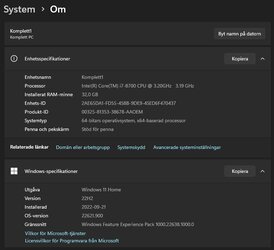
System as enclosedphoto.
Do I have to reinstall Windows or is there any other way to fix the task bar?
System as enclosedphoto.
- Windows Build/Version
- Windows 11 22621.900
Attachments
My Computer
At a glance
Windows 11 HomeAMD Ryzen 7 9800 X3D 4.7 GHz32 GBPower Color Radeon RX 9070 XT 16 GB Reaper
- OS
- Windows 11 Home
- Computer type
- PC/Desktop
- Manufacturer/Model
- Taurus Hardcore Gaming
- CPU
- AMD Ryzen 7 9800 X3D 4.7 GHz
- Motherboard
- Asus TUF Gaming B650-E Wifi
- Memory
- 32 GB
- Graphics Card(s)
- Power Color Radeon RX 9070 XT 16 GB Reaper
- Sound Card
- Realtek
- Monitor(s) Displays
- Dell 4K
- Screen Resolution
- 3840 x 2160
- Hard Drives
- 2 x Kingston NV3 M.2 NVMe Gen 4 2TB
- PSU
- Corsair 850W
- Case
- Taurus Gaming Case RGB
- Cooling
- Cooler Master Hyper 212 Black Edition
- Keyboard
- Logitech MX
- Mouse
- Logitech Master MX
- Internet Speed
- 100/100 Gbit
- Browser
- Chrome
- Antivirus
- MS Defender