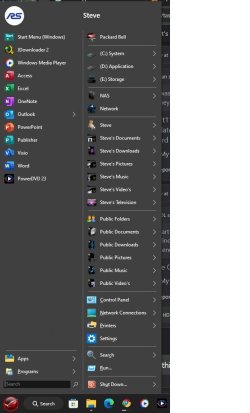
Taskbar not loading all the items it should


I was fairly certain the issue was with an app like Start11. You might want to try the combination of Explorer Patcher and Open Shell Menu instead. They work flawlessly together, and you may find them an acceptable replacement without the problems caused by Start11 - and they are free.
 

My Computer My Computer

At a glance

W11
OS
W11
Computer type
PC/Desktop
Manufacturer/Model
2 HP Desktops, 1 Dell Desktop, 2 Dell XPS Laptops, 1 HP Laptop
Keyboard
Logitech
Mouse
Logitech MX Master 4 & 3
Internet Speed
500 mps
Browser
Firefox
Antivirus
Bitdefender
  • Great Support
Reactions: HDL
I was fairly certain the issue was with an app like Start11. You might want to try the combination of Explorer Patcher and Open Shell Menu instead. They work flawlessly together, and you may find them an acceptable replacement without the problems caused by Start11 - and they are free.
Start11 is denying that it is their program causing the problem. I mentioned when it started and it is in direct correlation with their latest update and Windows most recent update today on the other computer. I am definitely keeping your suggestion in mind. I had never heard of it, nor Open Shell Menu. After Googling both of them, it sounds like what I would want on my computers. Thanks.
 

My Computer My Computer

At a glance

Windows 11 Pro ver. 24H212th Grn. Intel i7-12700K 3600 Mhz 12 Cores64 GB DDR5NVIDIA GeForce GTX 1650
OS
Windows 11 Pro ver. 24H2
Computer type
PC/Desktop
Manufacturer/Model
ACPI x64-based PC
CPU
12th Grn. Intel i7-12700K 3600 Mhz 12 Cores
Motherboard
ASUSTeK - Prime Z690-P WIFI
Memory
64 GB DDR5
Graphics Card(s)
NVIDIA GeForce GTX 1650
Sound Card
NVIDIA High Definition Audio
Monitor(s) Displays
ViewSonic
Screen Resolution
1920 x 1080
Hard Drives
HDS72252 5VLAT80 2 Tb ssd Hard drive
PSU
850 Watt Power Supply
Case
19" high desktop
Cooling
A lot of fans
Keyboard
Logitech
Mouse
Logitech
Internet Speed
500 Mg
Browser
FF
Antivirus
Windows Defendor & Malwarebytes
Other Info
2 Asus Blu-Ray burners - BW - 16D1HT
Start11 is denying that it is their program causing the problem. I mentioned when it started and it is in direct correlation with their latest update and Windows most recent update today on the other computer. I am definitely keeping your suggestion in mind. I had never heard of it, nor Open Shell Menu. After Googling both of them, it sounds like what I would want on my computers. Thanks.
I use Open Shell on all of my systems and Explorer Patcher on my W11 systems. Big fan!!!
 

My Computer My Computer

At a glance

W11
OS
W11
Computer type
PC/Desktop
Manufacturer/Model
2 HP Desktops, 1 Dell Desktop, 2 Dell XPS Laptops, 1 HP Laptop
Keyboard
Logitech
Mouse
Logitech MX Master 4 & 3
Internet Speed
500 mps
Browser
Firefox
Antivirus
Bitdefender
  • Great Support
Reactions: HDL
Start11 is denying that it is their program causing the problem. I mentioned when it started and it is in direct correlation with their latest update and Windows most recent update today on the other computer. I am definitely keeping your suggestion in mind. I had never heard of it, nor Open Shell Menu. After Googling both of them, it sounds like what I would want on my computers. Thanks.
OpenShell rocks, lot's of customisation options..
 

Attachments

  • OpenShell.jpg
    OpenShell.jpg
    44.2 KB · Views: 1

My Computers My Computers

  • At a glance

    Windows 11 Enterprise 25H2 26200 7462Intel XEON E5-2699 v364GB Teamgroup UD4-3600NVIDIA GeForce GTX 1080 Ti
    OS
    Windows 11 Enterprise 25H2 26200 7462
    Computer type
    PC/Desktop
    Manufacturer/Model
    Custom Build
    CPU
    Intel XEON E5-2699 v3
    Motherboard
    ASUS X99-A
    Memory
    64GB Teamgroup UD4-3600
    Graphics Card(s)
    NVIDIA GeForce GTX 1080 Ti
    Sound Card
    Integrated
    Monitor(s) Displays
    ACER X34 Predator
    Screen Resolution
    3440 x 1440
    Hard Drives
    Crucial CT1000P 3P SSD8 1TB
    Crucial CT1000 BX500 SSD 1TB
    PSU
    GameMax Pro
    Case
    Fractal Design
    Cooling
    Corsair H110iGT + 6 140mm Fans
    Keyboard
    Corsair K4
    Mouse
    G-Skill G502
    Internet Speed
    300MBs
    Browser
    Chrome
    Antivirus
    OEM
    Other Info
    ASUS RT-AC87U Router
  • At a glance

    25H2 26200.50748GB
    Operating System
    25H2 26200.5074
    Computer type
    Laptop
    Manufacturer/Model
    ASUS X555LA
    Memory
    8GB
    Browser
    Chrome
    Antivirus
    OEM
  • Great Support
Reactions: HDL
I am assuming Explorer Patcher and Open Shell Menu are downloads. So, I found them both at Major Geeks. The choices for Explorer Patcher there are an executable file or a Major Geeks' download. What do you recommend for that? Not sure about downloading an executable file, that's why I'm asking.

The Open Shell I found says (Formerly Classic Start) I believe that is what I'm supposed to use. Am I correct?
 

My Computer My Computer

At a glance

Windows 11 Pro ver. 24H212th Grn. Intel i7-12700K 3600 Mhz 12 Cores64 GB DDR5NVIDIA GeForce GTX 1650
OS
Windows 11 Pro ver. 24H2
Computer type
PC/Desktop
Manufacturer/Model
ACPI x64-based PC
CPU
12th Grn. Intel i7-12700K 3600 Mhz 12 Cores
Motherboard
ASUSTeK - Prime Z690-P WIFI
Memory
64 GB DDR5
Graphics Card(s)
NVIDIA GeForce GTX 1650
Sound Card
NVIDIA High Definition Audio
Monitor(s) Displays
ViewSonic
Screen Resolution
1920 x 1080
Hard Drives
HDS72252 5VLAT80 2 Tb ssd Hard drive
PSU
850 Watt Power Supply
Case
19" high desktop
Cooling
A lot of fans
Keyboard
Logitech
Mouse
Logitech
Internet Speed
500 Mg
Browser
FF
Antivirus
Windows Defendor & Malwarebytes
Other Info
2 Asus Blu-Ray burners - BW - 16D1HT
Well I did manage to download Open Shell, if I got the correct one, as mentioned in my last post. However, I am not able to download Explorer Patcher from Major Geeks. My security blocks and removes it. Any suggestions on where to get a save download for Explorer Patcher?
 

My Computer My Computer

At a glance

Windows 11 Pro ver. 24H212th Grn. Intel i7-12700K 3600 Mhz 12 Cores64 GB DDR5NVIDIA GeForce GTX 1650
OS
Windows 11 Pro ver. 24H2
Computer type
PC/Desktop
Manufacturer/Model
ACPI x64-based PC
CPU
12th Grn. Intel i7-12700K 3600 Mhz 12 Cores
Motherboard
ASUSTeK - Prime Z690-P WIFI
Memory
64 GB DDR5
Graphics Card(s)
NVIDIA GeForce GTX 1650
Sound Card
NVIDIA High Definition Audio
Monitor(s) Displays
ViewSonic
Screen Resolution
1920 x 1080
Hard Drives
HDS72252 5VLAT80 2 Tb ssd Hard drive
PSU
850 Watt Power Supply
Case
19" high desktop
Cooling
A lot of fans
Keyboard
Logitech
Mouse
Logitech
Internet Speed
500 Mg
Browser
FF
Antivirus
Windows Defendor & Malwarebytes
Other Info
2 Asus Blu-Ray burners - BW - 16D1HT
An executable file is one that runs when you double-click it. Downloading an executable in this case means you install it simply by double clicking the file after it is downloaded. You can get the latest version of explore patcher here: Releases · valinet/ExplorerPatcher

You want to download ep_setup.exe in the ASSETS area under the first paragraph ( version 22621.3296.64.1 )

If your AV continues to block it, just disable the AV while downloading. The file is absolutely, 100% safe to download and install.
 

My Computer My Computer

At a glance

W11
OS
W11
Computer type
PC/Desktop
Manufacturer/Model
2 HP Desktops, 1 Dell Desktop, 2 Dell XPS Laptops, 1 HP Laptop
Keyboard
Logitech
Mouse
Logitech MX Master 4 & 3
Internet Speed
500 mps
Browser
Firefox
Antivirus
Bitdefender
  • Great Support
Reactions: HDL
Thanks for the link. I have to ask because having to restart Windows Explorer to propagate my taskbar seems minor to some of the things I just read about Explorer Patcher. If I may, please tell me what exactly Explorer Patcher does. I ask because I have a batch file that opens Windows Explorer the way it used to in Windows 7 or 10. If it deals with that Explorer, I may not need it. If it deals with the Taskbar then I guess I would need it but am not looking for more problems than I currently have.


Here is just 1 quote from a few that I read and it does concern me, "Yeah, I used ExplorerPatcher earlier, but then I heard that people often got grey screens of death during Windows updates, so I switched to Retrobar. My reasoning tells me that Retrobar is safer because it doesn't "hook" itself into critical system files like ExplorerPatcher, because it is just a separate portable program, which hides the normal taskbar."
 

My Computer My Computer

At a glance

Windows 11 Pro ver. 24H212th Grn. Intel i7-12700K 3600 Mhz 12 Cores64 GB DDR5NVIDIA GeForce GTX 1650
OS
Windows 11 Pro ver. 24H2
Computer type
PC/Desktop
Manufacturer/Model
ACPI x64-based PC
CPU
12th Grn. Intel i7-12700K 3600 Mhz 12 Cores
Motherboard
ASUSTeK - Prime Z690-P WIFI
Memory
64 GB DDR5
Graphics Card(s)
NVIDIA GeForce GTX 1650
Sound Card
NVIDIA High Definition Audio
Monitor(s) Displays
ViewSonic
Screen Resolution
1920 x 1080
Hard Drives
HDS72252 5VLAT80 2 Tb ssd Hard drive
PSU
850 Watt Power Supply
Case
19" high desktop
Cooling
A lot of fans
Keyboard
Logitech
Mouse
Logitech
Internet Speed
500 Mg
Browser
FF
Antivirus
Windows Defendor & Malwarebytes
Other Info
2 Asus Blu-Ray burners - BW - 16D1HT
When someone says "I heard that people....", find something else to read.

I've been using EP since W11 was introduced. Never had any issues. Just trust me and download and install it.
 

My Computer My Computer

At a glance

W11
OS
W11
Computer type
PC/Desktop
Manufacturer/Model
2 HP Desktops, 1 Dell Desktop, 2 Dell XPS Laptops, 1 HP Laptop
Keyboard
Logitech
Mouse
Logitech MX Master 4 & 3
Internet Speed
500 mps
Browser
Firefox
Antivirus
Bitdefender
  • Like
Reactions: HDL

Latest Support Threads

Back
Top Bottom