Taskbar Stuck At The Top. I Don't Want It There


Kapt

New member
Local time
6:59 PM
Posts
7
OS
Windows 11 Home Version

I have a Dell Desktop with a Intel(R) Core(TM) i5-8400 CPU @ 2.80GHz 2.81 GHz Processor, 16.0GB of RAM, 64-bit operating system, with Windows 11 Home, and an NVIDIA GeForce GTX 1060 6GB video card. I run Display Fusion and have three monitors spanned to a 5760x1080 resolution. Every time I start my PC the taskbar is at the top of the screen. I have to restart the PC every time to get the taskbar back to the bottom of the screen. Any ideas why? I looked and looked on Google and all I can find is ways to move it to the top where I don't want it to be
 

My Computer My Computer

At a glance

Windows 11 Home Version

OS
Windows 11 Home Version
I have a Dell Desktop with a Intel(R) Core(TM) i5-8400 CPU @ 2.80GHz 2.81 GHz Processor, 16.0GB of RAM, 64-bit operating system, with Windows 11 Home, and an NVIDIA GeForce GTX 1060 6GB video card. I run Display Fusion and have three monitors spanned to a 5760x1080 resolution. Every time I start my PC the taskbar is at the top of the screen. I have to restart the PC every time to get the taskbar back to the bottom of the screen. Any ideas why? I looked and looked on Google and all I can find is ways to move it to the top where I don't want it to be


My Computers My Computers

  • At a glance

    Win 11 Home ♦♦♦26200.9168 ♦♦♦♦♦♦♦25H2AMD Ryzen 7 3700XG.Skill (F4-3200C14D-16GTZKW)EVGA RTX 2070 (08G-P4-2171-KR)
    OS
    Win 11 Home ♦♦♦26200.9168 ♦♦♦♦♦♦♦25H2
    Computer type
    PC/Desktop
    Manufacturer/Model
    Built by Ghot® [May 2020]
    CPU
    AMD Ryzen 7 3700X
    Motherboard
    Asus Pro WS X570-ACE (BIOS 5302)
    Memory
    G.Skill (F4-3200C14D-16GTZKW)
    Graphics Card(s)
    EVGA RTX 2070 (08G-P4-2171-KR)
    Sound Card
    Realtek ALC1220P / ALC S1220A
    Monitor(s) Displays
    Dell U3011 30"
    Screen Resolution
    2560 x 1600
    Hard Drives
    2x Samsung 860 EVO 500GB,
    WD 4TB Black FZBX - SATA III,
    WD 8TB Black FZBX - SATA III,
    DRW-24B1ST CD/DVD Burner
    PSU
    PC Power & Cooling 750W Quad EPS12V
    Case
    Cooler Master ATCS 840 Tower
    Cooling
    CM Hyper 212 EVO (push/pull)
    Keyboard
    Ducky DK9008 Shine II Blue LED
    Mouse
    Logitech Optical M-100
    Internet Speed
    300/300
    Browser
    Firefox (latest)
    Antivirus
    Bitdefender Total Security
    Other Info
    Speakers: Klipsch Pro Media 2.1
  • At a glance

    Windows XP Pro 32bit w/SP3AMD Athlon 64 X2 5000+ (OC'd @ 3.2Ghz)TWIN2X2048-6400C4DHX (2 x 1GB, DDR2 800)EVGA 256-P2-N758-TR GeForce 8600GT SSC
    Operating System
    Windows XP Pro 32bit w/SP3
    Computer type
    PC/Desktop
    Manufacturer/Model
    Built by Ghot® (not in use)
    CPU
    AMD Athlon 64 X2 5000+ (OC'd @ 3.2Ghz)
    Motherboard
    ASUS M2N32-SLI Deluxe Wireless Edition
    Memory
    TWIN2X2048-6400C4DHX (2 x 1GB, DDR2 800)
    Graphics card(s)
    EVGA 256-P2-N758-TR GeForce 8600GT SSC
    Sound Card
    Onboard
    Monitor(s) Displays
    ViewSonic G90FB Black 19" Professional (CRT)
    Screen Resolution
    up to 2048 x 1536
    Hard Drives
    WD 36GB 10,000rpm Raptor SATA
    Seagate 80GB 7200rpm SATA
    Lite-On LTR-52246S CD/RW
    Lite-On LH-18A1P CD/DVD Burner
    PSU
    PC Power & Cooling Silencer 750 Quad EPS12V
    Case
    Generic Beige case, 80mm fans
    Cooling
    ZALMAN 9500A 92mm CPU Cooler
    Keyboard
    Logitech Classic Keybooard 200
    Mouse
    Logitech Optical M-BT96a
    Internet Speed
    300/300
    Browser
    Firefox 3.x ??
    Antivirus
    Symantec (Norton)
    Other Info
    Still assembled, still runs. Haven't turned it on for 15 years?
How do you change it? All I can find are ways to move it to the top where I don't want it. I tried the steps to see if my computer was set to move it, and it is not. I always get the weird issues lol
 

My Computer My Computer

At a glance

Windows 11 Home Version
OS
Windows 11 Home Version
How do you change it? All I can find are ways to move it to the top where I don't want it. I tried the steps to see if my computer was set to move it, and it is not. I always get the weird issues lol


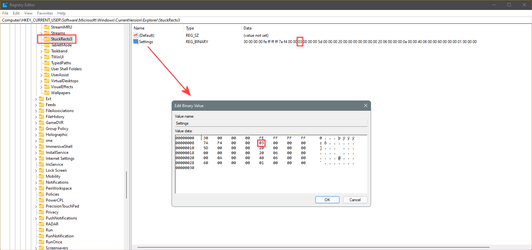
Go to this location in the registry... [in the Taskbar search box type: regedit.exe and hit ENTER]

HKEY_CURRENT_USER\SOFTWARE\Microsoft\Windows\CurrentVersion\Explorer\StuckRects3

Make sure the 13th "set" of digits is 03
If they're not... the double click the word "Settings" and you will be able to change them to 03


If the 13th set of digits is 01 the Taskbar will be at the top... if 03, the Taskbar will be at the bottom.

You will probably have to reboot the computer to apply the changes.


Image1.png
 
Last edited:

My Computers My Computers

  • At a glance

    Win 11 Home ♦♦♦26200.9168 ♦♦♦♦♦♦♦25H2AMD Ryzen 7 3700XG.Skill (F4-3200C14D-16GTZKW)EVGA RTX 2070 (08G-P4-2171-KR)
    OS
    Win 11 Home ♦♦♦26200.9168 ♦♦♦♦♦♦♦25H2
    Computer type
    PC/Desktop
    Manufacturer/Model
    Built by Ghot® [May 2020]
    CPU
    AMD Ryzen 7 3700X
    Motherboard
    Asus Pro WS X570-ACE (BIOS 5302)
    Memory
    G.Skill (F4-3200C14D-16GTZKW)
    Graphics Card(s)
    EVGA RTX 2070 (08G-P4-2171-KR)
    Sound Card
    Realtek ALC1220P / ALC S1220A
    Monitor(s) Displays
    Dell U3011 30"
    Screen Resolution
    2560 x 1600
    Hard Drives
    2x Samsung 860 EVO 500GB,
    WD 4TB Black FZBX - SATA III,
    WD 8TB Black FZBX - SATA III,
    DRW-24B1ST CD/DVD Burner
    PSU
    PC Power & Cooling 750W Quad EPS12V
    Case
    Cooler Master ATCS 840 Tower
    Cooling
    CM Hyper 212 EVO (push/pull)
    Keyboard
    Ducky DK9008 Shine II Blue LED
    Mouse
    Logitech Optical M-100
    Internet Speed
    300/300
    Browser
    Firefox (latest)
    Antivirus
    Bitdefender Total Security
    Other Info
    Speakers: Klipsch Pro Media 2.1
  • At a glance

    Windows XP Pro 32bit w/SP3AMD Athlon 64 X2 5000+ (OC'd @ 3.2Ghz)TWIN2X2048-6400C4DHX (2 x 1GB, DDR2 800)EVGA 256-P2-N758-TR GeForce 8600GT SSC
    Operating System
    Windows XP Pro 32bit w/SP3
    Computer type
    PC/Desktop
    Manufacturer/Model
    Built by Ghot® (not in use)
    CPU
    AMD Athlon 64 X2 5000+ (OC'd @ 3.2Ghz)
    Motherboard
    ASUS M2N32-SLI Deluxe Wireless Edition
    Memory
    TWIN2X2048-6400C4DHX (2 x 1GB, DDR2 800)
    Graphics card(s)
    EVGA 256-P2-N758-TR GeForce 8600GT SSC
    Sound Card
    Onboard
    Monitor(s) Displays
    ViewSonic G90FB Black 19" Professional (CRT)
    Screen Resolution
    up to 2048 x 1536
    Hard Drives
    WD 36GB 10,000rpm Raptor SATA
    Seagate 80GB 7200rpm SATA
    Lite-On LTR-52246S CD/RW
    Lite-On LH-18A1P CD/DVD Burner
    PSU
    PC Power & Cooling Silencer 750 Quad EPS12V
    Case
    Generic Beige case, 80mm fans
    Cooling
    ZALMAN 9500A 92mm CPU Cooler
    Keyboard
    Logitech Classic Keybooard 200
    Mouse
    Logitech Optical M-BT96a
    Internet Speed
    300/300
    Browser
    Firefox 3.x ??
    Antivirus
    Symantec (Norton)
    Other Info
    Still assembled, still runs. Haven't turned it on for 15 years?
I'm guessing you will need to disable/uninstall DisplayFusion for now. Looking at their forums they don't have things working on Windows 11 right now. If the registry changes don't help, it has to be DF.
 

My Computer My Computer

At a glance

Windows 11 Proi7-10700K64GB DDR4NVIDIA Geforce RTX 2070 Super
OS
Windows 11 Pro
Computer type
PC/Desktop
Manufacturer/Model
PowerSpec G435
CPU
i7-10700K
Motherboard
ASRock Z490 Phantom Gaming 4/ax
Memory
64GB DDR4
Graphics Card(s)
NVIDIA Geforce RTX 2070 Super
Monitor(s) Displays
Dell S3220DGF
Screen Resolution
2560x1440
Hard Drives
1TB WDC .M2 Nvme SSD
4TB Samsung 870 SSD
PSU
750 Watt Gold
Case
Lian Li ATX 205
Cooling
Thermal-Take Water Cooled CPU
Keyboard
Corsair K70 RGB
Mouse
Razer Basilisk X
Internet Speed
Gigabit
Browser
Brave
Antivirus
Windows Defender
Go to this location in the registry... [in the Taskbar search box type: regedit.exe and hit ENTER]

HKEY_CURRENT_USER\SOFTWARE\Microsoft\Windows\CurrentVersion\Explorer\StuckRects3

Make sure the 13th "set" of digits is 03
If they're not... the double click the word "Settings" and you will be able to change them to 03


If the 13th set of digits is 01 the Taskbar will be at the top... if 03, the Taskbar will be at the bottom.

You will probably have to reboot the computer to apply the changes.


View attachment 10214
Thank you for that. I looked, and I am set at 03


I'm guessing you will need to disable/uninstall DisplayFusion for now. Looking at their forums they don't have things working on Windows 11 right now. If the registry changes don't help, it has to be DF.
This HAS to be the problem
 

My Computer My Computer

At a glance

Windows 11 Home Version
OS
Windows 11 Home Version
Display Fusion uninstalled. Sadly not the problem
 

My Computer My Computer

At a glance

Windows 11 Home Version
OS
Windows 11 Home Version
Just me, but I`d unhook 2 monitors, put the taskbar at the bottom, reboot a few times and make sure it stays there, like normal.
Then hook up your other 2 monitors. This should not be a problem.
Or restore windows with a Macrium image that we know you made before you installed Display Fusion, or a Restore point that was made before you installed Display Fusion.
As simply uninstalling it did not fix the issue.
 

My Computers My Computers

  • At a glance

    Windows 11 ProIntel Core i9 9900XGSkill Trident Z RGB 32GB 3600 16-16-16-36 (F...EVGA RTX 3080 12GB FTW3 Ultra Gaming (12G-P5-...
    OS
    Windows 11 Pro
    Computer type
    PC/Desktop
    Manufacturer/Model
    Skylake Special X299
    CPU
    Intel Core i9 9900X
    Motherboard
    Asus ROG Strix X299-E Gaming II
    Memory
    GSkill Trident Z RGB 32GB 3600 16-16-16-36 (F4-3600C16Q-32GTZR)
    Graphics Card(s)
    EVGA RTX 3080 12GB FTW3 Ultra Gaming (12G-P5-4877-KL)
    Sound Card
    Supreme FX
    Monitor(s) Displays
    Asus PG279Q
    Screen Resolution
    2560 x 1440 165Hz
    Hard Drives
    Samsung 980 Pro 500GB x2, Seagate Barracuda 4TB x2, Western Digital Black 4TB x1
    PSU
    EVGA 1200 P2, EVGA Black Custom Braided Cables
    Case
    Thermaltake View 31 Tempered Glass Limited Edition
    Cooling
    Corsair H115i, Thermal Grizzly Kryonaut
    Keyboard
    Logitech G910 Orion Spark
    Mouse
    Logitech G700s, Asus ROG GX860 Buzzard
    Internet Speed
    Verizon Fios Quantum Gateway 75/75
    Browser
    Edge
    Antivirus
    Windows Defender, Malwarebytes 4.5.2
    Other Info
    Thermaltake Riing Duo 14 x3, Thermaltake Riing Plus 14 x2, Corsair HS70 Pro Wireless Headset
  • At a glance

    Windows 10 ProIntel Core i7 6700KGSkill Trident Z RGB 16GB 3600 16-16-16-36 (F...EVGA GTX 980 Ti SC x2, EVGA Pro SLI Bridge
    Operating System
    Windows 10 Pro
    Computer type
    PC/Desktop
    Manufacturer/Model
    Skylake Special Z170
    CPU
    Intel Core i7 6700K
    Motherboard
    Asus Sabertooth Z170 Mark 1
    Memory
    GSkill Trident Z RGB 16GB 3600 16-16-16-36 (F4-3600C16D-16GTZR)
    Graphics card(s)
    EVGA GTX 980 Ti SC x2, EVGA Pro SLI Bridge
    Sound Card
    Realtek High Definition
    Monitor(s) Displays
    AOC G2460PG
    Screen Resolution
    1920 x 1080 144Hz
    Hard Drives
    Samsung 870 Evo 500GB, Seagate Barracuda 4TB x2
    PSU
    EVGA 1000 P2, EVGA White Custom Braided Cables
    Case
    Corsair Vengeance C70 Gunmetal Black
    Cooling
    Corsair H100i v2, Corsair ML120 x2, Thermal Grizzly Kryonaut
    Keyboard
    Logitech G910 Orion Spectrum
    Mouse
    Logitech G500s
    Internet Speed
    Verizon Fios Quantum Gateway 75/75
    Browser
    Edge
    Antivirus
    Windows Defender, Malwarebytes 4.5.2
    Other Info
    Corsair SP120 x4, LG Blu-ray Drive, Durabrand HT-395 100 Watt Dolby Digital Amp
I started using Display Fusion like, three computers ago lol. I could try turning off the span surround and see what it does. If that doesn't make a difference then I'll try unplugging two of the monitors and see what happens
 

My Computer My Computer

At a glance

Windows 11 Home Version
OS
Windows 11 Home Version
Yep you gotta just keep troubleshooting til you figure it out.
 

My Computers My Computers

  • At a glance

    Windows 11 ProIntel Core i9 9900XGSkill Trident Z RGB 32GB 3600 16-16-16-36 (F...EVGA RTX 3080 12GB FTW3 Ultra Gaming (12G-P5-...
    OS
    Windows 11 Pro
    Computer type
    PC/Desktop
    Manufacturer/Model
    Skylake Special X299
    CPU
    Intel Core i9 9900X
    Motherboard
    Asus ROG Strix X299-E Gaming II
    Memory
    GSkill Trident Z RGB 32GB 3600 16-16-16-36 (F4-3600C16Q-32GTZR)
    Graphics Card(s)
    EVGA RTX 3080 12GB FTW3 Ultra Gaming (12G-P5-4877-KL)
    Sound Card
    Supreme FX
    Monitor(s) Displays
    Asus PG279Q
    Screen Resolution
    2560 x 1440 165Hz
    Hard Drives
    Samsung 980 Pro 500GB x2, Seagate Barracuda 4TB x2, Western Digital Black 4TB x1
    PSU
    EVGA 1200 P2, EVGA Black Custom Braided Cables
    Case
    Thermaltake View 31 Tempered Glass Limited Edition
    Cooling
    Corsair H115i, Thermal Grizzly Kryonaut
    Keyboard
    Logitech G910 Orion Spark
    Mouse
    Logitech G700s, Asus ROG GX860 Buzzard
    Internet Speed
    Verizon Fios Quantum Gateway 75/75
    Browser
    Edge
    Antivirus
    Windows Defender, Malwarebytes 4.5.2
    Other Info
    Thermaltake Riing Duo 14 x3, Thermaltake Riing Plus 14 x2, Corsair HS70 Pro Wireless Headset
  • At a glance

    Windows 10 ProIntel Core i7 6700KGSkill Trident Z RGB 16GB 3600 16-16-16-36 (F...EVGA GTX 980 Ti SC x2, EVGA Pro SLI Bridge
    Operating System
    Windows 10 Pro
    Computer type
    PC/Desktop
    Manufacturer/Model
    Skylake Special Z170
    CPU
    Intel Core i7 6700K
    Motherboard
    Asus Sabertooth Z170 Mark 1
    Memory
    GSkill Trident Z RGB 16GB 3600 16-16-16-36 (F4-3600C16D-16GTZR)
    Graphics card(s)
    EVGA GTX 980 Ti SC x2, EVGA Pro SLI Bridge
    Sound Card
    Realtek High Definition
    Monitor(s) Displays
    AOC G2460PG
    Screen Resolution
    1920 x 1080 144Hz
    Hard Drives
    Samsung 870 Evo 500GB, Seagate Barracuda 4TB x2
    PSU
    EVGA 1000 P2, EVGA White Custom Braided Cables
    Case
    Corsair Vengeance C70 Gunmetal Black
    Cooling
    Corsair H100i v2, Corsair ML120 x2, Thermal Grizzly Kryonaut
    Keyboard
    Logitech G910 Orion Spectrum
    Mouse
    Logitech G500s
    Internet Speed
    Verizon Fios Quantum Gateway 75/75
    Browser
    Edge
    Antivirus
    Windows Defender, Malwarebytes 4.5.2
    Other Info
    Corsair SP120 x4, LG Blu-ray Drive, Durabrand HT-395 100 Watt Dolby Digital Amp
After removing Display Fusion and my PC turned off for a while it started up correctly this time. Was it a fluke? Time will tell
 

My Computer My Computer

At a glance

Windows 11 Home Version
OS
Windows 11 Home Version
Excellent (y)
 

My Computers My Computers

  • At a glance

    Windows 11 ProIntel Core i9 9900XGSkill Trident Z RGB 32GB 3600 16-16-16-36 (F...EVGA RTX 3080 12GB FTW3 Ultra Gaming (12G-P5-...
    OS
    Windows 11 Pro
    Computer type
    PC/Desktop
    Manufacturer/Model
    Skylake Special X299
    CPU
    Intel Core i9 9900X
    Motherboard
    Asus ROG Strix X299-E Gaming II
    Memory
    GSkill Trident Z RGB 32GB 3600 16-16-16-36 (F4-3600C16Q-32GTZR)
    Graphics Card(s)
    EVGA RTX 3080 12GB FTW3 Ultra Gaming (12G-P5-4877-KL)
    Sound Card
    Supreme FX
    Monitor(s) Displays
    Asus PG279Q
    Screen Resolution
    2560 x 1440 165Hz
    Hard Drives
    Samsung 980 Pro 500GB x2, Seagate Barracuda 4TB x2, Western Digital Black 4TB x1
    PSU
    EVGA 1200 P2, EVGA Black Custom Braided Cables
    Case
    Thermaltake View 31 Tempered Glass Limited Edition
    Cooling
    Corsair H115i, Thermal Grizzly Kryonaut
    Keyboard
    Logitech G910 Orion Spark
    Mouse
    Logitech G700s, Asus ROG GX860 Buzzard
    Internet Speed
    Verizon Fios Quantum Gateway 75/75
    Browser
    Edge
    Antivirus
    Windows Defender, Malwarebytes 4.5.2
    Other Info
    Thermaltake Riing Duo 14 x3, Thermaltake Riing Plus 14 x2, Corsair HS70 Pro Wireless Headset
  • At a glance

    Windows 10 ProIntel Core i7 6700KGSkill Trident Z RGB 16GB 3600 16-16-16-36 (F...EVGA GTX 980 Ti SC x2, EVGA Pro SLI Bridge
    Operating System
    Windows 10 Pro
    Computer type
    PC/Desktop
    Manufacturer/Model
    Skylake Special Z170
    CPU
    Intel Core i7 6700K
    Motherboard
    Asus Sabertooth Z170 Mark 1
    Memory
    GSkill Trident Z RGB 16GB 3600 16-16-16-36 (F4-3600C16D-16GTZR)
    Graphics card(s)
    EVGA GTX 980 Ti SC x2, EVGA Pro SLI Bridge
    Sound Card
    Realtek High Definition
    Monitor(s) Displays
    AOC G2460PG
    Screen Resolution
    1920 x 1080 144Hz
    Hard Drives
    Samsung 870 Evo 500GB, Seagate Barracuda 4TB x2
    PSU
    EVGA 1000 P2, EVGA White Custom Braided Cables
    Case
    Corsair Vengeance C70 Gunmetal Black
    Cooling
    Corsair H100i v2, Corsair ML120 x2, Thermal Grizzly Kryonaut
    Keyboard
    Logitech G910 Orion Spectrum
    Mouse
    Logitech G500s
    Internet Speed
    Verizon Fios Quantum Gateway 75/75
    Browser
    Edge
    Antivirus
    Windows Defender, Malwarebytes 4.5.2
    Other Info
    Corsair SP120 x4, LG Blu-ray Drive, Durabrand HT-395 100 Watt Dolby Digital Amp
It was a fluke.
 

My Computer My Computer

At a glance

Windows 11 Home Version
OS
Windows 11 Home Version

Latest Support Threads

Back
Top Bottom