taskkill


spisi

New member
Local time
5:48 PM
Posts
12
OS
Windows 10
Hey guys! Newbie here. Having trouble with taskkill. I run this code with a batch file, and it's not closing the window.
Code:
ECHO OFF

Taskkill /IM /F ACDSeeQVFree.exe

EXIT 0
 
Windows Build/Version
Windows 10

My Computer

System One

  • OS
    Windows 10
    Computer type
    PC/Desktop
    Manufacturer/Model
    HPZ230
The funny thing is, if I run the same code through the command prompt, it works. But when I use a batch file it doesn't.....
 

My Computer

System One

  • OS
    Windows 10
    Computer type
    PC/Desktop
    Manufacturer/Model
    HPZ230
The funny thing is, if I run the same code through the command prompt, it works. But when I use a batch file it doesn't.....
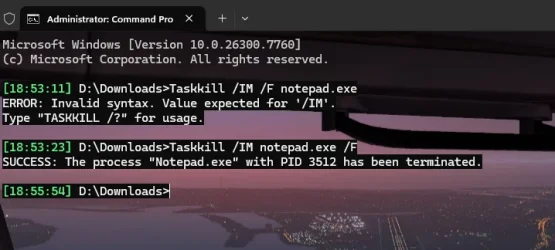
Are you sure?
Move the /F after the .exe please.
The 0 after exit is superfluous.

cmd.webp
 

My Computers

System One System Two

  • OS
    All Branches but Release
    Computer type
    Laptop
    Manufacturer/Model
    Acer Nitro ANV15-51
    CPU
    AMD Ryzen 7 7735HS 3200-4500 Mhz 8 cores x 2
    Motherboard
    Sportage_RBH
    Memory
    32 GB DDR5
    Graphics Card(s)
    Radeon Graphic / NVIDIA GeForce RTX 4060 8 GB GDDR6
    Sound Card
    AMD/Realtek(R) Audio
    Monitor(s) Displays
    Integrated Monitor (15.3"vis)
    Screen Resolution
    FHD 1920X1080 16:9 144Hz
    Hard Drives
    KINGSTON OM8SEP4512Q-AA 1TB
    Western Digital 256GB
    PSU
    19V DC 6.32 A 120 W
    Cooling
    Dual Fans
    Mouse
    MS Bluetooth
    Internet Speed
    Fiber 1GB Cox -us & 1GB Orange-fr
    Browser
    Edge Canary- Firefox Nightly-Chrome Dev-Chrome Dev
    Antivirus
    Windows Defender
  • Operating System
    Windows 11 Beta
    Computer type
    Laptop
    Manufacturer/Model
    Asus X751BP
    CPU
    AMD A9-9420
    Memory
    8 GB of DDR4
    Graphics card(s)
    AMD Radeon R5
    Screen Resolution
    1600x900
    Hard Drives
    Seagate 1 TB
Don't use @ECHO OFF, when debugging any batch file. You would have seen @OAT's error message.

taskkill /f /im process.exe is also valid.
 

My Computer

System One

  • OS
    Windows 7
Tried this, not working either
Code:
taskkill /IM ACDSeeQVFree.exe /F
 

My Computer

System One

  • OS
    Windows 10
    Computer type
    PC/Desktop
    Manufacturer/Model
    HPZ230
How are you running the batch file, if via scheduled task for example, does the user running the task have the correct privilages etc...

When you run the command in command prompt are you having to elevate for it to work i.e. run as administrator?
 

My Computer

System One

  • OS
    Windows 11 Pro / LTSC 2024
Tried this, not working either
Code:
taskkill /IM ACDSeeQVFree.exe /F
"Not working" as in what's the output? Can you share the screenshot/error message?
 

My Computer

System One

  • OS
    Windows 11 Pro
    Computer type
    Laptop
    Manufacturer/Model
    Microsoft Surface Laptop Studio
    Memory
    32GB
    Hard Drives
    1TB
I'm double-clicking on the batch file manually. Post a pic in a bit.
 

My Computer

System One

  • OS
    Windows 10
    Computer type
    PC/Desktop
    Manufacturer/Model
    HPZ230
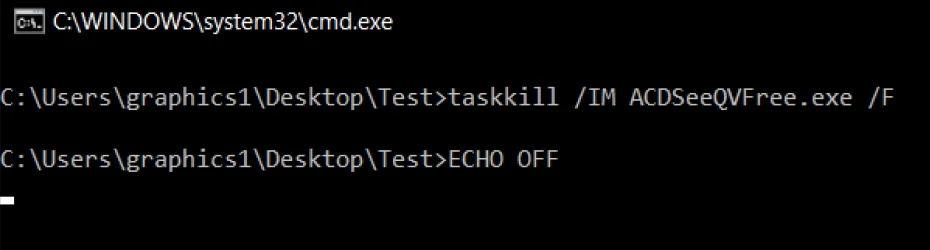
Here it is.
 

Attachments

  • ERROR.webp
    ERROR.webp
    119 KB · Views: 1

My Computer

System One

  • OS
    Windows 10
    Computer type
    PC/Desktop
    Manufacturer/Model
    HPZ230
There's no "error" message. It just doesn't close the window...
 

My Computer

System One

  • OS
    Windows 10
    Computer type
    PC/Desktop
    Manufacturer/Model
    HPZ230
Closing which window? It doesn't kill ACDSee? Or clicking the batch file from Explorer opens a new CMD window, and that window doesn't exit.
 

My Computer

System One

  • OS
    Windows 7
Both windows stay open...when I open cmd.exe and run the code it closes ACDSee, but the cmd window stays open.
 

My Computer

System One

  • OS
    Windows 10
    Computer type
    PC/Desktop
    Manufacturer/Model
    HPZ230
Ok, so taskkill works but it's the Command Prompt window that's not closing, correct?

And you have "Exit" as the last command in your batch file? Because your screenshot does not match your initial code snippet of your batch file (i.e., after taskkill, you have "EXIT 0" but in the screenshot above you have "ECHO OFF").
 

My Computer

System One

  • OS
    Windows 11 Pro
    Computer type
    Laptop
    Manufacturer/Model
    Microsoft Surface Laptop Studio
    Memory
    32GB
    Hard Drives
    1TB
taskkill works ONLY when I manual run it out of command prompt window. When I run the batch file taskkill does not work. In both instances the command prompt window stays open. I had removed the "Exit" during testing. I'll add it back in.
 

My Computer

System One

  • OS
    Windows 10
    Computer type
    PC/Desktop
    Manufacturer/Model
    HPZ230
Added it back, same result...
 

My Computer

System One

  • OS
    Windows 10
    Computer type
    PC/Desktop
    Manufacturer/Model
    HPZ230
Open Notepad and put the code below in it. Save the file as test.bat but don't close notepad.
Now Run the test.bat

Code:
@ECHO OFF
Taskkill /IM notepad.exe /F
EXIT

You can replace the 2nd line with

Code:
Tskill notepad

What happens then?
 

My Computers

System One System Two

  • OS
    All Branches but Release
    Computer type
    Laptop
    Manufacturer/Model
    Acer Nitro ANV15-51
    CPU
    AMD Ryzen 7 7735HS 3200-4500 Mhz 8 cores x 2
    Motherboard
    Sportage_RBH
    Memory
    32 GB DDR5
    Graphics Card(s)
    Radeon Graphic / NVIDIA GeForce RTX 4060 8 GB GDDR6
    Sound Card
    AMD/Realtek(R) Audio
    Monitor(s) Displays
    Integrated Monitor (15.3"vis)
    Screen Resolution
    FHD 1920X1080 16:9 144Hz
    Hard Drives
    KINGSTON OM8SEP4512Q-AA 1TB
    Western Digital 256GB
    PSU
    19V DC 6.32 A 120 W
    Cooling
    Dual Fans
    Mouse
    MS Bluetooth
    Internet Speed
    Fiber 1GB Cox -us & 1GB Orange-fr
    Browser
    Edge Canary- Firefox Nightly-Chrome Dev-Chrome Dev
    Antivirus
    Windows Defender
  • Operating System
    Windows 11 Beta
    Computer type
    Laptop
    Manufacturer/Model
    Asus X751BP
    CPU
    AMD A9-9420
    Memory
    8 GB of DDR4
    Graphics card(s)
    AMD Radeon R5
    Screen Resolution
    1600x900
    Hard Drives
    Seagate 1 TB
ok - when I run as administrator it works. But there's not option to have it always run as administrator.
 

My Computer

System One

  • OS
    Windows 10
    Computer type
    PC/Desktop
    Manufacturer/Model
    HPZ230
ACDSee runs with elevated privileges. Unless you're in a Admin shell, your taskkill doesn't have enough permission to terminate it. To make this work by clicking from File Explorer, you need a way to grant your script Admin rights.
 

My Computer

System One

  • OS
    Windows 7
Create a shortcut for the batch file.

Then right-click on the shortcut and on the Shortcut tab, press the Advanced... button then check the "Run as administrator" box.
 

My Computer

System One

  • OS
    Windows 11 Pro
    Computer type
    Laptop
    Manufacturer/Model
    Microsoft Surface Laptop Studio
    Memory
    32GB
    Hard Drives
    1TB
I did your test...both windows stayed open. It's the "run as administrator" situation.
 

My Computer

System One

  • OS
    Windows 10
    Computer type
    PC/Desktop
    Manufacturer/Model
    HPZ230
Back
Top Bottom