Telegram Blog:
Telegram is 13 years old now — but we can't stop adding new features:
- Welcome Messages: Chat owners can send messages visible only to new members.
- Create custom welcome messages in your group or channel.
- Only new members will see the welcome message.
- Attach media or send multiple messages at once.
- Add rich formatting via the text editor.
- Buttons in Messages: Developers can make any text interactive.
- Put buttons inside text in groups and channels.
- Build automated flows with ephemeral messages.
- Send surveys, host games or create quizzes.
- Inline Documents in Messages: Anyone can place files inside blocks of text.
- Include documents, files and music next to your text.
- Attach inline files in two taps.
- Signed Gifts: Add a comment when sending gifts through the Telegram Marketplace.
Welcome Messages
Groups and channels now support welcome messages to give new members extra info without cluttering the chat for others. When a user joins, only they can see the message.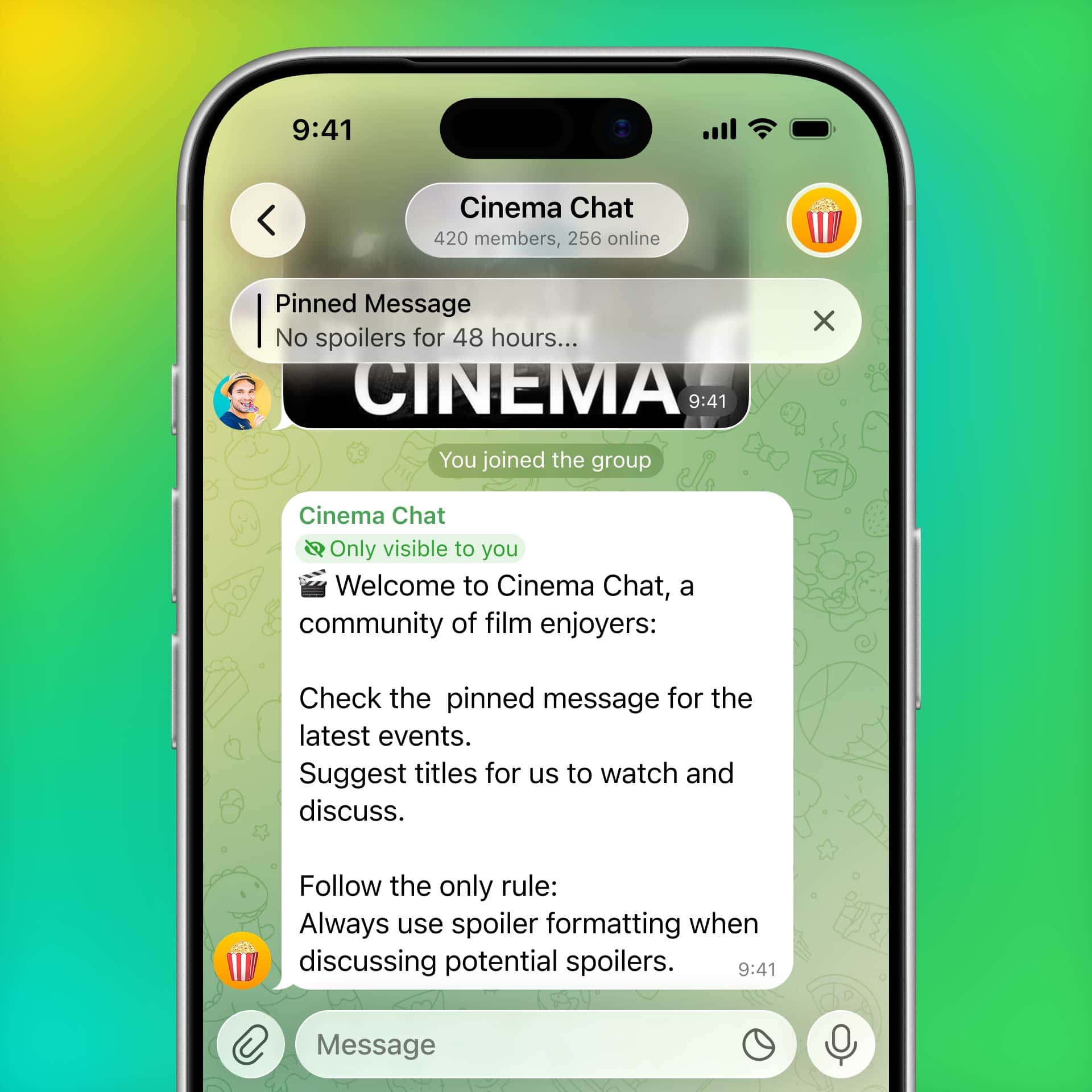
Multiple messages and media can be added to the welcome pack. Rich formatting also works here — including tables, inline media and more arcane ways to scare off new members.
How to Add a Welcome Message?
Easy! No bots or voodoo magic required. To add a welcome message in your group or channel, just open its profile and select Edit > Welcome Message — and send some messages:Buttons inside Messages
11 years ago, Telegram bots made it possible to create any app inside a regular chat. Starting today, you can create apps that fit inside a single message. (Stop us before we cram the Universe into a sticker.)Developers can now put multiple buttons right inside a message. Paired with ephemeral messages, this lets you create flows for anything from surveys, games, and horoscopes to viewing and ordering products.
Such messages can be posted anywhere, including groups or channels where any number of users can interact with them — for example, to play chess in separate simultaneous games.
You can even use them as welcome messages to help members find out Which Kind of Panda They Are — or tap through dark patterns in your group's Terms of Use.
How to Add Automated Flows Inside Messages?
No voodoo magic required here either — but you will need to do some coding. Not that this scares anyone in these vibe-coding days, right?More information for developers is available here.
Inline Documents in Messages
The rich text editor now supports more types of inline media, so you can include documents, files and music anywhere in your text. Because nothing says “I love you” like an Excel spreadsheet after every word.
To open the text editor, tap the ⛶ icon that appears after typing more than 3 lines of text in the input field.
Placeholders for App Updates
Everyone has that one friend who doesn't have automatic updates enabled, so our designers added a stylish placeholder that appears when outdated apps can't render a new feature — and gives you a button for instantly downloading the latest update.
Your quest is to make them update now, so they can enjoy these effects next time we add something cool.
To enable automatic updates on Android, open the Play Store and tap Settings > Network Preferences > Auto-update Apps. On iOS, go to Settings > Apps > App Store and enable 'App Updates'.
Signed Gifts from the Marketplace
You can use Telegram Stars to buy thousands of rare gifts from other users in our safe, easy-to-use gift marketplace. Now you can also add your signature and a comment to the gifts you buy there.
Because nothing says “I love you” like a pre-loved Plush Pepe that actually says "I love you!"
How to Send a Signed Gift?
To send a gift from the Telegram Marketplace, open any user's profile and tap ⋮ / ⋯ > 'Send a Gift', then select the 'Collectible' filter to buy rare upgraded gifts.13 Years of Telegram
Telegram just turned 13! It still can't drive or vote (when somebody's looking), but at least our social media accounts are finally out of the grey zone — or would be if they weren't run by 8-year-olds.In the past year we released 12 major updates containing more than 55 features — here are some of our favorites:
- Rich Text Formatting
- Liquid Glass Design on iOS and a Massive Redesign on Android
- Chat Automation
- 100M+ Sticker & Emoji Search
- Telegram for Smartwatches
- Support for AI Bots
- Mighty Polls
- Member Tags in Groups
- Communities
- Passkeys
- Music on Profiles
It won't speak itself!
August 25, 2026
The Telegram Team
Source:
Welcome Messages, Buttons in Messages and Signed Gifts
Introducing Welcome Messages to greet new members of groups or channels, Buttons in Messages to make any text interactive, Inline Documents in Messages and much more.
 telegram.org