Microsoft Teams Blog:
Install GitHub in Microsoft Teams to build with your team around the shared context from your chats, channels, and meeting chats using your GitHub Copilot license. Your team can contribute ideas, add context, and steer the work all in the same conversation.
GitHub empowers any team to become builders in Microsoft Teams. Customer support teams are using GitHub to turn customer feedback from Teams channels into filed issues. Engineering teams are asking GitHub to investigate, reproduce, and fix bugs without leaving Teams. Business and marketing teams with innovative ideas are asking GitHub to turn their discussions into working prototypes.
During public preview, our team has been hard at work addressing feedback and making product improvements to the GitHub experience in Teams. Here is what’s new.
Review work in the GitHub Canvas
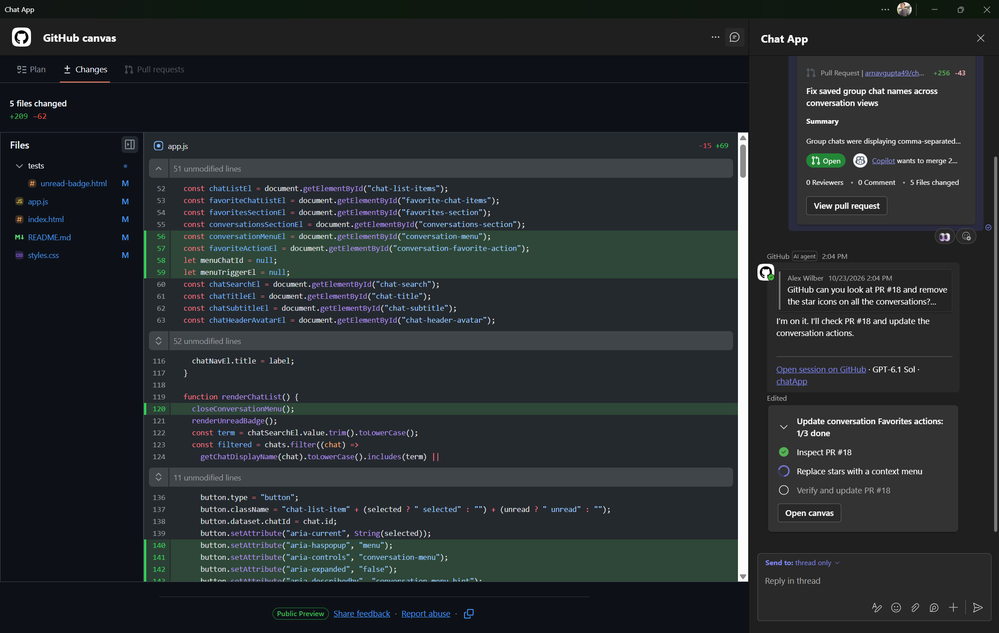
The new GitHub canvas lets you review the plan, file changes, and pull request without leaving Teams. Click “Open Canvas” to follow GitHub Copilot’s progress and see your team’s ideas take shape in code, right beside the conversation.
Go from notification to pull request in one app
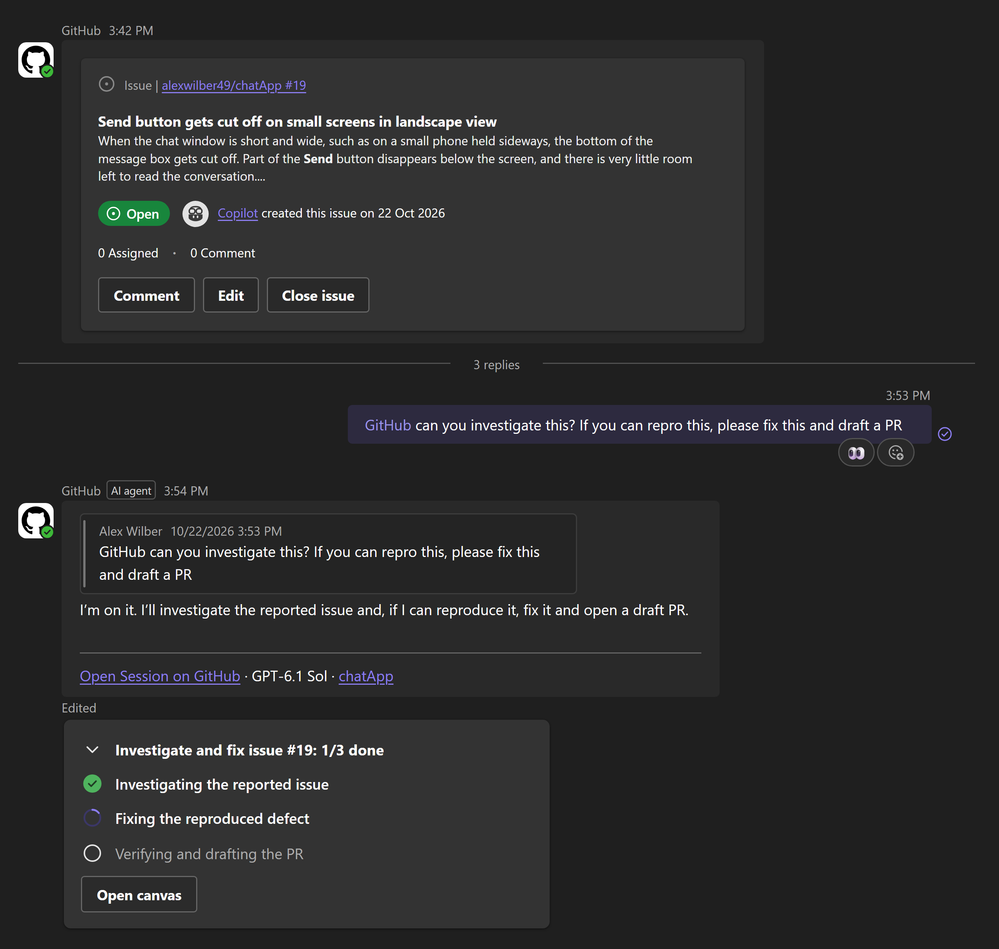
GitHub notifications and GitHub Copilot now live in a single app in Teams called GitHub. Stay on top of issue and pull request updates and act on them right in Teams. When an update needs attention, reply to the notification with "@GitHub". GitHub Copilot can investigate, make the fix, and draft a pull request in the same thread, so your team sees the update and the response together.
Issues and pull requests created from Teams now carry attribution. Reviewers can see who started the work and link back to the Teams conversation where it was discussed.
Work across repositories and tools
Real work rarely lives in one repository. With multi-repo support, GitHub Copilot can work across all the repositories your task needs in the same conversation. In addition, MCP support lets you configure which tools and connected services GitHub can leverage in Teams. Learn more about configuring MCP.Get set up in a guided experience

The new guided web onboarding experience helps you sign in through your default browser using saved passwords or passkeys and grant Teams access to the right organizations and repositories.
You can now use natural language to ask GitHub to use a default repository or switch repositories in your Teams conversations. You can also choose the model GitHub Copilot uses for a task. Pick a faster model for quick fixes or a more capable model for larger changes.
Get started today
Add the GitHub app to Teams today, then click “Get started” from its welcome message to connect your account. Type "@GitHub help" to see what else it can do.Admins should verify the following are enabled for users to get started:
- Microsoft 365 admins: ensure resource-specific consent is enabled so users can let the GitHub app use conversation context.
- TAC admins: ensure the GitHub app is allowed for users in the Teams admin center.
- GitHub enterprise admins: ensure Copilot cloud agent, cloud sandboxes, and CLI billing are enabled for each organization and assign GitHub Copilot licenses to users.
Source:
The GitHub app in Microsoft Teams is now generally available! | Microsoft Community Hub
GitHub empowers any team to become builders in Microsoft Teams. Customer support teams are using GitHub to turn customer feedback from Teams channels into...
 techcommunity.microsoft.com