Thoughts on Windows 11


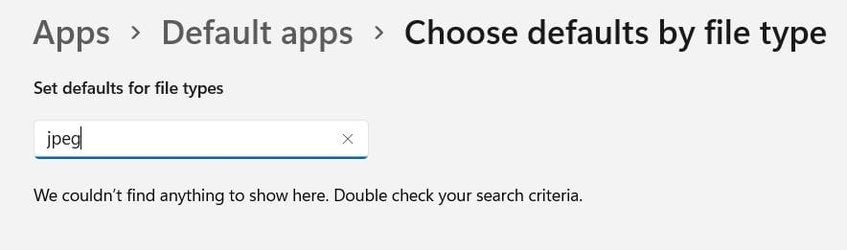
The option "always open" is missing with JPEG files in Windows 11.
Once you have successfully used Open with to open a .jpeg in Irfanview, then Irfanview should now be in the list of available apps in Apps > Default apps, it should appear in the list of 'More apps'.
 

My Computers My Computers

  • At a glance

    Windows 11 HomeAMD Athlon Silver 3050U8GBRadeon Graphics
    OS
    Windows 11 Home
    Computer type
    Laptop
    Manufacturer/Model
    Acer Aspire 3 A315-23-R9VY
    CPU
    AMD Athlon Silver 3050U
    Memory
    8GB
    Graphics Card(s)
    Radeon Graphics
    Monitor(s) Displays
    laptop screen
    Screen Resolution
    1366x768 native resolution, up to 2560x1440 with Radeon Virtual Super Resolution
    Hard Drives
    1TB Samsung EVO 870 SSD (from April 2026: 250GB EVO 850)
    Internet Speed
    150 Mbps
    Browser
    Edge, Firefox
    Antivirus
    Defender
    Other Info
    fully 'Windows 11 ready' laptop. Windows 10 C: partition migrated from my old unsupported 'main machine' then upgraded to 11. A test migration ran Insider builds for 2 months. When 11 was released on 5th October 2021 it was re-imaged back to 10 and was offered the upgrade in Windows Update on 20th October. Windows Update offered the 22H2 Feature Update on 20th September 2022. It got the 23H2 Feature Update on 4th November 2023 through Windows Update, 24H2 on 3rd October 2024 through Windows Update by setting the Target Release Version for 24H2, and 25H2 on 30th September 2025 through Windows Update by setting the Target Release Version for 25H2.

    UPDATE - 11 April 2026: due to mechanical deterioration this PC has been retired from active duty. The OS with all software and files has been migrated to my System Seven in 'Other systems' to carry on as my general purpose 'main machine'.
  • At a glance

    Windows 11 ProIntel® Core™ i5-520M8GB(integrated graphics) Intel HD Graphics
    Operating System
    Windows 11 Pro
    Computer type
    Laptop
    Manufacturer/Model
    Dell Latitude E4310
    CPU
    Intel® Core™ i5-520M
    Motherboard
    0T6M8G
    Memory
    8GB
    Graphics card(s)
    (integrated graphics) Intel HD Graphics
    Screen Resolution
    1366x768
    Hard Drives
    500GB Crucial MX500 SSD
    Browser
    Firefox, Edge
    Antivirus
    Defender
    Other Info
    unsupported machine: Legacy bios, MBR, TPM 1.2, upgraded from W10 to W11 using W10/W11 hybrid install media workaround.

    In-place upgrade to 22H2 using ISO and a workaround.
    Feature Update to 23H2 by manually installing the Enablement Package.
    In-place upgrade to 24H2 using hybrid 23H2/24H2 install media.
    Upgraded to 25H2 by Enablement Package.

    Also running Insider Dev, and Canary builds and Windows 10 as native boot .vhdx.
  • My SYSTEM THREE is a Dell Latitude 5410, i7-10610U, 32GB RAM, 512GB NVMe ssd, supported device running Windows 11 Pro.

    My SYSTEM FOUR is a 2-in-1 convertible Lenovo Yoga 11e 20DA, Celeron N2930, 8GB RAM, 256GB ssd. Unsupported device: currently running Win10 Pro, plus Win11 Pro RTM and Insider Dev, Beta, and RP 24H2 as native boot vhdx.

    My SYSTEM FIVE is a Dell Latitude 3190 2-in-1, Pentium Silver N5030, 8GB RAM, 1TB NVMe ssd, supported device running Windows 11 Pro, plus Insider Beta, Dev, and Canary builds (and a few others) as a native boot .vhdx.

    My SYSTEM SIX is a Dell Latitude 5550, Core Ultra 7 165H, 64GB RAM, 1TB NVMe SSD, supported device, Windows 11 Pro 24H2, Hyper-V host machine. Updated to 25H2 on 30th September 2025.

    My SYSTEM SEVEN is a Lenovo Thinkpad T580, Intel Core i7-8650U, 16GB RAM, 512GB NVMe SSD + 2nd 512GB NVMe SSD, a supported device for Windows 11. This is my current general purpose 'main machine'. The installed Windows 11 Home from my System One has been migrated to this machine.
You've not tried hard enough.....
View attachment 16115

Right-click on a .jpeg, choose Open with > Choose another app. Scroll down and click More apps, scroll down and click Look for another app on this PC. Browse and find your Irfanview.exe.
jpg and jpeg are missing in windows 11
 

Attachments

  • Screen Shot 12-13-21 at 10.05 AM.jpg
    Screen Shot 12-13-21 at 10.05 AM.jpg
    14.9 KB · Views: 3

My Computer My Computer

At a glance

windows 11 ,Ubuntu Cinnamon - for tinkering onlyIntel i51140016 GB0
OS
windows 11 ,Ubuntu Cinnamon - for tinkering only
Computer type
PC/Desktop
Manufacturer/Model
No Name - Assembled by a Compute shop in a Strip Mall.
CPU
Intel i511400
Motherboard
ASUS PRIME B560-PLUS motherboard
Memory
16 GB
Graphics Card(s)
0
Sound Card
0
Monitor(s) Displays
25 in BenQ
Screen Resolution
1920 x 1080
Hard Drives
9 SSDs 4 Nvme, 2 in M.2 slot and 2 in PCIE with adapter + 5 Sata. DVD drive
PSU
600w
Case
Antec- VSK4000E-U3 Mid Tower
Internet Speed
Bell pure fibre optic. 3 GB package. 6E Wireless adapter 750/500
Browser
Firefox, Microsoft Edge
Antivirus
Defender
Hi,
Search is broken looks like
Look at all and scroll down the list.
 

My Computer My Computer

At a glance

Win-7-10-11Pro's10900k & 9940x & 5930kTrident-Z Royal 4000c16 2x16gb & Trident-Z 36...Titan Xp & 1080ti FTW3 & evga 980ti gaming
OS
Win-7-10-11Pro's
Computer type
PC/Desktop
Manufacturer/Model
Acer 17" Nitro 7840sn/ 2x16gb 5600c40/ 4060/ stock 1tb-os/ 4tb sn850x
CPU
10900k & 9940x & 5930k
Motherboard
z490-Apex & x299-Apex & x99-Sabertooth
Memory
Trident-Z Royal 4000c16 2x16gb & Trident-Z 3600c16 4x8gb & 3200c14 4x8gb
Graphics Card(s)
Titan Xp & 1080ti FTW3 & evga 980ti gaming
Sound Card
Onboard Realtek x3
Monitor(s) Displays
1-AOC G2460PG 24"G-Sync 144Hz/ 2nd 1-ASUS VG248QE 24"/ 3rd LG 43" series
Screen Resolution
1920-1080 not sure what the t.v is besides 43" class scales from 1920-1080 perfectly
Hard Drives
2-WD-sn850x 4tb/ 970evo+500gb/ 980 pro 2tb.
PSU
1000p2 & 1200p2 & 850p2
Case
D450 x2 & 1 Test bench in cherry Entertainment center
Cooling
Custom water loops x3 with 2x mora 360mm rads only 980ti gaming air cooled
Keyboard
G710+x3
Mouse
Redragon x3
Internet Speed
xfinity gigabyte
Browser
Firefox
Antivirus
mbam pro
I really don't fine much difference than Win10 except I had to tweak the explorer to open all options and a few other things. It do run smooth no doubt, but so did Win10. One bug I don't like is that sometimes when I open Firefox it defaults to the main monitor. I can open and close Firefox 90% of the time and it will stay on the 2nd monitor. But occasionally it will open on the main monitor. Weird but not a big deal. For now if I want to test something between OS's I just sit at wife's Windows 10 :)

Cheers
 

My Computer My Computer

At a glance

Windows 11 ProIntel Core i7-11700K Desktop Processor 8 CoresCorsair Vengeance LPX 32GB (2 x 16GB) DDR4 DR...ASUS GTX ROG STRIX 1080 8GB
OS
Windows 11 Pro
Computer type
PC/Desktop
Manufacturer/Model
ASUS
CPU
Intel Core i7-11700K Desktop Processor 8 Cores
Motherboard
ASUS ROG Strix Z590-A Gaming WiFi LGA 1200
Memory
Corsair Vengeance LPX 32GB (2 x 16GB) DDR4 DRAM 3600MHz
Graphics Card(s)
ASUS GTX ROG STRIX 1080 8GB
Sound Card
Sound Blaster Z SE
Monitor(s) Displays
ASUS VG34VQL1B plus a Samsung 60" Smartv
Screen Resolution
3440x1440, 165Hz
Hard Drives
Samsung 980 Series - (OS)1TB Pro Gen4 NVMe M.2, 1TB Gen3. x4 NVMe 1.4 - M.2, WD 1TB, WD 500GB, WD 350GB
PSU
Silverstone Olympia OP1000W PSW
Case
Phanteks Enthoo Pro
Cooling
Noctua NH-D15 SSO2 D-Type Premium CPU Cooler, NF-A15 x 2 PWM Fans
Keyboard
Corsair K70 RGB
Mouse
Logitech 310 wireless
Internet Speed
1 GB
Browser
Firefox
Antivirus
ESET Internet Security
Other Info
Testing Windows 10 Pro on 350GB drive
jpg and jpeg are missing in windows 11
Once you have right-clicked on them and set a default (anything will do) using Open with, then they will appear in the defaults list.
 

My Computers My Computers

  • At a glance

    Windows 11 HomeAMD Athlon Silver 3050U8GBRadeon Graphics
    OS
    Windows 11 Home
    Computer type
    Laptop
    Manufacturer/Model
    Acer Aspire 3 A315-23-R9VY
    CPU
    AMD Athlon Silver 3050U
    Memory
    8GB
    Graphics Card(s)
    Radeon Graphics
    Monitor(s) Displays
    laptop screen
    Screen Resolution
    1366x768 native resolution, up to 2560x1440 with Radeon Virtual Super Resolution
    Hard Drives
    1TB Samsung EVO 870 SSD (from April 2026: 250GB EVO 850)
    Internet Speed
    150 Mbps
    Browser
    Edge, Firefox
    Antivirus
    Defender
    Other Info
    fully 'Windows 11 ready' laptop. Windows 10 C: partition migrated from my old unsupported 'main machine' then upgraded to 11. A test migration ran Insider builds for 2 months. When 11 was released on 5th October 2021 it was re-imaged back to 10 and was offered the upgrade in Windows Update on 20th October. Windows Update offered the 22H2 Feature Update on 20th September 2022. It got the 23H2 Feature Update on 4th November 2023 through Windows Update, 24H2 on 3rd October 2024 through Windows Update by setting the Target Release Version for 24H2, and 25H2 on 30th September 2025 through Windows Update by setting the Target Release Version for 25H2.

    UPDATE - 11 April 2026: due to mechanical deterioration this PC has been retired from active duty. The OS with all software and files has been migrated to my System Seven in 'Other systems' to carry on as my general purpose 'main machine'.
  • At a glance

    Windows 11 ProIntel® Core™ i5-520M8GB(integrated graphics) Intel HD Graphics
    Operating System
    Windows 11 Pro
    Computer type
    Laptop
    Manufacturer/Model
    Dell Latitude E4310
    CPU
    Intel® Core™ i5-520M
    Motherboard
    0T6M8G
    Memory
    8GB
    Graphics card(s)
    (integrated graphics) Intel HD Graphics
    Screen Resolution
    1366x768
    Hard Drives
    500GB Crucial MX500 SSD
    Browser
    Firefox, Edge
    Antivirus
    Defender
    Other Info
    unsupported machine: Legacy bios, MBR, TPM 1.2, upgraded from W10 to W11 using W10/W11 hybrid install media workaround.

    In-place upgrade to 22H2 using ISO and a workaround.
    Feature Update to 23H2 by manually installing the Enablement Package.
    In-place upgrade to 24H2 using hybrid 23H2/24H2 install media.
    Upgraded to 25H2 by Enablement Package.

    Also running Insider Dev, and Canary builds and Windows 10 as native boot .vhdx.
  • My SYSTEM THREE is a Dell Latitude 5410, i7-10610U, 32GB RAM, 512GB NVMe ssd, supported device running Windows 11 Pro.

    My SYSTEM FOUR is a 2-in-1 convertible Lenovo Yoga 11e 20DA, Celeron N2930, 8GB RAM, 256GB ssd. Unsupported device: currently running Win10 Pro, plus Win11 Pro RTM and Insider Dev, Beta, and RP 24H2 as native boot vhdx.

    My SYSTEM FIVE is a Dell Latitude 3190 2-in-1, Pentium Silver N5030, 8GB RAM, 1TB NVMe ssd, supported device running Windows 11 Pro, plus Insider Beta, Dev, and Canary builds (and a few others) as a native boot .vhdx.

    My SYSTEM SIX is a Dell Latitude 5550, Core Ultra 7 165H, 64GB RAM, 1TB NVMe SSD, supported device, Windows 11 Pro 24H2, Hyper-V host machine. Updated to 25H2 on 30th September 2025.

    My SYSTEM SEVEN is a Lenovo Thinkpad T580, Intel Core i7-8650U, 16GB RAM, 512GB NVMe SSD + 2nd 512GB NVMe SSD, a supported device for Windows 11. This is my current general purpose 'main machine'. The installed Windows 11 Home from my System One has been migrated to this machine.
I am staying with Win 11 - I like it even with addons and hacks unless there are so many of them and MS decide to scrap it
and go back to Win+abit
 

My Computer My Computer

At a glance

Windows 11 25309Ryzen 7 5800X16 GbMSI GTX 3060
OS
Windows 11 25309
Computer type
PC/Desktop
Manufacturer/Model
Home built
CPU
Ryzen 7 5800X
Motherboard
Asus ROG Strix B450-F
Memory
16 Gb
Graphics Card(s)
MSI GTX 3060
Sound Card
onboard
Monitor(s) Displays
1 x 27" Philips & 2 x 24" LG
Screen Resolution
1920 x 1080
Hard Drives
970 EVO 250 Gb NVMe
950 EVO 250 M.2
4 TB internal
4 Tb internal
2 TB external
2 TB External
500Mb External
PSU
Corsair RM750W
Case
Modified Corsair
Cooling
Standard boxed fan
Keyboard
Logitech K800
Mouse
Logitech MX Vertical
Internet Speed
390 Gb
Browser
Firefox, Brave
Antivirus
Win Defender
This is a bit extreme:
HWMonitor.jpg
 

My Computers My Computers

  • At a glance

    Windows 10Intel i840016GBNVIDIA GeForce GT710
    OS
    Windows 10
    Computer type
    PC/Desktop
    Manufacturer/Model
    Self built
    CPU
    Intel i8400
    Motherboard
    ASUS PRIME Z370-P
    Memory
    16GB
    Graphics Card(s)
    NVIDIA GeForce GT710
    Sound Card
    ASUS Xonar D2X
    Monitor(s) Displays
    Dell SE2417HGXF Full HD Gaming Monitor, 24"
    Screen Resolution
    1920 x 1080
    Hard Drives
    Samsung V-NAND SSD 860EVO
    Other spinning HDDs
    PSU
    Xilence XP420
    Cooling
    PSU fan and stock CPU fan
    Mouse
    Microsoft
    Browser
    Firefox
    Antivirus
    Avira free
  • At a glance

    Windows 11 on VMware (Release, Beta and Dev)
    Operating System
    Windows 11 on VMware (Release, Beta and Dev)
    Computer type
    PC/Desktop

My Computer My Computer

At a glance

Windows 11 Pro and Windows 11 BetaRyzen 9 3900X 4.35GHz OC32GB Corsair 2400 2800 OCMSI 2070
OS
Windows 11 Pro and Windows 11 Beta
Computer type
PC/Desktop
Manufacturer/Model
Self made
CPU
Ryzen 9 3900X 4.35GHz OC
Motherboard
MSI MPG X570S Edge MAX
Memory
32GB Corsair 2400 2800 OC
Graphics Card(s)
MSI 2070
Sound Card
On MB
Monitor(s) Displays
Samsung 32 inch curved 4k
Screen Resolution
3840 X 2160P
Hard Drives
M.2 times 3, 1 SSD 3, HD
PSU
Corsair 750 semi mod
Case
Phanteks
Cooling
NZXI 280MM
Keyboard
Mech
Mouse
Not sure
Internet Speed
1 GB/S (Comcast)
Browser
Firefox, Edge
Antivirus
Malewarebytes/Windows defender
Other Info
Second self made PC - 82 years young and still going (first Windows for me was 3.1)
Unless early next year's major update to W11 comes though with our collective requests, I will continue to use W10 as my primary OS. I will be dual booting in February 2022 so I can keep an eye on the proposed major update. So far, I have used several 3rd party apps with W11 and no joy. Still cannot achieve the useful customizable context menus and Taskbar Context Menu.

Could very well get swept under the rug and replaced with W12 just like what happened with W8/8.1.
 

My Computer My Computer

At a glance

W11 HomeIntel Core i9-13900KFDDR5 32GB (2x16GB) DDR5 4600RTX 4080 12GB
OS
W11 Home
Computer type
PC/Desktop
Manufacturer/Model
Build Date: March 2022
CPU
Intel Core i9-13900KF
Motherboard
ASUS Prime 690-P
Memory
DDR5 32GB (2x16GB) DDR5 4600
Graphics Card(s)
RTX 4080 12GB
Screen Resolution
1920 x 1080 (scaled 125%) (144Mhz Refresh Rate)
PSU
1000 Watt
Cooling
AIO
Internet Speed
1GB
Browser
Chrome and Edge
Antivirus
Malwarebytes Premium
Hello guys,
Yesterday i had to reinstall windows and installed windows 10 game edition 2020 on 3 disk ssd m2 because in pcgames online it launches in windows 11 GetCACaps: Not Found and the computer resets itself. Does anyone know about this mistake
 
Last edited:

My Computer My Computer

At a glance

Win11 PRORyzen Threadripper 1920xHyperx 32GB 3600MhzAsus GeForce TURBO RTX 2080Ti 11GB
OS
Win11 PRO
Computer type
PC/Desktop
Manufacturer/Model
AsRock
CPU
Ryzen Threadripper 1920x
Motherboard
AsRock Fatal1ty
Memory
Hyperx 32GB 3600Mhz
Graphics Card(s)
Asus GeForce TURBO RTX 2080Ti 11GB
Sound Card
matheboard and Logitech G933 Gaming Headset
Monitor(s) Displays
ASUS 28"
Screen Resolution
3840 x 2160
Hard Drives
ssd m2 970, 960, ssd 840 EVO 1TB, 4 x 4TB HDD
PSU
corsair 1200W
Case
big tower
Cooling
corsair H150IPro
Keyboard
logitech k800
Mouse
logitech G603
Internet Speed
download 200 Mbps upload 100 Mbps
Browser
Maxthon
Antivirus
avira
Hello guys,
Yesterday i had to reinstall windows and installed windows 10 game edition 2020 on 3 disk ssd m2 because in pcigrama online it launches in windows 11 GetCACaps: Not Found and the computer resets itself. Does anyone know about this mistake
I would start a new thread for this.. it's the best way to get an answer.
 

My Computer My Computer

At a glance

Windows 11 Home(RP) - 25H2 -26200.8728AMD Ryzen 5 5600GG.SKILL Ripjaws V Series 64GB 4x16Nvidia geforce gtx titan x
OS
Windows 11 Home(RP) - 25H2 -26200.8728
Computer type
PC/Desktop
Manufacturer/Model
Banana Junior 5600-G Series
CPU
AMD Ryzen 5 5600G
Motherboard
Asus ROG Strix B550-F
Memory
G.SKILL Ripjaws V Series 64GB 4x16
Graphics Card(s)
Nvidia geforce gtx titan x
Monitor(s) Displays
28" ASUS VP28U 4k
Screen Resolution
4K
Hard Drives
Primary SAMSUNG 970 EVO Plus
PSU
EVGA BQ 700w 80+ Bronze
Case
Zalman i3 NEO
Cooling
ARCTIC Freezer 7 X
Keyboard
Corsair
Mouse
Amazon Generic with Cord
Internet Speed
Download: 295.11 mbps Upload: 65.35 mbps T-Mobile Internet
Browser
Firefox and Edge
Antivirus
MS - Defender
Other Info
Speakers: Klipsch ProMedia 2.1
I totally agree with you BunnyJ
 

My Computer My Computer

At a glance

Win11 PRORyzen Threadripper 1920xHyperx 32GB 3600MhzAsus GeForce TURBO RTX 2080Ti 11GB
OS
Win11 PRO
Computer type
PC/Desktop
Manufacturer/Model
AsRock
CPU
Ryzen Threadripper 1920x
Motherboard
AsRock Fatal1ty
Memory
Hyperx 32GB 3600Mhz
Graphics Card(s)
Asus GeForce TURBO RTX 2080Ti 11GB
Sound Card
matheboard and Logitech G933 Gaming Headset
Monitor(s) Displays
ASUS 28"
Screen Resolution
3840 x 2160
Hard Drives
ssd m2 970, 960, ssd 840 EVO 1TB, 4 x 4TB HDD
PSU
corsair 1200W
Case
big tower
Cooling
corsair H150IPro
Keyboard
logitech k800
Mouse
logitech G603
Internet Speed
download 200 Mbps upload 100 Mbps
Browser
Maxthon
Antivirus
avira
I consider myself a GNU/Linux IT Pro, but for the last 6 months+ I've been learning Windows and some of its tasteless tricks, because I'm locked in Isolated User Mode (IUM) or some security container that would require me doing a jailbreak to be able to boot anything else.
 

My Computer My Computer

At a glance

Windows 11 v22H2 (22621.1992)Intel® Core™ i7-12700H Processor2 x 16GB DDR5 4800 MHz SK Hynix SODIMMsIntel® Iris Xe Graphics (Alder Lake-P 682 GT2...
OS
Windows 11 v22H2 (22621.1992)
Computer type
Laptop
Manufacturer/Model
Dell XPS 15 9520
CPU
Intel® Core™ i7-12700H Processor
Motherboard
Dell 0MWGD4 with Intel® Alder Lake-P PCH
Memory
2 x 16GB DDR5 4800 MHz SK Hynix SODIMMs
Graphics Card(s)
Intel® Iris Xe Graphics (Alder Lake-P 682 GT2) & NVIDIA GeForce RTX 3050 (GA107M)
Sound Card
Realtek ALC289 & Intel® Alder Lake-P PCH - cAVS (Audio, Voice, Speech)
Monitor(s) Displays
LG Philips (Model: LGD06B3; Monitor Name: 156WU1, Dell P/N: 4DWVJ)
Screen Resolution
1920x1200
Hard Drives
Micron 3400 NVMe 2048GB Pyrite-based SED
Browser
Microsoft Edge but really Internet Explorer behind the sceenes
Antivirus
Windows Offender
Other Info
Intel® Killer Wi-Fi 6E AX211 160MHz & Intel® Wireless Bluetooth, both embedded on the motherboard

Latest Support Threads

Back
Top Bottom