Tiny 11 Experiences?


Xplorer4x4

Well-known member
Local time
6:57 AM
Posts
9
OS
Windows 11 Pro Insider Preview Dev
Since this is just a Windows mod, I hope it's allowed to discuss this here. I have tried Tiny 11 on Win 11 LTSC build and I found the performance to be sluggish. I know there was a time you could run LTSC without a work or school account, but I guess that has changed in the past year or so. Does anyone have any tips or suggestions on running the lightest version of Win 11 possible?
 

My Computer

System One

  • OS
    Windows 11 Pro Insider Preview Dev
    Computer type
    PC/Desktop
    CPU
    AMD Ryzen 5 2600x
    Motherboard
    MSI MPG B550 GAMING EDGE WIFI
    Memory
    Corsair DDR4-2132
    Graphics Card(s)
    AMD B550
    Monitor(s) Displays
    Spectere C24
Have you tried building your own Tiny 11 using Windows 11?
 

My Computer

System One

  • OS
    Windows 11
    Computer type
    PC/Desktop
    Manufacturer/Model
    HP Pavilion
    CPU
    AMD Ryzen 7 5700G
    Motherboard
    Erica6
    Memory
    Micron Technology DDR4-3200 16GB
    Graphics Card(s)
    NVIDIA GeForce RTX 3060
    Sound Card
    Realtek ALC671
    Monitor(s) Displays
    Samsung SyncMaster U28E590
    Screen Resolution
    3840 x 2160
    Hard Drives
    SAMSUNG MZVLQ1T0HALB-000H1
Have you tried building your own Tiny 11 using Windows 11?
I have a Win 11 iso that's been run through Tiny 11 but I haven't tested it yet.

If I could just use a personal account with the LTSC branch I might satisfied. I'll probably give the Win 11 Tiny 11 iso build a shot tomorrow.
 

My Computer

System One

  • OS
    Windows 11 Pro Insider Preview Dev
    Computer type
    PC/Desktop
    CPU
    AMD Ryzen 5 2600x
    Motherboard
    MSI MPG B550 GAMING EDGE WIFI
    Memory
    Corsair DDR4-2132
    Graphics Card(s)
    AMD B550
    Monitor(s) Displays
    Spectere C24
You can use Rufus to create bootable local account Windows 11 USB.
 

My Computer

System One

  • OS
    Windows 11
    Computer type
    PC/Desktop
    Manufacturer/Model
    HP Pavilion
    CPU
    AMD Ryzen 7 5700G
    Motherboard
    Erica6
    Memory
    Micron Technology DDR4-3200 16GB
    Graphics Card(s)
    NVIDIA GeForce RTX 3060
    Sound Card
    Realtek ALC671
    Monitor(s) Displays
    Samsung SyncMaster U28E590
    Screen Resolution
    3840 x 2160
    Hard Drives
    SAMSUNG MZVLQ1T0HALB-000H1
You can use Rufus to create bootable local account Windows 11 USB.
Ewww who issues Rufus anymore. Ventoy for the win. I have my 2x Tiny 11 isos plus a regular Win 11 iso on there. I have a couple Linux Distros, Hieren's Boot CD, gparted, and more all ok a single flash drive, and yes it even boots Windows just fine.

Now if you're telling me Rufus should magically solve the problem of using a local account on a full blown untouched version of Win 11 LTSC, I'm in. Otherwise Ventoy is far superior IMO and maybe local account was the wrong terminology. What I meant is Tiny 11 LTSC allows you to use a personal email to get the ball rolling. Official LTSC is limited to work and school accounts only.
 

My Computer

System One

  • OS
    Windows 11 Pro Insider Preview Dev
    Computer type
    PC/Desktop
    CPU
    AMD Ryzen 5 2600x
    Motherboard
    MSI MPG B550 GAMING EDGE WIFI
    Memory
    Corsair DDR4-2132
    Graphics Card(s)
    AMD B550
    Monitor(s) Displays
    Spectere C24
Since this is just a Windows mod, I hope it's allowed to discuss this here. I have tried Tiny 11 on Win 11 LTSC build and I found the performance to be sluggish. I know there was a time you could run LTSC without a work or school account, but I guess that has changed in the past year or so. Does anyone have any tips or suggestions on running the lightest version of Win 11 possible?
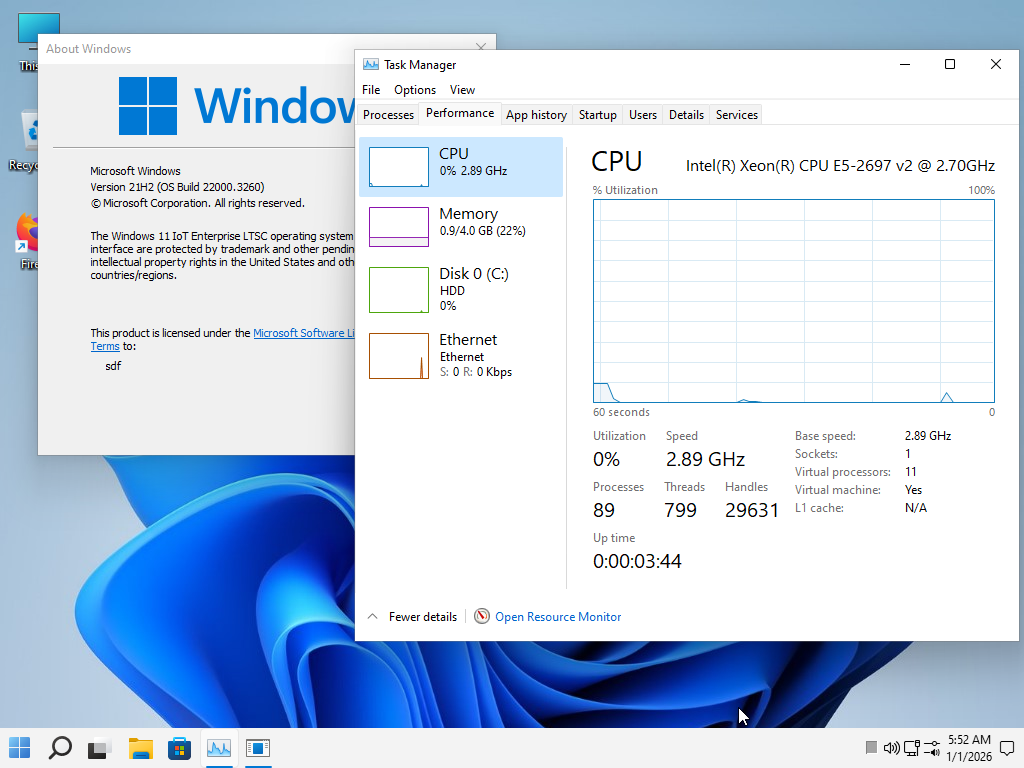
test my custon ISO on my signature

screen
fcajCX.png

The version I use daily on my PC to this day runs very well; my PC stays on for weeks without restarting, maintaining good speed.
If you try it, let me know how it went!
 

My Computer

System One

  • OS
    Windows 11 Iot Enterprise 21h2 22000.3260
    Computer type
    PC/Desktop
    Manufacturer/Model
    Asus
    CPU
    xeon E5-2697v2
    Motherboard
    rampage iv extreme
    Memory
    32gb 8x4gb ddr3 1333 mhz
    Graphics Card(s)
    gtx 570 poit of view
    Sound Card
    realtek HD (ALC898)
    Monitor(s) Displays
    samsung b2030
    Screen Resolution
    1600x900
    Hard Drives
    2tb hd 5400 rpm
    3tb hd 5400 rpm
    1tb nvme pcie 3.0
    PSU
    hx850w
    Keyboard
    mtek
    Internet Speed
    500/250 gpon
    Browser
    r3dfox 146.0
    Antivirus
    none
@Xplorer4x4

Rufus and Ventoy are 2 completely different tools with completely different ideologies. And not to forget iVentoy that leverage PXE which is even more amazing.

Use the right tool for the job when it comes to forcing local user acconts. Ofc you can do this manually too, while Rufus lets you do this in one or two clicks. The choice is yours.
 

My Computers

System One System Two

  • OS
    Win 11 Pro 25H2 26200.8457 / Linux Mint 22.3
    Computer type
    Laptop
    Manufacturer/Model
    Lenovo A485
    CPU
    Ryzen 7 2700U Pro
    Motherboard
    Lenovo (WiFi/BT module upgraded to Intel Wireless-AC-9260)
    Memory
    32GB
    Graphics Card(s)
    iGPU Vega 10
    Sound Card
    Realtek
    Monitor(s) Displays
    14" FHD (built-in) + 14" Lenovo Thinkvision M14t (touch+pen) + 32" Asus PB328
    Screen Resolution
    FHD + FHD + 1440p
    Hard Drives
    Intel 660p m.2 nVME PCIe3.0 x2 512GB
    PSU
    125W(Dock)/65W(Travel Adapter)
    Keyboard
    Thinkpad / Logitech MX Keys
    Mouse
    Logitech MX Master 2S
    Internet Speed
    1/1Gbit
    Browser
    Firefox
    Antivirus
    Windows Defender
    Other Info
    SecureBoot: Enabled
    TPM2.0: Enabled
    AMD-V: Enabled
  • Operating System
    Win 11 Pro 25H2 26200.8521(RP)
    Computer type
    PC/Desktop
    Manufacturer/Model
    Custom
    CPU
    i7-7700k @4.8GHz
    Motherboard
    Asus PRIME Z270-A
    Memory
    32GB 2x16GB 2133MHz CL15
    Graphics card(s)
    EVGA GTX1080Ti FTW 11GB
    Sound Card
    Integrated
    Monitor(s) Displays
    32" 10-bit Asus PB328Q
    Screen Resolution
    WQHD 2560x1440
    Hard Drives
    512GB ADATA SX8000NP NVMe PCIe Gen 3 x4
    PSU
    850W
    Case
    Fractal Design Define 7
    Cooling
    Noctua NH-D15 chromax.black
    Keyboard
    Logitech MX Keys
    Mouse
    Logitech MX Master 2S
    Internet Speed
    1/1Gbit
    Browser
    Firefox
    Antivirus
    Windows Defender
    Other Info
    AC WiFi Card
test my custon ISO on my signature

screen
fcajCX.png

The version I use daily on my PC to this day runs very well; my PC stays on for weeks without restarting, maintaining good speed.
If you try it, let me know how it went!
Looks nice. What other mods have you applied to it out of curiosity?

@Xplorer4x4

Rufus and Ventoy are 2 completely different tools with completely different ideologies. And not to forget iVentoy that leverage PXE which is even more amazing.

Use the right tool for the job when it comes to forcing local user acconts. Ofc you can do this manually too, while Rufus lets you do this in one or two clicks. The choice is yours.
What clicks would that be for Rufus and what are the options for Ventoy?
 

My Computer

System One

  • OS
    Windows 11 Pro Insider Preview Dev
    Computer type
    PC/Desktop
    CPU
    AMD Ryzen 5 2600x
    Motherboard
    MSI MPG B550 GAMING EDGE WIFI
    Memory
    Corsair DDR4-2132
    Graphics Card(s)
    AMD B550
    Monitor(s) Displays
    Spectere C24
Looks nice. What other mods have you applied to it out of curiosity?


What clicks would that be for Rufus and what are the options for Ventoy?
Okay, in this version I removed the CPU mitigations and all the bloatware, basically I also removed Edge.
 

My Computer

System One

  • OS
    Windows 11 Iot Enterprise 21h2 22000.3260
    Computer type
    PC/Desktop
    Manufacturer/Model
    Asus
    CPU
    xeon E5-2697v2
    Motherboard
    rampage iv extreme
    Memory
    32gb 8x4gb ddr3 1333 mhz
    Graphics Card(s)
    gtx 570 poit of view
    Sound Card
    realtek HD (ALC898)
    Monitor(s) Displays
    samsung b2030
    Screen Resolution
    1600x900
    Hard Drives
    2tb hd 5400 rpm
    3tb hd 5400 rpm
    1tb nvme pcie 3.0
    PSU
    hx850w
    Keyboard
    mtek
    Internet Speed
    500/250 gpon
    Browser
    r3dfox 146.0
    Antivirus
    none
Rufus have option to disable Microsoft account and create local account but if you want to do it manually here's how.

In this guide, I’ll outline the methods that still work to bypass the online account and connection requirements for setting up Windows 11.
 

My Computer

System One

  • OS
    Windows 11
    Computer type
    PC/Desktop
    Manufacturer/Model
    HP Pavilion
    CPU
    AMD Ryzen 7 5700G
    Motherboard
    Erica6
    Memory
    Micron Technology DDR4-3200 16GB
    Graphics Card(s)
    NVIDIA GeForce RTX 3060
    Sound Card
    Realtek ALC671
    Monitor(s) Displays
    Samsung SyncMaster U28E590
    Screen Resolution
    3840 x 2160
    Hard Drives
    SAMSUNG MZVLQ1T0HALB-000H1

Latest Support Threads

Back
Top Bottom