Solved Title bar doesn't show up when hovering in taskbar


Vathanak

Well-known member
Local time
6:31 PM
Posts
24
OS
Windows 11
JUXzGmV9va.png
 
Windows Build/Version
Windows 11 version 22H2 (0S Build 22621.1105)

My Computer My Computer

At a glance

Windows 11i7-10750h16GBRTX2060
OS
Windows 11
Computer type
Laptop
Manufacturer/Model
MSI GS66
CPU
i7-10750h
Motherboard
H470
Memory
16GB
Graphics Card(s)
RTX2060
Suggestions. Hope one will help.
1. Restart the machine.

2. If you are using any 3rd party tools that alters the GUI try disabling/uninstalling

3. Make sure you have no corrupt system files that is causing this problem. Open a command prompt as administrator and type sfc /scannow

Pay attention to the scan results to see if SFC found anything it could not repair. If it found corruption it could not fix followup with this command (note the spaces)
dism /online /cleanup-image /restorehealth
Restart computer

4. Do a quick clean boot to eliminate software conflicts. If it doesn't happen in a clean boot, you have some software conflicting with Windows. Brink's procedure will help you weed out which one. Perform a Clean Boot in Windows 11 to Troubleshoot Software Conflicts Tutorial

5. Do a repair install. Repair Install Windows 11 with an In-place Upgrade Tutorial
 

My Computers My Computers

  • At a glance

    Windows 11 Pro 25H2 26200.8655i9-10900 10 core 20 threads32 gbnone-Intel UHD Graphics 630
    OS
    Windows 11 Pro 25H2 26200.8655
    Computer type
    PC/Desktop
    Manufacturer/Model
    Dell Optiplex 7080
    CPU
    i9-10900 10 core 20 threads
    Motherboard
    DELL 0J37VM
    Memory
    32 gb
    Graphics Card(s)
    none-Intel UHD Graphics 630
    Sound Card
    Integrated Realtek
    Monitor(s) Displays
    Benq 27
    Screen Resolution
    2560x1440
    Hard Drives
    2x1tb Solidigm m.2 nvme /External drives 512gb Samsung m.2 sata+2tb Kingston m2.nvme
    PSU
    500w
    Case
    MT
    Cooling
    Dell Premium
    Keyboard
    Logitech wired
    Mouse
    Logitech wireless
    Internet Speed
    so slow I'm too embarrassed to tell
    Browser
    #1 Edge #2 Firefox
    Antivirus
    Defender+MWB Premium
  • At a glance

    Windows 11 Pro 24H2 26200.8457AMD Ryzen 7 6800U32 gbintegrated
    Operating System
    Windows 11 Pro 24H2 26200.8457
    Computer type
    PC/Desktop
    Manufacturer/Model
    Beelink Mini PC SER5
    CPU
    AMD Ryzen 7 6800U
    Memory
    32 gb
    Graphics card(s)
    integrated
    Sound Card
    integrated
    Monitor(s) Displays
    Benq 27
    Screen Resolution
    2560x1440
    Hard Drives
    1TB Crucial nvme
    Keyboard
    Logitech wired
    Mouse
    Logitech wireless
    Internet Speed
    still too embarrassed to tell
    Browser
    Firefox
    Antivirus
    Defender
    Other Info
    System 3 is non compliant Dell 9020 i7-4770/24gb ram Win11 PRO 26200.8457
Mine works with only the Title.
Win11
1674516370462.png

Win10
1674516530298.png
 

My Computers My Computers

  • At a glance

    Win11 Pro RTM Version 24H2 Build 26100.4202Intel Core i5 11th Gen. 2.40GHz12GB
    OS
    Win11 Pro RTM Version 24H2 Build 26100.4202
    Computer type
    Laptop
    Manufacturer/Model
    Dell Vostro 3400
    CPU
    Intel Core i5 11th Gen. 2.40GHz
    Memory
    12GB
    Hard Drives
    256GB SSD NVMe M.2
  • At a glance

    Win11 Pro RTM Version 24H2 Build 26100.4202Intel Core i5 10th Gen. 2.90GHz16GBOnboard, no VGA, using a DisplayPort-to-VGA a...
    Operating System
    Win11 Pro RTM Version 24H2 Build 26100.4202
    Computer type
    PC/Desktop
    Manufacturer/Model
    Dell Vostro 5890
    CPU
    Intel Core i5 10th Gen. 2.90GHz
    Memory
    16GB
    Graphics card(s)
    Onboard, no VGA, using a DisplayPort-to-VGA adapter
    Monitor(s) Displays
    24" Dell
    Hard Drives
    512GB SSD NVMe, 4TB Seagate HDD
    Browser
    Firefox, Edge
    Antivirus
    Windows Defender/Microsoft Security
I mean when hovering program that already opened
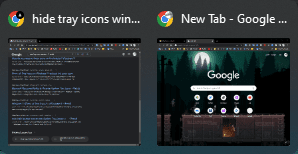
In that case, it does not give a title. It pops up a miniature copy of the opened window.
 

My Computers My Computers

  • At a glance

    Windows 11 Pro 25H2 26200.8655i9-10900 10 core 20 threads32 gbnone-Intel UHD Graphics 630
    OS
    Windows 11 Pro 25H2 26200.8655
    Computer type
    PC/Desktop
    Manufacturer/Model
    Dell Optiplex 7080
    CPU
    i9-10900 10 core 20 threads
    Motherboard
    DELL 0J37VM
    Memory
    32 gb
    Graphics Card(s)
    none-Intel UHD Graphics 630
    Sound Card
    Integrated Realtek
    Monitor(s) Displays
    Benq 27
    Screen Resolution
    2560x1440
    Hard Drives
    2x1tb Solidigm m.2 nvme /External drives 512gb Samsung m.2 sata+2tb Kingston m2.nvme
    PSU
    500w
    Case
    MT
    Cooling
    Dell Premium
    Keyboard
    Logitech wired
    Mouse
    Logitech wireless
    Internet Speed
    so slow I'm too embarrassed to tell
    Browser
    #1 Edge #2 Firefox
    Antivirus
    Defender+MWB Premium
  • At a glance

    Windows 11 Pro 24H2 26200.8457AMD Ryzen 7 6800U32 gbintegrated
    Operating System
    Windows 11 Pro 24H2 26200.8457
    Computer type
    PC/Desktop
    Manufacturer/Model
    Beelink Mini PC SER5
    CPU
    AMD Ryzen 7 6800U
    Memory
    32 gb
    Graphics card(s)
    integrated
    Sound Card
    integrated
    Monitor(s) Displays
    Benq 27
    Screen Resolution
    2560x1440
    Hard Drives
    1TB Crucial nvme
    Keyboard
    Logitech wired
    Mouse
    Logitech wireless
    Internet Speed
    still too embarrassed to tell
    Browser
    Firefox
    Antivirus
    Defender
    Other Info
    System 3 is non compliant Dell 9020 i7-4770/24gb ram Win11 PRO 26200.8457

Attachments

  • FppjAbEKhT.png
    FppjAbEKhT.png
    13.4 KB · Views: 1

My Computer My Computer

At a glance

Windows 11i7-10750h16GBRTX2060
OS
Windows 11
Computer type
Laptop
Manufacturer/Model
MSI GS66
CPU
i7-10750h
Motherboard
H470
Memory
16GB
Graphics Card(s)
RTX2060
I mean when hovering program that already opened
Do you have Taskbar set to 'Never combine thumbnails unless full'?
Your screenshot is a bit small, I can't see what the window is or what you're hovering on.

0002456.png

0002457.png
 

My Computers My Computers

  • At a glance

    Windows 11 Pro
    OS
    Windows 11 Pro
    Computer type
    PC/Desktop
    Manufacturer/Model
    ASUS ROG Strix
  • At a glance

    Windows 11 Pro
    Operating System
    Windows 11 Pro
    Computer type
    Laptop
    Manufacturer/Model
    ASUS VivoBook
  • ASUS VivoBook 'Lite' ~ Windows 11 Home
Do you have Taskbar set to 'Never combine thumbnails unless full'?
Your screenshot is a bi small, I can't see what the window is or what you're hovering on.

View attachment 50764

Windows 11 doesn't allow uncombine taskbar
 

My Computer My Computer

At a glance

Windows 11i7-10750h16GBRTX2060
OS
Windows 11
Computer type
Laptop
Manufacturer/Model
MSI GS66
CPU
i7-10750h
Motherboard
H470
Memory
16GB
Graphics Card(s)
RTX2060
Maybe it a part of new windows 11 design but I like the old way better. Is there any workaround?
 

My Computer My Computer

At a glance

Windows 11i7-10750h16GBRTX2060
OS
Windows 11
Computer type
Laptop
Manufacturer/Model
MSI GS66
CPU
i7-10750h
Motherboard
H470
Memory
16GB
Graphics Card(s)
RTX2060
So it seems like it only show up when there multiple windows open
rczn43gAe3.png
 

My Computer My Computer

At a glance

Windows 11i7-10750h16GBRTX2060
OS
Windows 11
Computer type
Laptop
Manufacturer/Model
MSI GS66
CPU
i7-10750h
Motherboard
H470
Memory
16GB
Graphics Card(s)
RTX2060

My Computers My Computers

  • At a glance

    Windows 11 Pro
    OS
    Windows 11 Pro
    Computer type
    PC/Desktop
    Manufacturer/Model
    ASUS ROG Strix
  • At a glance

    Windows 11 Pro
    Operating System
    Windows 11 Pro
    Computer type
    Laptop
    Manufacturer/Model
    ASUS VivoBook
  • ASUS VivoBook 'Lite' ~ Windows 11 Home

My Computer My Computer

At a glance

Windows 11i7-10750h16GBRTX2060
OS
Windows 11
Computer type
Laptop
Manufacturer/Model
MSI GS66
CPU
i7-10750h
Motherboard
H470
Memory
16GB
Graphics Card(s)
RTX2060

My Computers My Computers

  • At a glance

    Windows 11 Pro
    OS
    Windows 11 Pro
    Computer type
    PC/Desktop
    Manufacturer/Model
    ASUS ROG Strix
  • At a glance

    Windows 11 Pro
    Operating System
    Windows 11 Pro
    Computer type
    Laptop
    Manufacturer/Model
    ASUS VivoBook
  • ASUS VivoBook 'Lite' ~ Windows 11 Home
I think it's the size of your thumbnail previews.
Have you tried larger?
 

My Computers My Computers

  • At a glance

    Windows 11 Pro
    OS
    Windows 11 Pro
    Computer type
    PC/Desktop
    Manufacturer/Model
    ASUS ROG Strix
  • At a glance

    Windows 11 Pro
    Operating System
    Windows 11 Pro
    Computer type
    Laptop
    Manufacturer/Model
    ASUS VivoBook
  • ASUS VivoBook 'Lite' ~ Windows 11 Home
Back
Top Bottom