JavaScript is disabled. For a better experience, please enable JavaScript in your browser before proceeding.
You are using an out of date browser. It may not display this or other websites correctly.
You should upgrade or use an
alternative browser .
TPM 2.0 & AMD PSP devices showing yellow question mark
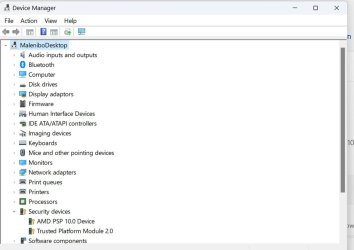
Checking my Device manager I noticed that entries under Security for AMD PSP 10.0 and TPM 2.0 have a yellow question mark. so I clicked to update drivers. Windows says that best drivers are installed and to check for updates. This I did and it says best drivers installed. So now a little confused as I know the question mark usually means a driver needs up dating.. When I look at the TPM info it says AMD 3.78.0.4 Spec 2.0 My windows sign in key works, if it did not I know it would be a sign that the TPM not recognised. Can anybody advice as to what this means and how to correct. I have not cleared the TPM as everything seems to be working fine.
Screenshot 2024-01-29 102416.png
38.8 KB
· Views: 8
Windows 11 Rizen 7 3Gb 16Gb onboard, Radion Windows 11 PC/Desktop AMD/Asus motherboard Rizen 7 3Gb Asus 16Gb onboard, Radion
Well-known member
Guru
VIP
Windows 11 Pro 23H2 (5699), 25H2 (9168) Mobile DualCore Intel Core 2 Duo T7250, 2000 MHz 4GB Mobile Intel(R) GMA 4500M (Mobile 4 series) Windows 11 Pro 23H2 (5699), 25H2 (9168) Laptop Acer Extensa 5630EZ Mobile DualCore Intel Core 2 Duo T7250, 2000 MHz Acer Extensa 5630 4GB Mobile Intel(R) GMA 4500M (Mobile 4 series) Realtek ALC268 @ Intel 82801IB ICH9 - High Definition Audio Controller 1 1280x800 Samsung SSD 850 EVO 250GB SATA Device (250 GB, SATA-III) 802.11g wireless 54 Mbps MICROSOFT EDGE WINDOWS DEFENDER Legacy MBR installation, no TPM, no Secure Boot, no WDDM 2.0 graphics drivers, no SSE4.2, cannot get more unsupported ;) This is only my test laptop. I had installed Windows 11 here before upgrading my main PC. For my main PC I use everyday see my 2nd system specs.
Windows 11 Pro v25H2 (build 26200.9168) Intel Core-i7 3770 3.40GHz s1155 (3rd generat... 2x Kingston Hyper-X Blu 8GB DDR3-1600 GIGABYTE GeForce RTX 3050 WINDFORCE OC V2 6GB... Windows 11 Pro v25H2 (build 26200.9168) PC/Desktop Custom-built PC Intel Core-i7 3770 3.40GHz s1155 (3rd generation) Asus P8H61 s1155 ATX 2x Kingston Hyper-X Blu 8GB DDR3-1600 GIGABYTE GeForce RTX 3050 WINDFORCE OC V2 6GB (GV-N3050WF2OCV2-6GD) Realtek HD audio (ALC887) Sony Bravia KDL-19L4000 19" LCD TV via VGA 1440x900 32-bit 60Hz WD Blue SA510 2.5 1000GB SSD as system disk, Western Digital Caviar Purple 4TB SATA III (WD40PURZ) as second Thermaltake Litepower RGB 550W Full Wired SUPERCASE MIDI-TOWER Deepcool Gamma Archer CPU cooler, 1x 8cm fan at the back Mitsumi 101-key PS/2 Microsoft Compact Optical Mouse 802.11ac 5GHz wireless 260Mpbs Microsoft Edge, Mozilla Firefox Microsoft Windows Defender Legacy BIOS (MBR) installation, no TPM, no Secure Boot, WDDM 3.0 graphics drivers, WEI score 7.4
Thank you, I downloaded and installed your suggestion. However the yellow question marks are still there it the Device Manager (Security)
Windows 11 Rizen 7 3Gb 16Gb onboard, Radion Windows 11 PC/Desktop AMD/Asus motherboard Rizen 7 3Gb Asus 16Gb onboard, Radion
Well-known member
Guru
VIP
Maybe there is another driver for TPM or something along the word "security". Also check your BIOS. Maybe you have to change some Security settings to enable/disable the TPM module. The description of the security module in BIOS will give you a clue what driver to look for. You can visit the motherboard manufacturer support site, there should be the relevant driver, so you won't need to search for it in AMD's site, unless there is a newer version.
Windows 11 Pro 23H2 (5699), 25H2 (9168) Mobile DualCore Intel Core 2 Duo T7250, 2000 MHz 4GB Mobile Intel(R) GMA 4500M (Mobile 4 series) Windows 11 Pro 23H2 (5699), 25H2 (9168) Laptop Acer Extensa 5630EZ Mobile DualCore Intel Core 2 Duo T7250, 2000 MHz Acer Extensa 5630 4GB Mobile Intel(R) GMA 4500M (Mobile 4 series) Realtek ALC268 @ Intel 82801IB ICH9 - High Definition Audio Controller 1 1280x800 Samsung SSD 850 EVO 250GB SATA Device (250 GB, SATA-III) 802.11g wireless 54 Mbps MICROSOFT EDGE WINDOWS DEFENDER Legacy MBR installation, no TPM, no Secure Boot, no WDDM 2.0 graphics drivers, no SSE4.2, cannot get more unsupported ;) This is only my test laptop. I had installed Windows 11 here before upgrading my main PC. For my main PC I use everyday see my 2nd system specs.
Windows 11 Pro v25H2 (build 26200.9168) Intel Core-i7 3770 3.40GHz s1155 (3rd generat... 2x Kingston Hyper-X Blu 8GB DDR3-1600 GIGABYTE GeForce RTX 3050 WINDFORCE OC V2 6GB... Windows 11 Pro v25H2 (build 26200.9168) PC/Desktop Custom-built PC Intel Core-i7 3770 3.40GHz s1155 (3rd generation) Asus P8H61 s1155 ATX 2x Kingston Hyper-X Blu 8GB DDR3-1600 GIGABYTE GeForce RTX 3050 WINDFORCE OC V2 6GB (GV-N3050WF2OCV2-6GD) Realtek HD audio (ALC887) Sony Bravia KDL-19L4000 19" LCD TV via VGA 1440x900 32-bit 60Hz WD Blue SA510 2.5 1000GB SSD as system disk, Western Digital Caviar Purple 4TB SATA III (WD40PURZ) as second Thermaltake Litepower RGB 550W Full Wired SUPERCASE MIDI-TOWER Deepcool Gamma Archer CPU cooler, 1x 8cm fan at the back Mitsumi 101-key PS/2 Microsoft Compact Optical Mouse 802.11ac 5GHz wireless 260Mpbs Microsoft Edge, Mozilla Firefox Microsoft Windows Defender Legacy BIOS (MBR) installation, no TPM, no Secure Boot, WDDM 3.0 graphics drivers, WEI score 7.4
Minor Threat
Power User
VIP
Thank you, I downloaded and installed your suggestion. However the yellow question marks are still there it the Device Manager (Security)
Hi,
Any TPM updates would have to come from the mother board manufacture via bios update.
Anything done in bios by user should only be restore defaults especially if you had and installed a bios update for win-11 support.
Outside of that contact the computer manufacture.
Win-7-10-11Pro's 10900k & 9940x & 5930k Trident-Z Royal 4000c16 2x16gb & Trident-Z 36... Titan Xp & 1080ti FTW3 & evga 980ti gaming Win-7-10-11Pro's PC/Desktop Acer 17" Nitro 7840sn/ 2x16gb 5600c40/ 4060/ stock 1tb-os/ 4tb sn850x 10900k & 9940x & 5930k z490-Apex & x299-Apex & x99-Sabertooth Trident-Z Royal 4000c16 2x16gb & Trident-Z 3600c16 4x8gb & 3200c14 4x8gb Titan Xp & 1080ti FTW3 & evga 980ti gaming Onboard Realtek x3 1-AOC G2460PG 24"G-Sync 144Hz/ 2nd 1-ASUS VG248QE 24"/ 3rd LG 43" series 1920-1080 not sure what the t.v is besides 43" class scales from 1920-1080 perfectly 2-WD-sn850x 4tb/ 970evo+500gb/ 980 pro 2tb. 1000p2 & 1200p2 & 850p2 D450 x2 & 1 Test bench in cherry Entertainment center Custom water loops x3 with 2x mora 360mm rads only 980ti gaming air cooled G710+x3 Redragon x3 xfinity gigabyte Firefox mbam pro
Well-known member
Member
VIP
Thank you, I downloaded and installed your suggestion. However the yellow question marks are still there it the Device Manager (Security)
Are you sure it's not a yellow key, mine has a yellow key next to it.
windows 11 Pro Intel I7 12700k 32 GB Corsair Vengeance RGB Pro DDR4 3200 EVGA 3070 windows 11 Pro PC/Desktop Asus Intel I7 12700k Asus Rog Strix Z690-A Gaming WiFi D4 32 GB Corsair Vengeance RGB Pro DDR4 3200 EVGA 3070 On Board Dell S2721QS 3840 x 2160 Samsung 980 pro m.2 1TB pci-express gen 4.0 x 4 NVMe Corsair RM 850 Asus Rog Strix Helios GX601 Asus Rog Strix LC II 240 ARGB Microsoft 1 GB Edge Malwarebytes Premium
Well-known member
Pro User
VIP
Perhaps an image of OP's Device Manager would clarify things?
Windows 11 Pro 24H2 (Build 26100.4770) Intel Core 9 Ultra 285K 64G (4x16) DDR5 Corsair RGB Dominator Platinu... Radeon (XFX Mercury) RX 9070XT OC (with Magne... Windows 11 Pro 24H2 (Build 26100.4770) PC/Desktop Custom built Intel Core 9 Ultra 285K Gigabyte Aorus Z890 Xtreme AI Top 64G (4x16) DDR5 Corsair RGB Dominator Platinum (6400Mhz) Radeon (XFX Mercury) RX 9070XT OC (with Magnetic Fans) Onboard (DTS:X® Ultra Audio: ESS ES9280A DAC) 27-inch Eizo Color Edge - CG2700X 3840 x 2160 4 Samsung NVM 990 Pro drives: 1TB (OS), 2TB, 2 X 4TB. Seasonic TX-1300 (1300 Watts) Cooler Master H500M Corsair Link Titan 280 RX RGB Logitech Craft Logitech MX Master 3S 1TB Download. 512mb Upload Microsoft Edge Chromium Windows Security System used for gaming, photography, music, school.
Windows 11 Pro 24H2 (Build 26100.4061) Intel Core i9-9900K 32gig (4 x 8) Corsair Dominator Platinum DDR4... Radeon XFX Merc 7900XT (20gig) Windows 11 Pro 24H2 (Build 26100.4061) PC/Desktop Custom built Intel Core i9-9900K Gigabyte Z390 Aorus Xtreme 32gig (4 x 8) Corsair Dominator Platinum DDR4 3600Mhz (B-Die) Radeon XFX Merc 7900XT (20gig) Onboard 24-Inch NEC PA242W 2880 x 1800 2 X NVME, 1 X SATA SSD EVGA Super Nova 1000 P2 (1000 Watt) Phantek Enthoo Luxe Corsair H115i Elite AIO Cooler Logitech Keys Logitech MX Master 3 1TB Download. 512mb Upload Microsoft Edge Chromium Windows Security Backup System
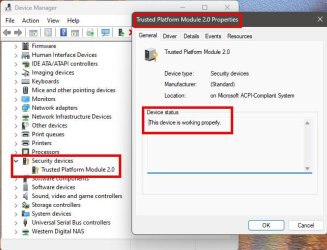
I am so used to seeing a yellow question mark in Win 10 that I just assumed that is what it was. Now I have looked closer it is a key and not a question mark. If Keenybb has the same key then I will assume that it is correct. Thank you
device man.jpg
48.9 KB
· Views: 8
security.jpg
45.4 KB
· Views: 7
Windows 11 Rizen 7 3Gb 16Gb onboard, Radion Windows 11 PC/Desktop AMD/Asus motherboard Rizen 7 3Gb Asus 16Gb onboard, Radion
Well-known member
Pro User
VIP
I am so used to seeing a yellow question mark in Win 10 that I just assumed that is what it was. Now I have looked closer it is a key and not a question mark. If Keenybb has the same key then I will assume that it is correct. Thank you
What you're seeing is normal. That's just an icon key. Nothing wrong there. I have the same thing, though I've only got one listing...
All is good there, and your Device Manager is clear of issues. No issues there.
Windows 11 Pro 24H2 (Build 26100.4770) Intel Core 9 Ultra 285K 64G (4x16) DDR5 Corsair RGB Dominator Platinu... Radeon (XFX Mercury) RX 9070XT OC (with Magne... Windows 11 Pro 24H2 (Build 26100.4770) PC/Desktop Custom built Intel Core 9 Ultra 285K Gigabyte Aorus Z890 Xtreme AI Top 64G (4x16) DDR5 Corsair RGB Dominator Platinum (6400Mhz) Radeon (XFX Mercury) RX 9070XT OC (with Magnetic Fans) Onboard (DTS:X® Ultra Audio: ESS ES9280A DAC) 27-inch Eizo Color Edge - CG2700X 3840 x 2160 4 Samsung NVM 990 Pro drives: 1TB (OS), 2TB, 2 X 4TB. Seasonic TX-1300 (1300 Watts) Cooler Master H500M Corsair Link Titan 280 RX RGB Logitech Craft Logitech MX Master 3S 1TB Download. 512mb Upload Microsoft Edge Chromium Windows Security System used for gaming, photography, music, school.
Windows 11 Pro 24H2 (Build 26100.4061) Intel Core i9-9900K 32gig (4 x 8) Corsair Dominator Platinum DDR4... Radeon XFX Merc 7900XT (20gig) Windows 11 Pro 24H2 (Build 26100.4061) PC/Desktop Custom built Intel Core i9-9900K Gigabyte Z390 Aorus Xtreme 32gig (4 x 8) Corsair Dominator Platinum DDR4 3600Mhz (B-Die) Radeon XFX Merc 7900XT (20gig) Onboard 24-Inch NEC PA242W 2880 x 1800 2 X NVME, 1 X SATA SSD EVGA Super Nova 1000 P2 (1000 Watt) Phantek Enthoo Luxe Corsair H115i Elite AIO Cooler Logitech Keys Logitech MX Master 3 1TB Download. 512mb Upload Microsoft Edge Chromium Windows Security Backup System
Well-known member
Guru
VIP
Yes, that's the default icon for security devices such as TPM 1.2 or 2.0 I don't have any so I didn't make this thought. Good job
@kennybb !
Windows 11 Pro 23H2 (5699), 25H2 (9168) Mobile DualCore Intel Core 2 Duo T7250, 2000 MHz 4GB Mobile Intel(R) GMA 4500M (Mobile 4 series) Windows 11 Pro 23H2 (5699), 25H2 (9168) Laptop Acer Extensa 5630EZ Mobile DualCore Intel Core 2 Duo T7250, 2000 MHz Acer Extensa 5630 4GB Mobile Intel(R) GMA 4500M (Mobile 4 series) Realtek ALC268 @ Intel 82801IB ICH9 - High Definition Audio Controller 1 1280x800 Samsung SSD 850 EVO 250GB SATA Device (250 GB, SATA-III) 802.11g wireless 54 Mbps MICROSOFT EDGE WINDOWS DEFENDER Legacy MBR installation, no TPM, no Secure Boot, no WDDM 2.0 graphics drivers, no SSE4.2, cannot get more unsupported ;) This is only my test laptop. I had installed Windows 11 here before upgrading my main PC. For my main PC I use everyday see my 2nd system specs.
Windows 11 Pro v25H2 (build 26200.9168) Intel Core-i7 3770 3.40GHz s1155 (3rd generat... 2x Kingston Hyper-X Blu 8GB DDR3-1600 GIGABYTE GeForce RTX 3050 WINDFORCE OC V2 6GB... Windows 11 Pro v25H2 (build 26200.9168) PC/Desktop Custom-built PC Intel Core-i7 3770 3.40GHz s1155 (3rd generation) Asus P8H61 s1155 ATX 2x Kingston Hyper-X Blu 8GB DDR3-1600 GIGABYTE GeForce RTX 3050 WINDFORCE OC V2 6GB (GV-N3050WF2OCV2-6GD) Realtek HD audio (ALC887) Sony Bravia KDL-19L4000 19" LCD TV via VGA 1440x900 32-bit 60Hz WD Blue SA510 2.5 1000GB SSD as system disk, Western Digital Caviar Purple 4TB SATA III (WD40PURZ) as second Thermaltake Litepower RGB 550W Full Wired SUPERCASE MIDI-TOWER Deepcool Gamma Archer CPU cooler, 1x 8cm fan at the back Mitsumi 101-key PS/2 Microsoft Compact Optical Mouse 802.11ac 5GHz wireless 260Mpbs Microsoft Edge, Mozilla Firefox Microsoft Windows Defender Legacy BIOS (MBR) installation, no TPM, no Secure Boot, WDDM 3.0 graphics drivers, WEI score 7.4