
Solved Trojan found on new PC


I am only getting to read the latest replies, thanks to everyone for the input.

I didn't really intend for people to be going at each other, it all seems to have got a bit opinionated - but hey, I suppose that is what forums are for.

I've decided that I am going to just do a wipe, it will give me more peace of mind. I don't really want to go to Bleeping Computer and things like that to just 'patch it up.' A wipe is best, as @JMedlock83 and @TraderGary also said.

I was going to follow this guide and I have already made a Windows 11 installation USB.


For this step about UEFI, I am not too sure what it means.
1 If you have not already, you will need to create a bootable Windows 11 installation USB that supports UEFI mode.

I just created the USB stick by following the guide here - Create Windows 11 Bootable USB Installation Media Tutorial

Would my BIOS already be in this UEFI mode? Sorry for the noob questions!
 

My Computer My Computer

At a glance

Windows 11 ProfessionalAMD Ryzen™ 9 7950XDOMINATOR® PLATINUM RGB 64GB (2x32GB) DDR5 DR...MSI GeForce RTX™ 3080 Ti SUPRIM X 12GB
OS
Windows 11 Professional
Computer type
PC/Desktop
Manufacturer/Model
Custom build
CPU
AMD Ryzen™ 9 7950X
Motherboard
ASUS ROG Strix X670E-E Gaming WiFi
Memory
DOMINATOR® PLATINUM RGB 64GB (2x32GB) DDR5 DRAM 5200MHz
Graphics Card(s)
MSI GeForce RTX™ 3080 Ti SUPRIM X 12GB
Hard Drives
980 PRO NVMe M.2 SSD 1TB
970 EVO Plus NVMe M.2 SSD 2TB
PSU
Corsair HX1000 1000 W 80+ Platinum
Case
Fractal Design Meshify 2
Cooling
iCUE H150i ELITE LCD Display Liquid CPU Cooler
I am only getting to read the latest replies, thanks to everyone for the input.

I didn't really intend for people to be going at each other, it all seems to have got a bit opinionated - but hey, I suppose that is what forums are for.

I've decided that I am going to just do a wipe, it will give me more peace of mind. I don't really want to go to Bleeping Computer and things like that to just 'patch it up.' A wipe is best, as @JMedlock83 and @TraderGary also said.

I was going to follow this guide and I have already made a Windows 11 installation USB.


For this step about UEFI, I am not too sure what it means.
1 If you have not already, you will need to create a bootable Windows 11 installation USB that supports UEFI mode.

I just created the USB stick by following the guide here - Create Windows 11 Bootable USB Installation Media Tutorial

Would my BIOS already be in this UEFI mode? Sorry for the noob questions!
About your UEFI question:

No such thing as a dumb Noob question...........

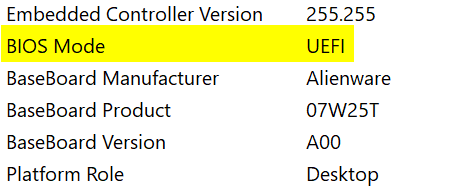
tap the Windows key to get the start menu up, type SYSTEMINFO. The app is listed on the left. C lick it. The display will conatin a lot of info. Look about half-way down for the line BIOS Mode. It should say UEFI.

Example
2023-02-02_17h15_46.png
 

My Computer My Computer

At a glance

Multi-boot Windows 11 & 10 - RTM, RP, Beta, D...11th Gen i9-11900KF @ 3.50GHz, 8 cores/16 log...32GBNVIDIA GeForce RTX 3080 w/10GB GDDR5X mem
OS
Multi-boot Windows 11 & 10 - RTM, RP, Beta, Dev and Canary
Computer type
PC/Desktop
Manufacturer/Model
Alienware R12
CPU
11th Gen i9-11900KF @ 3.50GHz, 8 cores/16 logical proc.
Motherboard
Alienware 07HV66 (U3E1)
Memory
32GB
Graphics Card(s)
NVIDIA GeForce RTX 3080 w/10GB GDDR5X mem
Sound Card
Realtek High Definition Audio
Monitor(s) Displays
Samsung 27" Curved C27F591
Screen Resolution
1920 x 1080 x 60 hertz
Hard Drives
1TB NVMe PM961 NVMe SSD SAMSUNG (Boot),
2TB Seagate ST2000DM001-1ER164 (SATA),
1TB Samsung SSD 850 EVO,
1TB Seagate ST1000DM003-1ER162,
1TB WD Elements 10A8 USB Device,
1TB BUFFALO HD-PNTU3 USB Device,
1TB x4 Seagate BUP Slim SCSI Disk Device
PSU
850W PSU Liquid Cooled Chassis - CyberPower 1500 UPS
Case
Alienware Mid-Tower (Dell)
Cooling
Liquid Cooled - 3 fan - Top exhaust
Keyboard
Logitech K800 Wireless
Mouse
Logitech MX Master Wireless
Internet Speed
1 Gigabit
Browser
FF, Chrome, Opera, Edge
Antivirus
Defender, MBAM, SuperAntiSpyware
Other Info
Blueray R/W Optical,
Canon MX410 series Printer/Fax/Scanner/Copier,
Altec 5.1 Speakers L-R, Mid Base Boom,

Macrium Home Premium, Revo Pro, Screenspresso Pro
About your UEFI question:

No such thing as a dumb Noob question...........

tap the Windows key to get the start menu up, type SYSTEMINFO. The app is listed on the left. C lick it. The display will conatin a lot of info. Look about half-way down for the line BIOS Mode. It should say UEFI.

Example
View attachment 51654
Thanks. Yes, it does have that it as the Bios mode, cheers.
 

My Computer My Computer

At a glance

Windows 11 ProfessionalAMD Ryzen™ 9 7950XDOMINATOR® PLATINUM RGB 64GB (2x32GB) DDR5 DR...MSI GeForce RTX™ 3080 Ti SUPRIM X 12GB
OS
Windows 11 Professional
Computer type
PC/Desktop
Manufacturer/Model
Custom build
CPU
AMD Ryzen™ 9 7950X
Motherboard
ASUS ROG Strix X670E-E Gaming WiFi
Memory
DOMINATOR® PLATINUM RGB 64GB (2x32GB) DDR5 DRAM 5200MHz
Graphics Card(s)
MSI GeForce RTX™ 3080 Ti SUPRIM X 12GB
Hard Drives
980 PRO NVMe M.2 SSD 1TB
970 EVO Plus NVMe M.2 SSD 2TB
PSU
Corsair HX1000 1000 W 80+ Platinum
Case
Fractal Design Meshify 2
Cooling
iCUE H150i ELITE LCD Display Liquid CPU Cooler
Sorry Haydon, that wouldn't be very smart on my part to name the ones i know. I hope you understand why !
It's to easy to go the "Dark Side" and find them for a price !
Some info on Rootkits:
If you booted from that drive and the rootkit has something in memory or has patched the operating system, then it absolutely could.
The only way to get rid of a rootkit is to format the hard drive and delete all partitions before reinstalling Windows.
Some root kits can overwrite firmware.
Some types of rootkits target BIOS/various roms/firmware of devices in your computer and not the HD, so it's a theoretical yes.
There are "in the wild" examples of rootkits infecting a special type of enterprise NICs, hardware controllers, etc.
Is it probable you have been infected by one such? No, they're kinda rare and the people who employ these are
typically fishing for something a little bit higher up than Average Joe's porn collection anyway.
The everyday root kit can be removed by using the tools provide & with patience. What i am saying is that not "ALL" rootkits can be removed by
reformatting or wiping it clean !
And that's all i have to say about that !!

No hard feelings on my part, just trying to help !!
 

My Computer My Computer

At a glance

Windows11 23H2 (OS Build 22631.2428)2.90 gigahertz Intel Core i7-1070016214 Megabytes Usable Installed Memor
OS
Windows11 23H2 (OS Build 22631.2428)
Computer type
PC/Desktop
Manufacturer/Model
HP HP ENVY TE01
CPU
2.90 gigahertz Intel Core i7-10700
Motherboard
Board: HP 8767 A (SMVB)
Memory
16214 Megabytes Usable Installed Memor
Hard Drives
1511.52 Gigabytes Usable Hard Drive Capacity
1418.15 Gigabytes Hard Drive Free Space
Keyboard
Logitech wireless
Mouse
M 185 wireless
Internet Speed
12 ms Jitter 8 ms Download 10.5 Mbps Upload 1.7
Browser
Edge & FF
Antivirus
Windows Defender
I think that is one way to tell if it's a rootkit or a bios virus. If you wipe the drive (ie secure wipe with secure erase) - so it's like a new drive - not just formatting it. Clean install windows. And set it up. If it comes back - you have a rootkit or bios virus. Then you need some real help. I'm not sure about this but I think flashing the bios sorts that.

Most times it will not come back and you'll have got rid of it with a drive wipe and clean install.
 

My Computers My Computers

  • At a glance

    Windows 11 Home 25H2Core i5-1035G132gb
    OS
    Windows 11 Home 25H2
    Computer type
    Laptop
    Manufacturer/Model
    HP Pavilion 14-ce3606sa
    CPU
    Core i5-1035G1
    Memory
    32gb
    Hard Drives
    Samsung 870 evo sata ssd
    Cooling
    Could be better
    Internet Speed
    50 mbps Starlink
    Browser
    Firefox
    Other Info
    Originally came installed with a 500gb H10 Optane ssd
  • At a glance

    Windows 11 HomeIntel Core i5-1035G116gb
    Operating System
    Windows 11 Home
    Computer type
    Laptop
    Manufacturer/Model
    HP Pavilion ce3606sa
    CPU
    Intel Core i5-1035G1
    Memory
    16gb
    Hard Drives
    Hynix Gold P31 2TB
    Internet Speed
    200mbps Starlink
    Browser
    Firefox
    Antivirus
    Defender
On that basis - Bleeping Computer will run through a lot of clean up stuff with you and checks and clean up the computer. Had to do it myself once. I did still need to do a clean install afterwards because there were a few changes as a result of all the tests (can't remember the details).

But at least then you'd know it's clean before reinstalling. Personally I wanted to reinstall anyway after the clean up to ensure all my files were as they should be.

Malwarebytes has an option for running a rootkit scan as well
 

My Computers My Computers

  • At a glance

    Windows 11 Home 25H2Core i5-1035G132gb
    OS
    Windows 11 Home 25H2
    Computer type
    Laptop
    Manufacturer/Model
    HP Pavilion 14-ce3606sa
    CPU
    Core i5-1035G1
    Memory
    32gb
    Hard Drives
    Samsung 870 evo sata ssd
    Cooling
    Could be better
    Internet Speed
    50 mbps Starlink
    Browser
    Firefox
    Other Info
    Originally came installed with a 500gb H10 Optane ssd
  • At a glance

    Windows 11 HomeIntel Core i5-1035G116gb
    Operating System
    Windows 11 Home
    Computer type
    Laptop
    Manufacturer/Model
    HP Pavilion ce3606sa
    CPU
    Intel Core i5-1035G1
    Memory
    16gb
    Hard Drives
    Hynix Gold P31 2TB
    Internet Speed
    200mbps Starlink
    Browser
    Firefox
    Antivirus
    Defender
However, if you wipe the drive (important so it cleans every sector including the mbr), flash the bios and reinstall, I can't see how anything can survive that! However flashing the bios can cause issues as well. So still maybe easier to get bleeping computer to clean it up first.

Or just wipe the drive, clean install and see if everything operates normally. If it does its probably fine.

I believe bios viruses are very rare though.
 

My Computers My Computers

  • At a glance

    Windows 11 Home 25H2Core i5-1035G132gb
    OS
    Windows 11 Home 25H2
    Computer type
    Laptop
    Manufacturer/Model
    HP Pavilion 14-ce3606sa
    CPU
    Core i5-1035G1
    Memory
    32gb
    Hard Drives
    Samsung 870 evo sata ssd
    Cooling
    Could be better
    Internet Speed
    50 mbps Starlink
    Browser
    Firefox
    Other Info
    Originally came installed with a 500gb H10 Optane ssd
  • At a glance

    Windows 11 HomeIntel Core i5-1035G116gb
    Operating System
    Windows 11 Home
    Computer type
    Laptop
    Manufacturer/Model
    HP Pavilion ce3606sa
    CPU
    Intel Core i5-1035G1
    Memory
    16gb
    Hard Drives
    Hynix Gold P31 2TB
    Internet Speed
    200mbps Starlink
    Browser
    Firefox
    Antivirus
    Defender
I think that is one way to tell if it's a rootkit or a bios virus. If you wipe the drive (ie secure wipe with secure erase) - so it's like a new drive - not just formatting it. Clean install windows. And set it up. If it comes back - you have a rootkit or bios virus. Then you need some real help. I'm not sure about this but I think flashing the bios sorts that.

Most times it will not come back and you'll have got rid of it with a drive wipe and clean install.
Hi,

When you say secure wipe with secure erase, do you mean just installing Windows again using the USB method and then deleting any partitions at the stage where that option appears to select the drive to install to? Rootkits etc...you have me lost there! Prob no need to worry about that stuff for me, hopefully.
 

My Computer My Computer

At a glance

Windows 11 ProfessionalAMD Ryzen™ 9 7950XDOMINATOR® PLATINUM RGB 64GB (2x32GB) DDR5 DR...MSI GeForce RTX™ 3080 Ti SUPRIM X 12GB
OS
Windows 11 Professional
Computer type
PC/Desktop
Manufacturer/Model
Custom build
CPU
AMD Ryzen™ 9 7950X
Motherboard
ASUS ROG Strix X670E-E Gaming WiFi
Memory
DOMINATOR® PLATINUM RGB 64GB (2x32GB) DDR5 DRAM 5200MHz
Graphics Card(s)
MSI GeForce RTX™ 3080 Ti SUPRIM X 12GB
Hard Drives
980 PRO NVMe M.2 SSD 1TB
970 EVO Plus NVMe M.2 SSD 2TB
PSU
Corsair HX1000 1000 W 80+ Platinum
Case
Fractal Design Meshify 2
Cooling
iCUE H150i ELITE LCD Display Liquid CPU Cooler
My Computer My Computer

At a glance

Windows 11 ProfessionalAMD Ryzen™ 9 7950XDOMINATOR® PLATINUM RGB 64GB (2x32GB) DDR5 DR...MSI GeForce RTX™ 3080 Ti SUPRIM X 12GB
OS
Windows 11 Professional
Computer type
PC/Desktop
Manufacturer/Model
Custom build
CPU
AMD Ryzen™ 9 7950X
Motherboard
ASUS ROG Strix X670E-E Gaming WiFi
Memory
DOMINATOR® PLATINUM RGB 64GB (2x32GB) DDR5 DRAM 5200MHz
Graphics Card(s)
MSI GeForce RTX™ 3080 Ti SUPRIM X 12GB
Hard Drives
980 PRO NVMe M.2 SSD 1TB
970 EVO Plus NVMe M.2 SSD 2TB
PSU
Corsair HX1000 1000 W 80+ Platinum
Case
Fractal Design Meshify 2
Cooling
iCUE H150i ELITE LCD Display Liquid CPU Cooler
However, if you wipe the drive (important so it cleans every sector including the mbr), flash the bios and reinstall, I can't see how anything can survive that! However flashing the bios can cause issues as well. So still maybe easier to get bleeping computer to clean it up first.

Or just wipe the drive, clean install and see if everything operates normally. If it does its probably fine.

I believe bios viruses are very rare though.
I won't be doing any flash stuff as I don't know anything about it.

I am just planning to wipe the PC, hopefully this weekend.
 

My Computer My Computer

At a glance

Windows 11 ProfessionalAMD Ryzen™ 9 7950XDOMINATOR® PLATINUM RGB 64GB (2x32GB) DDR5 DR...MSI GeForce RTX™ 3080 Ti SUPRIM X 12GB
OS
Windows 11 Professional
Computer type
PC/Desktop
Manufacturer/Model
Custom build
CPU
AMD Ryzen™ 9 7950X
Motherboard
ASUS ROG Strix X670E-E Gaming WiFi
Memory
DOMINATOR® PLATINUM RGB 64GB (2x32GB) DDR5 DRAM 5200MHz
Graphics Card(s)
MSI GeForce RTX™ 3080 Ti SUPRIM X 12GB
Hard Drives
980 PRO NVMe M.2 SSD 1TB
970 EVO Plus NVMe M.2 SSD 2TB
PSU
Corsair HX1000 1000 W 80+ Platinum
Case
Fractal Design Meshify 2
Cooling
iCUE H150i ELITE LCD Display Liquid CPU Cooler
Is it really worth installing these three pieces of software? Are they not gimmicky? I know Malwarebytes has a good enough reputation as a combo with Windows Defender, but the other two tools people in here have mentioned, I have never heard of these:

Malwarebytes AdwCleaner
Malwarebytes Anti-Rootkit Scanner

Are these totally seperate or all in the standard free Malwarebytes?
 

My Computer My Computer

At a glance

Windows 11 ProfessionalAMD Ryzen™ 9 7950XDOMINATOR® PLATINUM RGB 64GB (2x32GB) DDR5 DR...MSI GeForce RTX™ 3080 Ti SUPRIM X 12GB
OS
Windows 11 Professional
Computer type
PC/Desktop
Manufacturer/Model
Custom build
CPU
AMD Ryzen™ 9 7950X
Motherboard
ASUS ROG Strix X670E-E Gaming WiFi
Memory
DOMINATOR® PLATINUM RGB 64GB (2x32GB) DDR5 DRAM 5200MHz
Graphics Card(s)
MSI GeForce RTX™ 3080 Ti SUPRIM X 12GB
Hard Drives
980 PRO NVMe M.2 SSD 1TB
970 EVO Plus NVMe M.2 SSD 2TB
PSU
Corsair HX1000 1000 W 80+ Platinum
Case
Fractal Design Meshify 2
Cooling
iCUE H150i ELITE LCD Display Liquid CPU Cooler
Is it really worth installing these three pieces of software? Are they not gimmicky? I know Malwarebytes has a good enough reputation as a combo with Windows Defender, but the other two tools people in here have mentioned, I have never heard of these:

Malwarebytes AdwCleaner
Malwarebytes Anti-Rootkit Scanner

Are these totally seperate or all in the standard free Malwarebytes?
No don't install those - unless an expert advises you to as part of a clean up. The standard malwarebytes actually includes an option to do a rootkit scan but it also warns you it can wreck your operating system!

If you do a clean install and run Malwarebytes and defender and nothing is fine you're probably ok but I would also run another offline antivirus from a usb stick (like the Kaspersky offline one) just to be sure.
 

My Computers My Computers

  • At a glance

    Windows 11 Home 25H2Core i5-1035G132gb
    OS
    Windows 11 Home 25H2
    Computer type
    Laptop
    Manufacturer/Model
    HP Pavilion 14-ce3606sa
    CPU
    Core i5-1035G1
    Memory
    32gb
    Hard Drives
    Samsung 870 evo sata ssd
    Cooling
    Could be better
    Internet Speed
    50 mbps Starlink
    Browser
    Firefox
    Other Info
    Originally came installed with a 500gb H10 Optane ssd
  • At a glance

    Windows 11 HomeIntel Core i5-1035G116gb
    Operating System
    Windows 11 Home
    Computer type
    Laptop
    Manufacturer/Model
    HP Pavilion ce3606sa
    CPU
    Intel Core i5-1035G1
    Memory
    16gb
    Hard Drives
    Hynix Gold P31 2TB
    Internet Speed
    200mbps Starlink
    Browser
    Firefox
    Antivirus
    Defender
No don't install those - unless an expert advises you to as part of a clean up. The standard malwarebytes actually includes an option to do a rootkit scan but it also warns you it can wreck your operating system!

If you do a clean install and run Malwarebytes and defender and nothing is fine you're probably ok but I would also run another offline antivirus from a usb stick (like the Kaspersky offline one) just to be sure.
Wow that is madness. I shall be avoiding it so, thanks!

I think by 'nothing' you meant everything?!

I am going to disconnect my two older sata drives before I do the wipe. Hopefully when I reconnect them after installing Windows 11 and re-scan them with Windows Defender and Malwarebytes they're OK.

When you say Kaspersky offline - do you mean just install a free version of Kaspersky and scan but keep the Internet off? Or is that a totally seperate scanner you are referring to? Maybe that would do for the two sata drives too once I reconnect them.
 

My Computer My Computer

At a glance

Windows 11 ProfessionalAMD Ryzen™ 9 7950XDOMINATOR® PLATINUM RGB 64GB (2x32GB) DDR5 DR...MSI GeForce RTX™ 3080 Ti SUPRIM X 12GB
OS
Windows 11 Professional
Computer type
PC/Desktop
Manufacturer/Model
Custom build
CPU
AMD Ryzen™ 9 7950X
Motherboard
ASUS ROG Strix X670E-E Gaming WiFi
Memory
DOMINATOR® PLATINUM RGB 64GB (2x32GB) DDR5 DRAM 5200MHz
Graphics Card(s)
MSI GeForce RTX™ 3080 Ti SUPRIM X 12GB
Hard Drives
980 PRO NVMe M.2 SSD 1TB
970 EVO Plus NVMe M.2 SSD 2TB
PSU
Corsair HX1000 1000 W 80+ Platinum
Case
Fractal Design Meshify 2
Cooling
iCUE H150i ELITE LCD Display Liquid CPU Cooler
I think by 'nothing' you meant everything?!
Lol yes - I was probably going to say nothing is wrong.

Sorry I meant this. Kaspersky rescue disk. You can download it and burn it to a usb stick. Then you boot from the usb and select to do a scan. It means any viruses can't interfere with it as it's done before the computer boots, and it can detect boot viruses as well I think. It'll probably show clean but it's reassurance


Others may have other advice - this is just what I would do. Last time I used it, it was slightly fiddly to connect to the internet to do the antivirus updates, from the usb stick but you can just run it without doing those.

There's some info about it here. You have various scanning options. The entire disk or just the boot sector - or both.


My Computers My Computers

  • At a glance

    Windows 11 Home 25H2Core i5-1035G132gb
    OS
    Windows 11 Home 25H2
    Computer type
    Laptop
    Manufacturer/Model
    HP Pavilion 14-ce3606sa
    CPU
    Core i5-1035G1
    Memory
    32gb
    Hard Drives
    Samsung 870 evo sata ssd
    Cooling
    Could be better
    Internet Speed
    50 mbps Starlink
    Browser
    Firefox
    Other Info
    Originally came installed with a 500gb H10 Optane ssd
  • At a glance

    Windows 11 HomeIntel Core i5-1035G116gb
    Operating System
    Windows 11 Home
    Computer type
    Laptop
    Manufacturer/Model
    HP Pavilion ce3606sa
    CPU
    Intel Core i5-1035G1
    Memory
    16gb
    Hard Drives
    Hynix Gold P31 2TB
    Internet Speed
    200mbps Starlink
    Browser
    Firefox
    Antivirus
    Defender
@Hazel123

Where does MBAM say this?

The standard malwarebytes actually includes an option to do a rootkit scan but it also warns you it can wreck your operating system!
 

My Computer My Computer

At a glance

Multi-boot Windows 11 & 10 - RTM, RP, Beta, D...11th Gen i9-11900KF @ 3.50GHz, 8 cores/16 log...32GBNVIDIA GeForce RTX 3080 w/10GB GDDR5X mem
OS
Multi-boot Windows 11 & 10 - RTM, RP, Beta, Dev and Canary
Computer type
PC/Desktop
Manufacturer/Model
Alienware R12
CPU
11th Gen i9-11900KF @ 3.50GHz, 8 cores/16 logical proc.
Motherboard
Alienware 07HV66 (U3E1)
Memory
32GB
Graphics Card(s)
NVIDIA GeForce RTX 3080 w/10GB GDDR5X mem
Sound Card
Realtek High Definition Audio
Monitor(s) Displays
Samsung 27" Curved C27F591
Screen Resolution
1920 x 1080 x 60 hertz
Hard Drives
1TB NVMe PM961 NVMe SSD SAMSUNG (Boot),
2TB Seagate ST2000DM001-1ER164 (SATA),
1TB Samsung SSD 850 EVO,
1TB Seagate ST1000DM003-1ER162,
1TB WD Elements 10A8 USB Device,
1TB BUFFALO HD-PNTU3 USB Device,
1TB x4 Seagate BUP Slim SCSI Disk Device
PSU
850W PSU Liquid Cooled Chassis - CyberPower 1500 UPS
Case
Alienware Mid-Tower (Dell)
Cooling
Liquid Cooled - 3 fan - Top exhaust
Keyboard
Logitech K800 Wireless
Mouse
Logitech MX Master Wireless
Internet Speed
1 Gigabit
Browser
FF, Chrome, Opera, Edge
Antivirus
Defender, MBAM, SuperAntiSpyware
Other Info
Blueray R/W Optical,
Canon MX410 series Printer/Fax/Scanner/Copier,
Altec 5.1 Speakers L-R, Mid Base Boom,

Macrium Home Premium, Revo Pro, Screenspresso Pro
Kaspersky is headquartered in Moscow, Russia, and has ties to the Russian Military. I wouldn't touch Kaspersky.
 

My Computers My Computers

  • At a glance

    Windows 11 ProIntel Series 3 Core Ultra X9 388H64GB LPDDR5x 9600 MT/sIntel Arc graphics B390 Panther Lake
    OS
    Windows 11 Pro
    Computer type
    Laptop
    Manufacturer/Model
    Dell XPS 16 DA16260
    CPU
    Intel Series 3 Core Ultra X9 388H
    Memory
    64GB LPDDR5x 9600 MT/s
    Graphics Card(s)
    Intel Arc graphics B390 Panther Lake
    Monitor(s) Displays
    16" 3.2K Tandem OLED Infinity Edge
    Screen Resolution
    3200 x 2000 16:10 236 PPI
    Hard Drives
    1 Terabyte M.2 PCIe NVMe SSD
    Case
    Black Anodized Aluminum
    Cooling
    Vapor Chamber Cooling
    Mouse
    None
    Internet Speed
    942 Mbps Netgear Mesh + 2 Satellites
    Browser
    Microsoft Edge (Chromium)
    Antivirus
    Windows Security (Defender)
    Other Info
    NPU delivering 67 TOPS
    Microsoft 365 subscription
    Microsoft Office 365
    Microsoft OneDrive 1TB Cloud
    Microsoft Visual Studio
    Microsoft Visual Studio Code
    Microsoft Sysinternals Suite
    Microsoft BitLocker
    Microsoft Copilot
    Dell Support Assist
    Dell Command | Update
    Macrium Reflect X subscription
    1Password Password Manager
    Amazon Kindle for PC
    Lightroom/Photoshop subscription
    Interactive Brokers Trader Workstation
  • At a glance

    Windows 11 ProSnapdragon® X Elite (12 Core) with Hexagon NP...32GB LPDDR5x 8448 MT/sIntegrated Adreno GPU
    Operating System
    Windows 11 Pro
    Computer type
    Laptop
    Manufacturer/Model
    Microsoft Surface Laptop 7
    CPU
    Snapdragon® X Elite (12 Core) with Hexagon NPU delivering 45 TOPS
    Memory
    32GB LPDDR5x 8448 MT/s
    Graphics card(s)
    Integrated Adreno GPU
    Sound Card
    Omnisonic speakers with Dolby Atmos spatial sound
    Monitor(s) Displays
    13.8″ PixelSense Flow touchscreen 120 Hz 600 NIT
    Screen Resolution
    2304 × 1536 (201 PPI), 3:2 aspect ratio
    Hard Drives
    1 TB PCIe NVMe Gen 4 SSD
    Case
    Black Anodized Aluminum
    Cooling
    Vapor Chamber Cooling
    Mouse
    None
    Internet Speed
    942 Mbps Netgear Mesh + 2 Satellites
    Browser
    Microsoft Edge (Chromium)
    Antivirus
    Windows Security (Defender)
    Other Info
    Microsoft 365 subscription (Office)
    Microsoft Office 365
    Microsoft OneDrive 1TB Cloud
    Microsoft Visual Studio 2026
    Microsoft Visual Studio Code
    Interactive Brokers Trader Workstation
    Lightroom/Photoshop subscription
    1Password Password Manager
    Microsoft Sysinternals
    Amazon Kindle for PC
    Microsoft BitLocker
    Microsoft Copilot
@Hazel123

Where does MBAM say this?

The standard malwarebytes actually includes an option to do a rootkit scan but it also warns you it can wreck your operating system!
Seems it doesn't any more, but it did used to come with a warning - maybe the warning pops up when you do a root scan? Apologies if it's incorrect.
 

My Computers My Computers

  • At a glance

    Windows 11 Home 25H2Core i5-1035G132gb
    OS
    Windows 11 Home 25H2
    Computer type
    Laptop
    Manufacturer/Model
    HP Pavilion 14-ce3606sa
    CPU
    Core i5-1035G1
    Memory
    32gb
    Hard Drives
    Samsung 870 evo sata ssd
    Cooling
    Could be better
    Internet Speed
    50 mbps Starlink
    Browser
    Firefox
    Other Info
    Originally came installed with a 500gb H10 Optane ssd
  • At a glance

    Windows 11 HomeIntel Core i5-1035G116gb
    Operating System
    Windows 11 Home
    Computer type
    Laptop
    Manufacturer/Model
    HP Pavilion ce3606sa
    CPU
    Intel Core i5-1035G1
    Memory
    16gb
    Hard Drives
    Hynix Gold P31 2TB
    Internet Speed
    200mbps Starlink
    Browser
    Firefox
    Antivirus
    Defender
Kaspersky is headquartered in Moscow, Russia, and has ties to the Russian Military. I wouldn't touch Kaspersky.
Trend Micro do one too - as an alternative


My Computers My Computers

  • At a glance

    Windows 11 Home 25H2Core i5-1035G132gb
    OS
    Windows 11 Home 25H2
    Computer type
    Laptop
    Manufacturer/Model
    HP Pavilion 14-ce3606sa
    CPU
    Core i5-1035G1
    Memory
    32gb
    Hard Drives
    Samsung 870 evo sata ssd
    Cooling
    Could be better
    Internet Speed
    50 mbps Starlink
    Browser
    Firefox
    Other Info
    Originally came installed with a 500gb H10 Optane ssd
  • At a glance

    Windows 11 HomeIntel Core i5-1035G116gb
    Operating System
    Windows 11 Home
    Computer type
    Laptop
    Manufacturer/Model
    HP Pavilion ce3606sa
    CPU
    Intel Core i5-1035G1
    Memory
    16gb
    Hard Drives
    Hynix Gold P31 2TB
    Internet Speed
    200mbps Starlink
    Browser
    Firefox
    Antivirus
    Defender
Seems it doesn't any more, but it did used to come with a warning - maybe the warning pops up when you do a root scan? Apologies if it's incorrect.
Long time back, with some of the Beta releases, the rootkit scan would lock the system and/or BSOD. That was solved. It's ok, no apologies needed.
 

My Computer My Computer

At a glance

Multi-boot Windows 11 & 10 - RTM, RP, Beta, D...11th Gen i9-11900KF @ 3.50GHz, 8 cores/16 log...32GBNVIDIA GeForce RTX 3080 w/10GB GDDR5X mem
OS
Multi-boot Windows 11 & 10 - RTM, RP, Beta, Dev and Canary
Computer type
PC/Desktop
Manufacturer/Model
Alienware R12
CPU
11th Gen i9-11900KF @ 3.50GHz, 8 cores/16 logical proc.
Motherboard
Alienware 07HV66 (U3E1)
Memory
32GB
Graphics Card(s)
NVIDIA GeForce RTX 3080 w/10GB GDDR5X mem
Sound Card
Realtek High Definition Audio
Monitor(s) Displays
Samsung 27" Curved C27F591
Screen Resolution
1920 x 1080 x 60 hertz
Hard Drives
1TB NVMe PM961 NVMe SSD SAMSUNG (Boot),
2TB Seagate ST2000DM001-1ER164 (SATA),
1TB Samsung SSD 850 EVO,
1TB Seagate ST1000DM003-1ER162,
1TB WD Elements 10A8 USB Device,
1TB BUFFALO HD-PNTU3 USB Device,
1TB x4 Seagate BUP Slim SCSI Disk Device
PSU
850W PSU Liquid Cooled Chassis - CyberPower 1500 UPS
Case
Alienware Mid-Tower (Dell)
Cooling
Liquid Cooled - 3 fan - Top exhaust
Keyboard
Logitech K800 Wireless
Mouse
Logitech MX Master Wireless
Internet Speed
1 Gigabit
Browser
FF, Chrome, Opera, Edge
Antivirus
Defender, MBAM, SuperAntiSpyware
Other Info
Blueray R/W Optical,
Canon MX410 series Printer/Fax/Scanner/Copier,
Altec 5.1 Speakers L-R, Mid Base Boom,

Macrium Home Premium, Revo Pro, Screenspresso Pro
Back
Top Bottom


