Trying (unsuccessfully) to repair Windows Security. Anyone kindly help me?


martinlest

Well-known member
Member
Local time
8:45 PM
Posts
33
OS
Windows 11 23H2
I have been trying to repair the Windows Security app for some months now (on and off!), following advice in threads I find online, but with no success. When I open the app, all I get it a black window with the app shield logo in the middle.. Has anyone any suggestions? This is what I have done:

In Settings, I tried to repair and then, when that didn't help, reset the app (got a 'tick' next to the options after a little while, so I assume it all worked), but still when I open Windows Security all I get is that black window with the app logo .. nothing happens.

I had also tried the same via Powershell, with this, by the way:
Get-AppxPackage Microsoft.Windows.SecHealthUI | Reset-AppxPackage

Then I tried to reinstall and re-register Windows Security via Command Prompt (as admin.):
C:\>PowerShell -ExecutionPolicy Unrestricted -Command "& {$manifest = (Get-AppxPackage Microsoft.Windows.SecHealthUI).InstallLocation + '\AppxManifest.xml' ; Add-AppxPackage -DisableDevelopmentMode -Register $manifest}"

This ran, producing this:
Add-AppxPackage : Cannot find path 'C:\AppxManifest.xml' because it does not exist.
At line:1 char:104
+ ... fest.xml' ; Add-AppxPackage -DisableDevelopmentMode -Register $manife ...
+ ~~~~~~~~~~~~~~~~~~~~~~~~~~~~~~~~~~~~~~~~~~~~~~~~~~~~~~~~~
+ CategoryInfo : ObjectNotFound: (C:\AppxManifest.xml:String) [Add-AppxPackage], ItemNotFoundException
+ FullyQualifiedErrorId : PathNotFound,Microsoft.Windows.Appx.PackageManager.Commands.AddAppxPackageCommand


I tried SFC, running Deployment Image Servicing and Management tool first. Unfortunately, DISM stops at about 58% with "system cannot find the path specified". Just one failure after another!! I attach the DISM log.

I ran scannow /sfc anyway, in spite of DISM failing to complete - no problems were reported. Of course, after a reboot, Windows Security is still as before.

About ready to admit defeat!!

Thanks.
 
Windows Build/Version
Windows 11 23H2 / 22631.6199

Attachments

Last edited:

My Computer My Computer

At a glance

Windows 11 23H2i9-11900KF64GB DDR4Asus ProArt RTX 4070 Ti Super 16GB
OS
Windows 11 23H2
Computer type
PC/Desktop
CPU
i9-11900KF
Motherboard
Intel Z590-PLUS
Memory
64GB DDR4
Graphics Card(s)
Asus ProArt RTX 4070 Ti Super 16GB
Hard Drives
1 x Evo 860 2TB + 2 x Evo 850 500GB SSDs
PSU
Corsair 850W
Cooling
Corsair H100i AIO
Have you tried?
Code:
Get-AppPackage Microsoft.SecHealthUI
 

My Computer My Computer

At a glance

Windows 7
OS
Windows 7
@martinlest


Here's ten points, just for filling out your computer specs.


I would just do an In-Place Upgrade (repair install).
It fixes Windows problems and you won't lose anything.

Use Option Two, ISO method...

 
Last edited:

My Computers My Computers

  • At a glance

    Win 11 Home ♦♦♦26200.8875 ♦♦♦♦♦♦♦25H2AMD Ryzen 7 3700XG.Skill (F4-3200C14D-16GTZKW)EVGA RTX 2070 (08G-P4-2171-KR)
    OS
    Win 11 Home ♦♦♦26200.8875 ♦♦♦♦♦♦♦25H2
    Computer type
    PC/Desktop
    Manufacturer/Model
    Built by Ghot® [May 2020]
    CPU
    AMD Ryzen 7 3700X
    Motherboard
    Asus Pro WS X570-ACE (BIOS 5302)
    Memory
    G.Skill (F4-3200C14D-16GTZKW)
    Graphics Card(s)
    EVGA RTX 2070 (08G-P4-2171-KR)
    Sound Card
    Realtek ALC1220P / ALC S1220A
    Monitor(s) Displays
    Dell U3011 30"
    Screen Resolution
    2560 x 1600
    Hard Drives
    2x Samsung 860 EVO 500GB,
    WD 4TB Black FZBX - SATA III,
    WD 8TB Black FZBX - SATA III,
    DRW-24B1ST CD/DVD Burner
    PSU
    PC Power & Cooling 750W Quad EPS12V
    Case
    Cooler Master ATCS 840 Tower
    Cooling
    CM Hyper 212 EVO (push/pull)
    Keyboard
    Ducky DK9008 Shine II Blue LED
    Mouse
    Logitech Optical M-100
    Internet Speed
    300/300
    Browser
    Firefox (latest)
    Antivirus
    Bitdefender Total Security
    Other Info
    Speakers: Klipsch Pro Media 2.1
  • At a glance

    Windows XP Pro 32bit w/SP3AMD Athlon 64 X2 5000+ (OC'd @ 3.2Ghz)TWIN2X2048-6400C4DHX (2 x 1GB, DDR2 800)EVGA 256-P2-N758-TR GeForce 8600GT SSC
    Operating System
    Windows XP Pro 32bit w/SP3
    Computer type
    PC/Desktop
    Manufacturer/Model
    Built by Ghot® (not in use)
    CPU
    AMD Athlon 64 X2 5000+ (OC'd @ 3.2Ghz)
    Motherboard
    ASUS M2N32-SLI Deluxe Wireless Edition
    Memory
    TWIN2X2048-6400C4DHX (2 x 1GB, DDR2 800)
    Graphics card(s)
    EVGA 256-P2-N758-TR GeForce 8600GT SSC
    Sound Card
    Onboard
    Monitor(s) Displays
    ViewSonic G90FB Black 19" Professional (CRT)
    Screen Resolution
    up to 2048 x 1536
    Hard Drives
    WD 36GB 10,000rpm Raptor SATA
    Seagate 80GB 7200rpm SATA
    Lite-On LTR-52246S CD/RW
    Lite-On LH-18A1P CD/DVD Burner
    PSU
    PC Power & Cooling Silencer 750 Quad EPS12V
    Case
    Generic Beige case, 80mm fans
    Cooling
    ZALMAN 9500A 92mm CPU Cooler
    Keyboard
    Logitech Classic Keybooard 200
    Mouse
    Logitech Optical M-BT96a
    Internet Speed
    300/300
    Browser
    Firefox 3.x ??
    Antivirus
    Symantec (Norton)
    Other Info
    Still assembled, still runs. Haven't turned it on for 15 years?
I second what Ghot said, except to add one other point. There is a possibility the repair install will fail, dependent on the corruptive state of your system. I would certainly either image the system or manually back up personal files just in case a reset or reinstall becomes necessary.
 

My Computers My Computers

  • At a glance

    Windows 11 Pro 25H2 26200.8875i9-10900 10 core 20 threads32 gbnone-Intel UHD Graphics 630
    OS
    Windows 11 Pro 25H2 26200.8875
    Computer type
    PC/Desktop
    Manufacturer/Model
    Dell Optiplex 7080
    CPU
    i9-10900 10 core 20 threads
    Motherboard
    DELL 0J37VM
    Memory
    32 gb
    Graphics Card(s)
    none-Intel UHD Graphics 630
    Sound Card
    Integrated Realtek
    Monitor(s) Displays
    Benq 27
    Screen Resolution
    2560x1440
    Hard Drives
    2x1tb Solidigm m.2 nvme /External drives 512gb Samsung m.2 sata+2tb Kingston m2.nvme
    PSU
    500w
    Case
    MT
    Cooling
    Dell Premium
    Keyboard
    Logitech wired
    Mouse
    Logitech wireless
    Internet Speed
    so slow I'm too embarrassed to tell
    Browser
    #1 Edge #2 Firefox
    Antivirus
    Defender+MWB Premium
  • At a glance

    Windows 11 Pro 24H2 26200.8875AMD Ryzen 7 6800U32 gbintegrated
    Operating System
    Windows 11 Pro 24H2 26200.8875
    Computer type
    PC/Desktop
    Manufacturer/Model
    Beelink Mini PC SER5
    CPU
    AMD Ryzen 7 6800U
    Memory
    32 gb
    Graphics card(s)
    integrated
    Sound Card
    integrated
    Monitor(s) Displays
    Benq 27
    Screen Resolution
    2560x1440
    Hard Drives
    1TB Crucial nvme
    Keyboard
    Logitech wired
    Mouse
    Logitech wireless
    Internet Speed
    still too embarrassed to tell
    Browser
    Firefox
    Antivirus
    Defender
    Other Info
    System 3 is non compliant Dell 9020 i7-4770/24gb ram Win11 PRO 26200.8875
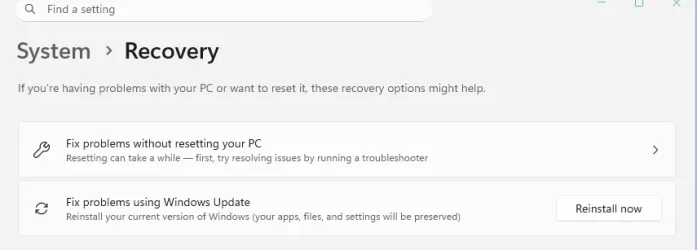
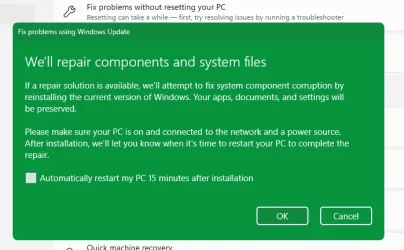
I've had good success with Settings -Recovery - Fix problems using Windows Update (Reinstall now). Takes a little time but easiest to do.


Snipaste_2026-07-22_05-53-36.webp

Snipaste_2026-07-22_05-54-11.webp
 

My Computers My Computers

  • At a glance

    Win 11 ProAMD Ryzen™ 7 7730U24GB Dual-Channel DDR4 @ 1596MHz (22-22-22-52)512MB ATI AMD Radeon Graphics (ASUStek Comput...
    OS
    Win 11 Pro
    Computer type
    Laptop
    Manufacturer/Model
    ASUS Vivobook
    CPU
    AMD Ryzen™ 7 7730U
    Motherboard
    M1605YA
    Memory
    24GB Dual-Channel DDR4 @ 1596MHz (22-22-22-52)
    Graphics Card(s)
    512MB ATI AMD Radeon Graphics (ASUStek Computer Inc)
    Monitor(s) Displays
    Generic PnP Monitor (1920x1200@60Hz) - P1 PLUS (1920x1080@59Hz)
    Screen Resolution
    1920 X 1200
    Hard Drives
    953GB Western Digital WD
    PSU
    45 Watts
    Mouse
    Lenovo Bluetooth.
    Internet Speed
    500 Mbps
    Browser
    Edge
    Antivirus
    Defender
  • At a glance

    Windows 11AMD Ryzen 7 5800H / 3.2 GHz32 GB DDR4 SDRAM 3200 MHzNVIDIA GeForce RTX 3060 6 GB GDDR6 SDRAM
    Operating System
    Windows 11
    Computer type
    Laptop
    Manufacturer/Model
    ACER NITRO
    CPU
    AMD Ryzen 7 5800H / 3.2 GHz
    Motherboard
    CZ Scala_CAS (FP6)
    Memory
    32 GB DDR4 SDRAM 3200 MHz
    Graphics card(s)
    NVIDIA GeForce RTX 3060 6 GB GDDR6 SDRAM
    Sound Card
    Realtek Audio. NVIDIA High Definition Audio
    Monitor(s) Displays
    15.6" LED backlight 1920 x 1080 (Full HD) 144 Hz
    Screen Resolution
    1920 x 1080 (Full HD)
    Hard Drives
    Samsung 970 Evo Plus 2TB NVMe M.2
    PSU
    180 Watt, 19.5 V
    Mouse
    Lenovo Bluetooth
    Internet Speed
    500 Mbps
    Browser
    Edge
    Antivirus
    Defender
I often have Defender open in a black window on my desktop PC having dual monitors using an RTX 2060 Super GPU. The issue clears if I log off/on again. I reckon its a display bug and just put up with it until MS fixes it if they ever do.
 

My Computer My Computer

At a glance

Windows 11 ProCore i7-13700K64 GB Kingston Fury Beast DDR5Gigabyte GeForce RTX 2060 Super Gaming OC 8G
OS
Windows 11 Pro
Computer type
PC/Desktop
Manufacturer/Model
Self build
CPU
Core i7-13700K
Motherboard
Asus TUF Gaming Plus WiFi Z790
Memory
64 GB Kingston Fury Beast DDR5
Graphics Card(s)
Gigabyte GeForce RTX 2060 Super Gaming OC 8G
Sound Card
Realtek S1200A
Monitor(s) Displays
Viewsonic VP2770 & Dell (secondary)
Screen Resolution
2560 x 1440
Hard Drives
Kingston KC3000 2TB NVME SSD & SATA HDDs & SSD
PSU
EVGA SuperNova G2 850W
Case
Nanoxia Deep Silence 1
Cooling
Noctua NH-D14
Keyboard
Microsoft Digital Media Pro
Mouse
Logitech Wireless
Internet Speed
80 Mb / s
Browser
Chrome
Antivirus
Defender, Malwarebytes Free & AdwCleaner
I was interested in the advice to do a repair install using both methods. I recently had a problem with computer freezes and tried a repair install (fix problems using Windows Update), which didn't fix the problem. Next, I downloaded the ISO, ran it and the problem was fixed. Does the ISO method work differently from the Settings method and does it do other things that Settings doesn't? Might have a bearing on the OP problem?
 

My Computer My Computer

At a glance

Windows 11 Home
OS
Windows 11 Home
I was interested in the advice to do a repair install using both methods. I recently had a problem with computer freezes and tried a repair install (fix problems using Windows Update), which didn't fix the problem. Next, I downloaded the ISO, ran it and the problem was fixed. Does the ISO method work differently from the Settings method and does it do other things that Settings doesn't? Might have a bearing on the OP problem?


The way I see it...

Via Windows Update, relies on the internet connection and the WU server.

Via the ISO... downloading the ISO requires internet connection, using that ISO as the source for un-corrupted files is completely LOCAL. Less things to go wrong when using the ISO method.
 

My Computers My Computers

  • At a glance

    Win 11 Home ♦♦♦26200.8875 ♦♦♦♦♦♦♦25H2AMD Ryzen 7 3700XG.Skill (F4-3200C14D-16GTZKW)EVGA RTX 2070 (08G-P4-2171-KR)
    OS
    Win 11 Home ♦♦♦26200.8875 ♦♦♦♦♦♦♦25H2
    Computer type
    PC/Desktop
    Manufacturer/Model
    Built by Ghot® [May 2020]
    CPU
    AMD Ryzen 7 3700X
    Motherboard
    Asus Pro WS X570-ACE (BIOS 5302)
    Memory
    G.Skill (F4-3200C14D-16GTZKW)
    Graphics Card(s)
    EVGA RTX 2070 (08G-P4-2171-KR)
    Sound Card
    Realtek ALC1220P / ALC S1220A
    Monitor(s) Displays
    Dell U3011 30"
    Screen Resolution
    2560 x 1600
    Hard Drives
    2x Samsung 860 EVO 500GB,
    WD 4TB Black FZBX - SATA III,
    WD 8TB Black FZBX - SATA III,
    DRW-24B1ST CD/DVD Burner
    PSU
    PC Power & Cooling 750W Quad EPS12V
    Case
    Cooler Master ATCS 840 Tower
    Cooling
    CM Hyper 212 EVO (push/pull)
    Keyboard
    Ducky DK9008 Shine II Blue LED
    Mouse
    Logitech Optical M-100
    Internet Speed
    300/300
    Browser
    Firefox (latest)
    Antivirus
    Bitdefender Total Security
    Other Info
    Speakers: Klipsch Pro Media 2.1
  • At a glance

    Windows XP Pro 32bit w/SP3AMD Athlon 64 X2 5000+ (OC'd @ 3.2Ghz)TWIN2X2048-6400C4DHX (2 x 1GB, DDR2 800)EVGA 256-P2-N758-TR GeForce 8600GT SSC
    Operating System
    Windows XP Pro 32bit w/SP3
    Computer type
    PC/Desktop
    Manufacturer/Model
    Built by Ghot® (not in use)
    CPU
    AMD Athlon 64 X2 5000+ (OC'd @ 3.2Ghz)
    Motherboard
    ASUS M2N32-SLI Deluxe Wireless Edition
    Memory
    TWIN2X2048-6400C4DHX (2 x 1GB, DDR2 800)
    Graphics card(s)
    EVGA 256-P2-N758-TR GeForce 8600GT SSC
    Sound Card
    Onboard
    Monitor(s) Displays
    ViewSonic G90FB Black 19" Professional (CRT)
    Screen Resolution
    up to 2048 x 1536
    Hard Drives
    WD 36GB 10,000rpm Raptor SATA
    Seagate 80GB 7200rpm SATA
    Lite-On LTR-52246S CD/RW
    Lite-On LH-18A1P CD/DVD Burner
    PSU
    PC Power & Cooling Silencer 750 Quad EPS12V
    Case
    Generic Beige case, 80mm fans
    Cooling
    ZALMAN 9500A 92mm CPU Cooler
    Keyboard
    Logitech Classic Keybooard 200
    Mouse
    Logitech Optical M-BT96a
    Internet Speed
    300/300
    Browser
    Firefox 3.x ??
    Antivirus
    Symantec (Norton)
    Other Info
    Still assembled, still runs. Haven't turned it on for 15 years?
Have you tried?
Resetting an app via Settings This is the safest and easiest method to clear frozen component settings: Press Win + I to open Settings. Go to Apps > Installed apps > System components. Search for Windows Security in the search bar. Click the three dots next to the app name and select Advanced options. Scroll down and click Repair. Wait for the process to complete. If that doesn't help, click Reset.
 

My Computer My Computer

At a glance

Windows 11
OS
Windows 11
Thank you for the replies folks...

To be honest, I have had supposedly 'safe' procedures go wrong on me in the past, resulting in an O/S I couldn't access or, at best, changes I had not looked for. So a non-functioning Windows Security app is not really an issue disastrous enough for me to take the risk of reinstalling the o/s in any way at all. I have Bitdefender installed now, so I am not without some kind of protection.

Some answers to some of the points above;

Have you tried?
Code:
Get-AppPackage Microsoft.SecHealthUI


Just tried. I get this as a response (PowerShell/Admin). What does it mean and what do I do now?

Name : Microsoft.SecHealthUI
Publisher : CN=Microsoft Corporation, O=Microsoft Corporation, L=Redmond, S=Washington, C=US
Architecture : X64
ResourceId :
Version : 1000.25873.9001.0
PackageFullName : Microsoft.SecHealthUI_1000.25873.9001.0_x64__8wekyb3d8bbwe
InstallLocation : C:\Program Files\WindowsApps\Microsoft.SecHealthUI_1000.25873.9001.0_x64__8wekyb3d8bbwe
IsFramework : False
PackageFamilyName : Microsoft.SecHealthUI_8wekyb3d8bbwe
PublisherId : 8wekyb3d8bbwe
IsResourcePackage : False
IsBundle : False
IsDevelopmentMode : False
NonRemovable : True
Dependencies : {Microsoft.VCLibs.140.00_14.0.33519.0_x64__8wekyb3d8bbwe,
Microsoft.UI.Xaml.2.7_7.2409.9001.0_x64__8wekyb3d8bbwe}
IsPartiallyStaged : False
SignatureKind : Store
Status : Ok

I used to have AVG installed, but removed it using Revo Unisntaller. Even though there are no traces left of the programme, since removing it I have had this present issue with Windows Security. Removing Bitdefender wouldn't help, since I installed it weeks after WS stopped working, just to have some security cover. The firewall part of Windows Security seems to be working just fine.

In summary - I don't think I have the 'nerve' to reinstall Windows in any form, just to fix this secific issue. If I can't get it working in the way I have been trying, I may just give up on it, as I say. Sorry to be a bit of a coward, but I have leaned through bitter experience that in this particular sphere, if anything can go wrong for me, it probably will!

Thanks once again.
 

My Computer My Computer

At a glance

Windows 11 23H2i9-11900KF64GB DDR4Asus ProArt RTX 4070 Ti Super 16GB
OS
Windows 11 23H2
Computer type
PC/Desktop
CPU
i9-11900KF
Motherboard
Intel Z590-PLUS
Memory
64GB DDR4
Graphics Card(s)
Asus ProArt RTX 4070 Ti Super 16GB
Hard Drives
1 x Evo 860 2TB + 2 x Evo 850 500GB SSDs
PSU
Corsair 850W
Cooling
Corsair H100i AIO
Your Security Center app is behind in app version (1000.27840.0.1000). Visit this MS page, and download the setup app:
Windows Security app update

When you run the setup, you won't see any visual confirmation. Restart Windows, and check the version again.
 

My Computer My Computer

At a glance

Windows 7
OS
Windows 7
I get this as a response (PowerShell/Admin). What does it mean and what do I do now?

Oh, I see now. Yes, will download the setup. :-)
 
Last edited:

My Computer My Computer

At a glance

Windows 11 23H2i9-11900KF64GB DDR4Asus ProArt RTX 4070 Ti Super 16GB
OS
Windows 11 23H2
Computer type
PC/Desktop
CPU
i9-11900KF
Motherboard
Intel Z590-PLUS
Memory
64GB DDR4
Graphics Card(s)
Asus ProArt RTX 4070 Ti Super 16GB
Hard Drives
1 x Evo 860 2TB + 2 x Evo 850 500GB SSDs
PSU
Corsair 850W
Cooling
Corsair H100i AIO
Now up to date, but no change with Windows Security. Every time I think I have found something else to try - such as running Win dows Health via scripts in Terminal, that process itself fails ('Can't find file specified' or some such thing). So even the repair tasks themselves end up failing, and so of course repair nothing.

Think I am getting to the end of my patience with this: as I say, I have been trying for months now. I can probably manage OK without Windows Security and stick with BitDefender.
 

My Computer My Computer

At a glance

Windows 11 23H2i9-11900KF64GB DDR4Asus ProArt RTX 4070 Ti Super 16GB
OS
Windows 11 23H2
Computer type
PC/Desktop
CPU
i9-11900KF
Motherboard
Intel Z590-PLUS
Memory
64GB DDR4
Graphics Card(s)
Asus ProArt RTX 4070 Ti Super 16GB
Hard Drives
1 x Evo 860 2TB + 2 x Evo 850 500GB SSDs
PSU
Corsair 850W
Cooling
Corsair H100i AIO

Latest Support Threads

Back
Top Bottom