Two Edge browsers open


fireberd

Retired
Member
VIP
Local time
1:46 PM
Posts
301
Location
Kansas City Missouri
OS
Windows 11 Pro
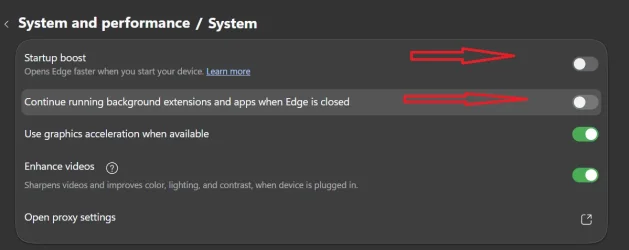
Recently I find Edge has opened a second browser. How do I prevent this? I open Edge, do what I want to do and upon closing Edge I find another open Edge.
 
Windows Build/Version
11 Pro, 25H2, 26200.8655

My Computer

System One

  • OS
    Windows 11 Pro
    Computer type
    Laptop
    Manufacturer/Model
    Dell Inspiron 16 5630
    CPU
    i7 1360P
    Motherboard
    Dell
    Memory
    16GB
    Graphics Card(s)
    Intel CPU
    Sound Card
    Realtek
    Monitor(s) Displays
    16" Touch Screen
    Screen Resolution
    1920X1080
    Hard Drives
    1TB Samsung NVME SSD
    PSU
    65 Watt Dell
    Case
    Dell
    Cooling
    Dell
    Keyboard
    Dell
    Mouse
    Trackpad
    Internet Speed
    Google Fiber
    Browser
    Edge
    Antivirus
    Defender and Malwarebytes
    Other Info
    Cakewalk by Bandlab and Presonus Studio One 4.6 Pro recording programs. MOTU recording interface
Screenshot 2026-06-11 122613.webp
 

My Computers

System One System Two

  • OS
    Windows 11 Pro 25H2 26200.8655
    Computer type
    PC/Desktop
    Manufacturer/Model
    Dell Optiplex 7080
    CPU
    i9-10900 10 core 20 threads
    Motherboard
    DELL 0J37VM
    Memory
    32 gb
    Graphics Card(s)
    none-Intel UHD Graphics 630
    Sound Card
    Integrated Realtek
    Monitor(s) Displays
    Benq 27
    Screen Resolution
    2560x1440
    Hard Drives
    2x1tb Solidigm m.2 nvme /External drives 512gb Samsung m.2 sata+2tb Kingston m2.nvme
    PSU
    500w
    Case
    MT
    Cooling
    Dell Premium
    Keyboard
    Logitech wired
    Mouse
    Logitech wireless
    Internet Speed
    so slow I'm too embarrassed to tell
    Browser
    #1 Edge #2 Firefox
    Antivirus
    Defender+MWB Premium
  • Operating System
    Windows 11 Pro 24H2 26200.8457
    Computer type
    PC/Desktop
    Manufacturer/Model
    Beelink Mini PC SER5
    CPU
    AMD Ryzen 7 6800U
    Memory
    32 gb
    Graphics card(s)
    integrated
    Sound Card
    integrated
    Monitor(s) Displays
    Benq 27
    Screen Resolution
    2560x1440
    Hard Drives
    1TB Crucial nvme
    Keyboard
    Logitech wired
    Mouse
    Logitech wireless
    Internet Speed
    still too embarrassed to tell
    Browser
    Firefox
    Antivirus
    Defender
    Other Info
    System 3 is non compliant Dell 9020 i7-4770/24gb ram Win11 PRO 26200.8457
Additionally look at these:

3 dots > Settings > Start, home, and new tab page.

Juggle with that page of settings.
 

My Computer

System One

  • OS
    Windows 11

Latest Support Threads

Back
Top Bottom