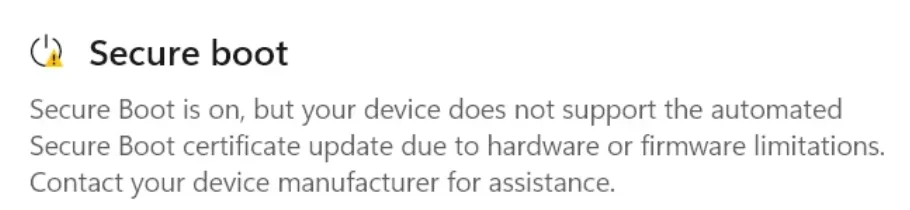
UEFI KEK Certs not updated.


Cameraman1955

Active member
Member
Local time
12:09 PM
Posts
74
OS
Windows 11 Pro 25H2 26200.7019
I have a Huawei D14 matebook from 2021 and updated the microsoft certificates, when I check this I get the following output, I see that the KEK cert is not updated is that stored in the bios ? Am I safe this way? Please help.
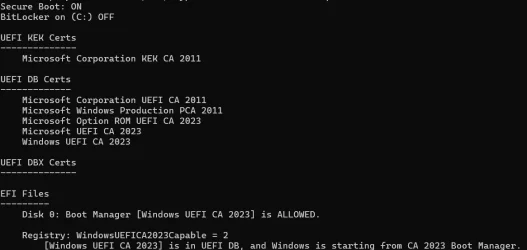
Schermafbeelding 2026-06-10 095938.webp
I also have this warning.
Schermafbeelding 2026-06-10 100347.webp
 

My Computer

System One

  • OS
    Windows 11 Pro 25H2 26200.7019
    Computer type
    PC/Desktop
    Manufacturer/Model
    Self built midi tower
    CPU
    Intel Core i7-8700K
    Motherboard
    Gigabyte Z390GX
    Memory
    Corsair 32GB 4x DDR4-2998 / PC4-23900 DDR4 SDRAM UDIMM
    Graphics Card(s)
    AMD RX570
    Sound Card
    Sound Blaster Z
    Monitor(s) Displays
    2x IIyama Prolite X2380HS
    Screen Resolution
    1920x1080
    Hard Drives
    Samsung SSD 970 EVO Plus NVMe 1TB
    Samsung SSD 970 EVO Plus NVMe 500GB
    PSU
    Seasonic 550W
    Cooling
    Noctua fans
    Keyboard
    Logitech G213
    Mouse
    Logitech Marble Mouse
    Browser
    Chrome
    Antivirus
    Norton
    Other Info
    Video/Audio editting machine

Maybe just wait a bit and keep restarting now and then and check the security settings again. When I did them on a few laptops, it took a few hours to "filter through" before the security settings changed (gradually) to you have everything needed or whatever. Leave the computer on for a few hours then restart maybe.

How did you update the security certificates? Via Windows update? Also keep running Windows update.

Just my two pennorth, but others, more expert than me, may know more.
 

My Computers

System One System Two

  • OS
    Windows 11 Home 25H2
    Computer type
    Laptop
    Manufacturer/Model
    HP Pavilion 14-ce3606sa
    CPU
    Core i5-1035G1
    Memory
    32gb
    Hard Drives
    Samsung 870 evo sata ssd
    Cooling
    Could be better
    Internet Speed
    50 mbps Starlink
    Browser
    Firefox
    Other Info
    Originally came installed with a 500gb H10 Optane ssd
  • Operating System
    Windows 11 Home
    Computer type
    Laptop
    Manufacturer/Model
    HP Pavilion ce3606sa
    CPU
    Intel Core i5-1035G1
    Memory
    16gb
    Hard Drives
    Hynix Gold P31 2TB
    Internet Speed
    200mbps Starlink
    Browser
    Firefox
    Antivirus
    Defender

My Computers

System One System Two

  • OS
    Windows 11 Pro build 26200.8524
    Computer type
    PC/Desktop
    Manufacturer/Model
    Home Built
    CPU
    Intel i7-4790
    Motherboard
    Asus H97 Pro Gamer with add-on TPM1.2 module
    Memory
    Teams DDR3-1600 4x4 GB
    Graphics Card(s)
    MSI Nvidia GeForce GTX 1050Ti
    Sound Card
    Realtek ALC1150
    Monitor(s) Displays
    Dell P2425D
    Screen Resolution
    2560 by 1440 pixels
    Hard Drives
    Corsair NVMe M.2 Core XT 1000 GB (Windows 11 v.25H2); Samsung SATA Evo 870 500 GB (Windows 11 v.25H2);
    PSU
    Corsair HX850
    Case
    Gigabyte Solo 210
    Cooling
    Zalman CNPS7X Tower
    Keyboard
    Microsoft AIO Wireless (includes touchpad)
    Mouse
    HP S1000 Plus Wireless
    Internet Speed
    500 Mb fiber optic
    Browser
    Chrome; MS Edge
    Antivirus
    Windows Defender
  • Operating System
    MacOS 12 Monterey
    Computer type
    Laptop
    Manufacturer/Model
    Apple Macbook Air
    CPU
    Intel Core i5
    Memory
    8 GB
    Graphics card(s)
    Intel integrated
    Screen Resolution
    1440 by 900 pixels
    Hard Drives
    128 GB
    Keyboard
    Built-in
    Mouse
    Microsoft Wireless
    Internet Speed
    802.11 ac
    Browser
    Chrome; Safari
    Antivirus
    N/A
this may explain better how the KEK database is updated
they will normally update after the 2023 certs have been installed by Windows update
or by a BIOS update from the manufacturer

also here is a MS KEK key update which has links to the KEK keys for downlaod
the download for the KEK keys downlaod is about halfway down the page.

so first use the KEK keys form MS then check Windows update then check the manufacturers website.
best of luck Steve ..
 
Last edited:

My Computers

System One System Two

  • OS
    Debian Trixie KDE Windows 11 Home
    Computer type
    PC/Desktop
    Manufacturer/Model
    HP 24" AiO
    CPU
    Ryzen 7 5825u
    Motherboard
    HP
    Memory
    64GB DDR4 3200
    Graphics Card(s)
    Ryzen 7 5825u
    Sound Card
    RealTek
    Monitor(s) Displays
    24" HP AiO
    Screen Resolution
    1920 x 1080 @60 Hz
    Hard Drives
    1TB WD Blue SN580 M2 SSD Partitioned.
    2x 1TB USB HDD External Backup/Storage.
    PSU
    90W external power brick
    Case
    24" All in One
    Cooling
    Default Air Cooling
    Keyboard
    HP WiFi UK extended
    Mouse
    HP WiFi 3 Button
    Internet Speed
    1GB full fibre
    Browser
    Edge & Firefox
    Antivirus
    AVG Internet Security/Windows Defender
    Other Info
    Mainly Open Source Software
  • Operating System
    Ubuntu 22.04.5 LTS
    Computer type
    Laptop
    Manufacturer/Model
    Dell 13" Latitude 2017
    CPU
    i5 7200u
    Motherboard
    Dell
    Memory
    16GB DDR4
    Graphics card(s)
    Intel
    Sound Card
    Intel
    Monitor(s) Displays
    13" Dell Laptop
    Hard Drives
    250GB Crucial 2.5" SSD
    Mouse
    Generic WiFi 3 button
    Internet Speed
    WiFi only
    Browser
    Firefox
    Antivirus
    ClamAV TK
    Other Info
    Mainly Open Source Software
All you need to do is let MS do it's analysis and it will be done automatically.
So you need it connected up for sometime, maybe days. Checking Windows updates now and again.
That should be all you need to do for a 2021 machine.
You could check the Manufacturers updates for your specific product but I doubt you will get anything after so many years.

If you read too much about the subject it gets overcomplicated, error prone, and wastes your time.
 

My Computer

System One

  • OS
    Windows 11

Latest Support Threads

Back
Top Bottom