un/activated


Hippi

New member
Local time
2:23 AM
Posts
15
OS
Win 11 Pro 25H2 Build 26200.7705
After successfully resolving my greyed out "get latest updates" problem I now have another problem. After my pc has been running for about 4 hours I get a notification saying that I need to activate windows. The odd thing is that when I select the activation troubleshooter it comes back with the message that it has successfully activated windows. But, again, this only lasts for about 4 hours when the activation message reappears. I have had a genuine version of windows since win 10.
I am running 25H2 26200.7623
 

My Computer My Computer

At a glance

Win 11 Pro 25H2 Build 26200.7705Intel i5 94008 Gb
OS
Win 11 Pro 25H2 Build 26200.7705
Computer type
PC/Desktop
Manufacturer/Model
msi
CPU
Intel i5 9400
Motherboard
H310M Pro
Memory
8 Gb
you could try
1. get your product key

once you have the product key open
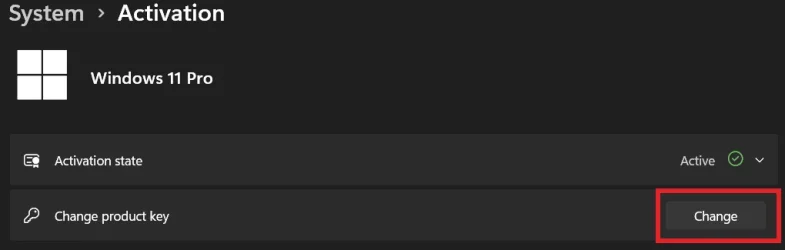
settings > system > activation

in this window click
upgrade your version of Windows

then click
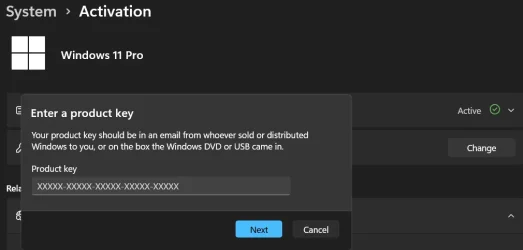
change product key

enter your product key that you have already found
and the system should re-activate with that key.

best of luck Steve ..
 

My Computers My Computers

  • At a glance

    Debian 13 KDE .. Windows 11 HomeRyzen 7 5825u64GB DDR4 3200Ryzen 7 5825u
    OS
    Debian 13 KDE .. Windows 11 Home
    Computer type
    PC/Desktop
    Manufacturer/Model
    HP 24" AiO
    CPU
    Ryzen 7 5825u
    Motherboard
    HP
    Memory
    64GB DDR4 3200
    Graphics Card(s)
    Ryzen 7 5825u
    Sound Card
    RealTek
    Monitor(s) Displays
    24" HP AiO
    Screen Resolution
    1920 x 1080 @60 Hz
    Hard Drives
    1TB WD Blue SN580 M2 SSD Partitioned.
    2x 1TB USB HDD External Backup/Storage.
    PSU
    90W external power brick
    Case
    24" All in One
    Cooling
    Default Air Cooling
    Keyboard
    HP WiFi UK extended
    Mouse
    HP WiFi 3 Button
    Internet Speed
    1GB full fibre
    Browser
    Edge & Firefox
    Antivirus
    AVG Internet Security/Windows Defender
    Other Info
    Mainly Open Source Software
  • At a glance

    Ubuntu 22.04.5 LTSi5 7200u16GB DDR4Intel
    Operating System
    Ubuntu 22.04.5 LTS
    Computer type
    Laptop
    Manufacturer/Model
    Dell 13" Latitude 2017
    CPU
    i5 7200u
    Motherboard
    Dell
    Memory
    16GB DDR4
    Graphics card(s)
    Intel
    Sound Card
    Intel
    Monitor(s) Displays
    13" Dell Laptop
    Hard Drives
    250GB Crucial 2.5" SSD
    Mouse
    Generic WiFi 3 button
    Internet Speed
    WiFi only
    Browser
    Firefox
    Antivirus
    ClamAV TK
    Other Info
    Mainly Open Source Software
you could try
1. get your product key

once you have the product key open
settings > system > activation

in this window click
upgrade your version of Windows

then click
change product key

enter your product key that you have already found
and the system should re-activate with that key.

best of luck Steve ..
Thank you for the reply but on the activation screen I do not have an option to upgrade your version of
Windows
you could try
1. get your product key

once you have the product key open
settings > system > activation

in this window click
upgrade your version of Windows

then click
change product key

enter your product key that you have already found
and the system should re-activate with that key.

best of luck Steve ..
Thank you for the reply but on the activation screen there is no option to upgrade the version of Windows
 

My Computer My Computer

At a glance

Win 11 Pro 25H2 Build 26200.7705Intel i5 94008 Gb
OS
Win 11 Pro 25H2 Build 26200.7705
Computer type
PC/Desktop
Manufacturer/Model
msi
CPU
Intel i5 9400
Motherboard
H310M Pro
Memory
8 Gb
Source of your Windows product and/or license key?

Is this a new install?
 

My Computers My Computers

  • At a glance

    Windows 11 2xH2 (latest update ... forever anal)Intel i5-124008GBNVIDIA GeForce GT730
    OS
    Windows 11 2xH2 (latest update ... forever anal)
    Computer type
    PC/Desktop
    Manufacturer/Model
    HP Slim S01
    CPU
    Intel i5-12400
    Memory
    8GB
    Graphics Card(s)
    NVIDIA GeForce GT730
    Sound Card
    OOBE
    Monitor(s) Displays
    Acer 32"
    Screen Resolution
    1920x1080
    Hard Drives
    512GB KIOXIA NVMe
    1TB SATA SSD
    PSU
    OOBE
    Case
    OOBE
    Cooling
    OOBE
    Keyboard
    BT
    Mouse
    BT
    Browser
    Brave FFox Chrome Opera
    Antivirus
    KIS
  • At a glance

    Windows 11 Pro 2xH2 (latest update ... 4ever ...i7-1165G7 @ 2.80GHzIntel Iris Xe Graphics
    Operating System
    Windows 11 Pro 2xH2 (latest update ... 4ever anal)
    Computer type
    Laptop
    Manufacturer/Model
    HP Pavillion 15
    CPU
    i7-1165G7 @ 2.80GHz
    Graphics card(s)
    Intel Iris Xe Graphics
    Hard Drives
    Samsung NVMe 512GB
    + numerous/multiple SSD Type C USB enclosures
    Internet Speed
    NBN FTTN 50
    Browser
    Brave
    Antivirus
    KIS

My Computers My Computers

  • At a glance

    Win 11 Pro 25H2 26200.8655Intel® Core™ i7-14700KG.SKILL Ripjaws S5 Series 64GB (2 x 32GB) DDR5ASUS GeForce RTX 4070 Super 12GB
    OS
    Win 11 Pro 25H2 26200.8655
    Computer type
    PC/Desktop
    Manufacturer/Model
    Self Built
    CPU
    Intel® Core™ i7-14700K
    Motherboard
    ASUS TUF Z690-PLUS WIFI BIOS 4505 11/29/25
    Memory
    G.SKILL Ripjaws S5 Series 64GB (2 x 32GB) DDR5
    Graphics Card(s)
    ASUS GeForce RTX 4070 Super 12GB
    Sound Card
    Sound Blaster AE-5 Plus
    Monitor(s) Displays
    ASUS TUF Gaming 27" 2K HDR Gaming
    Screen Resolution
    2560 x 1440
    Hard Drives
    Samsung 990 Pro 1TB NVMe (Win 11 25H2)
    SK hynix P41 500GB NVMe 25H2 DEV/Games
    SK hynix P41 2TB NVMe (x3)
    Crucial P3 Plus 4TB
    PSU
    Corsair RM850x Shift
    Case
    Antec Dark Phantom DP502 FLUX
    Cooling
    Corsair Nautilus 360 RS AIO
    Keyboard
    Logitech MK 320
    Mouse
    Razer Basilisk V3
    Internet Speed
    750Mbs
    Browser
    Firefox
    Antivirus
    Winows Security
    Other Info
    MR 8.1 Home
  • At a glance

    Win 11 Pro 25H2 26200.8655Intel Core i7-11700F64 GB DDR4MSI GeForce RTX 3060 Ventus 2X 12GB
    Operating System
    Win 11 Pro 25H2 26200.8655
    Computer type
    PC/Desktop
    Manufacturer/Model
    Self Built
    CPU
    Intel Core i7-11700F
    Motherboard
    Asus TUF Gaming Z590 Plus WiFi (BIOS 2803)
    Memory
    64 GB DDR4
    Graphics card(s)
    MSI GeForce RTX 3060 Ventus 2X 12GB
    Sound Card
    SoundBlaster Audigy Fx V2
    Monitor(s) Displays
    Samsung F27T350
    Screen Resolution
    1920x1080
    Hard Drives
    Samsung 980 Pro 1TB
    Samsung 970 EVO Plus 2TB
    Samsung 870 EVO 500GB SSD
    PSU
    Corsair HX750
    Case
    Cougar MX330-G Window
    Cooling
    Thermalright Frozen Edge 240 Black AIO
    Internet Speed
    350Mbps
    Browser
    Firefox
    Antivirus
    Windows Security
  • System Three
    Win 11 Pro 25H2 26200.8655
    ASUS PRIME Z370-P II BIOS 3004 7/12/21
    Intel Core i7-8700 CPU @ 3.20GHz
    32GB DDR4 RAM (4x8)
    iGPU Intel UHD Graphics 630
    Mid-Tower Desktop
Source of your Windows product and/or license key?

Is this a new install?
Thanks for the reply. The source is my original win 10 key, the installs were all upgrades via updates
 

My Computer My Computer

At a glance

Win 11 Pro 25H2 Build 26200.7705Intel i5 94008 Gb
OS
Win 11 Pro 25H2 Build 26200.7705
Computer type
PC/Desktop
Manufacturer/Model
msi
CPU
Intel i5 9400
Motherboard
H310M Pro
Memory
8 Gb
The source is my original win 10 key
But what was the source of your Win 10 key?

It wouldn't be the first time that a user's key from a dubious source has satisfied requirements for some time, only to be swooped on eventually by Windows/Microsoft in some later update process.
 

My Computers My Computers

  • At a glance

    Windows 11 2xH2 (latest update ... forever anal)Intel i5-124008GBNVIDIA GeForce GT730
    OS
    Windows 11 2xH2 (latest update ... forever anal)
    Computer type
    PC/Desktop
    Manufacturer/Model
    HP Slim S01
    CPU
    Intel i5-12400
    Memory
    8GB
    Graphics Card(s)
    NVIDIA GeForce GT730
    Sound Card
    OOBE
    Monitor(s) Displays
    Acer 32"
    Screen Resolution
    1920x1080
    Hard Drives
    512GB KIOXIA NVMe
    1TB SATA SSD
    PSU
    OOBE
    Case
    OOBE
    Cooling
    OOBE
    Keyboard
    BT
    Mouse
    BT
    Browser
    Brave FFox Chrome Opera
    Antivirus
    KIS
  • At a glance

    Windows 11 Pro 2xH2 (latest update ... 4ever ...i7-1165G7 @ 2.80GHzIntel Iris Xe Graphics
    Operating System
    Windows 11 Pro 2xH2 (latest update ... 4ever anal)
    Computer type
    Laptop
    Manufacturer/Model
    HP Pavillion 15
    CPU
    i7-1165G7 @ 2.80GHz
    Graphics card(s)
    Intel Iris Xe Graphics
    Hard Drives
    Samsung NVMe 512GB
    + numerous/multiple SSD Type C USB enclosures
    Internet Speed
    NBN FTTN 50
    Browser
    Brave
    Antivirus
    KIS
But what was the source of your Win 10 key?

It wouldn't be the first time that a user's key from a dubious source has satisfied requirements for some time, only to be swooped on eventually by Windows/Microsoft in some later update process.
The source was my win 10 installation disc
 

My Computer My Computer

At a glance

Win 11 Pro 25H2 Build 26200.7705Intel i5 94008 Gb
OS
Win 11 Pro 25H2 Build 26200.7705
Computer type
PC/Desktop
Manufacturer/Model
msi
CPU
Intel i5 9400
Motherboard
H310M Pro
Memory
8 Gb
Another way to do this if type in the run box slui 4

Enter your location and you will get a phone number you can call with the installation ID that is on the screen.

Call the number and provide the installation ID then they provide a confirmation ID to activate Windows.

If it was an OEM key it may not work but should for retail keys.
 

My Computer My Computer

At a glance

Windows 11 Pro
OS
Windows 11 Pro
The source was my win 10 installation disc
*SIGH* But what was the (purchase) source of the disc ... WHERE DID YOU BUY IT FROM??? (or maybe this evasiveness an indication of the answer I suspect ...?? :devilish:)

(Blood ... stone ...)
 

My Computers My Computers

  • At a glance

    Windows 11 2xH2 (latest update ... forever anal)Intel i5-124008GBNVIDIA GeForce GT730
    OS
    Windows 11 2xH2 (latest update ... forever anal)
    Computer type
    PC/Desktop
    Manufacturer/Model
    HP Slim S01
    CPU
    Intel i5-12400
    Memory
    8GB
    Graphics Card(s)
    NVIDIA GeForce GT730
    Sound Card
    OOBE
    Monitor(s) Displays
    Acer 32"
    Screen Resolution
    1920x1080
    Hard Drives
    512GB KIOXIA NVMe
    1TB SATA SSD
    PSU
    OOBE
    Case
    OOBE
    Cooling
    OOBE
    Keyboard
    BT
    Mouse
    BT
    Browser
    Brave FFox Chrome Opera
    Antivirus
    KIS
  • At a glance

    Windows 11 Pro 2xH2 (latest update ... 4ever ...i7-1165G7 @ 2.80GHzIntel Iris Xe Graphics
    Operating System
    Windows 11 Pro 2xH2 (latest update ... 4ever anal)
    Computer type
    Laptop
    Manufacturer/Model
    HP Pavillion 15
    CPU
    i7-1165G7 @ 2.80GHz
    Graphics card(s)
    Intel Iris Xe Graphics
    Hard Drives
    Samsung NVMe 512GB
    + numerous/multiple SSD Type C USB enclosures
    Internet Speed
    NBN FTTN 50
    Browser
    Brave
    Antivirus
    KIS

My Computer My Computer

At a glance

Win 11 Pro 25H2 Build 26200.7705Intel i5 94008 Gb
OS
Win 11 Pro 25H2 Build 26200.7705
Computer type
PC/Desktop
Manufacturer/Model
msi
CPU
Intel i5 9400
Motherboard
H310M Pro
Memory
8 Gb
The source was my win 10 installation disc
THe key was on the documentation (sleeve) of the installation disc. It ws bought from a large computer store and the disc and sleeve looked totally genuine
 

My Computer My Computer

At a glance

Win 11 Pro 25H2 Build 26200.7705Intel i5 94008 Gb
OS
Win 11 Pro 25H2 Build 26200.7705
Computer type
PC/Desktop
Manufacturer/Model
msi
CPU
Intel i5 9400
Motherboard
H310M Pro
Memory
8 Gb
*SIGH* But what was the (purchase) source of the disc ... WHERE DID YOU BUY IT FROM??? (or maybe this evasiveness an indication of the answer I suspect ...?? :devilish:)

(Blood ... stone ...)
The key was on the documentation (sleeve) of the installation disc. It was bought from a large computer store and the disc and sleeve looked totally genuine
 

My Computer My Computer

At a glance

Win 11 Pro 25H2 Build 26200.7705Intel i5 94008 Gb
OS
Win 11 Pro 25H2 Build 26200.7705
Computer type
PC/Desktop
Manufacturer/Model
msi
CPU
Intel i5 9400
Motherboard
H310M Pro
Memory
8 Gb
After successfully resolving my greyed out "get latest updates" problem I now have another problem. After my pc has been running for about 4 hours I get a notification saying that I need to activate windows. The odd thing is that when I select the activation troubleshooter it comes back with the message that it has successfully activated windows. But, again, this only lasts for about 4 hours when the activation message reappears. I have had a genuine version of windows since win 10.
I am running 25H2 26200.7623

I have not heard about this form of OS corruption before.
I suggest you reinstall Windows.
Download Windows 11 ISO file - ElevenForumTutorials
Create Windows 11 Bootable USB Installation Media - ElevenForumTutorials
Clean Install Windows 11 - ElevenForumTutorials

But first, backup your own files and applications' installation files [and their activation / registration keys].
And save yourself some time & effort by backing up your hardware drivers.
Backup and Restore Device Drivers - ElevenForumTutorials

In the unlikely event of a re-occurence, use slui as KevTech suggested above in post #9.

@NavyLCDR Do you have any advice?


Denis
 

My Computer My Computer

At a glance

Windows 11 Home x64 Version 25H2 Build 26200....
OS
Windows 11 Home x64 Version 25H2 Build 26200.8037
I agree with Denis that a clean install is the best thing to do. I will suggest you to create a Data partition to put your data (on a partition other than C:). This way you can reinstall Windows without loosing your data

I suppose you have a backup drive so why don't you use a drive image software to make partitions images backups?
After you have your computer running well, create an OS partitions (EFI, MSR, C: and Recovery) backup.
If things go wrong again, in less than half a hour you will have computer running fresh and clean again.

I update my Data backup every week and create an OS partitions (EFI, MSR, C: and Recovery) backup every year (I create an image before upgrading and another after upgrading)
 

My Computers My Computers

  • At a glance

    Windows 11 Pro - Windows 7 HP 64 - Lubuntui5 6600K - 800MHz to 4400MHz4+4G GSkill DDR4 3000IG - Intel 530
    OS
    Windows 11 Pro - Windows 7 HP 64 - Lubuntu
    Computer type
    PC/Desktop
    Manufacturer/Model
    custom build
    CPU
    i5 6600K - 800MHz to 4400MHz
    Motherboard
    GA-Z170-HD3P
    Memory
    4+4G GSkill DDR4 3000
    Graphics Card(s)
    IG - Intel 530
    Monitor(s) Displays
    Samsung 226BW
    Screen Resolution
    1680x1050
    Hard Drives
    (1) -1 SM951 – 128GB M.2 AHCI PCIe SSD drive for Win 11
    (2) -1 WD SATA 3 - 1T for Data
    (3) -1 WD SATA 3 - 1T for backup
    (4) -1 BX500 SSD - 256G for Windows 7 and Lubuntu
    PSU
    Thermaltake 450W TR2 gold
    Keyboard
    Old and good Chicony mechanical keyboard
    Mouse
    Logitech mX performance - 9 buttons (had to disable some)
    Internet Speed
    500 Mb/s
    Browser
    Firefox 64
  • At a glance

    Windows 11 Proi7-4500U 800- 3000MHz(4+4)G DDR3 1600IG intel 4400 + NVIDIA GeForce GT 745M
    Operating System
    Windows 11 Pro
    Computer type
    Laptop
    Manufacturer/Model
    Asus Q550LF
    CPU
    i7-4500U 800- 3000MHz
    Motherboard
    Asus Q550LF
    Memory
    (4+4)G DDR3 1600
    Graphics card(s)
    IG intel 4400 + NVIDIA GeForce GT 745M
    Sound Card
    Realtek
    Monitor(s) Displays
    LG Display LP156WF4-SPH1
    Screen Resolution
    1920 x 1080
    Hard Drives
    BX500 120G SSD for Windows and programs
    & 1T HDD for data
    Internet Speed
    500 Mb/s
    Browser
    Firefox 64
I agree with Denis that a clean install is the best thing to do. I will suggest you to create a Data partition to put your data (on a partition other than C:). This way you can reinstall Windows without loosing your data

I suppose you have a backup drive so why don't you use a drive image software to make partitions images backups?
After you have your computer running well, create an OS partitions (EFI, MSR, C: and Recovery) backup.
If things go wrong again, in less than half a hour you will have computer running fresh and clean again.

I update my Data backup every week and create an OS partitions (EFI, MSR, C: and Recovery) backup every year (I create an image before upgrading and another after upgrading)
Thanks for the info, but I dont fancy a complete reinstall as I also have 25+ other programs installed. As it happens I have 3 separate drives: C for programs, D for data and E for back-ups. I use Macrium software to copy the C drive weekly as well as copying most of the data files onto the E drive.

When the activation message appears I click on the troubleshooter which returns with the message "we have activated your windows". Alternatively I have logged off my local account and logged on using my MS account which results in the "digital activation with your MS account" message.

Could it be that my problem is the result of my updating the BIOS a while back??
 

My Computer My Computer

At a glance

Win 11 Pro 25H2 Build 26200.7705Intel i5 94008 Gb
OS
Win 11 Pro 25H2 Build 26200.7705
Computer type
PC/Desktop
Manufacturer/Model
msi
CPU
Intel i5 9400
Motherboard
H310M Pro
Memory
8 Gb
Could it be that my problem is the result of my updating the BIOS a while back??
Don't think so.
BIOS update can be related to issues with Bitlocker
 

My Computers My Computers

  • At a glance

    Windows 11 Pro - Windows 7 HP 64 - Lubuntui5 6600K - 800MHz to 4400MHz4+4G GSkill DDR4 3000IG - Intel 530
    OS
    Windows 11 Pro - Windows 7 HP 64 - Lubuntu
    Computer type
    PC/Desktop
    Manufacturer/Model
    custom build
    CPU
    i5 6600K - 800MHz to 4400MHz
    Motherboard
    GA-Z170-HD3P
    Memory
    4+4G GSkill DDR4 3000
    Graphics Card(s)
    IG - Intel 530
    Monitor(s) Displays
    Samsung 226BW
    Screen Resolution
    1680x1050
    Hard Drives
    (1) -1 SM951 – 128GB M.2 AHCI PCIe SSD drive for Win 11
    (2) -1 WD SATA 3 - 1T for Data
    (3) -1 WD SATA 3 - 1T for backup
    (4) -1 BX500 SSD - 256G for Windows 7 and Lubuntu
    PSU
    Thermaltake 450W TR2 gold
    Keyboard
    Old and good Chicony mechanical keyboard
    Mouse
    Logitech mX performance - 9 buttons (had to disable some)
    Internet Speed
    500 Mb/s
    Browser
    Firefox 64
  • At a glance

    Windows 11 Proi7-4500U 800- 3000MHz(4+4)G DDR3 1600IG intel 4400 + NVIDIA GeForce GT 745M
    Operating System
    Windows 11 Pro
    Computer type
    Laptop
    Manufacturer/Model
    Asus Q550LF
    CPU
    i7-4500U 800- 3000MHz
    Motherboard
    Asus Q550LF
    Memory
    (4+4)G DDR3 1600
    Graphics card(s)
    IG intel 4400 + NVIDIA GeForce GT 745M
    Sound Card
    Realtek
    Monitor(s) Displays
    LG Display LP156WF4-SPH1
    Screen Resolution
    1920 x 1080
    Hard Drives
    BX500 120G SSD for Windows and programs
    & 1T HDD for data
    Internet Speed
    500 Mb/s
    Browser
    Firefox 64
Back
Top Bottom