Unable to reinstall Windows with rufus bootable USB


futbolfan

Member
Local time
2:20 AM
Posts
23
OS
Windows 11
I have been successfully running Windows 11 v24H2 on an ASUS E403SA VivoBook. However, while executing some disk partitioning tasks, the system froze and was powered down. Now the system opens into the legacy BIOS screen when powered on and the boot menu only offers "Enter Setup" Here is what I've observed and done since the crash.

* Attempt to reboot failed
* Boot menu initially offered "Windows Boot Manager" as an option but system entered recovery mode
* Attempt to reinstall Windows with bootable media on USB drive failed
(Windows 11 can't be installed on disk 0 partition 2 (The selected disk is of the GPT partition style)
* Used diskpart from cmd to convert disk from GPT to MBR
* From a cmd prompt, entered >bootrec/rebuildbcd
( Identified 0 Windows installations; System32>c:\boot is corrupted and unreadable)
* Downloaded latest firmware (E403SA.301) and successfully upgraded the BIOS with the Easy Flash utility
* Boot menu now only offers "Enter Setup"; Windows recovery mode is no longer available
* Attempt to reinstall Windows with bootable media is not possible because the USB drive does not appear in Boot Override on the Save & Exit screen of the Legacy BIOS
* Main screen of Aptio Setup Utility verifies that American Megatrends 301 is the BIOS version.
* In Boot screen - Changed FastStart to [Disabled]; (Launch CSM is also Disabled at this point)
* In Security screen - Changed Secure Boot Control to [Disabled]
* Returned to Boot screen - Changed Launch CSM to [Enabled]
* Boot menu still only offers "Enter Setup"
* Legacy USB Support is [Enabled]
* USB Mass Storage Driver Support is [Enabled]
* Mass Storage Device 1.00 is [Auto]
Note: Installation Media is on a bootable USB drive created with rufus v4.8 using an MBR partition scheme, BIOS (or UEFI-CSM) target system, and NTFS file system.
ASUS Support site: "If there is nothing in the boot option, it means that the device cannot detect media storage correctly."
?Do I need to use FAT32 rather than NTFS? If so, rufus does not offer FAT32 for this .iso file (5.6GB) on this 32GB device..

I'm out of ideas. Thanks in advance for any help.

Regards,
John
 
Windows Build/Version
version 24H2 (build 26100.3194)

My Computer My Computer

At a glance

Windows 11Intel i5-2400 @ 3.10GHz8.00 GBATI Mobility Radeon HD 4500
OS
Windows 11
Computer type
PC/Desktop
Manufacturer/Model
Dell Optiplex 790
CPU
Intel i5-2400 @ 3.10GHz
Motherboard
Dell 0D28YY
Memory
8.00 GB
Graphics Card(s)
ATI Mobility Radeon HD 4500
Other Info
Dual boot with Windows 10
However, while executing some disk partitioning tasks, the system froze and was powered down.
What tasks exactly? Were you working in a live environment?
 

My Computers My Computers

  • At a glance

    Windows 11 Pro 25H2 26200.8655i9-10900 10 core 20 threads32 gbnone-Intel UHD Graphics 630
    OS
    Windows 11 Pro 25H2 26200.8655
    Computer type
    PC/Desktop
    Manufacturer/Model
    Dell Optiplex 7080
    CPU
    i9-10900 10 core 20 threads
    Motherboard
    DELL 0J37VM
    Memory
    32 gb
    Graphics Card(s)
    none-Intel UHD Graphics 630
    Sound Card
    Integrated Realtek
    Monitor(s) Displays
    Benq 27
    Screen Resolution
    2560x1440
    Hard Drives
    2x1tb Solidigm m.2 nvme /External drives 512gb Samsung m.2 sata+2tb Kingston m2.nvme
    PSU
    500w
    Case
    MT
    Cooling
    Dell Premium
    Keyboard
    Logitech wired
    Mouse
    Logitech wireless
    Internet Speed
    so slow I'm too embarrassed to tell
    Browser
    #1 Edge #2 Firefox
    Antivirus
    Defender+MWB Premium
  • At a glance

    Windows 11 Pro 24H2 26200.8457AMD Ryzen 7 6800U32 gbintegrated
    Operating System
    Windows 11 Pro 24H2 26200.8457
    Computer type
    PC/Desktop
    Manufacturer/Model
    Beelink Mini PC SER5
    CPU
    AMD Ryzen 7 6800U
    Memory
    32 gb
    Graphics card(s)
    integrated
    Sound Card
    integrated
    Monitor(s) Displays
    Benq 27
    Screen Resolution
    2560x1440
    Hard Drives
    1TB Crucial nvme
    Keyboard
    Logitech wired
    Mouse
    Logitech wireless
    Internet Speed
    still too embarrassed to tell
    Browser
    Firefox
    Antivirus
    Defender
    Other Info
    System 3 is non compliant Dell 9020 i7-4770/24gb ram Win11 PRO 26200.8457
Do you have another PC? Just wondering if you actually saw two disks listed from diskpart (system drive + USB device). Or maybe it didn't see the system drive, and you accidentally overwrote the USB device with your commands.

Booting the same USB drive off another PC would test if you clobbered it.
 

My Computer My Computer

At a glance

Windows 7
OS
Windows 7
glasskuter: Merging and resizing C partition
garlin: Good thought! Not the issue though because I was able to boot another MBR system from this USB drive.
 

My Computer My Computer

At a glance

Windows 11Intel i5-2400 @ 3.10GHz8.00 GBATI Mobility Radeon HD 4500
OS
Windows 11
Computer type
PC/Desktop
Manufacturer/Model
Dell Optiplex 790
CPU
Intel i5-2400 @ 3.10GHz
Motherboard
Dell 0D28YY
Memory
8.00 GB
Graphics Card(s)
ATI Mobility Radeon HD 4500
Other Info
Dual boot with Windows 10
One more idea: The Windows media that you made, did it contain only a single edition of Windows? Apparently Rufus had a bug related to that in 4.8 and so a 4.9 version that fixes the issue has been released. You might want to see if that works better.
 

My Computers My Computers

  • At a glance

    Win11 Pro 25H2 (RTM+)Intel i7-14650HX32 GBNo GPU - Built-in Intel Graphics
    OS
    Win11 Pro 25H2 (RTM+)
    Computer type
    PC/Desktop
    Manufacturer/Model
    Acemagic
    CPU
    Intel i7-14650HX
    Memory
    32 GB
    Graphics Card(s)
    No GPU - Built-in Intel Graphics
    Sound Card
    Integrated
    Monitor(s) Displays
    Varies as machine will often be moved to locations with different monitors
    Screen Resolution
    Varies
    Hard Drives
    1 x 1TB Gen 4 NVMe SSD
    PSU
    120W Power Brick
    Keyboard
    Corsair K70 Max RGB Magnetic Keyboard
    Mouse
    Logitech MX Master 3
    Internet Speed
    1Gb Up / 1 Gb Down
    Browser
    Edge
    Antivirus
    Windows Defender
  • At a glance

    Win11 Pro 25H2 (RTM+)Intel i7-1255U16 GBIntel Iris Xe Graphics
    Operating System
    Win11 Pro 25H2 (RTM+)
    Computer type
    Laptop
    Manufacturer/Model
    Lenovo ThinkBook 13x Gen 2
    CPU
    Intel i7-1255U
    Memory
    16 GB
    Graphics card(s)
    Intel Iris Xe Graphics
    Sound Card
    Realtek® ALC3306-CG codec
    Monitor(s) Displays
    13.3-inch IPS Display
    Screen Resolution
    WQXGA (2560 x 1600)
    Hard Drives
    2 TB 4 x 4 NVMe SSD
    PSU
    USB-C / Thunderbolt 4 Power / Charging
    Keyboard
    Backlit, spill resistant keyboard
    Mouse
    Buttonless Glass Precision Touchpad
    Internet Speed
    1Gb Up / 1Gb Down
    Browser
    Edge
    Antivirus
    Windows Defender
    Other Info
    WiFi 6e / Bluetooth 5.1 / Facial Recognition / Fingerprint Sensor / ToF (Time of Flight) Human Presence Sensor

My Computers My Computers

  • At a glance

    Windows 11 2xH2 (latest update ... forever anal)Intel i5-124008GBNVIDIA GeForce GT730
    OS
    Windows 11 2xH2 (latest update ... forever anal)
    Computer type
    PC/Desktop
    Manufacturer/Model
    HP Slim S01
    CPU
    Intel i5-12400
    Memory
    8GB
    Graphics Card(s)
    NVIDIA GeForce GT730
    Sound Card
    OOBE
    Monitor(s) Displays
    Acer 32"
    Screen Resolution
    1920x1080
    Hard Drives
    512GB KIOXIA NVMe
    1TB SATA SSD
    PSU
    OOBE
    Case
    OOBE
    Cooling
    OOBE
    Keyboard
    BT
    Mouse
    BT
    Browser
    Brave FFox Chrome Opera
    Antivirus
    KIS
  • At a glance

    Windows 11 Pro 2xH2 (latest update ... 4ever ...i7-1165G7 @ 2.80GHzIntel Iris Xe Graphics
    Operating System
    Windows 11 Pro 2xH2 (latest update ... 4ever anal)
    Computer type
    Laptop
    Manufacturer/Model
    HP Pavillion 15
    CPU
    i7-1165G7 @ 2.80GHz
    Graphics card(s)
    Intel Iris Xe Graphics
    Hard Drives
    Samsung NVMe 512GB
    + numerous/multiple SSD Type C USB enclosures
    Internet Speed
    NBN FTTN 50
    Browser
    Brave
    Antivirus
    KIS

hsehestedt: I'll rebuild the bootable USB with rufus 4.9 and give it a try. I think what I have now only contains the Windows home edition.​


My Computer My Computer

At a glance

Windows 11Intel i5-2400 @ 3.10GHz8.00 GBATI Mobility Radeon HD 4500
OS
Windows 11
Computer type
PC/Desktop
Manufacturer/Model
Dell Optiplex 790
CPU
Intel i5-2400 @ 3.10GHz
Motherboard
Dell 0D28YY
Memory
8.00 GB
Graphics Card(s)
ATI Mobility Radeon HD 4500
Other Info
Dual boot with Windows 10

hsehestedt: It was worth a try but using rufus 4.9 did not fix my issue.​

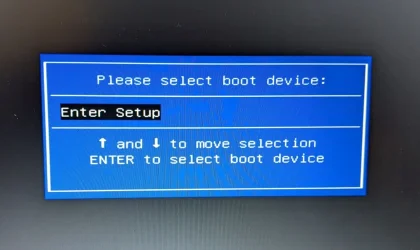
On the premise that a picture is worth a thousand words, the boot menu shown in the attached image is what I see with a tested bootable USB drive inserted. Simply put, my computer cannot detect media storage correctly. I need to figure out why. Events leading up to the crash and corruption are moot at this point.
boot menu.webp
 

My Computer My Computer

At a glance

Windows 11Intel i5-2400 @ 3.10GHz8.00 GBATI Mobility Radeon HD 4500
OS
Windows 11
Computer type
PC/Desktop
Manufacturer/Model
Dell Optiplex 790
CPU
Intel i5-2400 @ 3.10GHz
Motherboard
Dell 0D28YY
Memory
8.00 GB
Graphics Card(s)
ATI Mobility Radeon HD 4500
Other Info
Dual boot with Windows 10
If I may, I'd like to make one more suggestion that will tell me a lot:

Try creating the bootable media using option #3 in Brink's tutorial that I link to below. The reason that I suggest this: I know this method inside and out. It orks on EVERYTHING. Legacy BIOS, UEFI, if the system does not like NTFS USB boot media, etc. If ANYTHING will work, that will!


My Computers My Computers

  • At a glance

    Win11 Pro 25H2 (RTM+)Intel i7-14650HX32 GBNo GPU - Built-in Intel Graphics
    OS
    Win11 Pro 25H2 (RTM+)
    Computer type
    PC/Desktop
    Manufacturer/Model
    Acemagic
    CPU
    Intel i7-14650HX
    Memory
    32 GB
    Graphics Card(s)
    No GPU - Built-in Intel Graphics
    Sound Card
    Integrated
    Monitor(s) Displays
    Varies as machine will often be moved to locations with different monitors
    Screen Resolution
    Varies
    Hard Drives
    1 x 1TB Gen 4 NVMe SSD
    PSU
    120W Power Brick
    Keyboard
    Corsair K70 Max RGB Magnetic Keyboard
    Mouse
    Logitech MX Master 3
    Internet Speed
    1Gb Up / 1 Gb Down
    Browser
    Edge
    Antivirus
    Windows Defender
  • At a glance

    Win11 Pro 25H2 (RTM+)Intel i7-1255U16 GBIntel Iris Xe Graphics
    Operating System
    Win11 Pro 25H2 (RTM+)
    Computer type
    Laptop
    Manufacturer/Model
    Lenovo ThinkBook 13x Gen 2
    CPU
    Intel i7-1255U
    Memory
    16 GB
    Graphics card(s)
    Intel Iris Xe Graphics
    Sound Card
    Realtek® ALC3306-CG codec
    Monitor(s) Displays
    13.3-inch IPS Display
    Screen Resolution
    WQXGA (2560 x 1600)
    Hard Drives
    2 TB 4 x 4 NVMe SSD
    PSU
    USB-C / Thunderbolt 4 Power / Charging
    Keyboard
    Backlit, spill resistant keyboard
    Mouse
    Buttonless Glass Precision Touchpad
    Internet Speed
    1Gb Up / 1Gb Down
    Browser
    Edge
    Antivirus
    Windows Defender
    Other Info
    WiFi 6e / Bluetooth 5.1 / Facial Recognition / Fingerprint Sensor / ToF (Time of Flight) Human Presence Sensor
This is encouraging information, and it addresses my earlier question.
"? Do I need to use FAT32 rather than NTFS? If so, rufus does not offer FAT32 for this .iso file (5.6GB) on this 32GB device."
I will rebuild the installation disk using Shawn's option #3 sometime tomorrow when I can concentrate on the procedure. I'll report back here.
 

My Computer My Computer

At a glance

Windows 11Intel i5-2400 @ 3.10GHz8.00 GBATI Mobility Radeon HD 4500
OS
Windows 11
Computer type
PC/Desktop
Manufacturer/Model
Dell Optiplex 790
CPU
Intel i5-2400 @ 3.10GHz
Motherboard
Dell 0D28YY
Memory
8.00 GB
Graphics Card(s)
ATI Mobility Radeon HD 4500
Other Info
Dual boot with Windows 10
NTFS would be the preferred format.
but ..

if the install cant see your drive then the install wont be able to install.
you can use a Linux live USB to boot in to and check the drive.

the Linux live does not install anything its just a way of checking the drive.
burn the Linux live distro like you would with a Windows ISO using Rufus
then reboot in to the Linux live USB session.

best of luck, Steve ..
 

My Computers My Computers

  • At a glance

    Debian 13 KDE .. Windows 11 HomeRyzen 7 5825u64GB DDR4 3200Ryzen 7 5825u
    OS
    Debian 13 KDE .. Windows 11 Home
    Computer type
    PC/Desktop
    Manufacturer/Model
    HP 24" AiO
    CPU
    Ryzen 7 5825u
    Motherboard
    HP
    Memory
    64GB DDR4 3200
    Graphics Card(s)
    Ryzen 7 5825u
    Sound Card
    RealTek
    Monitor(s) Displays
    24" HP AiO
    Screen Resolution
    1920 x 1080 @60 Hz
    Hard Drives
    1TB WD Blue SN580 M2 SSD Partitioned.
    2x 1TB USB HDD External Backup/Storage.
    PSU
    90W external power brick
    Case
    24" All in One
    Cooling
    Default Air Cooling
    Keyboard
    HP WiFi UK extended
    Mouse
    HP WiFi 3 Button
    Internet Speed
    1GB full fibre
    Browser
    Edge & Firefox
    Antivirus
    AVG Internet Security/Windows Defender
    Other Info
    Mainly Open Source Software
  • At a glance

    Ubuntu 22.04.5 LTSi5 7200u16GB DDR4Intel
    Operating System
    Ubuntu 22.04.5 LTS
    Computer type
    Laptop
    Manufacturer/Model
    Dell 13" Latitude 2017
    CPU
    i5 7200u
    Motherboard
    Dell
    Memory
    16GB DDR4
    Graphics card(s)
    Intel
    Sound Card
    Intel
    Monitor(s) Displays
    13" Dell Laptop
    Hard Drives
    250GB Crucial 2.5" SSD
    Mouse
    Generic WiFi 3 button
    Internet Speed
    WiFi only
    Browser
    Firefox
    Antivirus
    ClamAV TK
    Other Info
    Mainly Open Source Software
As you converted the drive from GPT to MBR with diskpart , everything on the drive is gone.

Windows can be installed in two ways: Legacy-MBR or UEFI-GPT
To install as Legacy-MBR you must boot the installation drive as Legacy
To install as UEFI-GPT you must boot the installation drive as UEFI.

As you have a UEFI BIOS, you should install as UEFI-GPT
Detach any other drives (SATA or Power cable) from the MB.

During POST, press F12(?) to launch the boot menu. You will see two options for the USB drive. USB UEFI (Name) and USB (Name). Select USB UEFI (Name) if you want to install as UEFI-GPT or select USB (name) if you want to install as Legacy-MBR.
Go to install and delete ALL partitions on the main drive till you have one and only one unallocated space and then proceed.

Is the computer the Dell Optiplex 790 with Intel i5-2400?
 

My Computers My Computers

  • At a glance

    Windows 11 Pro - Windows 7 HP 64 - Lubuntui5 6600K - 800MHz to 4400MHz4+4G GSkill DDR4 3000IG - Intel 530
    OS
    Windows 11 Pro - Windows 7 HP 64 - Lubuntu
    Computer type
    PC/Desktop
    Manufacturer/Model
    custom build
    CPU
    i5 6600K - 800MHz to 4400MHz
    Motherboard
    GA-Z170-HD3P
    Memory
    4+4G GSkill DDR4 3000
    Graphics Card(s)
    IG - Intel 530
    Monitor(s) Displays
    Samsung 226BW
    Screen Resolution
    1680x1050
    Hard Drives
    (1) -1 SM951 – 128GB M.2 AHCI PCIe SSD drive for Win 11
    (2) -1 WD SATA 3 - 1T for Data
    (3) -1 WD SATA 3 - 1T for backup
    (4) -1 BX500 SSD - 256G for Windows 7 and Lubuntu
    PSU
    Thermaltake 450W TR2 gold
    Keyboard
    Old and good Chicony mechanical keyboard
    Mouse
    Logitech mX performance - 9 buttons (had to disable some)
    Internet Speed
    500 Mb/s
    Browser
    Firefox 64
  • At a glance

    Windows 11 Proi7-4500U 800- 3000MHz(4+4)G DDR3 1600IG intel 4400 + NVIDIA GeForce GT 745M
    Operating System
    Windows 11 Pro
    Computer type
    Laptop
    Manufacturer/Model
    Asus Q550LF
    CPU
    i7-4500U 800- 3000MHz
    Motherboard
    Asus Q550LF
    Memory
    (4+4)G DDR3 1600
    Graphics card(s)
    IG intel 4400 + NVIDIA GeForce GT 745M
    Sound Card
    Realtek
    Monitor(s) Displays
    LG Display LP156WF4-SPH1
    Screen Resolution
    1920 x 1080
    Hard Drives
    BX500 120G SSD for Windows and programs
    & 1T HDD for data
    Internet Speed
    500 Mb/s
    Browser
    Firefox 64
heshestedt: When using Option #3 in Brink's tutorial, is it possible to customize the installation to remove the requirements for Secure Boot and TPM 2.0?

megahertz: more valuable information...thank you!
I gather that American Megatrends 301 is a UEFI BIOS and that's how you knew I should install as UEFI-GPT...correct?
This Dell Optiplex 790 "powerhouse" has a Pentium N3700 @ 1.60 GHz. :-)
 

My Computer My Computer

At a glance

Windows 11Intel i5-2400 @ 3.10GHz8.00 GBATI Mobility Radeon HD 4500
OS
Windows 11
Computer type
PC/Desktop
Manufacturer/Model
Dell Optiplex 790
CPU
Intel i5-2400 @ 3.10GHz
Motherboard
Dell 0D28YY
Memory
8.00 GB
Graphics Card(s)
ATI Mobility Radeon HD 4500
Other Info
Dual boot with Windows 10
Sorry, one more thing. Apologies if this has already been explored...

Do we know for a fact the boot media is good? In other words, could the problem be not that your system
heshestedt: When using Option #3 in Brink's tutorial, is it possible to customize the installation to remove the requirements for Secure Boot and TPM 2.0?

megahertz: more valuable information...thank you!
I gather that American Megatrends 301 is a UEFI BIOS and that's how you knew I should install as UEFI-GPT...correct?
This Dell Optiplex 790 "powerhouse" has a Pentium N3700 @ 1.60 GHz. :-)
Yes, it is absolutely possible. But that's a whole other topic. I would be glad to help with that, but first let's see if this will even result in a bootable media Once we get past that hurdle, we can tweak to our heart's content OR we could use that knowledge to figure out why it is not working with Rufus which, to be honest, may be easier :-).

I'm a huge fan of doing stuff without tools like Rufus when I can, but I have to be honest and tell you that my methods are not what I would suggest to most people because there can be a big learning curve and it simply wouldn't be the easiest route for most people to go.

Using a tool like Rufus makes these tasks so easier that I can hardly justify making people do it the way that I do :-). I'm mainly suggesting option 3 from Brink's tutorial as an information gathering tool at this point. The idea is that if that method doesn't at least result in media booting successfully, then we have a bigger issue to diagnose.
 

My Computers My Computers

  • At a glance

    Win11 Pro 25H2 (RTM+)Intel i7-14650HX32 GBNo GPU - Built-in Intel Graphics
    OS
    Win11 Pro 25H2 (RTM+)
    Computer type
    PC/Desktop
    Manufacturer/Model
    Acemagic
    CPU
    Intel i7-14650HX
    Memory
    32 GB
    Graphics Card(s)
    No GPU - Built-in Intel Graphics
    Sound Card
    Integrated
    Monitor(s) Displays
    Varies as machine will often be moved to locations with different monitors
    Screen Resolution
    Varies
    Hard Drives
    1 x 1TB Gen 4 NVMe SSD
    PSU
    120W Power Brick
    Keyboard
    Corsair K70 Max RGB Magnetic Keyboard
    Mouse
    Logitech MX Master 3
    Internet Speed
    1Gb Up / 1 Gb Down
    Browser
    Edge
    Antivirus
    Windows Defender
  • At a glance

    Win11 Pro 25H2 (RTM+)Intel i7-1255U16 GBIntel Iris Xe Graphics
    Operating System
    Win11 Pro 25H2 (RTM+)
    Computer type
    Laptop
    Manufacturer/Model
    Lenovo ThinkBook 13x Gen 2
    CPU
    Intel i7-1255U
    Memory
    16 GB
    Graphics card(s)
    Intel Iris Xe Graphics
    Sound Card
    Realtek® ALC3306-CG codec
    Monitor(s) Displays
    13.3-inch IPS Display
    Screen Resolution
    WQXGA (2560 x 1600)
    Hard Drives
    2 TB 4 x 4 NVMe SSD
    PSU
    USB-C / Thunderbolt 4 Power / Charging
    Keyboard
    Backlit, spill resistant keyboard
    Mouse
    Buttonless Glass Precision Touchpad
    Internet Speed
    1Gb Up / 1Gb Down
    Browser
    Edge
    Antivirus
    Windows Defender
    Other Info
    WiFi 6e / Bluetooth 5.1 / Facial Recognition / Fingerprint Sensor / ToF (Time of Flight) Human Presence Sensor
heshestedt: I was able to use this installation media to boot a different computer which reinforces the idea that the current problem is with my laptop.
I don't mind experimenting with the nuts and bolts of a procedure; it's very satisfying to learn how things work. Tools like rufus are certainly handy, but I also like to know what it actually does rather than employing it blindly. I'll post again when I've rebuilt and tested the boot media.
 

My Computer My Computer

At a glance

Windows 11Intel i5-2400 @ 3.10GHz8.00 GBATI Mobility Radeon HD 4500
OS
Windows 11
Computer type
PC/Desktop
Manufacturer/Model
Dell Optiplex 790
CPU
Intel i5-2400 @ 3.10GHz
Motherboard
Dell 0D28YY
Memory
8.00 GB
Graphics Card(s)
ATI Mobility Radeon HD 4500
Other Info
Dual boot with Windows 10
Is your laptop BIOS compatible with UEFI? I'm not a big user of Rufus but maybe it can only boot as UEFI an your laptop can only boot as Legacy.
 

My Computers My Computers

  • At a glance

    Windows 11 Pro - Windows 7 HP 64 - Lubuntui5 6600K - 800MHz to 4400MHz4+4G GSkill DDR4 3000IG - Intel 530
    OS
    Windows 11 Pro - Windows 7 HP 64 - Lubuntu
    Computer type
    PC/Desktop
    Manufacturer/Model
    custom build
    CPU
    i5 6600K - 800MHz to 4400MHz
    Motherboard
    GA-Z170-HD3P
    Memory
    4+4G GSkill DDR4 3000
    Graphics Card(s)
    IG - Intel 530
    Monitor(s) Displays
    Samsung 226BW
    Screen Resolution
    1680x1050
    Hard Drives
    (1) -1 SM951 – 128GB M.2 AHCI PCIe SSD drive for Win 11
    (2) -1 WD SATA 3 - 1T for Data
    (3) -1 WD SATA 3 - 1T for backup
    (4) -1 BX500 SSD - 256G for Windows 7 and Lubuntu
    PSU
    Thermaltake 450W TR2 gold
    Keyboard
    Old and good Chicony mechanical keyboard
    Mouse
    Logitech mX performance - 9 buttons (had to disable some)
    Internet Speed
    500 Mb/s
    Browser
    Firefox 64
  • At a glance

    Windows 11 Proi7-4500U 800- 3000MHz(4+4)G DDR3 1600IG intel 4400 + NVIDIA GeForce GT 745M
    Operating System
    Windows 11 Pro
    Computer type
    Laptop
    Manufacturer/Model
    Asus Q550LF
    CPU
    i7-4500U 800- 3000MHz
    Motherboard
    Asus Q550LF
    Memory
    (4+4)G DDR3 1600
    Graphics card(s)
    IG intel 4400 + NVIDIA GeForce GT 745M
    Sound Card
    Realtek
    Monitor(s) Displays
    LG Display LP156WF4-SPH1
    Screen Resolution
    1920 x 1080
    Hard Drives
    BX500 120G SSD for Windows and programs
    & 1T HDD for data
    Internet Speed
    500 Mb/s
    Browser
    Firefox 64
hsehestedt (and Megahertz):
I've created the dual file system bootable USB per Brink's tutorial method #3. The system still does not boot but I think the BIOS "sees" the USB drive for reasons described below.
1. Power on now displays the ASUS splash screen rather than entering BIOS directly
2. Calling up the boot menu still only offers "Enter Setup"
3. Entering BIOS and selecting the boot screen shows no bootable options.
4. I then tried "Add boot option" which I named "USB"
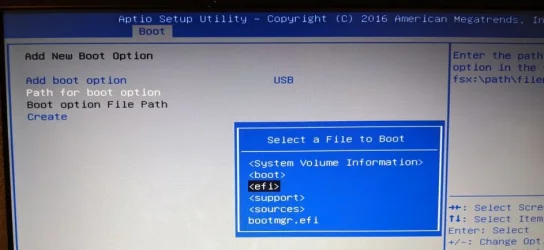
5. I then selected "Path for boot option" and this appeared:

Path for boot option.webp

I clicked through a few more screens selecting what I thought were the logical options like this:

Select a File to Boot.webp

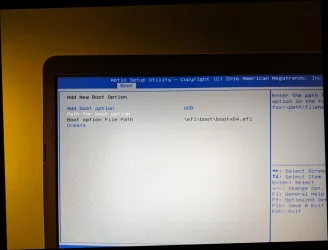
I ended up with this:

Boot option file path.webp

I clicked "create" which appeared to be successful, but clicking the OK message cleared everything from the screen. I could not save the configuration. I don't think I entered the correct file path (fsx:\path\filename.efi) and I'm unsure how to do that.

Does it look like we are getting closer to solving the problem?
Thanks for all your help thus far!

Regards,
John
 

My Computer My Computer

At a glance

Windows 11Intel i5-2400 @ 3.10GHz8.00 GBATI Mobility Radeon HD 4500
OS
Windows 11
Computer type
PC/Desktop
Manufacturer/Model
Dell Optiplex 790
CPU
Intel i5-2400 @ 3.10GHz
Motherboard
Dell 0D28YY
Memory
8.00 GB
Graphics Card(s)
ATI Mobility Radeon HD 4500
Other Info
Dual boot with Windows 10

My Computers My Computers

  • At a glance

    Windows 10 HomeIntel Core 2 Duo [email protected] GHz2 GB
    OS
    Windows 10 Home
    Computer type
    Laptop
    Manufacturer/Model
    HP Elitebook 2530p
    CPU
    Intel Core 2 Duo [email protected] GHz
    Memory
    2 GB
  • At a glance

    Windows 11 HomeIntel Core 2 Duo E75004 GB
    Operating System
    Windows 11 Home
    Computer type
    PC/Desktop
    Manufacturer/Model
    Dell Optiplex 330
    CPU
    Intel Core 2 Duo E7500
    Memory
    4 GB
If the ASUS E403SA used a GPT drive it was booting as UEFI - GPT.
I think the main problem is the Rufus Win 11 USB installation drive.
I suggest you recreate the drive and make sure to select UEFI boot able.
To boot as UEFI, all files as folders should be on a Fat32 partition EXCEPT install.wim or install.esd that should be on a NTFS partition (FAT32 size limitation)
If you create a Win 11 USB installation drive using MCT , does it boot normally?
 

My Computers My Computers

  • At a glance

    Windows 11 Pro - Windows 7 HP 64 - Lubuntui5 6600K - 800MHz to 4400MHz4+4G GSkill DDR4 3000IG - Intel 530
    OS
    Windows 11 Pro - Windows 7 HP 64 - Lubuntu
    Computer type
    PC/Desktop
    Manufacturer/Model
    custom build
    CPU
    i5 6600K - 800MHz to 4400MHz
    Motherboard
    GA-Z170-HD3P
    Memory
    4+4G GSkill DDR4 3000
    Graphics Card(s)
    IG - Intel 530
    Monitor(s) Displays
    Samsung 226BW
    Screen Resolution
    1680x1050
    Hard Drives
    (1) -1 SM951 – 128GB M.2 AHCI PCIe SSD drive for Win 11
    (2) -1 WD SATA 3 - 1T for Data
    (3) -1 WD SATA 3 - 1T for backup
    (4) -1 BX500 SSD - 256G for Windows 7 and Lubuntu
    PSU
    Thermaltake 450W TR2 gold
    Keyboard
    Old and good Chicony mechanical keyboard
    Mouse
    Logitech mX performance - 9 buttons (had to disable some)
    Internet Speed
    500 Mb/s
    Browser
    Firefox 64
  • At a glance

    Windows 11 Proi7-4500U 800- 3000MHz(4+4)G DDR3 1600IG intel 4400 + NVIDIA GeForce GT 745M
    Operating System
    Windows 11 Pro
    Computer type
    Laptop
    Manufacturer/Model
    Asus Q550LF
    CPU
    i7-4500U 800- 3000MHz
    Motherboard
    Asus Q550LF
    Memory
    (4+4)G DDR3 1600
    Graphics card(s)
    IG intel 4400 + NVIDIA GeForce GT 745M
    Sound Card
    Realtek
    Monitor(s) Displays
    LG Display LP156WF4-SPH1
    Screen Resolution
    1920 x 1080
    Hard Drives
    BX500 120G SSD for Windows and programs
    & 1T HDD for data
    Internet Speed
    500 Mb/s
    Browser
    Firefox 64
Megahertz:
When first trying to reinstall the OS, I received this error message: Windows 11 can't be installed on disk 0 partition 2 (The selected disk is of the GPT partition style). At that time, I still had access to a cmd prompt and used diskpart to convert the disk from GPT to MBR.
 

My Computer My Computer

At a glance

Windows 11Intel i5-2400 @ 3.10GHz8.00 GBATI Mobility Radeon HD 4500
OS
Windows 11
Computer type
PC/Desktop
Manufacturer/Model
Dell Optiplex 790
CPU
Intel i5-2400 @ 3.10GHz
Motherboard
Dell 0D28YY
Memory
8.00 GB
Graphics Card(s)
ATI Mobility Radeon HD 4500
Other Info
Dual boot with Windows 10

Latest Support Threads

Back
Top Bottom